LinkedIn workflows for customer retention automation
Published:
November 14, 2025
Updated:
November 27, 2025
Most retention systems lean on email and product notifications. They’re useful, but they miss too many critical moments.
Your CRM already shows clear signals—renewal dates approaching, onboarding friction, usage changes, support escalations, and promoters who could amplify your story.
What’s missing is a consistent way to act on these signals through a channel customers actually respond to.
LinkedIn sits in that gap.
People open messages on social media faster, reply more naturally, and treat the channel as a space for direct, human communication. When you connect CRM events to automated LinkedIn outreach, you add a reliable touchpoint across the entire customer lifecycle without creating extra work for the team.
Retention automation becomes far more effective when CRM signals trigger the right sequence in real-time. It gives RevOps measurable influence on customer churn reduction, renewal performance, and customer lifetime value.
I’m breaking down four practical plays you can use to turn LinkedIn into the human layer of your retention stack and support stronger customer relationships across the lifecycle.
These workflows support stronger customer engagement, improve customer satisfaction, and give teams clearer visibility into how customer behavior changes across the lifecycle.
4 plays to automate customer retention without losing the human touch
Retention depends on timing. The moments that matter—first-week onboarding, usage dips, renewal cycles, and customer advocacy—are already captured in your CRM as part of your broader customer interactions. What’s often missing is a direct, personal follow-up on LinkedIn when those moments surface.
These four plays show how to connect CRM events to HeyReach so every key signal creates a consistent, human-feeling LinkedIn touchpoint. Each play covers a specific retention stage and includes workflows teams can activate immediately.
PLAY 1: Wire CRM events to trigger LinkedIn campaigns
CRMs carry the most reliable retention signals: renewal dates, support escalations, product usage patterns, NPS changes, and key account movements.
This play explains how to turn those signals into automatic LinkedIn outreach using Make or Zapier as automation tools that bridge your CRM and HeyReach.
Once the connection is set up, each event sends the right customer into the right sequence, creating predictable follow-ups that don’t depend on manual reminders.
Requirements for the workflow
- CRM with webhook capabilities (e.g., HubSpot Operations Hub Professional+, Salesforce)
- LinkedIn profile URL stored in the contact record
- Make (free tier) or Zapier (paid plan)
- HeyReach API key (Settings → Integrations → API)
These pieces allow the CRM to pass structured customer data into HeyReach campaigns through Make/Zapier.
How the workflow operates
1. Set up the trigger in your CRM
Choose the CRM events that should start a LinkedIn sequence. Examples include renewal timelines and support escalations.
When the condition is met, the CRM sends a webhook containing:
- Contact name
- LinkedIn URL
- Renewal date or ticket type
- Additional segmentation fields (tier, segment, usage)
This ensures downstream steps receive consistent data. Because these signals run through automation tools rather than manual actions, teams can streamline their retention efforts and keep customer support aligned with every outreach sequence.
retention efforts and utilise AI receptionist to keep customer support aligned with every outreach sequence.
2. Add the customer to a HeyReach campaign through Make
Inside Make:
- Select the “Add Lead to Campaign” HeyReach module
- Authenticate using your HeyReach API key
- Map the CRM payload fields:
- Contact Name → Lead Name
- LinkedIn URL → Profile URL
- Choose the destination campaign (e.g., Renewal_30, CS Follow-Up)
Each time the CRM fires the webhook, Make places the contact in the correct LinkedIn sequence. It’s the closest thing to having a teammate who never forgets a follow-up, never gets distracted, and never says ‘I’ll do it after lunch.
3. Route missing LinkedIn URLs to review
If the CRM record lacks a LinkedIn profile URL, send it to a Google Sheet or Airtable “Review Needed” list. This keeps the workflow clean and prevents failed enrolments.
Example: support escalation
Trigger: Ticket status becomes Escalated
Flow: CRM → Make → HeyReach → LinkedIn campaign
Message: “Just checking if your issue was resolved etc.”
A quick, personal message at the right time reassures the customer while support continues handling the issue.
Segmentation before triggering
Apply filters inside the CRM before firing the webhook:
- Renewal tier
- Product usage
- Account size
Targeted filtering keeps outreach relevant and supports a more omnichannel retention workflow. Combining CRM conditions with LinkedIn campaigns also brings structure to your retention strategies, making them more cost-effective for larger customer bases.
PLAY 2: Personalise customer experience across every retention stage
Retention isn’t a single workflow. It’s a sequence of small moments where the right message keeps the relationship moving. By creating dedicated LinkedIn campaigns for onboarding, renewals, advocacy, and win-backs, you can automate personalised touchpoints with minimal manual coordination.
Onboarding automation (first 30 days)
Onboarding defines how quickly a customer gains confidence. When a new account appears in the CRM, you can start a short LinkedIn sequence that feels supportive without being intrusive.
Trigger: New customer created
Campaign: Onboarding_30D
Sequence outline:
- Day 1: Welcome message with one helpful pointer
- Day 5: Check-in to see whether they’ve hit any blockers
Day 10: Invitation to share early impressions
Tag replies in HeyReach (Engaged, Needs CS, At Risk) to help the team prioritise follow-ups. Onboarding touchpoints often reveal early customer needs and help shape more personalized experiences later in the relationship.
Renewal campaigns
Renewal dates are already defined in the CRM, making them ideal automation triggers. Short, well-timed LinkedIn messages help maintain clarity and reduce friction in the renewal process. These messages work alongside existing renewal workflows and help increase customer retention with timely support.
Trigger: Renewal Date – 30 days
Campaign: Renewal_30
Sequence outline:
- T-30: Share a brief results summary
- T-14: Check whether the renewal plan is clear
- T-7: Offer a final reminder or scheduling link
These messages complement existing renewal workflows and keep communication warm.
Advocacy activation
Happy customers are valuable loyal customers and potential brand advocates, but outreach often happens inconsistently. And yes, they exist, even if it sometimes feels like only support tickets make themselves known.
You can automate these touchpoints based on positive signals in the CRM.
Trigger: High NPS or “Happy Customer” status
Campaign: Advocacy_Ask
Examples:
- Thank-you note
- Request for a success story
- Light referral or review invitation
Tag respondents as advocates in HeyReach to build an accessible pool of champions.
Advocacy workflows are also a practical way to identify loyal customers and understand what drives satisfaction across different segments.
Win-back sequences
Usage drops, long periods of inactivity, or missed renewals often signal a need to reconnect with existing customers before they churn.
Trigger: Usage decline or closed-lost renewal
Campaign: WinBack_Light
Example message:
“We noticed a recent dip — happy to understand if there’s anything you’d like us to improve.”
This sequence is lightweight by design and helps teams re-engage accounts before they churn completely. For select accounts, you can upload a curated CSV list into HeyReach.
PLAY 3: Prove retention impact with campaign-to-CRM attribution
Retention automation becomes far more useful when teams can quantify its influence on renewal outcomes and broader customer retention rate improvements. Connecting HeyReach metrics with CRM data gives RevOps a clear view of which touchpoints drive outcomes and where customers disengage.
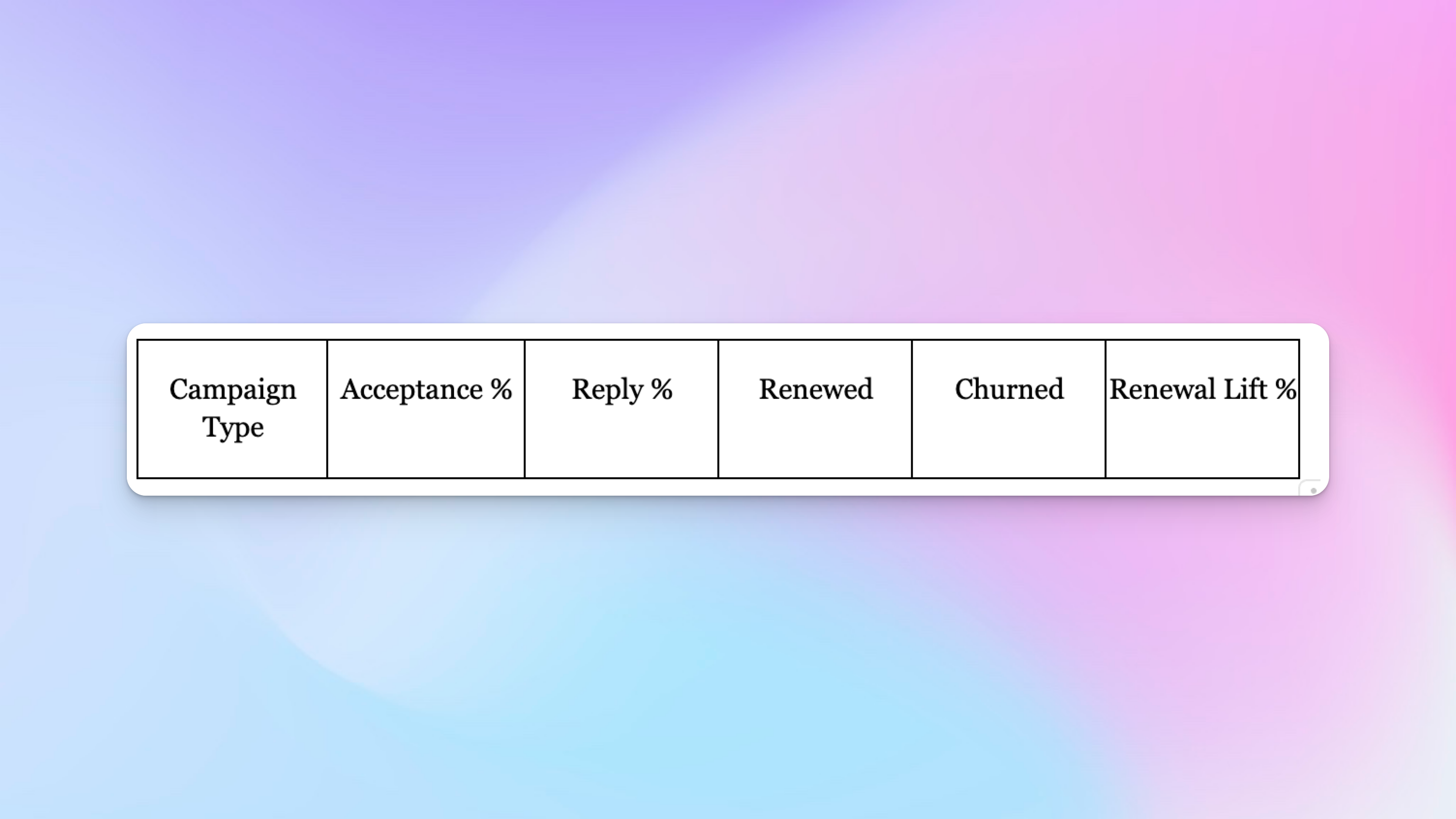
Create a weekly retention tracker
Export campaign performance from HeyReach and combine it with CRM renewal data.
Suggested workflow:
- Export campaign metrics from HeyReach.
- Append them to a Google Sheet each week.
- Add renewal status for each account from the CRM.
- Compare campaign engagement with outcomes.
- Calculate renewal lift as the change compared to your historical baseline.
A clear table helps keep the view simple and connects outreach with key analytics tools you already use.
Metrics worth monitoring
- Churn rate
- Renewal rate
- Customer lifetime value
- Renewal lift
- Acceptance and reply rates
- Advocacy or referral actions
Together, these give RevOps a consistent way to evaluate campaign impact.
Scaling safely
As workflows grow and more CRM events activate campaigns, volume management becomes important.
Useful practices include:
- Batching CRM triggers hourly
- Applying per-seat caps
- Rotating seats to spread activity
- Routing overflow to a review sheet
- Keeping segmentation filters current
These adjustments keep automation reliable, scalable, and cost-effective for SaaS customer bases with high activity.
PLAY 4: Add safety layers and AI-assisted optimisation
As retention workflows expand, safeguards help keep outreach appropriate and relevant. This play covers when automation should pause and how MCP can help teams handle operational tasks more efficiently.
Scenarios where automation should pause
Certain accounts require manual handling. Automation is powerful, but some moments still deserve the ‘hands-on-human’ treatment; preferably by someone who’s had coffee.
Examples include:
- Renewals already owned by an account executive
- “Do Not Contact” records
- Accounts evaluating competitors
- Long-term LinkedIn inactivity
- Accounts that require a more personal, hands-on approach
Adding these conditions inside the CRM or Make/Zapier ensures automation stays responsible.
Using MCP for operational support
MCP provides ai-powered support by summarising messages, flagging potential issues, and reviewing lists, helping teams manage multiple workflows without losing sight of important details.
Useful tasks include:
- Summarising recent LinkedIn threads before renewal discussions
- Listing “At Risk” tagged messages
- Identifying inactive leads for cleanup
These tasks help teams prioritise attention and stay ahead of churn signals. However, some scenarios call for manual handling rather than automated workflows or chatbots, especially where tone or context is sensitive.
Rolling out retention automation
Introducing workflows gradually keeps outreach predictable and easier to manage.
A phased rollout could include:
- Launch a renewal workflow.
- Add onboarding and advocacy flows.
- Track renewal lift and engagement.
- Increase volume and enable seat rotation.
- Use MCP for summarisation, list checks, and risk detection.
Safety checklist
- Respect LinkedIn limits and activate seat rotation
- Keep a log of CRM-triggered events
- Review MCP outputs before sending
- Maintain accurate LinkedIn URLs
- Update segmentation filters regularly
These guidelines help maintain quality while scaling.
Conclusion
Connecting CRM signals to HeyReach creates a reliable foundation for customer retention. With automated LinkedIn touchpoints running across onboarding, renewals, advocacy, and risk stages, teams can stay present in the customer journey without adding manual work. Each workflow supports renewal readiness and helps identify issues earlier.
Combined with attribution, dashboards, and MCP assistance, these workflows create a retention system that is easier to manage and more predictable as it grows. A phased rollout could include small A/B testing cycles to refine message timing and templates as sequences expand.
Once the core plays are in place, teams can strengthen their retention strategies and consistently boost customer retention across their entire customer base.

Try it for free
Frequently Asked Questions
Which CRM signals work best for LinkedIn-based retention workflows?
Useful triggers include renewal dates, support escalations, usage changes, lifecycle stage transitions, and high-NPS indicators. These events reliably reflect moments when a short, human touchpoint helps.
How can I measure the impact of LinkedIn retention campaigns?
Export campaign data from HeyReach and compare acceptance and reply rates with CRM renewal results. Tracking renewal lift against your historical baseline shows the direct impact of your retention workflows.
How often should retention automation workflows be reviewed?
Most teams review them monthly or at the end of each renewal cycle. This helps refine timing, messaging, and audience filters based on real outcomes.
Can LinkedIn retention automation support forecasting?
Yes. Engagement trends combined with renewal timelines create a clearer view of renewal readiness and help RevOps anticipate where additional support may be needed.
What limits should I consider when scaling automation?
Keep an eye on daily seat limits in HeyReach, ensure campaigns stay within LinkedIn’s safe activity thresholds, and batch CRM-triggered flows when volumes increase.