11 LinkedIn connection message templates that people actually accept
Published:
January 19, 2024
Updated:
September 7, 2026
Let me paint you a picture.
It’s 2021. I’m sitting at my desk, feeling very productive, copy-pasting the same “Hey [Name], I’d love to connect and grow together!” to anyone with a pulse and a LinkedIn profile.
My acceptance rate? Embarrassing. My reply rate? Worse.
The painful part wasn’t the silence, but realizing I’d been optimizing for volume when the problem was the LinkedIn connection message itself. One sentence is often all that stands between a connection that goes somewhere and one that disappears into the void.
Since then, I’ve tested what actually moves the needle, and backed it up with data from over 96,000 campaigns run through HeyReach. What I found: most people get connections, but they’re failing to turn those connections into actual conversations.
Below: four strategies, 11 templates you can steal right now, and the mistakes that tanked my results before I knew better.
LinkedIn outreach takes more finesse than cold email, but once you master it, you can accelerate growth to insane numbers.
Connection request acceptance rates, benchmarked
Before we get into templates, let’s set a real-world baseline.
Across 96,051 campaigns, the typical LinkedIn outreach funnel looks like this:
- Acceptance rate: 21%. One in five requests gets accepted.
- Reply rate: 22%. Just over a fifth of the conversations you start get a reply.
- Reply-to-acceptance conversion: 18%. Of everyone who accepts, fewer than one in five ever writes back.
The biggest drop in the funnel happens after acceptance, not before. In fact, 10.7% of campaigns with accepted connections got zero replies. Getting someone to accept your request is only half the job. What you say next is where most campaigns fall apart.
This is why the quality of connection messages matters as much as the quality of follow-up messages. The two are inseparable.
How to write a LinkedIn connection request message: 4 strategies that work
I’ve tested a range of approaches within my own professional network and at varying degrees of connection. What I keep coming back to is this: the best connection messages don’t feel like messages. They feel like the natural start of a conversation.
Here are the four strategies I use most:
1. Empty connection request
This is my personal favorite. Many people assume it’s a strategy reserved for influencers with large followings, but that’s not been my experience at all.
When your LinkedIn profile is polished and speaks for itself, sending a connection request without a note can work surprisingly well. It’s like a nod across the room - non-intrusive, but deliberate.
Why it works:
- It’s efficient. No risk of saying something off-putting before the relationship even starts.
- It feels more organic. Most real-life connections don’t begin with a formal pitch.
- Strong profiles carry the message on their own.
2. Common ground
This approach means finding a shared angle, a mutual connection, a common interest, an industry overlap, and leading with it. It’s one of the most reliable ways to make a message feel relevant rather than random. It’s a core part of any serious lead generation strategy on LinkedIn.
Why it works:
- Shared context creates immediate relevance.
- It reads as the start of a conversation, not a cold pitch.
3. Compliments
A genuine, specific compliment on a post, article, career move, or milestone sets a positive tone before you’ve asked for anything. Generic praise often reads as automated and does more harm than good.
A well-placed compliment strengthens an already solid connection message. It rarely saves a weak one.
Why it works:
- Makes the recipient more open to engaging.
- Creates a natural thread to pull on in follow-up.
4. Short and sweet
When in doubt, be brief. A tight two-sentence message that communicates clearly what you want and why you’re reaching out will almost always outperform a long, overwrought one.
LinkedIn caps the note on a connection request at 200 characters on a free account, 300 if you're on Premium, Sales Navigator or Recruiter. Either way, that's room for two sentences, maybe three. Say the one thing that earns a reply and stop.
Why it works:
- Easier to read. Easier to say yes to.
- Forces you to be precise about what you actually want.
No single approach wins in every situation. The skill is knowing which one to reach for based on context, the person, and the goal.
11 LinkedIn connection message templates
These are the templates I’ve used to grow my network from essentially zero to 6k. Each one is designed for a specific scenario and intent. Each demonstrates different types of sentences with examples to achieve various connection goals, from building rapport to proposing collaborations. Pay attention to how the phrasing shifts to suit the specific intent of the message.
Template 1: connecting on common ground
Hi [Name],
I see we're both into [Common Interest]. I've been experimenting with [Tactic] lately. How do you find it compared to other channels?
Cheers,
[Your Name]
This template uses a shared interest to open naturally. It reads like a peer-to-peer conversation, not outreach. It invites a response without pressuring one, which tends to keep the exchange going.
Template 2: genuine compliment
Hey [Name],
Just read your article on [Specific Topic] - really cool take on [What]. I'm dabbling in something similar. Ever run into [Common Challenge]?
Best,
[Your Name]
A genuine compliment on someone's work not only flatters but also shows that you've engaged with their content thoughtfully. This approach sets a positive tone and fosters mutual respect. It also naturally leads to a discussion about shared professional interests or challenges.
Template 3: mentioning a common connection
Hi [Name],
[Common Connection's Name] said you're the go-to person for [Field]. I'm poking around in this field and could use a few pointers. Any quick tips/resources you can share?
Thanks,
[Your Name]
It’s one of the best-performing LinkedIn connection request templates out there. Mentioning a mutual connection provides a sense of trust and commonality. It leverages existing networks and suggests a pre-vetted credibility.
This approach often makes the recipient more open to engaging, as it feels like a recommendation rather than a cold call.
🚀 Want to see these templates in action? Launch your first LinkedIn campaign for free - no card required.
Template 4: connecting after a conference
Hi [Name],
Caught your session at [Conference] - your thoughts on [Topic] were spot on. I'm working in [Industry]. [Relevant Question]?
Best,
[Your Name]
Linking your message to a recent networking event, like a conference, creates a timely and relevant connection point. It demonstrates active involvement in your field and provides a natural starting point for discussion, based on shared experiences or interests highlighted at the event.
Template 5: conversation starter/relationship building
Hey [Name],
I'm in the trenches of [Industry] and saw you're in the same boat. Just tackled [Related Challenge]. What's been your most interesting project in this area?
Best,
[Your Name]
Discussing common challenges in a specific industry area cultivates a sense of shared experience and understanding.
It's an approach that not only builds rapport but also invites collaboration or the sharing of insights, setting the stage for a professional relationship.
Template 6: general networking message
Hi [Name],
I’m exploring [Industry] and noticed your work in/at/with [Project/Company]. That’s very impressive! I’d love to hear about your recent projects and experiences.
Best,
[Your Name]
It effectively shows your interest in the recipient’s projects or skills, making the outreach more personal and relevant. This template doesn’t require high levels of personalization and makes for an effective en-masse campaign.
Template 7: post-engagement connection
Hey [Name],
Loved your take on [Post/Article] about [Specific Topic]. Your comment on [Specific Point] got me thinking. What are your thoughts on [Area of Interest]?
Best,
[Your Name]
Showing you value someone’s opinion is a great way to turn a simple interaction into an opportunity for deeper conversation. This approach makes the recipient feel recognized and appreciated, increasing the likelihood of a positive response.
Template 8: shared professional challenge
Hey [Name],
I've been grappling with [Challenge] in [Industry] and noticed you might have faced something similar. How did you approach it? Would love to exchange notes.
Cheers,
[Your Name]
Addressing a shared professional challenge immediately creates a connection based on mutual understanding. It’s an effective way to initiate a dialogue that can lead to the exchange of valuable insights, advice, and experiences.
Template 9: collaboration proposal
Hi [Name],
I'm running a project on [What] and saw your recent work at [Company]. I see a unique opportunity for us to collaborate. Interested to discuss?
Best,
[Your Name]
It demonstrates a clear understanding of the recipient’s work and suggests a synergy that could benefit both parties, making the connection highly targeted and potentially fruitful.
Template 10: inviting to a niche webinar/seminar
Hi [Name],
I noticed your interest in [Topic]. I’m hosting a webinar on [What], with [Number] people registered already. Would you be interested in joining as a speaker?
Cheers,
[Your Name]
Inviting someone to a webinar or seminar that aligns with their interests is a tactful way to provide value upfront. It shows you’re not just looking to expand your network, but also to engage in meaningful knowledge exchange, making the connection more appealing and beneficial.
Template 11: seeking input for a specialized publication
Hey [Name],
I'm working on a feature for [Website] about [Topic], and your expertise in [Specific Area] would be beneficial. I'd love to feature you. Interested?
Best,
[Your Name]
It flatters the recipient by valuing their expertise and offers them a platform to share their insights. I found this approach is often met with enthusiasm, as it recognizes their professional reputation and offers them visibility.
Once you're sending from a few accounts at once, the messages are the easy part. The mess is everything after: who replied out of four hundred people, which of those replies actually meant something, and which account sent what.
In HeyReach every reply across every sender lands in one inbox and gets tagged as interested, not interested or generic about fifteen minutes after it arrives. Campaign analytics break it down by step and by sender, so you can see whether the connection note or the follow-up is what's failing.
💪 Try all these features and start your first campaign for free - no card required.
6 LinkedIn connection message mistakes that kill your acceptance rate
I’ve made every mistake out there, including sending bad LinkedIn connection messages, and let me tell you: I’ve probably lost more deals than you can count.
So, based on my experience I can confirm that it would be very wise to avoid the following six mistakes.
1. Sending low-effort, generic messages
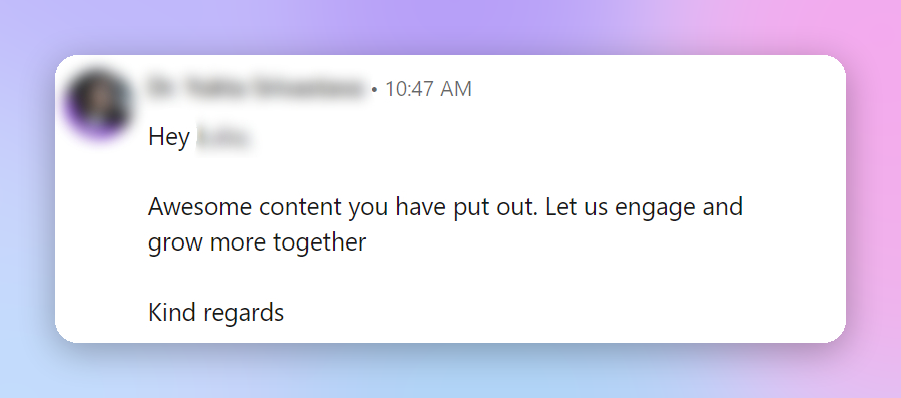
- The message lacks substance, offering no engaging content or call to action
- There’s no mention of specific content I've created, which casts doubt on the sincerity of their interest (plus I immediately think the message is automated).
- The vague notion of 'growing together' feels like a filler, not an authentic invitation to engage.
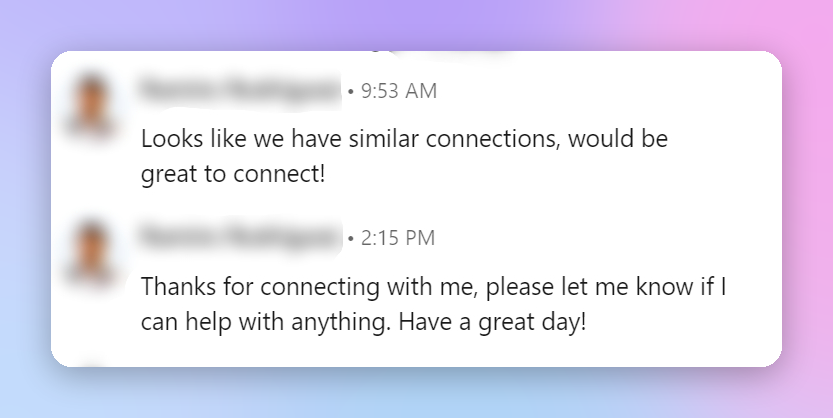
- The mention of "similar connections" is a weak attempt at finding common ground.
- Lacks any introduction that would place us in the same professional sphere.
- The offer to help is non-specific and comes off as insincere, failing to establish a genuine rapport.
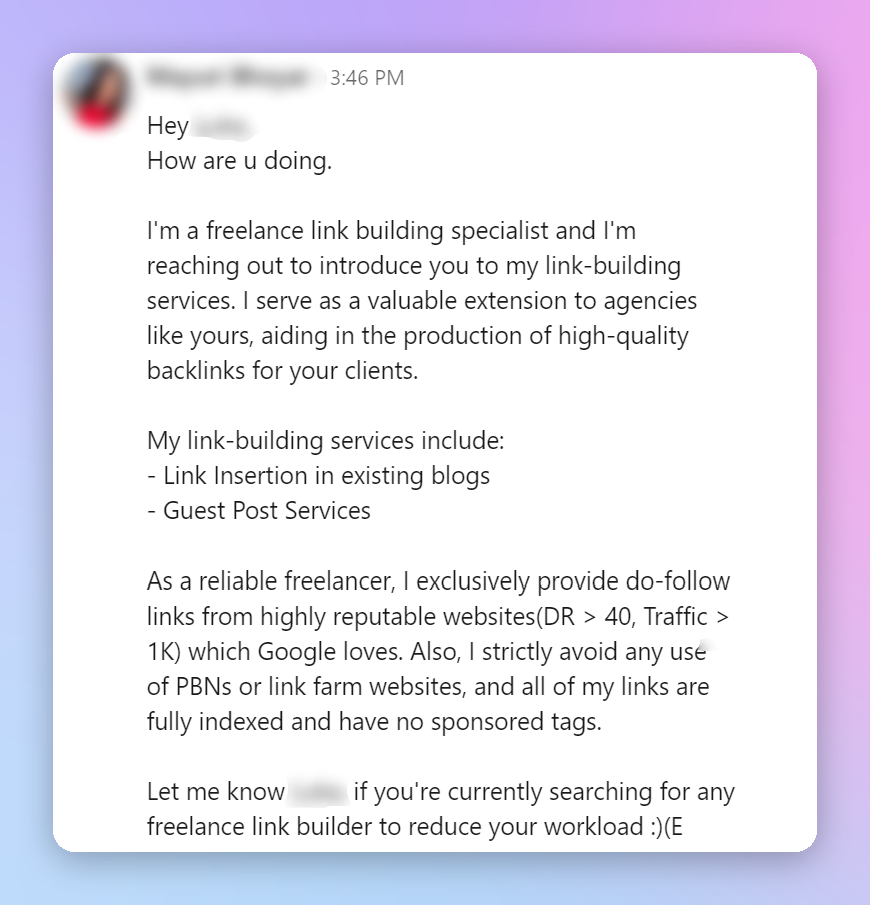
- This message jumps straight into a sales pitch, skipping the crucial step of gauging my interest or need.
- Overloaded with details, the lengthy message loses my attention before building a connection.
In summary, these types of connection messages miss the mark because they're crafted with minimal effort, lack personalization, and fail to provide a clear and engaging call to action.
2. Ignoring your acceptance rate
For years the Social Selling Index was the number people optimized here. LinkedIn has since walked away from it. Its own Sales Navigator resources now say a high SSI "doesn't always represent the efficacy of a sales person or correlate with measurable sales outcomes," and that the time and effort spent chasing one distracts from closing deals. The score page still exists. LinkedIn has simply stopped recommending you aim at it.
That leaves the number that does carry consequences: your acceptance rate.
LinkedIn doesn't publish how it uses that number, but every outreach tool that reports on it sees the same pattern: accounts with healthy acceptance keep their sending capacity, and accounts whose acceptance slides get less room to send.
3. Getting account penalties
People can report a connection request as spam, and LinkedIn keeps count. Enough reports and you get a warning, then a temporary restriction, and in the worst case you lose the account. The first two are recoverable, but slowly, and while you're restricted your outreach is off entirely.
Reports usually come from people who had no reason to hear from you in the first place. That makes it a targeting problem more than a volume one.
4. Sending more than your account has earned
LinkedIn doesn't publish its invitation limits, and the reason is that they aren't fixed — they move with your account. The safe working average is around 100 connection requests a week, which is roughly 20 a day across a normal working week.
A new or dormant account needs to stay under that: 10–15 requests a day for the first two weeks, then build it up gradually. An established account with a large network and a consistently high acceptance rate can push higher, up to around 140 a week.
5. Cutting the wrong words
Here's what often happens: you write the note you wanted to write, it runs over the character limit, and you start shaving words. Somehow, the filler survives and the specifics go. "I'd love to connect and explore synergies" stays. "Saw your post on pricing experiments" gets cut.
Fillers and generic phrases are the first to go, and there's usually more of them than you think.
If your message is still too long, you're probably trying to say two things when there's room for one. Drop the second and use that point in a follow-up.
6. Ignoring pending connections
Regular review and withdrawal of unaccepted requests help maintain a targeted outreach strategy and are increasingly important with the new LinkedIn limits.
I've found that waiting 1-2 weeks to see if a connection request is accepted is optimal. After this period, it's usually clear if the person is interested or active. Even though LinkedIn automatically clears pending invitations after 6 months, it's still a good idea to keep this clean if you're actively reaching out to people.
How to remove a pending connection request:
- Access Invitations: Go to your LinkedIn homepage and click on the 'My Network' icon at the top.
- Navigate to Sent Invitations: In the 'My Network' section, find and click on 'Manage' located near the top of the 'Invitations' section. This will take you to a page where you can see all the invitations you've sent and received.
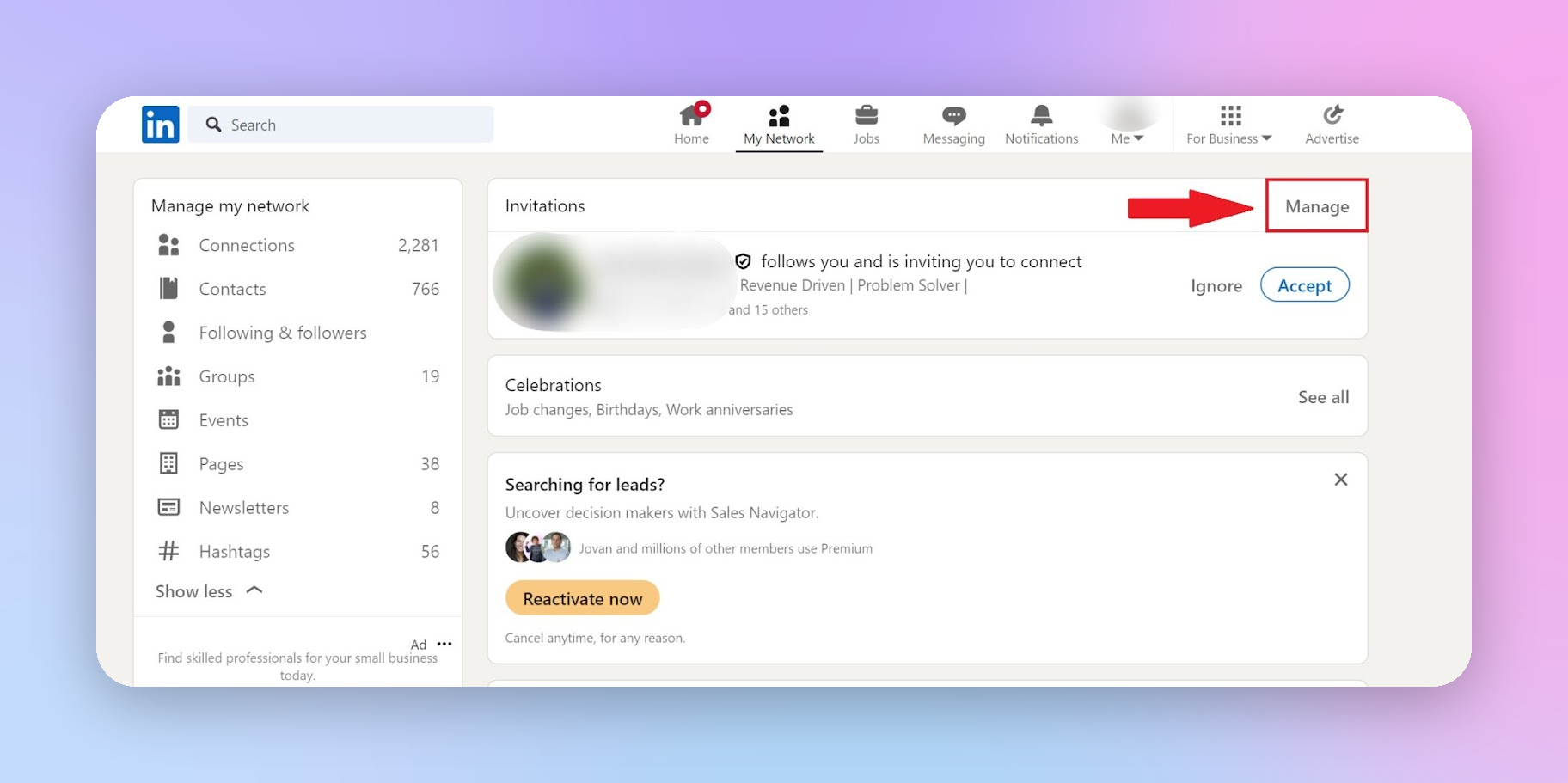
- Withdraw Sent Invitations: Switch to the 'Sent' tab to view all the invitations you've sent. Here, you'll see a list of people to whom you've sent connection requests that haven't been accepted yet. Click 'Withdraw' next to the ones you want to pull back.
- Confirm Withdrawal: After clicking 'Withdraw', you may be asked to confirm your decision. Confirm it, and the invitation will be withdrawn.
Or you can skip the manual part. In HeyReach you set how long to wait and the requests withdraw themselves.
Keep in mind the little-known LinkedIn rule that prevents you from resending it to the same person for 3 weeks. This forces a more strategic approach to whom we send requests.
Keep it simple, keep it real
The most effective LinkedIn connection messages share two qualities: simplicity and authenticity. Instead of pushing a transaction, they open a conversation.
Every person in your network deserves that small investment of research and a message that feels written for them, not at them.
That said, templates are just a starting point. Mastering LinkedIn message automation and outreach means adapting to each situation, reading context, and refining your approach based on what actually works.
If tracking all your outreach – request messages, InMail, follow-ups, replies, and pending connections – across multiple accounts sounds like an endless task, that’s exactly the problem that LinkedIn automation tools are built to solve.

Try it for free
Frequently Asked Questions
What should I say in a LinkedIn connection message?
Keep it specific and short. The best messages reference something real: a shared interest, mutual connection, piece of content, or event, and end with a single open question. Avoid generic openers and skip the sales pitch entirely on the first touch.
How long should a LinkedIn connection message be?
As short as you can make it while still being specific. LinkedIn caps the note at 200 characters on a free account and 300 on a paid one, so one to three sentences is usually all you get. A tight, targeted message nearly always outperforms a long one.
Why are my LinkedIn connection requests not getting replies?
Getting accepted is the easier part. The bigger drop happens after acceptance: the typical campaign turns only about 18% of accepted connections into replies, and 10.7% of campaigns with accepted connections get zero replies at all. If your acceptance rate is healthy but replies are low, the issue is almost always in your first follow-up message, not your connection request.
Is it better to send a LinkedIn connection request with or without a message?
It depends on your profile and context. A strong profile with a clear professional identity can perform well with no message at all. When your profile is less established or you have a specific, credible reason to connect, a short, personalized note improves acceptance rates. What doesn’t work: long, vague, or salesy messages as the very first touch.
What are the biggest mistakes in LinkedIn connection messages?
The most common ones: jumping into a sales pitch before any rapport exists, using filler phrases like “growing together” or “similar connections,” writing messages that are too long, and sending the same generic text to everyone. Each of these signals low effort, and LinkedIn users notice.