LinkedIn outreach campaign targeting inbound leads (from 8% to 16% CR increase)
Published:
February 27, 2024
Updated:
May 19, 2026
Automated personalization completely changed the way I run LinkedIn outreach. It’s the difference between sending messages and actually running a system that consistently turns outreach into pipeline
That's why today I’ll break down a recent campaign that doubled our conversion rate in just two months — and show you exactly what we changed to get there.
I’ll also share a simple but powerful upcoming approach for running inbound-style campaigns almost on autopilot, without losing the human touch.
LinkedIn outreach campaign that helped boost our conversion rate from 8% to 16%
My goal with this campaign was to connect with users who just signed up for the free trial. I want to talk to them, listen to their feedback, build relationships, and ideally encourage them to buy.
Here are the results:
- Connections sent: 162
- Connections accepted: 104
- Acceptance rate: 64.1%
- Messages sent: 83
- Replies: 21
- Response rate: 25.3%
- Conversion boost: from 8% in December to 16% in February
The campaign I put together is straightforward. I've used HeyReach to automate my LinkedIn outreach, from sending requests and liking posts all the way to LinkedIn message automation. Here’s how the entire campaign looked like.
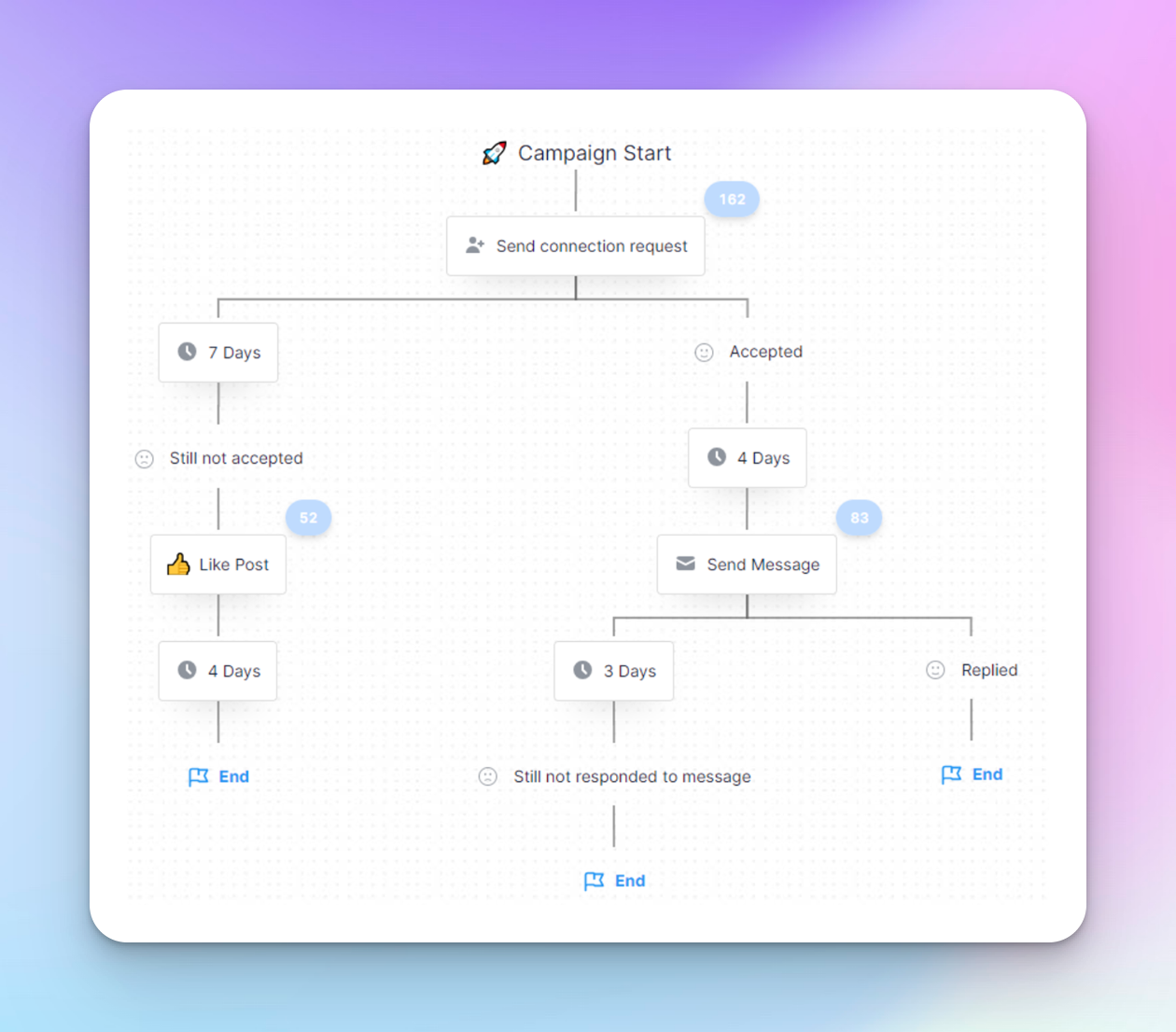
Now let me show you the mindset behind it and how I built it step by step.
Step 1: Upload my lead list
Usually, I start by doing a strategic search to gather a list of targeted leads. However, for this campaign, I already had the list because when a user signs up for our free trial.
Long story short, they undergo our qualification process, which provides us with key details I need. In other words, I only add qualified users to this campiagn which are our ideal customers, of course.
Then, my colleague Mrki double-checks the list and manually uploads the CSV file to HeyReach. I know, it's a bit of a hassle to do it manually, but if you’re curious how to do this automatically, read on… there’s a little surprise coming.
Step 2: Send automated connection requests
I started my LinkedIn outreach campaign by automating a simple connection request exactly one day after users signed up for HeyReach. I didn’t include a LinkedIn connection message with the request at this stage. Wanted to keep things clean.
Once I began receiving responses, I personally talked to each user to gather fresh insights and feedback about our tool, ensuring a direct line of communication. This approach worked well for me in this campaign.
However, one user asked me how I did this campaign and whether it would be possible for his Co-Founders to manage all the responses in one inbox. In such case, the way it would work is you will scale this LinkedIn campaign by having multiple senders. This way, you'll be able to reach more users in less time.
Then, the three Co-Founders can manage all the responses through a unified inbox replying in each other's name if needed, this eliminating the hassle of logging in and out of different accounts. All of this is possible to do in HeyReach, btw.
🚀 Test all these features, add your colleagues, and send your first campaign for free - no card required. Start here
Step 3: Send LinkedIn outreach campaign
This step depended on the users' reaction to my connection requests.
For those who didn’t accept the connection request:
- I waited 7 days and then automated a 'like' on their freshest post. Just to pop up in their notifications and jog their memory of me
- Then I waited 4 more days for a response and then hung up my hat, knowing that I tried my best
For those who accepted my connection request:
- I set up automation to wait four days, giving users enough time to explore HeyReach, before (automatically) sending a personalized message that read:
Hey hey {FIRST_NAME}, thx for accepting me!
How's your HeyReach experience so far?
My goal was to get authentic feedback and convey my genuine interest in their opinion.
I wanted to show my commitment to understanding their needs and improving user experience—something I religiously practice on a consistent basis. This creates a deep bond between the users and our company.
The message I chose to do the job was short and conversational. It includes a question to encourage users to respond. Also, I went for a casual tone to put them at ease and encourage genuine feedback, not superficial answers.
A few tips for crafting short and sweet messages
When in doubt, use AI as your sparring partner to help you craft these messages. For example, my good friend Vuk users Notion AI Assistant to shorten content, make it sound more professional, or simplify the language... depending on the use case, obviously.
You can also write your raw draft and submit it to ChatGPT with a specific prompt, like “rewrite this content concisely and in a professional tone.” Moreover, you have many other tools to help you rephrase your content quickly.
Whatever you end up using, AI will give you a few ideas that you can additionally polish. Ultimately, you end up with a great option which was the point of having a sparring partner in the first place.
Step 4: Listen to your users
Once the user replies and the conversation starts, the sequence is ended.
Finally, it’s my job to actively listen to the users’ feedback and understand their pain points, learn, and tweak the tool accordingly.
To get the best results, I had a set of thoughtful follow-up questions prepared to dive deeper into their feedback and uncover additional insights. Again, I wanted to avoid superficial answers at all costs while being respectful of my users' time and space.
Example of a happy user - something I'll never get tired of.
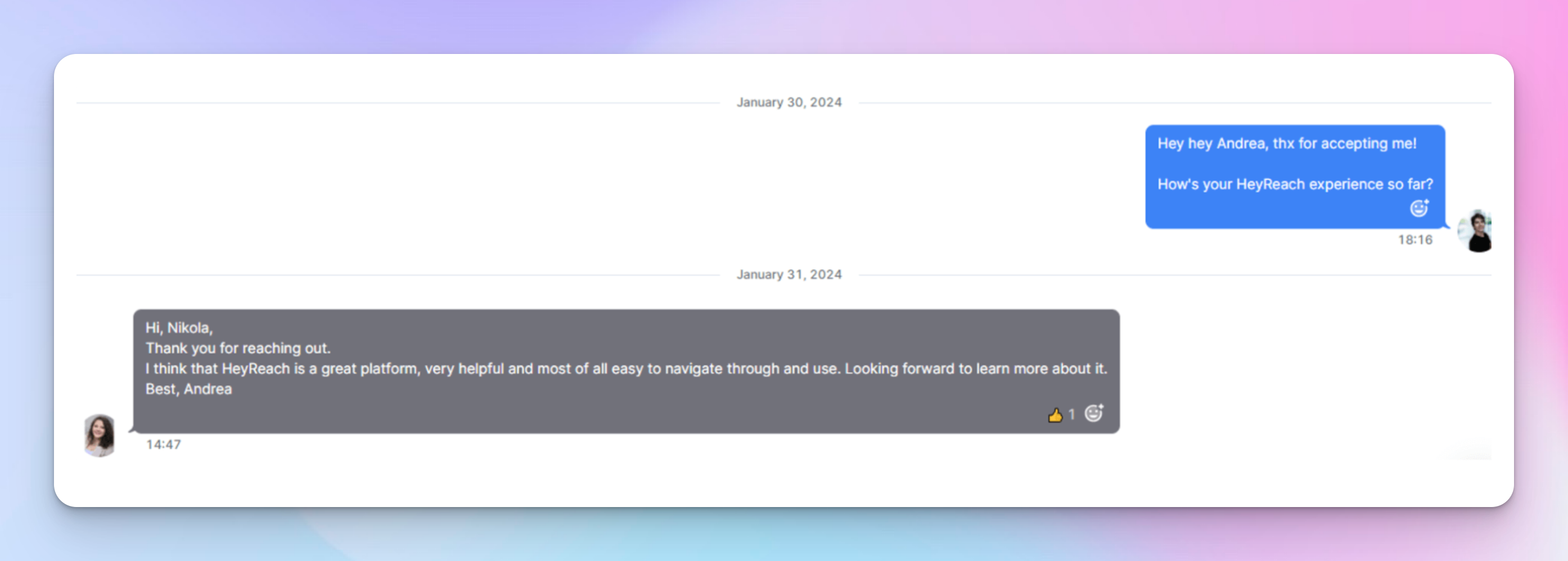
Example of how this LinkedIn outreach campaign helped boost conversions

Step 5: Assess the results
Even though we deployed one or two conversion optimization strategies elsewhere, this campaign definitely helped double our conversion rate from 8% to 16% in two months.
The high acceptance rate (64.1%) and response rate (25.3%) show how quickly human-to-human connection turned a 'maybe' into a 'yes.' With the majority of users who replied I ended up having a conversation about how they can maximize their LinkedIn outreach efforts, as well as how can HeyReach help them accomplish that.
And on top of everything, I'm connected with these great people which opens more conversational opportunities down the road. They will see my content, I will see theirs... so it's really a win-win.
Why this campaign worked
First, I didn't send any messages to users who had just signed up. I gave them some time to maximize their initial experience with the tool and explore the software themselves without any distractions.
I only sent them a connection request a day after they signed up to gently introduce them to the community aspect of our service. Plus, it's
Secondly, sending a message using a casual tone from my account definitely multiplied the campaign's performance. This move put a face to the product and transformed a regular digital service into a human experience.
It definitely made our users feel valued and motivated them to respond and provide feedback.
Thirdly, I didn't go in guns blazing. Although this campaign helped boost our conversion rate from free to paid, I didn't sell right off the bat. Instead, I prefer to connect and interact. Pitch only once you see an opportunity for a genuine solution to their problem.
Human connection + smart automation: The winning LinkedIn formula
From my personal experience, I can confidently say that the success of any LinkedIn outreach campaign is not just about sending messages; it's about creating lasting connections. When you have meaningful relationships with your customers, it opens a window into how your product performs, offering invaluable insights so you can make adjustments for the best user experience.
I also learned that while there is no substitute for human interaction, smart automation makes a marketer’s life so much easier. It gives you more time to plan crucial details, engage with your prospects, and create customized solutions.

Try it for free
Frequently Asked Questions
What was the goal of this LinkedIn outreach campaign?
The goal was to engage new free trial users right after signup, gather feedback, build relationships, and increase conversion from trial to paid users.
What results did the campaign achieve?
The campaign delivered strong performance improvements: 64.1% connection acceptance rate and 25.3% message response rate. Conversion rate increased from 8% to 16% in two months
What tools were used in the campaign?
The campaign was executed using HeyReach to automate connection requests, follow-ups, and message sequencing while keeping personalization and timing controlled.
How did the messaging approach look like?
Messages were short, casual, and focused on feedback rather than selling. The goal was to start conversations, not pitch immediately.
Can this type of campaign be scaled?
Yes. By using multiple senders and a unified inbox (like in HeyReach), teams can scale inbound engagement while keeping conversations organized.