How to network on LinkedIn without sounding like a sales bot: 12 actionable tips
Published:
March 3, 2024
Updated:
May 19, 2026
Here is the uncomfortable truth about LinkedIn networking: almost everyone is doing it, and almost nobody is doing it well. People blast connection requests, sprinkle a few “Great post!” comments, and then wonder why their inbox stays dead quiet.
We pulled the receipts. Across 96K outreach campaigns run through HeyReach, only about 18% of accepted connections ever turn into a reply. Read that again. You can win the connection and still get ghosted roughly 4 out of 5 times. That silence is where most networking quietly dies.
It does not have to. Get this right, and LinkedIn becomes the single best career tool you own: jobs, clients, hires, referrals, and direct access to people who are years ahead of you.
Below, I’ll explain how to network on LinkedIn: how to set up your profile so people take you seriously, 12 tactics you can run today, how to grow your network without becoming the spam everyone mutes, and how to know whether any of it is actually working.
The ROI of networking
Remember that saying “It’s not what you know, it’s who you know?” Connecting with the right people is everything. And LinkedIn made it infinitely easier.
In the last few years, LinkedIn helped me:
- Connect with experts and learn form them
- Get a bunch of partnerships and collaborations
- Find and hire top talent for my startup
- Get recommendations and referrals
- Ask for (and return) quick little favors

Quite frankly, the ROI is tremendous and I think every successful entrepreneur will tell you the same. Even if you're an introvert, there's a way you can network without stepping out of your comfort zone too much (although I suggest you step out of it as much as you can). I'll show you what I mean soon.
Do this before you start networking
Before you reach out to anyone, two things need to be in place: an optimized profile and the beginnings of topical authority. Together, they paint a realistic picture of your skills and show people you are serious about your career. That gives you an advantage later, when you start approaching strangers.
On profile optimization, aim for 100% complete:
- Use a professional headshot and an appropriate cover image
- Customize your LinkedIn URL with your name (linkedin.com/in/brucewayne/, not linkedin.com/in/user2154511/)
- Write a relevant headline (your position plus what you do or what you are passionate about)
- Write an interesting bio (bonus points for engaging storytelling about your achievements and values)
- Fill in education and work experience (list accomplishments, not duties)
- Add key skills relevant to your role and industry
- Collect endorsements and recommendations from past partners and coworkers for credibility
- Distribute the keyword you want to be found for (usually your position) evenly across your profile
Too much theory? Check out what it looks like in practice:

Next comes topical authority. You build it by regularly posting relatable, actionable, applicable content. Think of it as building your career in public: sharing your experiences, wins, failures, lessons, and ideas.
You do not have to be an expert to post. Being a practitioner who tries things and documents the journey works perfectly well and sharpens your networking skills along the way.
With the prerequisites covered, here are the tactics.
How to network on LinkedIn: 12 tactics that earn replies
Doesn’t matter if you’re a seasoned pro or just starting with networking — the tips below will help you grow your network on LinkedIn and nurture those meaningful connections in the right way.
1. Leverage LinkedIn Search
One of the simplest, most direct ways to grow your network is the LinkedIn Search tool. It is a free feature that lets you search people, companies, jobs, posts, events, and groups, with a decent set of filters to refine your results.
For example, you are a new Sales Associate in SaaS. You want to learn as much as possible about sales and marketing, but the people you currently follow are not inspiring. You need more fellow Sales Associates, and you want to be deliberate about who you learn from. So you filter for people who:
- Are based in the US and UK
- Work in SaaS, ideally at companies like Airtable, Notion, and Asana
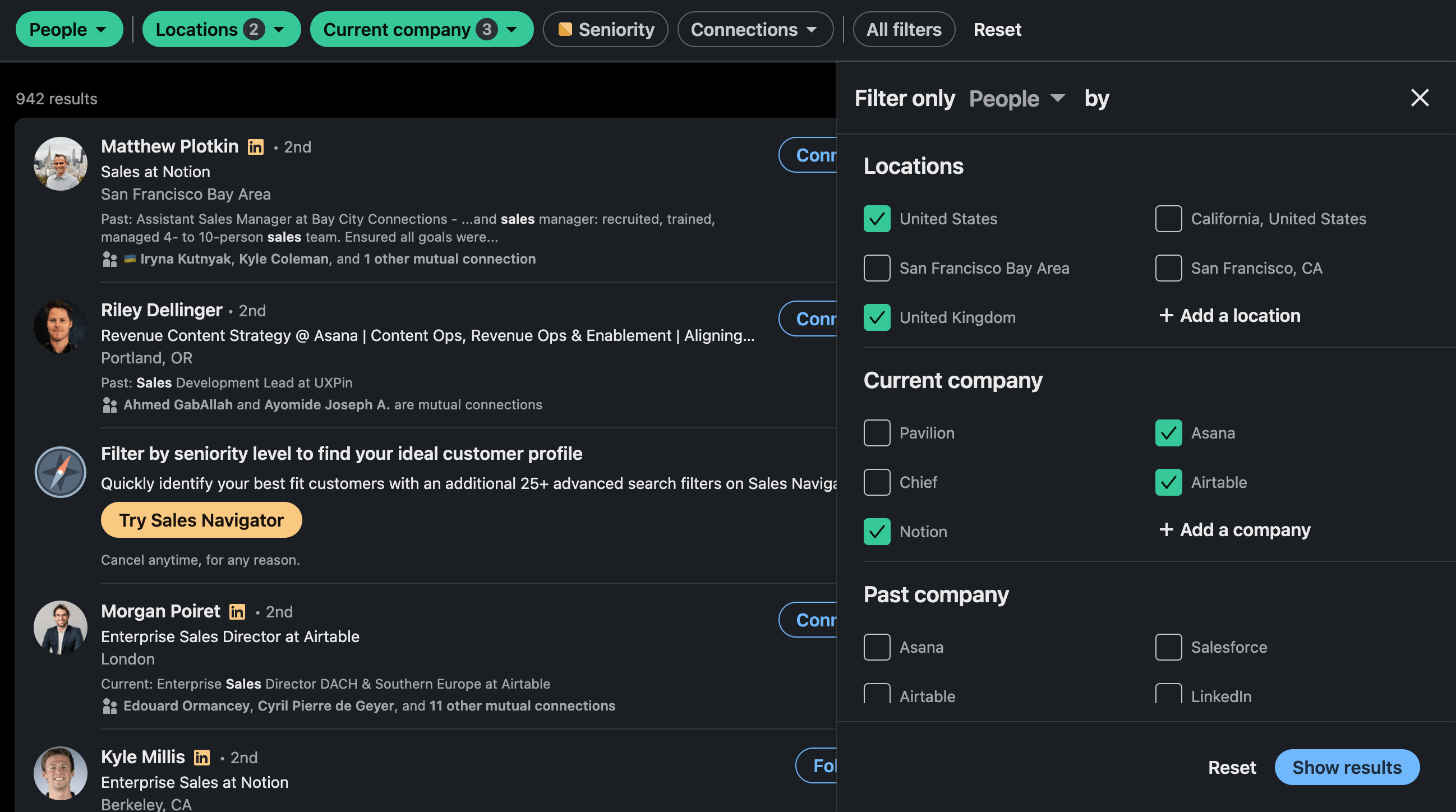
Depending on who you are looking for, you can add filters for previous company, education, language, or even name. In this case, it would be useful to reach people who grew their company from $1M to $10M in ARR, so you can apply their lessons to your own path. As a rule, the more precise you are about who you want to connect with, the better.
The result: less noise, a homepage filled with relevant people and posts, tailored information, and more learning opportunities. You get even better filters and more results with Sales Navigator, but everything here works on free LinkedIn Search, so anyone can benefit.
2. Send connection requests automatically
Connect only with relevant people who fit the profile of your target audience. This way, you’re making sure your homepage is tailored to your preferences and thus brimming with opportunities.
Doing this manually might take a bit of time, so it’s easier to automate the process with a tool I love like HeyReach (obviously 😀).
In this example, I’m currently searching for US content writers in the IT space. I’ve set the relevant filters in LinkedIn Search box. Then, I’m gonna copy/paste the URL to HeyReach to import the list into my LinkedIn campaign.

I simply drop the URL into HeyReach...

And now I have a list of relevant writers to connect with. After I launch the campaign, I can see the results at any time and import more leads if I need to.
Btw, if you need some inspiration for this type of a campaign, here are some LinkedIn connection message templates you can borrow.
3. Use LinkedIn Groups & Events
Groups are niche communities where you can participate in discussions, share insights, connect with people, and build opportunities. Think of it as an ongoing discussion.
LinkedIn events are super useful if you want to learn or share more about a certain topic. Plus, checking out the attendee lists can help you identify potential connections and plan your networking strategy.
To find appropriate groups and events, just type in your keyword in the Search bar and click on Groups or Events.
4. Use the “People you may know” section
“People you may know” is a nice little section that contains people you have some similarities with (same connections, same/similar industry/role, similar education, members of the same LinkedIn group, attended the same event).
Go to “My Network” and scroll down until you see the “People you may know” section. Do a bit of digging and you’re guaranteed to find at least a few interesting people you’d hit it off right away with.
5. LinkedIn content prospecting
Pay attention to who engages with the content you see on the daily. You can find ideal people to build connections there. I recommend checking out things like:
- The engagement (likes & comments) you get on your posts
- The engagement your competitors get on their posts
- The engagement influencers in your industry get on their posts
Most of the people engaging with these posts are in the position/industry you’re targeting. Given that they’re actively engaging with relevant content, they’re qualified prospects. If you approach them, chances are they’ll be willing to connect and open to some sort of collaboration.
Say you’d like to pitch your product to a wider list of qualified prospects, at scale. You can use tools like HeyReach to connect with them and create elaborate sequences, have multiple senders on one campaign, and manage everything from a single, unified inbox. 😉
🚀 Want to test multiple senders feature yourself? Send your first LinkedIn outreach campaign for free - no card required.
6. LinkedIn messaging and networking templates
At the beginning of this article, I showed you a few examples of my networking messages and responses I’ve got. Now, I want to give you a few additional examples I borrowed from my friend Vuk. He was kind enough to drop me a few screenshots.
- Networking template he used connect with David (marketing expert), after they spoke on the same conference together when he was the Head of Growth at lemlist

- Networking template Vuk used when he was doing product research for Skillful Communications. He wanted to get in touch with Stephanie (Head of People at Flinks) and used the referral strategy to contact her

- Networking template used to get insights from Kevin (SEO expert) after following his newsletter for a while

- Networking template leveraged to gain additional insights about the HR world and their preferences after engaging on Julia’s posts first

Obviously, you can take any of the templates from this article or from anywhere else, and templatize then. For example:
Hi NAME,
I loved {GENUINE COMPLIMENT}.
Speaking of which, can I ask you a few questions about {TOPIC}. No strings attached, I’m genuinely interested to get your advice. 🙂
Take care, YOUR NAME
7. Make every LinkedIn interaction matter
Forget about AI-generated or “That’s great” comments. They’re generic, pointless, and can be spotted from a mile away. Plus, nobody likes them. You don’t want to take that cheap shortcuts that get you nowhere.
Instead, set some time aside, ideally on a daily basis, for leaving meaningful comments on your connections’ posts.
To make the process easier and cooler, create a custom feed of your favorite creators only. That way you’ll save time on scrolling and searching for meaningful posts to comment on.
Check out how to do it here — thanks for the tip, Danny! 🙏
8. How to find a job using LinkedIn networking
If there’s a company you’d love to work for, one out-of-the-box way to try and join it would be to get referred by someone from that company. If you don’t know anyone, there’s a powerful LinkedIn tactic I discovered from others to help. Let me illustrate.
Imagine that I’m a growth marketer who wants to join a company like Notion. I love their product and I think they’d simply be the perfect match for my skills.
I now need to find the right people to get in touch with and start networking. I’m interested only in people working in growth in Notion, so I’ll set my search filters to narrow down the list of people according to that.
Having set those basic filters, I’ll go to All Filters, find Keywords, and set Growth as my keyword (in case I want people in growth and marketing, I can add both keywords).

Voila. I got a list of appropriate people. I decided that Joshua looks like a pretty interesting guy. So I’ll shoot him a message and I’ll try to personalize it as much as I can.
Here’s an example of the networking message I might user:
Hey {NAME}, I stumbled upon your profile the other day. I'm impressed with your work at {COMPANY}. As I'm very interested in pursuing a similar career, I'd really appreciate the opportunity to ask you a few questions and get your advice on a few things. If you have 15 min to chat, I’ll be forever grateful.
Maybe one day, we’ll jump on a call. I’ll prepare a tailored agenda that would help me extract as much valuable information as I can. And I’ll ask Joshua one secret question:
What’s the biggest challenge your team is facing right now?
After the call, I’ll go all in and try to find different ways to solve that pain point for them. I’ll create a detailed plan and prepare a presentation. A week later, I’ll pop up in his inbox again, following up and pitching my ideas. If I play it our right, we’ll bounce some ideas off and start an interesting discussion… and after that, who knows what can happen. Especially if they have a live job ad for a Growth Marketer.
Bottom line: Don’t wait around. Know what you want, create a plan on how to get it, be resourceful and open to collaboration, and make that first step. You have nothing to lose.
9. Do small favors generously
Doing small favors for people is convenient, it helps you gain their trust, enhance your reputation, and build a tight, supportive community.
Whenever you can:
- Connect them with relevant people
- Repost their job-searching post or comment for wider reach
- Suggest relevant people for collaboration
- Endorse them if you know they’re great at what they do
- Obtain a piece of info they need
- Write a recommendation
- Forward a relevant article
You get the drill, but don’t expect anything in return. Not the point. But in the long run, you’ll build your capital and people will naturally want to help you back. If a day comes when you need help, I bet you won’t even have to ask for a favor — they’ll offer it themselves.
That’s the power of a LinkedIn community.
10. Relationship management and nurturing
Actively managing and nurturing your relationships is an investment in your growth and opportunities. By being present in people’s lives you’re enhancing your foundations, and you’re helping each other grow.
So remember to get in touch occasionally, just to check in and see how life has been treating them. Ask about how that project is going. If you randomly remembered a funny anecdote with them, share it. If they’ve been on sick leave, ask how they’re doing.
In case you’re forgetting things as you have too much to deal with it on a daily basis, you can set a reminder campaign in HeyReach. The template is simple.
Hey {NAME}! Just wanted to ask you how did {PERSONALIZATION} go?
The {PERSONALIZATION} tag gets replaced with what they mentioned. For example, "your Product Hunt launch", "marketing headhunting", or "first campaign at HeyReach". Then, I set up the campaign, import leads manually since there's a handful of them, and we're ready to rock and roll.

That way, these messages are flying automatically, but I can jump in manually once the person replies and have a proper conversation. 🙂
11. Build relationships at all levels
You’ll miss out on a lot if you’re only building relationships with hot shots, directors, and VPs. You’ll want to treat everyone with respect. This also means you’ll reply to other people who wanna connect with you without any reservations.
You never know, perhaps there’s an extremely talented newbie somewhere out there who looks to you for a bit of mentorship and guidance. And I simply know it would make your life a bit more fulfilled knowing that you helped them develop their skills and achieve their dreams.
Of course, this doesn’t mean that you have to waste your time and energy (and LinkedIn connections, as you can only have up to 30,000 of them) on literally anyone.
12. Be a host, not a guest
Being a host rather than a guest will require you to actively search for ways to contribute to your network. But the cool thing about being a host is that everyone wants to talk to you. A particularly interesting tactics for introverts. It’s kinda like organizing a party in high school at your place. Because when it's your place, it's your rules + you're the one person that will talk to most people.
Some ways you can do this:
- Host webinars and live sessions
- Provide mentorship opportunities
- Organize “open doors” days in your company
- Provide feedback on people’s work
- Create communities and groups and share resources
- Organize events
Depending on your expertise, you can also create all kinds of workshops.
Say you’re a senior SEO writer. You could organize quick editing sessions where interested writers could submit their recent articles, you could pick a few, and do a live editing session to help them spot areas of improvement.
You could record these calls and upload them to your YouTube channel so anyone interested could check out the principles of great writing.
With just a bit of dedication, you could find endless ways to give back to your community.
How to grow LinkedIn network at scale
If you want to start reaching out to people and learn how to grow LinkedIn network at scale, there’s a cool tactic you can use.
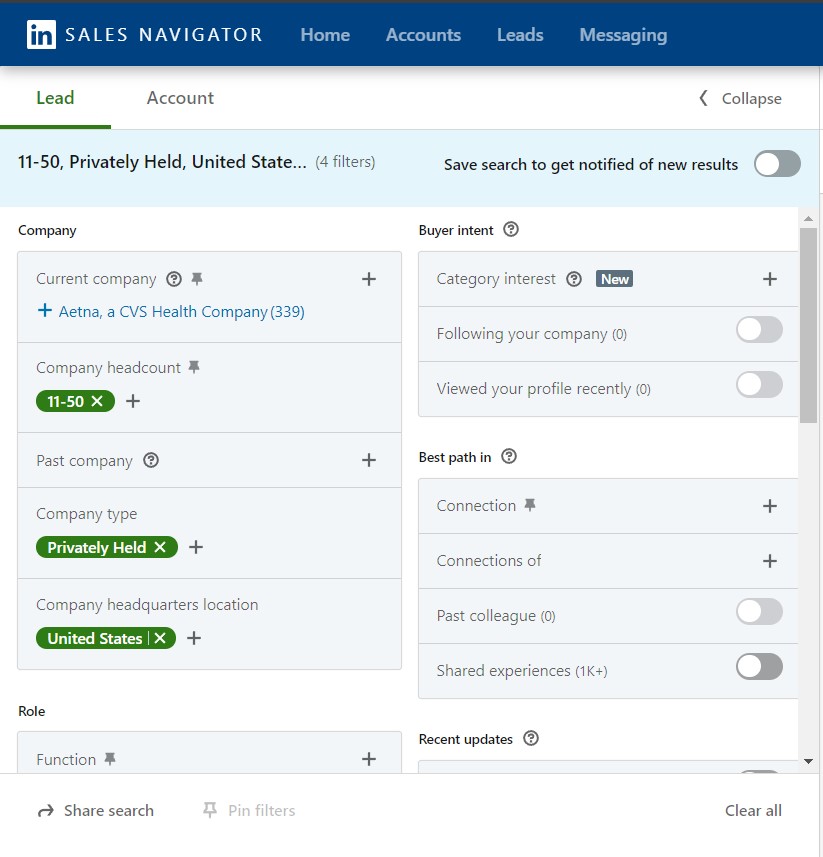
You can easily import prospects from different sources on LinkedIn (search bar, Sales Navigator, Recruiter, etc…) without getting extensions or scraping sites. For example, I want to connect with CMOs of smaller (<50 employees), privately held companies from the US. Here’s what I could do.
1. Find leads on Sales Navigator
I’ll go to the Sales Navigator and set the appropriate filters.
2. Add leads to your campaign
As mentioned before in the article, I’ll just copy/paste the Sales Navigator search URL into HeyReach and I just tap “Start Importing”.

Voila! I skipped the tedious manual data collection and now I have a list of 2k prospects to work with.
3. Send your LinkedIn networking campaign
Now, imagine a scenario where I want to do a networking campaign as a team. Basically, have my teammates participate to reach more people, do more meetings, learn more, etc. If I was sending this campaign on my own, I’d be limited to 20 connections per day. Which is fine if I’m doing a campaign on that level.
But if I want to scale it or reach more people in less time, I will need HeyReach’s Multiple Senders feature that will enable my team to do outreach by rotating multiple accounts and sync all the senders in the same sequence.
With that out of the way, it’s time to create a campaign. I’m setting up the sequence where the first step will be me sending them a connection request with an introductory message. If you need inspiration, here are a few LinkedIn connection message examples.
Depending on whether or not they accept my request, I can withdraw a connection request after a certain number of days. After X days pass, I can choose to send additional messages based on whether or not they accepted my request.

This way, I can create and automate a sequence once for all 5K people and save time and effort on messaging each person separately.
Here are a few LinkedIn outreach campaign examples.
- LinkedIn message automation playbook [42% reply rate example]
- 3 LinkedIn sales pitch examples
- LinkedIn outreach campaign to engage inbound users
Give more, get more
LinkedIn is a goldmine offering endless possibilities for your networking attempts, whether you want to connect with experts from your industry or find and nurture leads.
And if you want to be successful, it’s better to take a tailored approach and not cast a wide net. Meaning, connect with people whose profile fits your industry, role, skills, and plans for the future. LinkedIn groups and events can help you find them, as well as the Search bar filters and the “People you may know” section.
From there, it’s all about meaningful connections. Let being a host, not a guest your priority. That means giving value whenever you can, in any way that you can.
Build a long table, and people will come to you. Give as much as you can, and you’ll be surprised at how much you’ll get in return.

Try it for free
Frequently Asked Questions
How do you grow a network on LinkedIn?
Grow a LinkedIn network by connecting with relevant people in your industry, personalizing requests, engaging with their posts, and sharing useful content consistently. Focus on quality connections, not random volume.
How many connection requests can you send on LinkedIn per week?
For most accounts, the safe ceiling is around 100 invitations per week, and the limit resets on a rolling seven-day window rather than a calendar week. Newer accounts should stay lower (closer to 80), while higher Social Selling Index scores and Sales Navigator can raise the tolerance. Personalized requests with a short note tend to get accepted more often than blank ones.
How do you network on LinkedIn as a student or new grad?
Start with alumni from your school and people in roles you want to grow into, since shared background makes them far more likely to reply. Optimize your profile first so it shows your projects and skills, then send short, specific messages asking for advice rather than a job. Most professionals are happy to help someone early in their career who asks a thoughtful question.
How do you network with recruiters on LinkedIn?
Connect with recruiters who hire for your target roles and industry, and make your headline and skills clearly reflect what you do. Send a brief note explaining the kind of role you are after instead of a generic “open to work” message. Staying lightly engaged with their posts keeps you on their radar for future openings.
How long does it take to grow your network on LinkedIn?
Building a professional network on LinkedIn is a steady process measured in months, not days, especially since weekly invitation limits cap how quickly you can add people. The accounts that network effectively treat it as an ongoing habit of posting, commenting, and checking in, which compounds over time. Consistency beats intensity here.