The ultimate LinkedIn profile optimization guide
Published:
November 14, 2025
Updated:
March 17, 2026
HBey, Diandra Escobar here! I’ve spent years helping people transform their LinkedIn profiles from quiet pages into magnets for recruiters, clients, and new opportunities.
This guide is the exact system I use: simple, proven, and built around real results.
Nothing here is theory. Each step is designed to boost your profile views, increase your visibility in LinkedIn searches, and make your first impression count.
If you want a profile that gets noticed and converts, start here.
1. Market research for LinkedIn profile optimization
When I was first building my own LinkedIn profile, I didn’t open Canva or start writing headlines right away. I spent time researching - scrolling, observing, and collecting examples from creators who already had strong personal brands.
If you try to optimize your profile or post content without knowing what works in your space, it’s like designing in the dark. You waste time guessing colors, fonts, and wording when the answers are already in front of you.
When I research, I look at people who already attract the kind of audience I want: founders, GTM engineers, or recruiters. I study personal brands like Laura Costa, Anthony Perry, and my own. Each one looks and feels different, but all of them work because they reflect who we are and what we teach.
I pay attention to:
- Visual cues: Colors, typography, and how everything feels. Laura’s brand is bold and strong, mine is clean and fresh, and Anthony’s is systematic and light.
- Narrative: What they talk about, how they talk about it, and how that connects to their goals.
- Reaction: Who comments, what people ask, and which topics pull engagement.
But I don’t stop at LinkedIn. I pull inspiration from YouTube, Instagram, newsletters, and podcasts. That’s how I understand how they communicate ideas across platforms.
Market research also means checking who already owns your audience. For example, if someone like Anthony reaches the same recruiters or B2B founders you want, learn what makes his tone or topics resonate with them.
This is where LinkedIn growth strategy thinking comes in: defining your point of view before you touch your profile. You can’t grow if you sound like everyone else. When you research, you start spotting patterns: tone, colors, and messages that make people stop scrolling.
I write down relevant keywords that keep showing up in headlines and posts. It helps later when I optimize my profile and align my SEO to attract the right crowd.
2. How to optimize your LinkedIn profile
Your LinkedIn profile is your landing page. It’s where people decide in a few seconds if they want to connect, follow, hire, or work with you.
Whether you’re in a job search, running a business, or building authority, your profile has to clearly and visually sell what you do.
When I optimize my own LinkedIn profile, I treat it like a mini website: clean, simple, and conversion-ready. Every section needs to show what I do, who I help, and what results I create. I’ll explain it bit by bit:
Profile picture and headshot

Your profile picture is the first impression anyone gets. A bad photo can make your entire profile feel off, no matter how strong your content is.
- Use a light, high-resolution headshot.
- Keep the background neutral or on-brand.
- Look approachable, not overly formal.
- Make sure colors match your personal brand (mine leans fresh and natural, Laura’s is bold and strong).
Think about this photo as a handshake: friendly, confident, and real.
Banner
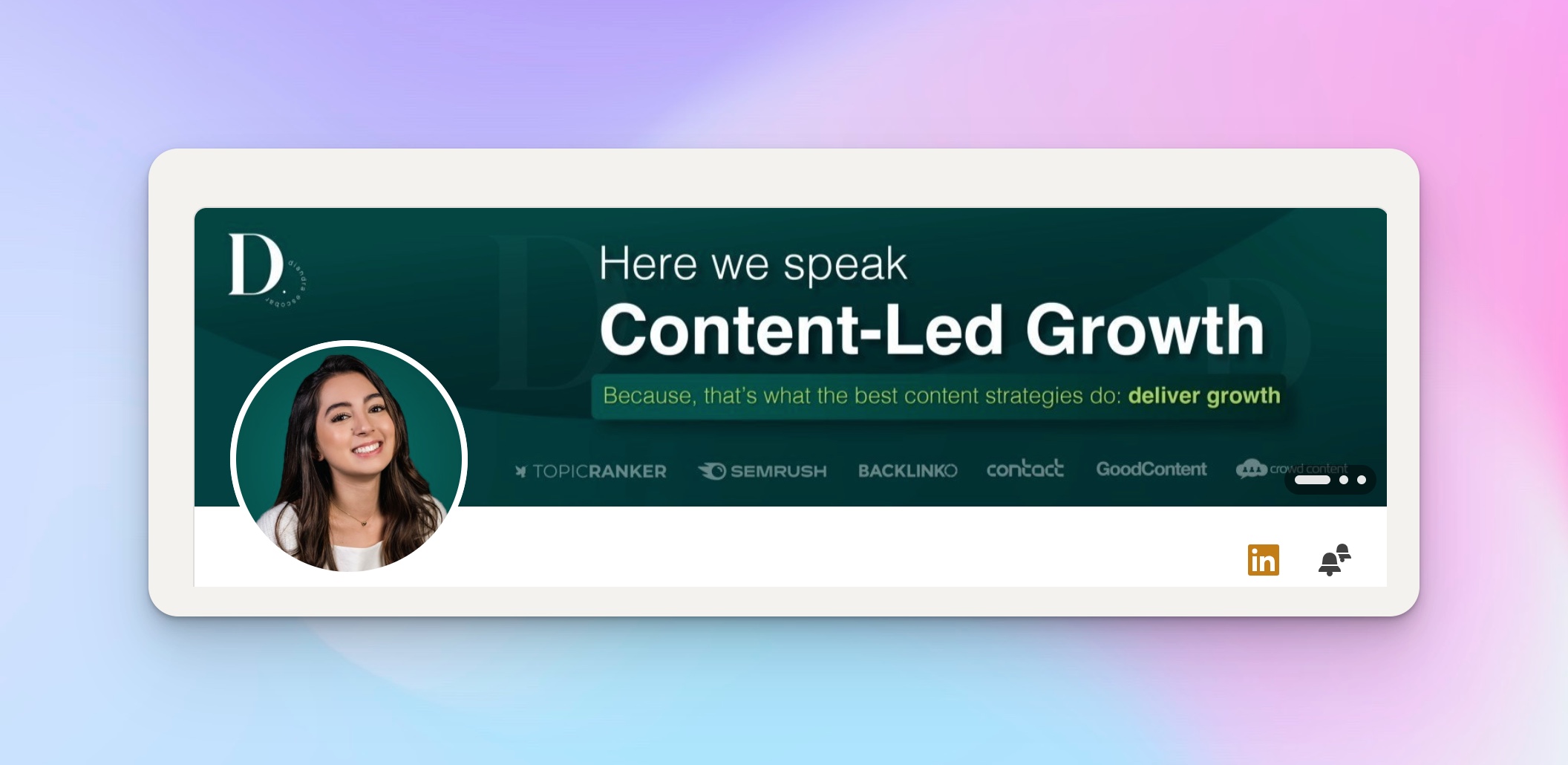
Your banner is a prime space that most people waste. It’s where you state your value clearly. Keep it simple and readable on mobile.
Add your:
- Value proposition (“I help X get Y through Z”).
- Provide proof of logos or media mentions, if you have them.
- CTA or URL that drives traffic where you want it (booking page, newsletter, or free tool).
Your banner’s goal is clarity, not decoration.
LinkedIn headline
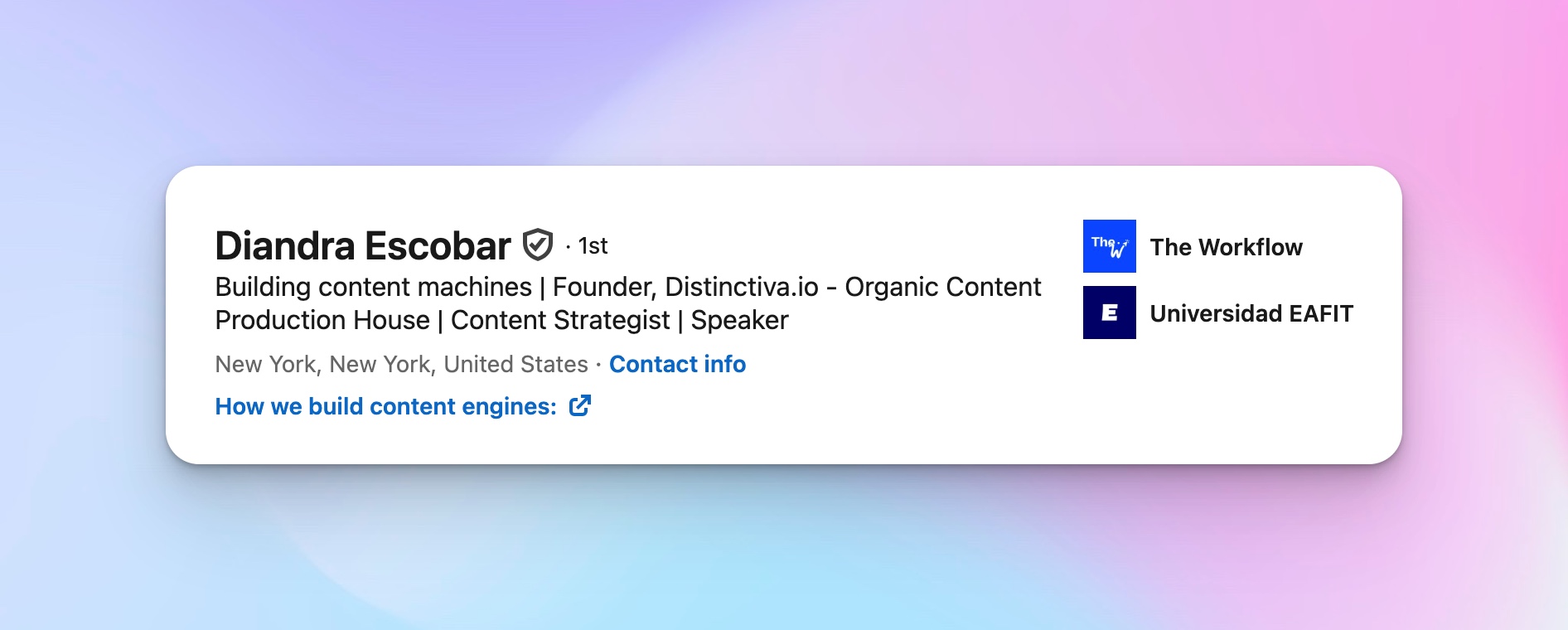
The LinkedIn headline is what people see every time you post, comment, or appear in LinkedIn searches. It’s one of the most powerful spots for visibility.
You can follow this proven formula:
“I help [target audience] get [result] through [method].”
Or, if you wear multiple hats, stack your roles and credibility:
“Founder at [Company] | Content Strategist | Speaker | Helping Teams Build Growth Engines.”
When you test your headline, ask: what’s the one thing I want people to remember about me?
Headlines are also a great place to add relevant keywords that help recruiters or hiring managers find you: this is core to SEO inside LinkedIn.
About section

Many people overcomplicate this part. The about section (also called the LinkedIn summary) should read like a story that sells, not a résumé.
I follow a simple 4-part structure:
- Problem – What challenges do your audience or clients face?
- Solution – How do you help solve that problem?
- Proof – Show evidence (projects, results, or clients).
- CTA – Tell them what to do next (book a call, subscribe, download).
Featured section

This is where you drive action. You can add:
- A case study or project you’re proud of.
- A free tool or resource that brings value.
- A booking link, newsletter, or event sign-up.
The goal is to move people closer to working with you or learning from you.
Experience section

The work experience area shouldn’t be a job history, but proof of results.
Start with the outcome, then describe your role. Focus on impact, not only the job title. Use bullet points only when they clarify measurable results or projects.
Your experience section should read as a continuation of your brand story, not just what you’ve done but why it matters.
Optimize through review and tools
After I finish editing, I always do a profile review to check how it looks on desktop and mobile. I test the banner’s readability, see how my profile views change over time, and track my profile’s visibility in LinkedIn searches.
If you’re new, use a free optimization tool to scan your profile or even ChatGPT to spot missing relevant skills and weak headlines. This saves time and gives a clear roadmap for improvement.
Consistent posting and engagement also keep your profile active in search. This is where tools like HeyReach make a difference — regular interaction, connection requests, and content rotation naturally increase reach.
3. Positioning, content strategy, and personal brand building
Once my LinkedIn profile looks clean and professional, the next step is defining what it means. Without clear positioning, even a perfect banner or LinkedIn headline won’t help. People might see you, but they won’t remember you.
Positioning is what makes someone stop scrolling and think, “That’s exactly what I need.” It’s how I decide what to post, what tone to use, and what results to show. Everything, from the about section to the featured section, flows from that clarity.
The four questions that define positioning
When I work with clients, I start with four questions from my framework:
- What do I know that creates value?
This defines your area of expertise. The question isn’t what you do day to day, but what you know deeply enough to help others. For me, it’s content strategy and growth systems. For someone else, it might be product marketing, recruitment, or leadership coaching. - Who do I help best?
This is your ICP, your ideal audience. Are you trying to reach recruiters, job seekers, or startup founders? Knowing your audience helps you speak their language, choose relevant keywords, and design your content for their needs. - How do I help them differently?
This is your approach, your method or process. Maybe you use storytelling, frameworks, or automation. Perhaps you’re data-driven, while others are creative. That difference is your leverage. - What is my edge vs others?
Everyone on LinkedIn claims to “help people grow,” but what gives your message weight is your edge: your proof, voice, or unique story. Your personal brand lives here.
Turning positioning into a strategy
Once I answer those questions, I turn them into clear content pillars: three or four recurring themes that guide my LinkedIn posts. This way, I never post random things just to stay active. Every piece of content builds authority in a specific direction.
For example, my pillars are:
- Organic content strategy and systems.
- Thought leadership and creative frameworks.
- Personal stories that show my process and mindset.
That mix keeps my audience clear on what I stand for.
How positioning shapes your profile
Every part of your LinkedIn profile optimization needs to reflect your positioning:
- The LinkedIn headline communicates who you help and what you’re known for.
- The about section expands on your method and results.
- The featured section backs it up with proof: a free resource, case study, or talk.
- The experience section shows how your work experience connects to your current focus.
It’s all one story. When people see that consistency, they trust you faster.
This is where I align my wording with what hiring managers and recruiters actually search for. I read a few job descriptions related to my field and note relevant skills that keep repeating. Those become keywords inside my headline and experience entries; not spammed, but placed naturally so LinkedIn’s SEO works in my favor.
Building trust through your personal brand
Developing a strong personal brand means building familiarity. When your profile, tone, and content all line up, people feel like they know you before they ever message you.

This connects closely with the idea of relationship selling: success comes from trust, not pushiness. When your positioning is clear, you don’t have to chase. People who see your profile or your LinkedIn posts instantly get what you do and why it matters.
That’s why I say LinkedIn growth strategy and positioning go hand in hand. Growth means being remembered by the right people, the ones who match your audience and values.
4. Media mentality and LinkedIn content execution
Once your LinkedIn profile and personal brand are clear, you need to treat your content like a system. This is what I call having a media mentality.
When I first started, I thought posting on LinkedIn meant writing good captions. But real growth started when I began thinking like a media brand, not just a text writer.
A brand builds systems. It plans, repurposes, experiments, and studies data. That mindset is what separates creators who post randomly from professionals who grow fast.
Think like a media brand
A media brand doesn’t rely on one format. It multiplies ideas. When I create content, I look at a single message and ask how it can live in different forms:
- A carousel that walks people through a framework.
- A short video that adds tone and emotion.
- A text post that explains one key point.
- A one-pager or checklist that becomes a free tool for engagement.
This cycle builds a content growth flywheel. One strong idea fuels multiple touchpoints across LinkedIn. When someone sees your post, then your video, then your resource, it reinforces memory and trust.
In the LinkedIn growth strategy framework, this is what keeps you top of mind, repetition with variation. You’re not shouting the same thing; you’re reinforcing your message in different ways.
Balancing content types
In my workflow, I follow a balance that keeps the audience learning and engaging without burning out:
- Growth content (about 35%) — broad insights that start conversations. These posts often share lessons, mistakes, or ideas that anyone can relate to. They bring new people in.
- Authority content (about 35%) — deep expertise, proof, or results that build trust. I share case studies, data, or frameworks. This tells people, “I know what I’m doing.”
- Conversion content (about 30%) — posts that lead to action. I might mention a free tool, offer a discovery call, or show a client an example that inspires people to reach out.
This mix keeps my feed valuable and strategic. Growth brings reach, authority builds credibility, and conversion drives results.
Experimentation and consistency
Every time I try a new post format, I treat it as a test. Some of my biggest wins came from experiments, like the video that hit almost a million impressions. If I hadn’t tested the video, I’d still think text-only was enough.
LinkedIn changes fast. What worked six months ago may not work today. I watch for signals: saves, comments, and reposts. Those tell me what to double down on.
I also use templates, bullet points, and AI tools like ChatGPT for brainstorming, structuring posts, or summarizing ideas into step-by-step formats. But I always rewrite in my own tone. Automation helps me start faster, not sound robotic.
The more I experiment, the more I learn what fits my energy. That’s key to keeping content sustainable.
Connecting it all
A strong content rhythm naturally increases profile views and grows your professional network. Every piece of content sends people back to your LinkedIn profile, where your optimized headline, banner, and proof do the conversion work.
This ties closely to LinkedIn social selling principles: using consistent, high-value content to warm up relationships before outreach. You don’t need to “sell” in every post. You’re building trust at scale, so when someone finally needs what you do, your name is the first they remember.
5. Building community engagement on LinkedIn
Engagement is the heartbeat of LinkedIn. If your LinkedIn profile is the landing page, your comments and DMs are the door that people actually walk through. Without real interaction, you can have the best content and still feel invisible.
I’ve seen this both for myself and my clients: the people who grow the fastest aren’t posting nonstop; they’re connecting nonstop.
Showing up as yourself
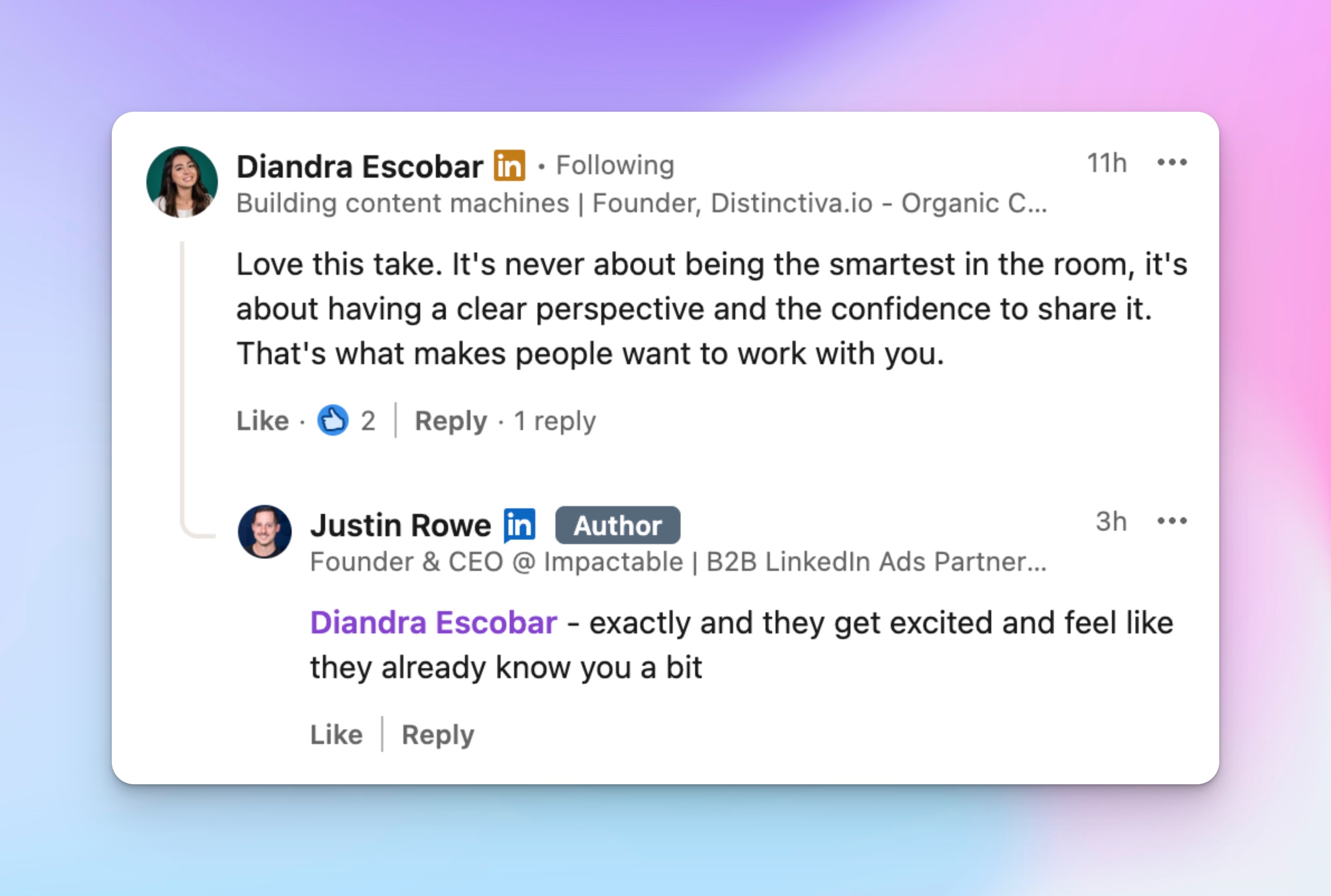
When I comment, I do it as me, as you can see in the example above. Not as a strategist, not as a “brand,” but as Diandra. I use my own tone, sometimes even a mix of languages. I’ve commented in Spanish plenty of times because that’s part of who I am. I’ve even joked about my team “giving birth to a newsletter.” It sounds funny, but it’s authentic, and people remember that energy.
That kind of personality in your comments creates a connection. People don’t just see your ideas; they feel your presence. It’s one of the most underrated ways to build a personal brand on LinkedIn.
Why engagement is non-negotiable
If you want job opportunities, clients, partnerships, or speaking gigs, engagement is required. When you reply, react, or comment with substance, you’re giving social proof that you exist beyond your LinkedIn headline.
It’s also part of LinkedIn profile optimization itself. Every meaningful comment increases your profile views, and every interaction signals to the algorithm that your profile is active. That visibility can bring inbound DMs from recruiters, peers, or collaborators without you having to pitch anyone directly.
How to build a real community
Here’s how I approach engagement:
- Comment daily on a focused list of creators, clients, or recruiters who align with your niche. You don’t need to comment everywhere, just where it counts.
- Reply to every thoughtful comment under your own posts. It doubles your visibility and shows respect for your audience.
- Use DMs as the next step in public conversations. Add value, reference something they posted, or share a quick insight. That’s how real relationships start.
Foundation of good engagement are soft skills: listening, clarity, and humor. You don’t need long speeches; a smart, kind comment is enough to make an impression.
Connection requests and relationship growth
When you combine targeted engagement with consistent connection requests, your professional network grows fast, but with the right people. Every thoughtful comment warms up a potential connection before you even click “connect.”
That’s how I built long-term relationships that turned into projects, collaborations, or referrals.
It’s exactly what the LinkedIn growth strategy framework highlights: visibility and authority come from interaction, not isolation. Growth happens when you show up for others first.
Important: Community engagement isn’t something you do after you’ve optimized your LinkedIn profile; it’s what makes that optimization work. When people see your name, voice, and consistency across posts and comments, they don’t just recognize you and trust you. And on LinkedIn, trust is what drives everything.
6. Conversion optimization and lead generation on LinkedIn
You can have thousands of LinkedIn profile views, but if nobody takes action, the work ends there. That’s why conversion optimization matters: you have to turn attention into conversations, clients, or job opportunities. I see this as a system with three simple paths:
- Your profile funnel
- Your DM flow
- Your content flow
Profile funnel
Your LinkedIn profile should act like a mini sales page. Every section has to lead somewhere. The easiest way to do that is through your featured section.
Here’s how I structure it:
- Main offer: The service or program that people can pay for.
- Free offer: A free tool, checklist, or resource that proves your value.
- Newsletter or bonus: Something that keeps them connected, even if they’re not ready to buy.
This mix creates a natural funnel. People who land on your profile see real proof, clear next steps, and something valuable to take with them. For job seekers, it works the same way: link your resume builder, portfolio, or cover letter template so recruiters can view your best work instantly.
Soft CTAs inside content
My LinkedIn posts are not direct ads, but they always lead somewhere. You can guide readers without sounding pushy by adding soft CTAs:
- Ask people to comment on the full version or resource.
- Mention that the full case study or guide is linked in your featured section.
- Drop a contextual link in the comments only after the post has engagement.
When you do this consistently, your posts become small entry points into your LinkedIn profile optimization funnel. The tone stays friendly, but the intent is still conversion.
DM flow
Most of my actual leads and partnerships start in DMs. It’s where I turn public visibility into private conversations. The trick is to keep DMs personal and valuable:
- Reply to people who already engage with your posts; they’re warm leads.
- Add value first: share advice, send a relevant link, or ask about their current goals.
- Use voice notes when it feels natural; they humanize your outreach. With HeyReach, you don't have to record one manually for every lead — assign your sender a cloned (or library) voice, write your message with your usual personalization variables, and HeyReach's AI turns it into a personalized audio note for each recipient automatically.
- Never pitch in the first message. Build rapport before you ask.
This exact logic applies to a job search as well. Don’t open with “Are you hiring?” Instead, mention something specific about the company, show interest, and connect through shared work. When you approach networking this way, your messages turn into opportunities, not rejections.
Why it works
The entire system comes back to trust. Conversion doesn’t happen because of one clever line; it happens when people already believe in your credibility.
You’re not forcing people through a funnel; you’re creating paths they can follow naturally. When your profile, DMs, and content all point to one clear value, you don’t need hard sells. People already see you as the obvious next step.
7. Advanced automation strategies with AI tools
When your LinkedIn profile is optimized and your personal brand is active, the next step is scaling outreach safely. This is where automation helps: not to replace real communication, but to support it.
Most people make the mistake of automating too early or too aggressively. I use AI and automation to extend what already works, not to fake relationships.
Finding the right people with ICP filtering
Before starting any outreach, I define my ICP (ideal client profile). That means filtering people by:
- Role (for example: founders, GTM engineers, or recruiters)
- Company size (small startup, mid-size agency, enterprise)
- Activity on LinkedIn (active posters or consistent engagers)
LinkedIn and Sales Navigator make this easy. Once I have that list, I export it into HeyReach. That’s where I start building safe, connection-only campaigns.
This method ensures that every connection request is relevant, targeted, and human.
Writing personalized openers with AI
When I send connection messages, I keep them short and personal. Generic messages don’t work anymore. Tools like ChatGPT or other AI-powered assistants help me brainstorm short openers that still sound natural.
I might ask the tool to summarize someone’s LinkedIn headline or recent LinkedIn posts and turn that into a custom message. Then I rewrite it in my own tone.
AI helps with efficiency, not personality. It gives me structure so I can focus on being authentic.
Staying safe and consistent
One rule I never break — I don’t blast. I focus on safe volumes that mimic real human behavior. Tools like HeyReach are built for this kind of compliance.
The platform’s Unibox feature lets me manage all conversations in one place, while multi-seat auto-rotation safely spreads the workload across several accounts.
Scheduling campaigns also helps maintain consistency even when I’m busy. This setup keeps my activity flowing without risking the safety of my LinkedIn profile.
As mentioned in the HeyReach review, the value lies in how the automation supports human work; it doesn’t pretend to be you. It just scales what you already do well.
Automation that feels human
The best automation setups make outreach look and feel natural. That’s why I always review messages manually before launching campaigns. My tone, word choice, and intent stay consistent with my personal brand.
AI and optimization tools work best when they amplify your presence, not replace it. When you use them this way, they strengthen your professional network, help you connect faster, and protect your reputation long term.
Step-by-step next Actions for job Seekers and recruiters
At this point, your LinkedIn profile can already look solid. Now you need clear next steps that turn it into real job opportunities, hires, and new opportunities.
I think in checklists, so I will break it down for you as a step-by-step plan. One for a job seeker, one for recruiters and hiring managers.
For job seekers
If you are in a job search, treat your profile like your main product page. Every detail matters for your dream job.
- Clean up the basics
Start with the first impression. Use a clean, light profile picture and a professional headshot that match your personal brand. Fix your LinkedIn profile URL so it is simple and searchable. Then optimize your LinkedIn headline. You can use a LinkedIn headline generator as a starting point, then rewrite it in your own words. Make sure it signals your role and value, not just your current job title. - Rewrite your About and Experience to match your target roles
Your about section and LinkedIn summary should show what you want next, not only what you did before. Mirror the language from the job description and drop in relevant keywords and relevant skills so your LinkedIn profile optimization works with LinkedIn’s internal SEO. Update your experience section and work experience with impact-focused bullets and ask for fresh endorsements that back up your core skills. This helps in LinkedIn searches and improves your profile's visibility. - Align documents with your profile
Do not send one story in your cover letter and another in your profile. Use a solid resume builder and simple templates so your CV, profile, and job application all tell the same story. Keep your message and achievements consistent across social media, especially if you use LinkedIn as your main platform. - Run regular reviews with tools and AI
At least once a month, run a profile review. You can use a simple optimization tool, a free tool, or even an AI-powered assistant to scan for gaps. Look at your profile views and the types of people visiting. If the wrong crowd is coming in, tweak your headline, summary, or skills. - Show your skills with posts, not just bullets
Plan a few LinkedIn posts that show your hard skills and soft skills in action. Write about a problem you solved, a system you built, or a lesson from your last role. Short posts with clear bullet points work well. This is how you build a professional profile that feels alive, not static. - Grow your network with intention
Start sending focused connection requests to recruiters, team leads, and peers in your field. You are not chasing numbers; you are building a professional network around the roles you want. A warm, targeted network is often more powerful than any job board.
For recruiters and hiring managers
If you work in talent or lead a team, your own professional profile also needs to work for you. People check who is behind the job description.
- Clarify what a strong profile looks like for your roles
Decide what you want to see in candidates: key relevant skills, type of work experience, and how clearly they explain their impact. When you use LinkedIn for sourcing, your LinkedIn searches will be sharper if you know exactly what you are filtering for. This saves time and helps surface better matches for every open job application. - Optimize your own presence
Your LinkedIn profile influences trust. Clean up your LinkedIn headline, about section, and experience section so candidates understand who you are and what team you represent. A clear, friendly first impression makes people more open to your messages and increases reply rates when you reach out about job opportunities. - Communicate like a relationship builder
When you send connection requests, give context. When you DM, focus on fit, growth, and clarity instead of pressure. This approach compounds over time, and people remember you even when they are not ready to move. - Use tools to scale without losing the human side
If you manage a big pipeline, you can lean on AI tools and platforms like HeyReach to keep outreach organized. As I showed in the HeyReach review, features like Unibox and structured flows help teams keep a clean overview of candidate conversations. You can still review messages by hand so your tone stays aligned with your brand and your company’s values. - Be transparent about the process and conditions
When it makes sense, mention basic pricing or compensation ranges, expectations, and growth paths in your posts or messages. Clear information filters out the wrong people and builds trust with the right ones.
For both sides, the idea is the same. Your LinkedIn profile, your content, and your behavior all work together. When you treat them as one system, you unlock better candidates, better roles, and better long-term matches.
Grow your LinkedIn profile and unlock new opportunities
Everything we covered connects into one system. Your LinkedIn profile optimization is an ongoing process that evolves with you. The real growth happens when all the pieces move together: a clear profile, consistent content, authentic community, and smart outreach.
The seven-step framework builds that rhythm:
- Research the market before you post or edit.
- Optimize your LinkedIn profile like a landing page.
- Clarify your positioning and personal brand so people know what you stand for.
- Create with a media mentality that multiplies your reach.
- Build engagement through real conversation.
- Convert attention into results through trust-based messaging.
- Scale responsibly with AI tools and automation.
When all these steps align, your professional profile turns into a living proof of your expertise. You’ll start seeing consistent profile views, stronger connection requests, and real job opportunities or clients that match your goals.
The platform changes fast, and learning to adapt to the algorithm — just like I’ll cover in the next video — is how you stay ahead without losing authenticity.

Try it for free