Why automation fails in sales sequences: 8 early-warning signs of outbound drift
Published:
January 5, 2026
Updated:
January 20, 2026
Outbound automation fails the way a fridge breaks: quietly, slowly… and you only notice when everything smells weird.
Acceptance dips go unnoticed.
Replies flatten without warning.
Pending invites quietly pile up.
CRM statuses drift just enough to break follow-ups.
And then everyone acts surprised as if ‘drift’ sends a calendar invite.
Usually, this starts with a series of small signals you miss.
This guide gives you 8 real-world, early-warning behavioural signals — what they look like in HeyReach and the fixes that stop the drift before it turns into a full reset.
No new tools, promise!
Why outbound automation fails silently (and why you notice too late)
Automation misfires show up as patterns, not necessarily errors.
These are some of the most common reasons teams miss them:
- You monitor outputs, not behaviour. Acceptance rates or reply counts can look stable while lead flow, pacing, or progression quietly drifts underneath. By the time the dashboard line moves, your system has already learned the wrong lesson.
- Pacing thresholds make this harder to spot. When “send” saturation hits, nothing “fails” outright. Delivery just slows down or spreads unevenly across senders. Because limits apply per LinkedIn account and across campaigns, upstream pressure quietly reshapes downstream steps without triggering obvious alerts.
Tip: HeyReach’s Sending Limits are per LinkedIn account and shared across campaigns, so your action steps higher in the sequence can limit steps below.
- Then cross-channel drift compounds the problem. LinkedIn, your email tool, and your CRM can all be technically “working” while lifecycle states, suppression rules, and follow-ups fall out of sync across them.
That’s why our goal is early detection: spotting the behavioural shift, then running a sequence recovery workflow before performance degradation becomes our new baseline.
The behavioural signals that show your outbound automation is drifting
Each signal below is an operator-visible pattern you can check quickly. If you’re waiting for an alert to tell you this, you’re already late — just like testers relying on test automation alone instead of observing real system behavior.
So start with the soft signals at the top.
They usually appear before anything “breaks” and are the fastest to correct.
The latter tells you drift has already spread across pacing, flow, or systems, and needs tighter intervention.
1. Acceptance rate drops vs your 4–8 week baseline
A slow acceptance dip is rarely random. It’s usually your first visible sign that targeting, pacing, or relevance is starting to drift.
Why it matters
Acceptance is the front door of your outbound system. When it slides over time:
- Fewer connections enter the system
- Downstream reply volume shrinks unevenly
- Lead flow becomes inconsistent across senders and campaigns
This creates routing inconsistencies later: fewer “good” leads, noisier follow-ups, and harder prioritization decisions.
Where to detect it in HeyReach
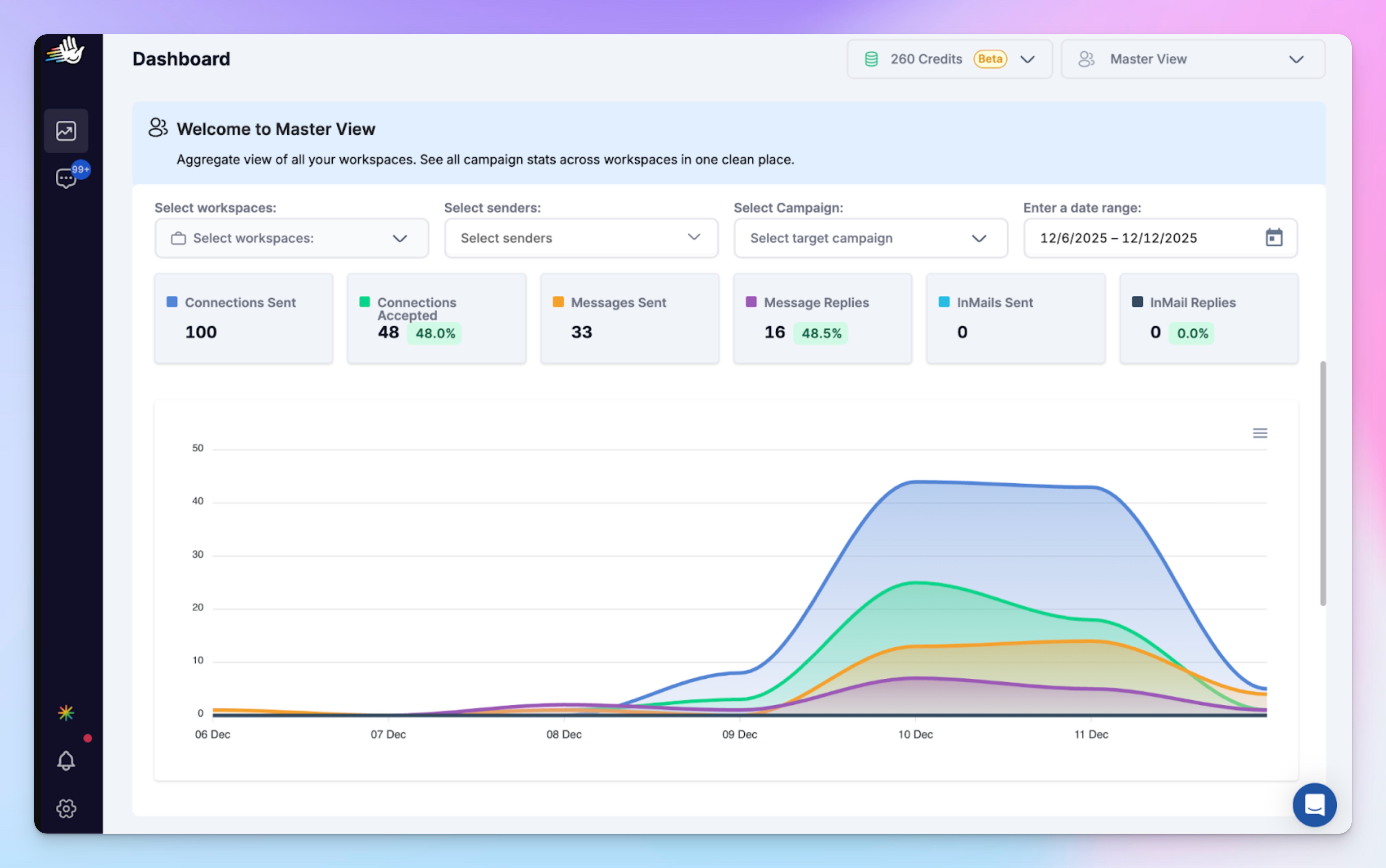
- Dashboard for a top-level performance view across LinkedIn senders/campaigns. Spot early acceptance, reply, and pacing shifts across senders and campaigns.
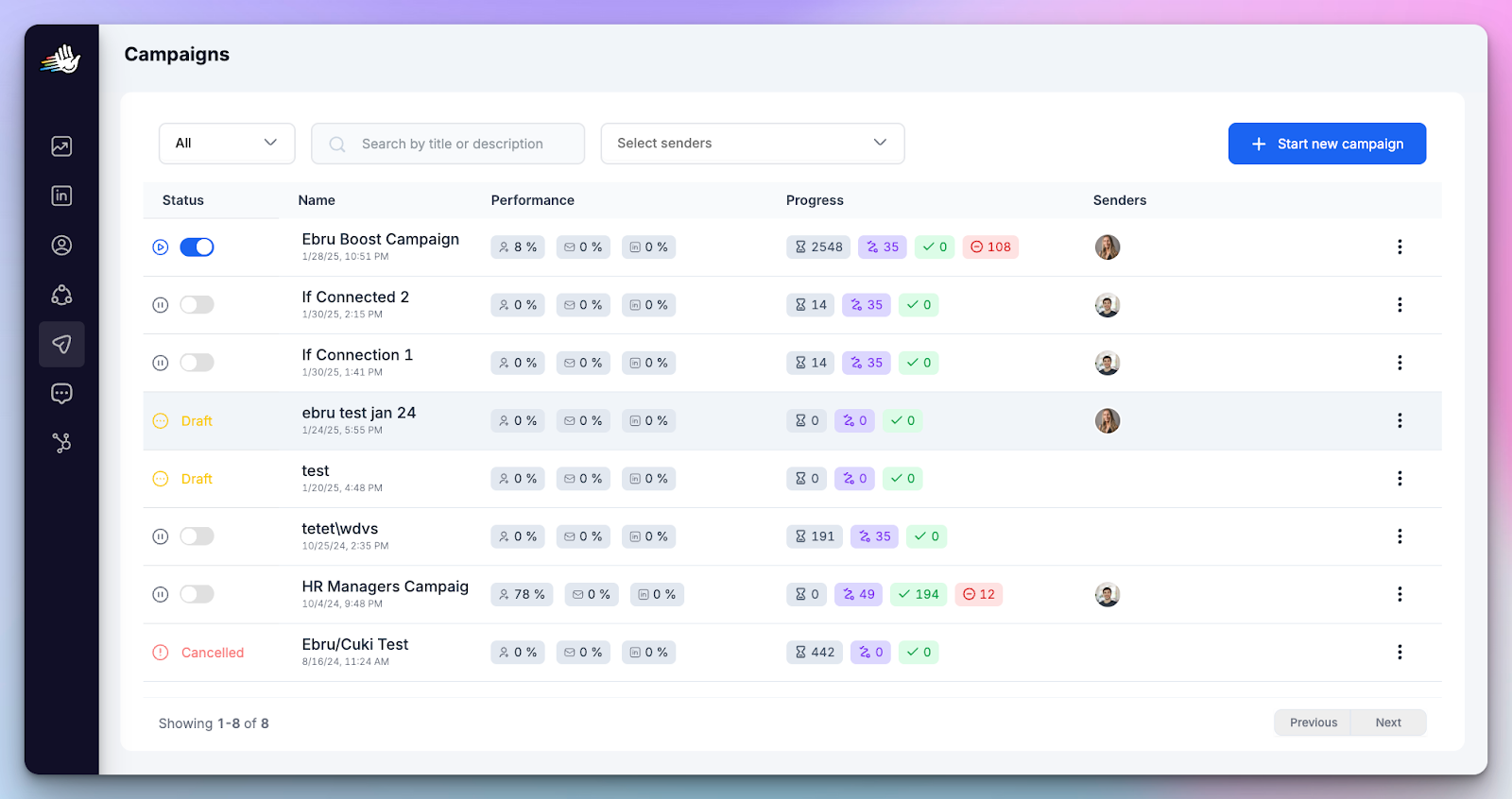
- Campaigns screen shows campaign performance metrics including % connections accepted
Quick fix (least disruptive)
Don’t nuke the whole sequence. Start with targeting:
- Tighten ICP filters and exclude obvious non-fit slices
- Split large lists into smaller, more focused segments
Then refresh only the first touch (new opener, same intent). Leave the rest intact.
2. Reply volume looks stable, but reply quality declines
If replies are still coming but they’re colder/weirder/less intent-rich, your LinkedIn message is landing… badly. You’re getting replies, sure — just not the kind that pays invoices.
Why it matters
Not all replies are equal. “We got replies” isn’t the same as “we got traction.” Your Reply volume can mask outreach decay.
When automation drifts, you often see:
- more vague or non-committal replies
- fewer clear “interested” signals
- longer back-and-forth without next steps
If you only track reply count, this decay stays hidden and conversion drops fast.
Where to detect it in HeyReach
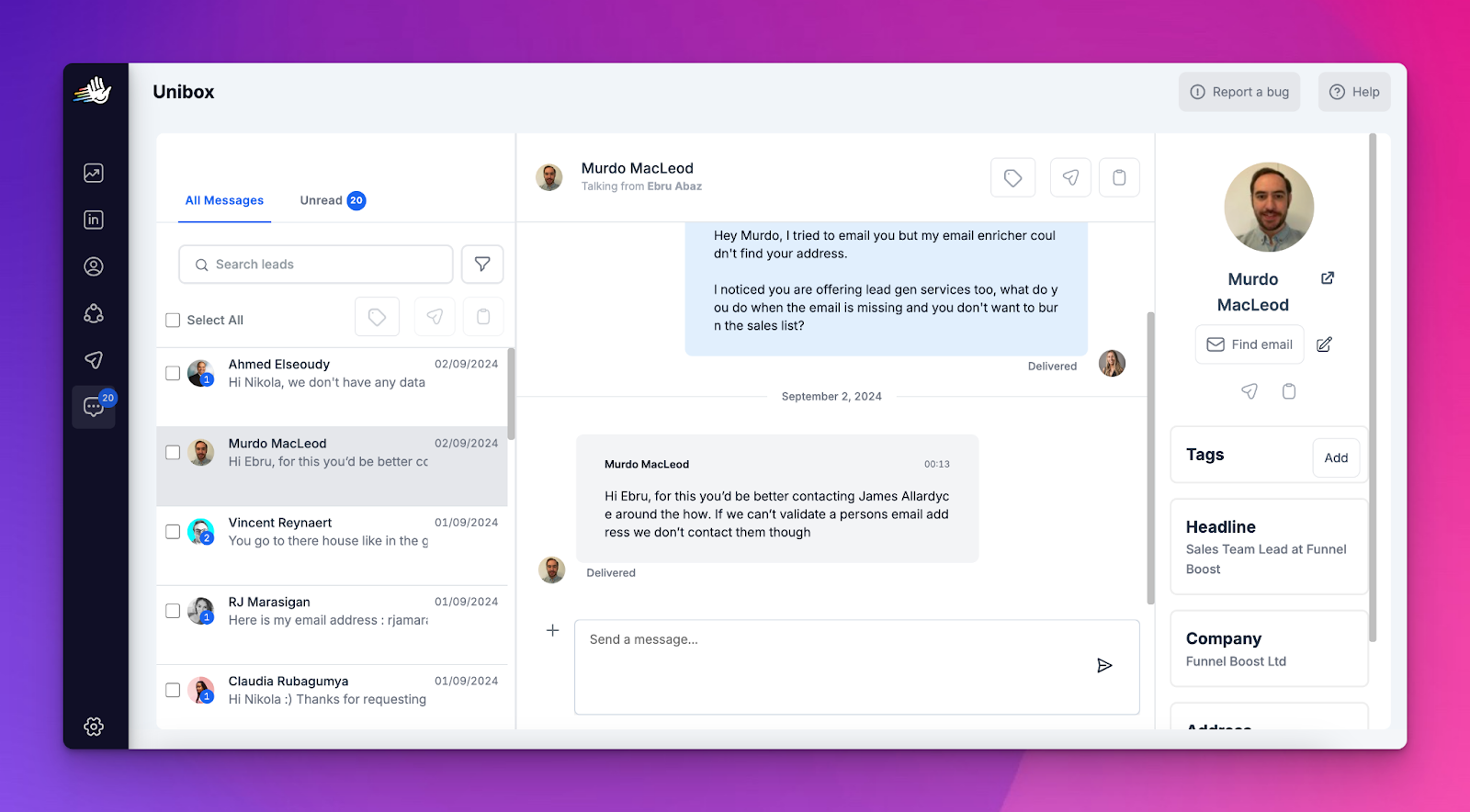
- Unibox is the source of truth here. Review replies directly and judge quality.
Quick fix
- Pull 20 recent replies from the Unibox and tag them into 3 buckets: Interested / Not now / Not relevant
- If “Not relevant” is rising, fix ICP targeting.
- If “Not now” is rising, fix timing + offer framing (less pitch, more relevance).
Scale reply-quality checks with MCP
Using HeyReach MCP, you can pass reply threads to an AI ( like Claude or ChatGPT) to assist with intent tagging and summarization, with the operator reviewing the output.
This helps you with scalability, but the final call stays human. Always.
See how Vukašin Vukosavljević, CMO at HeyReach, uses MCP to assist reply analysis and apply intent tags.
3. Early-stage message fatigue sets in
Your opener is getting seen, but it’s no longer generating meaningful intent.
Why it matters
This is the earliest warning sign of outreach decay and the easiest one to gaslight yourself about.
When first touches fatigue:
- You burn more daily actions to get the same number of replies
- Conversations feel polite but go nowhere
- Conversion drops after replies begin, not before them
Left unchecked, this quietly turns into a full-quarter performance slide.
Where to detect it in HeyReach
In Unibox
Unibox is where you judge intent quality manually, not algorithmically.
Look for patterns like:
- Replies that acknowledge the message but don’t advance the conversation
- Increased “thanks,” “sounds interesting,” or vague deferrals
- Fewer replies that naturally invite a follow-up or next step
In Campaigns screen
Use campaign-level metrics to confirm this is not a volume issue:
- Reply rate remains stable
- Acceptance and send pacing look normal
- But downstream outcomes (meetings or next steps) decline when reviewed outside HeyReach (CRM, calendar bookings, or manual tracking)
Quick fixes
- Rotate openers intentionally: Introduce 1–2 alternate first messages with a different relevance hook (trigger, problem framing, timing). Avoid micro-tweaks that keep the same core idea.
- Shrink the call-to-action: If your opener reads like a landing page, people will treat it like one: close tab, move on. Aim for response-inviting early CTAs.
- Re-anchor to context: Reference why now (role change, timing, signal, situational relevance). Generic relevance accelerates fatigue faster than low volume ever will.
Scaling this check with AI (advanced)
You can’t reliably review replies at scale.
Lean on the MCP-assisted approach we used in Signal 2: batch-summarize replies, group them by intent, and surface patterns sooner — with the final call staying yours.
4. Pending invites backlog grows week after week
A growing backlog of pending LinkedIn invites doesn’t just hurt emotionally; it's a pacing mismatch that quietly chokes your sequences.
What’s actually happening: You’re sending connection requests faster than the account can clear them.
When acceptance lags behind send pace, pending invites accumulate, sender capacity stays locked up, and downstream steps slow down.
Nothing is broken. Pacing is simply out of sync with reality.
Why it matters
Pending invites represent capacity you’ve already spent but haven’t recovered. It’s like paying for ads and refusing to look at the spend.
When they pile up:
- Sender availability shrinks across campaigns
- Message steps fire later than expected
- LinkedIn risk increases without obvious errors
- Campaign throughput drops before dashboards flag a problem
Most teams miss this because nothing technically “fails.” It just gets slow, uneven, and weird.
Where to detect it (HeyReach + LinkedIn)
- Campaigns screen → lead progression: Look for a high volume of leads stuck in early connection steps or progressing slowly into messaging.
- Campaign throughput patterns: Active campaigns producing fewer daily actions than planned pacing would suggest.
- Cross-sender comparison: Some senders move leads smoothly while others stall, despite similar targeting and sequences.
- Weekly pattern check: If campaigns that normally deliver 20 connections/day are only hitting 12-15, pending invite buildup may be the cause.
In LinkedIn:
LinkedIn → My Network → Manage invitations → Sent: This is where pending LinkedIn invites are actually visible and can be withdrawn.
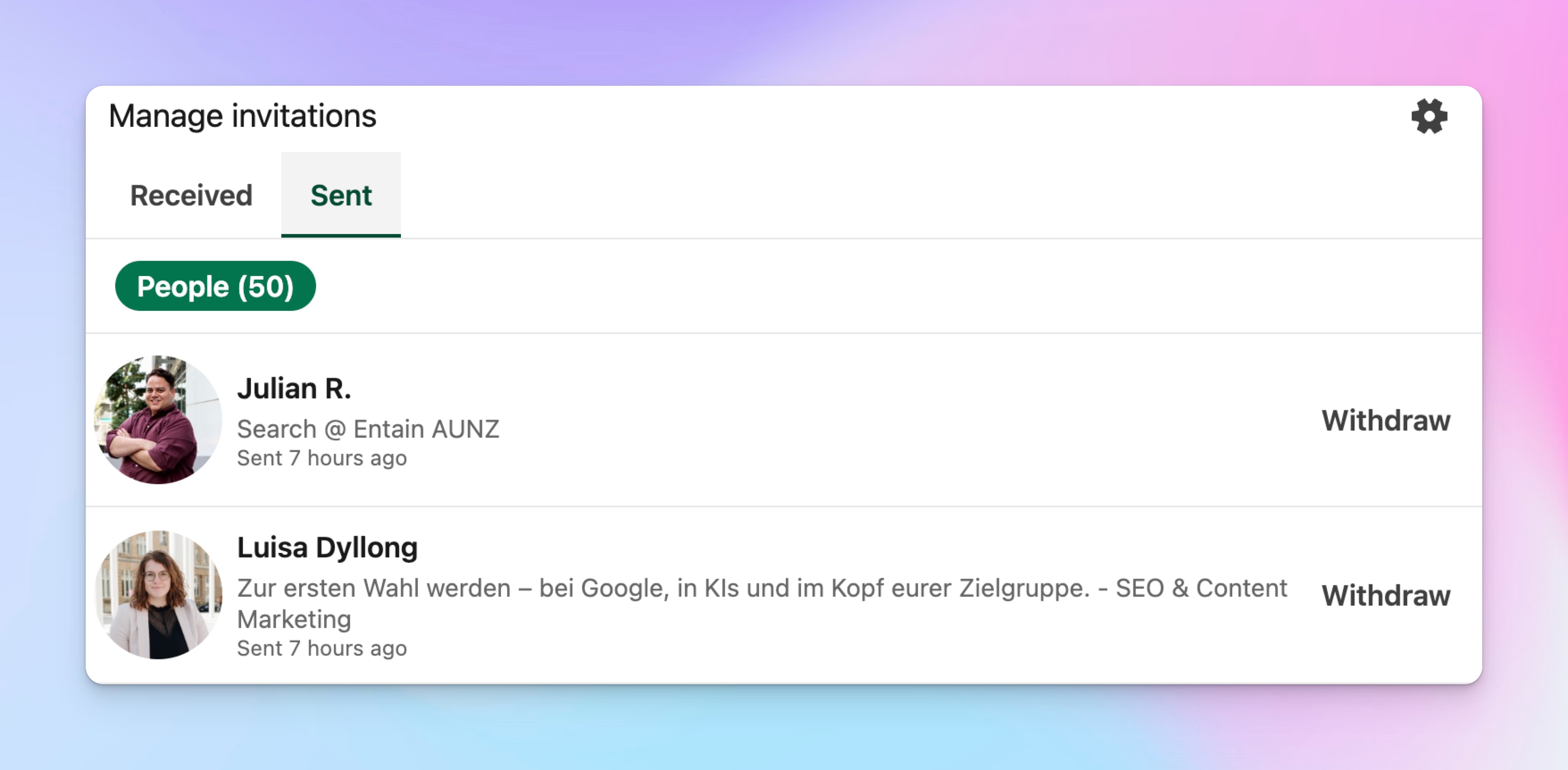
⚠️ LinkedIn is the source of truth for the invite backlog; HeyReach shows the impact on progression.
Quick fix
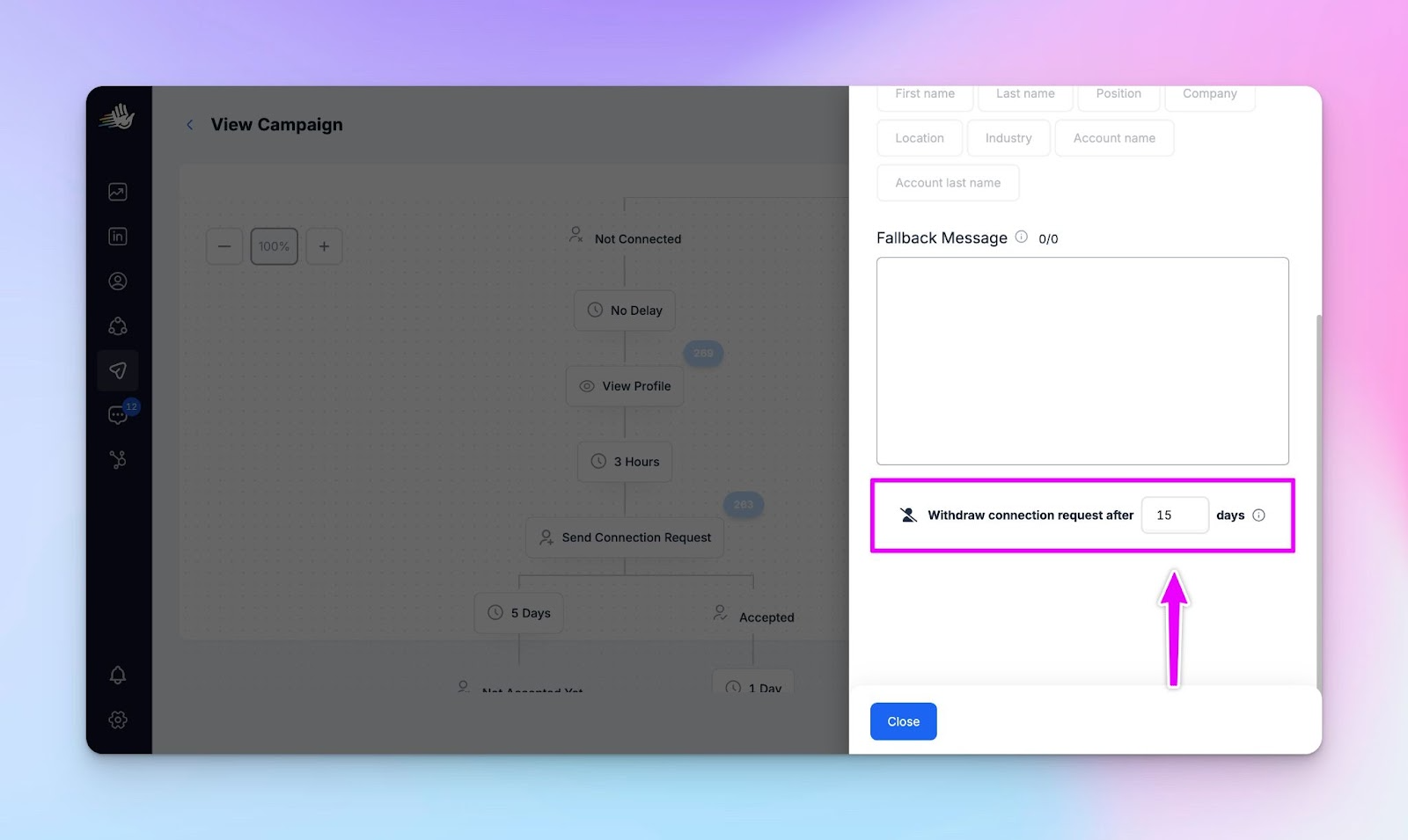
Configure invite withdrawal in future campaigns
Set connection requests to withdraw after 7–14 days when building the sequence
Prevents sender capacity from being permanently locked by inactive invites
Temporarily lower daily connection pacing
Allow existing pending invites to clear before adding pressure
Rebalance volume across senders
Shift load away from saturated LinkedIn accounts instead of pushing harder
Reconfirm sending limits and working hours per account
Misaligned caps or schedules can amplify backlog effects across campaigns
5. Sequence progression stalls in early steps
When leads pile up “In sequence” without advancing, it usually means early steps are consuming shared limits and quietly throttling the rest of the flow.
Why it matters
Stalled progression is how sequence drift turns into pipeline drift.
Your campaign still shows as “active,” but:
- Leads aren’t reaching later messages
- Follow-ups fire late or unevenly
- Conversion drops without clear failure signals
Because nothing technically breaks, teams often miss this until results slide.
Where to detect it in HeyReach
- Campaigns screen → lead progression states
Review how many leads sit in:- Pending
- In sequence
- Finished
- Failed
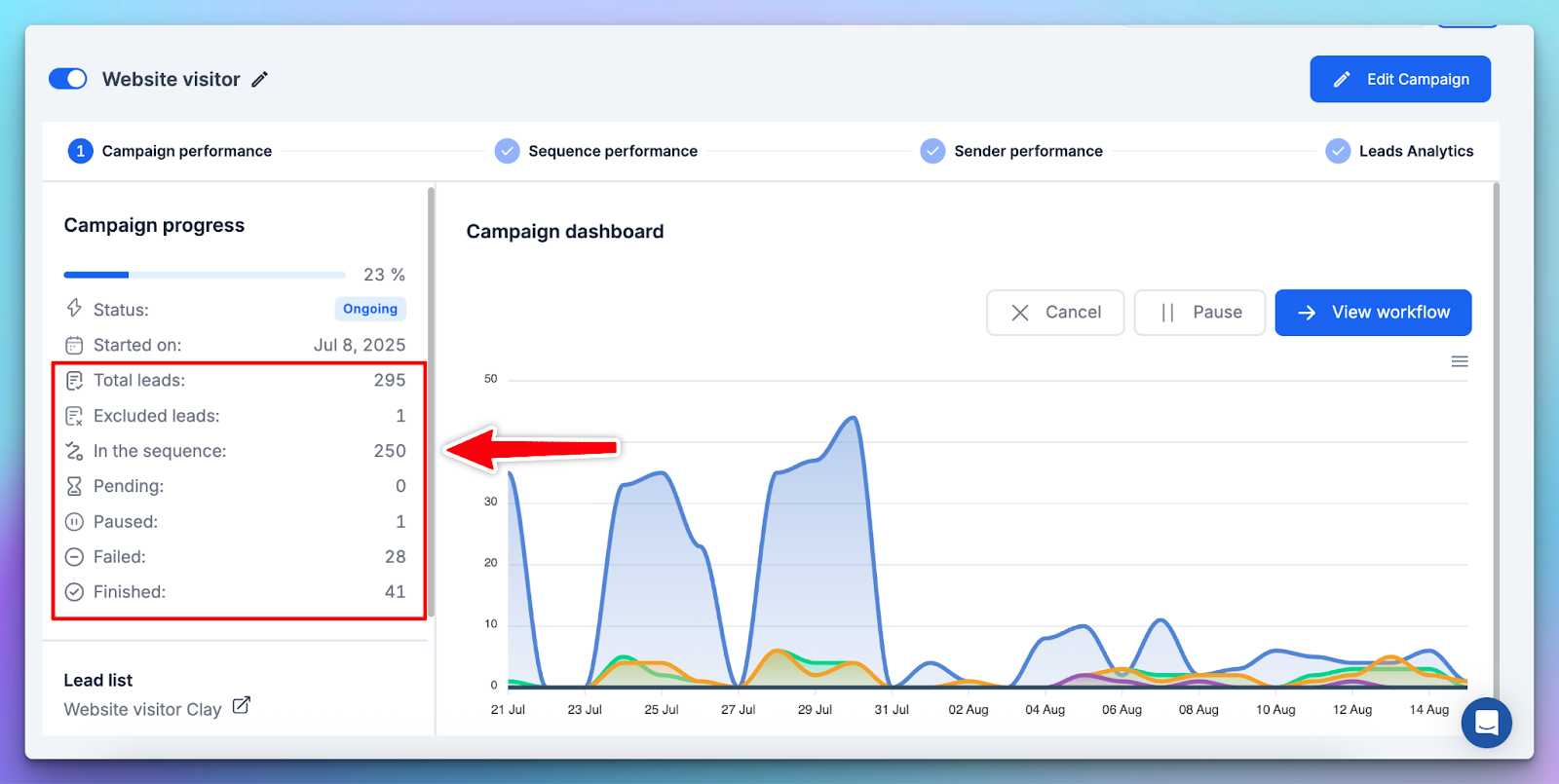
If a large share remains “In sequence” longer than expected, progression is stalling.
This is especially telling when:
- Campaigns are active
- Senders are available
- But downstream steps lag behind expectations
Quick fix
- Check early steps for limit pressure: Actions like profile views or likes placed before the connection step can consume shared daily limits and throttle the rest of the sequence.
- Confirm shared limits per sender: All campaigns on the same LinkedIn account share one daily action limit. If early steps use it up, the rest of the sequence gets blocked.
- Remove the bottleneck: Either raise the daily limit on the limiting step, or reorder the sequence so the throttled action doesn’t gate the entire flow.
6. Unanswered conversations pile up: reply latency quietly spikes
If replies are coming in but sitting unanswered, you’re losing momentum and deals without any obvious failure signal.
Why it matters
Reply latency kills intent. When conversations sit unanswered:
- Interested leads cool off
- Context is lost
- Follow-ups feel forced instead of natural
The dangerous part?
Everything looks fine at the campaign level. Replies are still coming in — they’re just not being worked fast enough.
This is how healthy-looking outbound quietly leaks pipeline.
Where to detect it in HeyReach
In Unibox: Unibox makes reply backlog visible immediately.
Look for:
- A growing number of Unanswered conversations
- Positive or neutral replies sitting idle
- Conversations requiring action but not tagged or triaged
Rule of thumb: If your response timelines regularly exceed 24–48 hours, latency is already hurting outcomes.
Quick fixes
- Build a daily Unibox routine: Start each day by filtering for Unanswered conversations.
Triage before launching or tweaking campaigns. - Tag before you reply: Use simple tags like:
- Interested
- Not now
- Not interested
- Respond to intent first: Clear high-intent replies before handling neutral or deflective ones.
Speed matters more here than perfect wording. - Use saved replies for common responses: Canned messages help reduce friction and keep response time low — without sounding robotic.
7. Sender imbalance emerges
If one sender is carrying delivery while others underperform, your outbound engine is uneven and you’re quietly burning your healthiest account.
Why it matters
Sender imbalance creates two problems at once:
- Risk concentration: One “good” account absorbs most activity, increasing fatigue and LinkedIn risk.
- Hidden underperformance: Other senders look active on paper but contribute little to actual throughput.
Account-level limits don’t just cap volume — they skew distribution when one sender carries more load than the rest.
Left unchecked, this turns a scalable system into a fragile one.
Where to detect it in HeyReach
In Dashboard (sender-level comparison): Use account filtering to compare performance across senders.
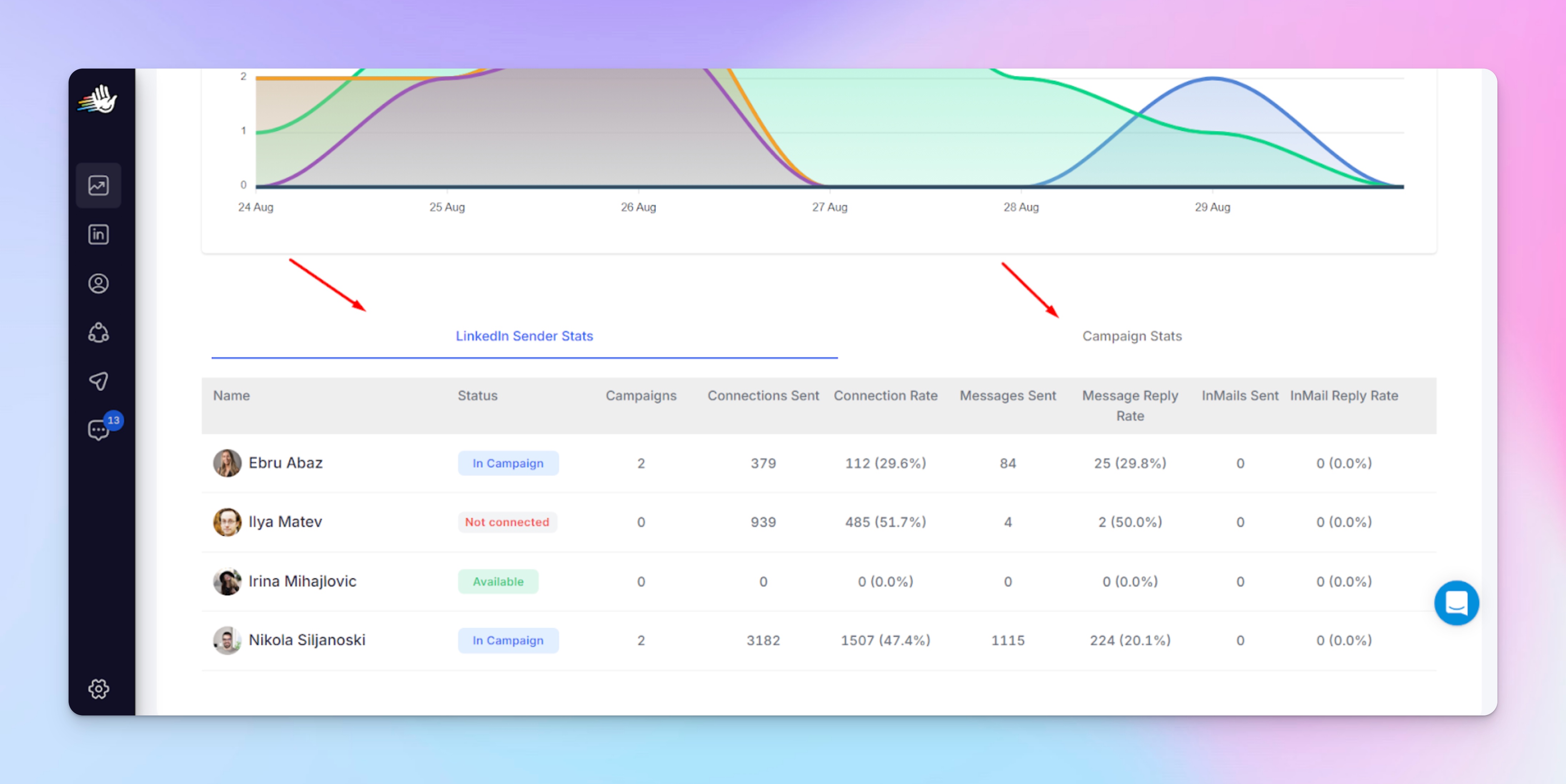
Look for patterns like:
- One account driving a disproportionate share of accepts or replies
- Similar campaigns behaving very differently by sender
- Some accounts consistently hitting limits while others never do
In Sending Limits & Working Hours: Limits and schedules are configured per LinkedIn account. Misaligned settings are a common cause of imbalance.
Tip: If one sender “always performs” and others never catch up, the issue is usually configuration — not targeting.
Why this happens
Sender imbalance is rarely about copy or ICP. More commonly it’s about:
- Uneven daily limits or working hours
- Too many campaigns sharing one sender’s limits
- One account consistently hitting early-step caps (connects, likes, views
- Accounts added later with more conservative safety settings
Quick fixes
- Normalize sender settings: Align daily limits and working hours across accounts wherever possible.
- Reduce limit contention: Fewer simultaneous campaigns per sender means cleaner distribution.
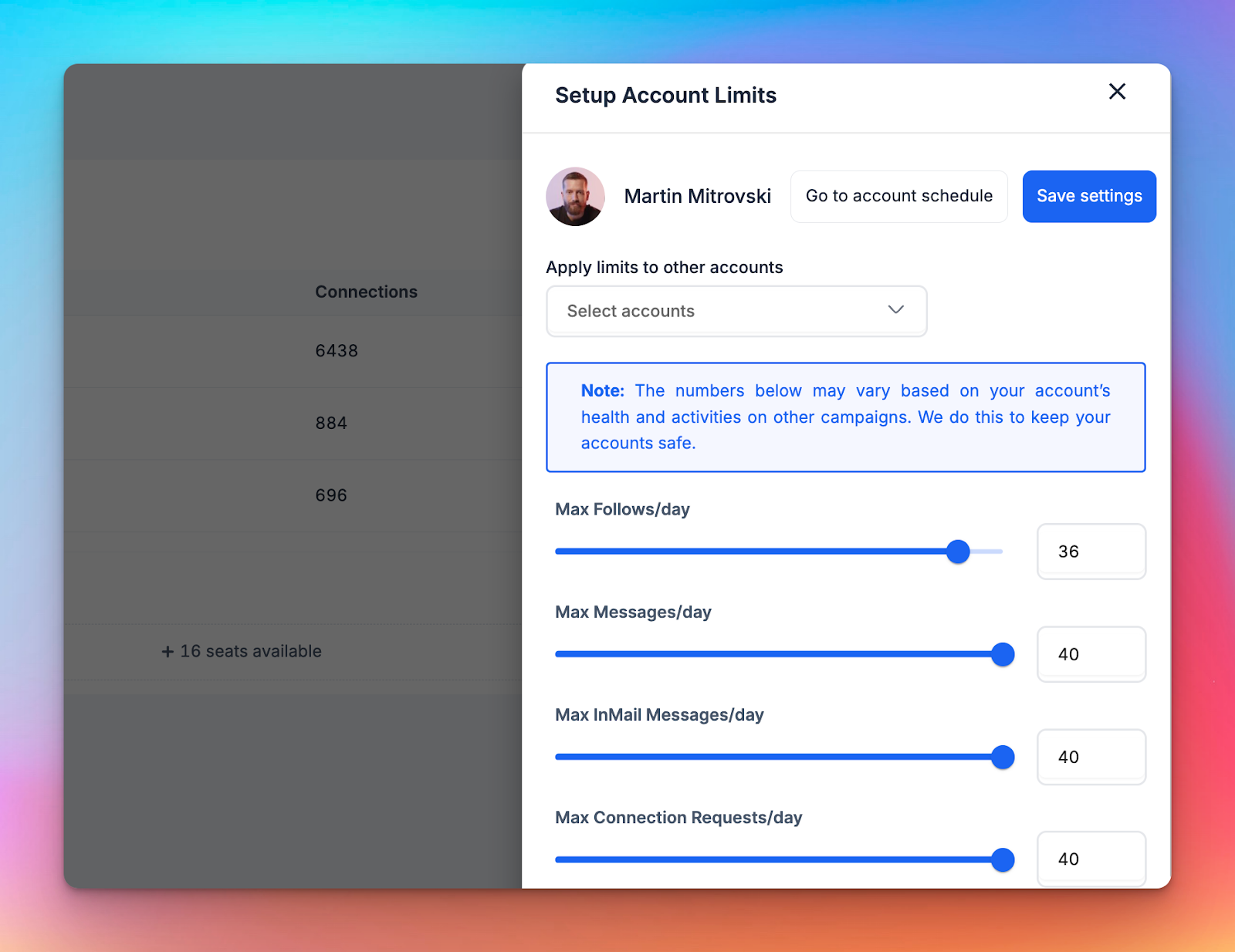
- Check early-step pressure: Steps higher in the sequence can throttle everything below them. Make sure one step isn’t quietly blocking the rest of the flow.
- Rotate responsibility intentionally: Don’t let the same “strong” account carry every test or new sequence.
8. CRM ↔ HeyReach lifecycle drift: statuses stop matching reality
If your CRM says a lead is qualified, but LinkedIn keeps nudging them, your outbound system is out of sync.
Why it matters
Lifecycle drift creates some of the most expensive outbound failures:
- Prospects get followed up after they’ve replied, booked, or disqualified
- Different teams act on conflicting ‘truths’ across CRM, reinforcing data silos
- Attribution breaks across LinkedIn, email, and CRM
Everything technically “works.” But trust across team members and stakeholders erodes fast.
Where to detect it (heyReach + CRM)
Your CRM is the source of truth.
Use HeyReach to push LinkedIn conversations, replies, and lead data to a CRM via Zapier (and similar automation tools).
- This allows your CRM to receive:
- Reply context
- Conversation links
- Tags applied in Unibox
You’ll usually spot it by combining tools and views:
- In Unibox: Replies that clearly signal interest, disqualification, or “already talking to someone,” but the lead continues moving through a LinkedIn sequence.
- In CRM: Leads marked as:
- Qualified
- In conversation
- Closed/disqualified
…but still receiving LinkedIn outreach.
If these two views don’t match, you have lifecycle drift.
Quick fix
- Pick one system as the source of truth: For most teams, this should be the CRM.
- Push LinkedIn outcomes into CRM consistently: Use HeyReach → Zapier to:
- Send replies and conversation links to the CRM
- Push Unibox tags that represent human-reviewed outcomes
- Update lifecycle fields based on those tags or rules, not automatic sentiment analysis
- Enforce stop logic outside HeyReach
Use your automation layer (Zapier / n8n) to:- Prevent new sequences from starting when CRM status changes
- Keep email and LinkedIn from running independently
Build your outbound early-warning framework
…so you know when to act.
You need a system to spot and fix outbound drift before it quietly eats pipeline, sender capacity, and trust — while there’s still time to act.
And not with more dashboards, but a simple triage model that tells you when to leave things alone, when to intervene, and when to hit pause before damage compounds.
The goal isn’t perfect monitoring. It’s fast judgment and fewer expensive “oops” moments.
The three-state outbound health model
HeyReach gives you visibility, and this framework fills the missing layer: operator decision-making.
With these two powers combined, you’ll always be able to answer the questions that matter: Do we leave this alone? Do we tweak it? Or do we stop before it gets expensive?
This simple system turns scattered signals into clear, repeatable action, which is exactly what outbound systems usually lack.
Think of your outbound engine like a control room: every signal you reviewed earlier rolls up into one of three states:
🟢 Green: Healthy, boring, working as expected
👉 Green is where compounding happens. Don’t interrupt it.
What it means: Your key signals sit within your normal baseline ranges:
- Acceptance and reply rates are stable
- Pending invites clear at a predictable pace
- Sequences progress smoothly
- Reply handling keeps up with volume
Nothing is spiking. Nothing is dragging.
The system is doing its job — and so are you. This is not the moment to “optimize for fun.”
Action
- Keep sequences running
- Monitor weekly, not daily
- Resist the urge to tweak copy or targeting “just because”
🟡 Yellow: Drift detected, but damage is still optional
👉 Yellow is your best leverage point. Small fixes here prevent big pauses later.
What it means: One or two behavioural signals start to slip:
- Acceptance dips slightly
- Reply quality changes
- Pending invites creep up
- Early steps slow down
Nothing is broken, but patterns are changing.
Your outbound system is still running, but inputs and outputs are no longer aligned.
This is where most teams hesitate. And hesitation is how yellow quietly turns red.
Action
- Optimize mid-sequence, not from scratch
- Tighten targeting or segment lists
- Refresh only the affected steps (usually the opener)
- Clean data before adding volume
🔴 Red: Breakage, compounding risk, or multiple signals firing
👉 Red is where “let’s wait and see” gets expensive.
What it means: Several warning signs stack at once, not as edge cases, but as compounding system failures:
- Acceptance drops and progression stalls
- Pending invites choke sender capacity
- Replies go unanswered
- CRM and LinkedIn disagree on lead status
At this point, performance degradation isn’t theoretical, it’s already happening.
Your outbound engine is consuming limits, trust, and attention without producing reliable outcomes.
Letting it “run a little longer” does not fix this. It just spreads the damage further.
Action
- Pause affected campaigns or senders
- Identify the root cause (targeting, pacing, limits, routing)
- Fix once, deliberately
- Resume with safeguards (limits, tags, stop logic)
Where Sales Ops can detect these signals inside HeyReach
I know.. you’re probably thinking, “Haven’t we already covered this?”
And you’re right. We’ve talked about the signals.
But this is one thing I don’t want you to miss: how to actually read HeyReach when something feels off.
Knowing what the warning signs are is only half the job.
Knowing where to look and just as importantly, where not to is what will keep you from misdiagnosing drift or chasing the wrong fix.
Because each HeyReach surface serves a different function and answers a different type of question. Mixing those questions is how teams fix the wrong thing very confidently.
Two things usually happen:
- They look in the wrong place and fix the wrong thing
- Or they expect HeyReach to answer questions it’s not designed to answer
So in this section, I’ll show you how to interpret the product correctly when outbound starts behaving… strangely.
Dashboard: trend detection, not intent
Use the Dashboard to spot movement over time, not to judge lead quality.
- Best for:
- Acceptance swings
- Reply-rate changes
- Sender-level anomalies
- Not for:
- Understanding why replies changed
- Judging intent or conversation quality
👉 If something shifts here, it’s just a prompt to investigate elsewhere.
Dashboard exports: confirming drift, not discovering it
Exports (or API-fed data, if you automate pulls) are how you prove a pattern. They’re:
- Best for:
- Week-over-week comparisons
- Baseline checks (4–8 week ranges)
- Stalled progression patterns across time
- Not for:
- Real-time monitoring
- Daily triage decisions
Unibox: intent, latency, and human reality
Unibox is where automation stops and reality starts.
- Best for:
- Reply quality
- Unanswered conversations
- Latency and triage gaps
- Not for:
- Performance reporting
- Volume analysis
👉 If replies feel “off,” this is always your source of truth.
Campaigns screen: flow health, not root cause
The Campaigns screen shows whether leads are moving, not why they aren’t.
- Best for:
- Spotting stalled leads
- Checking progression states
- Seeing where sequences slow down
- Not for:
- Diagnosing messaging or ICP issues
👉 Think of this as a traffic report, not a mechanic.
Sending limits & working hours: safety pressure points
Limits tell you what’s being stressed.
- Best for:
- Detecting pacing saturation
- Understanding sender imbalance
- Explaining uneven throughput
- Not for:
- Evaluating campaign quality
👉 When things slow down “for no reason,” limits are often the reason.
Master View: pattern spotting across scale
Master View is for system-level awareness, not alerts.
- Best for:
- Cross-workspace inconsistencies
- One sender or workspace behaving differently
- Not for:
- Diagnosing individual campaigns
👉 This is where small issues reveal themselves as systemic ones.
The 5-minute weekly outbound health check
Use this check as a fast, repeatable way to stay in control without dashboards, alerts, or overthinking. It’ll help you catch small behavioural drift before it turns into pipeline loss or sender saturation.
- Export last 7 days from the Dashboard
- Compare acceptance and reply rates week-over-week
- Check pending invites and pacing limits
- Scan Unibox for untagged positive replies
- Verify CRM sync mappings still align
Five minutes. Every week. No excuses.
Think of this as DevOps-style monitoring for outbound: small checks, run often, before failures cascade.
Fixing warning signs without disrupting live sequences
I’ve already shown you how to fix each signal when it appears.
Now let’s apply those fixes without breaking live sequences: start small, protect momentum, and only escalate when necessary.
If your first instinct is to pause everything, stop.
Most drift can be corrected without resetting campaigns or wiping hard-won progress.
Do this instead:
- Acceptance rate drops: This almost always points to an ICP mismatch or opener fatigue — not a broken sequence.
Fix: Start by tightening your targeting filters or splitting oversized lists. Then refresh only the first touch. Leave the rest of the sequence intact so you don’t reset momentum. - Pending invites pile up: When invite backlogs grow, pacing is usually too aggressive for the sender’s limits.
Fix: Withdraw stale connection requests and reset pacing caps to let capacity recover. Pushing harder here only makes the slowdown worse. - Reply quality declines: If replies are coming in but intent is weaker, the issue is rarely volume — it’s usually CTA fatigue or unclear framing.
Fix: Shorten the ask and shift the angle. Don’t add steps or over-explain. Early messages should invite conversation, not force decisions. - CRM ↔ HeyReach mismatch: When lifecycle stages stop matching reality, mapping drift is the usual culprit.
Fix: Fix the field mapping and re-sync via your automation layer. Avoid manual overrides — they create more inconsistency, not less. - Positive replies go unworked: This isn’t a campaign problem — it’s a triage gap.
Fix: Use Unibox + Tags to streamline how high-intent replies are surfaced and prioritize them quickly. Speed here matters more than perfect wording.
Align LinkedIn, email, and CRM so outbound doesn’t drift again
Drift starts in handoffs.
If LinkedIn, email, and your CRM don’t agree on what’s happening, outbound slowly turns into noise — even when each tool “works.”
The fix is clear ownership.
LinkedIn → Email (Instantly): move on without starting over
LinkedIn starts the conversation, email picks it up when LinkedIn stalls.
Not everyone replies on LinkedIn. That’s normal. What matters is what you do next.
When a LinkedIn sequence runs its course without a reply, pass those non-responders cleanly into an email sequence in Instantly.
Find Email: build a fallback
Every outbound system needs a fallback path.
HeyReach’s Find Email ensures that when LinkedIn doesn’t convert, you’re not stuck guessing what to do next.
If a verified email is found, the lead can move forward into email — without restarting outreach logic or duplicating effort.
CRM → HeyReach (Zapier / n8n): one source of truth
Your CRM should always win arguments.
Use Zapier or n8n to push lifecycle updates from your CRM into HeyReach, so LinkedIn steps stay aligned with reality.
If a lead is qualified, disqualified, or already in conversation elsewhere, LinkedIn should know.
Email → CRM: close the loop
Email outcomes belong in the CRM.
Make sure opens, replies, bounces, and bookings from Instantly are synced back so:
- LinkedIn doesn’t keep nudging closed leads
- Sales isn’t acting on stale information
- Attribution doesn’t fall apart mid-funnel
HeyReach tags: the glue between channels
Tags are how human judgment travels across systems.
Use simple, explicit tags. These can be pushed to your CRM and used to enforce stop logic across LinkedIn and email. No sentiment guessing. No AI deciding intent behind your back.
Next steps: put this into practice without overthinking it
You don’t need to rebuild your outbound system to use this guide. Start small.
- Pick one active campaign or one sender
- Run the 5-minute weekly health check for two weeks
- Classify what you see as Green, Yellow, or Red
- Apply the smallest possible fix — not a full reset
- Only expand changes once behavior stabilizes
That’s it.
Do this weekly, and you’ll see drift coming from miles away and fix it with style.
Why automation fails and what keeps outbound reliable
Outbound automation failure happens when small behavioural signals go unnoticed, handoffs fall out of sync, and teams keep pushing volume while judgment lags behind.
In this guide, we laid out the early warning signals that show drift before performance collapses and the smallest fixes that bring things back into alignment.
By breaking failure into acceptance decay, reply drift, pacing pressure, triage gaps, and lifecycle misalignment, you now have a way to spot outbound drift early and fix it deliberately without panic resets or disrupting what’s already working.
The three-state outbound health model gives you a simple way to act on what you see: when to leave things alone, when to intervene, and when to pause before damage compounds.
HeyReach gives you execution and visibility.
Keeping outbound reliable especially across growing automation initiatives is still an operator job

Try it for free
Frequently Asked Questions
What causes outbound automation to fail silently?
Behavioural drift. Pacing pressure, targeting slip, and broken handoffs compound.
How often should Sales Ops run outbound health checks?
Weekly. Daily isn’t practical, and monthly is too late.
How do I fix declining acceptance rates?
Start with intent quality signals, audience fit and pacing. Acceptance usually drops because of who you’re reaching and how fast, not what you say.
How do I diagnose issues across LinkedIn, email, and CRM?
No single tool keeps systems in sync. Use HeyReach for visibility, your CRM, and email tools for alignment, and manual checks for end-to-end judgment, always.