HeyReach + Jungler: Turn LinkedIn Engagement Into Booked Meetings, Automatically
Published:
May 5, 2026
Updated:
May 11, 2026
You've felt this before: you scroll LinkedIn, see a post in your space blowing up with comments from your exact ICP — and by the time you've copied names into a spreadsheet, enriched them somewhere, cleaned the list, and pushed them into your outreach tool, the moment's gone. The signal went stale. The prospect moved on.
That's the gap Jungler fills. It watches LinkedIn engagement in real time, filters it against your ICP, enriches the lead, and hands it off — directly to HeyReach, where the outreach runs itself.
No CSVs. No Clay middle step. No "I'll get to those comments tomorrow."
This guide walks you through connecting Jungler to HeyReach so intent signals turn into LinkedIn outreach without you lifting a finger.
🍿 Watch the full integration walkthrough:
The building blocks: What's what?
HeyReach – A LinkedIn automation platform built for scale. It lets you run personalized outreach campaigns across multiple LinkedIn accounts, manage sequences with smart delays and conditions, and track every connection request, message, and reply. Whether you're an agency managing dozens of accounts or a sales team running high-volume prospecting, HeyReach handles the LinkedIn side — safely, efficiently, and at scale.
Jungler – A LinkedIn intent monitoring tool. Jungler watches LinkedIn profiles and posts for engagement — comments and likes — then enriches each engager with live profile and company data and filters them against your ICP. The result: a continuously refreshed list of people who've actively shown interest in topics adjacent to what you sell. No LinkedIn login, no cookies, no browser extension — Jungler runs entirely outside your account.
What they solve together
- Warm signals, not cold guesses. Outreach starts from people who actually engaged with relevant content — not a filtered job-title list.
- Live enrichment. Profile and company data is captured at the moment of engagement, not pulled from a database snapshot that's six months out of date.
- Native handoff to HeyReach. Jungler has a direct integration with HeyReach — no webhook plumbing, no CSV exports, no Clay middle step.
- Self-filling evergreen pipeline. Set your monitors and filters once; Jungler feeds HeyReach continuously while you focus on replies.
- Backfill + ongoing capture. Jungler pulls engagement from the last 31 days of a monitored profile's posts on day one, then keeps watching for new engagement going forward.
Setup instructions
The whole integration takes under 5 minutes. Here's how to wire it up.
Step 1: Set up a monitor in Jungler
In your Jungler dashboard, create a new monitor. You can monitor:
- A LinkedIn profile — Jungler will pull engagement from that person's posts (e.g., your founder's profile, a competitor's CEO, a thought leader in your space).
- A specific LinkedIn post — Filter by the post's URL to capture only the people engaging with that one piece of content.
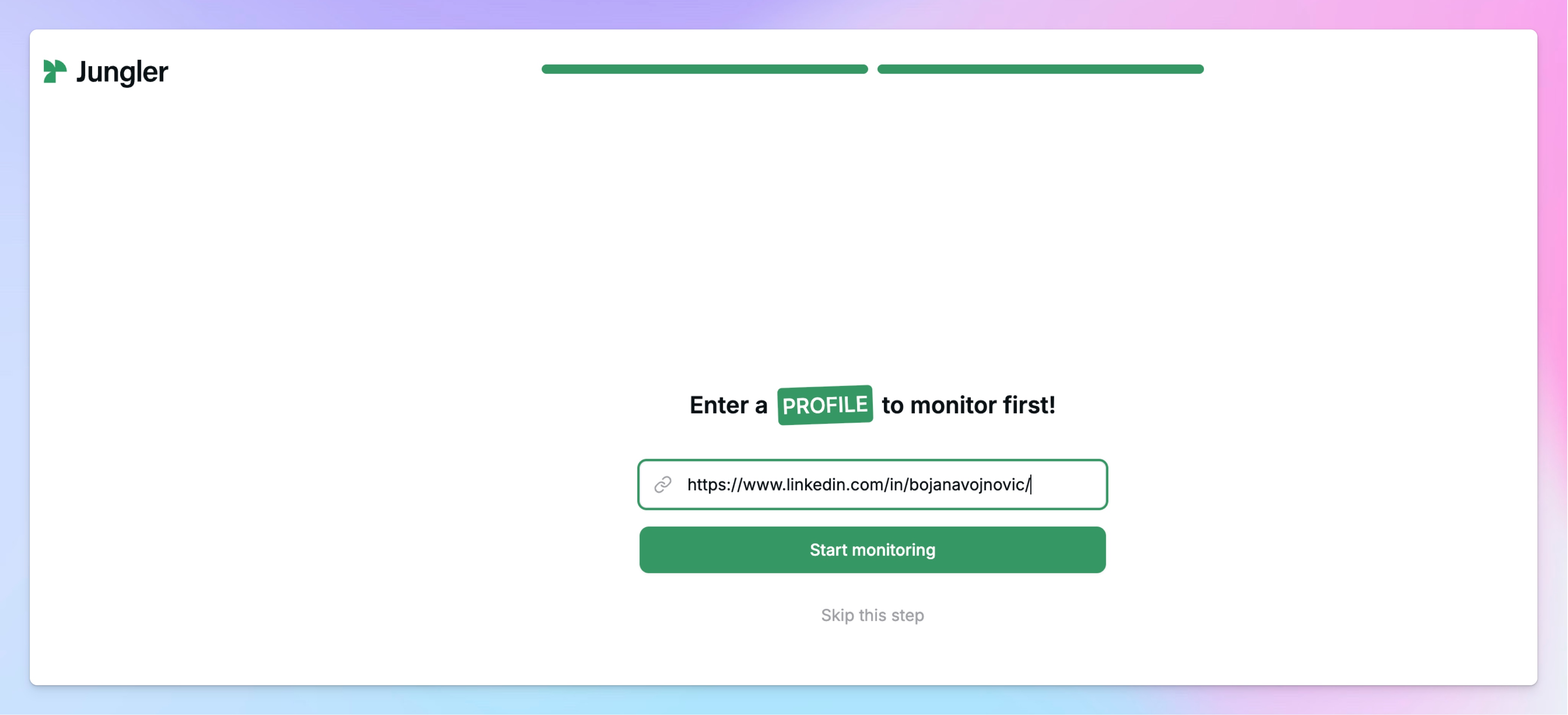
When you add a profile monitor, Jungler immediately backfills by scanning the last 31 days of posts from that profile, pulling all the comments and likes, and enriching every engager with profile and company data. From then on, any new engagement on that profile flows in automatically.
💡 Pro tip: Start narrow. One or two high-signal monitors will outperform ten broad ones. Your founder's profile, one or two competitor profiles, and a single thought leader is usually plenty to start.
⚠️ First run takes a moment. Because Jungler is processing 31 days of historical engagement on the first sync, it's not instant. Give it a few minutes before checking your lead list — especially if the profile has a lot of activity.
Step 2: Apply your ICP filters
Once Jungler has surfaced engagers, configure your ICP filters to keep only the ones that match. The filters use standard LinkedIn fields, so they'll feel familiar:
- Job title
- Company size
- Industry
- Geography (e.g., exclude or include specific countries)
- Seniority
Anyone who engages but doesn't match these filters gets dropped. Only ICP-qualified leads continue down the pipeline into HeyReach.
⚠️ Watch out: Filters that are too tight will starve your campaign. If you're not seeing leads come through, loosen one filter at a time — start with company size or seniority before touching job titles.
Step 3: Connect HeyReach to Jungler
In Jungler, open the Integrations section. You'll see a list of native integrations — HeyReach is one of them. Select it and connect using your HeyReach API key.
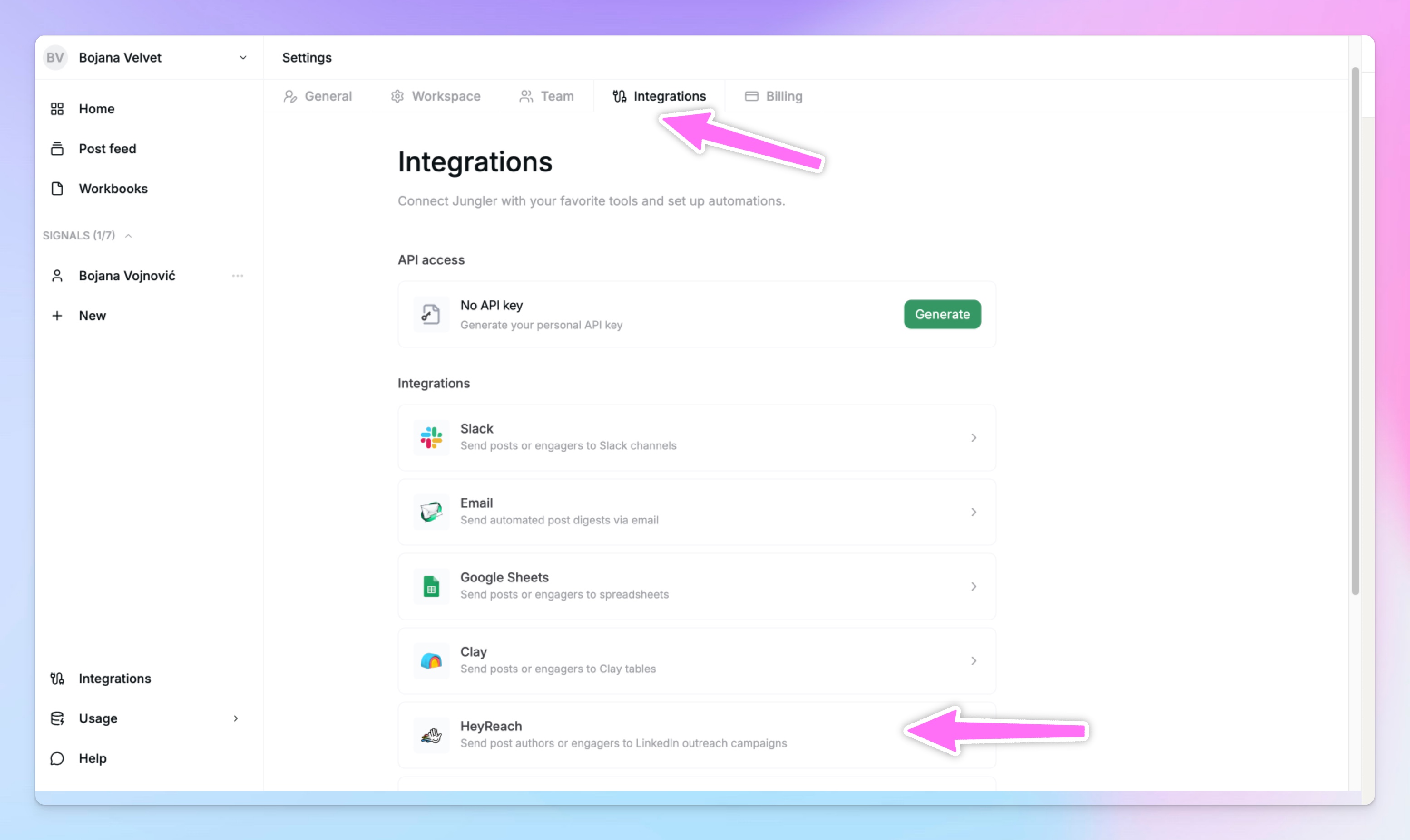
To get your API key:
- Log into HeyReach.
- Go to Settings → Integrations → API key
- Generate a new key and copy it.
- Paste it into Jungler's HeyReach connection field.
🚨 Do not skip: Treat your API key like a password. Don't share it, and don't paste it anywhere outside Jungler.
💡 No native integration for the tool you use? Jungler also supports custom webhooks, so you can route leads anywhere. But for HeyReach, the native integration means zero plumbing — just connect and go.
Step 4: Map fields and select your campaign
Once connected, Jungler will ask you to:
- Select the HeyReach campaign that should receive the leads. Make sure this campaign is evergreen (set up to accept new leads continuously) and is active and ready to run.
- Map the contact fields between Jungler's enriched data and HeyReach's lead fields — first name, last name, LinkedIn URL, company, title, and any other fields you want to use for personalization.
✅ Good to know: Because Jungler enriches at the moment of engagement, your personalization variables in HeyReach will be working with current titles and companies — not whatever LinkedIn looked like six months ago.
Step 5: Turn it on
Activate the integration. From this point forward:
- Jungler watches your monitors.
- New engagement gets enriched and filtered against your ICP.
- Matching leads get pushed into HeyReach.
- Your evergreen campaign runs the sequence — connection request, follow-ups, the whole thing.
You're done. Go check your HeyReach inbox in a few hours.
Common workflows
Workflow 1: Competitor post monitoring
Trigger: Someone comments or likes a competitor's LinkedIn post → Action: If they match your ICP, they enter a HeyReach campaign with a sequence built around "you engaged with [competitor's topic] — here's a different take."
People engaging with competitor content are actively in-market for your category. This is one of the highest-converting use cases — and because Jungler backfills 31 days, you start with a chunk of leads on day one.
Workflow 2: Thought leader engagement
Trigger: Someone reacts to a thought leader's post in your industry → Action: Push to HeyReach with a sequence that references the topic without naming the influencer.
Engagement with category thought leaders is a strong signal that someone is researching solutions or staying current on the space.
Workflow 3: Single-post signal hunting
Trigger: A specific post (a product launch, an industry hot take, an event recap) is generating relevant engagement → Action: Add the post URL as a Jungler monitor, push ICP-matched engagers into a tailored HeyReach campaign.
Time-sensitive signals work best when outreach reaches people within days, not weeks. The single-post monitor lets you spin up a campaign around one moment without committing to monitoring the whole profile.
Workflow 4: Your own content as a lead engine
Trigger: Someone engages with your founder's or company's LinkedIn posts → Action: Push ICP-matched engagers into a HeyReach campaign.
If you're already investing in LinkedIn content, this turns every post into a lead source. The people reacting to your content are already warm — Jungler just makes sure your team actually follows up with them.
Troubleshooting
Problem: No leads are flowing into HeyReach yet.
Solution: If you just set up the monitor, give it a few minutes — Jungler is backfilling 31 days of engagement on the first run. After that, check three things in order: (1) Is your monitor actually picking up engagement? (2) Are your ICP filters too tight — is anything passing them? (3) Is the HeyReach campaign you selected active and accepting new leads?
Problem: The HeyReach API key isn't connecting.
Solution: Regenerate the key in HeyReach and paste it again. Make sure there are no leading or trailing spaces. If you have multiple HeyReach workspaces, confirm the key belongs to the workspace where the target campaign lives.
Problem: Leads are coming through, but key fields (like company or title) are missing.
Solution: Double-check the field mapping in Step 4. If a Jungler field isn't mapped to the corresponding HeyReach field, that data won't carry over even though it was enriched.
Problem: Duplicate leads appearing in HeyReach.
Solution: HeyReach's built-in deduplication will catch most of this, but if you're running multiple Jungler monitors pointed at the same campaign, the same person could match more than one. Either consolidate monitors or split them across separate HeyReach campaigns.
Problem: Leads enter HeyReach but the campaign doesn't start sending.
Solution: Confirm the campaign is active (not paused or in draft), that you have available LinkedIn sender accounts assigned to it, and that you're not hitting daily sending limits.
Quick-start checklist
In Jungler:
- ☐ Create a monitor (profile or single post URL)
- ☐ Wait for the initial 31-day backfill to complete
- ☐ Configure your ICP filters (title, company size, industry, geography, seniority)
- ☐ Open Integrations and select HeyReach
- ☐ Paste your HeyReach API key
- ☐ Select the target HeyReach campaign and map the fields
- ☐ Activate the integration
In HeyReach:
- ☐ Have an evergreen campaign set up and active
- ☐ Confirm LinkedIn sender accounts are assigned to that campaign
- ☐ Sequence is finalized and ready to run
🎯 You're all set! Intent signals are now flowing straight into LinkedIn outreach — no spreadsheets, no Clay detour, no manual imports.

Try it for free
.avif)