Positive reply rate is live: Auto-detect warm leads
Published:
May 6, 2026
HeyReach now analyzes reply sentiment and auto-tags warm leads—turning your inbox into a qualified pipeline.
Managing hundreds of LinkedIn conversations manually is chaos. You're scrolling through replies, trying to figure out who's interested, who's politely declining, and who's just being nice. It's slow. Warm leads slip through the cracks while you're buried in noise.
That changes today. HeyReach's new Positive Reply Rate feature automatically analyzes the sentiment of every reply and tags warm leads for you.
Here's how it works and where to find your interested leads.
Dashboard: see your warm leads at a glance
The first place you'll notice the update is your dashboard. You now have a new metric: Interested Leads (or total people auto-tagged).
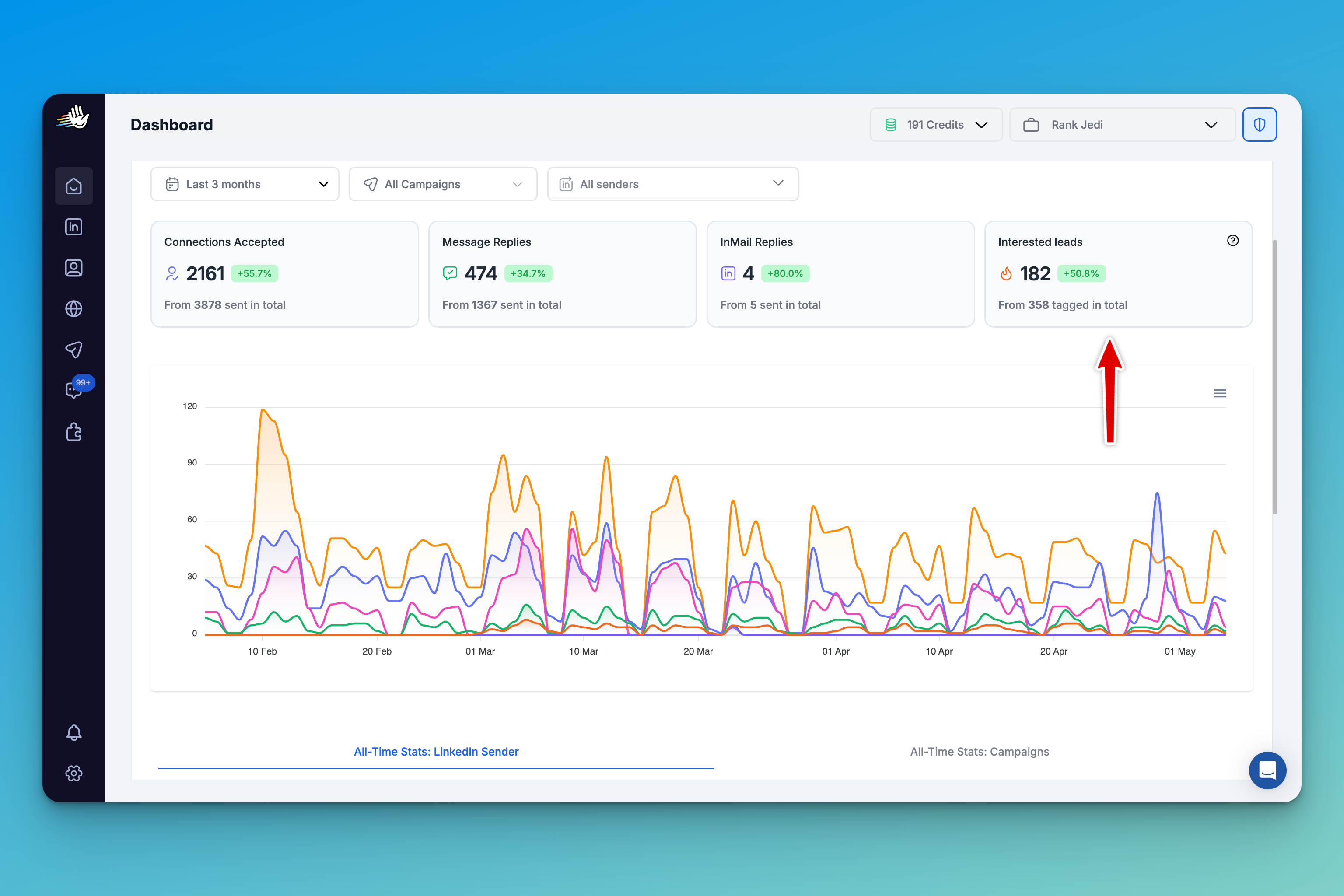
Right alongside your acceptance rate, replies, and InMail stats, you'll see how many warm leads HeyReach has flagged. Apply filters—by date range, campaign, sender—and watch the numbers update in real time.
Campaign-level analytics
Inside each campaign, you will see the same stats and layout. Want to compare senders? Filter by sender and see how many interested leads Person A generated versus Person B.
To see which specific people are interested in a campaign, go to the Lead Analytics tab and apply the filter: Auto-tag → Interested Lead
From here, you can:
- Export them as a CSV for follow-up in your CRM
- Add them to another campaign for further nurturing
- Open the conversation directly and reply
And it's not just for positive replies. You can filter by generic responses or negative responses too.
Unibox view
Probably the most important view for managing interested leads is the Unibox (your unified inbox).
Every conversation now displays a simple tag showing the sentiment: Interested, Generic, or Negative. It's right there, next to the conversation preview.
Want to see only warm leads? Apply the filter:
- Go to Filters
- Select Auto-tag → Interested
- Apply
One important note: You cannot edit the auto-tag assigned by HeyReach. It's locked to preserve data integrity. But you can still add your own custom tags on top of it.
New webhooks
HeyReach's Positive Reply Rate integrates with webhooks, which means you can trigger automated workflows based on sentiment.
Go to your webhook settings and create a new webhook. Select an event type:
- Auto-tag: Positive
- Auto-tag: Generic
- Auto-tag: Negative
Now you have endless possibilities:
- Push interested leads to HubSpot automatically
- Trigger follow-up campaigns in other tools
- Send Slack notifications when a warm lead replies
- Update your CRM with sentiment tags
Positive Reply Rate is live for all HeyReach users. No setup required. Just open your dashboard and start filtering.
Your inbox just became a qualified pipeline. Now go close some deals.

Try it for free