HeyReach + Saava.io Integration guide
Published:
July 15, 2026
You've felt this before: you build a list of 1,000 "perfect fit" prospects based on title, industry, and headcount, launch the campaign, and... crickets. A 20% acceptance rate if you're lucky. A handful of replies if you're luckier. The targeting wasn't wrong, exactly — it just had no idea who was actually paying attention right now.
That's the gap Saava closes. Instead of guessing who might care based on demographics alone, Saava watches LinkedIn for the exact posts and keywords your ICP is engaging with, and turns those real-time reactions into a lead list of people who are already in the conversation you want to have with them.
Connect that to HeyReach, and you've got a pipeline that runs on intent instead of guesswork — fresh, warm leads flowing straight into your campaigns, no manual list-building required.
This guide walks you through connecting Saava to HeyReach so intent-based leads land in the right campaign automatically, and performance data flows back to Saava to keep improving your targeting.
🍿 Watch the full integration walkthrough
💡 The best use case, in one line: set up Saava, connect it to HeyReach, and let it auto-push high-intent leads into your campaigns. That's the whole workflow — and it's what drives the 2–3x response rate jump below.
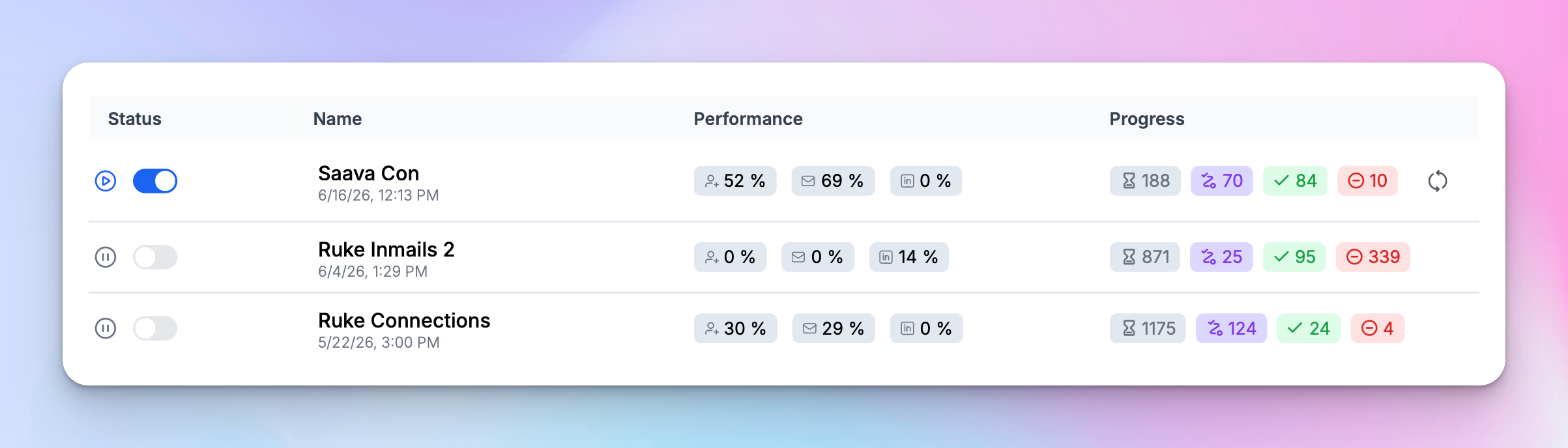
✅ Real results: In side-by-side HeyReach campaign data, a Saava-sourced campaign hit a 52% connection acceptance rate and a 69% reply rate — compared to 0–30% acceptance and 0–29% reply on standard campaigns in the same account. That's the gap between reaching people cold and reaching people who are already engaged.
The building blocks: What's what?
- HeyReach – A LinkedIn automation platform built for scale. It lets you run personalized outreach campaigns across multiple LinkedIn accounts, manage sequences with smart delays and conditions, and track every connection request, message, and reply. Whether you're an agency managing dozens of accounts or a sales team running high-volume prospecting, HeyReach handles the LinkedIn side — safely, efficiently, and at scale.
- Saava – An intent-based lead generation tool. It monitors LinkedIn posts and keywords relevant to your offer, identifies who's engaging with that content, and builds a curated lead list out of it — people who've shown a real, recent signal of interest rather than just matching a job title filter.
What they solve together
- No more cold-list guesswork. Saava feeds HeyReach leads who've already engaged with content tied to the problem you solve, instead of a generic ICP match.
- Continuous list refresh. Leads flow into HeyReach on an ongoing basis as new engagement happens, so you're never manually rebuilding lists.
- Sharper personalization. Saava passes along why a lead qualified — the post they engaged with, the keyword that surfaced them — as variables you can use in your HeyReach messaging.
- A feedback loop, not a one-way push. Campaign outcomes (accepts, replies, status) flow back to Saava, so it can learn which signals are actually converting.
- Fewer burned accounts, better numbers. Warmer targeting means fewer sends needed to hit the same pipeline goals — which is easier on your LinkedIn accounts and your reply rate.
Setup instructions
The whole connection happens through a HeyReach API key, so the setup lives almost entirely on the Saava side. Here's the flow from a blank Saava account to live leads landing in HeyReach.
Step 1: Set up your Saava account
- Add your company and LinkedIn profile. Enter your website — Saava uses it to start pulling relevant company and profile information automatically.
- Find your competitors. Saava will suggest people and companies already posting about the pain point you solve (think: founders or marketers at competitor companies). Select the ones relevant to you and click Continue.
💡 Pro tip: This step is what Saava uses to figure out where to listen — pick competitors who genuinely post about the problem you solve, not just any company in your space.
Step 2: Set up the intent monitor
- Describe your ideal customer. This is where you tell Saava who you're actually trying to reach — for example, the industries, company stage (like startup or mid-market), and business type (B2B SaaS, services, etc.) that make up your ICP.
- Click Continue to review. Saava will auto-select the leads it thinks fit best.
Step 3: Review and refine your leads
- Edit the auto-selected list. Remove anyone that's clearly not a fit, and narrow down by filters like location (e.g., Canada, UK) and job title.
- Click Apply and Finish. Saava will start actively analyzing LinkedIn activity and surfacing leads that match.
✅ Once this is done, head to the Leads section in Saava — you'll see your qualified leads populate there, along with the reasoning for why each one is a fit.
Step 4: Connect your HeyReach account
- Grab your HeyReach API key. In HeyReach, go to Settings → Integrations to find your API key.
- Copy the key.
- In Saava, go to Integrations and paste your HeyReach API key in to connect your workspace.
⚠️ Warning: Treat your API key like a password — anyone with it can act on your HeyReach workspace. Don't share it or paste it anywhere public.
- Choose the HeyReach campaign your leads should flow into.
🚨 Critical: Once connected, this flow is fully automated — new intent leads will keep flowing into HeyReach without you touching anything. Make sure the destination campaign is actually live and ready to receive new prospects before you connect.
✅ Success state: Leads start appearing as new prospects in your chosen HeyReach campaign, each one tagged with the engagement context (the post or keyword) that qualified them — ready to use as a personalization variable in your messaging.
Common workflows
Workflow 1: Always-on warm list building Saava continuously detects new engagement on relevant posts → qualifying leads get pushed automatically into your HeyReach campaign → you never manually build a prospecting list again. This is the core setup — and the one behind the 52% acceptance / 69% reply numbers above.
Workflow 2: Intent-aware personalization A lead engages with a post about a specific pain point → Saava passes that context into HeyReach as a variable → your opening message references the exact post or topic they engaged with, instead of a generic icebreaker.
Workflow 3: Performance feedback loop A lead accepts, replies, or moves through your HeyReach campaign → that outcome data flows back to Saava → Saava uses it to refine which signals (posts, keywords, engagement types) are actually producing your best leads.
Workflow 4: Duplicate and sequence protection Before pushing a new lead, Saava checks against leads already in an active HeyReach sequence → avoids re-adding someone who's already being reached out to.
Troubleshooting
Problem: Leads aren't showing up in HeyReach after connecting.
Solution: Double check your API key was copied in full and pasted without extra spaces, and confirm the lead source is actually mapped to an active campaign or list.
Problem: Not sure which leads are being pushed or why.
Solution: Check the Leads section in Saava — each lead includes the reasoning (post/keyword match) for why it qualified before it's sent to HeyReach.
Problem: Same lead appears in multiple campaigns.
Solution: Confirm your lead source is mapped to a single destination campaign, and check whether the lead was already manually added to another sequence outside of Saava.
Quick-start checklist
Saava setup:
- Add your company and LinkedIn profile
- Select relevant competitors to monitor
- Set up your intent monitor (ICP description, business type, region)
- Review and refine your auto-generated lead list
- Confirm leads are populating in the Leads section
Connecting to HeyReach:
- Grab your API key from HeyReach → Settings → Integrations
- Paste it into Saava's Integrations tab
- Choose the HeyReach campaign your leads should flow into
- Confirm your destination campaign is live and ready
🎯 You're all set! Intent-qualified leads are now flowing straight into your HeyReach campaigns — less volume, more relevance, and reply rates that can run 2–3x higher than standard cold outbound.

Try it for free