How to a/b test LinkedIn outreach inside HeyReach (and actually trust the results)
Published:
May 30, 2026
Updated:
June 1, 2026
The results are unreadable before the first send goes out.
Every GTM team has been told to a/b test their LinkedIn outreach. Most of them are. New messages, different angles, fresh variations every week.
But almost none of those tests are valid.
Not because the copy is weak but because the structure guarantees the results are broken before a single message is sent.
Inside HeyReach, the way campaigns, senders, and capacity interact means most "tests" are actually comparing delivery conditions, not messages.
We'll break down why that happens and how to run LinkedIn outreach tests that produce the kind of signal that supports data-driven decisions.
Why running two separate campaigns isn’t really a/b testing
When the same sender runs multiple outreach campaigns, their sending capacity distributes proportionally across all of them, with priority going to whichever campaign launched first. The latter campaign gets what's left. Sometimes nothing.
So if you're running two versions of a connection note — split testing across campaigns, same sender in both — the first campaign gets the lion's share of sends. The second gets the remainder, if there is one.
The result looks real: Campaign A performs better. You change the message. You double down.
But Campaign A didn't win because of the copy. It won because it launched first.
Unlike email tools, where traffic can be evenly split by system design, LinkedIn outreach depends on sender-level limits — which makes distribution inherently uneven unless you explicitly control for it.
Most LinkedIn automation tools don't handle this for you — equal distribution is something you have to engineer manually.
You have data. You don't have a test (yet).
Before getting into the setup, it helps to know what a valid test actually requires.
The three conditions of a valid LinkedIn outreach test
A valid outreach test requires three things: equal exposure, isolation, and consistency. These determine whether your key metrics reflect message quality or just delivery conditions.
In my experience, most LinkedIn tests fail at least two of them.
- Equal exposure
Each version must receive comparable send volume. If one version gets 200 sends and the other gets 80, the result reflects volume, not message quality. Without enough — and roughly equal — exposure, the numbers aren't readable.
Acceptance rate and reply rate both become meaningless without comparable volume.
- Isolation
Only one variable can change between versions. Copy or CTA or note — not all three. If multiple things change, the result might be real, but there's no way to know what caused it.
- Consistency
The test runs without changes from launch to read. No edits mid-flight. No ICP changes. No sender swaps. Once anything moves, the dataset splits — and the result stops meaning anything.
The point of a testing program is to iterate cleanly, one variable at a time.
Not all variables are worth equal testing cycles. Connection note copy resolves first — it's the entry gate and shows up cleanly in acceptance rate within one cycle. Once acceptance is stable, move to the opener in the follow-up. CTA and timing are last-mile variables — they don't shift results until the upstream is resolved. GTM engineers running systematic programs test in this sequence because it eliminates the most expensive unknowns first.
Where most teams break their tests — real scenarios
I've seen all three of these in real campaigns. Each one kills a different condition.
Scenario 1 — The shared sender pool
One sender runs three campaigns. HeyReach distributes that sender's capacity across all of them, priority goes to the first campaign launched. Each campaign gets a different slice of sends. Version A and Version B never receive equal exposure.
Condition violated: equal exposure.
Scenario 2 — The mid-test edit
Two days in, the response rate looks low. The opener gets updated. Leads already in the sequence receive the original version. New leads receive the updated one. The dataset is now split across two different messages — neither of which was tested cleanly.
Condition violated: consistency.
Scenario 3 — Multiple variables changed at once
New campaign. Three different outreach messages stacked into one test — different opener, different CTA, different ICP filter applied to the list. Version B performs better. But why? There's no way to isolate the impact.
You see the results but not the reason — which means you can't reliably replicate it with the decision-makers who actually convert.
Condition violated: isolation.
How to run a clean LinkedIn outreach test in HeyReach
HeyReach has a native way to run LinkedIn A/B testing: Add Message Variation. Running both versions inside a single campaign using this feature is the most reliable way to satisfy all three conditions simultaneously.
Most teams try to test across campaigns. That’s a mistake.
Here’s how I run a clean test inside one campaign.
Step 1 — Use Add Message Variation, not separate campaigns
Go to your campaign's Sequence section. Click the Send Connection Request action — a panel opens on the right where you compose the message. Add Message Variation is available in that panel. Create version A and version B there.
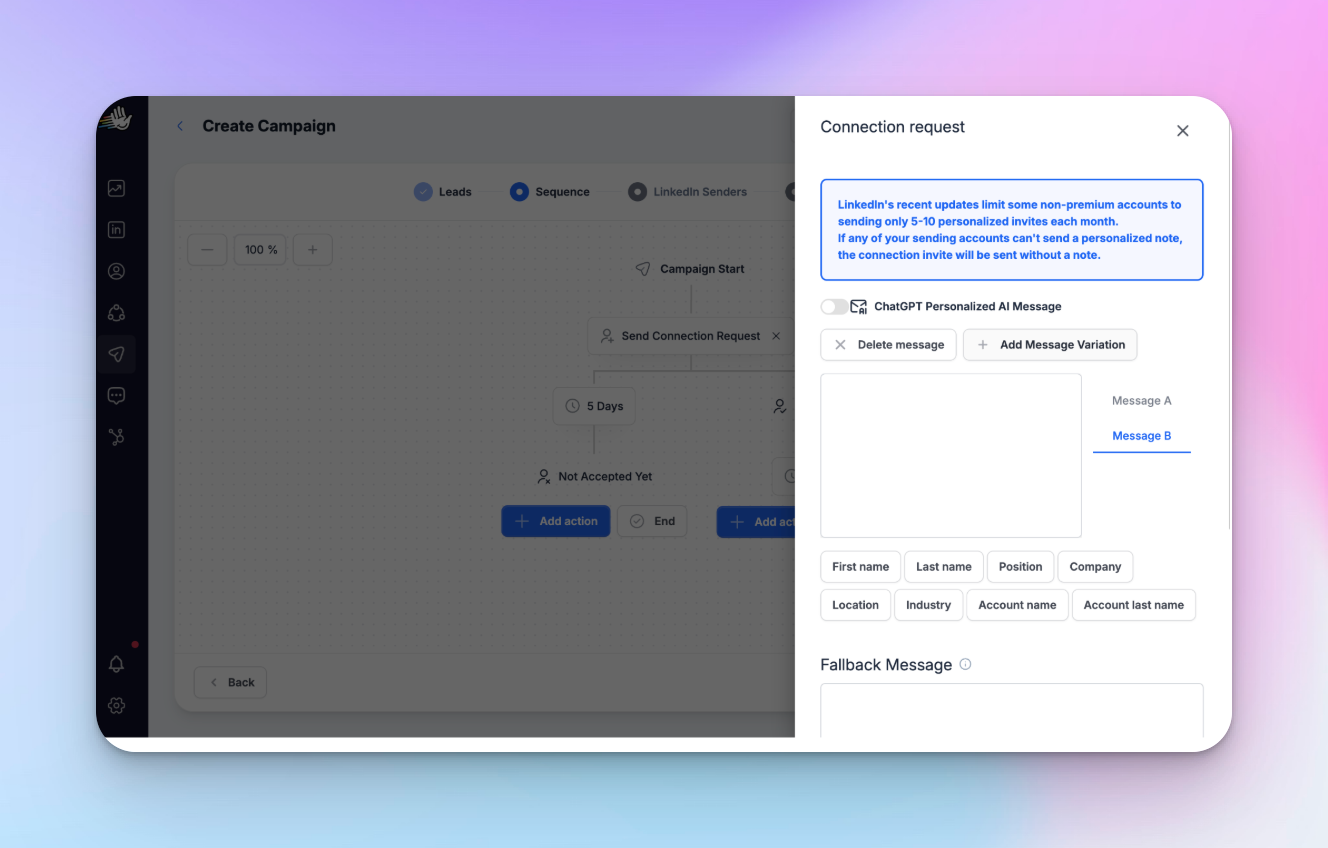
You can also add more than two versions. But more variations mean fewer leads per version. Plus, slower, noisier results.
So, in my opinion, two versions at a time get you a cleaner signal in most campaigns.
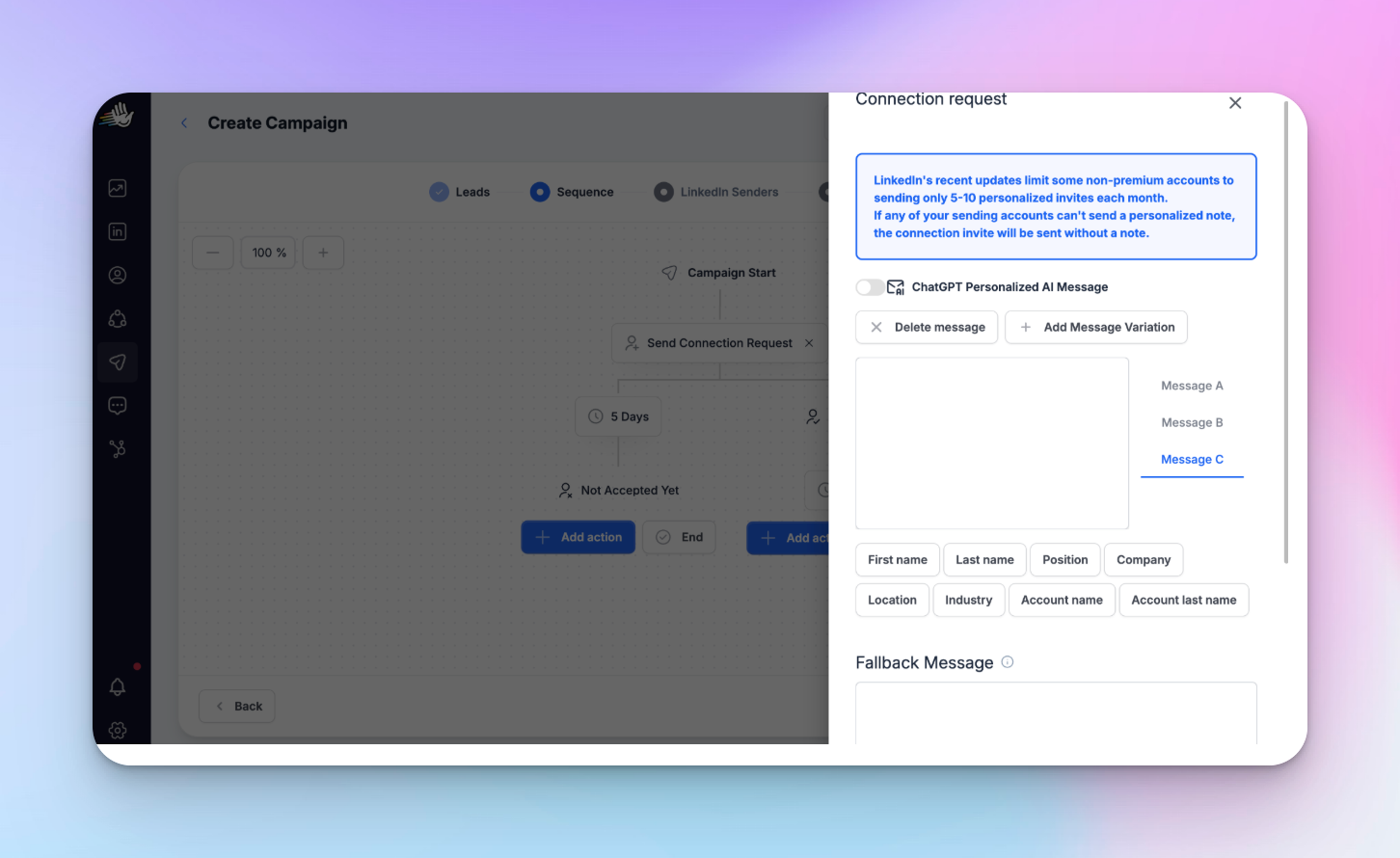
Both versions now run inside the same campaign, using the same sender pool, against the same audience.
That's what gives you equal exposure. No split across campaigns. No uneven capacity distribution.
Why not separate campaigns? Because even with the same senders and the same list, sender capacity still gets distributed unevenly across active campaigns. Equal exposure fails before the first message is sent.
Add Message Variation keeps everything inside one campaign — which is what makes the test valid.
The same option exists in Send Message and InMail steps — across connection note formats, opener formats, or follow-up formats.
Step 2 — Change exactly one variable
Keep everything identical except for one thing. It could be your connection note copy, opener sentence or CTA wording. Pick one, change it. Lock everything else.
Something like: Version A opens with a role-specific hook:
“Saw you're scaling your SDR team at [Company].”
Version B opens with a problem statement:
“Most outbound teams I talk to are sending more and booking less.”
Same sender. Same list. Same CTA. Both versions can still be personalized messages — the variable is the angle, not the personalization layer.
Only the opener changes, which means the result can only come from the opener.
Step 3 — Set your threshold before launch
Decide how many leads each version needs before you evaluate results — and stick to it before the campaign goes live.
100 leads per version is a practical starting point — enough to establish a baseline before drawing any conclusions. Not a statistical rule, but enough to filter the early noise that makes a 12% reply rate on day two look like a breakthrough when it's actually twelve replies.
Don't check early. Checking and acting early is the same as a mid-campaign edit. It splits the pool.
Step 4 — Lock the campaign and let it run
Once live:
- no edits
- no ICP changes
- no sender swaps
- no list additions
If something looks off in the first few days — whether from real-time dashboard checks or gut feel — note it. Fix it in the next test. Touching a live test invalidates it — you can't un-split a data pool.
Step 5 — Check your results
Once you’ve hit your threshold, compare campaign performance per version.
Focus on two numbers: acceptance rate and reply rate.
[product screenshot]
If Version A and Version B show a meaningful difference — more than a few percentage points — you have a directional signal.
If the gap is small, the variable you tested likely doesn’t move the needle for this audience.
Log it either way. Then move to the next test. This is how you actually optimize outreach — not by reacting to noise, but by compounding clean data points.
What a clean test looks like vs a broken one
If you’ve set the test up correctly, it should look like this.-
How to read your test results
Once your test is clean, three metrics tell you exactly where to look.
Acceptance rate shows whether your connection request is landing. If it drops, friction is happening at entry — relevance, tone, or length is off. Fix the message, not the list.
Reply rate shows whether interest turns into conversation. If acceptance holds but replies drop, the issue is in the follow-up — not the note.
Reply-to-acceptance rate helps when both move. It shows where the drop happens across the sequence — entry vs follow-up — and acts as a proxy for conversion rates across the full outreach funnel.
For context: across 96,051 HeyReach campaigns, median acceptance sits around ~21% and reply rate around ~22% — tracked against campaigns targeting qualified leads, not cold spray lists.
If you're well below those, use the signals above to pinpoint whether it's targeting, messaging, or execution. Lead generation from LinkedIn only compounds when the signals are readable.
One test gives direction. Only repeated clean tests give you confidence — and an outreach strategy you can actually defend.
The test log — so your results don't disappear between campaigns
Without a log, every cycle of running tests resets your learning.
Most teams run a test, pick a winner, move on — then unknowingly repeat the same test months later because no one wrote down what they learned. I've seen this happen in teams running dozens of campaigns a month. The knowledge just evaporates.
A four-column Google Sheet template solves this at the source.
- Version — what you tested
- Sender + volume — who ran it and how many leads each version received
- Result — acceptance rate and reply rate, with raw numbers
- Decision — what changed and what gets tested next
No dashboards. No scoring models. Just a single source of truth for every test you’ve run.
[Download the LinkedIn outreach testing log]
Over time, this becomes the most useful reference in your outreach system — not because any single test matters, but because it shows which variables are already resolved for your ICP. That’s what stops teams from running the same experiments again and again and forces testing strategies to actually mature over time.
If you want to skip manual entry, HeyReach's dashboard export gives you the raw numbers. Export the CSV from the dashboard and pull the acceptance and reply rate figures directly into the Result column — or push them into your CRM if you're tracking outreach performance alongside pipeline.
Run LinkedIn outreach tests the right way
Most teams don't need more tests. They need valid ones.
The structure is simple: one variable, equal exposure, no edits mid-flight, a threshold you set before launch. Run that inside Add Message Variation and every test produces a real data point instead of a delivery artifact you've been calling a result.
That's not tweaking your way to improvement — it's the framework that makes every iteration meaningful. You're not fine-tuning randomly. You're fine-tuning with data.
One clean data point per cycle compounds — and builds a picture of what actually resonates with your target audience, specifically, not outreach audiences in general.
That's the difference between an outreach system that compounds and one that just runs.
If your tests aren't valid, your system isn't learning.

Try it for free
Frequently Asked Questions
Why can’t you run LinkedIn outreach tests like email A/B tests?
Because LinkedIn doesn’t control distribution — senders do. Each account has its own limits, so volume gets split unevenly across campaigns. If you run versions separately, you’re testing delivery, not the message. Run both inside one campaign using Add Message Variation to get equal exposure.
Why do LinkedIn outreach tests fail more often than email tests?
Because most aren’t real tests. Multiple variables change, campaigns get edited mid-flight, and sender capacity isn’t controlled. The result looks like data — it’s just noise.
How many leads do you need for a LinkedIn outreach test?
Start with ~100 leads per version. It’s not perfect, but enough to separate signal from noise. What matters more is consistency — set the threshold before launch and don’t evaluate early.
Can you test LinkedIn outreach messages without a tool?
You can — but it’s fragile. You’ll need identical lists, strict control, and no edits. Even then, you can’t guarantee equal exposure because of sender limits. That’s the real constraint.
What should you do if your test has no clear winner?
Log it and move on. If the gap is small, it’s noise. Mark the variable as resolved, set a new hypothesis, and run the next test.