ScrapeLi x HeyReach Integration: Step-by-Step Setup
Published:
October 29, 2026
People who follow your competitor's LinkedIn page are telling you something. They're interested in the problem you solve, they're watching how others solve it, and some of them are actively comparing options.
That's one of the warmest lists you can build. The hard part is getting it out of LinkedIn. You find the page, scrape the followers somehow, filter out everyone who isn't your ICP, clean up a CSV, and then upload it into your outreach tool. By the time it's ready, half your afternoon is gone.
ScrapeLi and HeyReach cut that down to a few clicks. ScrapeLi pulls your competitors' followers and filters them to your ICP. HeyReach starts reaching out to them on LinkedIn.
This guide shows you how to connect the two, send your first order, and set things up so every new order lands in HeyReach automatically.
The building blocks: What's what?
HeyReach – A LinkedIn automation platform built for scale. It lets you run personalized outreach campaigns across multiple LinkedIn accounts, manage sequences with smart delays and conditions, and track every connection request, message, and reply. Whether you're an agency managing dozens of accounts or a sales team running high-volume prospecting, HeyReach handles the LinkedIn side — safely, efficiently, and at scale.
ScrapeLi – A LinkedIn data tool that exports the followers of any LinkedIn company page, filtered to your ideal customer profile. You can describe your ICP in plain English and its AI ICP builder sets the filters for you. ScrapeLi also offers cookieless Sales Navigator search exports.
What they solve together
- Competitor followers become a live campaign. Scrape, filter, and send to HeyReach without a single CSV.
- Only your ICP gets contacted. ScrapeLi filters before anything reaches HeyReach, so your senders don't waste connection requests on the wrong people.
- Hands-off lead flow. Turn on auto-send and every completed order goes straight into your chosen campaign or lead list.
- Richer personalization. Each lead arrives with job title, company, location, and extra fields like industry, company size, and website.
- No email required. Every lead keeps its LinkedIn profile URL, so orders without email enrichment still work.
How the data flows
Data moves one way: ScrapeLi → HeyReach. Nothing is sent back from HeyReach to ScrapeLi.
Here's what arrives with each lead:
Field typeFieldsRequiredLinkedIn profile URLStandard (when available)First name, last name, company name, job title (as position), location, email addressCustom (when available)industry, employee_count, company_hq, company_linkedin_url, website, email_status, scrapeli_order_id
💡 Good to know: Custom fields are only filled when ScrapeLi has that data for the lead. If you use them as variables in your HeyReach messages, set a fallback value so leads with empty fields still get a clean message. Before you start
Make sure you have:
- ✅ A ScrapeLi account. The integration works on every ScrapeLi plan, and sending leads to HeyReach uses no credits.
- ✅ A HeyReach account that can create an API key under Settings → Integrations → HeyReach API.
- ✅ A destination in HeyReach: either a campaign with LinkedIn senders already assigned, or a lead list.
⚠️ Watch out: HeyReach rejects leads sent to a campaign that's still in draft or already finished. If you want outreach to start as leads arrive, make sure your campaign is active before you send.
Step 1: Build your order in ScrapeLi
If you already have a completed order, skip to Step 2.
- Open Company page followers: Log in at scrapeli.io and click Company page followers at the top.
- Add your competitor's page: Paste the URL of a competitor's LinkedIn company page, then click Show all followers. ScrapeLi pulls the followers live from LinkedIn, which takes a few seconds.
💡 Pro tip: You can add more than one company page. ScrapeLi shows each company's followers side by side, plus the total across all of them.
- Filter to your ICP: Use the filters on the left side. The fastest route is the AI ICP builder: describe who you want in plain English, then click Generate ICP. The AI fills in the filters for you. Check them, then click Apply filters.The list now shows only the matching followers, and the price updates to match.
- Place your order: Pay by card with Stripe, or use your ScrapeLi credits to place the order in one click. You can follow progress under Active orders.
- Wait for completion: When the order is ready, ScrapeLi emails you and moves it to Completed Orders. Click View to browse every follower in a table you can filter and sort.
Step 2: Connect ScrapeLi to HeyReach

- Get your HeyReach API key: In HeyReach, click the settings icon at the bottom left, then Integrations. On the HeyReach API row, click Get API key and copy it.
🚨 Critical: Treat your API key like a password. Anyone with it can add leads to your campaigns.
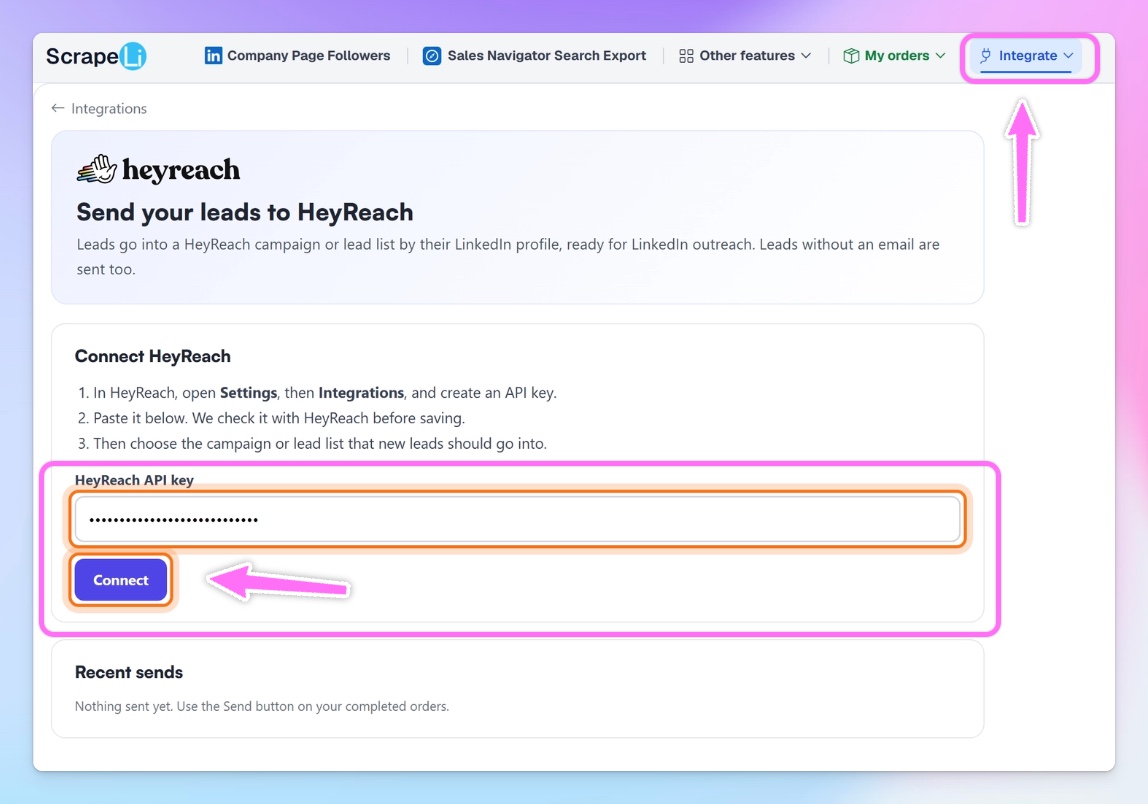
- Open the HeyReach integration in ScrapeLi: In ScrapeLi, open the Integrate menu in the left sidebar and click the HeyReach tile.
- Paste your key and connect: Paste the key into the HeyReach API key field and click Connect. ScrapeLi checks the key with HeyReach before saving it.
✅ Success: Once the key is accepted, your HeyReach campaigns and lead lists load into ScrapeLi automatically.

Step 3: Choose where your leads go
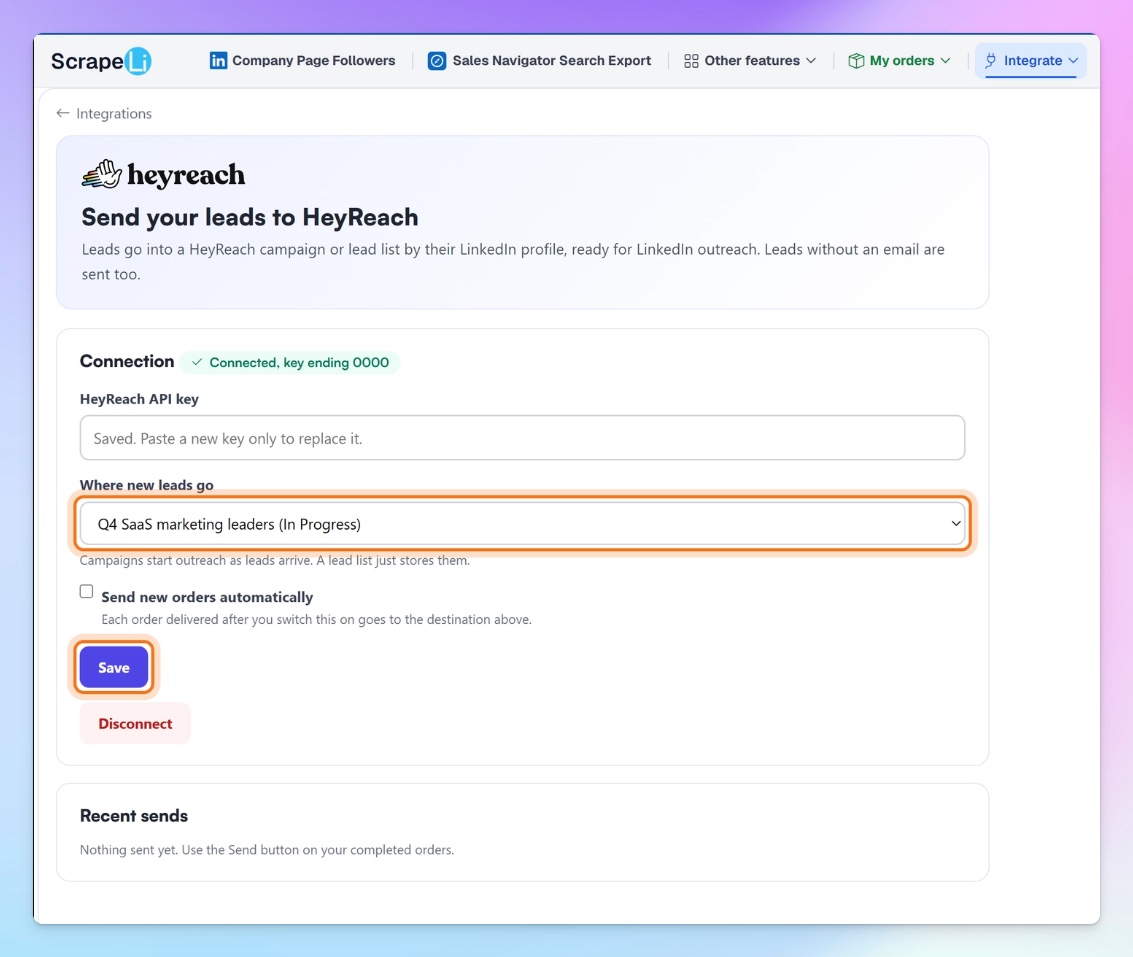
- Pick a destination Under Where new leads go, choose a campaign or a lead list from the dropdown.
- Campaign: Outreach starts as leads arrive. Leads are automatically assigned to the campaign's existing LinkedIn senders.
- Lead list: Leads are stored in HeyReach but not contacted. Good if you want to review them first or add them to a campaign later.
- Click Save.
💡 Good to know: You can have one destination selected at a time. To send to a different campaign or list, change the destination and click Save again.
⚠️ Watch out: Cancelled and failed campaigns don't appear in the dropdown. Step 4 (optional): Turn on auto-send
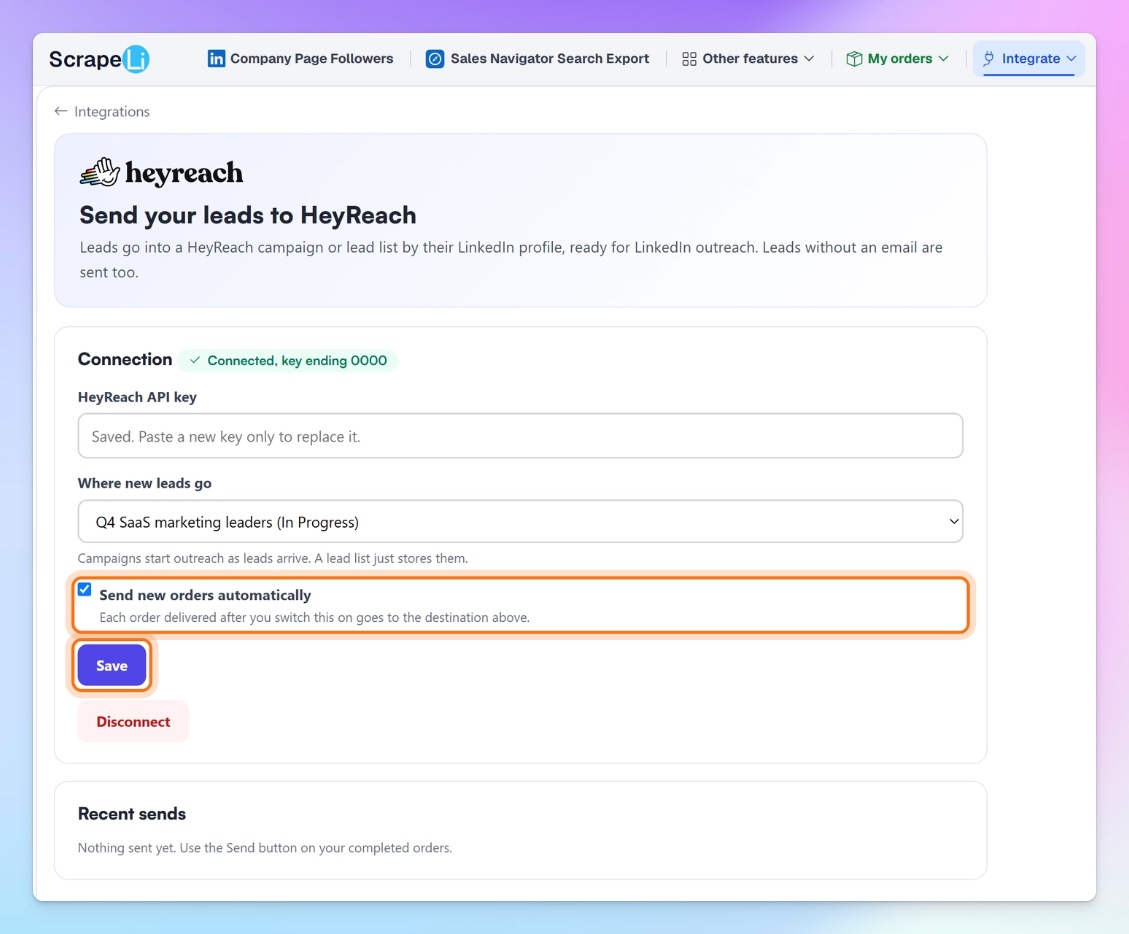
- Tick Send new orders automatically.
- Click Save.
From now on, every order delivered to your ScrapeLi account goes straight to your chosen campaign or lead list.
⚠️ Watch out: Auto-send isn't retroactive. Only orders delivered after you switch it on are sent. For older orders, use the manual send in Step 5.
Step 5: Send an order manually
- Go to Completed Orders.
- Click Send on the HeyReach button in the row for the order you want, then confirm.ScrapeLi shows the progress on the button. A send starts within about a minute.
💡 Pro tip: You can send all rows of an order or only the rows that match your current filters. This is useful for splitting one order across different campaigns, for example C-level leads to one sequence and managers to another.
Step 6: Confirm your leads arrived
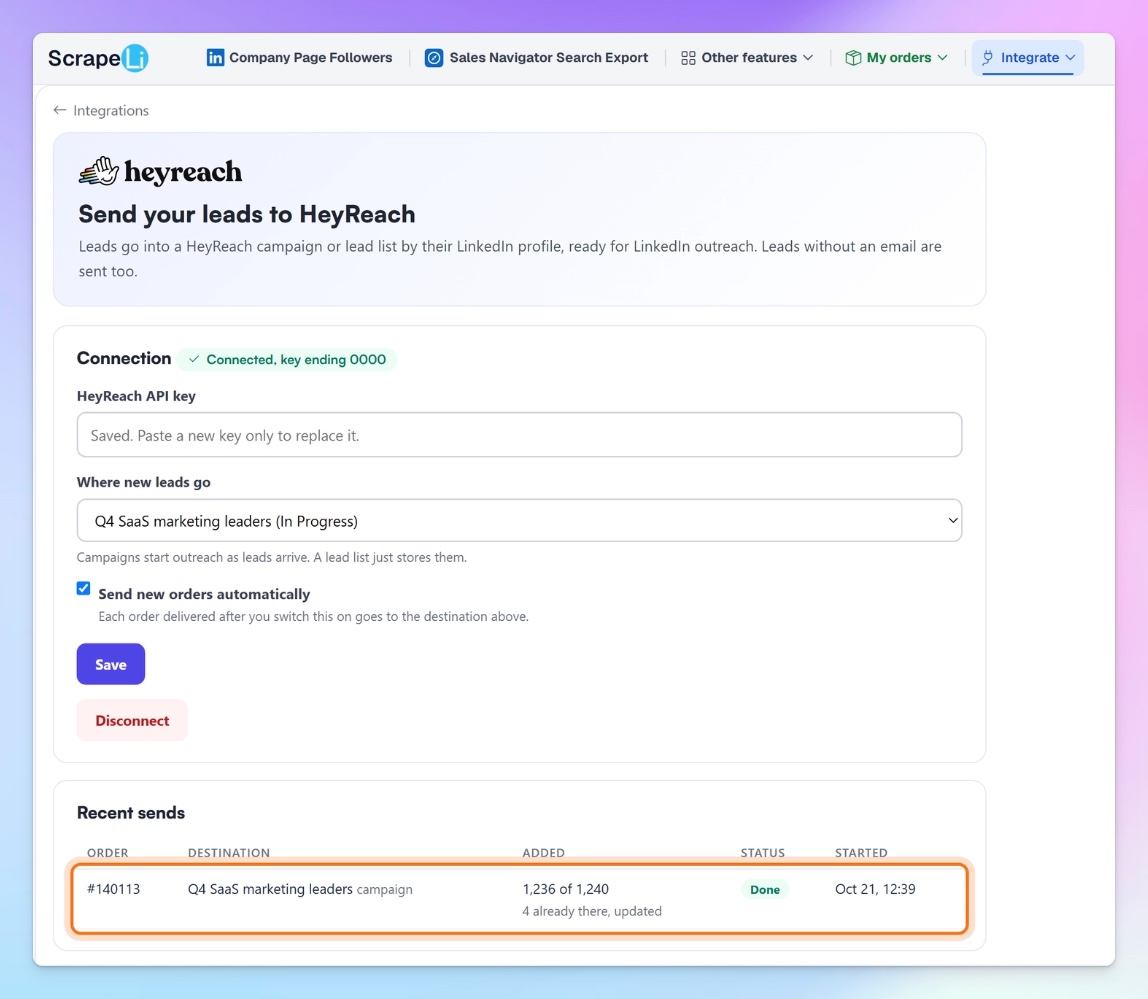
- Check Recent sends in ScrapeLi: Go back to Integrate → HeyReach. Each send appears under Recent sends with:
- The order number
- The campaign or lead list it went to
- How many leads were added
- Its status
- When it started
- Check HeyReach:Open your campaign or lead list in HeyReach. Each lead should show their name, job title, company, and location, plus the custom fields ScrapeLi had for them.

💡 Good to know: Leads that were already in the campaign or list are updated, not duplicated. You'll see this in Recent sends, for example "4 already there, updated."
Limits and behavior to know
- People only. ScrapeLi sends individual people, matched by LinkedIn profile URL. Orders that return companies instead of people can't be sent to HeyReach.
- LinkedIn URL required. Rows without a LinkedIn profile URL are skipped.
- Emails are optional. Included when ScrapeLi has one; leads without an email are still sent.
- No regional limits. Leads from any country can be sent.
- One send per destination. An order can be sent to the same campaign or list only once. You can send it again to a different destination, or send a filtered subset of its rows.
- Paused campaigns stay paused. Leads sent to a paused campaign are added, but the campaign doesn't restart. The same goes for finished campaigns.
- Your campaign settings stay in charge. Which LinkedIn sender contacts each lead and how many connection requests go out per day are set in your HeyReach campaign. ScrapeLi doesn't change them.
- Speed. ScrapeLi sends up to 100 leads per request and stays within HeyReach's limit of 300 API requests per minute per organization. Large orders of tens of thousands of leads may take longer. If HeyReach asks ScrapeLi to slow down, the send pauses and picks up where it left off, without losing or repeating leads.
Common workflows
Workflow 1: Competitor follower campaign
The core use case: reach people who already care about what you sell.
Trigger: You place a ScrapeLi order for a competitor's page followers, filtered with the AI ICP builder.
Action: You send the completed order to an active HeyReach campaign. Your LinkedIn senders start connecting right away.
💡 Pro tip: Use the company context in your first message. Mentioning their industry or company size (via the custom fields) makes the message feel researched without naming your competitor.
Workflow 2: Always-on lead pipeline
Set it once and let every new order feed your outreach.
Trigger: Any new ScrapeLi order completes.
Action: Auto-send pushes it into your chosen HeyReach campaign with no clicks.
This works well for agencies running a standing "competitor followers" campaign per client: place new orders as you find new competitor pages, and HeyReach keeps the campaign topped up.
Workflow 3: Review first, then launch
Not ready to contact everyone straight away?
Trigger: You send a completed order to a HeyReach lead list instead of a campaign.
Action: You review the leads in HeyReach, then add the ones you want to a campaign when you're ready.
This is a good fit for first-time orders, when you want to sanity-check your ICP filters before spending connection requests.
Workflow 4: Split one order across sequences
Different personas need different messages.
Trigger: One large ScrapeLi order covering several seniority levels.
Action: Filter the order to one segment (for example, founders and C-level), set the destination to your executive campaign, and send. Then change the destination, filter to the next segment, and send again.
Troubleshooting
Problem: ScrapeLi won't accept my API key.
Solution: Copy the key again from HeyReach (Settings → Integrations → HeyReach API → Get API key) and check you haven't picked up extra spaces. Make sure your HeyReach account can create API keys.
Problem: My campaign doesn't show up in the dropdown.
Solution: Cancelled and failed campaigns are hidden. Check the campaign's status in HeyReach. If it's new, confirm it's been saved and refresh the ScrapeLi integration page.
Problem: Leads arrived, but nobody is getting contacted.
Solution: The campaign is probably paused. Sending leads doesn't restart a paused campaign, so resume it in HeyReach. Also check the campaign has LinkedIn senders assigned.
Problem: Fewer leads arrived than were in my order.
Solution: A few things can cause this. Rows without a LinkedIn profile URL are skipped. Leads already in the campaign or list are updated rather than added again (Recent sends shows this, for example "4 already there, updated"). And if you had filters active when you clicked Send, only matching rows were sent.
Problem: My older orders didn't go to HeyReach after I turned on auto-send.
Solution: Auto-send only covers orders delivered after you switched it on. Send older orders manually from Completed Orders.
Problem: I can't send the same order again.
Solution: An order can only be sent to the same campaign or list once. Pick a different destination, or send a filtered subset of the rows.
Quick-start checklist
In HeyReach
- Copy your API key (Settings → Integrations → HeyReach API → Get API key)
- Create an active campaign with LinkedIn senders assigned, or a lead list
In ScrapeLi
- Place an order for competitor page followers, filtered to your ICP
- Open Integrate → HeyReach
- Paste your API key and click Connect
- Choose a campaign or lead list under Where new leads go and click Save
- (Optional) Tick Send new orders automatically and click Save
- Send a completed order from Completed Orders
- Confirm the status says Done under Recent sends
🎯 You're all set! Your competitors' followers are now one click away from your LinkedIn outreach.

Try it for free