How to automate LinkedIn outreach using Clay, HeyReach and n8n
Published:
April 27, 2026
Updated:
July 28, 2026
What if you could send hyper-personalized LinkedIn messages to your ideal customers every single day without lifting a finger?
The personalized messages I'm sending are indistinguishable from manual outreach because they speak directly to each prospect's pain points and current situation. Here's the stack that makes it possible:
- Clay — the best for LinkedIn lead generation and data enrichment
- HeyReach — the best LinkedIn automation tool for running your outreach campaign
- N8N — the best for the post-positive reply automation flow
Now I'm going to show you how to automate LinkedIn outreach using these three tools.
Step 1: Setting up Clay for lead scraping and data enrichment
Clay is the backbone of this system. It allows me to scrape LinkedIn lead and company data, qualify that data to make sure I'm reaching out to the right people, and discover new data points that help me create relevant sales outreach campaigns at the right moment in each prospect's journey.

Finding and qualifying leads
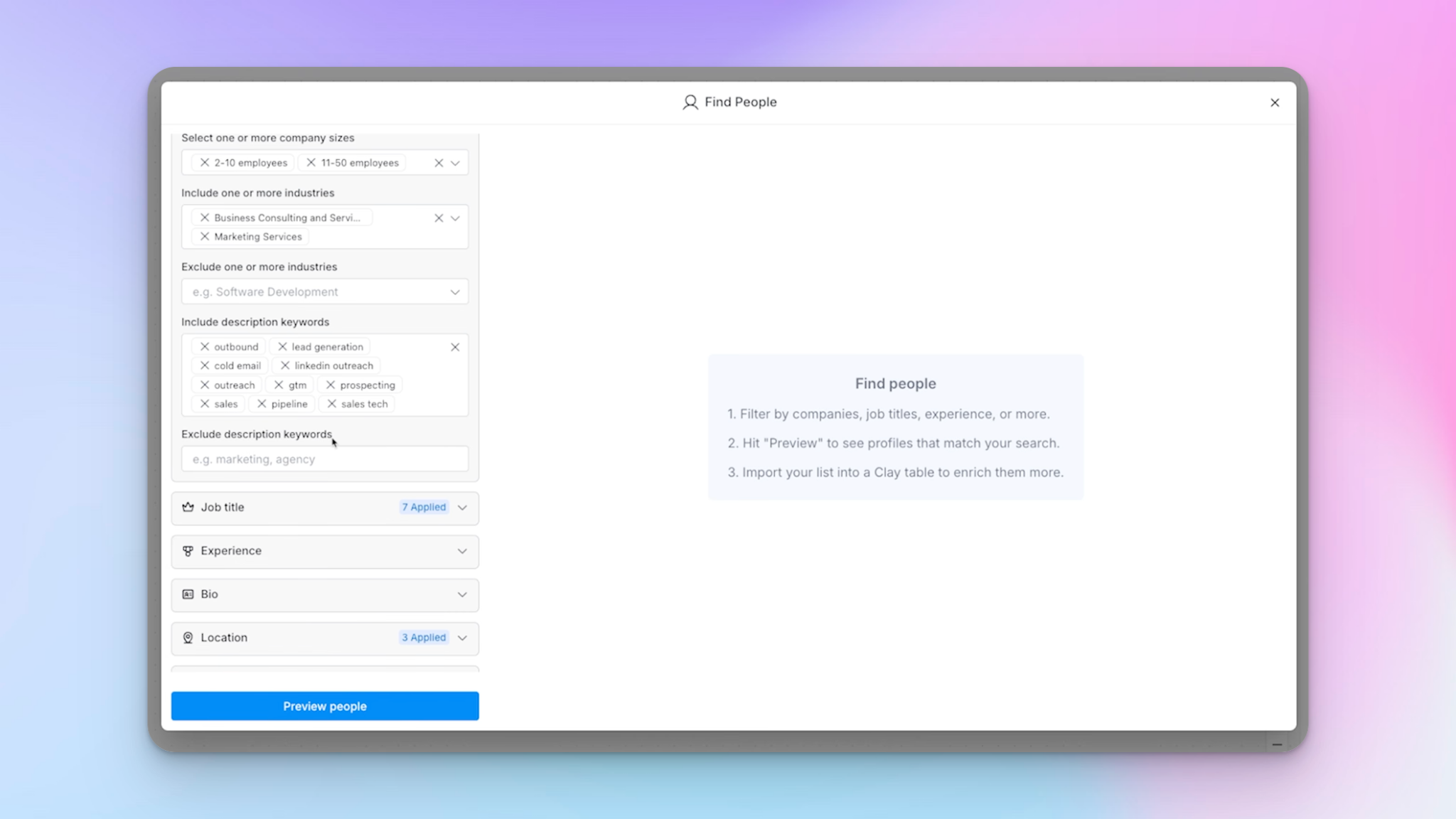
My Clay workbook starts with a people search that works very similarly to a Sales Navigator search.
I'm looking for companies with 2–50 employees in the relevant industries, filtering by keyword descriptions to keep things targeted. I then layer on the relevant job titles for decision-makers (founders, CEOs) and restrict results to English-speaking countries — UK, US, and Canada.
You can also import leads via CSV if you already have a list ready to go.
Once I have that initial table of leads, I run a Claygent prompt to qualify them. This AI agent visits each company's website and categorizes them — either confirming they're a lead gen agency (my ICP) or identifying what they actually are.
I then create a filtered view showing only confirmed agencies. This keeps unqualified leads completely separate before I stack on any additional enrichments.
Adding intent signals: the two campaign funnels
Once I have my qualified target audience, I layer on signals to determine which leads to reach out to and which campaign they should be funnelled into.
The rule I follow is simple: define your ICP first, then add intent signals that show genuine readiness. I run two signals:
Signal 1: Job posting (operations roles)
This signal runs monthly and identifies whether any of my qualified decision-makers are currently hiring for operations-type roles — account manager, ops, GTM, client fulfillment, anything to do with delivery. If they're hiring for one of these positions, it's a strong indicator of a capacity issue, which opens the door for me to reach out.
I filter job postings to a maximum of 30 days old, because recency is everything here. The personalized variable I pull into the outreach message is the specific job title they're posting for.
Signal 2: Someone left the company
This one is slightly more complex. I use Clay's 'past experiences' filter to find people who have ever worked at my target companies — not just those currently employed there. This surfaces 200+ rows of people who have worked at these companies at some point.
The problem is that some of these people might have left years ago, so I can't just blast everyone.
To fix this, I enrich each person's LinkedIn profile (using Clay's native integration or a cheaper Rapid API option) to pull their latest experience. I then run an AI prompt that cross-references their enriched data and returns either the date they left the company or 'present' if they're still there.
From this, I create a view called 'Left lead gen agency less than four months ago' — and that's my qualified list for this campaign. The personalized variable I pull into the message is the name of the employee who recently left, which I can reference naturally in the outreach.
Step 2: Connecting Clay to HeyReach campaigns
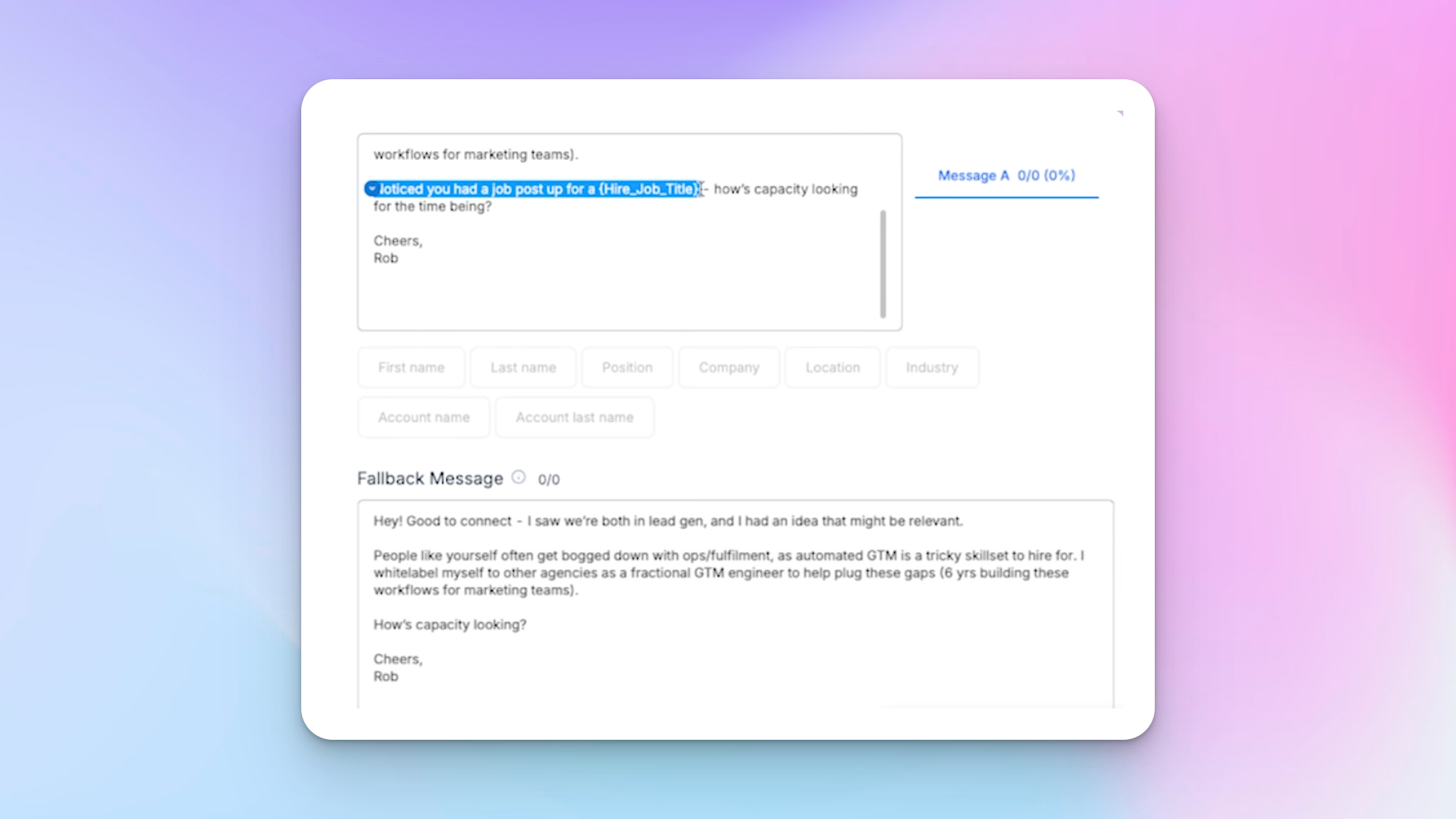
Before adding leads to a campaign in Clay, I always create the LinkedIn campaign copy first — because I need to know which personalized variables I'll be pulling in before I map the fields.
Once the campaign is ready, I connect my HeyReach API key in Clay, select the campaign ID, map the fields (first name, last name, LinkedIn URL), and choose the personalized variable relevant to each campaign. The step-by-step setup is covered in detail here if you need a visual walkthrough:
I also add a protection filter: 'only run if decision-maker first name has a value' — just to prevent incomplete records from sneaking into a campaign. Once the workbook is built and set to auto, new leads get added automatically to the correct HeyReach campaign without me doing a thing.
Step 3: Building the HeyReach campaigns
Here's what the job posting message sequence looks like inside HeyReach:
Connection request sent
Wait 2 days
Message: "Hey [First Name], good to connect. I saw we're both in lead gen and I had an idea that might be relevant. People like yourself often get bogged down with ops and fulfillment — automated GTM is a tricky skill set to hire for. I white-label myself... noticed you had a job post up for [Job Title]. How's capacity looking for the time being?"
There's a fallback message in case the variables don't pull through, plus one follow-up after 7 days:
"As I haven't heard from you, I assume capacity isn't an issue right now."
Making an assumption like this often prompts people to quickly correct you if you're wrong — it's a solid little sales tactic that helps build trust while keeping the conversation open. I also offer to network, because genuinely, I want to build relationships with some of these people.
To optimize campaign performance, I regularly A/B test different opening lines and follow-up timings, tracking metrics like acceptance rate, reply rates, and conversion rate to see what's working. Small tweaks to your personalized outreach copy can meaningfully shift your numbers over time.
It's also worth being mindful of LinkedIn limits — HeyReach is designed to stay within safe daily thresholds so your accounts don't get flagged or restricted.
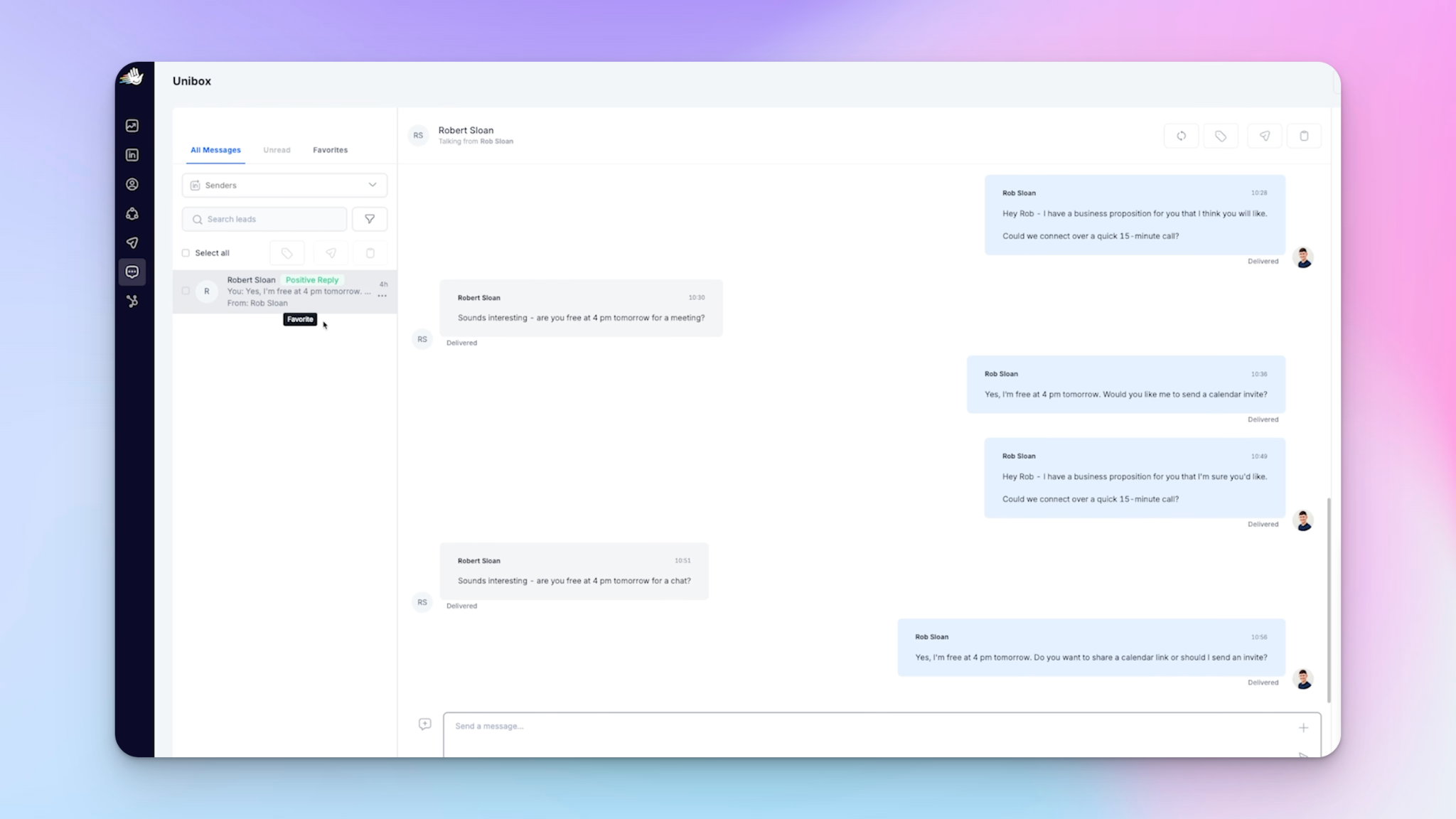
All incoming replies land in HeyReach's Unibox — a unified inbox that streamlines conversations from all your LinkedIn sender accounts in one place. It means I never have to jump between accounts to check for replies.
Step 4: How to automate LinkedIn outreach and reply handling in N8N
This is where it gets really powerful.
When a lead replies positively, I want them automatically logged in my CRM, the sentiment verified, an AI-drafted reply ready for my approval, and the message sent via HeyReach — all without me doing anything except clicking 'approve' in Slack.
Setting up the webhook trigger in n8n
In n8n, I start with a webhook node as the trigger. I go to HeyReach's integrations, create a webhook, paste in the N8N test URL, and set it to fire on 'every message'. (If you haven't connected the two yet, here's how to integrate HeyReach with n8n step by step.)This means every incoming message in HeyReach pings my N8N flow in real time.
The HeyReach webhook documentation covers all the available event types in detail. I test this by listening for a test event in N8N and pressing 'test event' in HeyReach — once that mock data pulls through, I know the connection is working. (Important note: make sure to switch from GET to POST.)

CRM agent: sentiment qualification and data logging
The first AI agent in the flow qualifies the sentiment of each incoming message — categorizing it as positive, negative, or neutral. If it's positive, the agent creates a record in my CRM (Airtable) and outputs a clean JSON object with structured dynamic variables I can reference further down the flow. If it's negative, the flow stops completely.
This is one of the most underrated advantages of LinkedIn automation software with strong CRM integrations — your pipeline updates itself, so sales teams don't have to manually log every conversation or chase data across tools.
I structure every AI agent the same way:
- a detailed system message (their role, primary tasks, rules, and expected output format) + a prompt that contains all the dynamic variables for that specific execution.
The system message is what directs the AI generally; the prompt is the information it needs to carry out those instructions for that specific lead.
LinkedIn reply agent: drafting the response
Once the sentiment is confirmed as positive, the next AI agent drafts a LinkedIn reply. I've given it the context of my business (I'm a GTM engineer targeting lead gen agencies), rules for how to approach each reply, examples to model from, and strict formatting rules at the bottom.
I pull the full conversation thread into the prompt so it can reply to the most recent message in context.
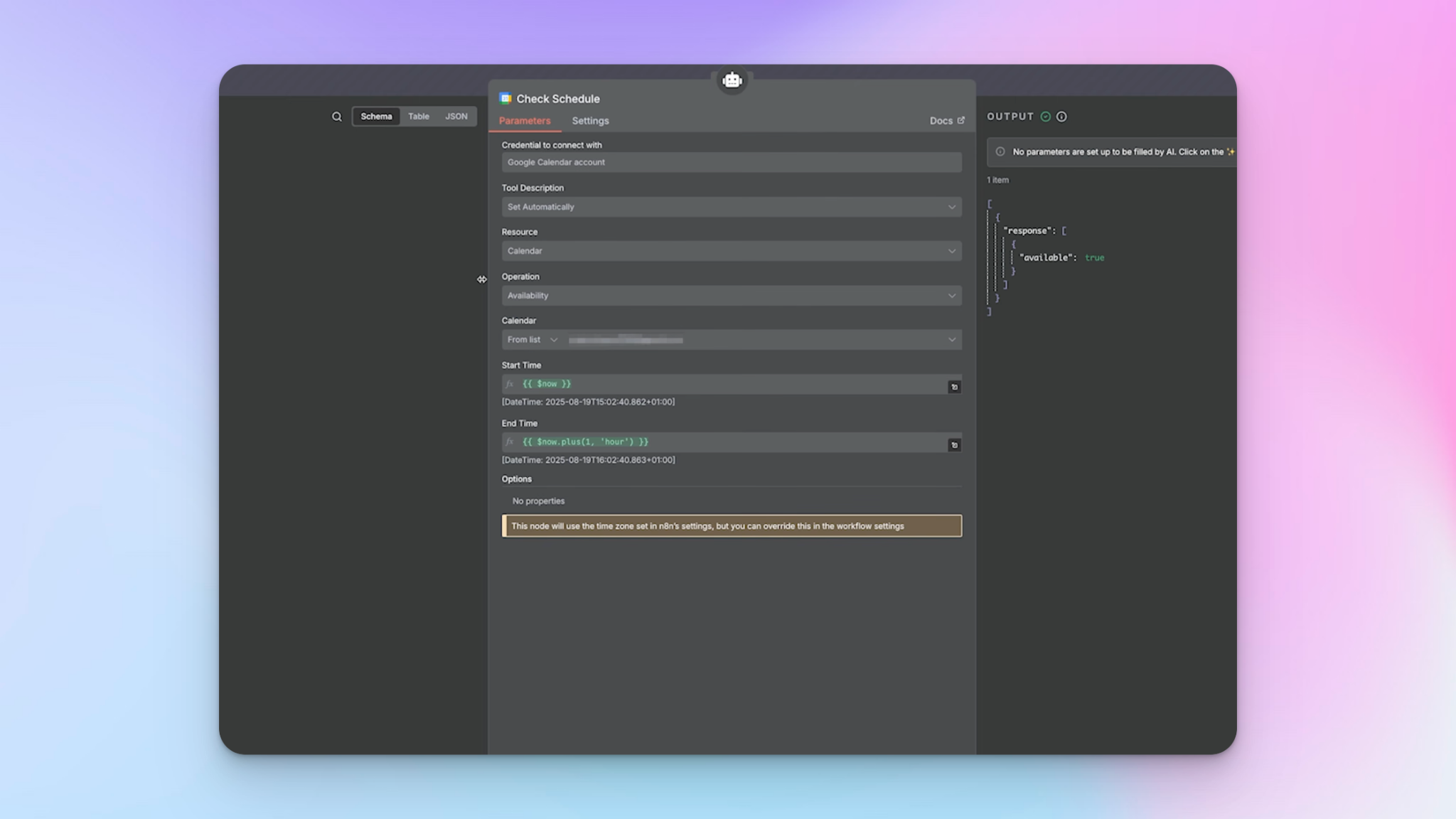
I also connect my Google Calendar as a tool within this agent.
Why? Because occasionally a lead will say something like 'Are you free at 4pm tomorrow?' — and without calendar access, the AI might confirm a time I'm not actually available. I tell the agent in the prompt to always check my calendar if a time is mentioned, and it uses the calendar tool to check availability before responding.
Slack approval gate: keeping humans in the loop
I don't want the AI sending messages without my review. Personally, I find about six out of seven messages are strong enough to send without edits — but there are always edge cases where I need to add nuance, especially for open-ended questions. So instead of auto-sending, the flow sends a Slack message with:
- The full conversation thread
- The AI-drafted reply
- Approve / Disapprove buttons
If I click 'Approve', the message is sent via HeyReach's API directly to the lead. If I click 'Disapprove', I'm reminded to reply manually. The message is sent using HeyReach's Postmaster with the correct conversation ID and LinkedIn sender ID mapped dynamically for each lead.
This outreach tool setup also complements email outreach workflows — if a lead goes cold on LinkedIn, you can trigger a parallel email sequence via N8N using the CRM data already captured.
Testing before going live
Before switching to the production webhook URL in HeyReach, I test the whole flow end to end. I created a dummy LinkedIn account and sent a message to myself through a test campaign.
When testing the send message node, I hard-code the LinkedIn ID and conversation ID manually (rather than relying on dynamic variables from mock data) so I can confirm the message actually delivers. Once everything checks out, I swap in the real IDs, update HeyReach to use the production webhook URL, and activate the N8N workflow.
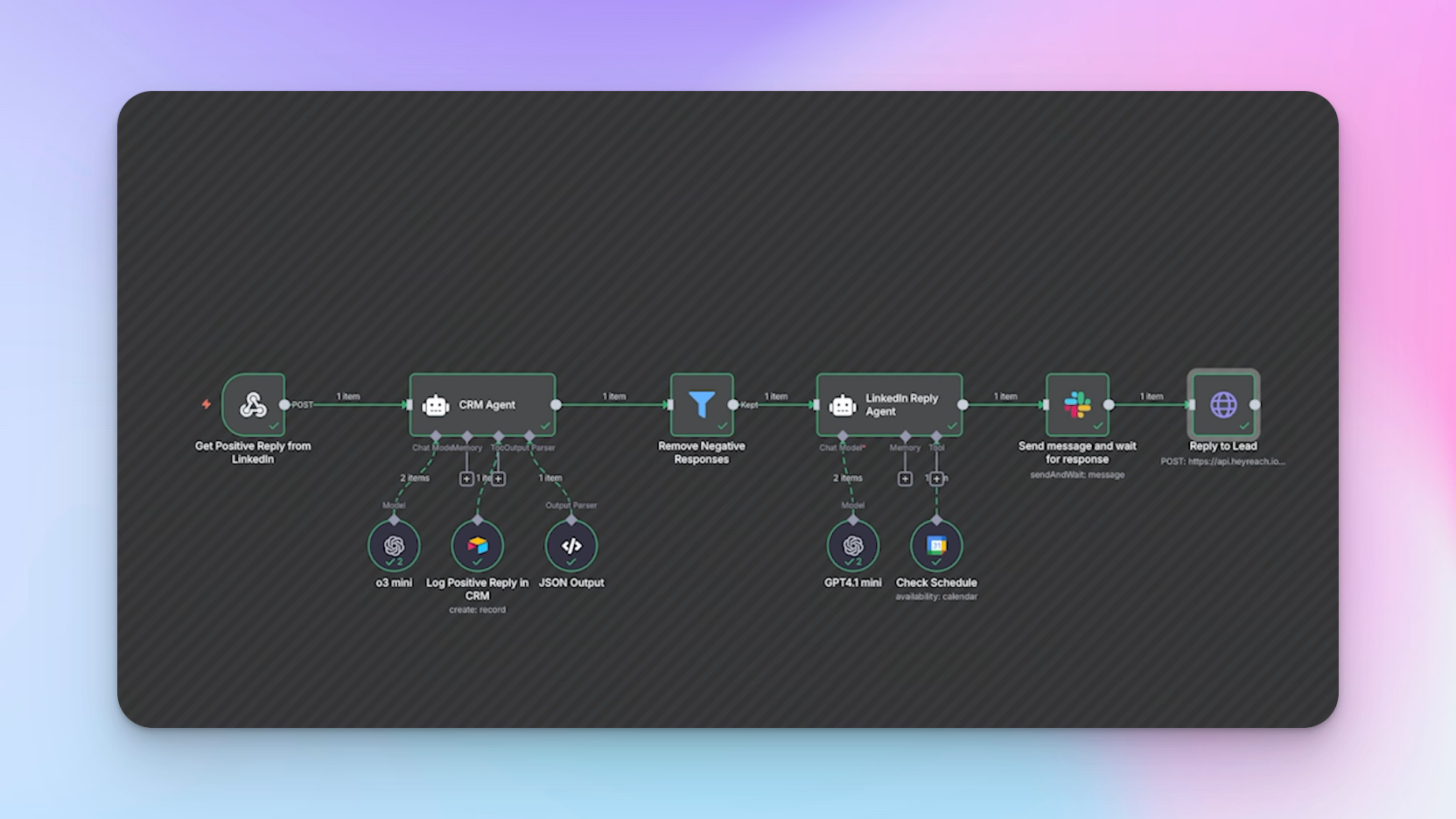
Here's how the whole system works once it's running:
- Clay continuously monitors for new leads matching my ICP, qualifies them, and identifies which signal they trigger (job posting or someone leaving the company).
- Qualified leads are automatically pushed into the correct HeyReach campaign — job posting campaign or left company campaign.
- HeyReach sends hyper-personalized connection requests and follow-up messages automatically, respecting LinkedIn limits to keep accounts safe.
- When a positive reply comes in, N8N catches it via webhook in real time, logs the lead in the CRM, drafts a reply using AI, and pings me in Slack for approval.
- I click approve, and the message is sent. The whole thing runs autonomously.
That's it! Save this guide on LinkedIn prospecting to experience the full power of personalized outreach and hands-free lead generation.
P.S. If you want ready-made workflow blueprints to adapt rather than building everything from scratch, the HeyReach N8N template library has battle-tested flows you can download and plug straight into your stack.

Try it for free
Frequently Asked Questions
Do automated LinkedIn messages feel personal?
Yes. Messages are based on real, current signals (like job posts or team changes), making them relevant to what’s happening in a company right now. Because of this, they feel like they were written manually—not like generic templates.
What does this Linkedin automation system cost?
Costs typically include Clay credits and subscription of choice (for data enrichment), a HeyReach subscription of choice, and an n8n account on subscription of your choice. Expenses can be reduced by using third-party APIs instead of Clay’s native integrations. Since data runs on a schedule, credits are not used continuously.
What if AI-generated messages don’t match the tone?
Messages can be reviewed before sending using an approval step. Most drafts are usable as-is, but quality improves significantly with clear instructions, tone guidelines, and strong examples. Regular updates to prompts help refine results over time.
How is scheduling handled to avoid conflicts?
The system can check calendar availability before suggesting meeting times. If a specific time is mentioned, availability is verified and the response is adjusted accordingly. If no time is suggested, no calendar check is performed.
Can generic campaigns run alongside signal-based ones?
Yes. Signal-based campaigns are more relevant but usually generate fewer leads. Generic campaigns help maintain volume by targeting a broader audience, though response rates may be lower due to less personalization. This balance is important when deciding how to automate LinkedIn outreach for both scale and quality.