LinkedIn Follow-Up Message: A Signal-Based System (+ Examples)
Published:
February 27, 2026
Updated:
August 21, 2026
If your LinkedIn reply rates are sliding, it’s probably not because you didn’t follow up enough.
It’s because you followed up where you shouldn’t have.
Here’s the pattern I often see (and yes, I’ve made this mistake too): silence happens → you assume it’s a timing issue → you add another nudge → replies drop → you add another one → prospects disengage even more.
And LinkedIn isn’t email. It’s personal. Your face, your name, your profile show up in their notifications next to colleagues and friends. Over-following feels like pressure, and will mess up your reputation.
Now, I’m definitely not saying don’t follow up. Follow-ups drive pipeline — but only when there's an actual buying signal or engagement behind them.
I'll show you how to figure this out and rethink follow-ups entirely. Including what to actually send after no response, with a follow-up example for each scenario you'll run into.
You’ll learn how to identify which LinkedIn conversations deserve another message, which ones need time, and which ones you should quit — and how to operationalize that logic so you stop over-messaging by default.
Why more follow-up messages may reduce LinkedIn reply rates
Over-following lowers reply rates because LinkedIn conversations carry social friction and attention cost.
Every extra message changes the probability of a reply and increases the probability of silent rejection.
LinkedIn is not an inbox — it’s a social space
On email, you’re just another subject line. On LinkedIn, you’re a person.
Your name, your face, your company, mutual connections, shared groups, maybe even someone they met at a networking event or conference — every message lands inside that social context of a professional network and professional relationships.
That changes the math.
When you send a second or third follow-up, it feels like tapping someone on the shoulder again and again.
Persistence works in cold email because inboxes are noisy and impersonal. On LinkedIn, over-persistence feels visible, and that visibility creates friction.
And more friction means lower reply probability.
Every message increases pressure (even if it sounds polite)
“Just wanted to check in.”
“Bumping this to the top of your inbox.”
“Wanted to circle back after my message last week.”
You may think you’re being low-pressure. But from the prospect’s side, every new notification creates micro-pressure:
- I saw this.
- I didn’t respond.
- Now they’re back.
- I either reply… or ignore again. (I roll my eyes, in any case.)
That tension compounds. Follow-up #1 might increase reply probability, but follow-up #3 decreases it.
At that point, the dynamic shifts. The prospect is no longer thinking, “Do I want this?” They’re thinking, “How do I make this stop?” It’s not effective, and it’s definitely not building relationships.
Silence is usually about priority, not awareness
“If they didn’t reply, they probably didn’t see it.” Ok, sometimes true, often not.
Silence usually means one of three things:
- Not relevant right now.
- Not compelling enough.
- Not worth the cognitive effort to engage.
None of those are solved by adding more nudges. If the underlying priority isn’t there, extra follow-ups don’t create it, they just expose the mismatch.
Follow-ups are a probability game, not a moral virtue
There’s a weird pride in “I follow up 7 times.”
Cool. But what does it do to your response rates?
Generally speaking, up to 2 follow-ups will see results. Every additional message:
- Slightly increases the chance of response from a small segment
- Significantly increases disengagement from the majority
If you measure campaign-level reply rate, blind persistence can drag the whole thing down.
This is where most sales teams get it wrong: they optimize for touch count instead of state quality.
Do you treat all silence in between the same?
- Not accepted? Follow up.
- Accepted but quiet? Follow up.
- Seen but no reply? Follow up.
- Replied once then ghosted? Follow up.
Teams often reach out to prospects on LinkedIn with the same actions — yet the context is wildly different. That’s how reply rates die.
Silence after a connection request is not the same as silence after a question. And silence after a “Seen” is very different from silence before a LinkedIn profile view.
If you don’t distinguish conversation states, you can’t make smart follow-up decisions. And when you can’t make smart decisions, you default to adding another step.
Which feels productive, until your reply rate drops drastically and you start blaming copy.
The problem with generic LinkedIn follow-up advice
Most LinkedIn advice assumes one thing: silence = try again.
- Follow up in 3–5 days.
- Add 4–6 touches.
- Be patient, persistence wins.
Sounds logical, but it’s also incomplete advice.
As we already said, not all silence means the same thing — and treating it like it does is exactly how reply rates slide after message two.
“Follow up every 3–5 days” ignores conversation state
Those rules were built for email sequences, not LinkedIn.
They don’t ask:
- Was the connection request accepted?
- Was the message likely seen?
- Did the prospect engage once and then disengage?
- Did they view your profile?
- Did they reply and stall?
Those are different contexts with completely different probabilities.
A connection request sitting unaccepted for 10 days is not the same as a prospect who replied once and then went quiet.
Follow ups on LinkedIn optimized for activity, not outcome
Generic follow-up frameworks reward motion. More steps, more touches, more “staying top of mind.”
But the uncomfortable truth is that not every conversation deserves continued attention.
When you treat every prospect equally:
- You push harder where you should pause.
- You increase pressure where interest is low.
- You dilute focus from high-probability threads.
After the second or third unreciprocated touch, reply probability declines because the conversation state shifted and you ignored it.
And because LinkedIn is socially visible, over-messaging prospects doesn’t just get ignored, it changes how you and your company are perceived.
👉 Bottom line: Generic LinkedIn follow-up advice treats every prospect the same, pushes volume where restraint is smarter, and predictably drives reply rates down after the second message — not because follow-ups don’t work, but because they’re applied without context.
To avoid this mess, I’ll walk you through a 4-state LinkedIn follow-up model that helps you decide when to push, when to wait, and when to stop, so your reply rates go up without increasing message volume.
The 4-state LinkedIn follow-up model
Not every quiet thread is the same, and your next action should depend entirely on where the conversation stands.
Instead of asking, “When should I follow up?,” ask “What state is this conversation in?”
We’re going to break LinkedIn outreach into four clear states:
1️⃣ Not accepted
2️⃣ Accepted, no reply
3️⃣ Active, no reply
4️⃣ Replied once, then stalled
👉 States 1 and 2 can, and should, be handled systematically inside your campaigns.
👉 States 3 and 4 require judgment — but only for high-value prospects, not your entire list.
This is where successful operators streamline operations and win:
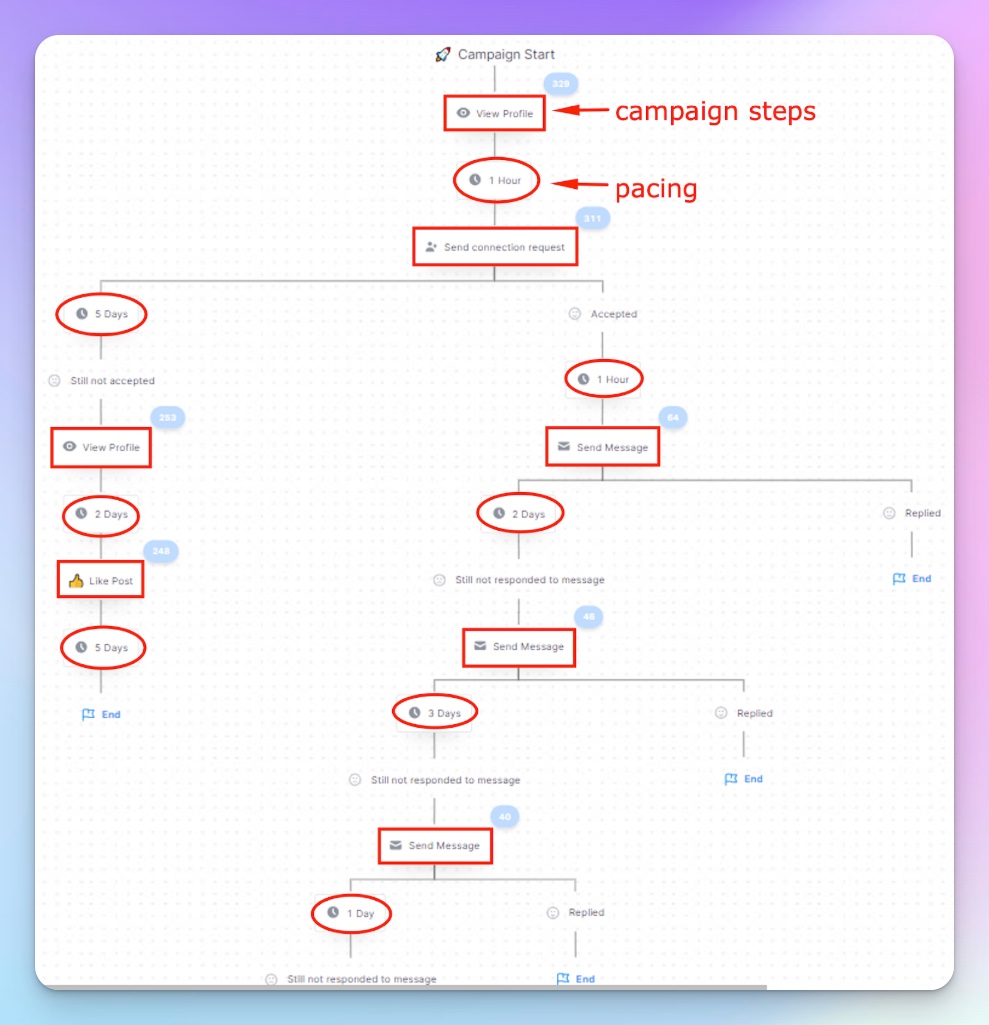
- They use HeyReach campaign steps and pacing to automate what’s safe.
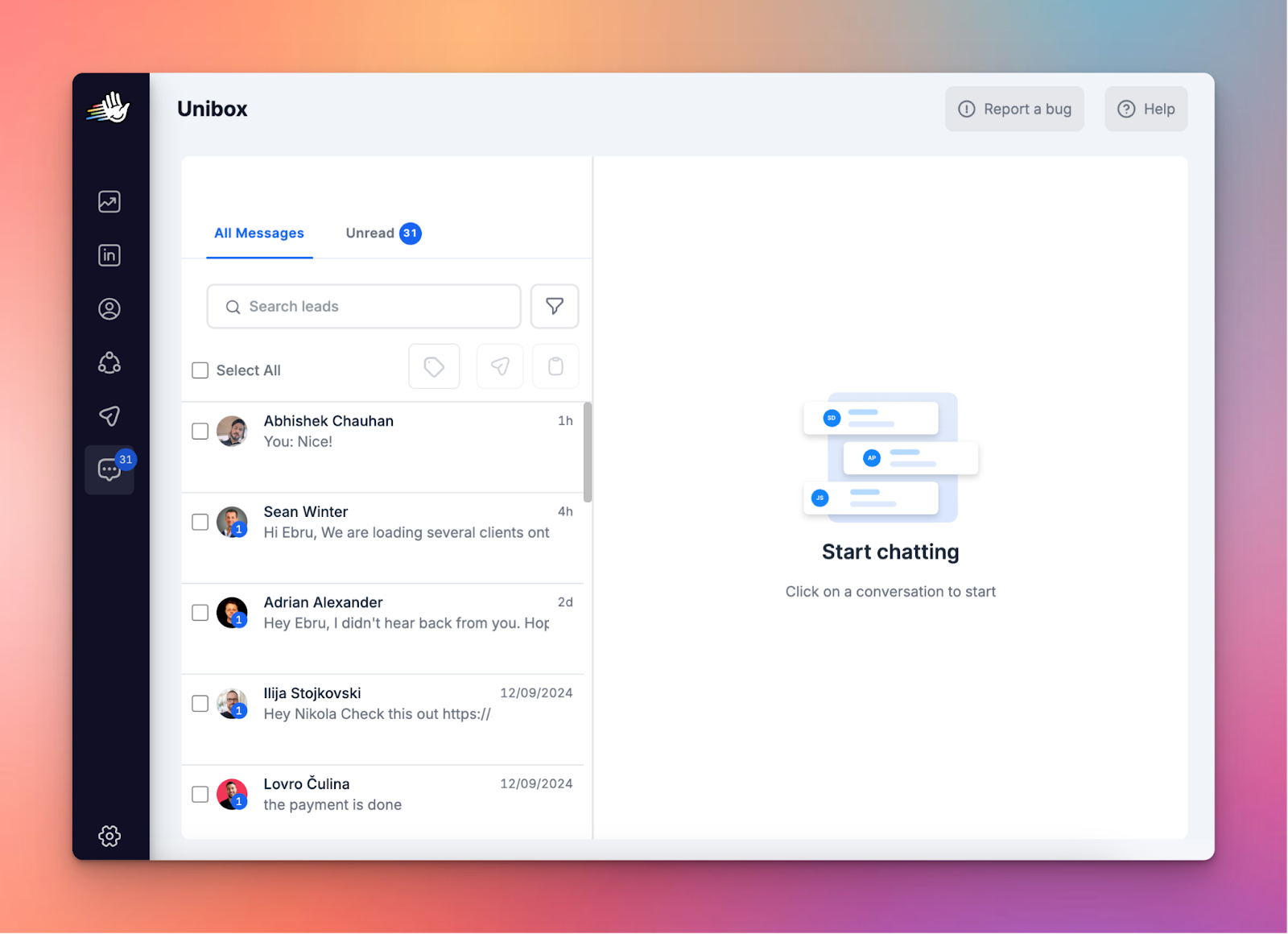
- They use tags and Unibox to review what’s promising.
- And they stop treating every thread like it deserves equal effort.
Let’s start with the most misunderstood one.
State 1: Not accepted
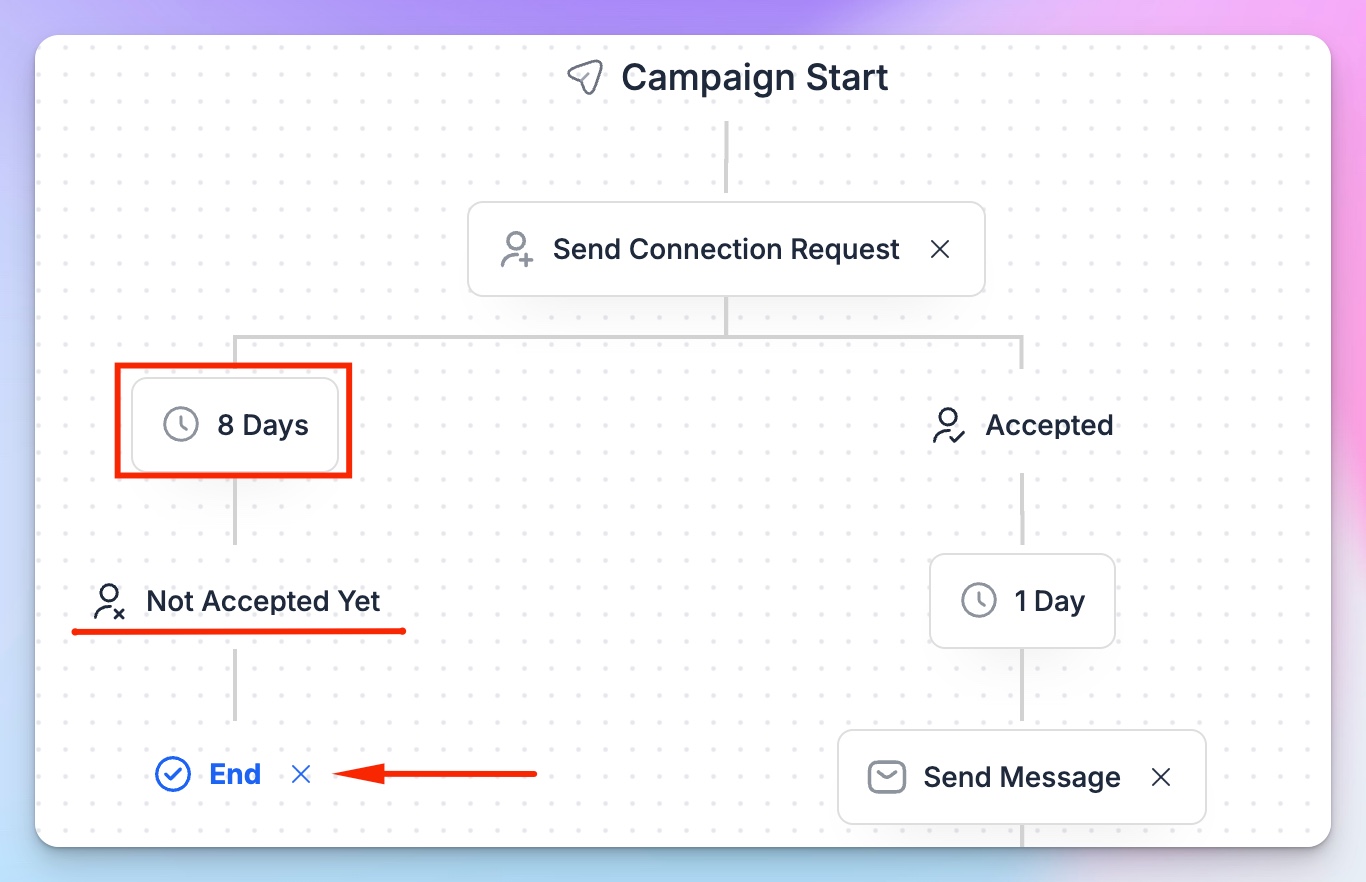
If a connection request has been pending for 7+ days, you don’t have a “follow-up opportunity,” you have a non-event.
There’s a big difference.
How to detect it
This is not a a warm thread, it’s probably a closed door, if:
- Connection request is still pending after a week
- No profile view
- No engagement
- No signal of recognition
Follow-up guidance
Do not treat this as a follow-up scenario.
Sending another message here doesn’t increase reply probability — it increases friction.
If they didn’t accept, they didn’t opt into the conversation. That’s your signal.
Over-messaging prospects might trigger early spam signals, lower future LinkedIn acceptance rates, and make prospects remember you as pushy.
Should you send a LinkedIn follow-up message after no response?
Let this campaign step expire inside HeyReach and don’t fall into temptation to add another “bump” message.
Add them to your LinkedIn exclude list and revisit after a while or through another channel.
For example, you could use multichannel outreach — send a few follow up emails and reconnect through HeyReach integration with Instantly. This too can be automated:
- Insert the “Add to Instantly” step inside your HeyReach campaign
- Pick “Instantly Campaigns”
- Select the specific Instantly sequence from the dropdown where those leads should be routed
This will push leads straight into an active Instantly campaign.
If you want to wait and collect the leads first and run the campaign later (in case you want to do manual research for some reason, or build a segmented list of State 1 leads for future lead generation efforts, or just wait a bit), then:
- Pick “Add to Instantly” in the campaign
- Pick “Instantly Lists”
- Choose the list you want to add your leads to
So, all in all, here’s what the procedure will look like for State 1 leads:
Send LinkedIn connection → pause 10 days → if no acceptance, find email → Add to Instantly Campaign → start email sequence.
👉 Another tip: you can also run the HeyReach-Instantly integration in reverse. If a cold email sequence stalls, don’t keep pushing the inbox — route that contact into a LinkedIn sequence instead. A profile view, a contextual connection request, or a reference to something they posted last week often reactivates the conversation in a lower-pressure environment.
And when someone replies warmly via email, that’s your cue to deepen the relationship on LinkedIn, for better visibility and credibility. That’s how you turn a positive reply into a great meeting (and eventually a demo) without forcing the next step.
State 2: Accepted, no reply
Your prospect saw the connection request and said “yes”. That’s a light acknowledgement, but they haven’t engaged.
Which means you’re in the room, but they haven’t invited you to speak.
How to detect it
- Connection accepted
- Your first message is still unanswered after 5–7 days
This is the first real opportunity for a follow-up — but it’s delicate. Jumping straight to InMail or aggressive LinkedIn follow-up messages often backfires.
Follow-up guidance
One follow-up is enough here. Then pause. Reassess.
If you overdo it, you’ll look pushy or tone-deaf. It signals “I’ll chase anyone”, and reply probability will drop sharply if you send more than one follow-up.
What to actually do
Cap the campaign to 2 or 3 steps max. Use a 7+ day delay before sending the follow-up to give them breathing room.
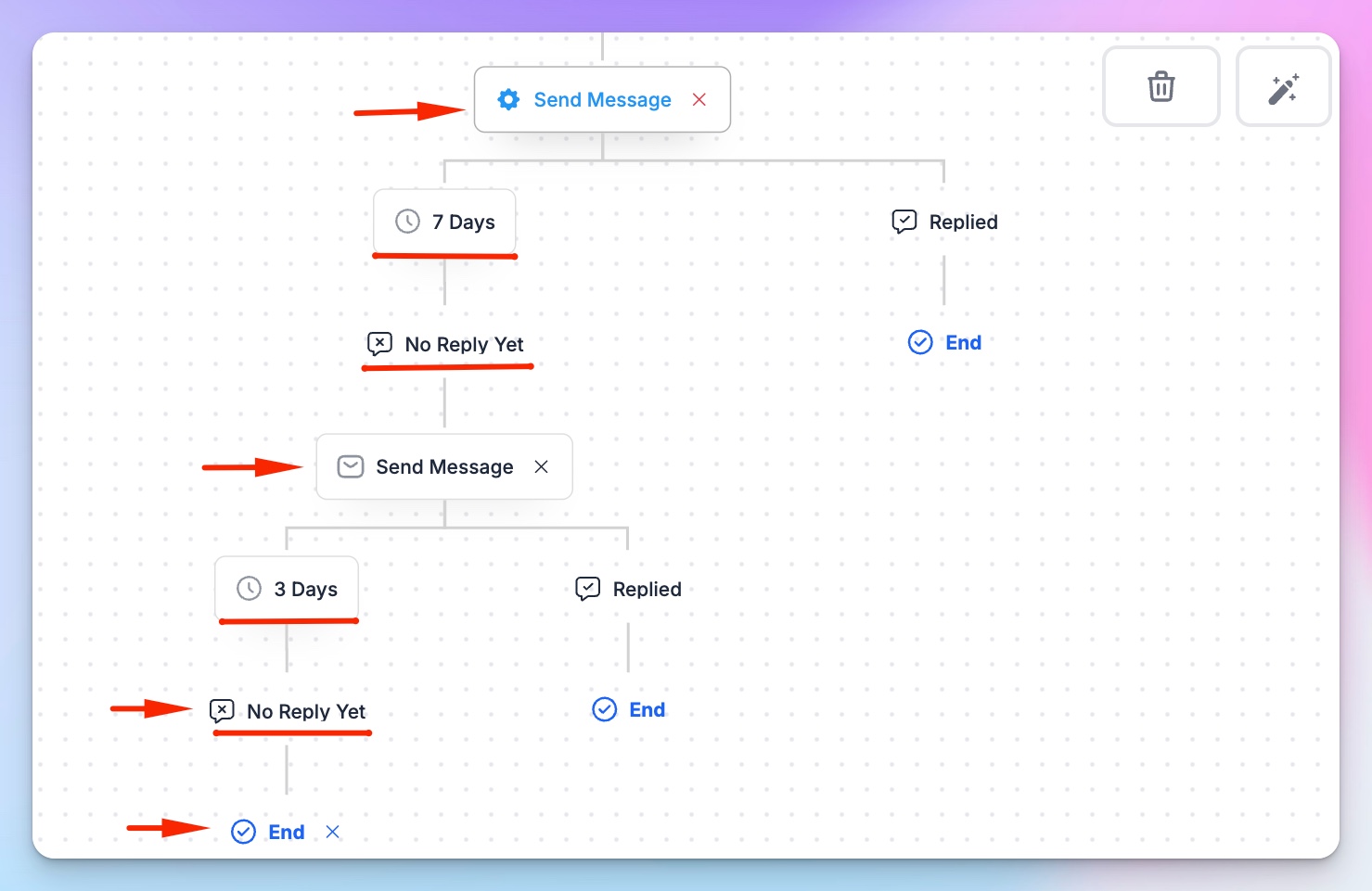
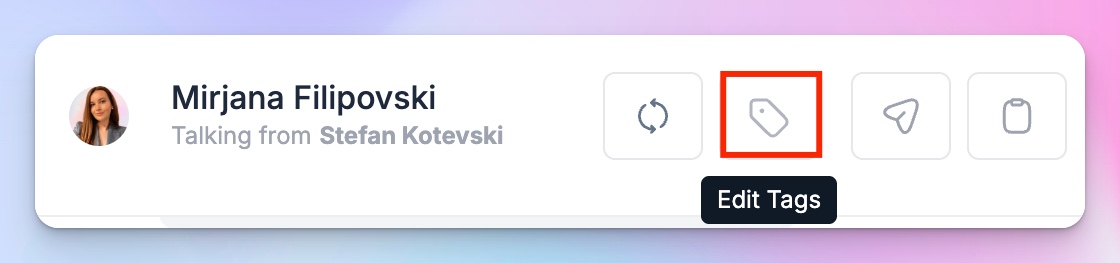
If they don’t reply after the second step, go to the Unibox, find the conversation, and next to the lead’s name, click Edit tags > Create tag > Add tag name and pick color, and tag the conversation as “Accepted – No Reply” for easy tracking and review.
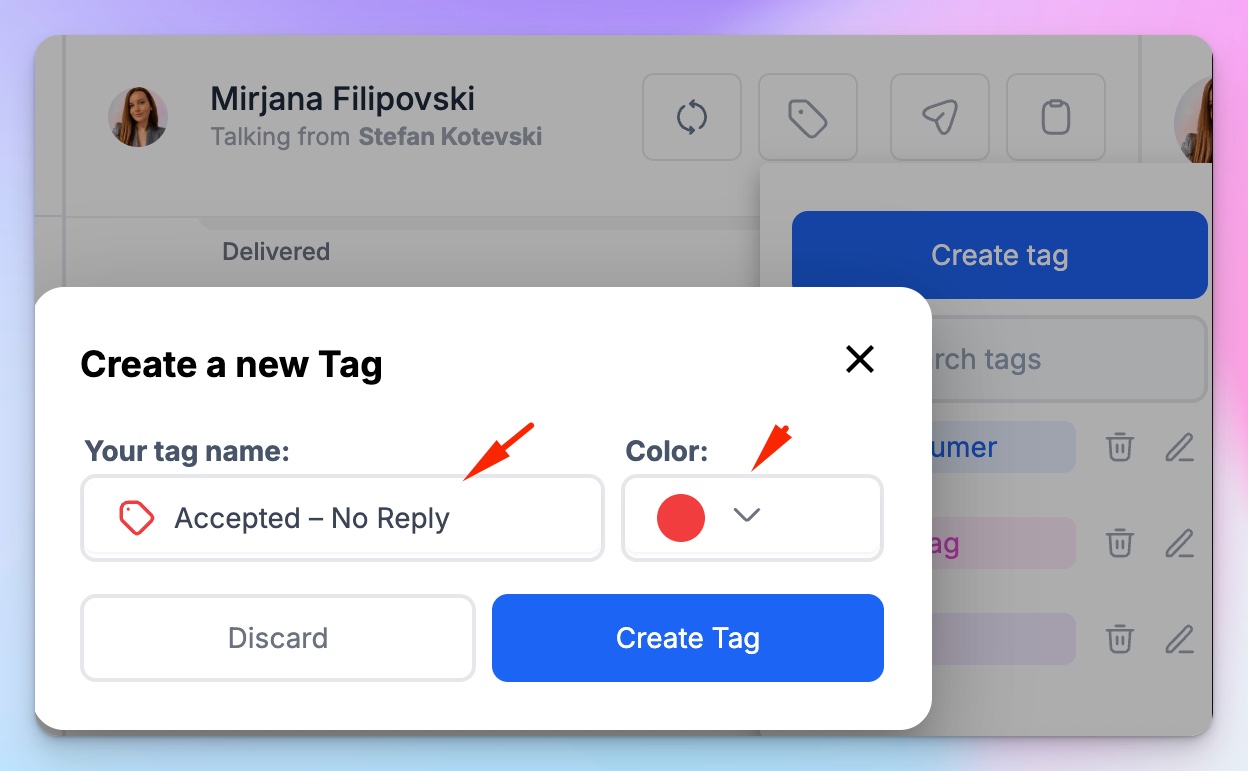
Once you click Create tag, this tag will be available and searchable, so you can tag the next Stage 2 lead.
Once you want to gather all State 2 leads in one place, just go to Unibox and click on the Filter icon next to the Search leads bar:
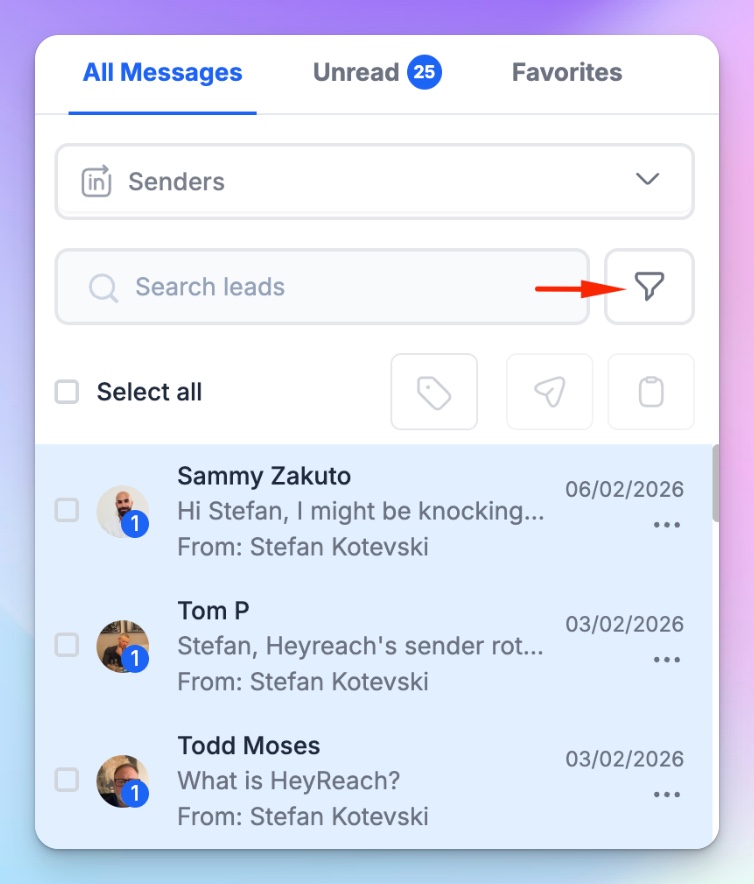
Click on Select tags and choose “Accepted – No Reply” tag, and click Apply.
You’ll get all conversations with this tag, then click on Select All and Add to list > Add leads to a new list:
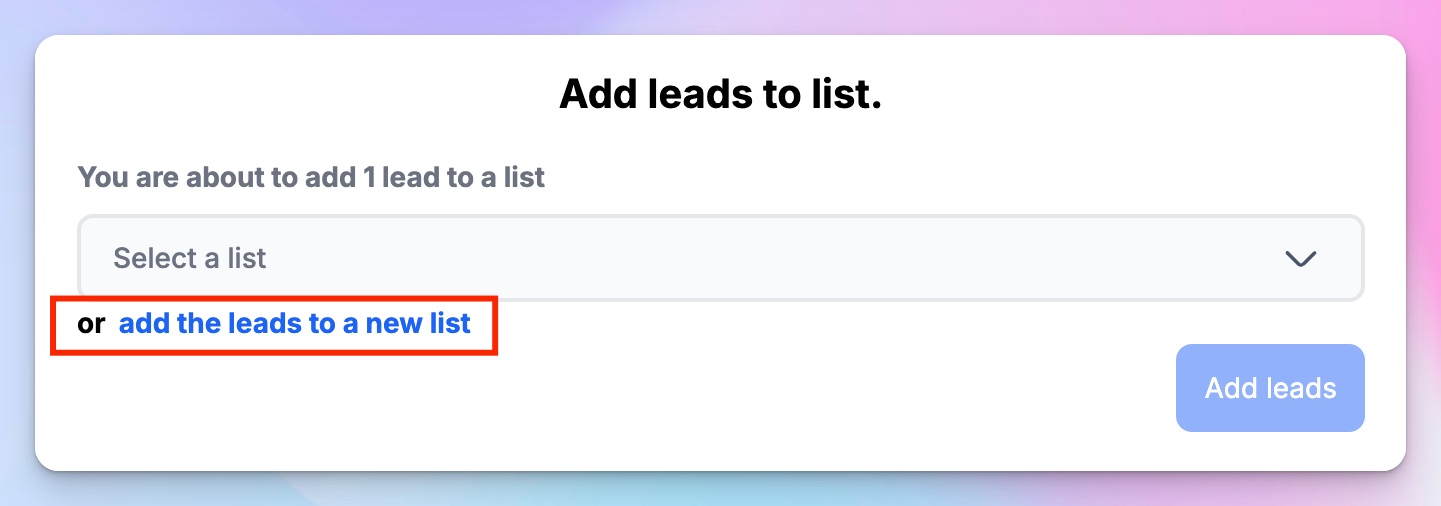
Name the list the same way as the tag, “Accepted – No Reply”. You’ll be able to find it in the menu on the left side under Leads, and find it manually on the list of lists (see what I did there) or by searching for it in the Search lists bar at the top.
You can then use it as an exclusion list. Or, after a while, create a new campaign with this list as the target audience. You’ll also be able to combine it or intersect with other lists, export it as a CSV file, and rename or delete it.
Repeat the procedure with each new tag for each new state.
State 3: Active, no reply
They likely saw your message, but they didn’t prioritize it. This is the dangerous middle ground.
They’re active on LinkedIn. They’re posting, commenting, engaging, but your message sits there untouched.
That usually doesn’t mean rejection. It means:
- Bad timing (wrong buying window)
- Internal conversations happening
- Competing priorities
- Mild interest, low urgency
- Or your message didn’t feel important enough right now
How to detect it
For high-value prospects, do a manual check. Were they recently active on LinkedIn? Are they posting, commenting, or engaging with others?
If yes, it increases the likelihood your message was surfaced — but remember that inbox handling and feed engagement often happen at different times. Treat this as a signal to pause.
If yes, assume they’ve likely seen your message.
Follow-up guidance
Do not follow up immediately.
If they’re active but silent, another message rarely increases reply probability. It often hardens the non-response and subtly shifts perception from “interesting” to “pushy.”
Instead, wait for a new signal, or for some time to pass.
A new signal can be:
- They post about a challenge your solution solves. Reference the post directly and connect your solution to that exact pain.
- They comment on a specific topic relevant to your outreach. Now you have context and a chance at a personal touch. Tie your follow-up to that thread instead of your original message.
- They change roles. A new role usually means new priorities and openness to revisiting tools. Congratulate them and reframe your outreach around optimizing their new setup.
- They engage with someone in your company. They like or comment on your teammate’s content. Awareness exists. A follow-up now feels connected, not random.
Or…
Wait for a meaningful time gap — think 3–4 weeks, not 3–4 days. That way, you’ll reset the context and when you follow up again, it will feel like a new moment, not a nudge.
What to actually do
- Manually tag as “Active – No Reply.” and create a list with these leads. See the procedure above.
- Remove them from active follow-up sequences. Just go to Campaigns > Choose the campaign and on the very first screen you’ll get the option to Select an exclusion list, pick the list from the drop-down menu and click Continue.
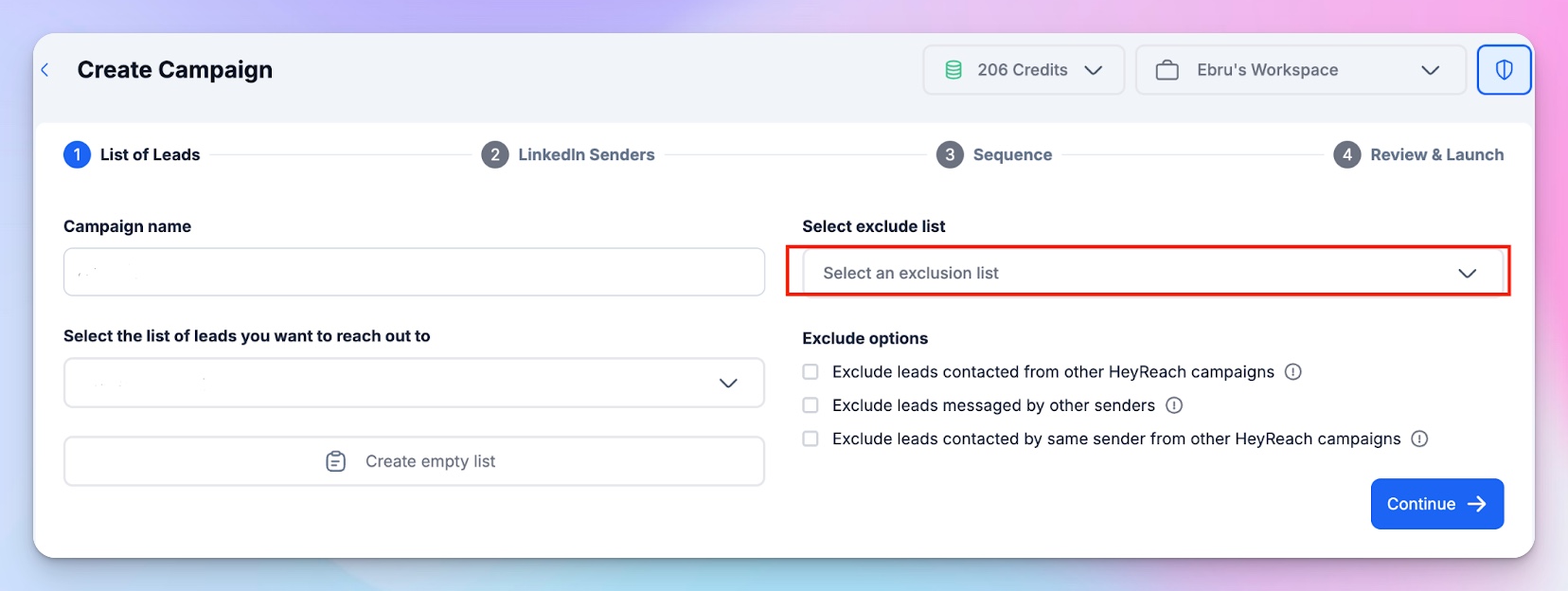
- Revisit only when a real external signal appears. Monitor them manually via Unibox filters (by tag) or do manual LinkedIn activity checks.
Now, the state that deserves the most attention because it’s closest to the pipeline.
State 4: Replied once, then stalled
This one means there was intent and you had momentum, but then it faded.
That’s not the same as cold silence. Some common reasons include:
- They needed to check internally and forgot
- It wasn’t urgent
- Timing shifted
- Your last question required effort
This state deserves care, not automation.
How to detect it
There is one reply from this prospect in your Unibox but there was no response for 7+ days after your last message.
The key is after your last message. If the ball is in their court and it’s been a week, this is follow-up territory.
Follow-up guidance
Send one thoughtful, contextual follow-up. Not bumps, “just checking in” messages, or copy-paste message templates.
You need to reference the last exchange directly.
For example:
- Acknowledge the previous point
- Reduce friction
- Offer a simple next step
Something like, “Hey {Name}, Last time you mentioned you’d check internally about X — did that conversation happen, or should we revisit this next month? Let me know!”
That’s low pressure, clear, and easy to answer.
Anything beyond one follow-up here starts turning goodwill into pressure. And once that happens, you’re not just losing a reply, you’re damaging relationship quality.
Format variety works: if a text follow-up goes unanswered, a 15-second voice note on the next touch is a cheap pattern-interrupt — HeyReach can generate one automatically from your existing script.
What to actually do
This state is manual.
Review the thread inside HeyReach Unibox, and send one contextual follow-up only.
If there’s still no reply after that, tag the conversation accordingly, create a list of these leads, and stop LinkedIn follow-ups.
No third nudge. No “final attempt” — if intent was real, they’ll re-engage later. If it wasn’t, pushing won’t manufacture it.
This is where disciplined sales teams protect both reply rates and reputation.
If you’re wondering how to craft an effective follow-up, go through the LinkedIn message automation playbook or these 7 LinkedIn and email follow-up examples.
👉 Bottom line: This 4-state model is what turns random nudges into a structured LinkedIn follow-up strategy.
LinkedIn follow-up message templates for each scenario
The 4-state model tells you when to act. Here's what to actually send in each one. These are short, they name something real, and they don't pitch. The whole job of a follow-up is to prove you noticed something specific. Fill in the real detail or don't send it.
State 1 (Not accepted): don't follow up — switch channels
Nothing to send here. They didn't accept, so there's no thread. If the account's worth it, go to email and lead with something real:
Hey Alex, tried connecting on LinkedIn but email's easier. Saw you just raised your seed. Congrats. Reaching out because [one specific reason]. Worth a quick chat?
Why it works: you're not re-pinging a dead request, you're starting fresh with a real trigger. The raise is the reason you're writing, not filler.
State 2 (Accepted, no reply): one nudge, then stop
They accepted, then went quiet. One message, and make it a real question — not "just bumping this."
Hey Alex, thanks for connecting. Is [specific thing] something you're handling in-house right now, or still on the list?
Why it works: it's one line, it's a yes/no they can answer between meetings.
State 3 (Active, no reply): wait for a signal, then reference it
They're posting and commenting but your message is sitting there. Don't re-send. Wait for something to react to, then react to that. This is the "how to send a LinkedIn follow-up message after no response" case people botch — the fix isn't another message, it's a new reason.
Hey Alex, saw your comment on [topic] — the part about [specific point] is spot on. It's basically why I messaged you in the first place. Worth picking up where we left off?
Why it works: you're referencing something they chose to put out there. That's not "checking in" — that's paying attention, and they can tell the difference.
State 4 (Replied once, then stalled): one contextual close
They replied, then it died. This is your warmest lead. Reference the last thing they actually said — never a generic bump.
Hey Alex, last time you said you were waiting on [their exact words] before looking into this. Did that sort out, or should I check back in a few weeks?
Why it works: you're quoting them back to themselves, which proves you were listening. Easy yes/no, zero pressure.
The follow-up priority rule
Your team’s manual follow-up effort should go only where the probability of a reply justifies the time, attention, and reputation risk.
The truth is, not every prospect deserves the same level of care. When you treat your entire list equally, two things happen:
- Your reps waste time reviewing low-impact threads.
- You over-touch conversations that were never likely to convert and drag down overall reply rates.
So the goal isn’t to follow up more, it’s to have outreach prioritization and follow up selectively.
Here’s how to think about it.
High-value prospects: manual judgment pays off
These are accounts where a single reply can materially change the pipeline.
You’ll recognize them by signals like:
- Strong ICP fit (company size, industry, geography)
- Clear buying authority, right job title (Head of Sales, VP GTM, Founder)
- Strategic logo value — meaning the company’s name carries weight. Landing them could unlock social proof, case studies, investor confidence, referrals, new connections and easier access to similar accounts (think recognizable SaaS brands, fast-growing startups, or well-known agencies in your niche)
- Existing engagement signals (profile views, one reply, mutual connections)
- Active LinkedIn presence
If they respond, it matters, and even a 10–15% lift in reply probability is worth the effort.
This is where manual review makes sense, especially in states 3 and 4 (Active, no reply or Replied once, then stalled).
- Check the thread in Unibox.
- Read context carefully.
- Look at their recent activity.
- Tailor the follow-up based on what’s happening now, not what you sent two weeks ago.
For example, let’s say a VP of Sales at a well-known SaaS company replied once:
“Interesting — we’re exploring outbound optimization this quarter.”
Then the thread went quiet.
You check their profile and see they posted yesterday about hiring 3 new SDRs. Generic bump would be “Hey, just checking in on this. Did you have time to read my previous message?”
Manual, contextual follow-up would be “Congrats on scaling the SDR team — saw the post yesterday. Since you’re growing outbound right now, this might actually be perfect timing. Want to take 15 mins next week to see how we structured [Client X]’s LinkedIn outbound to increase reply rates by 32% without triggering account limits? Best regards, [Your name]”
That’s situational awareness.
High-value prospects deserve manual judgment because the upside justifies the effort.
Medium-value prospects: structured automation is enough
These are solid ICP matches, but not strategic must-win accounts.
Maybe:
- Mid-level roles
- Smaller companies
- Less clear buying authority
- No strong engagement signals yet
They’re viable, but not worth 1:1 time unless they raise their hand.
For these prospects:
- Cap campaigns at 2–3 steps.
- Use clear delays (7+ days between touches).
- Automate tagging.
- Remove them from sequences after the defined limit.
If they engage, they move up in priority, and if they don’t, you move on.
Your system does the filtering for you.
Low-value or low-signal prospects: exit early
This is where most teams bleed performance.
Low-value doesn’t mean “bad company.” It means:
- Weak ICP match
- No authority
- No engagement
- No connection acceptance
- No visible activity
- Or repeated non-response across campaigns
These threads have low reply probability and high annoyance risk.
Continuing to follow up inflates activity metrics and erodes account health.
Operationally:
- Exclude them early.
- Withdraw stale connection requests. You can do this at the very first step when launching your first campaign. When setting up a Send Connection Request step, scroll all the way down and you’ll see this option.
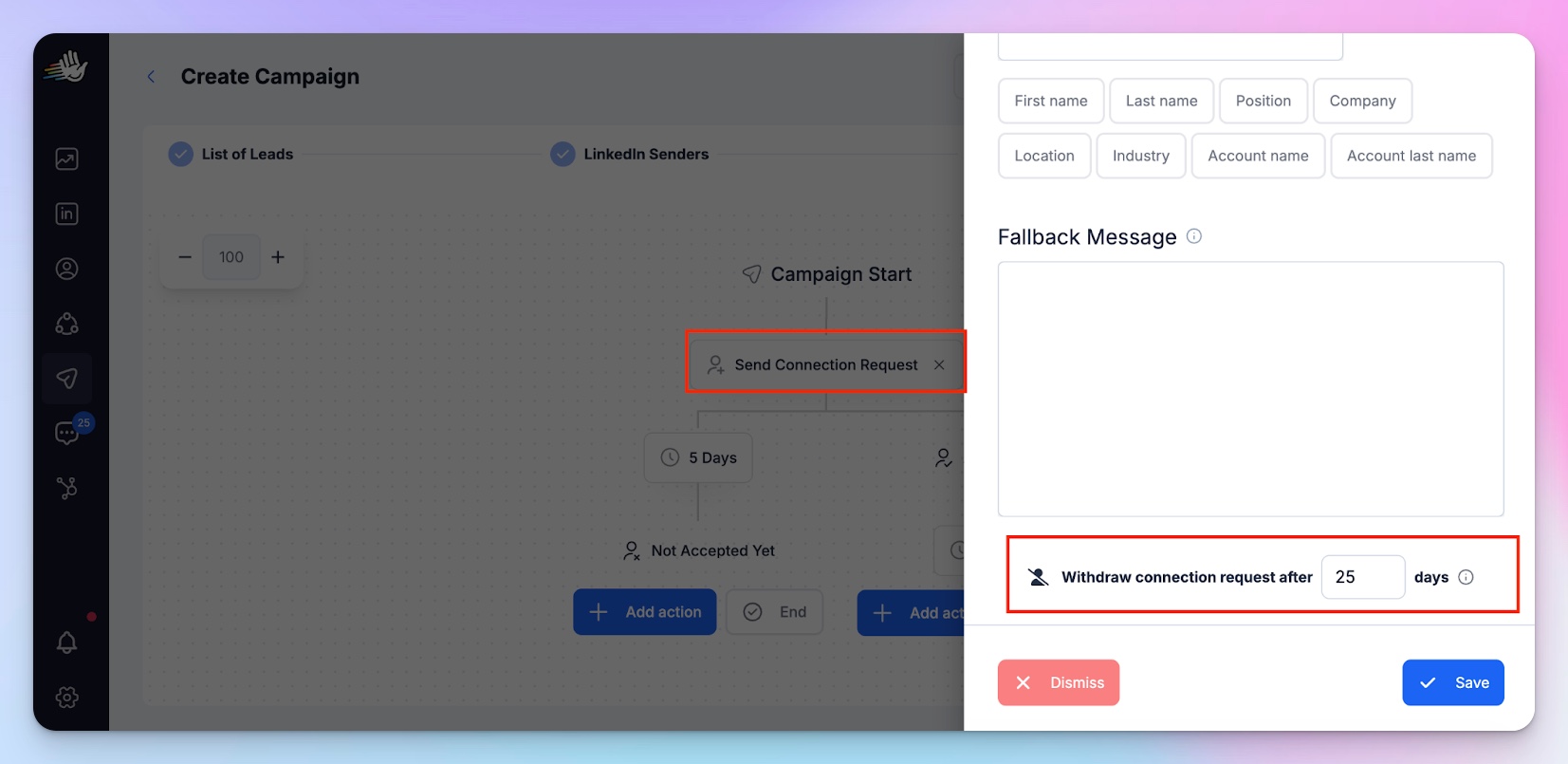
- Add to LinkedIn exclude lists.
- Do not recycle them into new campaigns immediately.
The fastest way to improve reply rates is removing conversations that shouldn’t be followed up on in the first place, and this will help you do just that.
When your team applies the follow-up priority rule consistently, effort shifts toward leverage — and reply rates climb without increasing message volume.
How to enforce follow-up restraint in HeyReach
Follow-up restraint isn’t enforced by AI guessing intent but by follow-up limits and process.
(Here’s how to configure sending limits in HeyReach.)
If you rely on “smart” automation to decide when to stop, you’ll eventually over-message. The safer move is simpler: design campaigns that physically prevent reps from sending too many touches in the first place.
Start with boundaries.
Cap LinkedIn sequences at 2–3 steps max — one connection request, one message, one follow-up. That’s it for medium-value accounts. If someone hasn’t engaged by then, the system exits them.
Next, enforce minimum 7-day delays between messages. This gap creates a sustainable follow-up cadence that protects both reply rates and account health.
Then use exclude lists aggressively.
Once a prospect hits “Accepted – No Reply” after the second step, or sits in “Active – No Reply,” they come out of active campaigns. No recycling into a new sequence next week. No silent re-hits. Just tag them accordingly and move along — you can try again after some time has passed, maybe through another channel.
Finally, keep manual oversight lightweight.
You don’t need daily audits, a focused 20–30 minute weekly Unibox review is enough. Scan high-value accounts in States 3 and 4. Decide: re-engage, pause, or stop. Tag accordingly.
The goal isn’t to message more intelligently in real time, but to build a system where over-messaging becomes structurally impossible. If you want to push this further, you can drive the whole tag-and-exclude workflow programmatically through the HeyReach MCP.
That’s how operators scale LinkedIn outreach strategies without slowly burning their own pipeline.
A realistic weekly workflow operators can easily follow
This system only works if it’s light enough to run every week without becoming a chore.
If it turns into a 2-hour CRM archaeology session, no one will stick to it. The goal isn’t perfection, but disciplined consistency.
Here’s what that looks like in practice, step-by-step.
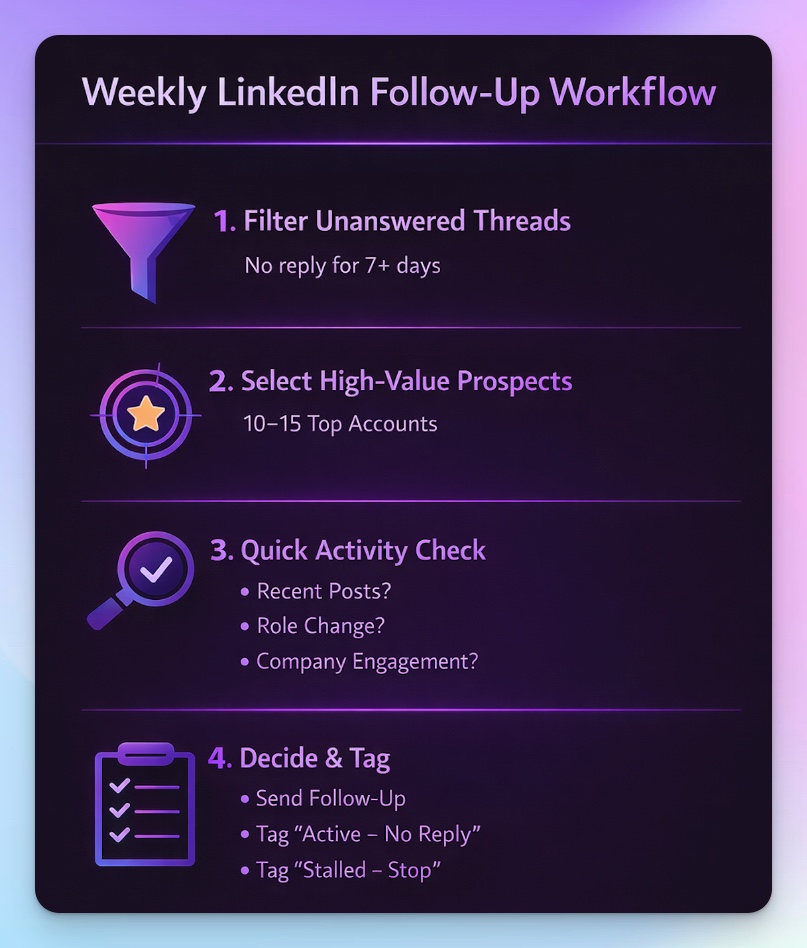
Step 1: Filter for unanswered threads (5 minutes)
Open Unibox. Filter for conversations where:
- You sent the last message
- No reply for 7+ days
Don’t read everything. Just generate the raw list.
Step 2: Cut the list down aggressively (5–10 minutes)
From that list, identify the 10–15 highest-value prospects.
- Use simple criteria:
- Strong ICP fit
- Real buying authority
- Strategic logo value
- Prior engagement (at least one reply or meaningful signal)
Leave anyone else untouched. The system already handled them through campaign caps and exclusions.
Step 3: Quick signal check (10 minutes)
For each of the highest-value prospect, seek additional information:
- Are they active on LinkedIn?
- Did they post or comment recently?
- Did they change roles?
- Did they engage with your company?
If yes → consider a contextual follow-up.
If no → tag and pause.
Step 4: Decide, tag, move on (5–10 minutes)
For each reviewed thread, choose one action:
- Send one contextual follow-up
- Tag as “Active – No Reply” and exclude
- Tag as “Stalled – Stop” and exit
That’s it.
You’re not reviewing 200 conversations. You’re making high-leverage decisions on 10–15.
Run this once a week, same time, same process. This is how follow-up restraint becomes operational, not theoretical, and how reply rates improve without increasing message volume.
Next steps to scale LinkedIn follow-ups without burning accounts
If you want this to work, don’t optimize anything yet. Just install the habit.
Start here:
1. Block 30 minutes next week
Put it on your calendar. Same day. Same time. This becomes your LinkedIn follow-up review slot.
2. Define your “high-value” criteria in advance
Write it down.
- ICP fit?
- Revenue band?
- Seniority?
- Past engagement?
If you don’t define this beforehand, you’ll justify following up with everyone.
3. Create 2–3 tags that enforce restraint
For example:
- Active – No Reply
- Stalled – Stop
The point is labeling, but also preventing emotional follow-ups.
4. Cap your manual follow-ups at 10–15 prospects per week
Hard limit. Scarcity forces prioritization.
5. Track only one metric:
Reply rate on manual follow-ups.
Not total replies or campaign volume. Just: are your signal-based follow-ups performing better than your automated ones?
If after 4 weeks your reply rate improves and your account health stays stable, you’ll know the system works.
If it doesn’t, adjust your signal threshold, not your volume.
That’s the discipline most teams skip. And that’s usually the difference between accounts that compound and accounts that burn out.
Turn LinkedIn follow-ups into a system that actually works
LinkedIn follow-ups don’t succeed by sending more messages. They succeed by sending the right messages to the right people at the right time.
The 4-state model shows you exactly when to act, when to pause, and when to stop — and the follow-up priority rule ensures your manual effort is focused where it moves the needle.
High-value prospects get tailored attention, medium-value threads follow structured automation, and low-value or low-signal conversations are excluded early, protecting both LinkedIn reply rates and account health.
The real power comes from consistent, disciplined execution.
Weekly reviews, capped sequences, tags, and exclude lists turn follow-up restraint into an operational habit rather than a judgment call made under pressure.
When you apply this system, your team spends less time guessing, more time on high-impact conversations, and sees higher reply rates without increasing volume — all while keeping LinkedIn accounts safe and relationships intact

Try it for free
Frequently Asked Questions
How many times should you follow up on LinkedIn?
No more than 2–3 times total. The first follow-up can increase reply rates, but each additional message beyond that raises disengagement risk. On LinkedIn — unlike email — over-messaging is socially visible and damages your reputation.
How long should you wait before following up on LinkedIn?
Wait at least 7 days before sending a follow-up message. For prospects who are active on LinkedIn but haven't replied, waiting 3–4 weeks resets the context and makes your follow-up feel like a new touchpoint rather than a nudge.
Why are my LinkedIn follow-ups not getting replies?
Most likely because you're treating all silence the same. A prospect who hasn't accepted your connection request is in a completely different state than one who replied once and went quiet. Sending the same follow-up logic to both is what kills reply rates.
When should you stop following up on LinkedIn?
Stop after 2–3 unanswered touches. If a prospect is active on LinkedIn but consistently unresponsive, continuing to follow up hardens their non-response and shifts their perception of you from "interesting" to "pushy." Tag them, exclude them from active campaigns, and revisit later — or try another channel.
What's the best way to follow up on LinkedIn after no response?
Reference something specific — a post they published, a role change, or a topic they engaged with. A contextual follow-up tied to a real signal dramatically outperforms generic "just checking in" messages and shows situational awareness instead of blind persistence.