Outreach strategies: how to turn inbound leads into replies
Published:
March 28, 2025
Updated:
July 9, 2026
Most outreach looks the same: a list, a template, and fingers crossed.
Inbound leads make it feel easier. They've already engaged with your content, visited your website, and maybe even checked out your pricing page. But as any BDR knows, warm doesn't mean ready. Some are browsing. Others will ghost you the moment you follow up. Many aren't even the decision-maker. And scaling any of this on LinkedIn is its own can of worms.
You've already done the prospecting and qualifying — now comes the part that actually moves the needle: a structured outreach strategy that works for inbound and outbound, scales without getting you banned, and keeps the human touch intact.
That's what this guide covers.
Part 1: Inbound Outreach Strategies
Inbound outreach means engaging prospects who have already interacted with your brand — they've visited your product page, downloaded a resource, engaged with a LinkedIn post, or signed up for a webinar. They're warm. That's the good news.
The bad news? Warm doesn't mean ready. Some are browsing. Others are comparing you to competitors. Many aren't even the decision-maker. You still need a structured approach to move them through the pipeline.
The need for speed: why first-touch response time matters
Inbound outreach means engaging prospects who have already interacted with your brand — they've visited your product page, downloaded a resource, engaged with a LinkedIn post, or signed up for a webinar. They're warm. That's the good news.
The bad news? Warm doesn't mean ready. Some are browsing. Others are comparing you to competitors. Many aren't even the decision-maker. You still need a structured approach to move them through the pipeline.
The need for speed: why first-touch response time matters
Inbound leads go cold fast. If you don't respond quickly, the lead is gone.
Send a personalized LinkedIn connection request within 5 to 10 minutes of them checking out your post, resource, or product. Head of Sales at HeyReach, Nadja Komnenic, uses a simple 3-step LinkedIn cadence that gets her a 39% reply rate:
- Initial DM
- Follow-up — 2 days later
- Final nudge — 7 days later
That's really all you need for the first-touch sequence. You're not making a sale here — this first touch is about keeping the conversation alive.
Example first message:
“Hey [Name], I saw you checked out our [product/solution], we’re happy to answer any questions you have about it! Are you available for a quick chat later this week?”
Double down on leads that show strong intent: those visiting product or sales pages, engaging with posts in meaningful ways, or downloading resources such as webinars and ebooks. Tools like HeyReach help you automatically identify and prioritize these high-intent leads.
Balancing personalization & volume at scale
Personalized outreach gets more replies. But manual personalization doesn't scale — especially when you factor in the time needed to get accurate customer data. And fully automated outreach reads like a bot. The answer is semi-automated personalization.
A Hunter study found that 67% of decision-makers don't mind AI-assisted emails as long as they're relevant and properly personalized. The problem isn't AI — it's the lazy use of AI.
Use the 80/20 personalization rule.
You don’t need to customize the entire message every time you want to engage a new lead. Instead, just customize one or two key elements, like their name and pain point, and keep the rest templated.
For example, you can use this message template:
“Hey [Name]. I noticed your team is scaling [Function]. Our team recently helped [Similar Company] with [Same Problem/Pain Point]. Are you up for a quick call?”
Use AI to create diverse message variations.
The reason every AI message sounds the same is that most people give it the same, basic prompt. But by using AI to craft different message variations, you’ll be less likely to trigger spam and will make your message sound more authentic.
As Trevor Young, CPO at Security Compass, says:
“AI in outreach, useful but not a magic bullet. AI is great for drafting messages, analyzing response rates, and testing different approaches. But it can’t replace real human connection. The best outreach strategies use AI to help with volume and structure, then let real people step in once a conversation starts.”
Here is how you SHOULDN’T reach out to someone on LinkedIn:
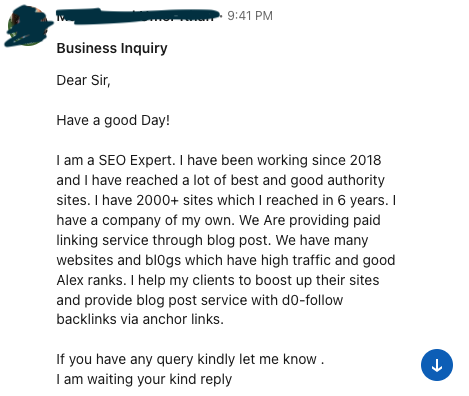
It’s not even all the spelling errors.
⚠️ It doesn’t mention my name (instead, I got a generic “Dear Sir” , while I’m obviously a ma’am).
⚠️ It’s crystal clear they did zero research on what my pain points might be – they talk awfully a lot about themselves though.
⚠️ Also, the non-existent Alexa rank took me off. For my non SEO people - it’s Ahrefs, not Alex.
It just screams spam, and craves >delete and report<.
💡For detailed guide and examples that worked for my colleague Ilija, CRO at HeyReach, jump straight to How to Reach Out to Someone on LinkedIn [11 Tactics].
Automating your inbound engagement cadence
Inbound leads don't stay fresh for long. Many take their time to reply, some you never hear from again, and others get lost in the pipeline. It's impossible to track dozens of leads manually, let alone hundreds.
What not to do:
- Send mass, generic, no-context connection requests
- Go straight for the pitch after they accept
- Send zero-value bot-driven comments and call it engagement
- Hard sell despite no engagement from them
- Send voice or video notes out of nowhere
- Guilt-trip leads for not responding
- Tag random prospects in public posts to get attention
Instead, build an automated cadence that keeps you top of mind without being pushy.
Example of a well-optimized and automated LinkedIn cadence that leads to building relationships
Here's the exact cadence that helped Nadja from HeyReach generate over $4,000,000 in revenue for her and her clients:
Day 1 — Personalized connection request:
Hey [First Name]. I noticed we both follow [Shared Connection]. I'd love to connect and share insights on [Mutual Topic]!
Day 3 — Engage with their recent post:
Hey [First Name]. I saw your post on [Topic]. Interesting take — any thoughts on [Related Topic]?
Day 5 — Send a value-add message:
Hey [First Name]. I came across this [Resource] on [Topic]. I'd love to hear your thoughts on [Related Topic].
Day 8 — Go multichannel:
See Part 3 below for the full multi-channel approach.
Day 10 — LinkedIn voice note or video message (high-value leads only):
Save this for high-value leads that have shown clear interest. You can also use video templates to mix and match in your video message outreach for greater personalization.
Hey [First Name]. I wanted to send a quick voice note since I see you've been exploring [Topic] and I've been working on [Similar Challenge].
Day 15 — CRM-triggered follow-up if they re-engage:
Hey [First Name]. I saw you check out our [Page/Product/Podcast] recently. Happy to answer any questions or explore anything further, just say the word.
Day 20 — Soft close:
Hey [First Name]. I realize this might not be the right time. If things change, don't hesitate to reach out — here's my contact info. Here's to your continued success!
Re-engaging unresponsive inbound leads
Many inbound leads engage on LinkedIn but won't convert right away. A re-engagement campaign can bring them back.
Ilija Stojkovski, CRO at HeyReach, built a 5-step re-engagement campaign using HeyReach automation that got a 67% reply rate. He sent 42 connection requests, got 57.5% accepted, and 66.7% of those accepted connections replied.
- Create contextual message templates using a tool like Fireflies AI to pull from past conversation transcripts
- Segment your lost leads from other pipeline categories
- Send an automated but personalized connection request:
Hey [Name], not sure if you remember, but we spoke a couple of months ago about using HeyReach for LinkedIn outreach [Company]. How are things on the LinkedIn front?
- Follow up with a more casual message after acceptance:
BTW, I may have created an integration tool that took our call transcript from Fireflies and Clay to write our last message. Wanna see how?
- Review results and refine the sequence based on reply and acceptance rates
Part 2: Outbound Outreach Strategies
Outbound outreach means proactively contacting prospects who haven't engaged with you yet. Cold prospecting, account-based outreach, and multi-sender campaigns all fall under this category.
To automate LinkedIn outreach effectively for outbound, you need four things: a precise ICP, a quality list, a sender profile that builds credibility, and a message sequence that earns a reply before it earns a sale.
Cold outreach: building a sequence that converts
A well-structured cold LinkedIn sequence follows these steps:
- ICP definition — before writing a single message, define who you're targeting and why they'd care
- List building — use Sales Navigator, Apollo, or Clay to build a targeted list based on your ICP
- Sender profile optimization — professional photo, strong headline, social proof in the summary
- Connection request with context — reference something specific, not just "I'd love to connect"
- Value-first first message — give before you ask
- Follow-up sequence — 2 to 3 touches spaced 3 to 5 days apart
- Multichannel escalation — move to email or other channels if LinkedIn goes quiet
Outbound LinkedIn outreach templates by use case
Cold outreach to a CMO:
Hey [Name], I noticed [Company] recently expanded into [Market/Segment]. We've helped similar companies accelerate pipeline in that space — would it be worth a 15-minute call to see if there's a fit?
Agency prospecting:
Hey [Name], I work with several agencies in [Niche] that are scaling LinkedIn outreach for their clients. I'd love to share what's been working — open to connecting?
Partnership outreach:
Hey [Name], I've been following [Company]'s work in [Space] — there might be a natural overlap with what we're doing at [Your Company]. Would love to explore if there's a partnership angle worth discussing.
Recruiting outreach:
Hey [Name], your background in [Skill/Domain] caught my attention. We're building something in [Space] and looking for people with exactly your experience. Would you be open to a quick chat?
Account-based outreach (ABO)
Account-based outreach means targeting multiple stakeholders within the same company simultaneously. Instead of reaching one contact and hoping they escalate, you engage the decision-maker, the champion, and the influencer in parallel.
A basic ABO sequence for LinkedIn:
- Map the account: Identify 3 to 5 contacts across different levels and functions
- Personalize by persona: The message to a VP differs from the message to an IC
- Stagger timing: Don't hit everyone on day 1; space your connection requests by 2 to 3 days
- Cross-reference engagement: If one contact responds, reference that context with others
- Coordinate via CRM: Track all threads in one place to avoid overlap and conflicting messages
HeyReach supports multi-account rotation, which is especially useful for ABO campaigns, where you want different senders to reach different stakeholders within the same account.
Part 3: Multi-Channel Outreach: LinkedIn + Email
Modern outreach doesn't live on one channel. The strongest sequences combine LinkedIn touches with email follow-ups, using each channel's strengths where they matter most.
LinkedIn typically produces higher-quality engagement, but email still has advantages: richer formatting, lower cost at scale, and broader automation options. The problem with email is years of bad sales emails have created an automatic spam trigger in many buyers.
The solution isn't choosing one over the other — it's sequencing them intelligently.
8-step multi-channel outreach sequence
Here's a proven multi-channel approach used by Gunner Park from Brij:
LinkedIn + email sequencing logic
A simple rule for when to use which channel:
- Use LinkedIn first — it's warmer, higher-signal, and easier to personalize
- Move to email after 2 to 3 LinkedIn touches with no response
- Reference LinkedIn in the email: "I reached out on LinkedIn last week..." — this increases reply rate
- Return to LinkedIn if the email thread goes cold — a comment on their post re-opens the door
Cold email templates to complement your LinkedIn sequence
After 2 LinkedIn touches with no response:
Subject: [Name] — quick follow-up
Hi [Name], I reached out on LinkedIn a few days ago about [Topic]. Didn't want it to get lost. We recently helped [Similar Company] with [Result] — thought there might be a fit. Worth a 15-minute call?
Value-add email (no pitch):
Subject: [Resource] I thought you'd find this useful
Hi [Name], I came across this [report/article/case study] on [Topic] and thought of your work at [Company]. No agenda — just thought it was worth sharing. Happy to chat if it sparks any questions.
Part 4: Agency Outreach Scaling Strategies
To automate LinkedIn outreach for agency growth, the core challenge differs from individual or team outreach: you're managing multiple clients, multiple ICPs, and multiple sender accounts simultaneously, all within LinkedIn's limits.
Multi-account management at scale
LinkedIn's sending limits apply per account: up to 100-200 connection requests per week and 40 messages per day. For agencies running outreach across multiple clients, this becomes a hard ceiling fast.
HeyReach solves this with multi-account rotation and a unified Unibox. Here's how it works:
- Add multiple LinkedIn accounts (called "senders") to a single campaign
- HeyReach auto-rotates which sender reaches which prospect, distributing volume across accounts without exceeding per-account limits
- All replies come into one Unibox, so you manage every client conversation from a single interface
From the HeyReach dashboard, go to LinkedIn Accounts (second icon from the top — the LinkedIn logo). Click "Connect Account" to add senders. HeyReach supports all types of LinkedIn accounts as senders. We recommend the Infinite Login option, which combines LinkedIn credentials with 2FA to keep accounts always connected.
From the benchmark data: campaigns using 6 to 20 senders show the strongest reply performance. That's large enough to distribute volume across accounts while keeping targeting and messaging consistent. Going above 20 senders doesn't necessarily improve results — it's more likely to introduce list-quality variation.
Client reporting and workflow structure for agencies
A clean agency workflow in HeyReach looks like this:
- One workspace per client — keeps campaigns, contacts, and reporting isolated
- Dedicated sender accounts per client — avoids cross-contamination of sending behavior
- Shared campaign templates — build once, clone and customize per client
- Unibox-based reply management — handle all client conversations in one place, with filters by sender or campaign
- Weekly performance review — export campaign metrics per client and track acceptance rate, reply rate, and reply-to-acceptance conversion
Scaling outreach for agencies: key rules
- Don't exceed LinkedIn's pre-set daily limits, even when using automation tools
- Keep sender profiles warm — inactive accounts that suddenly start outreaching at volume get flagged
- Match ICP quality to client goals — sloppy lists hurt acceptance rates and waste sender capacity
- For detailed agency use cases, see How to Use HeyReach for Agency LinkedIn Outreach
Part 5: LinkedIn Outreach Benchmarks and Metrics
What does healthy LinkedIn outreach performance actually look like? Based on data from 96,051 campaigns run through HeyReach over the last 12 months, here are the baselines every team should know.
Where campaigns actually fall apart
The biggest drop in the outreach funnel doesn't happen at the connection request, but after. About 10.7% of campaigns with accepted connections got zero replies. Getting accepted isn't the hard part. Turning acceptance into a conversation is.
The data also shows that scale doesn't automatically hurt performance. Acceptance rates decline slightly as campaign volume rises, but reply rates stay broadly flat. If a larger campaign is underperforming, the first thing to check is list quality and ICP fit, not message copy.
Campaign duration follows a similar pattern: campaigns under 30 days consistently underperform on both acceptance and reply rate. Longer campaigns aren't inherently better; stronger campaigns survive longer. Short duration is a reliable underperformance signal, not a cause.
How to read the benchmarks:
- Below 13% reply rate AND below 13% acceptance rate → likely an ICP or targeting issue
- Below 13% reply rate WITH healthy acceptance rate → likely a messaging issue
- Around 22% reply rate → typical campaign performance
- Above 33% reply rate → strong messaging performance
Part 6: Best Tools for LinkedIn Outreach
To automate LinkedIn connection requests and scale outreach without violating LinkedIn's Terms of Service, you need a tool that operates within platform limits and handles both sequencing and inbox management.
Here's how the main LinkedIn outreach tools compare:
When evaluating tools, the key things to check are:
- Does it operate within LinkedIn's connection and message limits?
- Does it support sender rotation for teams?
- Does it have a unified inbox for reply management?
- Does it integrate with your existing CRM stack?
For detailed guidance on connecting your LinkedIn accounts and setting up sender rotation, see the HeyReach LinkedIn Accounts setup guide.
Part 7: LinkedIn Outreach Best Practices (Scaling Without Getting Banned)
LinkedIn has zero tolerance for spam. Do outreach the wrong way, and you're looking at a restricted account. Follow these LinkedIn best practices to maximize your outreach without penalties:
- Optimize your LinkedIn profile for inbound. Professional photo, industry-aligned banner, strong headline, and a summary with social proof. People check your profile before accepting.
- Stay within connection limits. LinkedIn allows 100 to 200 requests per week, depending on your Social Selling Index. Aim for 15 to 25 per day to stay safely within weekly limits.
- Use different message variations. Rotate message types, personalize with name, company, industry, or recent activity. Don't send the same message to 500 people.
- Use secure automation tools that operate within LinkedIn's ToS. Not all tools are created equal — check whether the one you're using respects LinkedIn's rate limits before you start.
- Use a VPN on public networks. Your team handles sensitive business data. Pair public Wi-Fi with a business VPN to ensure data privacy and compliance.
- Engage before you message. Cold DMs without any prior interaction have a much lower conversion rate. Comment on a post, react to an article, and establish some presence first.
- Share valuable content. A mix of curated content and your own posts builds credibility. Give proper credit for anything you share. As your profile grows, an identity theft protection service can help monitor for misuse of your professional identity. For an example of sharing done right, see Gaetano's post sharing insights from Kevin's newsletter.
- Respect a "no". A hard no, no response after two follow-ups, or a polite decline are all signals to stop. Don't push past them.
For more on LinkedIn outreach tactics and what works in practice, see How to Reach Out to Someone on LinkedIn [11 Tactics].
Key Takeaways
Whether you're running inbound follow-up or cold outbound prospecting, these principles apply:
- Speed matters for inbound. Engage while the lead is still hot. A first touch within 5 to 10 minutes of engagement dramatically outperforms waiting for hours.
- Balance personalization and automation. A semi-automated framework, templated structure with personalized key elements, scales better than either extreme.
- Fix targeting before fixing copy. Benchmark data consistently shows that below-average acceptance rates signal an ICP or targeting problem, not a messaging problem.
- The biggest drop happens after acceptance. Getting a connection accepted is not the finish line. Post-acceptance messaging — the opener, the follow-up — is where most campaigns succeed or fail.
- Use success stories. Adding relevant case studies and social proof has been shown to boost response rates by 45% in email marketing campaigns, and the effect carries over to LinkedIn.
- Don't violate LinkedIn's ToS. A banned account sets your pipeline back further than a slow month of outreach ever would.
- Keep refining. Track acceptance rate, reply rate, and reply-to-acceptance conversion. Use those three numbers to diagnose exactly where your sequence is leaking.
Ready to put this into practice? Start a free trial with HeyReach and run your first multi-sender LinkedIn campaign today. Not sure where to start? Schedule a 1-on-1 strategic call and we'll help you build an effective outreach strategy from scratch.

Try it for free
Frequently Asked Questions
How do you automate LinkedIn outreach effectively?
Use a cloud-based tool with sender rotation, safe sending limits, and CRM integration. Personalize the first message, then automate the follow-ups so outreach stays consistent without looking spammy.
How do you scale LinkedIn outreach for agencies?
Use one workspace per client, dedicated sender accounts, and a unified inbox to manage replies. Sender rotation helps agencies run outreach across multiple clients without overusing one LinkedIn account.
How do you automate LinkedIn connection requests?
Use a LinkedIn automation tool to send requests on a safe schedule. Add a short personalized note that references the person’s role, company, post, or shared interest instead of sending a generic request.
How do you automate LinkedIn prospecting workflows?
A LinkedIn prospecting workflow usually includes list building, lead qualification, connection requests, follow-ups, and CRM sync. Tools like HeyReach can connect these steps, so leads move through the funnel without manual tracking.
How do you automate LinkedIn for agency growth?
Build a repeatable system for each client: define the ICP, create targeted lists, run multi-sender campaigns, automate follow-ups, and manage replies in one inbox. Track acceptance rate, reply rate, and conversion to improve each campaign.