How to use LinkedIn for sales: The SDR’s blueprint to dominance
Published:
April 29, 2026
Updated:
April 30, 2026
The top 1% of SDRs don't "use" LinkedIn – they own it. They know how to skip the gatekeepers and slide into DMs the right way.
They know that playing the volume game with a manual mindset is like trying to dig a skyscraper foundation with a spoon. It’s slow, it hurts, and it doesn't work.
Instead, high-performing sales teams build systems that make the pipeline grow while they sleep. If you want to be a top-tier sales rep, I’ll show you exactly how to do it.
First, the mindset shift: From activity to infrastructure
The biggest mistake salespeople make is focusing on daily activity metrics. LinkedIn doesn't reward you for being "busy". It rewards you for being surgical with your target audience and staying within safe activity limits.
The single-account ceiling
Most sales professionals are taught to run everything from a single LinkedIn profile. In practice, that becomes a ceiling.
LinkedIn typically allows somewhere between ~40–100 connection requests per week per account, depending on factors like account age, activity, and whether you’re using tools like Sales Navigator. Even with solid performance — say a ~20–30% acceptance rate — that translates into a relatively small number of new conversations.
And here’s where the math gets tight.
Based on HeyReach data from 96,000+ campaigns, the typical LinkedIn campaign converts only about 1 in 5 accepted connections into a reply (~18%). So even if you’re getting connections, turning those into actual conversations — and eventually meetings — is where most pipelines stall.
If your target is 20+ meetings per month, relying on a single account quickly becomes limiting.
This is where HeyReach changes the setup — not by “extending” LinkedIn limits, but by coordinating multiple senders within a single campaign.

Instead of pushing one account harder (and risking restrictions), you distribute outreach across several profiles. Each sender operates within its natural limits, but together they create a larger, more stable outreach system.
In other words, you’re not scaling by forcing more volume through one profile.
You’re scaling by adding more aligned senders into one coordinated campaign — moving from a single SDR mindset to running a structured outbound system.
And the data backs this up: campaigns using 6–20 senders consistently show stronger reply performance, suggesting there’s a clear advantage in controlled, multi-sender setups over both single-account outreach and overly large sender pools.
The "landing page" profile
Before you send a single LinkedIn connection request, optimize your LinkedIn profile. It needs to stop looking like a resume and start looking like a sales page to build trust with potential customers.
- The profile picture: Get rid of the cropped wedding photo. A professional headshot is the first step to being taken seriously.
- The headline: If it says "SDR at [Company]," change it. It should say: "Helping [Persona] achieve [Result] by [Method]."
- The "zero-click" content: Use your Featured section to answer the top 3 pain points you solve. Also, share content that adds value – stuff that makes people want to jump in and comment. When potential buyers click your profile, they shouldn't see where you went to college. They should see a reason to reply.
Precision prospecting: Finding the hidden intent
Relying solely on “Job Title” and “Industry” search filters puts you in a red ocean. Every other SDR has the same LinkedIn Sales Navigator subscription. To get what you want, you need to find the right people who are experiencing the problem right now.
Identifying "signals" over "states"
A "State" is: CEO at a Series B Company.
A "Signal" is: CEO at a Series B Company who just hired a new Head of Sales and started using a competitor’s software.
How to find these practical signals:
- Job change notifications: Set up LinkedIn filters (or Sales Navigator alerts) to track recent job changes in your ICP, then plug those leads into your campaign and reach out within their first 90 days.
- Technology installs: Use tools like Clay to track companies that recently added a competitor’s script, then push those leads into HeyReach to trigger outreach while the problem is top of mind.
- Engagement extraction: Track people engaging with relevant “how-to” posts, sync them into your campaign, and reach out while they’re already thinking about the problem.
The Linkedin messaging playbook: Kill the pitch-slap
We’ve all seen it: the 4-paragraph sales pitch that arrives 0.5 seconds after you accept a connection request. It’s desperate. Annoying. And it has a 0% conversion rate.
A good social selling is about starting a conversation and verifying interest, not closing a deal in the first message.
The anatomy of a high-converting message:
- The trigger: Why are you reaching out today? ("Saw you’re expanding the EMEA team...")
- The pain/gap: A specific problem related to that trigger. ("Usually, that means your LinkedIn outreach is hitting the 100-invite limit...")
- The low-friction CTA: Ask for a "Yes/No" or "Interest-based" response. ("Curious if you've already found a way around that, or if it's currently a bottleneck?")
🌉 LinkedIn as multi-channel bridge
LinkedIn doesn't exist in a vacuum. Use it to warm up other channels.
For instance, if a prospect views your profile but doesn't accept the invite, send them a highly personalized email mentioning the specific LinkedIn context. They want to see a human behind the screen.
HeyReach pro tip:
- Use tags + automation to separate LinkedIn follow-ups from email sequences.
- Example workflow:
- Connection request → no reply → tag as “Not Accepted” → route to Instantly email sequence.
- Accepted, no reply → send one follow-up → pause → monitor profile activity.

This respects social friction while keeping your pipeline moving.
Scaling LinkedIn sales safely: The art of invisible automation
To build relationships at scale, your execution must be “silent”. LinkedIn’s AI looks for patterns; if you send personalized messages with the exact same 1.5-second delay in bulk, you’re at high risk of getting banned.
To make it work in your favor, you must stay under the radar.
LinkedIn for sales: The "guardrail" system
- Randomized pacing: Your execution layer must mimic human behavior. It should vary the time between clicks, "rest" on weekends, and simulate "typing" time.
- Account rotation: This is the "secret sauce." Instead of one account doing 50 tasks, you want 5 accounts doing 10 tasks each. This keeps every account under the radar while your total volume stays high.
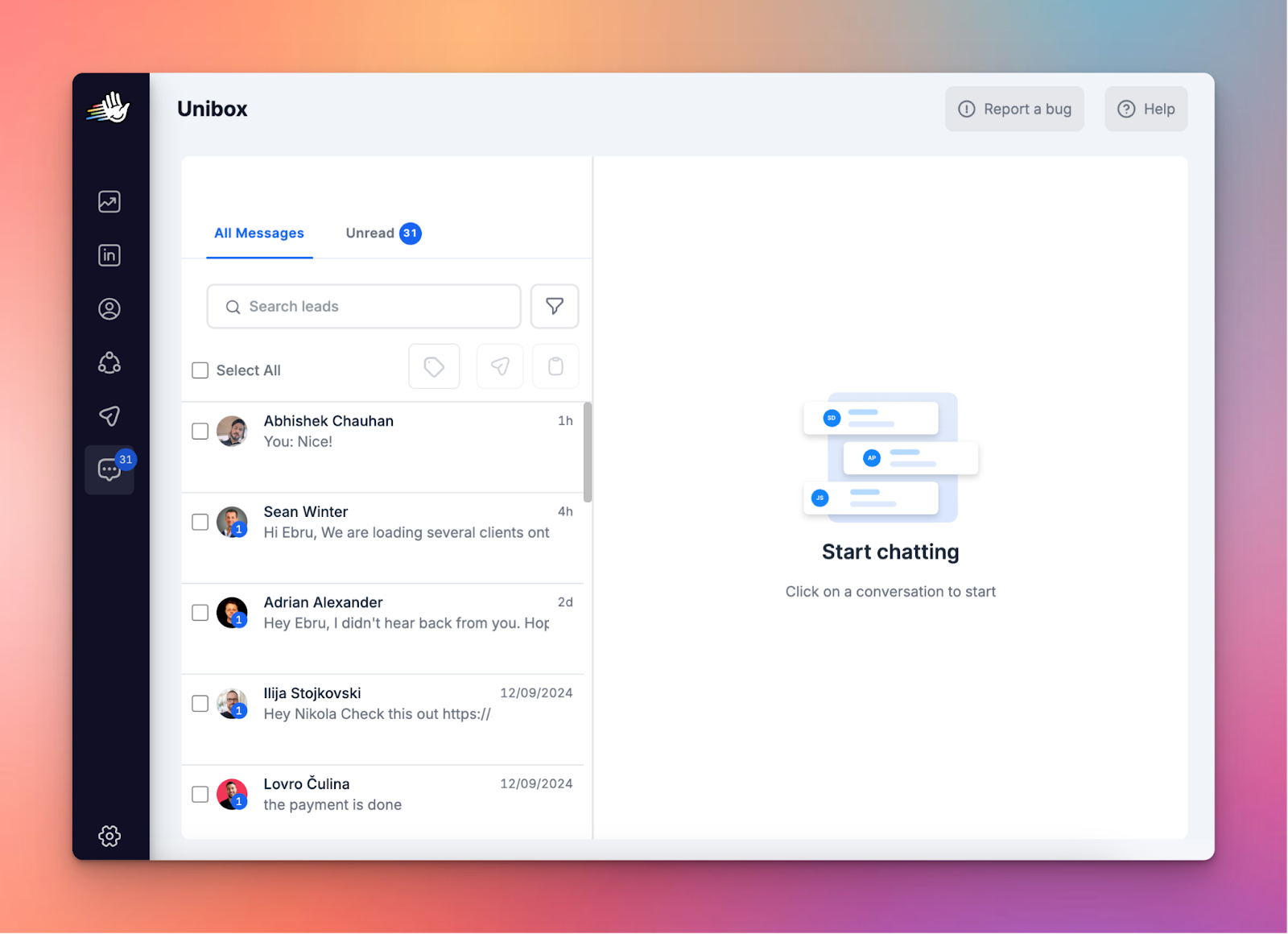
The biggest practical hurdle of a multi-account strategy is the inbox mess. If you have to log into 5 different Chrome profiles to check for replies, you will miss leads.
HeyReach’s Unified Inbox aka Unibox fixes this by pulling every single conversation from every LinkedIn sender into one command center. You can filter by specific campaigns, tag leads for easy follow-up, and even jump in to reply on behalf of a teammate without ever needing their login credentials.
The intermediate skill: Signal orchestration
Once you have the accounts and the messaging, the next level is orchestration. This is where you decide which potential leads are worth your time.
A lead list is only as good as its last update. Practical SDRs run a validation layer before hitting "send":
- Deduplication: Make sure you aren't messaging the same decision-makers from 2 different accounts. This makes you look incompetent.
- Clean-up: Remove "Inc.", "LLC", and "Pty Ltd" from company names. No human writes: "Hey, I saw you work at Google Inc. Pty Ltd."
- CRM check: Be sure the person isn't already talking to your AE. There is nothing worse than an SDR "cold pitching" an active prospect.
- Social proof: Leverage mutual connections in your outreach to increase your acceptance rate.
MeasuringLinkedIn sales success: The metrics that don't lie
“Invites sent” is mostly a vanity metric. High volume means little if it doesn’t translate into replies, conversations, and qualified opportunities.
Data from the HeyReach report shows that performance is surprisingly consistent. To close deals, you need to track:
- Connection acceptance rate (Target: 21% - 32%): If this is low, your profile or your ideal customer profile is off.
- Reply rate (Target: 22% - 33%): If this is low, your message is too long or too "salesy."
- Positive reply %: Are they saying "No" or "Tell me more"?
- Meeting set rate: The only metric that pays the bills.
Common pitfalls with LinkedIn sales and how to avoid them
Pitfall #1: The bot vibe
LinkedIn users are “trained” to recognize a pitch from a mile away. If your message sounds like a template, it will be treated like a template → deleted 🗑️.
☑️ Fix: Use "pattern interrupts." Start your message with something specific that a bot couldn't easily find, like a reference to a specific line in their "About" section.
Pitfall #2: The volume spike
Uploading 5,000 leads and hitting "Start" is the fastest way to get your accounts restricted.
☑️Fix: Use a throttling layer. Even if you have 5,000 leads, only "drip-feed" them into your campaigns at a rate your accounts can safely handle. Quality over-speed always wins.
Pitfall #3: Ignoring the "no"
SDRs often keep pushing after a prospect says "Not interested."
☑️ Fix: Respect the "No." Tag them in your CRM as "Not now" and set a reminder for 6 months. LinkedIn is about long-term brand building as much as short-term booking.
Build. Rotate. Dominate.
LinkedIn is the most powerful B2B sales database on the planet, but it’s becoming increasingly crowded. The "junior" approach – manual, slow, and unscaled – is no longer enough to hit modern quotas.
To succeed, you have to move from being a manual laborer to a system architect. You need:
- Multiple sender accounts to bypass limits.
- Signal-based prospecting to stay relevant.
- A unified execution layer (HeyReach) to manage the chaos.
Remember – pipelines don’t rise from effort. They rise from a lead generation system built to scale. Focus on the right structure, watch it work, and let your growth run on autopilot.

Try it for free
Frequently Asked Questions
Can I scale LinkedIn outreach without getting my account restricted?
Yes. The key is multi-account orchestration and safe automation. With HeyReach, you can rotate actions across multiple accounts, randomize timings, and maintain human-like behavior, keeping each account under LinkedIn’s radar while reaching more prospects.
How do I know which prospects to message first?
Focus on signal-based sales prospecting, not just job titles. Look for job changes, funding events, or tech installs – these are “why now” signals. HeyReach lets you tag and segment these leads so you always prioritize the hottest opportunities.
How to use LinkedIn as a sales person?
Using LinkedIn for sales means turning the right signals into conversations, not just sending invites. Optimize your profile, target prospects with real-time triggers, and start relevant chats. HeyReach helps scale safely with multiple senders and manage all replies in one inbox, creating a repeatable flow of qualified conversations.
How do I keep track of replies from multiple accounts?
HeyReach’s Unibox centralizes every conversation from all accounts into one inbox. You can filter by campaign, tag leads, and even reply on behalf of teammates safely.
What metrics should I actually care about?
Focus on acceptance rate, reply rate, positive reply %, and meetings set. HeyReach dashboards make it easy to track these in real-time so you know which campaigns are working and which need tweaking.