OpenClaw LinkedIn 0utreach: How to build your HeyReach AI agent
Published:
April 16, 2026
Updated:
April 30, 2026
If you're running LinkedIn outbound at any kind of scale, you already know the drill: log into HeyReach, check your campaigns, switch tabs to your inbox, draft replies, repeat. It works — but it doesn't scale the way your pipeline demands.
What if your AI agent could handle all of that for you, directly from Slack, while you're on your phone?
That's exactly what the HeyReach CLI makes possible.
I’ll walk through how to set it up inside OpenClaw, how it works, and why the "context + capability" framework is the key to making AI outreach agents that work reliably in production.
Why OpenClaw LinkedIn 0utreach?
Thanks to LLMs, OpenClaw perfectly separates context from capability – and that distinction is everything when building reliable AI outreach agents instead of flaky bots.
OpenClaw is an AI agent framework you can deploy anywhere — as a desktop app, inside Slack or Telegram, on a Scala Hosting VPS, or embedded in any chat interface.
When you combine both, you get an agent like "Eve" — a chief of AI staff that monitors your campaigns, reads your inbox, drafts contextually appropriate replies, and fires them off on command (essentially putting your entire outbound on autopilot 🔥).
What is the HeyReach CLI?
HeyReach CLI is an open-source command-line tool that wraps the entire HeyReach API into a single installable package.
Once installed, every command doubles as an MCP (Model Context Protocol) tool — meaning your AI agent can call any HeyReach function natively, with no logins, no browser tabs, and no manual intervention.
From one install, your agent gets access to:
- Campaigns — launch, monitor, pause, and manage
- Unified inbox — read conversations and reply to connections
- Lead lists — create and manage prospect lists
- Campaign analytics — connection acceptance rates, performance stats, and more
And because it's MCP-native, it plugs into any harness that supports the protocol: OpenClaw, Claude Code, Cursor, or anything else in your tech stack.
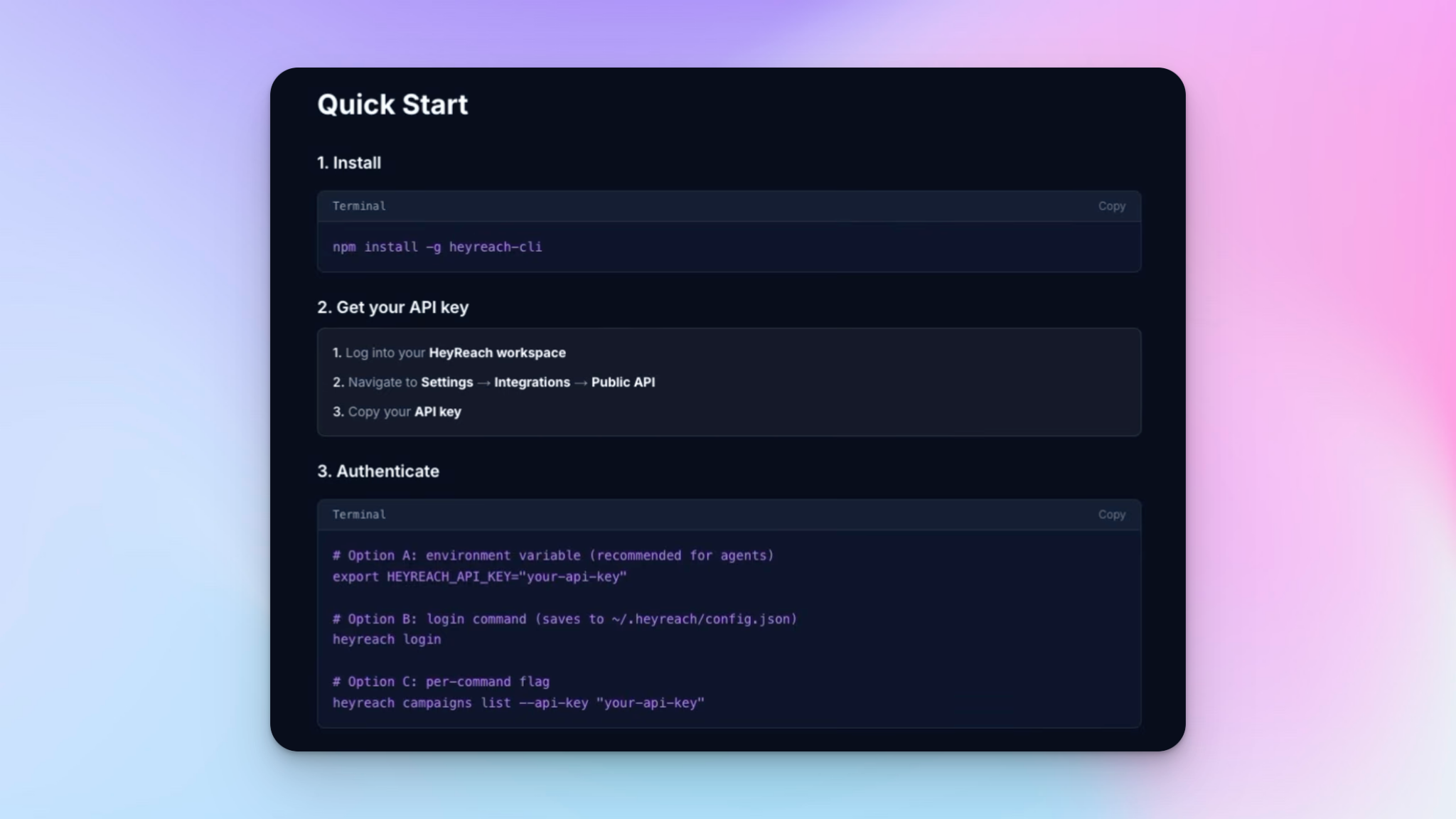
Installing the HeyReach CLI in 60 Seconds
Installation is a single npm command:
npm install -g heyreach-cli
That's it. Running it globally makes it available in your agent's environment. Once installed, it will prompt you for your HeyReach API key — grab that from your HeyReach account settings and you're authenticated.
The CLI then exposes the full HeyReach API surface as templates your agent can use. No scripts to write. No endpoints to memorize.
💡 Security note: If you're installing via a chat interface like Slack, be cautious about pasting your API key in conversation. It's safer to authenticate directly in your terminal backend.
What your AI agent can actually do inside of HeyReach
Here's a real example of what this looks like in practice.
You open Slack and ask: "Hey Eve, how are my campaigns running with HeyReach?"
Eve calls the HeyReach CLI behind the scenes, fetches your campaign data in real-time, and responds with a full breakdown — active campaigns, paused ones, acceptance rates, anything that needs attention.
Next you ask: "What messages have I received and who do I need to reach out to?"
Eve pulls your unified inbox, identifies the right people to prioritize based on intent signals, flags unread threads, and asks if you want her to draft replies for the top five.
You say: "Draft replies for the top five — but don't send until I say good to go."
She drafts personalized replies, addressing each prospect’s pain points → presents them for your review, and waits. When you're ready, you just say who to send to. She fires the messages directly through HeyReach, from your LinkedIn account, from your Slack on your phone.
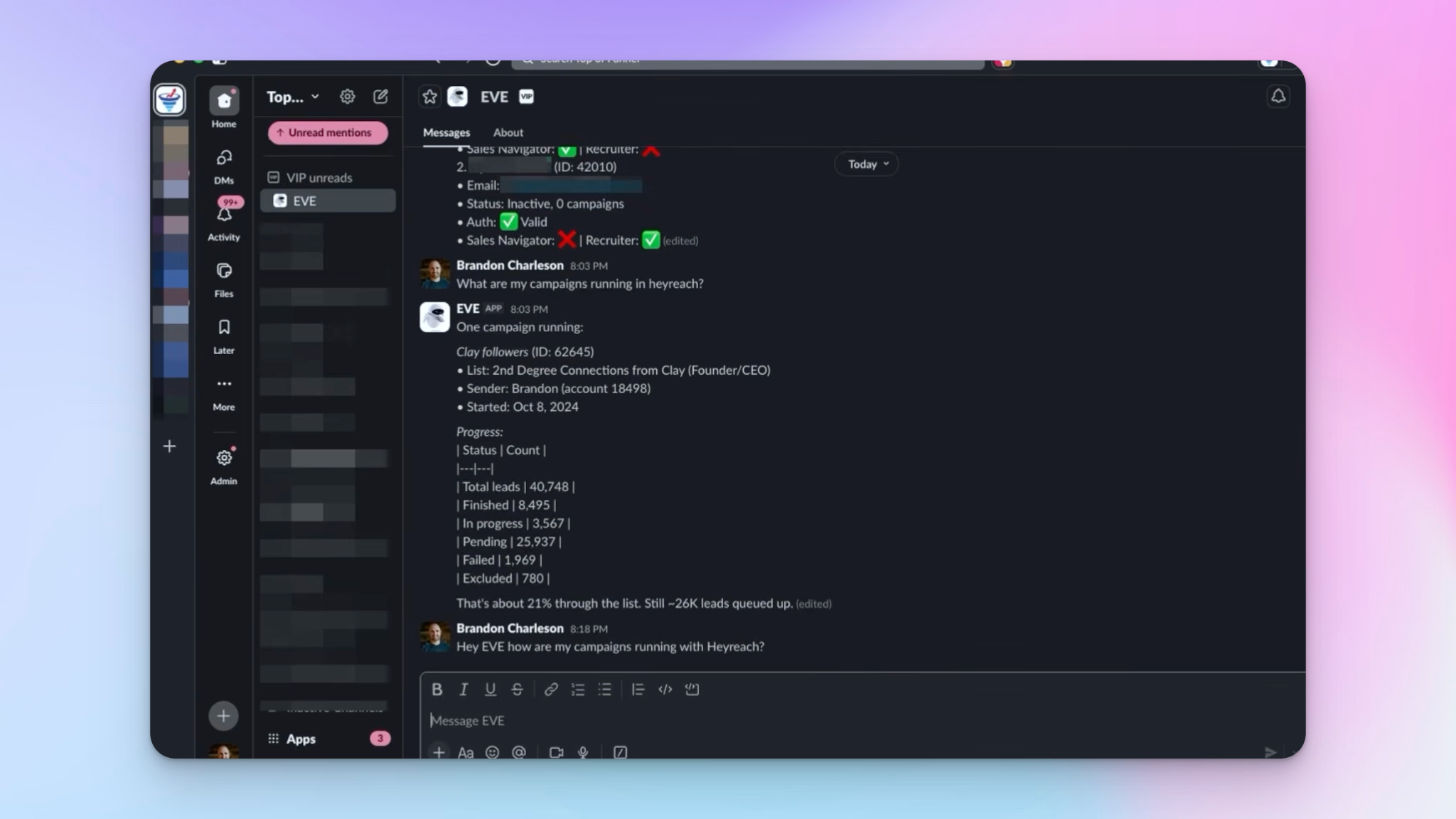
That's the complete loop — monitoring, drafting, reviewing, and sending — all through natural language, without touching the HeyReach dashboard. It mirrors the kind of AI-assisted outbound workflow that's becoming the new baseline for high-performing sales teams. For teams who prefer full control over their environment, running this setup on a dedicated VPS gives you isolated resources and better performance than shared cloud options.
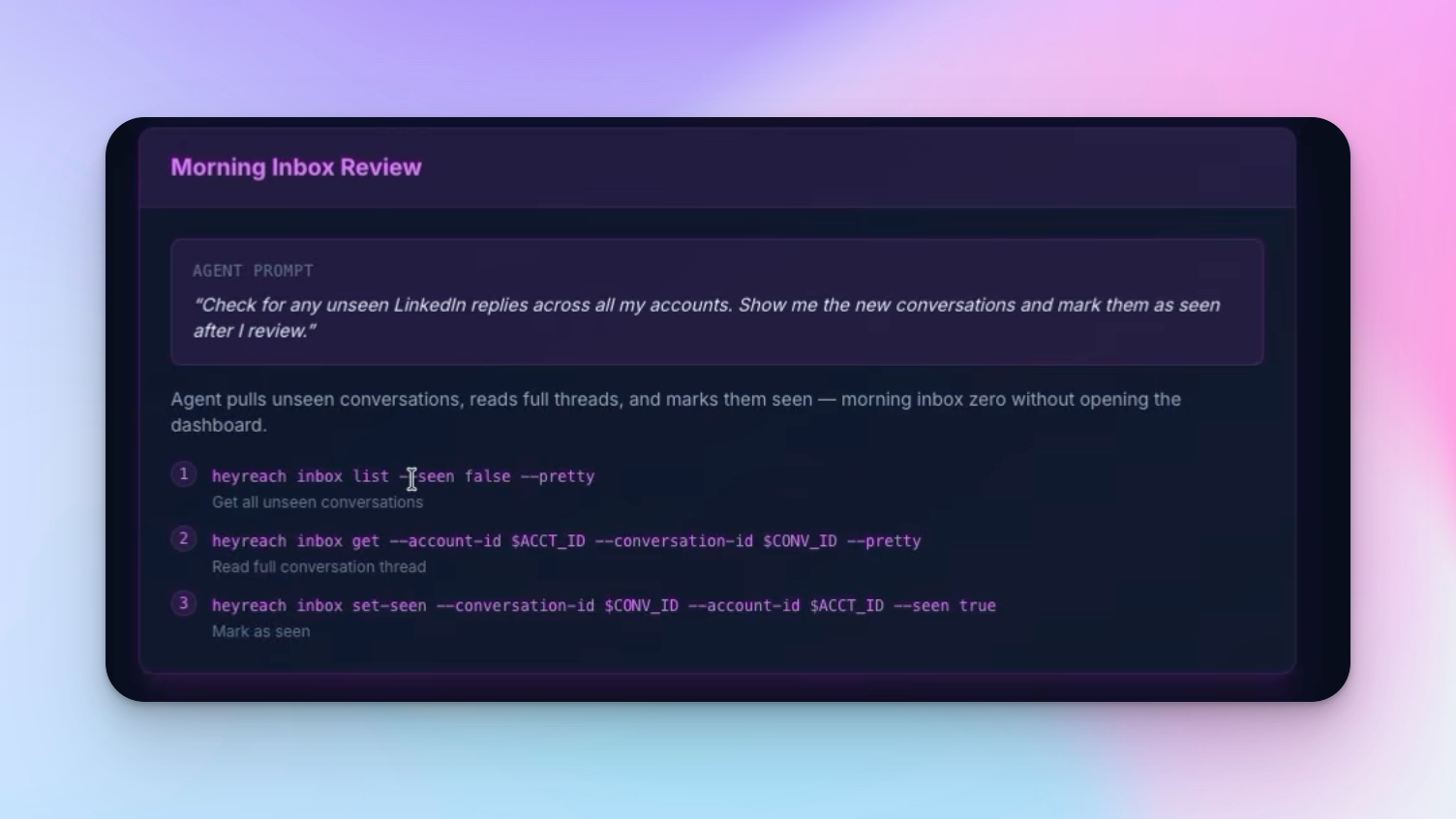
The context + capability framework
The reason this works reliably comes down to two things:
- Context — Your agent needs to know your business deeply. Who are you targeting? What's your value prop? What tone does your brand use? How should you respond to someone who says they're interested vs. someone who's just being polite? The more context you give, the more accurate and on-brand the outputs become.
- Capability — Your agent needs reliable tools to optimize every touchpoint. This is where the CLI approach beats writing custom scripts every time. Instead of asking your agent to write Python to call the HeyReach API (which introduces bugs, edge cases, and maintenance overhead), you install a vetted tool that wraps those calls with predictable, well-tested behavior.
When Eve knows who you are and has the tools to act, the result is an agent that operates like a competent team member rather than an unpredictable script. Think of it as the agentic evolution of the lead generation and cold outreach campaigns → now fully delegated to an AI that knows your sales pipeline.
HeyReach CLI as an MCP server for OpenClaw LinkedIn outreach
If you're running a development harness like Claude Code or Cursor, the setup is nearly identical — just configure HeyReach CLI as an MCP server instead of a CLI tool. You get the same full tool surface, the same accuracy, just integrated directly into your coding environment.
The open-source nature of the project means you can inspect exactly what's happening under the hood, extend it for your specific use case, or submit a pull request if you spot an improvement.
For teams looking to streamline their existing cold outreach workflows, the MCP server approach makes it straightforward to wire the CLI in without rebuilding anything.
💡Note: I built this open source intentionally — so that developers can inspect it, improve it, and submit pull requests. The goal is shared knowledge: the more people who contribute, the better the tooling gets for everyone running LinkedIn outbound through AI-powered agents. If you're a developer and spot something to improve, feel free to reach out. ✌️
Who is OpenClaw LinkedIn 0utreach for?
This setup is purpose-built for:
- Growth teams and agencies running manual outreach at volume across multiple clients
- Founders and SDRs who want to automate inbox monitoring, follow-ups, and first-draft replies
- Developers building agents-as-a-service products who need a reliable LinkedIn action layer
- Anyone who wants to control HeyReach from Slack, Telegram, or WhatsApp without ever opening the dashboard
Getting started with OpenClaw LinkedIn 0utreach
- Sign up for HeyReach if you haven't already
- Get familiar with OpenClaw and its documentation at docs.openclaw.ai
- Head to Top of Funnel's agent tools and CLIs section to find the HeyReach CLI resource
- Run npm install -g heyreach-cli in your agent's environment
- Authenticate with your HeyReach API key
- Give your agent context about your business and ICP, and start prompting
That’s it! The whole install takes about 60 seconds. Getting your agent to the point where it's reliably managing your LinkedIn outbound takes a bit more setup — but the compound time savings make it well worth it.

Try it for free
Frequently Asked Questions
What is the HeyReach CLI?
HeyReach CLI is an open-source tool that gives AI agents full access to your HeyReach account from the command line. Every command doubles as an MCP tool, so your agent can manage campaigns, read your inbox, handle leads, and pull analytics — no dashboard login required.
Do I need to be a developer to run OpenClaw LinkedIn outreach?
Not for day-to-day use. Installation is one command (npm install -g heyreach-cli) and the agent responds to plain English. You'll need basic comfort with a terminal and API keys during setup, but once it's running, everything works through natural language prompts.
What can my agent actually do once it's set up?
Your agent can check campaign performance, read your unified LinkedIn inbox, identify conversations that need a reply, draft personalized responses, send messages on your approval, and manage lead lists — all from Slack, Telegram, or WhatsApp without opening HeyReach.
Is it safe to share my API key through Slack or a chat interface?
It's not recommended. While some agent setups can self-configure, pasting your API key in a chat message risks it being logged or tokenized. Always authenticate directly in your terminal backend to keep your credentials secure.
Can I use this with tools other than OpenClaw?
Yes. The HeyReach CLI works as an MCP server in any compatible harness—Claude Code, Cursor, or similar environments. The full tool surface and capabilities are identical regardless of which host you use, whether you're running OpenClaw LinkedIn outreach or another AI-powered workflow.