How to turn post reactors into a high-converting lead list in 30 minutes
Published:
May 30, 2026
Updated:
June 9, 2026
Lately, I've been getting the same question over and over: how do you build a lead list that actually gets accepted?
Like: what actually makes the list work?
And honestly? It's the right question. Because most teams are optimizing downstream while the real problem sits upstream. You’re rewriting openers when the acceptance-rate ceiling was already set the moment they chose the wrong lead source.
Two campaigns. Same copy. Same offer. One gets 30%+ acceptance. The other barely breaks 20%.
Your list decides how hard the message has to work.
Copy can amplify list quality, but it can’t compensate for a bad one.
So this piece is built around one principle:
Relationship proximity → audience warmth → acceptance rate.
The closer a lead already is to you before the first message lands — your content, your events, your network — the less friction the connection request has to overcome.
Four decisions that shape acceptance rate before launch
Your list quality is set in four decisions you make before the campaign launches. Get them right and everything downstream works better.
Four steps. Run all of them before every campaign launch.
And no, I'm not being dramatic about it. Each step protects something specific.
- Skip Step 1 and you're targeting the wrong people.
- Skip Step 2 and bad-fit leads enter the campaign.
- Skip Step 3 and someone gets contacted who never should have.
- Skip Step 4 and warm audiences get cold outreach logic.
Step 1: Choose your source based on relationship proximity
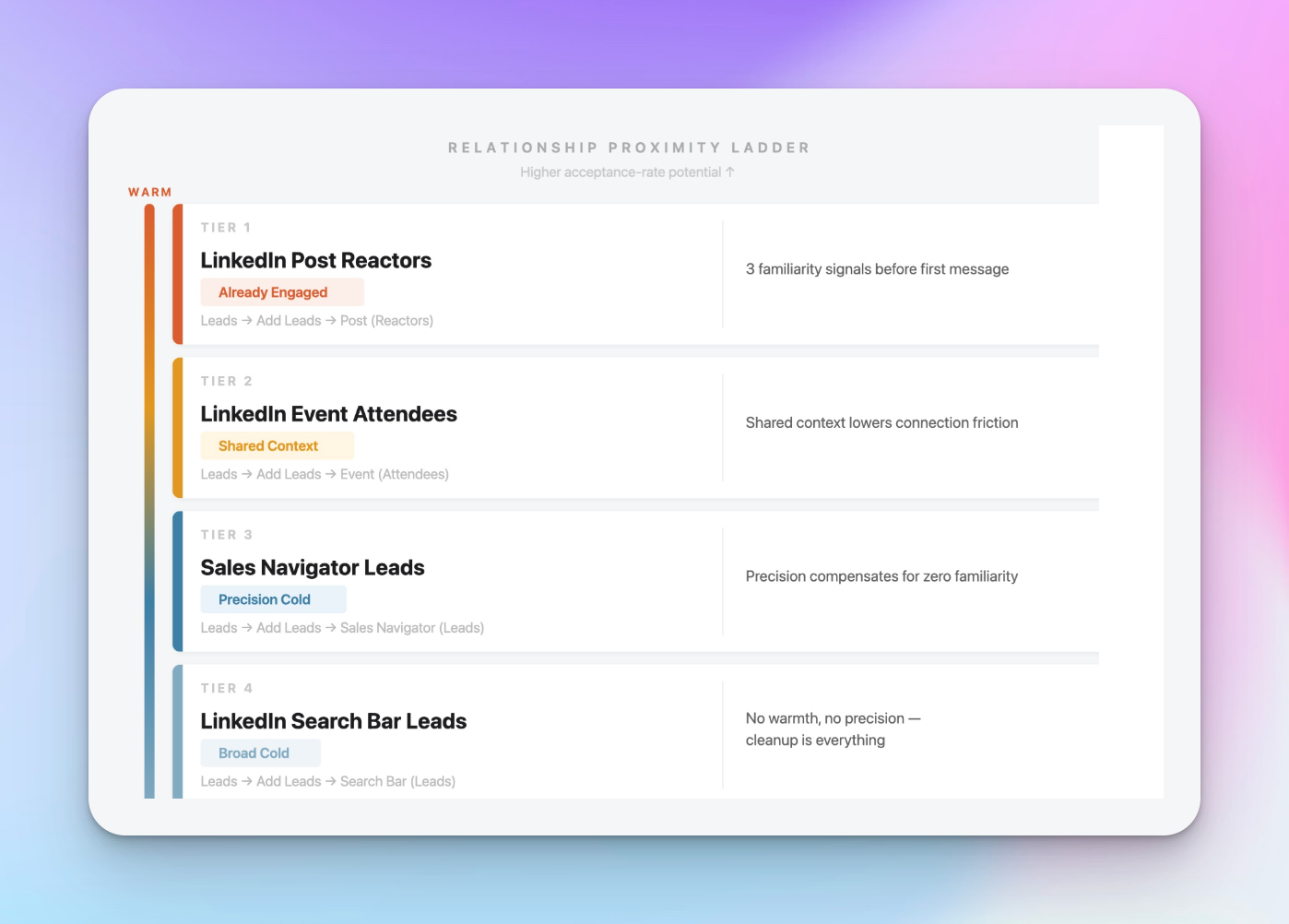
Not all lead sources are equal. And I don't mean that in a generic "quality over quantity" way.
I mean it literally: the source you choose sets your acceptance rate ceiling before you write a single word of copy.
Here's the question that actually matters: you have one sender account available this week. Do you run 180 post reactors from your last three posts, or 500 cold Sales Navigator leads filtered by ICP?
HeyReach lets you pull lists from sources that already have different levels of familiarity attached. I use it to decide which campaigns deserve warm outreach and which ones should stay cold.
Here's how I rank the four confirmed native HeyReach import sources — warmest to coldest.
Tier 1 — LinkedIn Post (Reactors): already engaged
The warmest leads you can build a list from.
They already saw your content, recognized your name, and self-selected into your topic area. That's three buyer signals before a connection request even lands. I've seen this be the single biggest lever agencies aren't pulling.
Import path: Leads → Add Leads → LinkedIn Post (Reactors) → paste the post URL → select the LinkedIn account → name the list → Start importing.
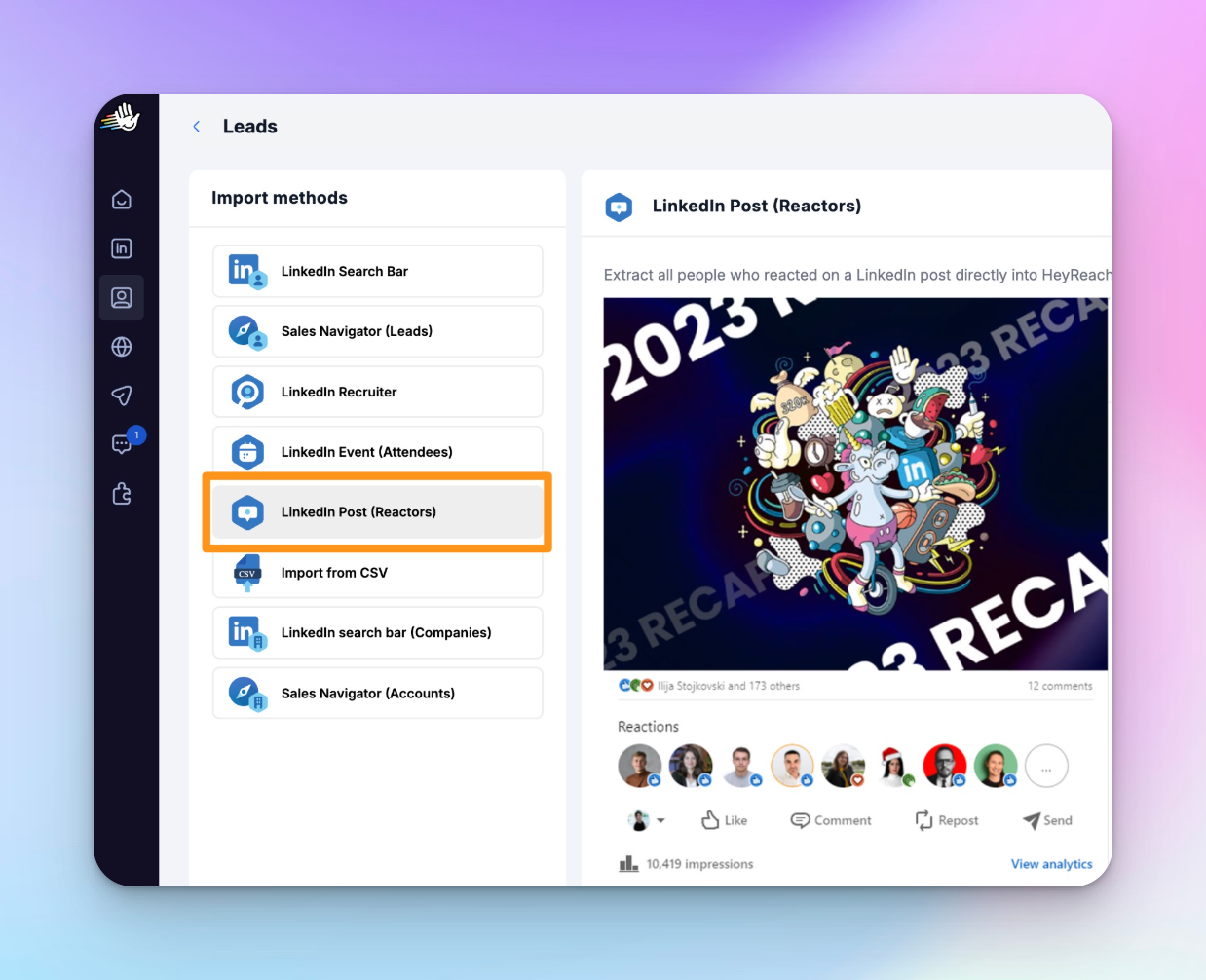
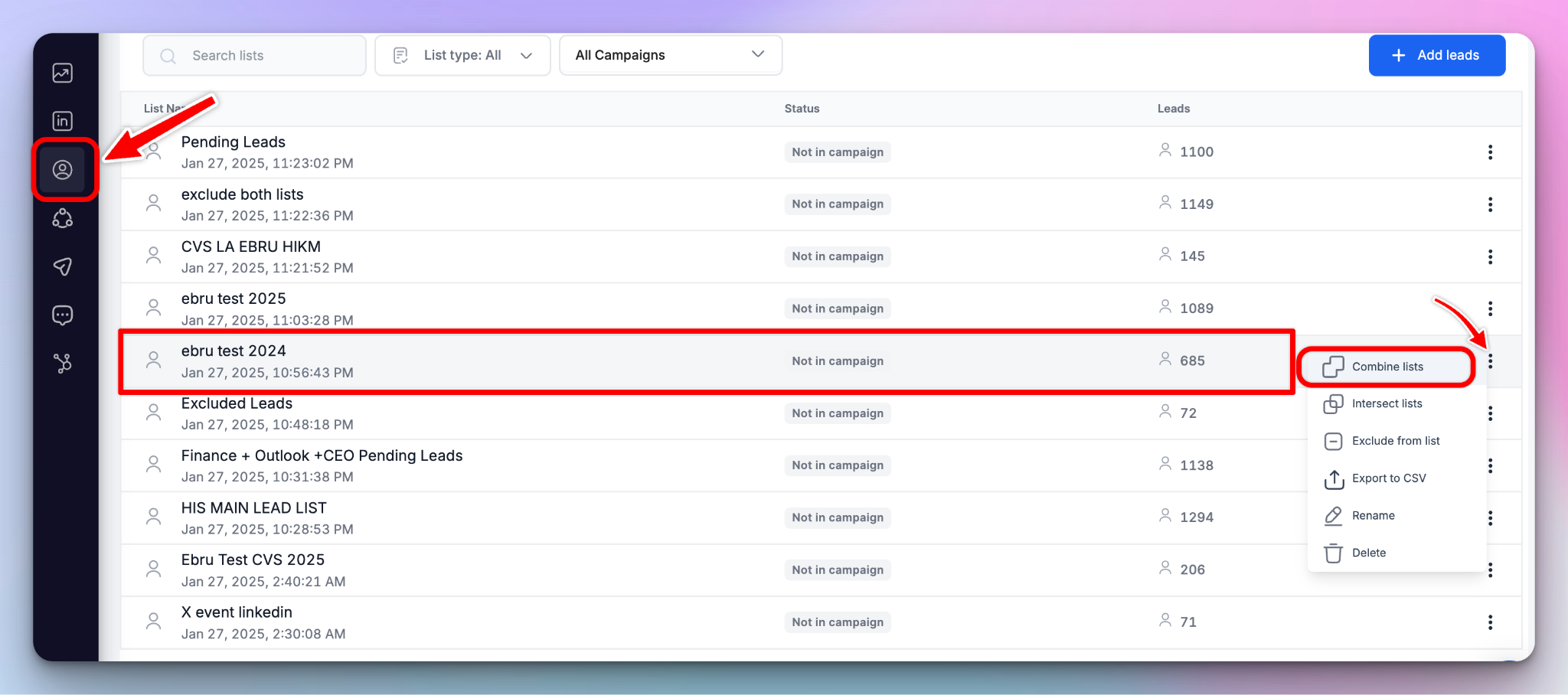
Running multiple posts? Import each one separately, then merge using Combine Lists. Five posts with around 40 ICP-fit reactors each gives you a 200-person warm list — enough for a meaningful micro-campaign.
One thing to know: HeyReach doesn't filter by job title at import time. Every reactor comes in. That's what Step 2 is for.
Tier 2 — LinkedIn Event (Attendees): shared context
People who attended or registered for a LinkedIn event already share something with you — like an interest, industry, or topic. This shared context lowers connection friction before your outreach starts.
Import path: Leads → Add Leads → LinkedIn Event (Attendees) → paste the event URL → select the account → name the list → Start importing.
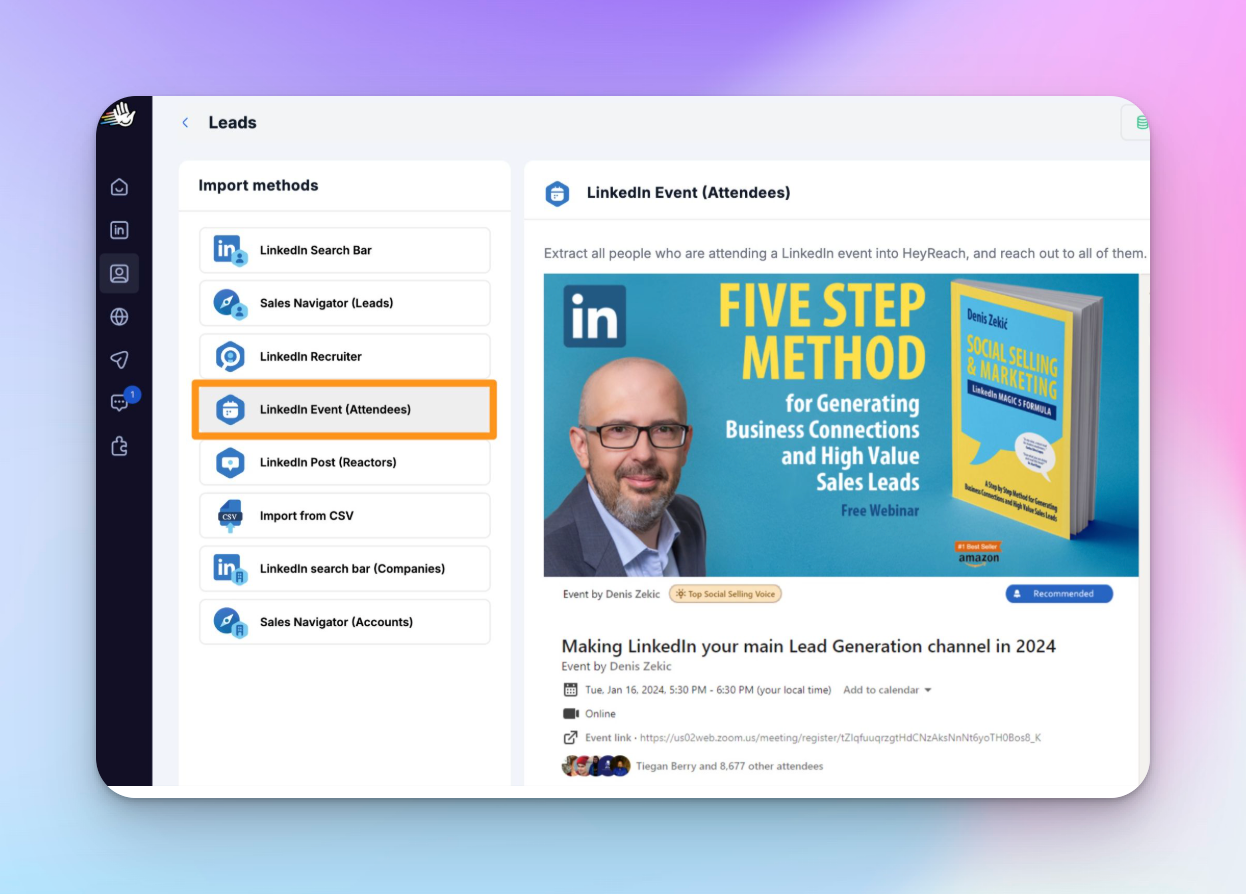
Best use case: post-event outreach where the connection request references the shared event. "We were both at X" lands — because it's true and it's specific.
One thing to watch: passive registrants inflate the list. Not everyone who registered actually showed up or engaged. So, ICP filtering in Step 2 matters more here than you may realize.
Tier 3 — Sales Navigator (Leads): precision cold
There’s no prior relationship, but Sales Navigator gives you the tightest ICP targeting you can get out of any cold source. Advanced filters (seniority, company size, recent job changes, growth signals) give you precision that basic LinkedIn search just can't match.
Import path: Leads → Add Leads → Sales Navigator (Leads). This does require a Sales Navigator subscription.
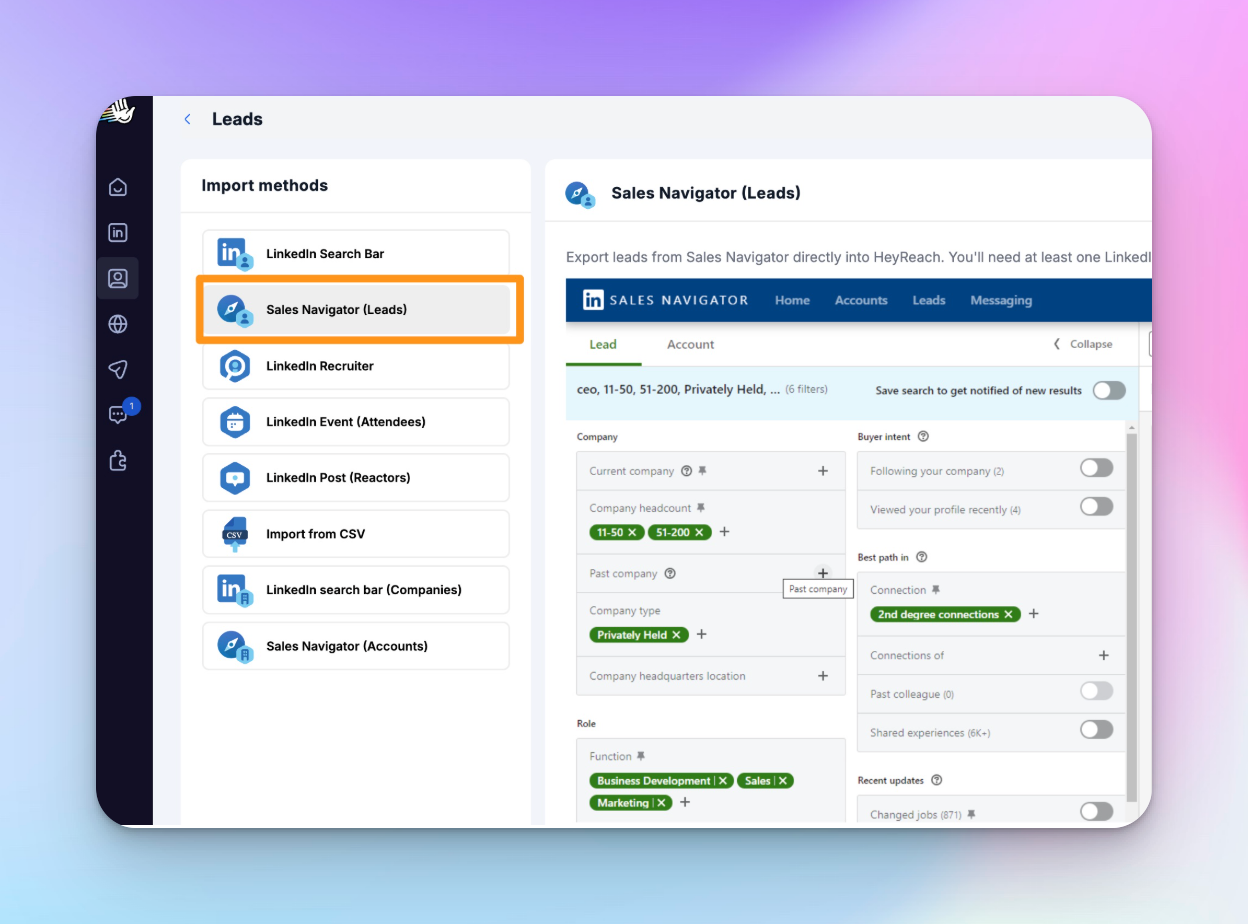
The honest trade-off: zero familiarity. Acceptance rate depends almost entirely on how precise your targeting is and how relevant your message feels to that specific role. Get the ICP right and precision compensates for the cold start.
Tier 4 — LinkedIn Search Bar (Leads): broad cold
Free. No Sales Navigator required.
And the lowest warmth, least precision, highest cleanup requirement of any source on this list. This is honestly where most low-acceptance campaigns begin because it's easy to use without ICP discipline.
You search a job title, get 500 results, import them all, and send. The list looks full, but the acceptance rates tell a completely different story.
Import path: Leads → Add Leads → LinkedIn Search Bar (Leads).
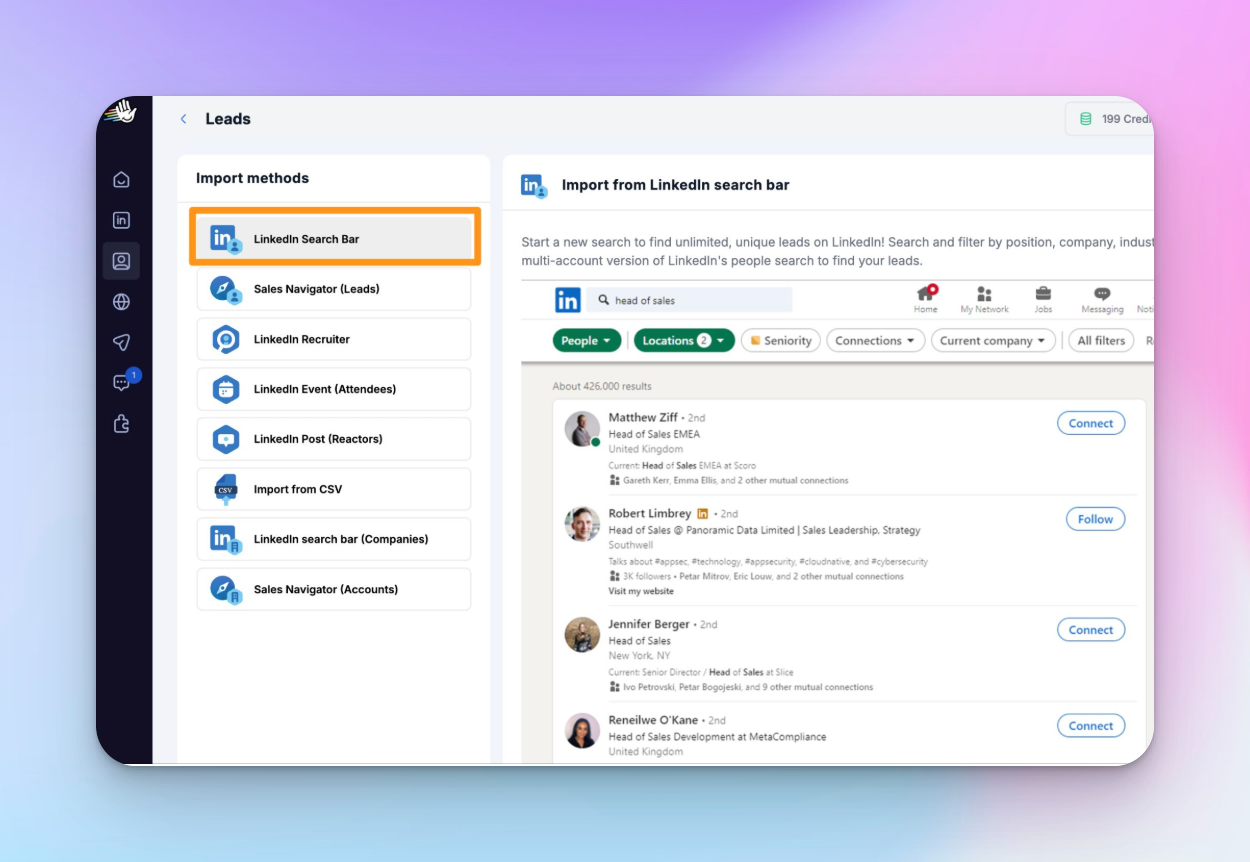
If this is your source, Step 2 cleanup is non-negotiable. More non-fits land here than anywhere else.
How to decide which source is right for your campaign
Before you pick a source, decide: what does your campaign need to achieve?
Warmth (Tier 1–2) for high-conversion micro-campaigns: smaller lists, higher intent, better conversations. Use this when you want quality over volume, and you have engagement to harvest.
Precision cold (Tier 3–4) for volume campaigns: larger lists, colder audiences, heavier dependence on ICP targeting and message relevance. Use this when you need to scale, and your ICP filters are tight enough to compensate for the lack of familiarity.
If you've posted three or more times in the last 30 days and averaged 40+ reactions, you have enough to run a warm campaign right now.
Here's a full walkthrough of the Leads screen and all import methods:
Tip: One campaign, one source tier. Don't mix Tier 1 and Tier 4 in the same list without the If Connection sequence split in Step 4 — otherwise you're applying the same logic to audiences that need completely different approaches.
Most agencies still build lists from completely cold sources. Same ICP filters, search patterns, and an unfamiliar audience every time. The source decision is made before the first message. Most agencies just don't treat it that way.
Step 2: Clean your list before it touches a campaign
No source can produce a perfect list. Not even Tier 1.
Ten minutes of manual review after import will do more for your campaign and acceptance rate than rewriting your connection note for the third time.
Here’s what I check before anything enters a campaign:
- Job title match
Does the role actually align with the ICP you're running this campaign for?
If you imported 180 post reactors and 40 of them are job titles that don't fit, remove them. Your list drops to 140 and your acceptance rate goes up. That's the return on ten minutes of work.
- Company fit
Wrong industry, wrong size, wrong stage.
If it's clearly off, it goes. Don't talk yourself into keeping borderline profiles because the list feels thin. A smaller clean list outperforms a larger noisy one every time.
- Existing relationships
Anyone you already know personally? Pull them out. They deserve a direct message, not a sequence. Putting someone you've met in a cold campaign is a fast way to damage a warm relationship.
Before you move to Step 3, run Intersect Lists across your combined list to catch duplicates.
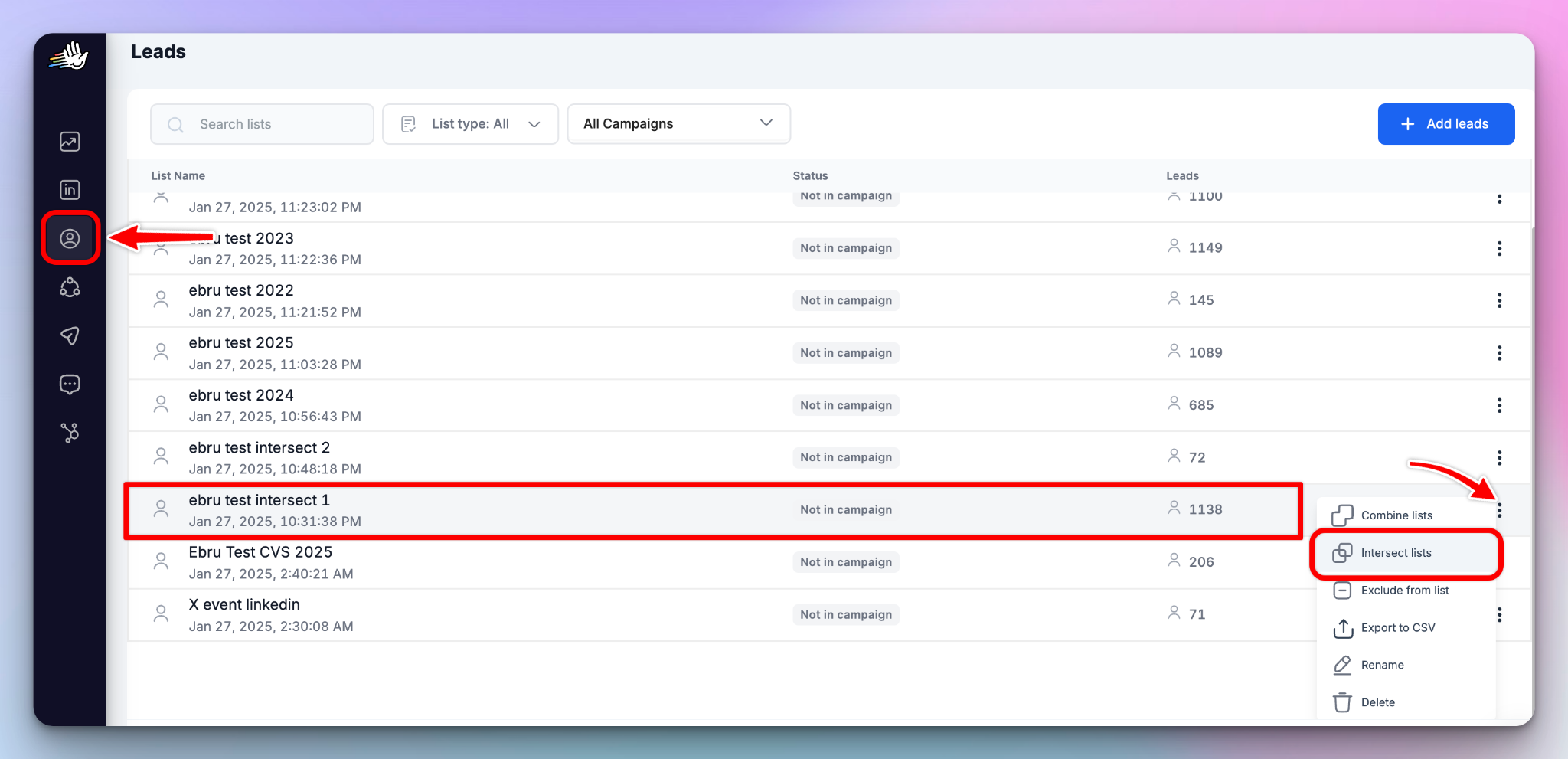
Then use Exclude from List to remove anything that doesn't fit. Takes five minutes. Do it in this order.
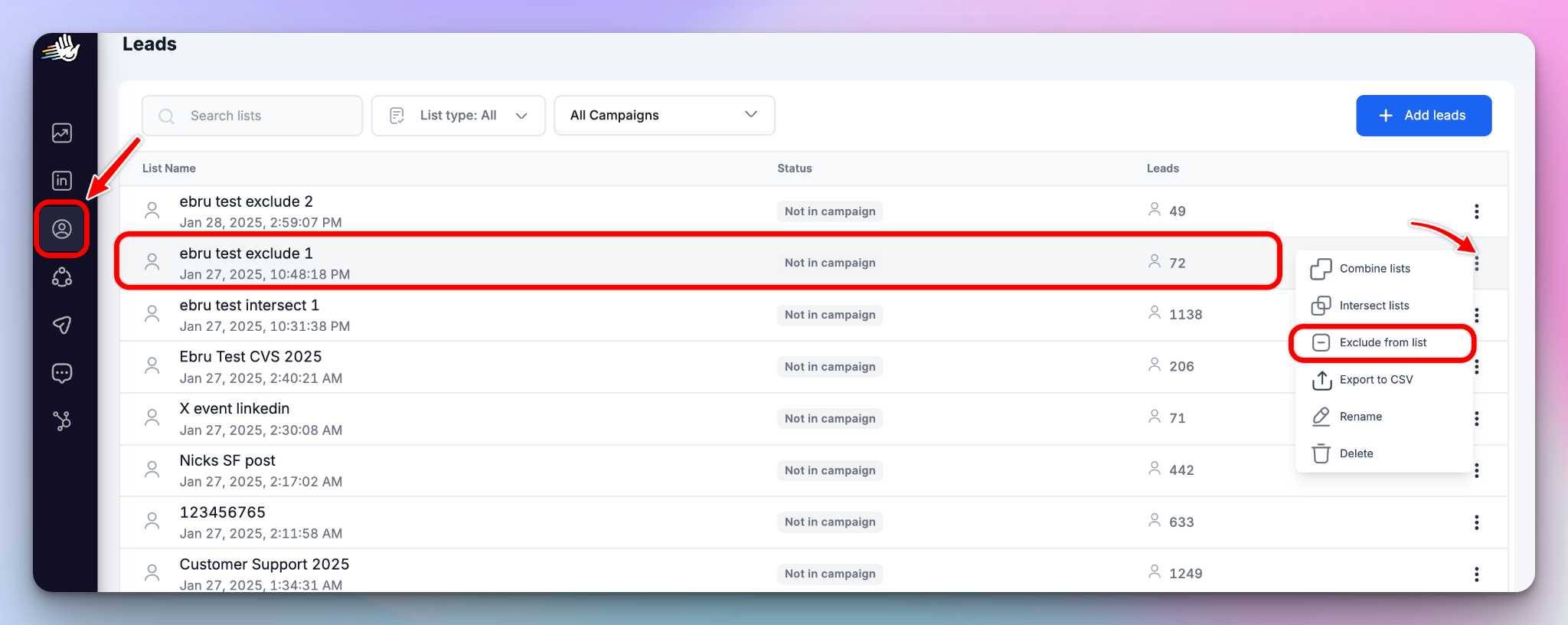
One thing I've learned: the temptation to skip this step is highest when the list feels good. I've been there. It never ends well.
Post reactor lists, especially — you built them from your own content, they feel relevant, so you assume they're clean. They're not always. The cleanup is still on you.
Step 3: Remove the wrong leads before launch
Building the right list is half the job. Removing the wrong leads is the other half. And this is the step most agencies skip — just because it feels administrative. It really isn't.
It's what protects:
- sender reputation
- client relationships
- campaign credibility
Write these down: three rules, every campaign.
- Exclude existing clients
Import current client contacts as a list and set it as the campaign exclude list during setup.
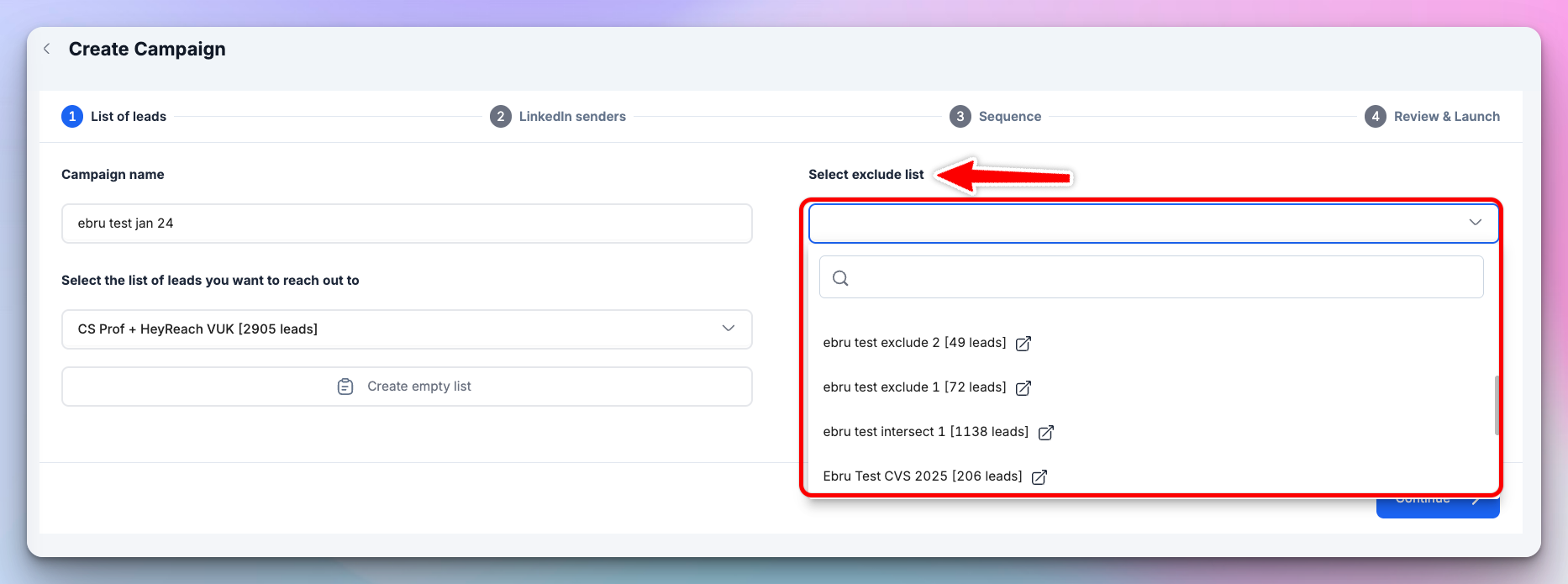
Here's why this matters: If you're running outreach for a SaaS client and one of their existing customers receives a cold connection request from that campaign, the conversation that follows is going to be awkward, to say the least.
I've seen it happen. It's an awkward conversation to be on either side of.
- Exclude leads already contacted elsewhere
Reaching the same person from multiple sender accounts inside the same workspace immediately makes the outreach feel automated.
Even strong copy struggles once trust breaks at the targeting layer.
Exclude leads already contacted by any sender in the workspace before launch. Every time.
- Exclude 1st-degree connections from cold campaigns
Sending a connection request to someone already in your network signals that the outreach wasn’t reviewed properly.
That’s especially damaging for warmer campaigns where familiarity is your biggest advantage.
One operational constraint agencies should know upfront
CSV-imported lists cannot immediately function as exclude lists.
The leads must first be properly matched and indexed by running them through a campaign. Even a simple View Profile-only sequence works.
If you're using a CRM export as a client blocklist, run it through a View Profile only campaign first — that's the fastest way to get it matched and ready to use as an exclude list.
Step 4: Stop running warm and cold leads through the same sequence
Most agency lists are mixed. Some leads are already connected to you. Others have never seen your profile.
Running both through the same sequence treats two completely different relationships as if they're identical. That's where your warm-list campaigns lose their advantage.
HeyReach's If Connection conditional step fixes this automatically.
It’s one of the most underused features in HeyReach for mixed-list campaigns. Genuinely, most operators I talk to haven't set this up yet. And for warm-source campaigns specifically, it's the difference between activating the familiarity you built and accidentally destroying it.
Here's how the split works:
Connected leads → direct message path
They're already in your network. No connection request needed.
Go straight to a message — and reference the specific reason you're reaching out.
For post reactor campaigns: the post they engaged with.
For event campaigns: the event you both attended.
One sentence. Specific context. No pitch.
“Saw you engaged with my post on [topic] — genuinely curious what's driving that for you right now.”
The ask comes later.
Not connected leads → connection request path
These leads go through the standard sequence first:
connection request → acceptance → message.
For warm sources (Tier 1 and Tier 2), start with a blank connection request. HeyReach data shows blank requests average 27% acceptance versus 22% for personalized notes.
Your profile photo and headline already work their magic — especially for post reactors who already know your face.
After acceptance, reference the post or event in the first message. Same rule: specific context first, pitch later.
For cold sources (Tier 3 and Tier 4), familiarity is lower — which makes testing more important. Use Add Message Variation to test blank versus personalized requests before scaling either version.
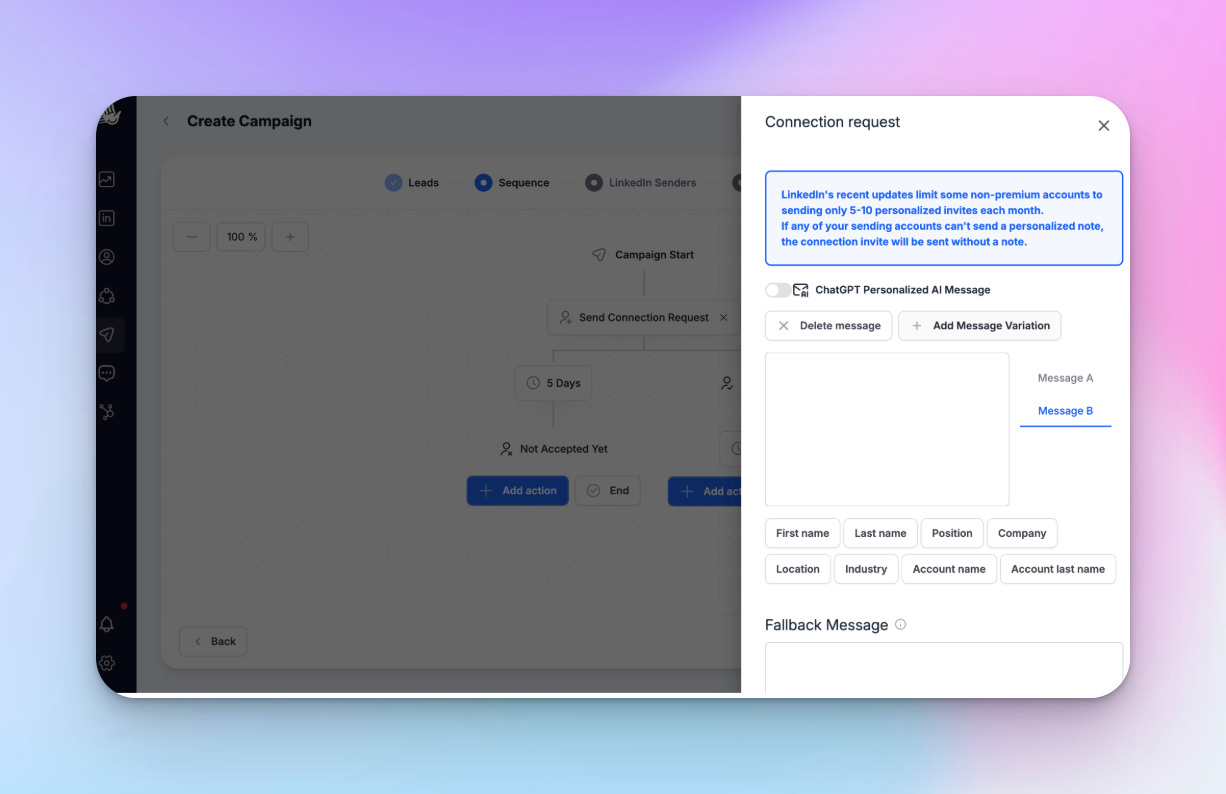
Why this matters more than most people realize
Before If Connection, agencies handling mixed lists had two options:
- manually pre-segment everything before import
- run everyone through the same sequence
One was slow. The other was wrong. Most chose the other one.
Why warm lists outperform cold ones — even at smaller volume
You don't need more leads, just fewer strangers.
A 500-person cold list converting at 12% gives you 60 accepted connections. A 150-person warm list converting at 32% gives you 48. The numbers may be close, but the quality couldn’t be any more different.
By the time the first message goes out, the acceptance rate is mostly already decided. And when acceptance or reply quality drops, the pattern usually tells you exactly where the breakdown started.
Next steps: Run your first warm campaign in 30 minutes
Pick one high-engagement post, import the reactors, clean the list, apply the exclusions, and split the sequence logic correctly.
You can have a warm-audience campaign live in under 30 minutes — entirely natively inside HeyReach, no additional tools required.
It starts with the list.
Acceptance rate problems start with the list and end at the copy.
The copy gets most of the blame because it's the most visible variable — but by the time the message goes out, the ceiling is already set by who's on the list and how warm they are.
I've watched good copy fail on bad lists more times than I can count. Start there.

Try it for free
Frequently Asked Questions
What is a good LinkedIn acceptance rate for agency outreach?
For cold outreach, 25–35% is a healthy range. Above 35% signals strong ICP targeting or warm audience selection — post reactors and event attendees consistently hit this range because familiarity already exists before the connection request lands. Below 20% is a clear warning sign. And in most cases, it's a list quality or ICP match problem, not a copy problem. Fix the list before touching the message.
What are the best lead list sources for LinkedIn outreach?
Ranked by warmth: LinkedIn Post Reactors, LinkedIn Event Attendees, Sales Navigator, LinkedIn Search Bar — in that order. Post reactors are the warmest leads you can build a list from because familiarity already exists before the first message lands. Event attendees share context. Sales Navigator gives you precision without familiarity. LinkedIn Search Bar gives you volume without either. All four import natively inside HeyReach. Which one you choose sets your acceptance ceiling — before you write a single word of copy.
Should I send a blank or personalized connection request?
For acceptance rate: blank and personalized requests perform similarly on average — HeyReach data puts blank at 27% vs. 22% for personalized notes. Where the personalized note earns its place is post-acceptance reply rate. A short, specific note that references why you're reaching out meaningfully increases the chance of a conversation starting after acceptance. For warm sources like post reactors, your profile already does the recognition work — blank usually wins. For cold sources where you're starting from zero familiarity, a relevant note can shift reply rate noticeably. Test both with Add Message Variation before you scale either.
How do I handle leads who are already connected when importing a new list?
Use HeyReach's If Connection conditional step. Connected leads go straight to a message — no connection request needed. Unconnected leads go through the standard path first. One campaign, two routes, handled automatically. For warm-source campaigns, this is especially important — sending a connection request to someone who already follows you removes the one advantage you had before the message even landed.
Can I use a CSV list as an exclude list in HeyReach?
Not immediately. CSV-imported lists must first be run through a campaign — even a View Profile only sequence with no other steps — to be properly matched and indexed before they can function as an exclude list. If you're using a CRM export as a client blocklist, run it through a View Profile only campaign first. That's the fastest way to get it matched and ready. Plan for this during setup — it affects your timeline more than most people expect.