How to set up LinkedIn drip campaigns that actually generate leads
Published:
February 9, 2026
Updated:
February 11, 2026
LinkedIn is one of the most effective lead generation channels for B2B, and there is data to prove it.
The State of B2B Digital Marketing Report by Wpromote reported 89% of B2B marketers use LinkedIn for lead generation, and 62% of marketers say LinkedIn actually generates leads for them, making it a top lead gen social media channel.
LinkedIn is no longer an option for B2B sales for you if you want to get the best out of your lead gen campaigns. Done right, you can achieve reply rates of up to 10.3% with LinkedIn messages, higher than the average cold email marketing reply rates of 5.1%
Here, you will learn about LinkedIn drip campaigns, what they are, and how to set up LinkedIn drip campaigns that generate quality leads for you.
What are LinkedIn drip campaigns?
A LinkedIn drip campaign is a strategic series of automated actions to engage, nurture, build trust and convert prospects over time. Unlike one-off messages, a drip campaign builds relationships and helps with lead nurturing before you make your offer.
With a LinkedIn drip campaign, you can send connection requests, view profiles, engage with posts, and send a series of messages to prospects. Imagine how many hours it would take to do this manually for hundreds and thousands of prospects per week. That is where LinkedIn outreach automation tools for drip campaigns come in.
Automation saves you hours, especially if you are an agency generating leads for multiple clients or a sales team running a large outreach campaign.
A step-by-step guide to creating a LinkedIn drip campaign
Here is how to create a high-performing LinkedIn drip campaign step by step, even if you have never created one before.
Define your one clear goal.
The first step in creating a successful drip campaign is defining your goals. What are you aiming to achieve with your campaign? Do you want to promote a lead magnet, such as an ebook and research report? Do you want to book meetings? Do you want to drive sign-ups for your product’s demo? Do you want to warm up prospects before your product launch?
The key is to have one clear goal per campaign. Trying for multiple goals in one campaign makes it longer and reduces its effectiveness.
Know your ICP (Ideal Customer Profile) and build your list.
Once your goal is clear, define your ideal customer profile. Who do you want to target in your campaign? Identify job title, industry, company size, location, and challenges.
For instance, here are some ICP example:
- CMOs in healthcare companies with fewer than 100 employees in the UK
- Customer service reps in companies with more than 1000 employees in the UAE
- B2B Startup Founders in the US with 11–50 employees struggling with lead generation
Once you have the ideal customer profile for your campaign, you can go ahead and build your prospect list using tools like the LinkedIn Sales Navigator.
Warm up your profile.
Your LinkedIn profile is a vital part of your drip campaign because the outreach would be from your profile, and it will shape people’s impression of you.
Before you kickstart your campaign, assess your profile. Ensure your profile picture is clear, and your headline, banner, about section, recent posts, and comments are optimized and reinforce your messages. A well-optimized profile can be the difference between a high-performing campaign and a low-performing one.
Import your leads into HeyReach and set up your drip campaign
HeyReach is a LinkedIn outreach automation tool that allows you to set up drip campaigns successfully. Unlike browser-based tools such as Linked Helper, HeyReach is cloud-based and runs your setup drip campaigns even when you are offline.
HeyReach has a 14-day free trial.
You can sign up here and follow this session practically, so that by the end of this session, you will have successfully created a demo LinkedIn drip campaign.
Here is a step-by-step guide on setting up your drip campaign on HeyReach:
a. Import your leads into HeyReach:
Once you have signed up for HeyReach, you have your dashboard as seen below
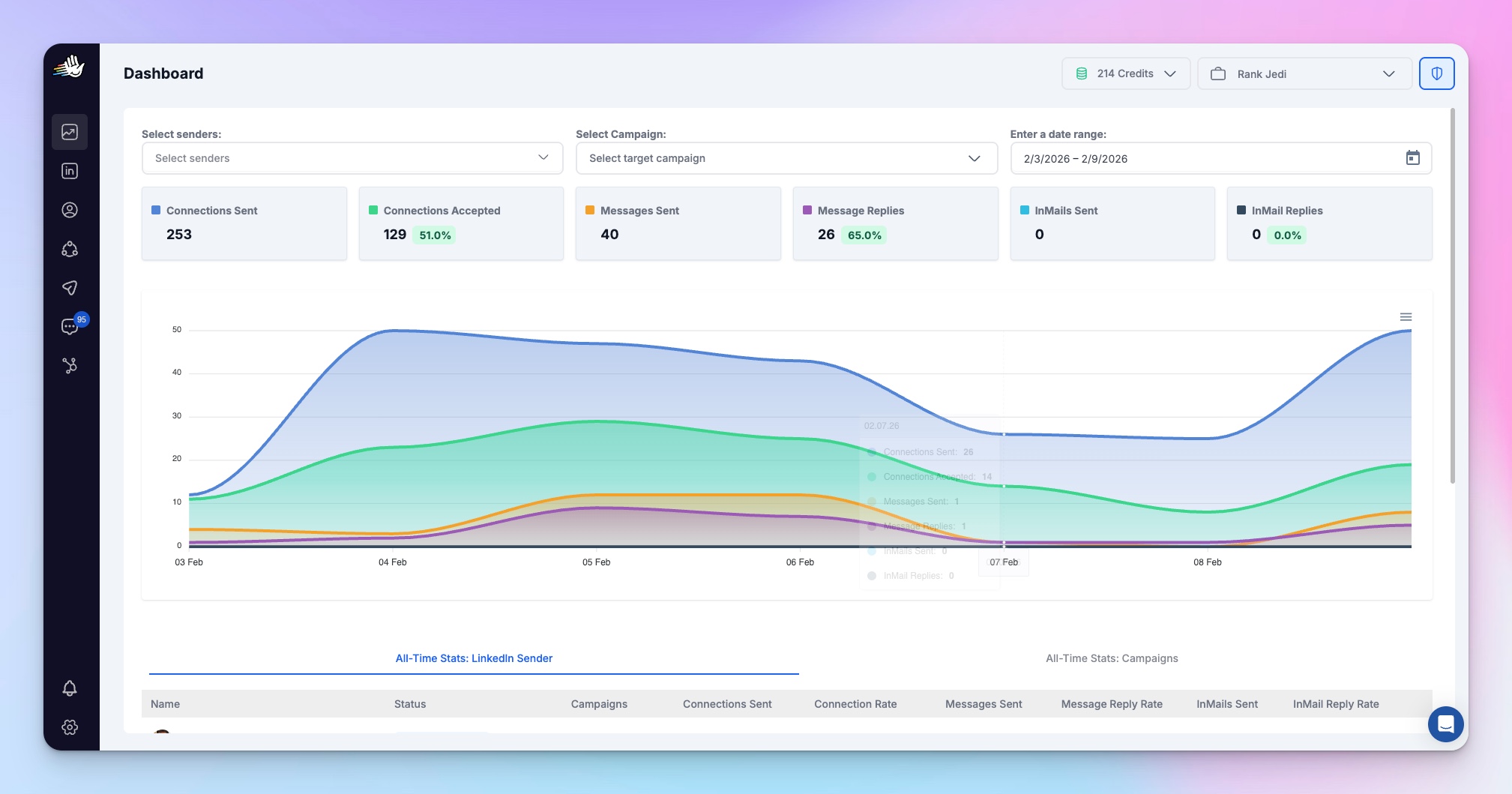
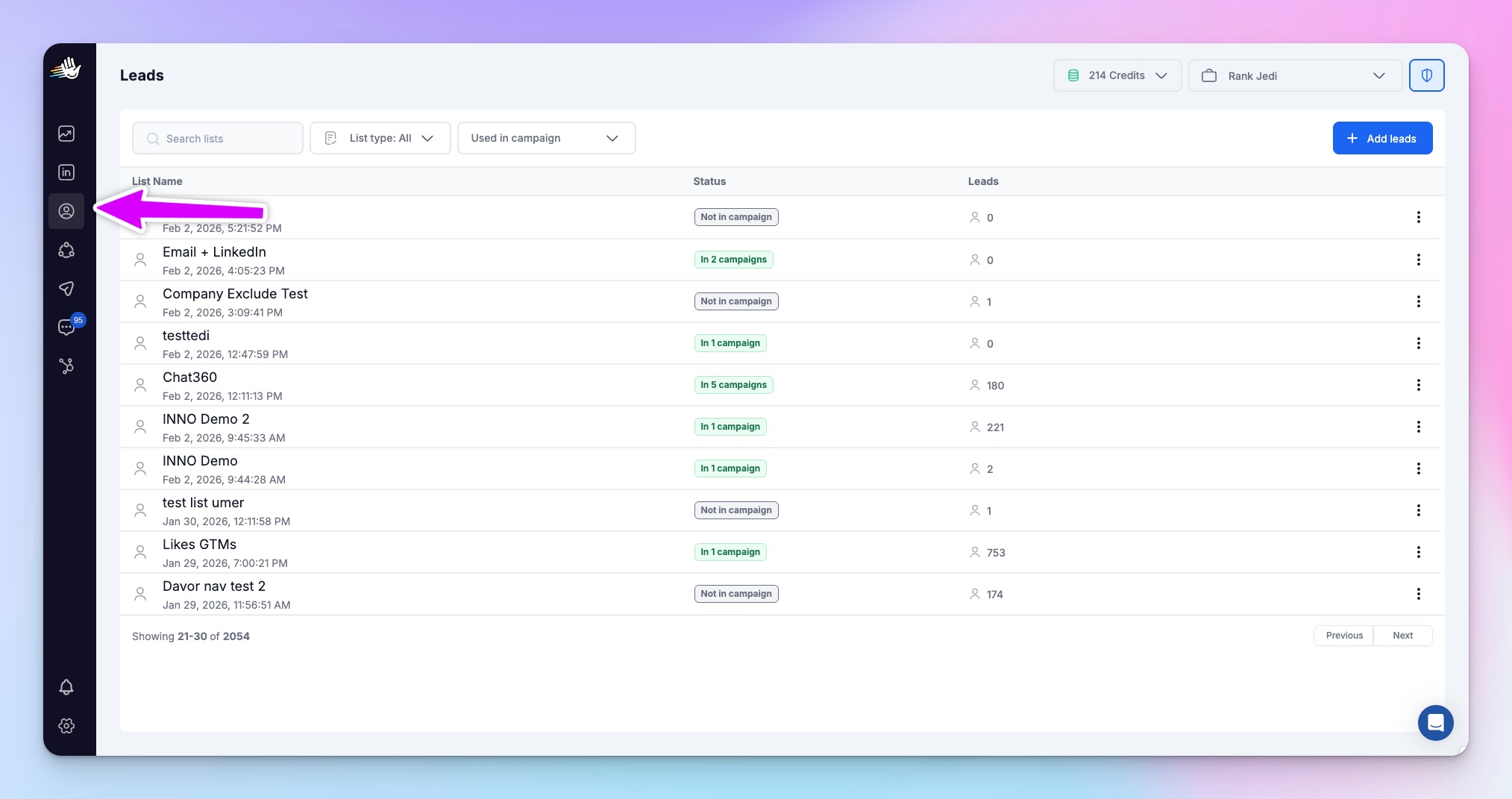
To import leads, locate the third icon on the left labeled “leads”. Click on it to proceed.
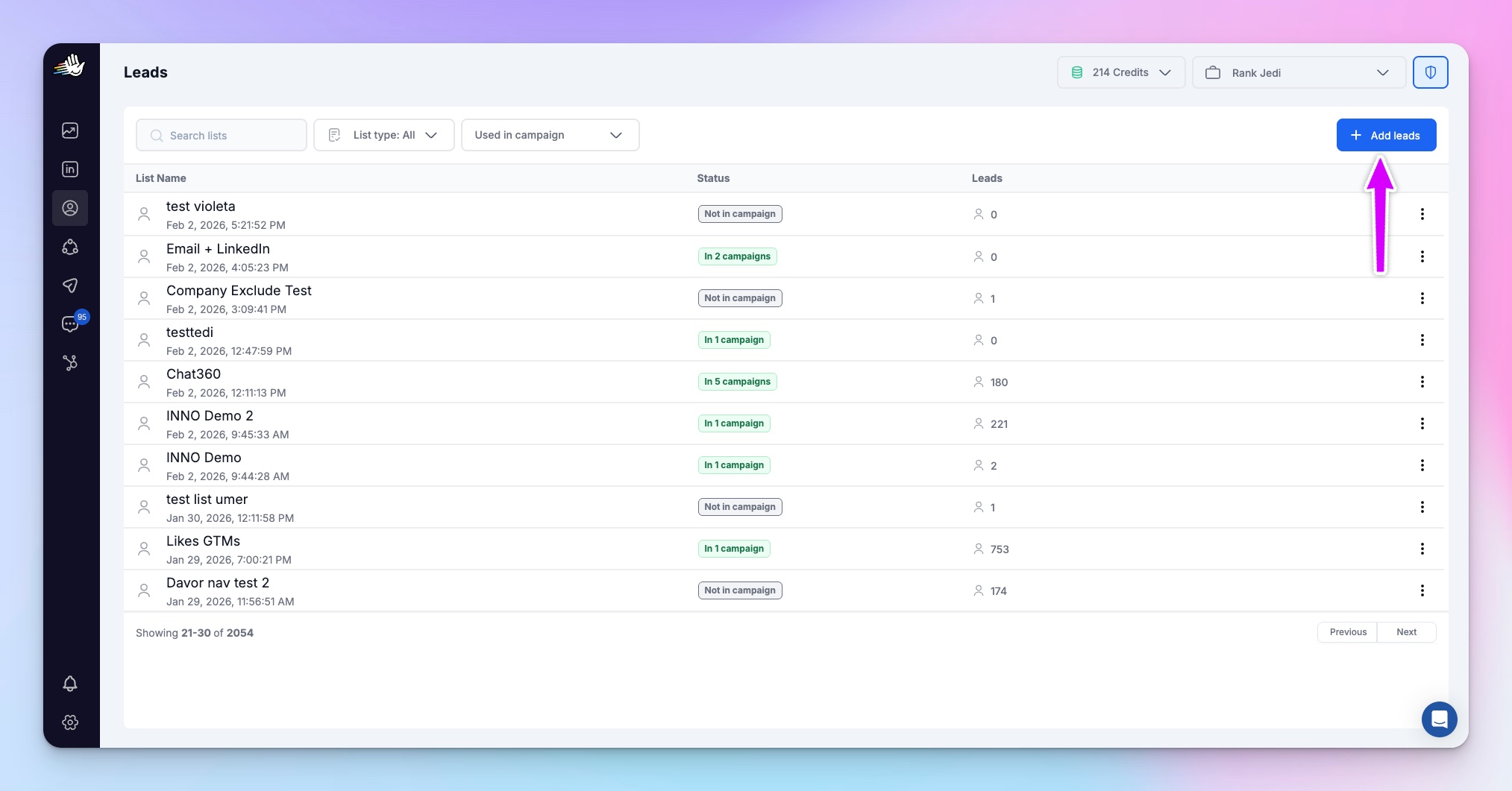
In the top right corner, click the icon “Add Leads” as seen below
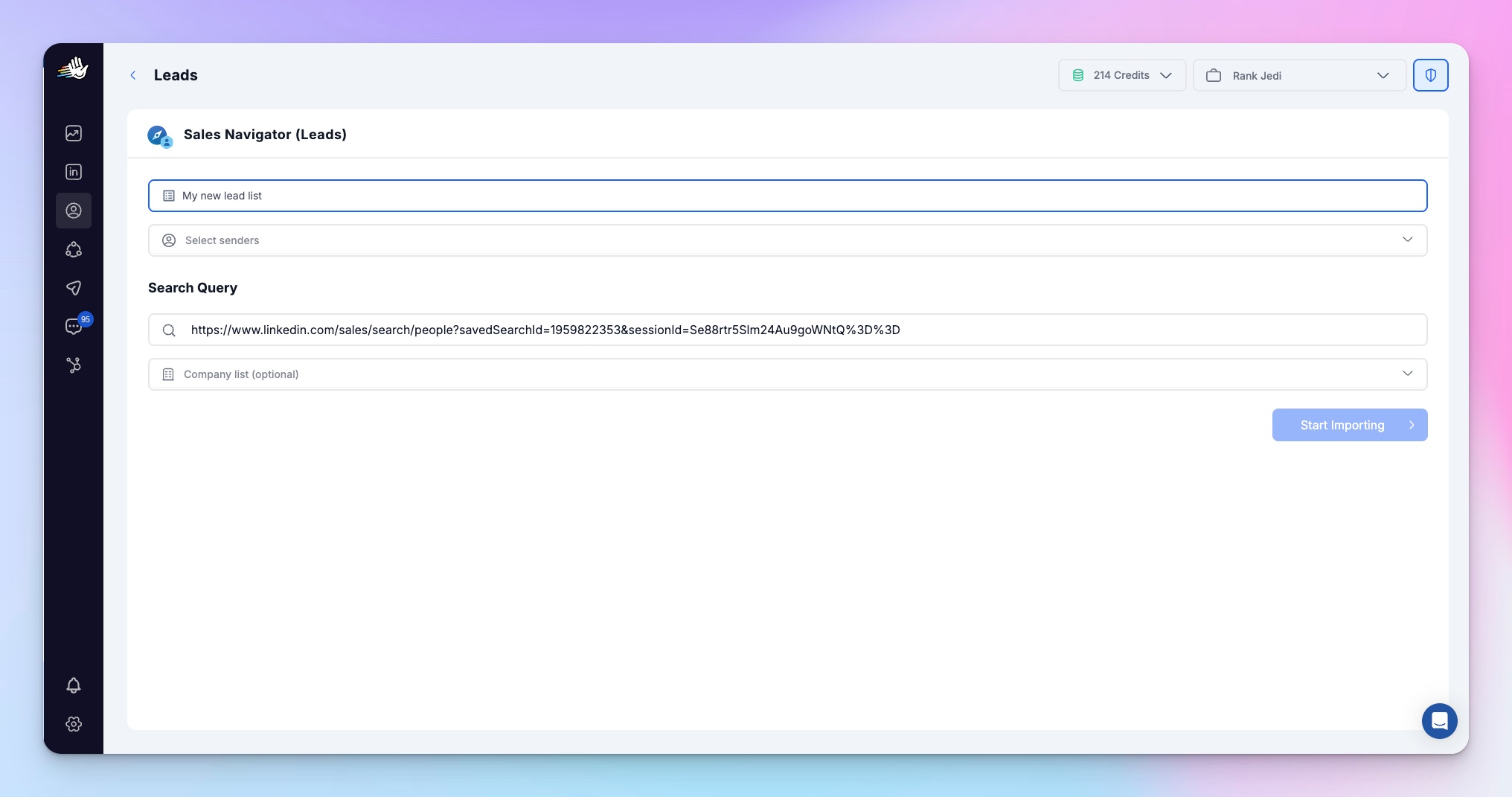
You can import leads via LinkedIn search, Sales Navigator, LinkedIn post reactors, webinar attendees or your own CSV file.
b. Start your campaign:
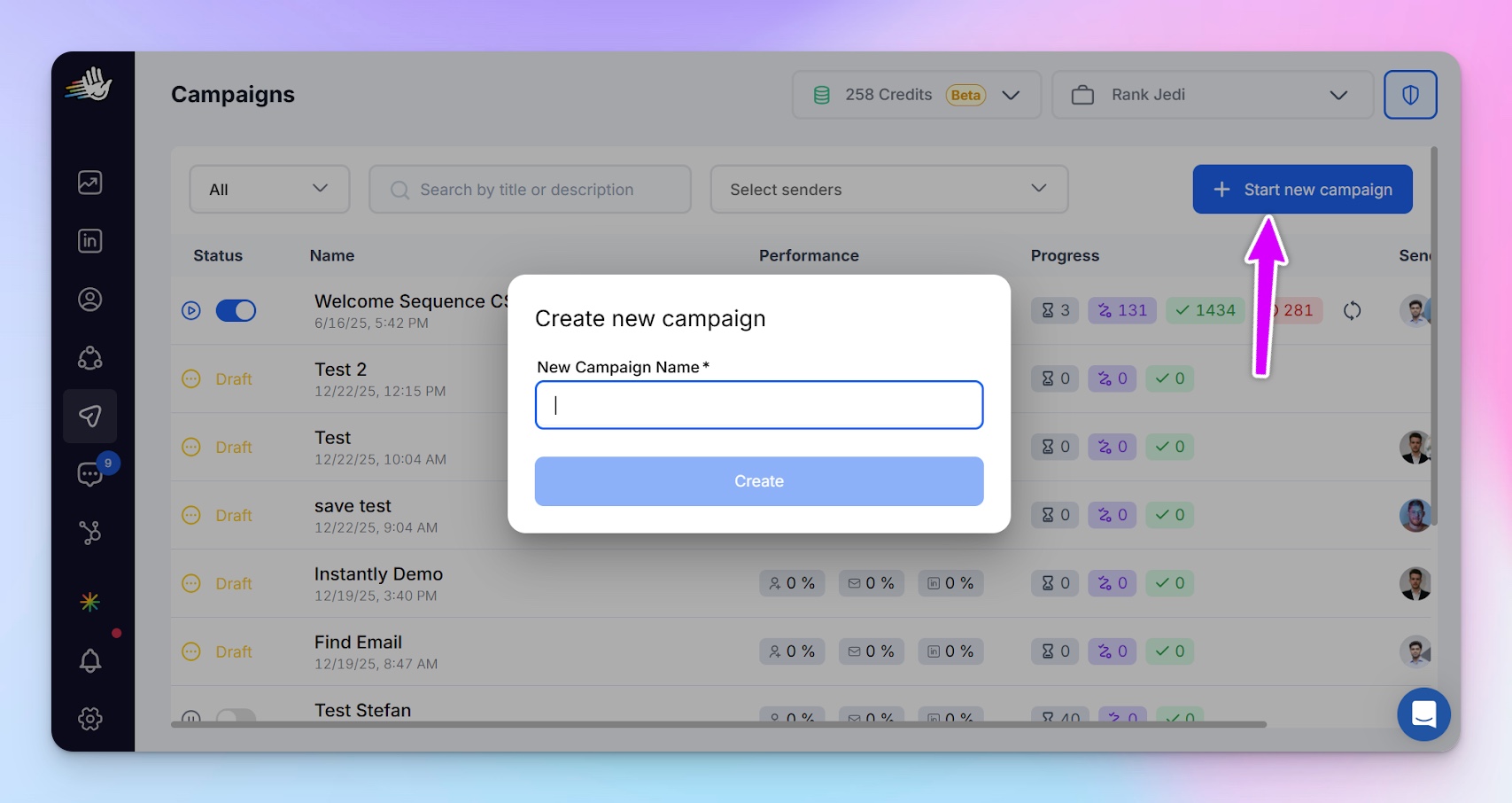
After importing your list, go to the dashboard and click on the fifth icon on the left. It will bring up the interface below. Select "Start new campaign" at the top right and name your campaign.
After naming your campaign, it will bring you to the next interface, as seen below, where you can select the leads previously uploaded.
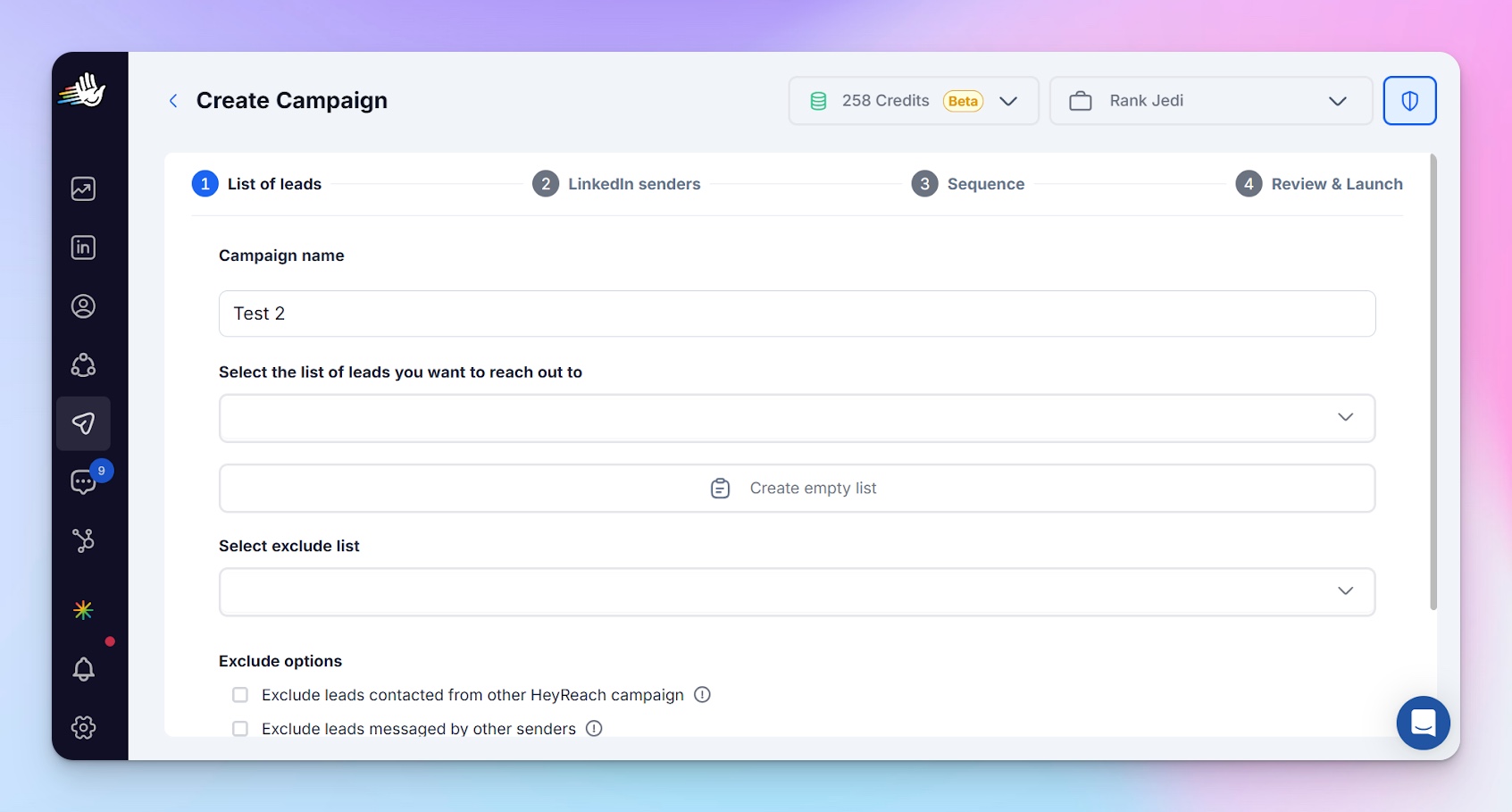
On this page, you can exclude contacts from other leads lists you have, leads you have contacted from another HeyReach campaign already, leads messages from other sender accounts already, and leads contacted by the same sender in another HeyReach campaign. This helps to avoid having a single lead in multiple campaigns simultaneously.
c. Select LinkedIn senders:
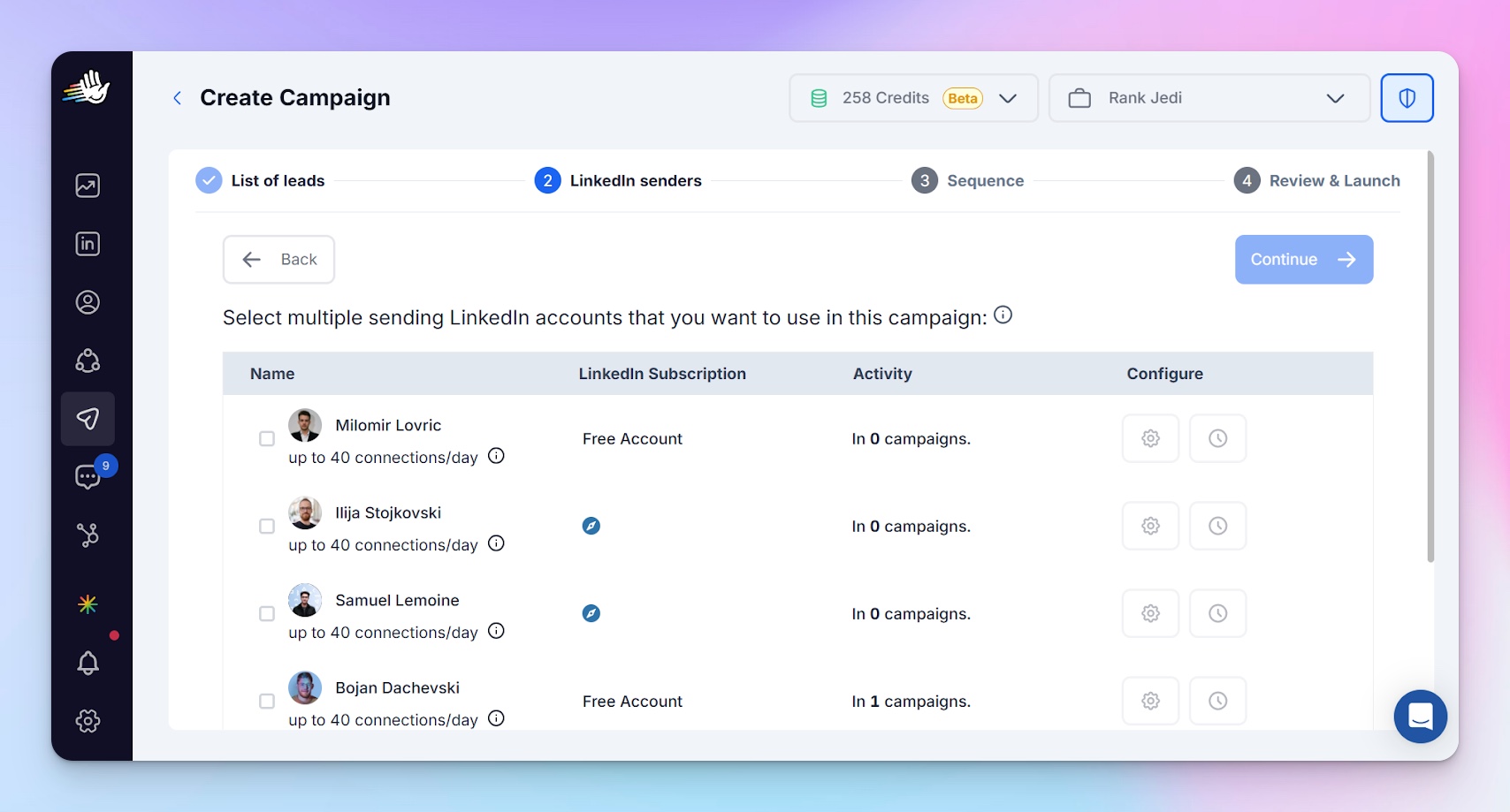
Here, select which LinkedIn accounts you want to use for sending in this campaign. Click continue to proceed.
d. Set up your campaign:
Once you select your LinkedIn sender account, it brings you to the following interface, where you can set up your campaign
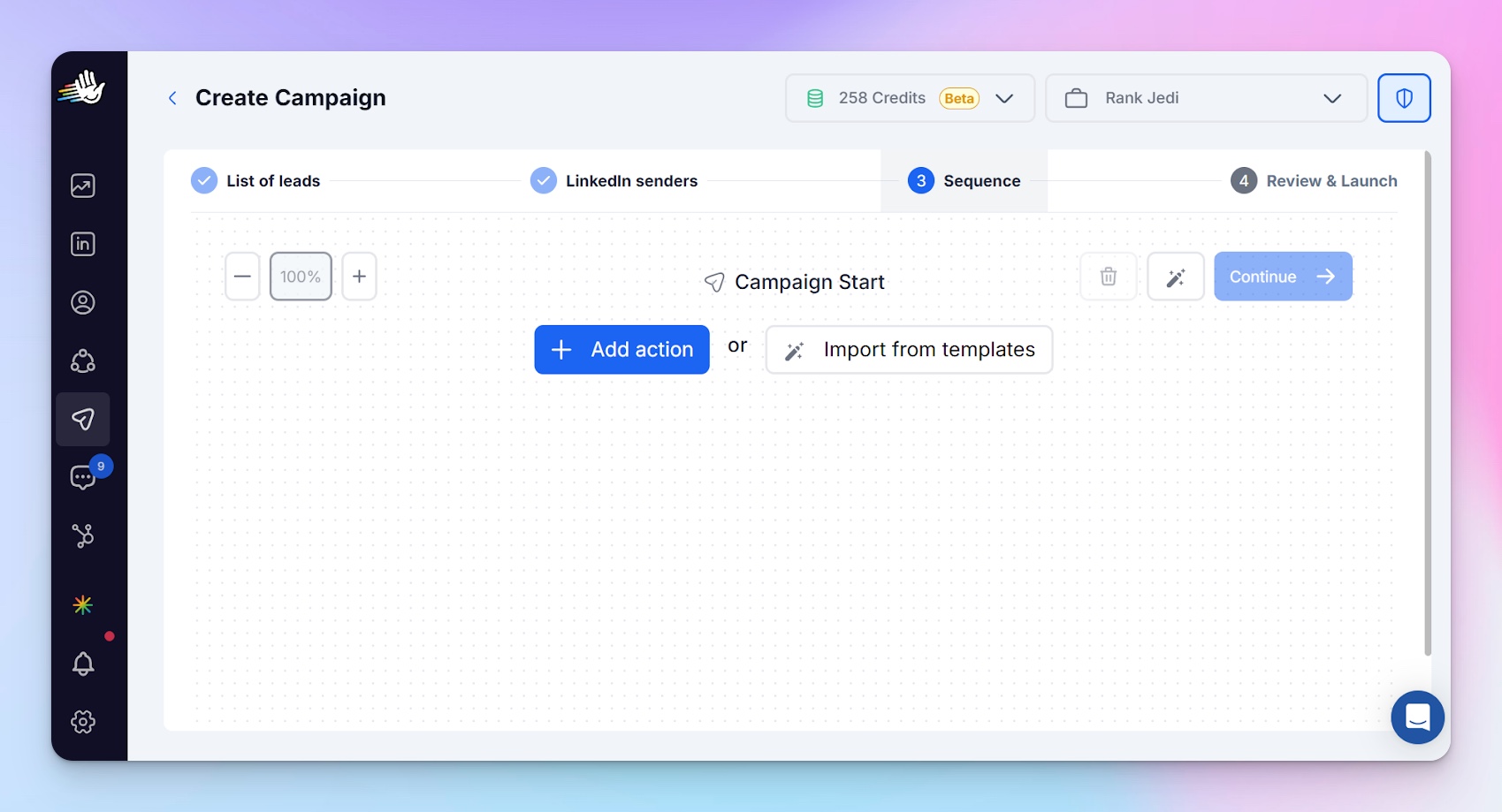
You can set custom actions for your drip campaign or import from the available templates. There are seven templates for different purposes you can choose from. There are message templates on
- Partnership proposal
- Engagement response sequence
- Comment follow-up sequence
- New connection nurture
- Value-first outreach
- Social proof sequence
- Expand your network sequence.
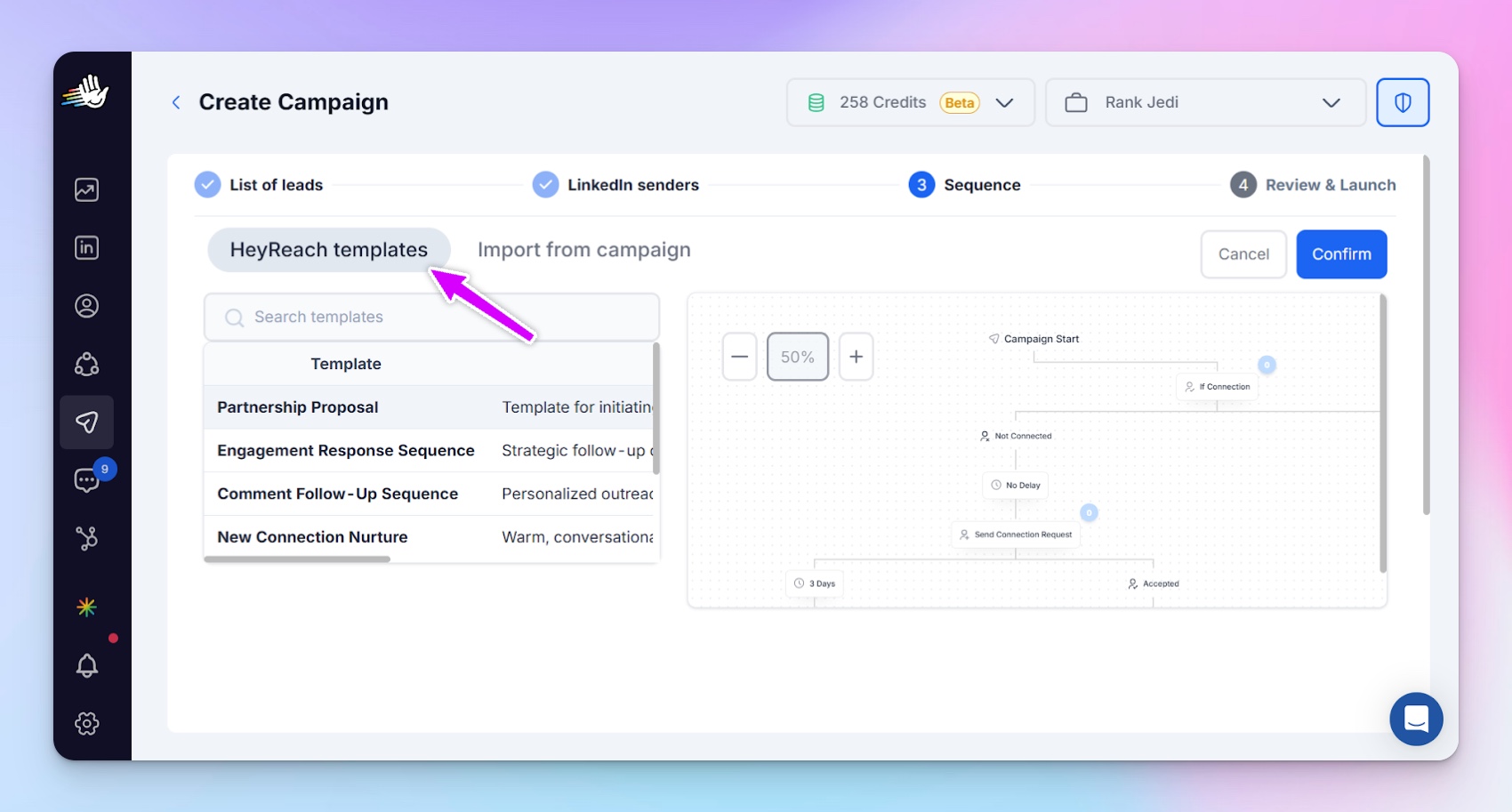
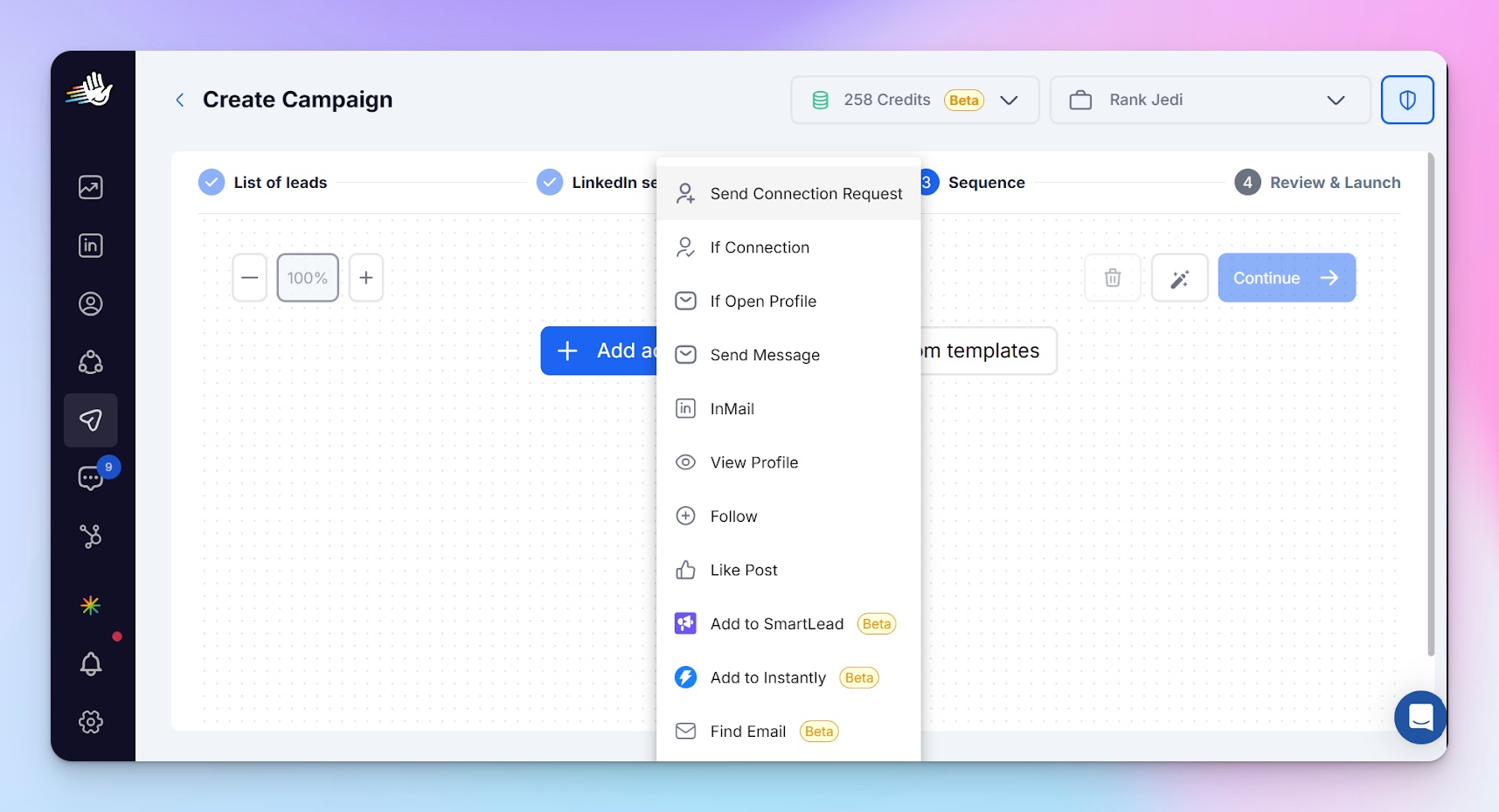
Alternatively, you can have your custom LinkedIn drip campaign system, which you want to build by adding actions of your choice, listed in the screenshot.
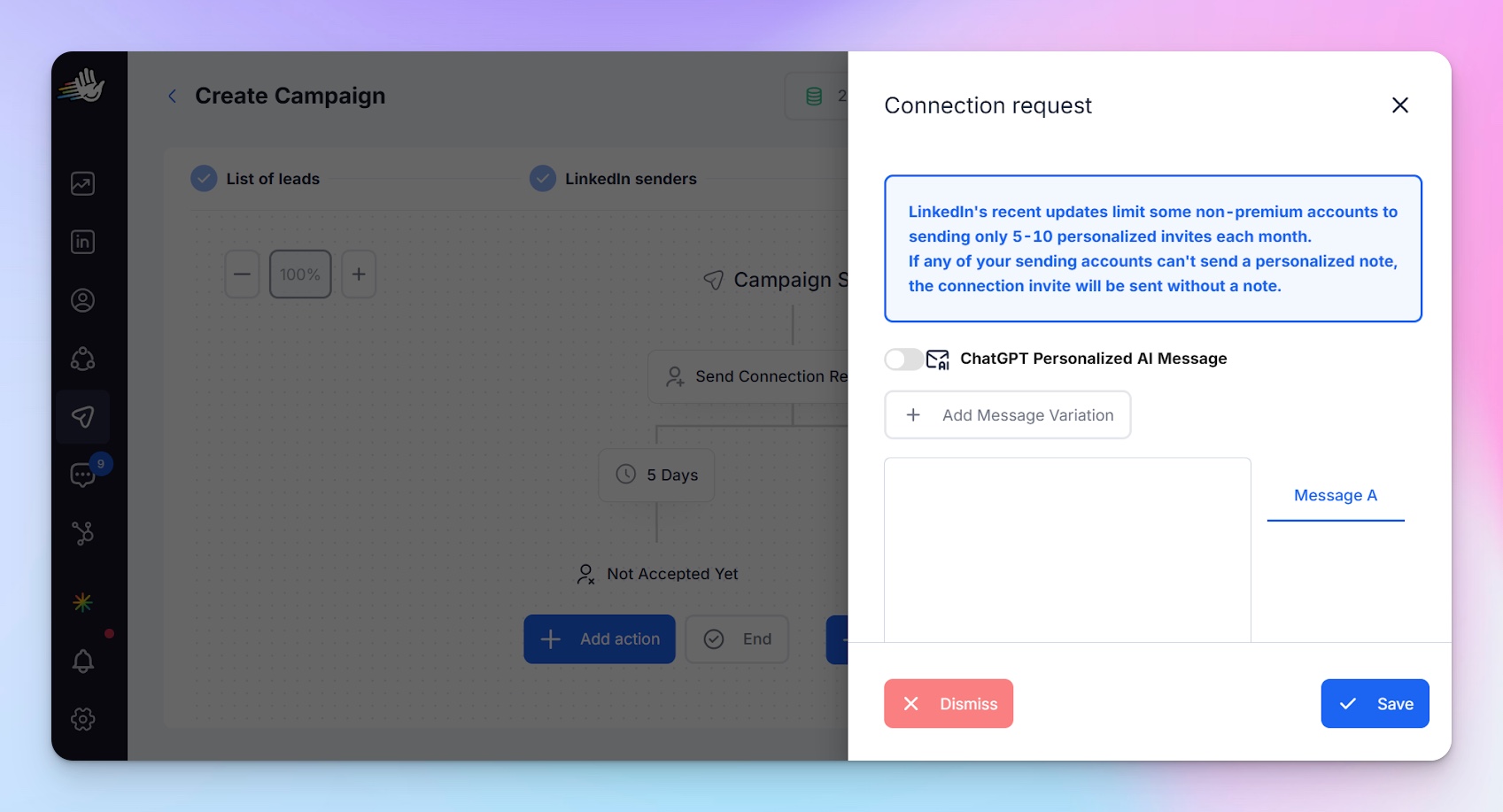
Next, add custom messages and actions as needed.
If you need even more detailed guide, you can follow full tutorial video on HeyReach with Nadja, our Head of Sales, giving a product tour and creating a custom LinkedIn drip campaign on HeyReach
Once you have set up your campaign, you can go ahead and review it before launching.
e. Track and optimize
Once you have launched your campaign, you can keep track of the results via the dashboard. You can see how many connection requests you sent in the campaign and how many were accepted, messages sent, and responses, same with inMails.
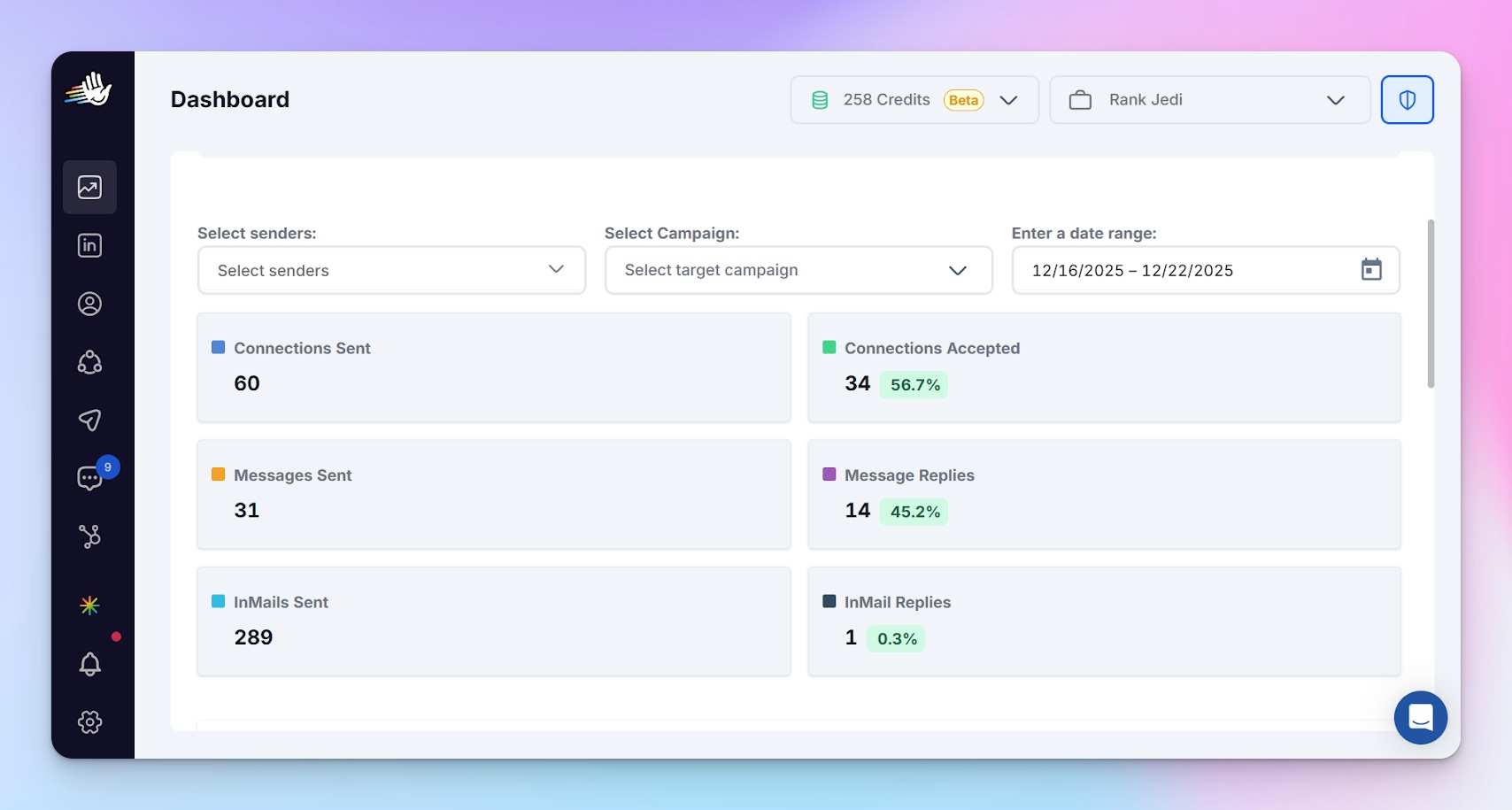
Based on your performance, you can modify an ongoing drip campaign sequence. You can edit your message copy, increase or reduce the wait times between the steps, your daily connection request, and message limits. You can pause a campaign and resume later, or you can even stop a campaign totally. However, you cannot undo an already executed task, such as an already sent message.
Common LinkedIn drip campaign mistakes to avoid
Here is a list of common mistakes to avoid in your LinkedIn drip Campaign:
Poor personalization
Your prospects can smell poor personalization from miles away, and it can be a turn-off and the culprit for low engagement rate in your drip campaigns. A good personalization should feel like a one-on-one with the reader.
Here is what poor personalization looks like: Hi Sam, I’d love to connect and tell you about our solution.
Here is a better way to reframe the message above: Hi Sam, I came across your post on outbound sales for SaaS teams. I really liked your point about follow-ups. How many follow-up messages do you typically send if you do not get a response from your prospect?
The first message centers around you and not your lead; it also shows that the only thing you know about Sam is their name, and it feels automated and sent to a large number of people.
Good, personalized content feels one-on-one, like the second example. Referencing their post and asking about them makes the message relevant, encouraging a response.
Targeting the wrong audience
Before you launch your drip campaign, have a clear picture of who your target audience is. What is their title, industry and location?
For instance, the subject line for marketing managers in B2B companies may not be applicable to a marketing manager in a B2C company. You can create different drip campaigns for these two audience segments, which would be hyper-specific and relevant to the audience.
No clear call-to-action (CTA)
One of the common mistakes in drip campaigns is CTA related. No clear call-to-action, making a call-to-action too soon in the campaign, and having multiple CTAs in one campaign are all mistakes that reduce the effectiveness of a drip campaign.
Weak LinkedIn profile
Has anyone ever just reacted to your post on LinkedIn, and you checked their profile?
Have you ever checked a person’s profile on LinkedIn, and because their profile is poorly put together, you decide to ignore their connection request?
It goes both ways; if you judge people by their profile, then others judge you by yours as well. A weak LinkedIn profile will reduce your connection acceptance and message response rate.
Not breaking up when you should
Follow-up is a gold in sales outreach, but a good salesperson knows when to withdraw and break up if there is no response after 2-3 follow-ups.
Not optimizing based on data.
The effort put into a drip campaign does not end when you launch. You need to continually check your performance and optimize accordingly for the best results. Observe a low open rate? Optimize your subject line. You got responses but no booked meetings? Optimize your CTA. Identify where the issue is and optimize for better results.
Tips to get the best out of your LinkedIn drip campaign
A high performing drip campaign is not coincidental. Here are tips to implement to get the best out of your LinkedIn drip campaign:
Have a clear goal and ICP
Have a clear single goal you want to achieve in your campaign and have a clear picture of who your ICP is. One goal and one ICP per campaign is ideal for maximal results.
Personalize properly
Here are some of the best personalization methods in LinkedIn outreach:
a. Personalize based on the company name.
For example:
Hi Sam,
I noticed you’re leading the sales team at {{Company}}. Curious how you’re currently handling LinkedIn outreach.
b. Personalize based on recent activity.
For example:
Hi Sam,
I noticed you recently moved into a Growth Lead role at {{Company}}.
Many teams at that stage struggle to turn LinkedIn connections into actual conversations.
Curious if that’s something you’re seeing too?
c. Personalize based on recent LinkedIn activity.
For example:
Hi Sam,
I liked your post on LinkedIn outreach, especially the part about follow-ups being underused.
What do you think is the ideal number of times to follow up on a prospect?
Messages, especially the first ones, should focus on the reader and not you. A litmus test for your personalized messages should be “If someone sent me this message, would I respond?” If you wouldn’t, your message is yet to hit the right note.
A follow-up tip to this: your outreach should feel more like creating relationships and meaningful conversations while adding value. For instance, when you get a response to the second message above with your lead affirming struggles they are experiencing, if you have a useful resource to help, share before you sell.
A/B test your messages
A/B testing your messages removes guesswork and tells you what is actually effective. It helps you figure out where the weak point in your campaign is for optimization. Experiencing a low connection acceptance rate? A/B test your connection note. Experiencing a good open rate but no response? A/B test the message you send after connection.
4. Use the right automation tool:
The LinkedIn marketing automation tool you use is also a factor in the success of your LinkedIn drip campaign. For browser-based tools such as Dux-soup, your campaign is paused whenever your browser is closed. This can lead to a delay in campaign actions.
With cloud-based tools like HeyReach, on the other hand, your campaign keeps running as scheduled even with your browser closed. This means your messages get delivered at the right time, making it more effective.
Also, HeyReach has a safe LinkedIn interaction limit and implements a multi-account rotation feature, a feature most other outreach tools do not have, making your accounts extra safe.
Here is a comprehensive review of HeyReach and how it stands out among other LinkedIn automation tools: HeyReach Review 2025: Why It’s the #1 LinkedIn Automation Platform
5. Monitor and refine
After you launch your campaign, continually monitor your performance metrics and refine based on data.
Templates to test for your next LinkedIn drip campaign
Here are 3 detailed templates to tweak and test for your next LinkedIn drip marketing campaigns:
Template 1
Day 0 – Send connection request with a note:
Hi {{First Name}}, I’ve been speaking with a few leaders in {{industry}} lately and thought it’d be good to connect.
Day 1: (Strike the conversation) Once your request has been accepted, point out the pain point you have noticed with people in the ICP and ask how they are approaching the challenge.
Hi {{First Name}}, Thanks for accepting my connection request. I’ve been speaking with a few leaders in {{industry}} lately, and one pattern I’ve seen is that {{role/company type}} teams are struggling with {{problem}}. Curious how you are approaching this at {{company}}
Day 3 – Light proof (Show how you have helped similar companies. Case studies and social proof can be useful here)
We’ve helped several teams in similar situations achieve {{specific outcome}} without {{common fear}}.
Day 5 – Soft CTA (Make the ask)
If this is relevant, open to a quick chat to see if it applies to you as well?
Day 8 – Follow-up (If there is no response)
Just checking back on this, {{First Name}}.
Template 2 (Best for people active on LinkedIn)
Day 0 – Engage with their post.
Like or comment thoughtfully (important)
Day 1 – Connection request
Hi {{First Name}},
I enjoyed your post on {{topic}}, especially your point about {{specific insight}}. Thought I’d connect.
Day 2 – Continue the conversation
Hi {{First Name}}
Thanks for connecting! Curious how you are currently approaching {{related challenge you mentioned}}?
Day 5 – Add value
I’ve seen teams run into {{problem}} when doing this. One thing that helps is {{insight}}.
Day 8 – Share proof and a soft CTA
If it’s useful, I'd be happy to share what’s worked for others (you can mention companies you have helped and the results you have helped them achieve). Will you be open to a quick chat?
Day 12 – Follow-up if there is no response
Just checking in regarding my previous message, {{First Name}}
Template 3
Day 0 – Connection request
Hi {{First Name}},
I work with {{industry}} teams and came across your profile. I thought it’d be good to connect.
Day 1 – Show your credibility
Thanks for connecting {{First Name}}
Recently, we helped a {{similar company/role}} achieve {{specific result}} in {{timeframe}}.
Day 4 – Relevance check
Curious if {{related problem}} is something you’re focused on right now as well?
Day 7 – Soft CTA
Happy to share what we did and see if it applies to your situation.
Day 10– Follow-up
Just checking in regarding my previous message, {{First Name}}
How to measure the success of a LinkedIn drip campaign
Here are metrics in measuring the success of your LinkedIn drip campaign and their healthy range
Connection request acceptance rate:
Your connection request acceptance rate = Number of connection request accepted/Number of connection request sent * 100%
According to observation by Leadloft, a 50%+ rate in connection acceptance is a healthy one. You can A/B test your connection request message to check which one delivers the best result.
Reply rate:
Your reply rate = total number of replies/Total number of messages delivered * 100%
A 30%+ in reply rate on LinkedIn is within a healthy rate. If you notice your reply rate dropping sharply after a particular message in your drip sequence, it calls for attention.
Other metrics to calculate and measure are:
Meeting/call booking rate:
This is calculated by: Total number of meetings booked/total number of people connected with * 100%
Your meeting booking rate is dependent on a range of factors: your industry, your offer, your messaging, etc. Booking a meeting is a higher commitment than replying, so do not panic when your call booking rates tend to be smaller than your reply rate.
Conversion rate:
This is different from the meeting booking rate because not everyone you get on a call with will turn out to be the perfect fit or have the budget to buy immediately. The conversion rate, therefore, tends to be smaller than your meeting booking rate as you take prospects down the sales funnel.
Conversion rate= total number of closed deals/total number of people reached out to * 100%
Revenue generated:
This is the total revenue that comes in from a particular campaign you ran. A good campaign should result in money in your bank account.
Why use HeyReach for your LinkedIn drip campaigns?
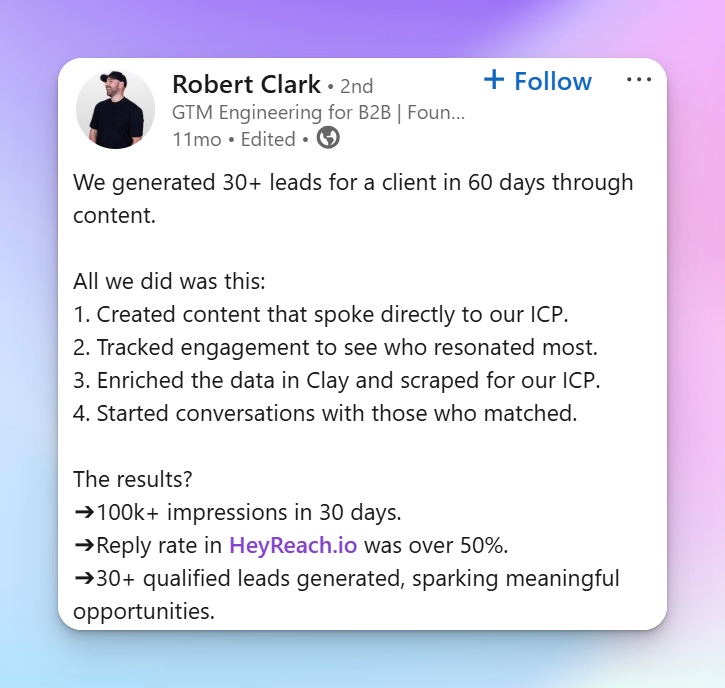
Don't just take our word for it, hear from our users on how they have been able to achieve results of booked meetings and generate revenue with HeyReach. Robert Clark, a Go-To-Market Engineer and Founder of a B2B outreach agency, generated 30+ leads for a client in sixty days via HeyReach:
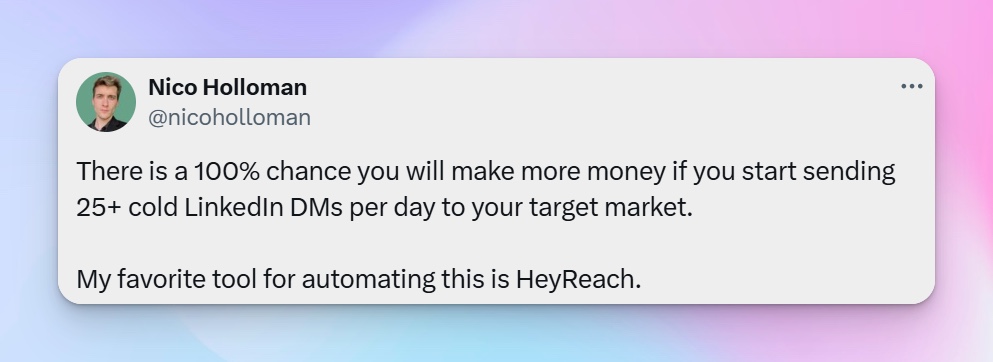
Nico Holloman, a B2B lead generation expert and Founder of Hologram agency, also shared his experience with generating leads with HeyReach:
HeyReach’s free trial extends as long as 2 weeks. In these two weeks, you have access to all the features, including the advanced ones. You can import your leads and set up drip campaigns right away. You can also kickstart your campaign and start booking meetings before the end of your free trial.

Try it for free