Sales prioritization matrix: a 3-step workflow for SDRs to set daily priorities
Published:
January 23, 2026
Updated:
January 25, 2026
Most SDRs don’t lose deals because they’re bad at outbound; they lose them because their day is running them, not the other way around.
If your day starts by opening your inbox and replying in pure chronological order, you’re already leaking pipeline.
The latest reply isn’t automatically the most important one. A polite “thanks, send info” from a low-fit account should not outrank a quiet-but-serious buying signal from your ICP that came in an hour earlier.
Yet that’s exactly how most days play out. Not because SDRs are lazy or clueless, but because there’s no outbound prioritization system telling them what deserves attention first. So they default to whatever is loudest, newest, or easiest to clear.
But a modern daily sales workflow should be conversation-led, not inbox-led.
That’s why the sales prioritization matrix saves the day — it’s a decision-making matrix, a clean line between what deserves attention now and what can wait without blowing up your pipeline.
It’s a simple, repeatable way to decide:
- Which campaigns deserve your time,
- Which replies to focus on first,
- And what work actually drives revenue.
You can apply the logic we’re about to cover in any outbound setup. Inside HeyReach, it’s easier to run — because replies, campaigns, and signals live in one place instead of being scattered like my empty coffee cups after a long workday.
Let’s see how it works and how to set it up.
Why SDRs lose pipeline: it’s not output, it’s ordering
Most pipeline leaks don’t come from low activity, but from bad sequencing.
I’ve seen SDRs work like crazy and still miss real opportunities because the system around them failed.
Two things usually break:
- They work reactively, letting inbox order decide priority.
- They lack real-time prioritization, because classic email-first CRMs don’t surface reply intent as it happens.
So everything ends up looking equally urgent. SDRs move quickly, but in the wrong direction.
This is precisely why prioritization has to happen inside the outreach inbox, where intent actually shows up.
SDRs work reactively
Without a clear prioritization system, SDRs don’t run their day. The inbox does.
Here’s the typical morning:
You open your outreach inbox, coffee in hand, Inter highlights still playing in the background (ok, this might be only me). You see a few new replies and think, “Cool, let me just clear these.” So you start from the top.
Reply one:
“Hey, this sounds interesting. Tell me more.”
Reply two (older, lower in the inbox):
“Can we book a demo this week?”
Bam. Guess which one gets answered first. The inbox made the choice instead of you.
It’s the reactive loop most SDRs fall into:
- Newest reply becomes top priority, even if it’s low intent.
- High-intent messages get buried, waiting while you “clear” softer threads.
- Campaigns get checked randomly, based on mood, curiosity, or a Slack ping, not performance.
- Follow-ups happen late, because urgency isn’t visible at a glance.
By the end of the day, you’ve replied to a lot of people. You’ve been busy. And somehow, the best opportunities feel colder than they should.
That’s the real cost of reactive work:
- High-intent conversations lose momentum,
- Response times stretch where they matter most,
- And productivity looks fine on paper, while the pipeline quietly suffers.
And until you fix this ordering problem, every inbox refresh is just another coin flip.
Why CRMs can’t prioritize outbound
Classic email-first CRMs aren’t built for LinkedIn-heavy outbound. They don’t show reply intent in real time, so high-impact conversations can sit cold while you chase yesterday’s threads.
Newer tools like Breakcold support LinkedIn and more modern workflows, but the reality is that most teams still use email-first CRMs that don’t show real-time reply intent.
The fix is simple — prioritize in the inbox first:
- See the conversation
- Tag intent (more on this soon)
- Only then create CRM tasks.
Prioritization must happen inside the outreach inbox — where intent actually appears
Here’s the deal: reply intent dictates urgency, and campaign health guides focus.
A “Can we book this week?” from a high-fit lead is more urgent than a generic “Send info” from someone who vaguely matches your ICP. Similarly, campaigns with stronger engagement or ICP alignment deserve more of your attention.
HeyReach makes figuring this out easy. Two powerful tools you need to care about:
- Unibox: One unified inbox for all channels. Lets you tag replies, apply filters, and instantly see which conversations are high intent, warm, or low priority. No guessing and no chaos.

- Dashboard: Real-time campaign analytics at your fingertips. See which campaigns are producing meaningful conversations, not just opens or clicks. Monitor across campaigns.

Combine the two, and your daily sales workflow stops being a random shuffle and starts being actionable, predictable, and revenue-focused.
Btw, if you’re still struggling with this, here’s 3 LinkedIn KPIs that tell you exactly if your outreach drives pipeline.
The sales prioritization matrix: a clear system to decide what to work on first every day
The sales prioritization matrix gives you a simple, repeatable framework to bring order to your day.
Unlike classic frameworks like the Eisenhower matrix with its four quadrants, this prioritization framework is built specifically for outbound — where reply intent, not task theory, determines urgency.
Think of it as your daily GPS for outbound, guiding you to the highest-impact conversations before everything else steals your attention.
- Campaign priority tells you which campaigns deserve focus.
- Reply priority shows which messages need immediate action.
- Task priority ensures the right work gets done today — and the less urgent tasks wait their turn.
We’ll break down each layer, and I’ll show how this system works in HeyReach.
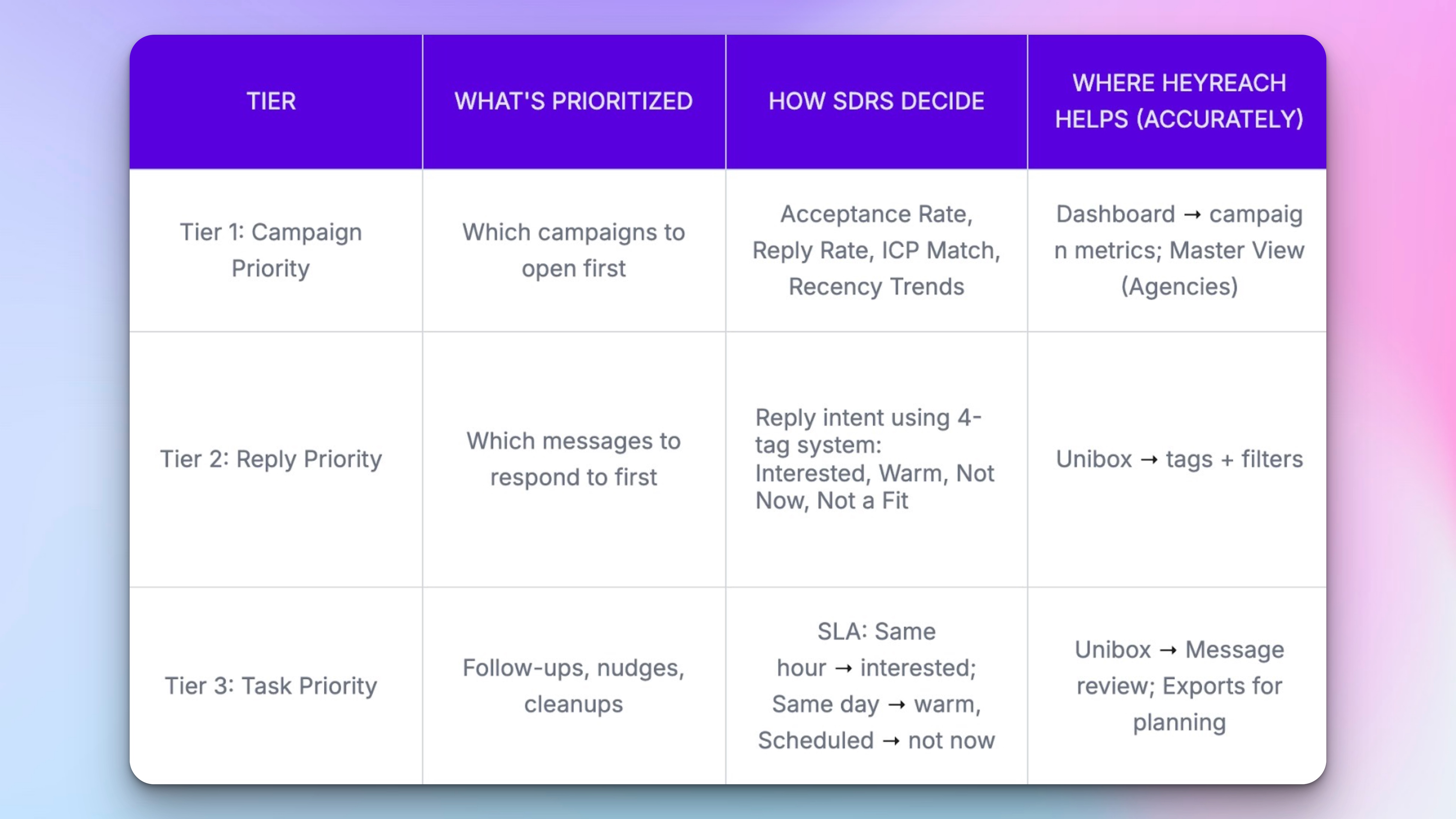
1. Campaign priority: which campaigns deserve attention first
Campaign priority isn’t a philosophical methodology. It’s a practical decision-making process based on performance signals, feasibility, and smart resource allocation. Open the wrong one first, and you’re busy without moving the pipeline.
Now, if you’re a team lead, you’ll most likely be in charge of deciding what campaign(s) will be prioritized.
Before touching a single reply, you should scan campaign performance to figure out where the high-intent action is likely to happen today. Campaigns should be ranked based on campaign performance signals, not gut feel.
Factors driving that decision:
- Acceptance rate: how many prospects actually engage.
- Reply rate: are conversations popping or are there crickets?
- ICP relevance: are the replies coming from your target accounts?
- Recent performance trends: what’s heating up right now versus old initiatives that peaked last week?
Inside HeyReach, this is painless:
- Dashboard shows campaign-level metrics at a glance — acceptance, reply, and engagement trends. You can see which campaigns are likely to deliver high-intent conversations, instead of guessing.
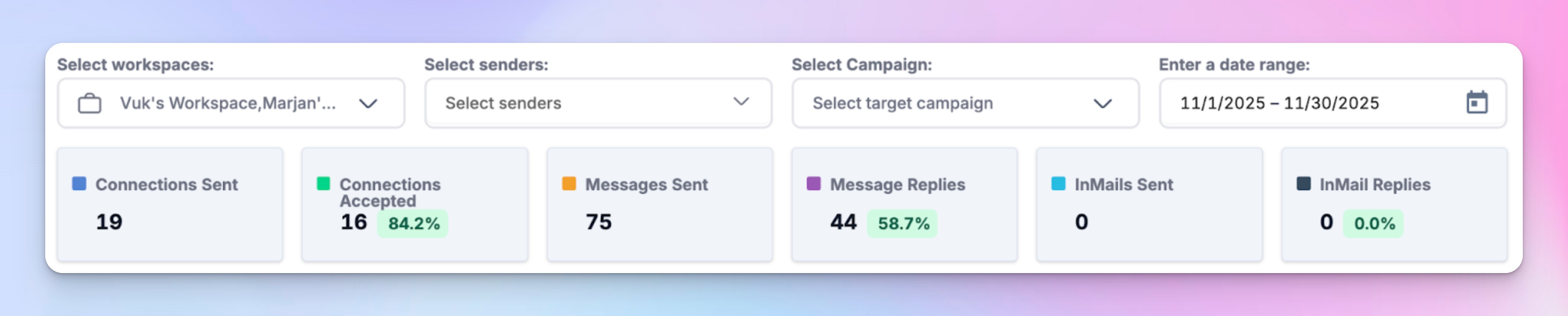
- For agencies or multi-workspace teams, Master View gives you cross-workspace visibility. If you’re a team lead, you can get a view of every SDR’s workspace and every campaign that matters:

👉 The goal: open the campaigns most likely to give you high-quality replies first, then move down the list.
Ideas for how you can make that call fast:
- Strong ICP match + recent performance spike → maybe the replies are slower overall, but the right accounts are engaging now. These are the campaigns worth jumping on early, even if total volume is low.
- High acceptance + high reply rate → these high-value campaigns are producing conversations. Even if the ICP fit isn’t perfect, momentum is on your side.
- Low acceptance but high ICP relevance → not for first action, but keep on the radar. These could become gold if trends start moving.
Scan the Dashboard for these metrics in combination: prioritize campaigns that score well across at least two of the four criteria. That’s your daily “sweet spot” where the most replies, from the most qualified prospects, are likely to appear first.
This will keep you focused on meaningful, revenue-impact tasks. And in a way, these are strategic decisions that protect your long-term goals, not just today’s activity.
Btw, if you're wondering whether to scale a campaign, here’s HeyReach’s 5-point campaign audit framework to help you validate traction like reply rates and CTA strength before ramping up.
2. Reply priority: which messages require immediate action
Once you nail down important campaigns, it’s time to figure out which conversations within those campaigns should be prioritized.
This 4-tag reply system is a life-saver. It creates a lightweight priority matrix — not an academic urgent-important matrix, but one grounded in buyer intent. Using it will help you spot low-effort, high-impact quick wins vs. high-effort, low-impact distractions.
How it works:
- Batch-tag new replies as they come in
Tags act as reply intent indicators, and you should use these four:
- Interested – prospects ready to engage or book. Time-sensitive; they need your immediate attention.
- Warm – curious, need nurturing.
- Not Now – interested but delayed timing.
- Not a Fit – irrelevant or out of scope.
They’ll help you decide on message urgency categorization. Sorted like this, replies fall into clear quadrants — urgent and valuable, valuable but later, low urgency, or not worth pursuing.
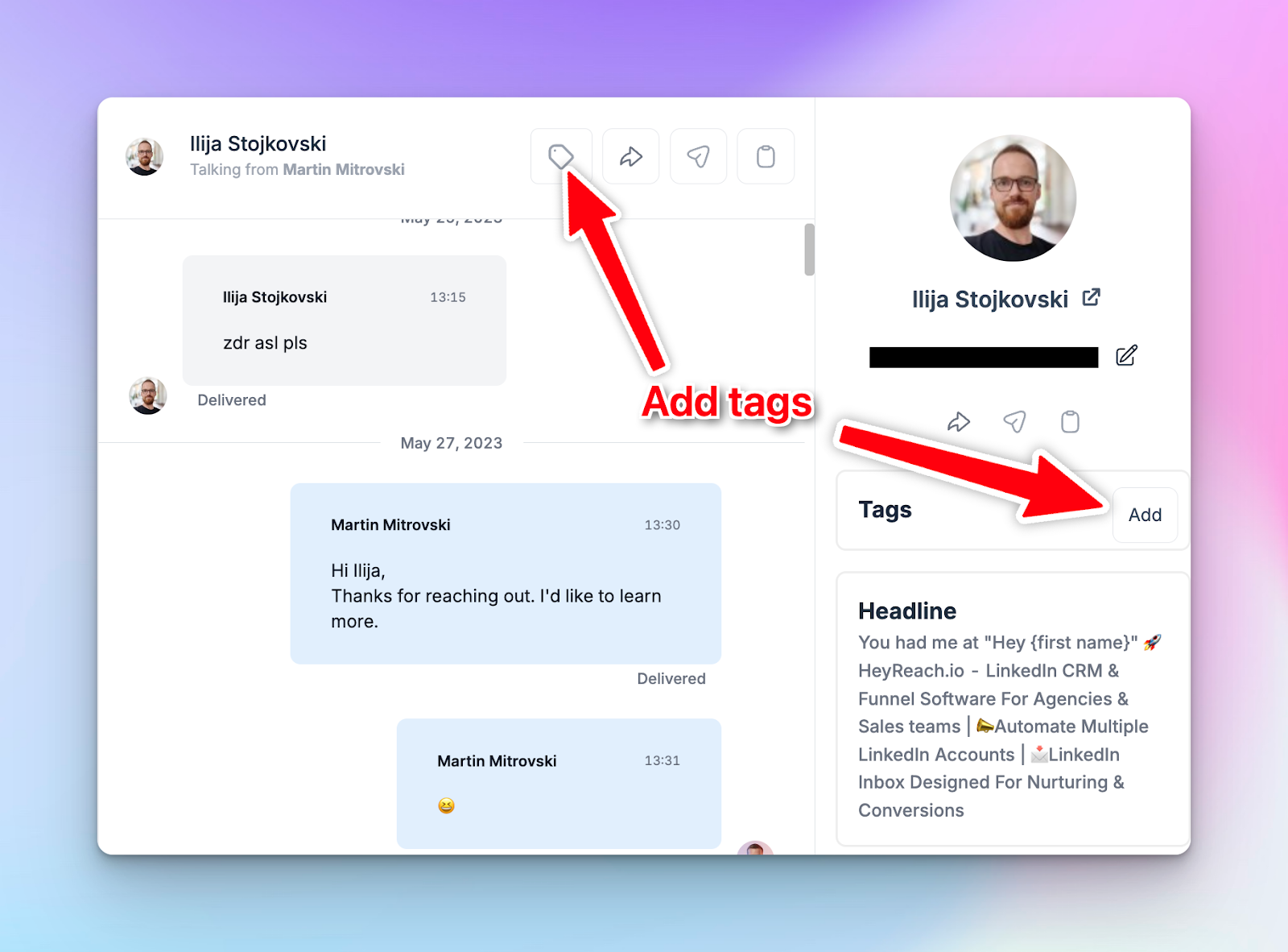
To add tags to each conversation, click on a little tag icon next to the lead’s name and add the tag in the menu on the right.
- Filter conversations by tags in Unibox
In Unibox, filter the replies that share the same tags.
Open Unibox and click on the Filter icon, then select the tags you want to filter by:


For example, you’ll filter all leads tagged as Interested, or Warm, etc.
A few tips here on how to handle each group of leads:
- View Interested first → reply to all immediately, this is high-intent lead handling.
Speed-to-lead data shows that replying to interested leads within 5 minutes boosts conversions by 391%; after 15-30 minutes, they’re already 21x less likely to convert. Here are speed-to-lead benchmarks and SLA templates that will help you win deals.
- Then Warm → reply to all, keep momentum.
- Not Now → schedule follow-up, no panic.
- Not a Fit → archive or log for reference.
You can use Model Context Protocol (MCP) to automate certain tasks, in this case — tagging a conversation.
It basically means connecting your favorite LLM to HeyReach. Then, your LLM of choice will be able to go through long back-and-forth messages with a lead to gauge the most appropriate tag instead of you, and save you time.
3. Task priority: what SDRs must accomplish today vs later
Once replies are tagged, the task sequencing hierarchy becomes obvious. It’s not a flat to-do list; there’s a clear task prioritization and task management hierarchy.
Simple Service-Level Agreement (SLA) based on the 4-tag system:
- Interested → same-hour action: reply, schedule call, or send content. Momentum matters.
- Warm → same-day action: follow up, provide extra info, or keep conversation warm.
- Not Now → scheduled: set reminders, add to nurture campaigns, don’t leave dangling.
- Not a Fit → clean + move on: archive, update notes, or reassign. Free your brain for real opportunities.
Treat this like a daily ritual: open high-priority campaigns, batch-tag replies, and then systematically knock out tasks according to SLA. It’s action sequencing in practice.
That way, you get a repeatable workflow that keeps high-intent conversations hot, prevents missed opportunities, and stops your day from running you.
How to implement the matrix inside HeyReach
As I already mentioned, you should bring the sales prioritization matrix template to life within the tool where outreach is taking place. Here’s how to do it in HeyReach without over‑engineering it.
Step 1. Identify campaign priorities using the Dashboard
Open your day by surveying the battlefield, aka decide which campaigns are your priority before you reply to a single message:
- Jump into the Dashboard and scan recent performance metrics. Pay attention to acceptance and reply rates — these are your strong signals for where high-impact conversations are happening.

- Look for campaign performance trends over the last few days, not just totals. A stalled campaign that used to produce replies isn’t worth your morning energy.
- Label the campaigns you want to open first as Tier 1 (manual tags, notes, or even a naming convention — after the campaign name, just add “Tier 1”, “Tier 2”, etc.). This primes your brain and your tools to surface the best opportunities.
Step 2. Prioritize replies using Unibox tags + Filters
Once you know which campaigns matter today, zoom into replies — and sort them by intent before you even think about replying.
Unibox provides you with a perfect inbox triage workflow:
- It gives you a central inbox for all LinkedIn outreach messages across accounts, no jumping between tabs or LinkedIn profiles.
- Use tags + filters inside Unibox (assign each like a Interested, Warm, Not Now, Not a Fit tag) to cut through the noise. Filter by those tags so only high‑intent replies are front and center:

- Reply accordingly.
Step 3. Weekly review using Dashboard or exports
Daily loops keep you sharp, weekly reviews keep you smart.
Make time weekly (or block it on Friday afternoons) for the things on this list:
Spot trends
Which campaigns are trending up? Which are flatlining? Look at the reply rate and acceptance rate over the last 7–14 days. If a campaign’s numbers are steadily increasing, it’s warming up, so keep it high on your Tier 1 list.
Watch recent spikes in high-intent replies (Interested tags). A sudden jump might indicate new messaging that worked, or market timing — prioritize these campaigns early next week.
Flatlined campaigns with low reply/acceptance rates? Either pause, adjust messaging, or move to Tier 2/3.
Reassign campaign tiers
Check the metrics and manually tag/reassign campaigns as Tier 1, 2, or 3.
👉 For example:
Tier 1 = high acceptance + high ICP fit + rising reply trends.
Tier 2 = moderate metrics or inconsistent engagement.
Tier 3 = low value; low intent or underperforming campaigns.
This sets the stage for Monday morning, so your SDRs know exactly how to start their week.
Audit consistency
Check how SDRs are using the 4-tag system in Unibox. Are they tagging consistently? Are Warm replies actually being followed up on?
If you notice gaps, run a quick huddle or share examples: “This Interested thread should have been tagged Warm — watch out for these cues next week.”
(If you’re leading a big team, here’s how to build a scalable LinkedIn inbox system with HeyReach.)
Clean data
Export campaign and reply metrics if needed to spot anomalies or deeper trends. Update lead statuses, archive Not a Fit threads, and ensure your Master View or cross-workspace dashboards reflect reality — nothing clogs your workflow like outdated info.
👉 So there you go. With HeyReach, you get a strategic daily workflow, not a spreadsheet you ignore until Tuesday.
High-intent reply conversion mini playbook
Here’s the part where most SDRs either turn momentum into meetings… or fumble it like a striker overthinking a tap-in.
High-intent replies don’t need more selling. They need clean framing, light direction, and zero desperation. Your job is to make the next step feel obvious and helpful, not to convince.
Below are battle-tested micro-templates you can drop straight into your workflow once a reply is tagged.
Interested → get them to book (high intent, act fast but don’t pounce)
The goal is to convert intent into a meeting without killing the vibe.
Template 1: Agenda-focused framing
Love that. Before we book time — what matters to you the most right now:
- volume,
- reply quality, or
- pipeline predictability?
I’ll tailor the convo around that. If it makes sense, we can grab 20 mins this week. Does {day of week} sound ok?
Template 2: Assumptive, but polite
Sounds like this is worth a quick look together.
I can walk you through how teams like yours are handling {specific problem they hinted at} — then you decide if it’s relevant.
Want to do Wednesday or Thursday?
Template 3: Light disqualification (confidence play)
Happy to chat. A quick check first:
Are you actively running outbound right now, or still planning for it?
If you’re active, I’ll send a link, and we’ll keep it practical.
Warm → nudge them (interest is there, urgency isn’t)
The goal is to restart momentum without sounding like a reminder bot.
Template 1: Contextual nudge
Quick nudge — when you mentioned {their earlier point}, it reminded me of a setup we’ve seen work well and bring X% increase in our client’s revenue.
Worth a quick exchange, or should I park this for later?
Template 2: Choice-based nudge (reduces friction)
I totally get that timing can be weird.
What’s better right now:
– a quick back-and-forth here, or
– a short call {at a suggested time}?
Let me know!
Template 3: Insight-led ping
Small thing I noticed working with similar teams: most reply drop-off happens after message 3, not message 1.
If that’s relevant, I’m happy to share how they fixed it.
Not Now → follow-up setup (future intent, handle with respect)
The goal is to lock future permission without becoming background noise.
Template 1: Time-boxed follow-up
Thanks for the info, makes sense.
When would it actually be useful for me to reappear — next quarter, or later in the year?
Template 2: Event-based follow-up
Got it.
Should I follow up after [specific event: hiring, launch, budget cycle], or just check back in a few months?
Template 3: Value-anchored exit
All good, I’ll step back for now. If it helps, I’ll send one short note when we see something new working for teams like yours. What do you think?
👉Final note: These templates work only if your prioritization is right:
- High-intent leads get speedy replies.
- Warm leads get clarity.
- “Not now” gets structure.
If you find yourself polishing messages instead of deciding who deserves attention first, the prioritization matrix needs fixing.
Rollout guide for SDR managers
You made it this far — congrats! Now, if you’re a manager, here’s how to roll this tiered work structure without turning it into yet another “process doc no one reads.”
Standardize the tags (non-negotiable)
If everyone tags differently, the matrix collapses.
- Lock the 4 tags: Interested / Warm / Not Now / Not a Fit
- Define them clearly. No nuance debates. Do what makes the most sense for your situation.
- Audit weekly: if “Interested” means five different things, fix it fast.
👉 Rule of thumb: if a new SDR can’t tag a reply correctly in 10 seconds, it’s not clear enough.
Define tier rules
Make the order of work explicit.
- Tier 1 — Campaign priority
Rules for deciding which campaigns get attention first
(based on reply rate, ICP fit, recent trends…). It probably makes sense that you set the priority each week. - Tier 2 — Reply priority
Rules for which replies are handled immediately vs. batched
(using the 4-tag system + response-time expectations) - Tier 3 — Task priority
Rules for what must happen today vs. later
(booking, nudges, follow-ups, cleanup)
The goal isn’t rigidity, it’s removing daily decision fatigue.
Enforce the daily loop (light discipline, high leverage)
Every SDR follows the same sequence:
- Review Tier 1 campaigns
- Respond to Interested
- Respond to Warm
- Handle follow-ups and cleanup
No inbox hopping. No “I’ll just reply to this real quick.” If meetings aren’t getting booked, this loop tells you exactly where things broke.
Coach from signals, not vibes (use the Dashboard)
Use the Master View to spot patterns across the team.
Look for:
- Slow responses to Interested
- Overuse of Warm to avoid booking
- Strong campaigns being ignored
Coach behavior, not individual messages.
Export data to stay objective
Dashboards are great for daily execution. You might find them useful for seeing the big picture over time, too — or you can export data weekly.
Pull weekly reports to:
- Track trends across campaigns and tags.
- Spot slow response times before they become habits.
- Understand where effort isn’t turning into meetings.
Use insights to validate what’s working, adjust tier rules if needed, and keep the coaching grounded in facts.
Pick a workspace, select senders, campaigns, and a date range — and download the report as a SVG, PNG, or CSV file.

👉 Final word: This isn’t extra work. It replaces gut-feel coaching, random pipeline reviews, and end-of-month panic. And, as I like to say, ABI. Always be iterating.
Next steps
You’ve seen the matrix. You know the tiers. You’ve got tags, dashboards, loops. Now what?
- Think in tiers, not emails.
- Make prioritization a habit. Small daily routines compound faster than heroic all-nighters. Open the right campaigns first. Handle the high-intent replies first. The rest follows.
- Let your tools work for you. Unibox, Dashboard, Master View — don’t just log in. Use them to see the patterns, not just the messages.
- Iterate constantly. Spot trends, tweak rules, and coach consistently. Nothing is perfect from day one, and that’s fine, the matrix is built to evolve.
- Get team members on board. Everyone should speak the same language of priority.
High-intent work starts here
Reactive inbox habits cost opportunities. Randomly opening campaigns and chasing every ping is pure chaos.
The Sales Prioritization Matrix fixes that by giving you clarity, sequence, and repeatability:
- Tier 1: Campaigns: pick the ones most likely to produce high-intent replies today.
- Tier 2: Replies: tackle the Interested and Warm messages before the polite but slow ones.
- Tier 3: Tasks — nudges, follow-ups, cleanup — all in the right order, with SLAs.
Combine that with Unibox tags, filters, and dashboards, and you’ll get a predictable, high-leverage routine.
The goal is consistency, speed, and smarter work. Master the matrix, keep iterating, and watch high-intent conversations turn into booked meetings.

Try it for free
Frequently Asked Questions
What is a sales prioritization matrix and how does it work?
A sales prioritization matrix is a simple framework that helps SDRs decide the order of work every day and streamline operations. It layers priorities into Campaign → Reply → Task, so you tackle the campaigns most likely to deliver high-intent replies first, respond to the messages that matter, and then handle follow-ups or administrative and less important tasks. Think of it as a tiered work structure that helps with prioritizing tasks, not another scoring model.
How should SDRs decide which campaigns, replies, and tasks to work first?
Start with campaigns that show strong recent performance and fit your ideal customer profile. Within those campaigns, tag replies properly and then tackle ones tagged as Interested or Warm before anything else. Tasks come last (nudges, follow-ups, sequence adjustments, or cleanup), but handle them according to urgency rules so nothing slips through. The key is following the tiers consistently.
How is a sales prioritization matrix different from lead scoring or lead prioritization?
Lead scoring ranks individual leads by numeric value; the matrix is broader. It doesn’t just say “this lead is hot,” it gives a repeatable daily order across campaigns, replies, and daily tasks. It’s about workflow prioritization, not just lead ranking, so you know what to open, reply to, and act on first, every single day.
How fast should SDRs respond to high-intent replies for best results?
Speed is everything. Interested replies: ASAP, ideally within 5 minutes for best results. After 30 minutes, your chances are getting slimmer. Warm replies: same day. Not Now can be scheduled for a follow-up later. Rapid action increases conversion chances and prevents opportunities from going cold — the matrix helps you keep that timing predictable.
Can I implement a sales prioritization matrix without automation or scoring tools?
Yes, you can start manually with tags, filters, and a disciplined daily routine. But with HeyReach, it gets much easier: Unibox centralizes replies, filters surface high-intent messages instantly, and the Dashboard shows campaign performance at a glance. You still follow the same matrix principles, but HeyReach removes the friction.