Customer segmentation automation: turn static data into live LinkedIn campaigns
Published:
November 27, 2025
Updated:
December 1, 2025
Most RevOps teams define their segments perfectly to the “t.”
Personas mapped (check), lifecycle stages documented (check), CRM taxonomies polished (check).
Everything looks flawless, “on paper.”
But, many times → none of it reaches your outreach. 🤯
And honestly, how would it?
Your tools are working in isolation.
Your persona data sits locked away in pretty Google Docs and Notion, while your LinkedIn campaigns keep firing the same old “spray and pray” sequences everyone else is using.
That ends today.
I'm going to show you exactly how I turn static audience segmentation into live, measurable, data-driven orchestration using HeyReach.
No more disconnected systems and definitely no more generic outreach.
Make your customer segmentation strategy consistent
Segmentation starts to work if it actually changes where a lead goes and what message they get.
When this doesn’t happen despite you having clear documentation of your persona, that means there’s an issue in your activation and routing.
So before you do absolutely anything else, you NEED to segment customers consistently before routing.
The initial setup takes a bit of operational discipline, but once your taxonomy is clean, the system runs without constant maintenance.
Also, consistency here isn’t about frequency. It's about making sure every single lead is segmented the same way, using the same rules, every time, before you push them into any workflow or campaign.
Imagine you have a persona rule like:
- Founder = job_title contains “Founder” or “Co-Founder”
- Marketing Leader = job_title contains “Head of Marketing,” “Marketing Manager,” etc.
If one team member tags a lead as Founder based on job title,
another tags based on seniority,
and another skips tagging completely…
…then your campaign routing breaks.
Lead A goes to the wrong LinkedIn sequence.
Lead B never enters the right workspace.
Lead C gets a generic opener even though they’re a perfect ICP.
And you’ve probably seen this play out: teams spend weeks perfecting personas, only for Sales to grab a “qualified lead,” glance at the CRM, and still send the same generic LinkedIn message sequence to everyone.
It hurts my soul every time.
When segmentation stops at your CRM, you lose:
- Control of customer data and messaging logic
- Automated routing based on buyer attributes
- Performance attribution by segment
- Early detection of underperforming personas
We're basically throwing away all our attribution by segment work the moment we hit "send campaign."
And if your personas and lifecycle stages never make it to your sequencer, your segmentation strategy needs a huge makeover.
Sure, you can keep whatever customer segmentation tools or market segmentation models your marketing team loves. HeyReach’s job is to make sure that work doesn’t die in a spreadsheet.
💡Pro tip: Use HeyReach MCP to stress-test personas: Use AI to summarize 20–50 leads at once and surface patterns in job titles, responsibilities, and intent signals so you can validate whether your “personas” actually reflect reality or not. MCP works best on smaller batches (up to ~100–150 leads), so don’t point it at your entire database in one go.
Turn segmentation into routing logic
Your segmentation needs to directly control where leads go and which marketing campaigns activate. The easiest way to do this is by using a simple matrix that maps each segment: persona × lifecycle stage to a specific HeyReach campaign and tag.
Build your persona × lifecycle matrix
Think of this matrix as your segmentation blueprint. It’s the foundation that every downstream step depends on.
The rule is simple: persona × stage = campaign name + tag.
Done right, the matrix is a real game-changer for outreach orchestration and downstream funnel clarity for several reasons:
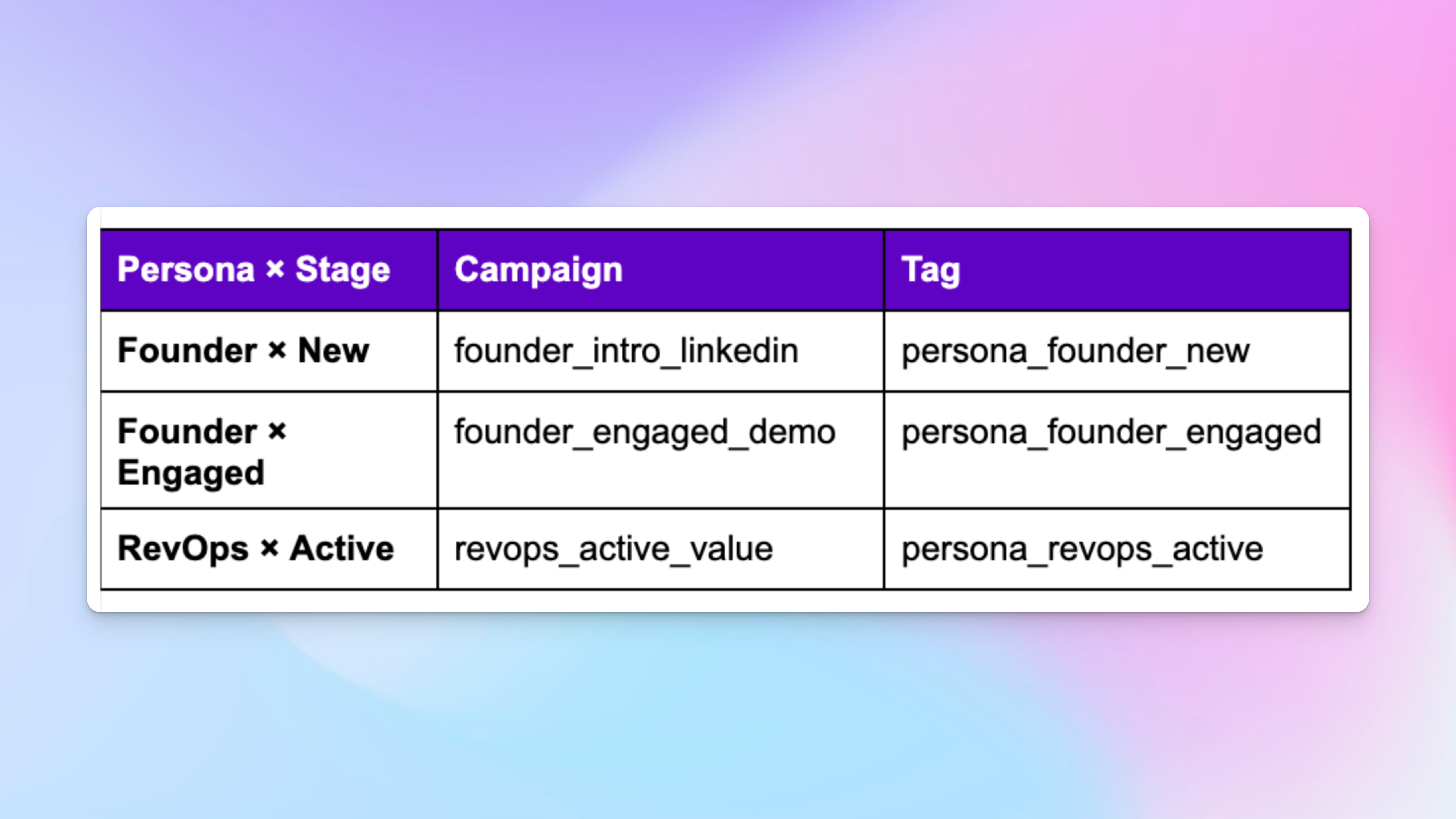
- It maps each unique segment to its own HeyReach campaign and routing tag, creating the foundation for automated lead routing and personalized messaging.
- Becomes your single source of truth for campaign creation, tagging, and routing logic.
- Ensures consistency: every persona × stage always leads to one campaign and one tag
💡Pro tip: Keep your naming clean and predictable: lowercase, underscores, short labels. It seems small, but it makes your automation flows bulletproof later.
Define your segments practically
Now that you’ve built your matrix, the next step is defining what each segment actually means in your system. You’re deciding how your customer base is carved up and what each slice is supposed to see and receive.
This is where you specify the exact criteria that determine how a lead gets classified before any campaign logic kicks in.
Persona identification criteria:
Use consistent, objective signals to assign each contact to a persona and build reliable customer profiles, such as:
- Job titles and departments (CEO/Founder, RevOps/Sales Ops, SDR Manager)
- Company size and industry (SaaS, B2B services, e-commerce)
- Technology stack indicators (CRM type, automation tools)
- LinkedIn activity patterns and content engagement — the raw signals for basic behavioural segmentation
- Social interactions across other platforms and previous customer interactions with your brand
- Demographic attributes tied to buying authority
- Psychographic traits shown in their content themes or motivations
Define how a lead progresses through your lifecycle using signals like:
- CRM lead status and scoring
- Engagement recency and depth (CRM + enrichment, visible customer behavior over time)
- Intent signals such as demo requests or pricing visits
- Event participation (webinars, workshops)
- Outreach and reply history
- Onboarding status or time-since-signup (where relevant)
- Product usage patterns
- Purchase or renewal cycle (for post-purchase stages)
(These signals should reflect real customer needs, not just internal stages made up for reporting.)
Example: RevOps × Active
- Titles: RevOps, Sales Ops, GTM Ops
- Company: 50–500 employees, B2B SaaS
- Signals: CRM-heavy behavior, automation interest
- Status: Current customer, expansion candidate, or upsell-ready account
- Lifecycle: Post-purchase, growth stage, with customer loyalty, retention, or expansion triggers
💡 Pro tip: Use MCP to generate consistent naming formats: Feed your persona × stage pairs into MCP and let it generate clean naming templates for your tags and campaigns. It standardizes lowercase + underscore formats and prevents naming drift before anything hits HeyReach.
Operationalize segments in HeyReach
Now that your segments are defined and mapped in the matrix, this is where everything becomes real.
Leads enter HeyReach from everywhere: CRM syncs, enrichment (Persana), CSV drops.
your job is to make sure every path lands on the same persona × lifecycle values.
If one entry point mislabels a lead, your reporting collapses and your routing logic starts behaving like it’s guessing, putting all our hard work to waste.
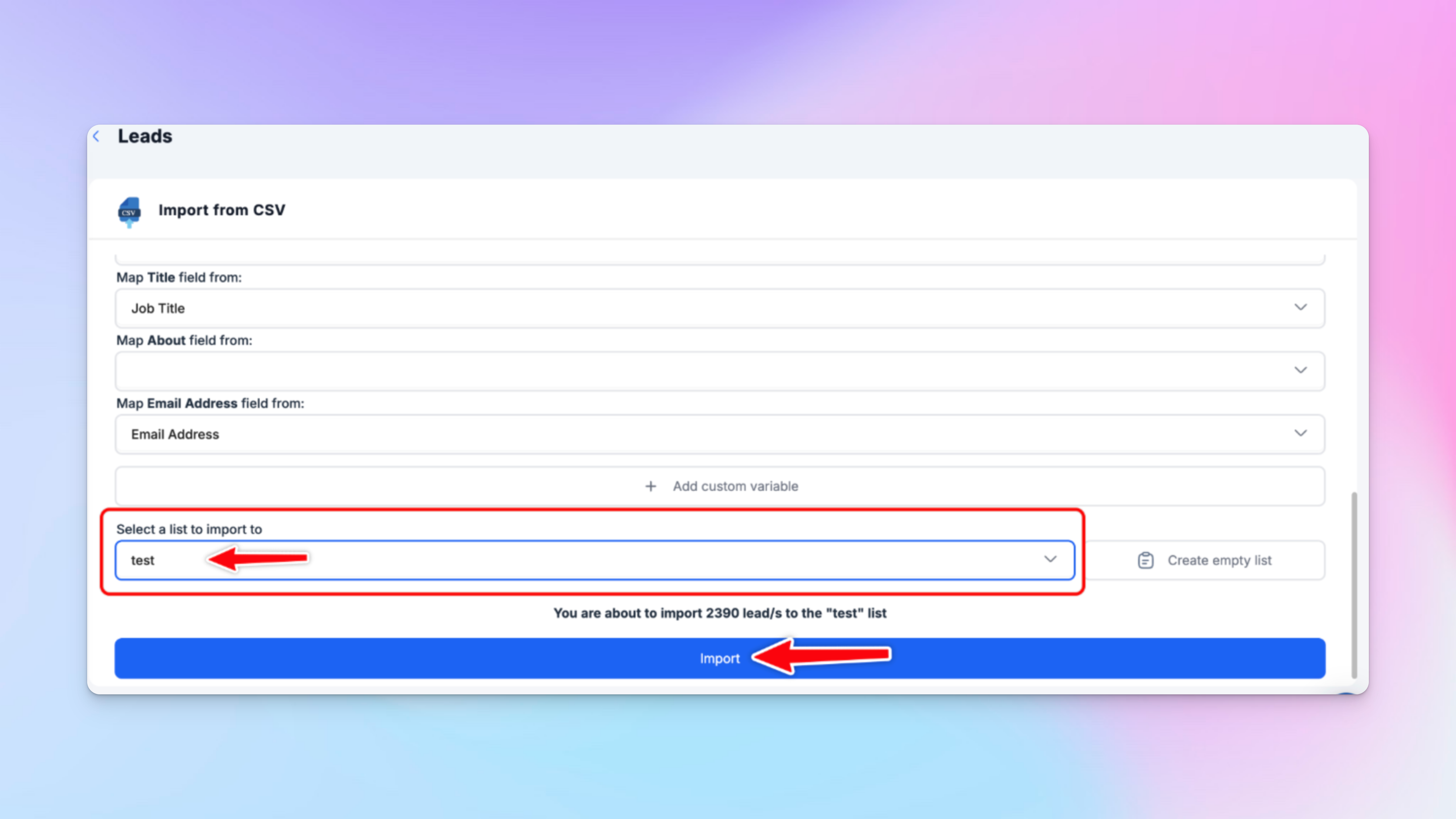
So the goal is simple:
Every lead should look the same no matter how they enter the system.
Here’s how your matrix translates into HeyReach building blocks:
- Tags → your routing signals (persona_founder_new, persona_revops_active)
- Campaigns → one per segment with messaging actually built for that persona × stage
- Workspaces → where your campaigns, senders, and routing logic live
- Imports & Integrations → the pipes that bring your persona/lifecycle fields from CRM, Persana, or CSV into HeyReach
Tags in HeyReach live directly inside the message thread view, which means the moment a lead enters your Workspace, operators can classify them without switching screens.
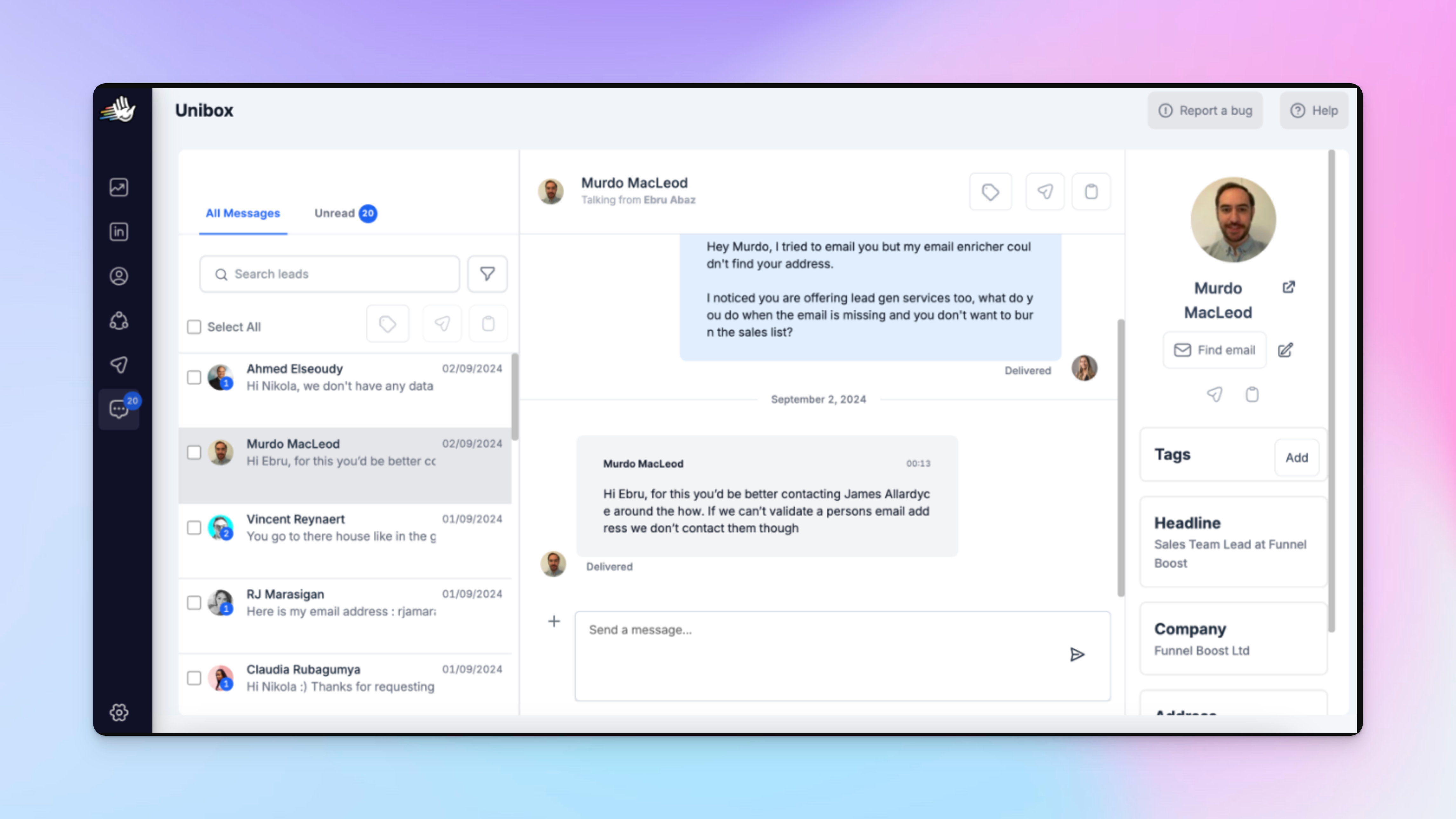
The rule is: any lead entering HeyReach should carry the same persona and lifecycle information you’re already using in your CRM or enrichment layer.
When segmentation enters cleanly:
- Routing becomes predictable
- Reporting becomes accurate
- Automation stops breaking because of messy imports
- Align messaging to segments
Each persona × lifecycle segment should trigger its own messaging path. This way, an enterprise founder in Evaluation doesn’t end up in the same sequence as an SMB manager in Awareness.
If they do, it’s a sign your segmentation didn’t survive the journey.
So when you set up campaigns in HeyReach, treat each persona × stage pair as a distinct campaign: unique sequence, timing, and messaging, real personalized campaigns, not recycled copy.
That’s how you move from “generic outreach” to “targeted experience”
And because HeyReach lets you customise sequence structure and follow-up intervals manually, you can tailor each segment’s path precisely.
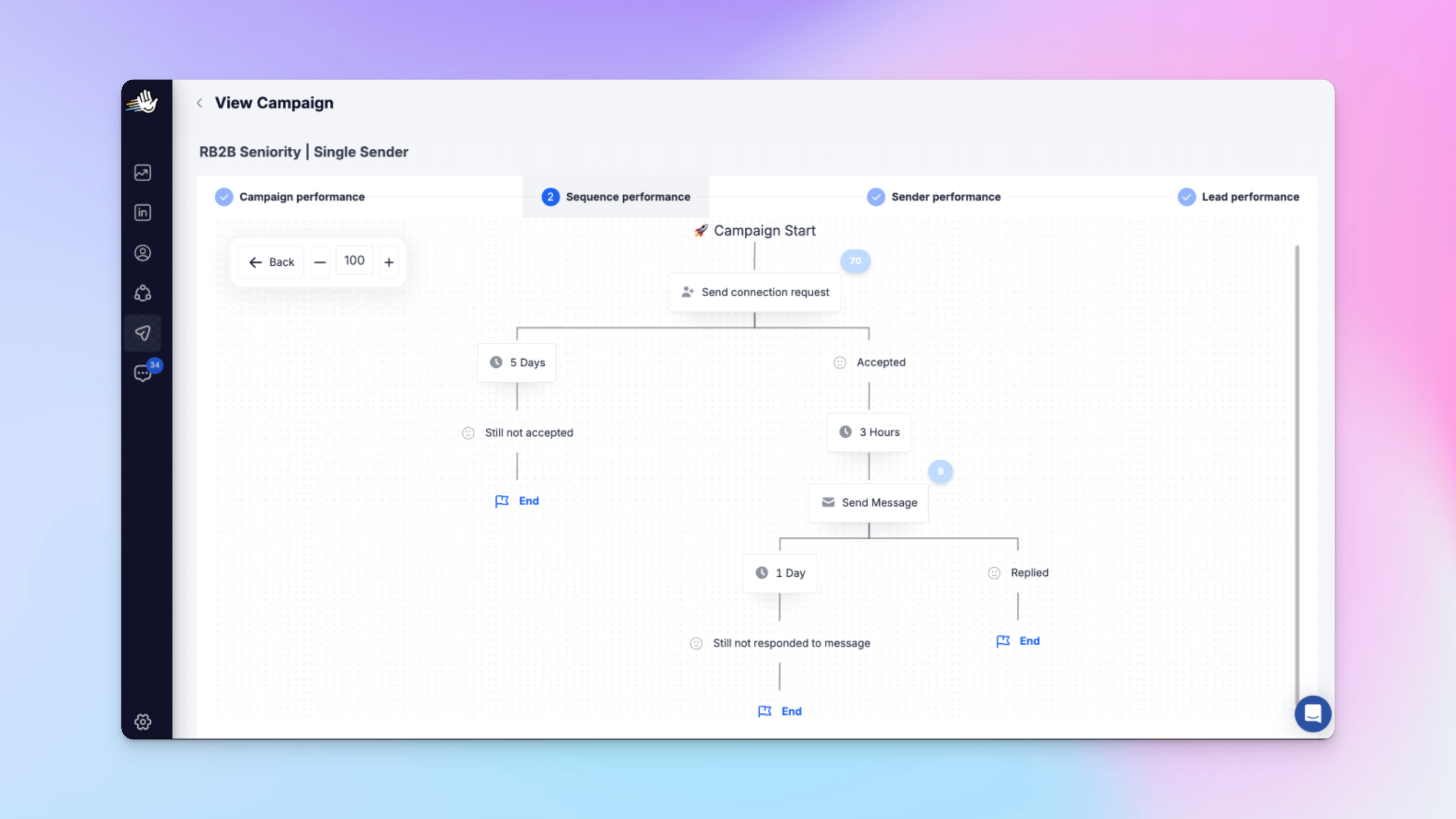
For example:
Enterprise Founder × Evaluation Stage
- Opener geared into scaling pains and operational drag for founders
- Social-proof highlighting companies of similar size
- Clear demo invitation aimed at exec-level availability
- Follow-up rhythm: maybe 5–7 days (given longer sales cycles)
SMB Manager × Awareness Stage
- Education-first opener: industry insights, quick wins
- Use cases emphasising ROI and small team agility
- Soft CTA for a resource download rather than direct sale
- Follow-up rhythm: perhaps 2–3 days (faster decision curve)
This macro-to-micro approach means: one broad persona category, but each lifecycle stage gets messaging built for that exact context.
No one size fits all, but truly personalized experiences across segments.
💡 Pro tip: Use HeyReach MCP for AI-powered segment messaging: Use Claude/ChatGPT to generate message variants tailored to each segment. Just make sure you still review and customize them so they match your voice and your audience.
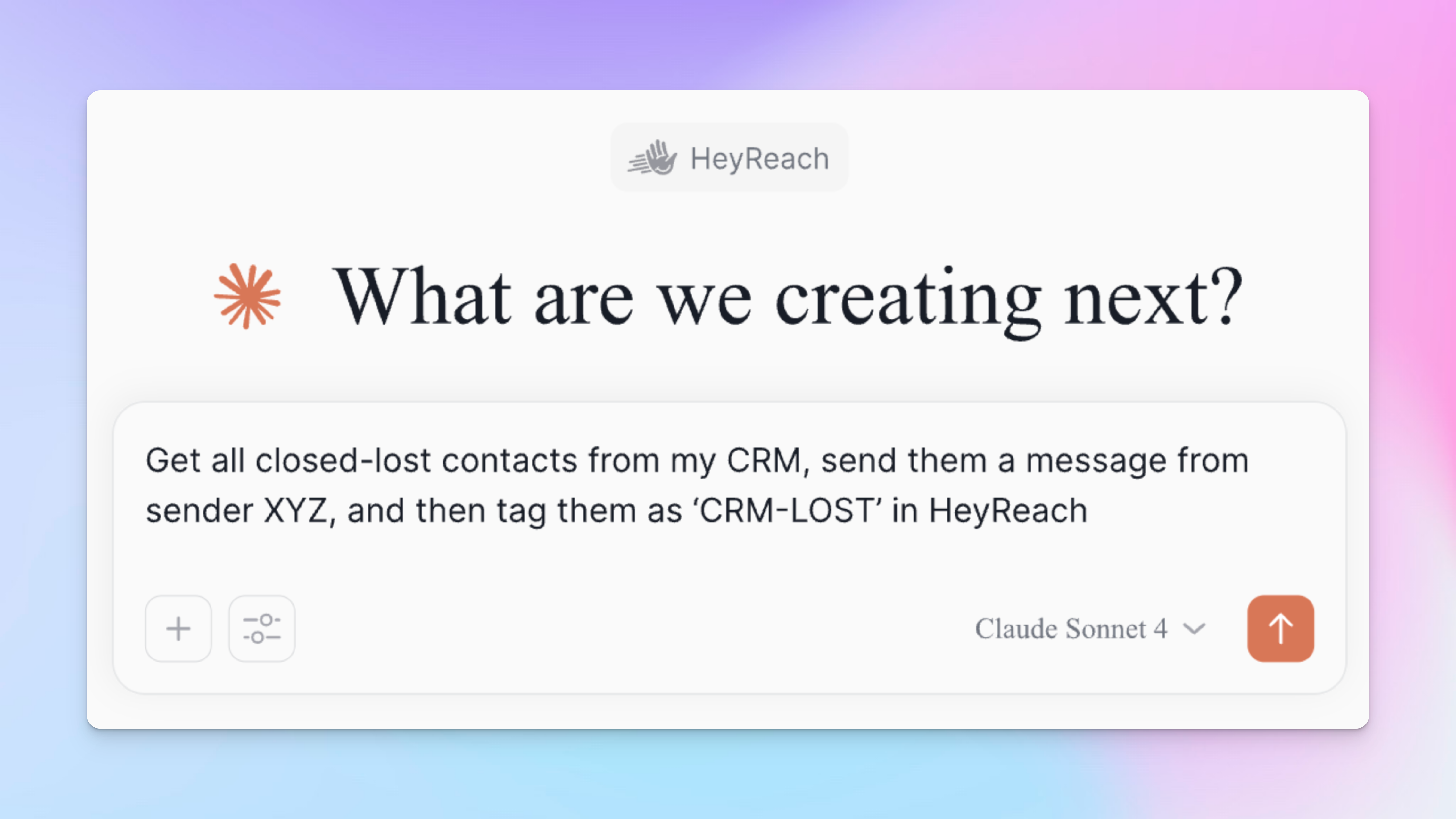
Automate your customer segmentation workflows
Once your tags follow the matrix, automation takes over. Every segment lead routes into the correct sequence while you sit back and enjoy your coffee.
This locks consistency, eliminates chances of human error, and keeps outreach aligned across all Workspaces.
Create segment tags in HeyReach
They’re the only signals your automation will read, so they must match your matrix exactly.
How to set them up:
- Jump into the Workspace you’re working in.
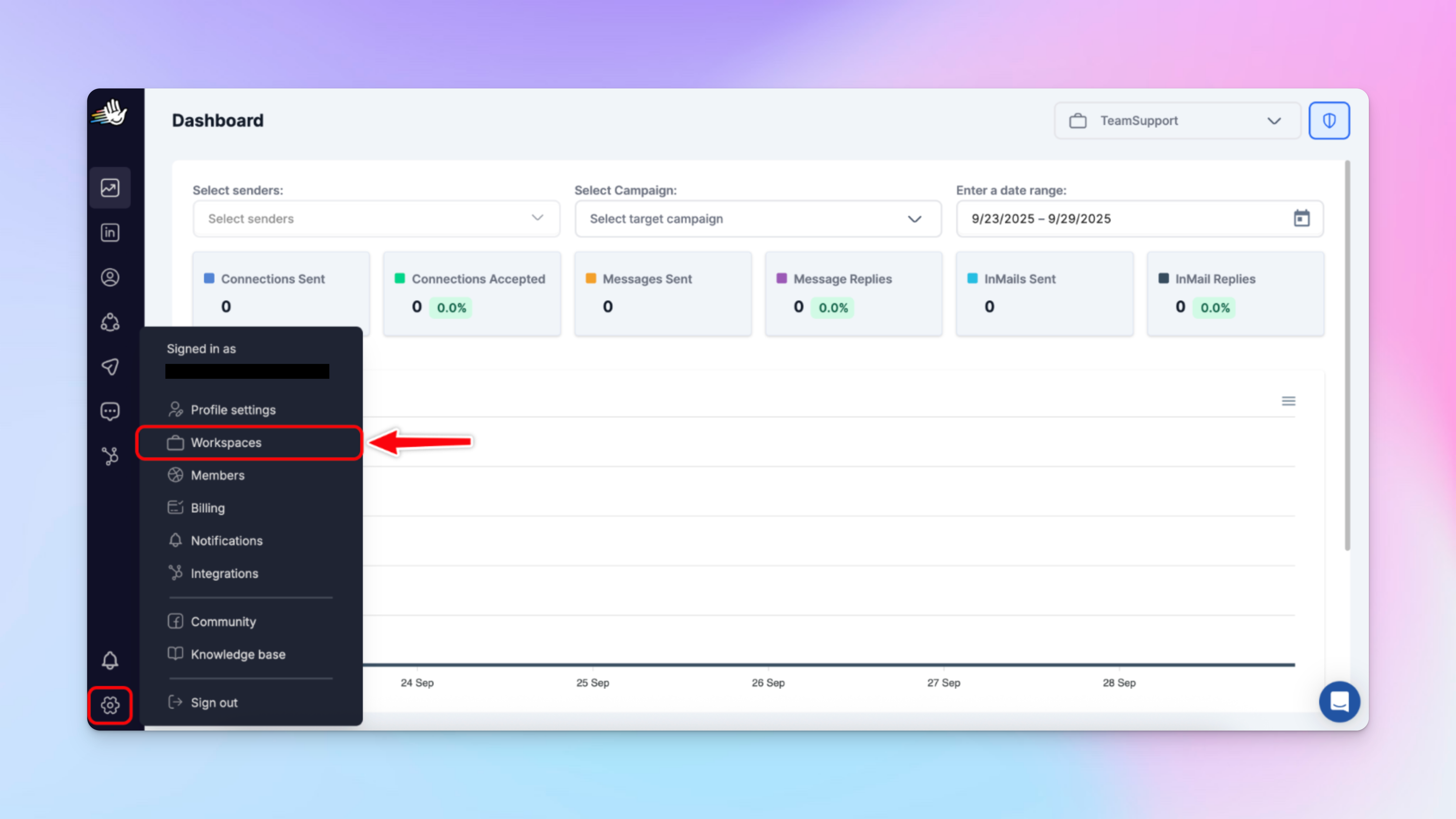
- In Unibox, in any conversation thread, assign tags.
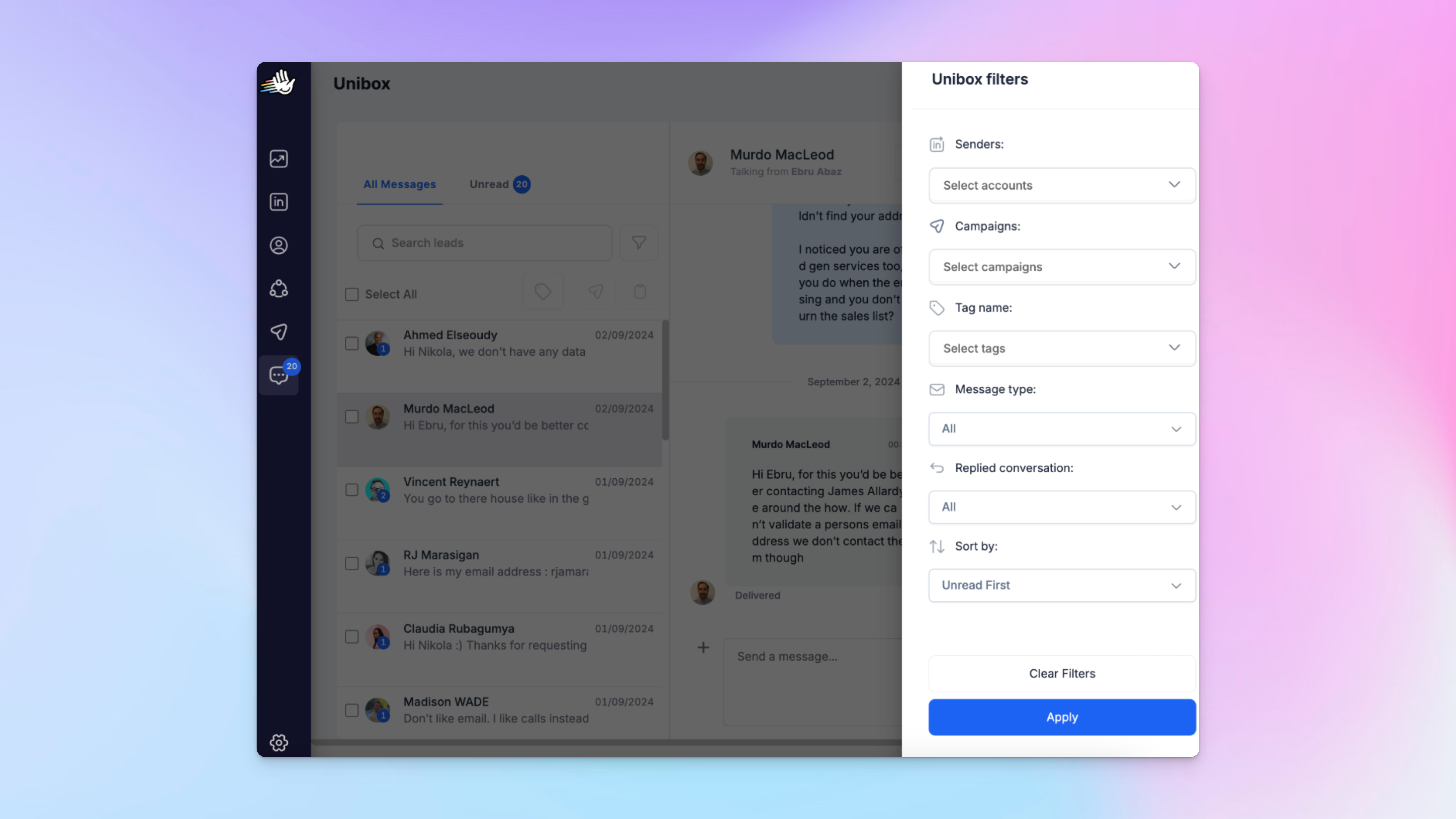
- Create tag values exactly as they appear in your matrix
- (persona_revops_active, persona_founder_new).
- Run 20–50 leads first just to make sure everything lands cleanly.
Map segment data during import or integration
Before importing, make sure your persona and lifecycle fields stay intact through each step — CRM → enrichment → CSV.
This is where most segmentation mistakes happen: fields get renamed, overwritten, or dropped before they ever reach HeyReach.
Once you’ve confirmed the data is clean, start importing.
In this workflow, your segment data usually enters HeyReach via one of three main paths: CSVs, Persana enrichment, or HubSpot sync.
CSV Import.
My rule: keep your CRM persona + lifecycle columns visible in the file so operators know exactly what they’re tagging.
- Export leads with persona/lifecycle columns.
- Import into HeyReach.
- Apply tags during or right after import.
- Drop leads into the right campaigns based on your matrix.
Persana Integration
Persana already enriches persona, seniority, and behavior.
Those values sync straight into HeyReach — which means no manual guessing.

HubSpot Integration
When HubSpot updates a property, HeyReach picks it up automatically.
Just map the fields once during setup, and your lifecycle logic stays clean.
Now every lead enters HeyReach with the correct persona + lifecycle, and your routing doesn’t drift off in random directions.
Route segments using Make + external triggers
This is the moment your segmentation stops being “labels in a CRM” and starts behaving like a real-time routing system.
The second a segment changes, your workflow should react — automatically.
Trigger the workflow
Your automation fires whenever an external system updates segmentation:
- HubSpot → a mapped property changes
- Persana → enrichment completes
- Clay → list enrichment refreshes
- Custom webhook → your own pipeline pings Make with new segment data
If a system you use can send a webhook, you can plug it into this flow.
Filter for valid segments
Inside Make, keep your logic tight:
- tag begins_with persona_
- lifecycle_stage exists
- Optional: segment_priority = high (for teams that triage leads)
This prevents noise from entering your routing logic.
Take action via the HeyReach API
Now Make tells HeyReach exactly what to do:
- Add lead to its mapped campaign: Look up the correct persona × lifecycle campaign from your matrix
- Assign sender: Match Workspace routing rules or distribute by load
- Notify the owner: Slack/Email: “Lead routed → persona_revops_active → revops_active_value.”
- Sync segmentation metadata back to CRM: Keeps your funnel reporting aligned across systems.
This is the cleanest way to turn your segmentation model into actual execution.
Guardrails (so nothing explodes)
- Keep scenario runs ≤ 100 ops to avoid runaway loops
- Validate with 5–10 test leads before scaling
- Standardize tag naming before turning automation on
When this is set up right, segmentation updates instantly trigger routing without anyone touching a single tag manually.
What automation unlocks for your team
With routing automated end-to-end:
- Nobody classifies leads manually anymore.
- Every sequence matches persona × lifecycle.
- Multi-workspace alignment becomes effortless.
- CRM ↔ HeyReach stay in sync.
- Segment-level attribution becomes accurate.
- You stop doing cleanup work and actually operate.
This is what you call “prevention is better than cure” in operator language. 🕶️
But here’s the catch: none of these automation wins matter if your Workspaces drift apart.
Workspace alignment: the only way segmentation scales without breaking
Your segmentation will only scales when every Workspace follows the same taxonomy.
If tags, campaigns, or naming conventions drift in even one Workspace, automation breaks, reporting becomes unreliable, and attribution by segment collapses.
So mark my words: Workspaces can differ — segmentation cannot.
Workspaces may represent different regions, business units, product lines, or clients. That’s expected.
But you must keep the segmentation logic identical across all HeyReach Workspaces.
Every Workspace should share:
- The same tag taxonomy.
- The same campaign naming structure.
- The same persona × lifecycle matrix.
- The same segmentation rules for classification and routing.
If these drift, you don’t get “variation.”
You get 14 versions of the same tag, and nobody will know which one actually triggers your routing scenario.
👉🏼 Use the Workspace Consistency Checklist to keep your system tight and stop rogue tags from blowing up your automation
Audit consistency using Master View + Dashboard
Master View and Dashboard are your early warning systems. Use them to spot drift before it becomes a full-scale cleanup project.

Regularly review:
- Which tags exist across all Workspaces
- Whether campaigns still map to segments in your matrix
- Any deviations from naming conventions
- Segments that are active in some Workspaces but missing in others
- Duplicate or misspelled tags creeping into the system
And trust me on this: segmentation breaks quietly, through tiny naming variations, duplicate tags, and inconsistent application across Workspaces.
Entire automations can fail because someone added one extra underscore. Ask me how I know!
Making segmentation measurable and proving revenue impact
Segmentation only matters if you can prove it works.
You can’t improve what you can’t measure, and you can’t measure if everything is lumped under one campaign.
Track performance at the persona × lifecycle level and you’ll instantly see:
- Which segments convert
- Which ones fall off
- Whether routing is accurate
- Whether your messaging actually matches buyer context
Your reporting must follow the exact same structure as your matrix.
Measure by segment, not by campaign
Campaign-level reporting hides what’s actually happening.
You need to know:
- Which segments accept more?
- Which reply?
- Which book meetings?
- Which fall off?
Segment-level reporting tell you whether targeting, messaging, or routing is working.
Export data from HeyReach
Directly from HeyReach Dashboard: this gives you the raw, no-BS data you need to see segment truth. You’ll still need to pull it into Sheets or BI to do the segment-matrix view.
Pull your data from HeyReach Dashboard exports and you’ll get:
- campaign name
- invites sent
- accepts
- replies
- lead status (Pending, In Sequence, Failed, Finished)
- reply and acceptance rates
These are your raw ingredients for segment-level reporting.
Build a segmentation KPI tracker
In Google Sheets, create one row per segment (not per campaign).
Columns:
- persona
- lifecycle_stage
- segment_tag
- invites_sent
- acceptance_rate
- reply_rate
- booked_rate
- segment_status (Scale / Optimize / Watch / Pause)
Use conditional formatting to surface outliers fast. You can also compare segments using analytics tools or internal benchmarks to validate performance.
This will become your segment-level ROI view and metrics your team can actually trust when they argue about what’s working.
👉🏼 Use the Segmentation KPI Tracker: this is the fastest way to see which segments are working, which need fixing, and where your routing might be breaking.
Connect to CRM for attribution
Push HeyReach outcomes back to CRM fields:
- source channel
- opportunity stage
- revenue / ARR
- lifecycle conversion rate
- ROI per segment
Now you can finally answer: Which segments actually drive pipeline?
Keep your segmentation healthy: review, troubleshoot, and iterate safely
Don’t “set it and forget it.”
Run a light weekly routine to catch drift early, fix routing issues fast, and keep automations safe for LinkedIn.
Your weekly ops routine
Check these in order:
- Review KPI tracker for segments below baseline
- Inspect campaigns with sudden changes
- Validate tag application accuracy
- Identify segments that need message or structure adjustments
These four checks catch 90% of issues before they become routing failures.
Early drift signals
And to catch drift before it impacts revenue, monitor for these red flags.
- Sudden drops in acceptance or reply rates
- Spikes in pending invites
- Messaging that performs inconsistently within the same segment
- Segments with volume but no meaningful engagement
👉🏼 When routing feels “off,” use this Troubleshooting Playbook to run a 5-minute check.
Keep things safe: LinkedIn delivery + account protection
HeyReach already does a ton of heavy lifting for you:
- Auto-withdraws pending invites before your account looks “too eager”
- Monitors sending limits and freezes activity before danger zones
- Uses Seat Rotation so teams can scale safely without burning one sender
But safety isn’t something you outsource 100%.
👉🏼 Before you scale segmentation automation, run through the Segmentation Automation Safety Guardrails to ensure you’re staying inside safe limits.
Expand into multichannel outreach orchestration
Once segmentation routing is stable, you can connect it to the rest of your RevOps stack for multi-channel outreach orchestration.
Because you can’t stop at LinkedIn. Not when:
- HeyReach gives you clean persona × lifecycle signals, and
- Instantly lets you mirror those same segments inside email campaigns.
When both channels run on the same segmentation logic, outreach stops being fragmented and becomes one orchestrated system.
The best part? Your LinkedIn outreach, marketing automation, CRM updates, and Slack alerts all move in real-timem with zero manual syncing.
Pretty cool.
Your multichannel workflow: (HeyReach × Instantly × CRM)
A simple, scalable flow looks like this:
How the multichannel loop works (HeyReach × Instantly × CRM)
- LinkedIn engagement → CRM update:
HeyReach pushes the first signal — connection acceptance → Engaged; positive reply → Evaluation or Qualified. CRM becomes the source of truth.
- CRM lifecycle change → Instantly sequence:
Instantly uses API/webhooks to add leads to matching email sequences, pause cold outreach, or trigger warm/nurture flows. Email stays aligned with LinkedIn context.
- Instantly engagement → CRM + Slack:
Replies, clicks, and warm signals flow back into CRM. Slack alerts notify the owner instantly.
- CRM → HeyReach sequence alignment:
When lifecycle or persona × stage changes, HeyReach switches sequences, applies the correct routing tag, assigns the right sender via seat rotation, and adjusts pacing to keep LinkedIn safe.
- Segment performance → unified attribution:
Send persona × lifecycle performance and real-time data from LinkedIn and email to Sheets or your BI tool to see which segments convert, which need new messaging, and whether routing behaves as expected.
What multichannel orchestration unlocks
When segmentation powers every touchpoint, you move from isolated outbound to real lifecycle orchestration, keeping your customer relationship aligned across every channel:
- LinkedIn routing stays clean
- Email marketing workflows adapt instantly
- CRM lifecycles stay accurate
- Slack alerts surface critical actions
- BI tools show which segments convert fastest
👉🏼 Use this quick-view System Health Dashboard to monitor whether segmentation is behaving as expected.
Next steps: A phased rollout for segmentation automation
Don’t rebuild your entire segmentation system at once.
Start with your highest-value, most painful segment, prove it works end-to-end, then scale the system with confidence.
🔹 Week 1: Validate the foundation
Pick the segment that hurts the most.
Maybe it's enterprise deals moving too slowly, SMB churn-risk accounts, or trial users getting generic sequences. Start with that one.
Do this tomorrow (2-hour task):
- Export your last 100 leads from your CRM
- Map each lead manually to your persona × lifecycle matrix
- Highlight segments that currently get generic treatment but clearly need targeted campaigns
Then fix the structure:
- Finalize tag taxonomy (lowercase, underscores, no variants)
- Set up your tagging workflow (persona_founder_new, persona_revops_active)
- Create one purpose-built campaign for the highest-value segment
Outcome: Clarity on which segments deserve automation first and a clean structure to support it.
🔹 Week 2–3: Build + prove the workflow
Now you turn segmentation into live routing.
- Set up tags for your test segment (persona_founder_evaluation)
- Build your Make routing workflow
- Route 20–50 real leads through the new segment
- Compare these against your generic campaigns:
- connection acceptance
- replies
- meetings booked
This is your pilot. If this segment performs better (it will), scaling becomes a no-brainer.
Outcome: Proven ROI for segmentation → validated workflow → leadership buy-in.
🔹 Month 2+: Scale the segments that win
Once the pilot works:
- Expand automation to your top 3 performing segments
- Connect HubSpot sync for lifecycle automation
- Build your KPI tracker (segment-level acceptance, replies, booked rate)
- Add attribution columns
- pipeline created
- ARR
- velocity per segment
- Review segmentation quarterly
- retire low-value segments
- refine lifecycle criteria
- tighten taxonomy
Outcome: Segmentation becomes the backbone of your GTM engine — predictable, measurable, and revenue-aligned.
Start small.
Prove it with one real segment. Scale the segments that win.
This is how you build a segmentation system that stays clean, performs reliably, and actually drives pipeline. While plugging seamlessly into your broader marketing strategies without adding complexity to your stack.
It’s also how you deliver consistent customer experiences instead of random one-off touches across channels.
Turn your customer segmentation into a system that actually scales
A pretty segmentation strategy won’t move revenue on its own. Your routing is equally important.
If persona × lifecycle logic never makes it into your campaigns, your segmentation will stay theoretical and your outreach will keep treating every lead the same way.
It’ll only work when every rule routes, updates, measures, and adapts across your stack.
You’ve already got the pieces:
- Tags that act like routing signals.
- Workspaces that keep campaigns and senders organized.
- Dashboard exports that show the truth about each segment.
- MCP that lets you check, clean, and standardize naming in seconds.
Once you bring your segmentation into your campaigns, automation and routing will help you track performance precisely, fix drift quickly, and scale messaging safely.
Grab the Customer Segmentation KPI Tracker, copy it, and plug in your persona × lifecycle tags to get segment-level truth in under 5 minutes.
HeyReach gives you the building blocks.
Now it’s your job to activate them.

Try it for free
Frequently Asked Questions
What is customer segmentation?
Customer segmentation is grouping leads by shared traits like persona or lifecycle stage, so each group gets the right message and routing. For RevOps, it’s how you turn a generic list into segments you can target, automate, and measure.
How can I automate customer segmentation?
You automate customer segmentation by defining clear personas + lifecycle stages and turning them into tags that your tools can actually read. Those tags must survive the journey from CRM to HeyReach. Once your segments stay intact end-to-end, routing and messaging can run automatically with zero manual classification.
Can HeyReach route leads automatically based on tag updates?
Yes. You can combine HeyReach webhooks, Make or n8n. When tags change in HeyReach, those events can trigger automations that move leads into the right campaigns and notify owners.
Is automated segmentation safe for LinkedIn accounts?
Yes, when done with guardrails. Respect platform limits, validate changes on small batches, use seat rotation where needed, and monitor performance weekly.
How do I prevent customer segmentation sprawl?
Limit active segments, enforce naming rules, audit monthly, merge redundant segments, and retire unused ones.