The ultimate guide to drip campaigns
Published:
February 28, 2026
Updated:
June 10, 2026
Drip campaigns are set-up systems that let you connect with your prospects, engage them, and lead them down the sales funnel to conversion, all on automation.
Compared to non-automated email blasts, drip campaigns have been discovered to generate 80% more sales at 33% lower cost, and the reason is not far-fetched. Compared to one-offs, drip campaigns nurture your leads and build trust before pushing for the sale.
You might have heard in-house GTM teams and outbound agencies talk about booking meetings and closing huge deals with drip campaigns, and wonder, “How exactly does one build a high-converting campaign?”
Whether you’ve run some yourself and did not get encouraging results, or you are totally new to drip campaigns, that is the question I will be answering in this post in detail, with practical steps and real case studies.
Different drip campaign channels
You can execute your drip campaigns on different communication channels. Each channel has its advantages and use cases:
LinkedIn is one of the best drip campaign channels for B2B activities. Because it’s a social media app, you can connect with and nurture leads more effectively than email. No surprise LinkedIn drip campaigs are resulting in a higher conversion rate.
Use cases: B2B lead generation, enterprise sales and account-based marketing, partnership and influencer outreach, and recruiting.
Sonke Venjacob, Founder of Platinum agency, used LinkedIn drip campaigns to generate B2B leads. Using PhantomBuster, he captured the data of people who commented and liked selected posts, enriched them with Clay and set up his drip campaign on HeyReach.
The campaign workflow:
- Connection request
- 2 days after acceptance, like their recent post
- 3 hours after liking, send first message
- 4 days after first message, send follow-up
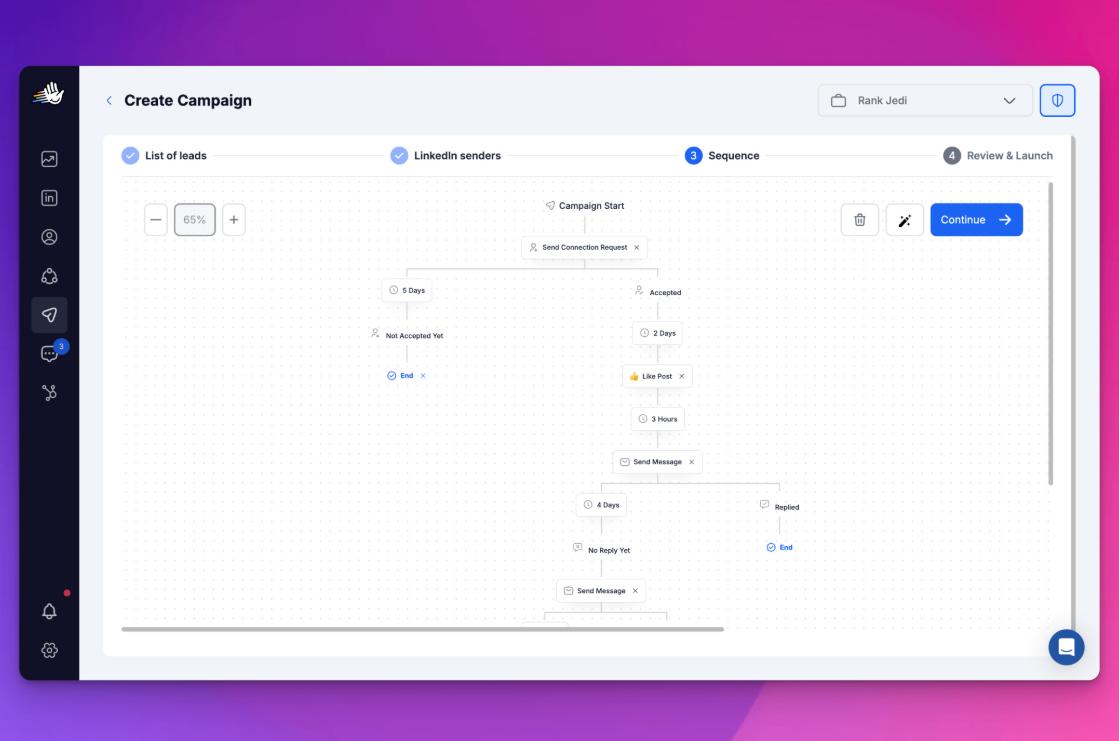
The results? 174 total leads, 57% acceptance rate, and a 48% reply rate!
According to Bayelsa Watch, 88% of people check their emails multiple times a day and relevant, targeted drip emails drive approximately 18× more revenue than generic broadcasts. With a single email marketing software of relatively affordable pricing, you can set-up and automate your email marketing campaigns. For those getting started with email marketing, choosing the right software early makes setting up these automated sequences significantly easier.
Use cases: Onboarding emails for new customers and activation emails for inactive customers are email drip campaign examples. Other use cases are lead generation, product education and new product announcements.
SuperOffice, a CRM company launched a drip campaign for people who downloaded their white paper and guided them through a sales funnel.
The campaign workflow:
- Email 1: A warm message thanking the lead for downloading the whitepaper and a brief explanation of SuperOffice and what it does.
- Email 2: An email stating industry trends in the CRM space and how SuperOffice addressed it, showing them as thought leaders.
- Email 3: The third email featured a case study of how SuperOffice helped a client, giving proof.
- Email 4: The last email in the sequence had a call to action for a free trial.
The result? a massive 30 percent higher conversion rate compared to typical campaigns.
- SMS
Short messages function best for SMS compared to email. Because they are linked to phone numbers, they feel more intimate and they must be used judiciously, or they can feel intrusive. SMS messages for drip campaigns should therefore be short and action-driven.
Use cases: Automated SMS drip campaigns work best for welcoming new members, event invites, nurturing campaigns in B2B sales, post-purchase follow-up and upsell, flash sales, and limited offers.
A typical example of an SMS drip campaign use case is the SaaS Academy case study. SaaS Academy, a coaching program for SaaS founders, used simple SMS texts to follow-up and increase the number of leads that showed up to sales demos.
The campaign workflow:
- Whenever someone booked a call, a short SMS message like “Hey, we noticed you booked a call. What do you hope to get out of it” makes a lot of difference in making the call more tailored, leading to higher conversion rates.
- Short SMS messages like “Hey, just checking in. Are you still good for our call in one hour?” were also sent before the call.
The result? A 20 percent decrease in no-show rates to sales calls and a whopping $90k increase in monthly income.
- In-app drip campaigns
These are messages shown in a product based on user actions, feature usage, and time since signup. In-app drip campaigns are for people who have already subscribed to your product, so they aren’t suitable for lead generation. The limitation with in-app drip campaigns is that they only reach users when they are inside the product. Hence, it can be combined with other drip-campaign channels, such as email.
Use cases: Best use cases include user onboarding for new subscribers, feature adoption, upselling and plan upgrades, and churn prevention.
MYOB, an accounting tool that streamlines financial management for businesses, realized their onboarding was not setting users up for success well enough and rebuilt the entire experience. Instead of hoping users will find their way in their product they set up an in-app campaign workflow:
- Personalizing the user's onboarding experience by asking questions like “Have you used accounting software before?” and “What will you use MYOB for?”
- Building checklists for what users want to do in the tool such as creating an invoice
- With each step in the checklist are tooltips on what you should do next, making tasks completion easy.
The results of this in-app drip campaign? A 21 percent increase in new user activation which is impressive.
- Push notification drip campaigns:
These are short messages delivered to your device, even when you aren’t actively using your app or web browser. Push notifications sit between email and SMS, interrupt your device activity, and grab your attention. Even if you don’t click them, they are still visible. They are good at bringing users back, nudging users to complete forgotten actions, and reinforcing habits. They are best for customer retention and not lead generation.
Use cases: User onboarding and activation, re-engagement of inactive users, and urgent nudges, such as when your subscription plan is about to end.
Brian Jackson, CMO of Kinsta, wanted to have their published content delivered to users instantly and increase overall website traffic. Push notification campaigns were the best man for the job.
Asides from the quality traffic it brought, their push notifications converted at 2.5%, also generating leads.
Multichannel drip campaigns
If one campaign channel can generate results, imagine how much result a combination of these channels can generate, if done properly. That’s what a multichannel drip campaign is about.
For in-house GTM teams and outbound agencies looking to generate leads, and smash quotas in the coming quarter, LinkedIn + email is the genius combination.
Let’s look at how CaptivateClick, an outbound agency combined email and LinkedIn to generate a 25% increase in qualified meetings booked and a 60% open rate on the first email for a B2B SaaS client.
- They used LinkedIn Sales Navigator to build a hyper-targeted list of decision makers
- Warmed up the prospects on LinkedIn by viewing, connecting and engaging with their content
- Once connected on LinkedIn, they obtained their work emails and sent them emails referencing their LinkedIn activities and sharing a highly relevant case study and the results poured in.
Both channels complemented each other. LinkedIn built awareness and warmed up the prospect, email further persuaded the prospects with value-adding messaging, case studies, and ultimately the call-to action.
Another quick example of how LinkedIn and email complements each other for B2B outreach is how DESelect generated 289 leads in two weeks with an ebook lead magnet.
- They made a post with the ebook, offering it for free in exchange for comments
- They captured the information of everyone who commented, got their email address and sent them the book
- Ended up with 289 warm leads as potential customers for their SaaS tool.
LinkedIn served as a lead generation tool, generating warm leads for their email sequence later on.
How to build an effective and high-converting multichannel (LinkedIn + Email) drip campaign
When running a multichannel drip marketing campaign across email and LinkedIn, the goal isn’t to repeat the same message across both channels, but to let each channel do what it does best at the right moment.
We’ve seen how GTM teams and outbound agencies built high-converting campaigns. It's time to walk you through how to build yours in simple steps, even if you have never built one before.
- Determine who your ICP is
The success of your campaign starts with knowing who you want to target. Don’t give a vague description of your ideal customer profile; be detailed so your message is relevant to your target audience.
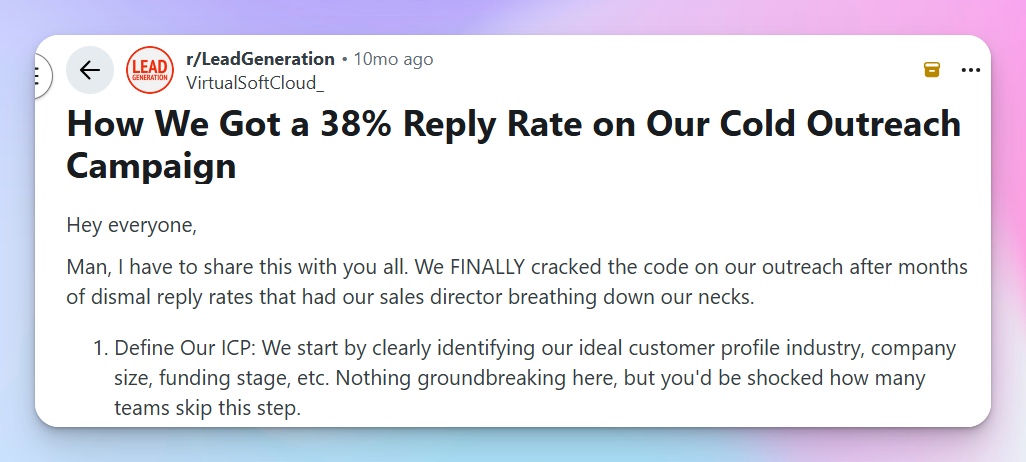
A Reddit user shared how defining their ICP clearly was the first step in cracking the code to their outreach campaign and a 38 percent reply rate.
An example of a vague ICP: B2B companies that need more leads.
Why it’s not helpful: This is too broad, lacks industry focus, company size, buyer role, and pain point.
An example of a clear ICP: Head of Sales for B2B SaaS companies with 20-100 employees, recently hired a team of five SDRs, and is experiencing a low outbound reply rate and inconsistent pipelines.
Why it’s helpful: Clear target, strong pain alignment, and messages sent to this set of people will be highly relevant, leading to more conversions.
- Determine the goal of your campaign.
Have one goal per campaign for effectiveness. What’s the single goal of your campaign? Booking a demo? Booking a meeting with you? Downloading a resource? Registering for an event?
Wanting to achieve multiple results in a campaign tires out your audience and waters down its effectiveness.
If you want to achieve multiple goals with an audience, take a cue from Zendesk’s drip campaign, rather than trying to achieve multiple goals at a go, have different campaigns adequately spaced.
Zendesk wanted to onboard, retain and upsell to customers, rather than doing all three at once, they spread it over three different campaign sequences. The result was a 50% reduction in churn and a 30% increase in customer lifetime value.
- Determine how you want to use each channel.
Don’t just combine channels; combine them strategically. LinkedIn is best for connecting with your prospect and establishing familiarity before taking things seriously via your drip campaign email.
Also, each channel can serve as a backup for the other. If you’re unable to connect with a prospect via email, you can add them on LinkedIn, and vice versa.
Because it’s two channels working simultaneously, space your messages appropriately to avoid overloading your prospect. You want to avoid email and LinkedIn messages being delivered on the same day.
- Design the sequence timeline:
A safe and effective timeline is 10-14 days. Here’s an example of a sequence timeline:
Day 1: LinkedIn (Purpose: Connect and engage)
Day 3: Email (Purpose: Share something valuable like a playbook, an ebook, or a relevant tip)
Day 5: LinkedIn (Purpose: Nudge with a question)
Day 7: Email (Purpose: Share proof, e.g., case study)
Day 10: Email: (Purpose: Call to action)
- Import your leads into HeyReach and start your drip campaign.
HeyReach is a multichannel outreach automation tool that lets you set up drip campaigns effectively.
HeyReach has a 14-day free trial. You can sign up here and follow hands-on, so that by the end of this session, you’ll have successfully created a demo multichannel drip campaign.
BUTTON FOR FREE TRIAL
a. Import your leads into HeyReach:
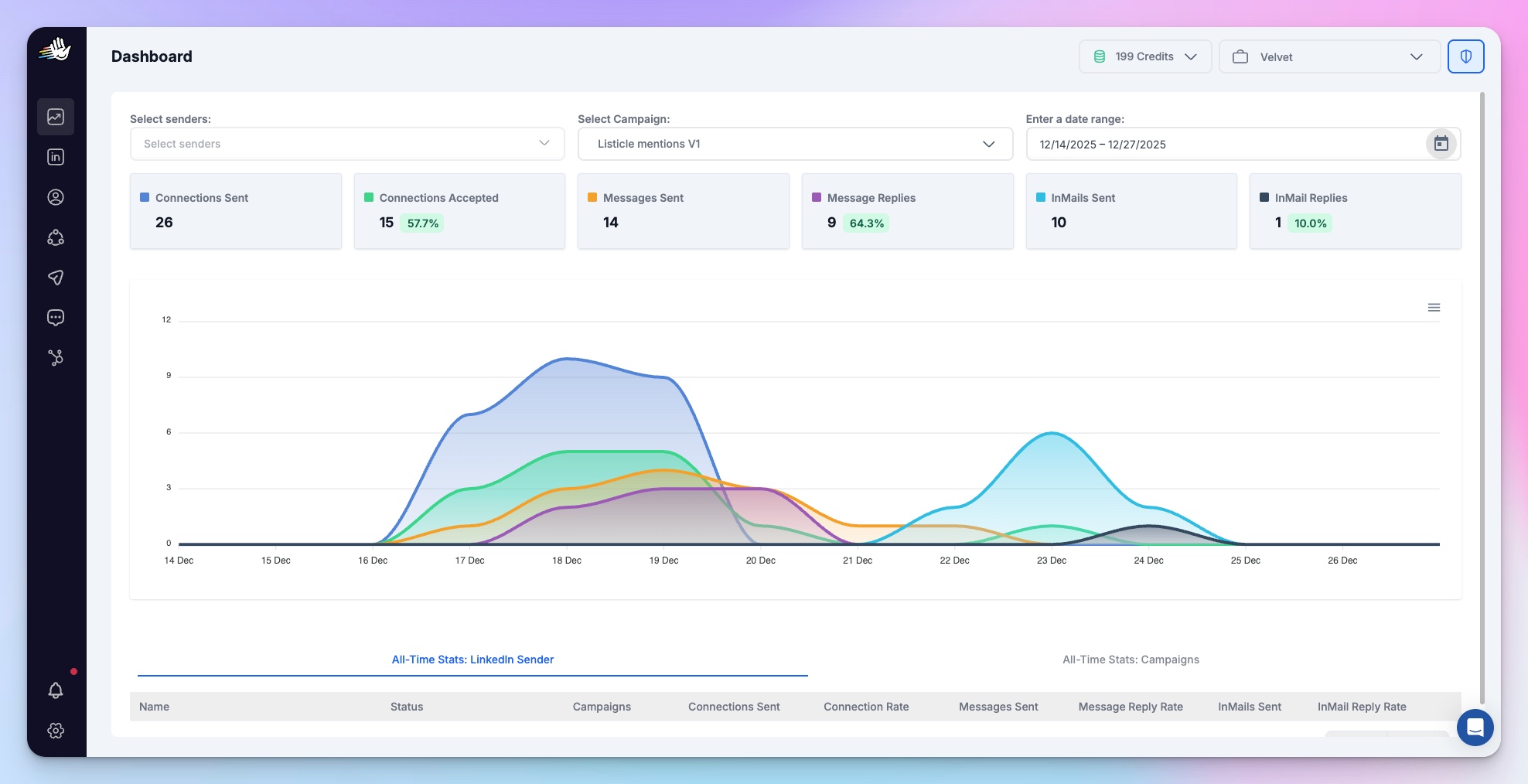
Once you have signed up for HeyReach, you have your dashboard as seen below
To import leads, locate the third icon on the left labeled “leads”. Click on it to proceed.
In the top-right corner, click the “Add Leads” icon, as shown below.
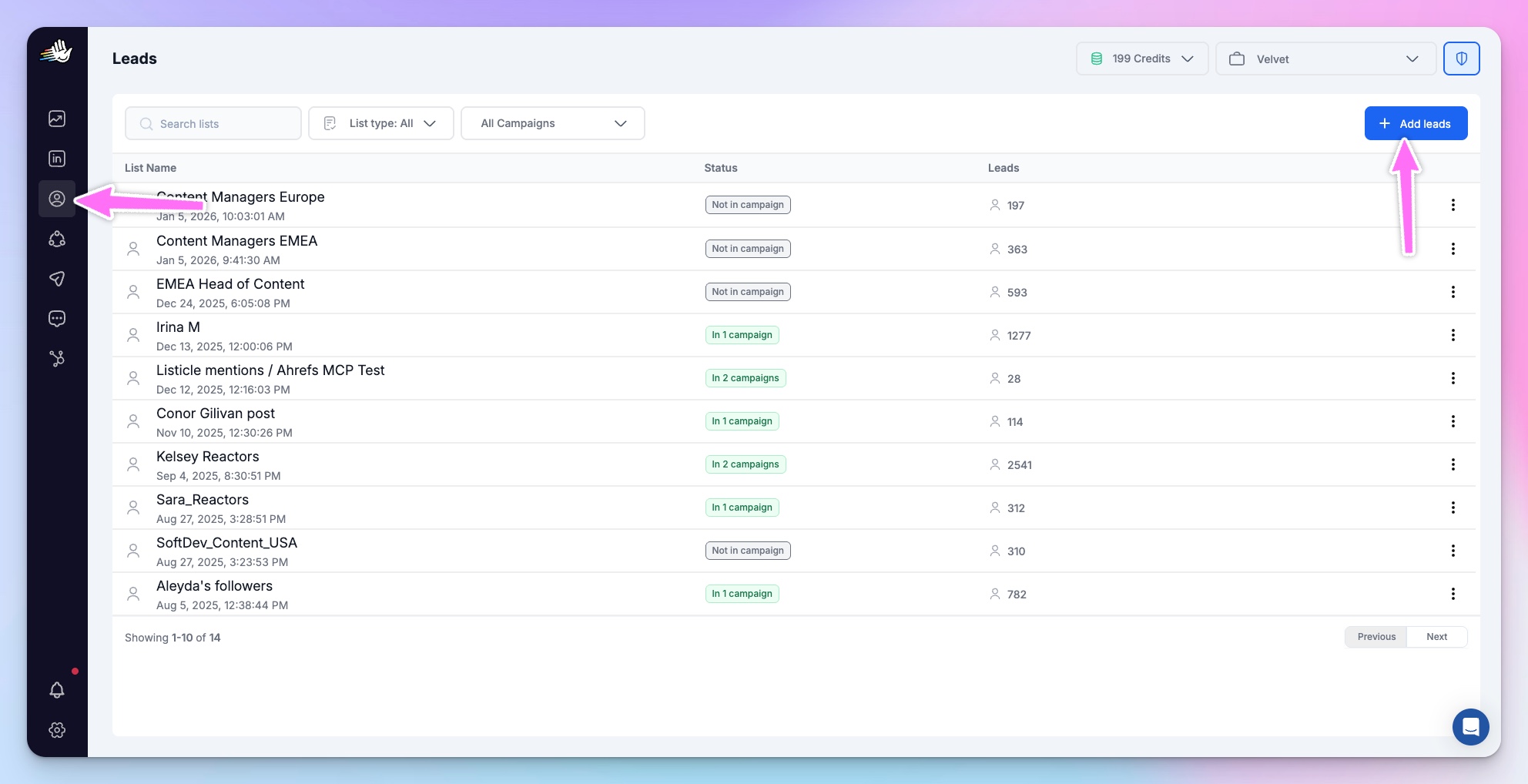
You can import leads via LinkedIn search, Sales Navigator, LinkedIn post reactors, webinar attendees, or your own CSV file.
b. Start your campaign:
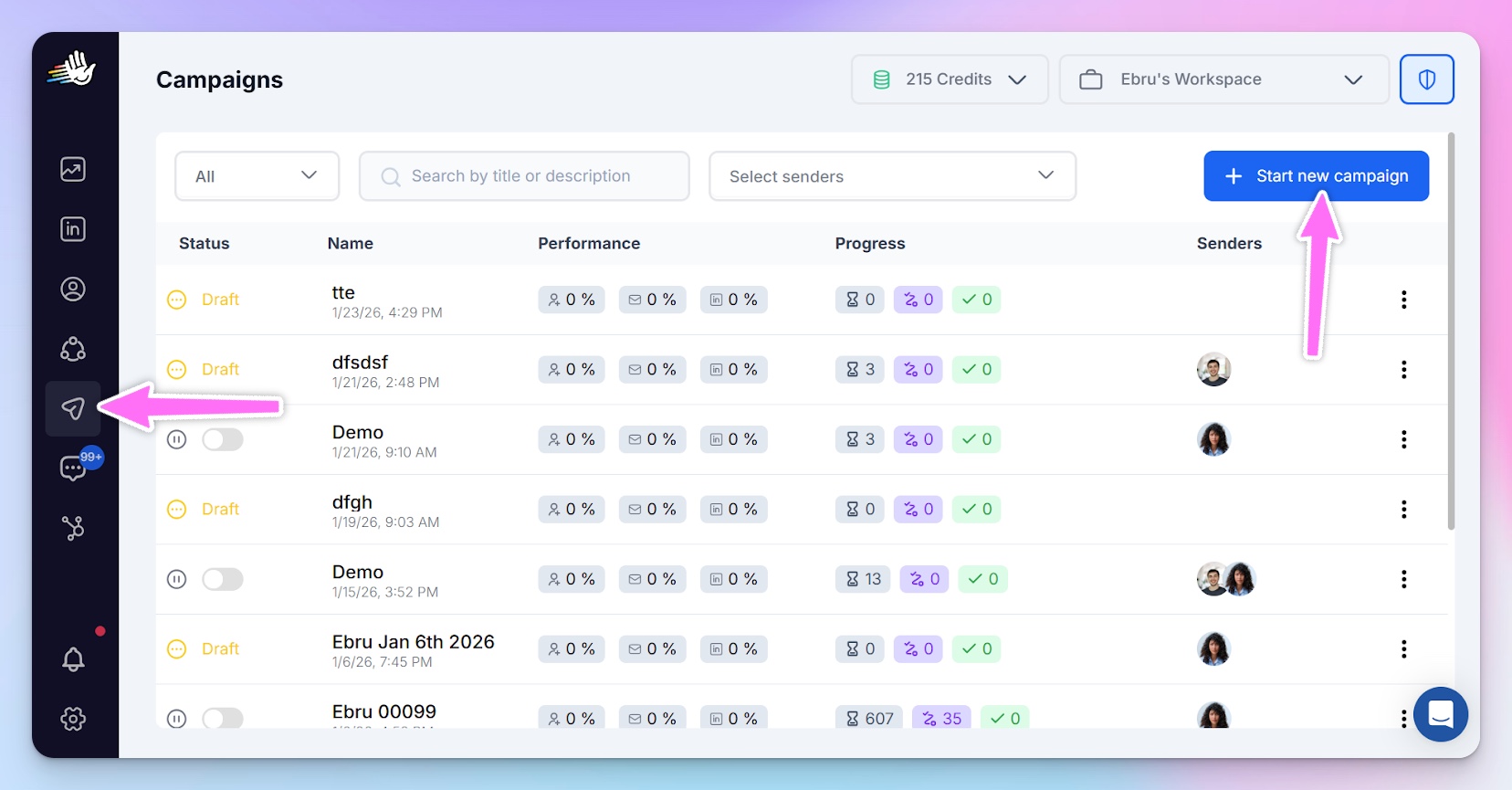
After importing your list, go to the dashboard and click on the fifth icon on the left. It’ll bring up the interface below. Select "Start new campaign" at the top right and name your campaign.
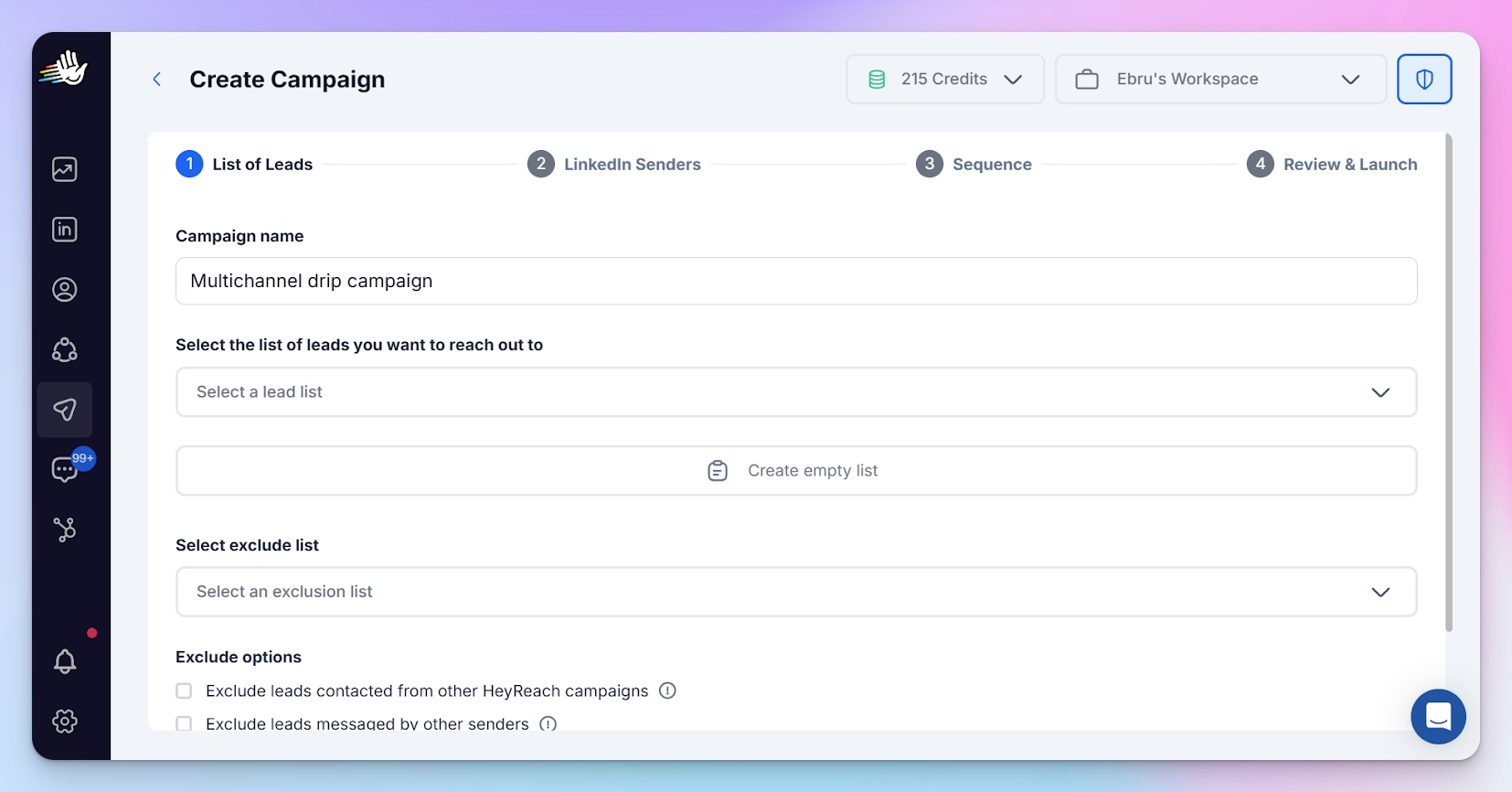
After naming your campaign, you’ll be taken to the next interface, as shown below, where you’ll be asked to select the Lead list you uploaded earlier. You can also exclude a set of leads that are already included in another campaign, so a lead does not end up in a dual campaign.
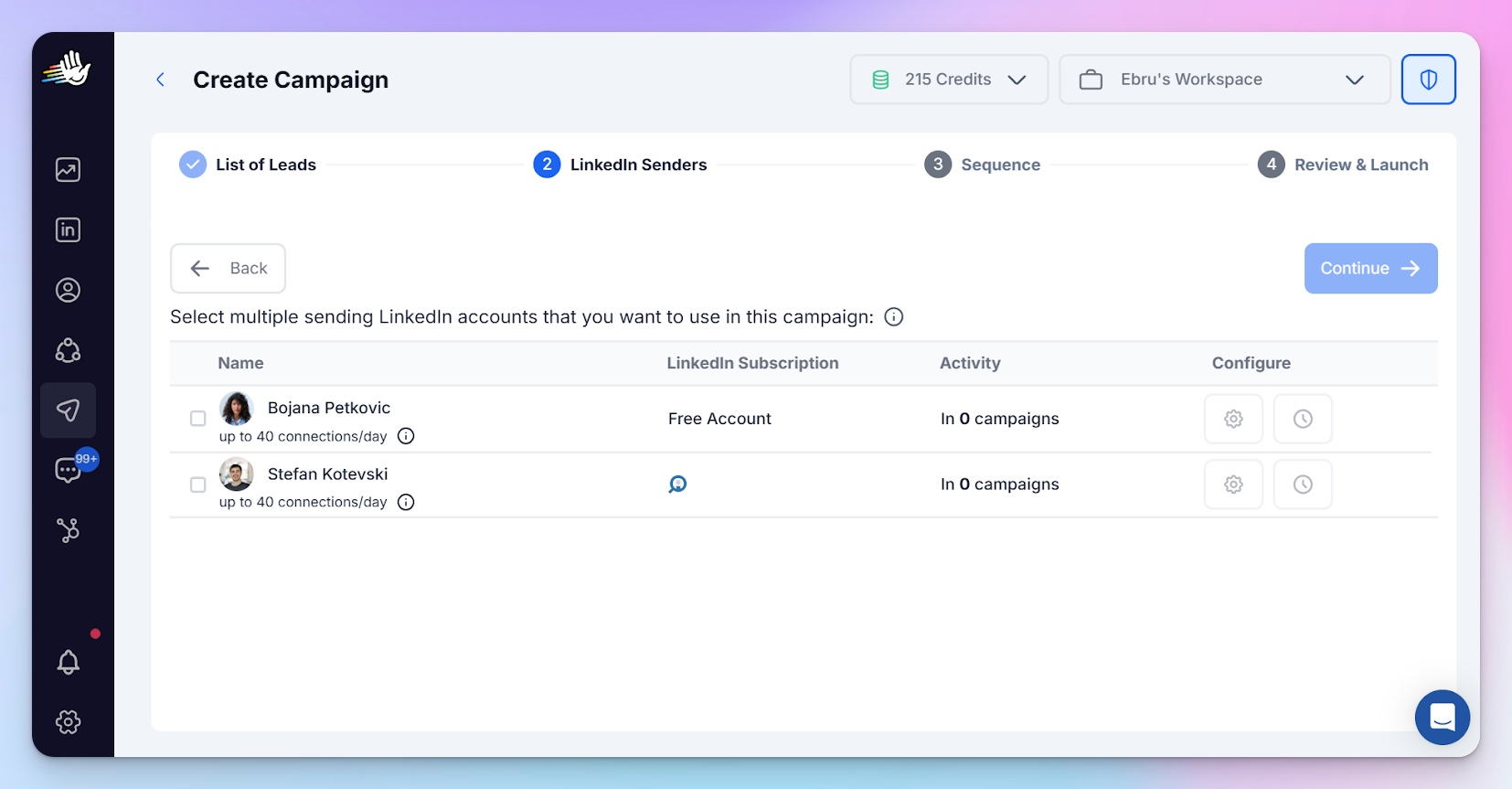
Then select the LinkedIn senders you want to use for your outreach.
After selecting the LinkedIn account you want to involve as senders in the campaigns, the next step is to set up your campaign sequence.

I added an action to send a connection request, and I was asked to write a connection request message.

Via the Instantly integration option seen below, you can include email integration to your sequence.

When you click on “Add to Instantly”, it brings out the following interface.
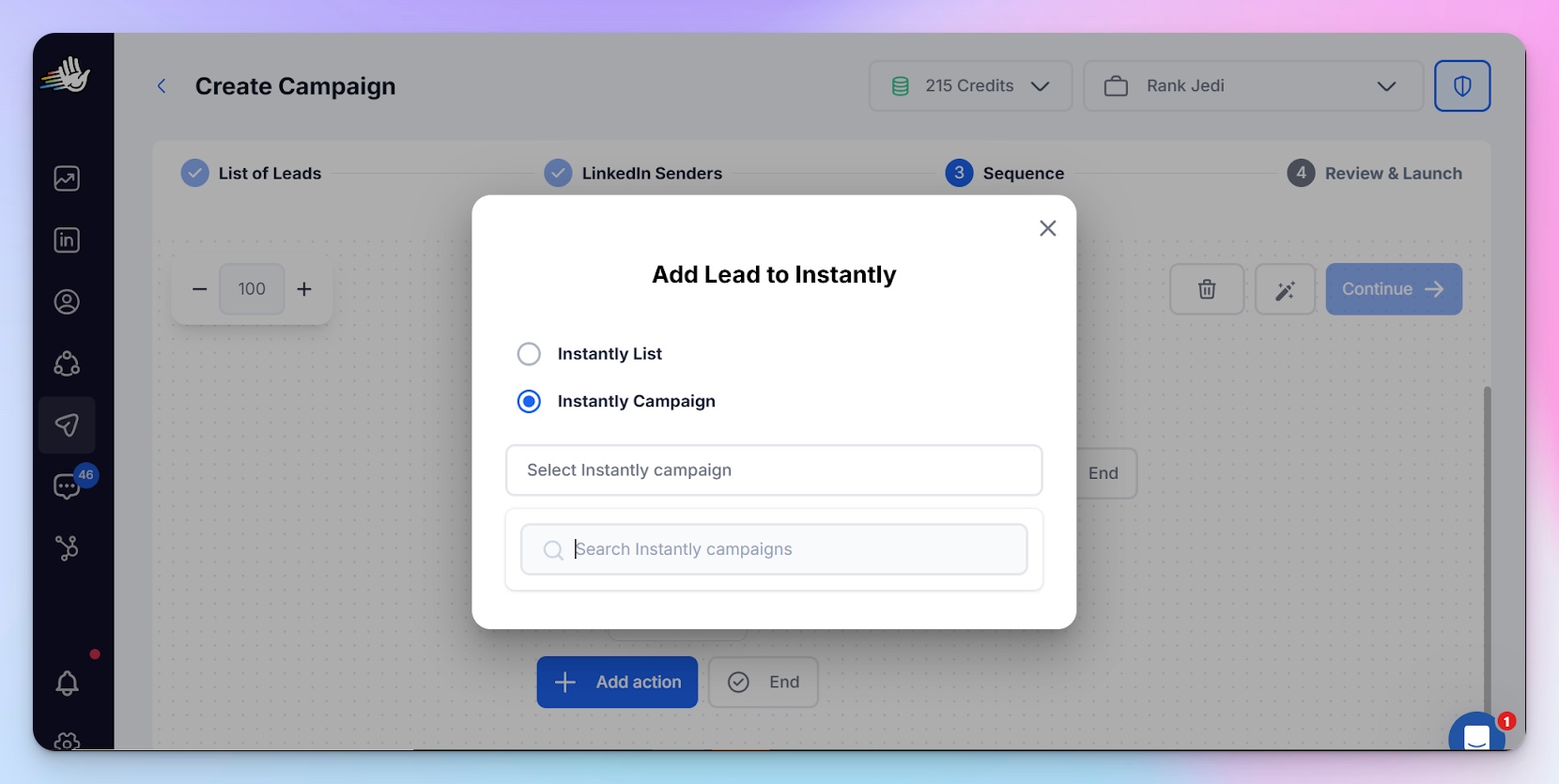
Select Instantly campaign, then select the email list you want sent to from the drop-down. Note that lead lists must be created in Instantly first.
Once created there, they'll automatically appear in HeyReach for you to select from. You can then go ahead to complete your campaign sequence setup, review your campaign, and launch it.
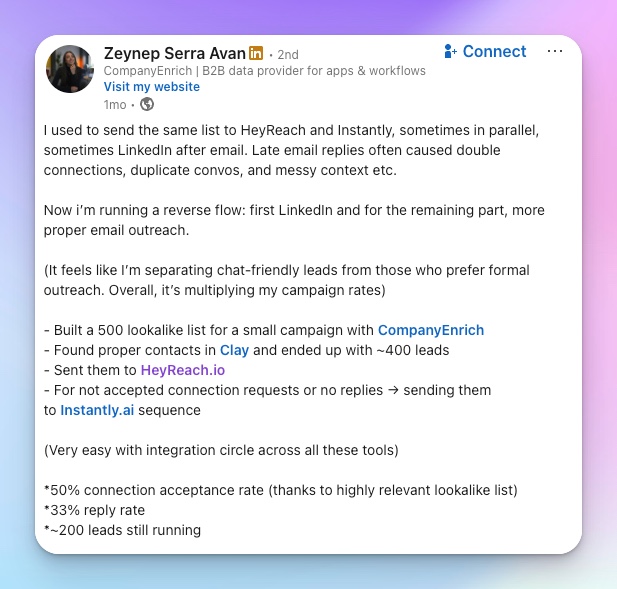
With HeyReach going multichannel, you can execute your email + LinkedIn campaign from one place and increase your outreach results. Zeynep Serra Avan, Partnership Manager at CompanyEnrich, shared in her LinkedIn post how she used HeyReach for her multichannel drip campaign and ended up with a whopping 50% connection acceptance rate, a 33% reply rate and approximately 200 leads still running.
- Track and optimize your campaign
Your campaign does not end at the launch; keep track of metrics that will be shown on your HeyReach dashboard.
Using metrics such as your connection acceptance rate, click-through rates, reply rates, and InMail reply rates, you can measure your performance and iterate for improvement.
Test different variables in your campaign to know what’s working and what’s not. The rule of thumb for A/B tests is to test one variable at a time. For instance, you can carry out an A/B test to determine which subject line gets the most open rates, and another to determine which messages get your connection request accepted the most, not the two at once, for clarity of results.
Templates to get started with your multi-channel drip campaign
There are templates available in HeyReach that you can use for your sequence, and you can also create your own custom sequence from scratch.
When you are creating your custom sequence, the AI message generator will also be handy in providing a first draft you can tailor to your needs.
Two templates for different scenarios you can edit to suit your campaign goals are:
Template one (Email + LinkedIn template for when your LinkedIn request is accepted)
Step 1 – LinkedIn connection (Day 1)
LinkedIn message (Purpose: Awareness)
Hi (First Name)
I’ve been speaking with a few (roles) in (industry) and noticed a pattern around (problem). Thought it’d be good to connect.
Step 2 – Email (Day 3)
Hi (First Name),
Quick observation from working with (industry) teams:
Most (roles) are hitting (symptom problem), not because of effort, but because of (root cause).
The interesting part is that many teams don’t realize this is happening until it's too late (negative outcome).
Curious, are you seeing anything similar on your end?
Best.
(Your name)
Step 3 – LinkedIn follow-up (Day 5)
LinkedIn message (Purpose: Reinforce email + stay visible)
Hey (First Name),
I shared a quick note by email earlier this week around (problem), no rush at all.
Curious if that’s something on your radar this quarter.
Step 4 – Email (Day 8)
Hi (First Name),
One quick example you might find useful:
A (industry) team we worked with was dealing with (problem).
After changing (specific action), they saw (specific result) in (timeframe).
Not saying this is a fit, just sharing what worked in a similar environment.
If helpful, happy to walk you through the thinking behind it.
Best,
(Your name)
Template Two (Email template for when your LinkedIn request is not accepted)
A Redditor asked for help on how to proceed with their campaign if their LinkedIn connection request is not accepted.
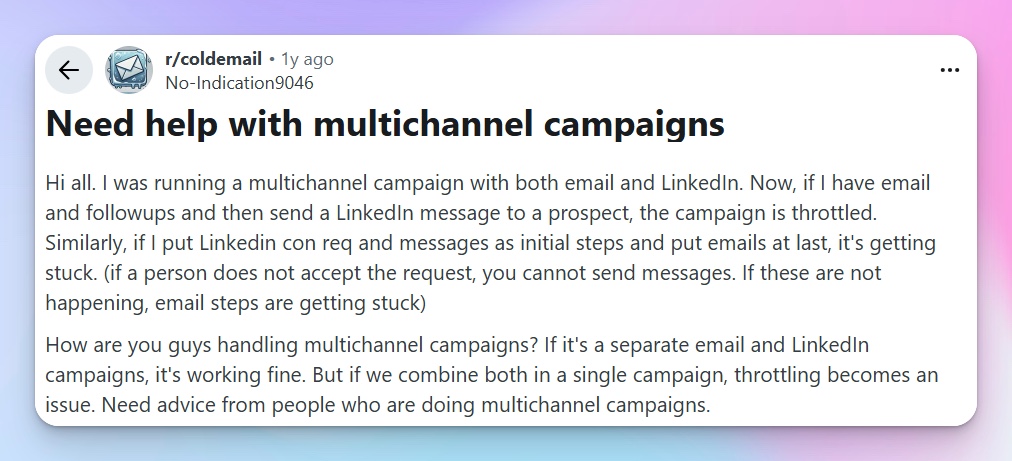
When you send a connection request on LinkedIn, and your prospect doesn’t accept it, add them to Instantly, where you can get the conversation started via email rather than LinkedIn.
Day 1 – LinkedIn connection request (Not accepted)
Day 3 – Email (Personalized email and conversation starter)
Hi (First Name),
I came across (Company) while researching how (industry) teams are addressing (problems).
One thing that keeps coming up in conversations with (role) is (key insight or pain).
Out of curiosity, has this been a challenge for your team recently?
Best,
(Your name)
Day 6 – Email (Value add)
Hi (First Name),
Quick follow-up with something useful.
What we’ve noticed is that (problem) usually arises because of (root cause), even in teams that are doing most things right.
Teams that address this early tend to see improvements in (metric) fairly quickly.
Happy to share what that looks like if it’s helpful.
Best,
(Your name)
Day 8 – LinkedIn soft touch (Profile view only)
Day 10 – Email (Proof / Credibility)
Hi (First Name),
One quick example in case it helps:
A (industry) team we spoke with was dealing with (problem).
After adjusting (specific action), they saw (specific outcome) within (timeframe).
Not suggesting this is the right approach for you. just sharing what worked in a similar situation.
Would it be useful to talk through this briefly?
Best,
(Your name)
Day 13 – Email (Politely close-the-Loop)
Hi (First Name),
Just wanted to check whether this is something worth revisiting later, or if I should close the loop for now.
Either way is completely fine.
Thanks,
(Your name)
How to measure the success of your multichannel drip campaign
You can easily audit your multichannel drip campaign by checking your analytics on your HeyReach dashboard.

- Connection acceptance rate:
While this metric isn’t the sole determinant of success, it’s important for making iterations. On your HeyReach dashboard, you see how many connection requests are sent and how many were accepted. For less than 15% connection acceptance rate, check the relevance of your connection message. For emails, check your subject line.
- Response rate:
On your HeyReach dashboard, you can check your response rate and how many of those responses were positive. Campaigns over 30% response rates are great, but for under 20%? Re-evaluate your messaging and offer positioning.
- Meeting booked:
Not all responses will result in a meeting. Having <1 meeting booked per 50 connection request sends is a low outcome. For such a situation, check and work on your offer positioning.
- Revenue generated:
The most crucial metric is revenue. The essence of the other metrics and their reiterations is the increase of this metric.
Go multichannel with HeyReach and get 10x outreach results
Exceed your outreach goals by going multichannel on HeyReach today. Don’t just take our word for it, our outbound playbook shows detailed processes of how different GTM teams and outbound agencies have crushed their outreach goals with HeyReach.
Sign up for the two-week free trial on HeyReach and launch your drip campaign today.

Try it for free
Frequently Asked Questions
What is a drip campaign?
A drip campaign is a series of messages sent to a prospect over time, each designed to move them towards a specific action, such as buying your product, signing up for an event, or downloading a resource.
What are the best tools for creating an automated drip campaign?
The best tools for creating an automated drip campaign are HeyReach, Meet Alfred, Expandi and lemlist among others.
What are the best practices for drip campaigns?
Best practices for drip campaigns are: having a clear ICP, having one goal per campaign, drafting your sequence before you draft your messages, one idea per message, A/B testing, understanding that different channels have their own roles and advantages.
What channels can be used for drip campaigns?
The different channels for drip campaigns are Email, LinkedIn, In-app, SMS, and push notifications.