How to automate your CRM with HeyReach, n8n, and AI sentiment analysis
Published:
May 31, 2026
Updated:
June 1, 2026
If your CRM looks like a graveyard — overdue leads no one touched, unassigned contacts floating in limbo, notes that tell you nothing — you have a problem bigger than a bad hygiene. You're losing deals every single week. I've seen it happen over and over again, and the worst part is that most teams try to fix it manually, burn out, and end up right back where they started.
What I'm going to walk you through is the exact workflow I set up using HeyReach, n8n, an AI sentiment agent, and a CRM (Attio in my case) to keep everything clean and organized with minimal effort. No 20-step integrations, no expensive consultants.
What a bad CRM actually looks like
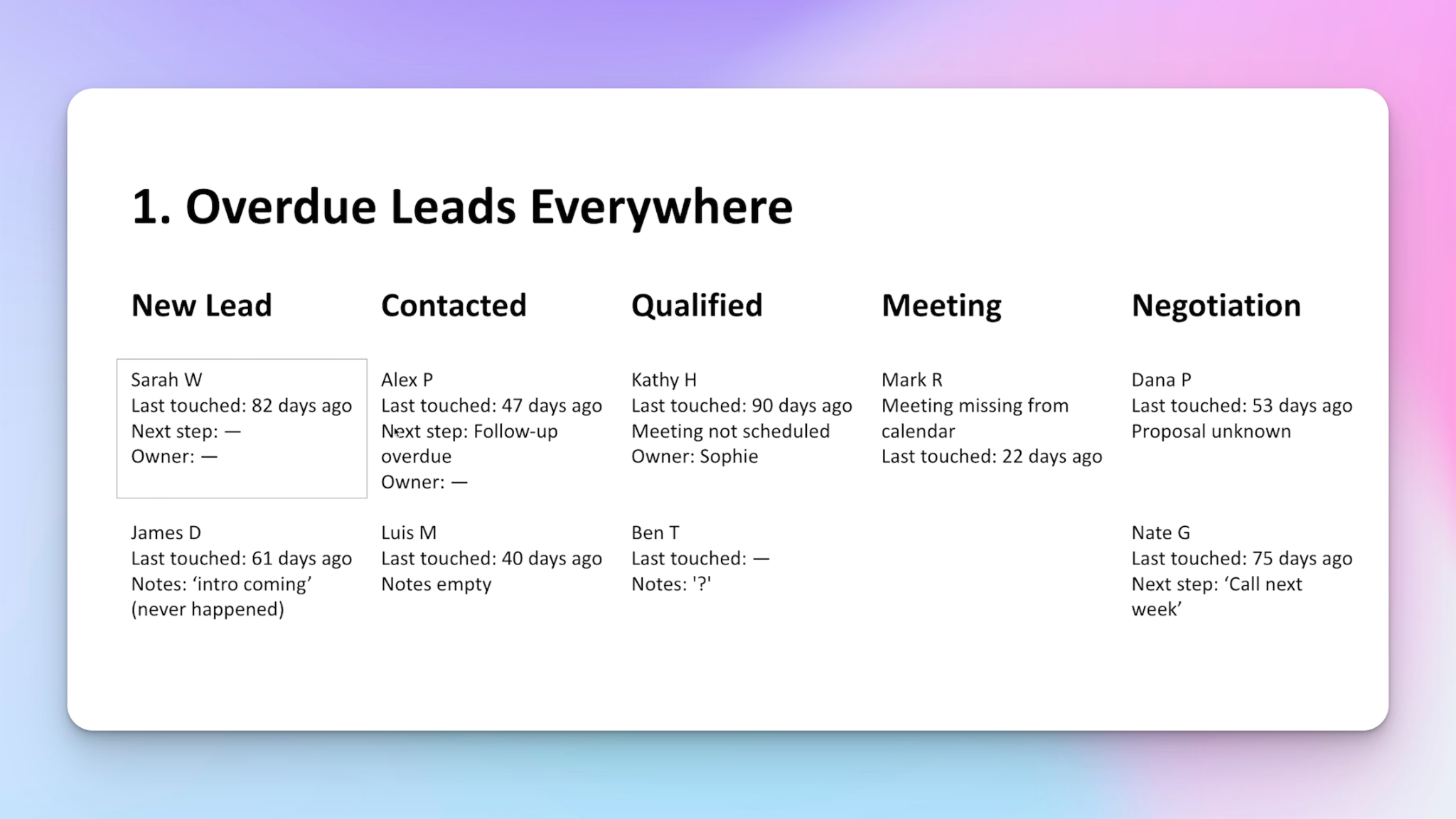
Before building anything, let's be honest about the five ways a CRM falls apart — because recognizing the problem is half the fix.
- Overdue leads that never move. A lead gets added, sits in "new lead" forever, and no one follows up. It just rots.
- Unassigned contacts. No one knows who owns the lead. Reporting becomes useless and finger-pointing starts.
- Missing or useless notes. If an SDR hands off to an AE without proper conversation notes, that sales call is going in blind.
- Leads stuck in wrong stages. Too many pipeline stages cause fatigue. People stop updating, and you lose visibility into what's actually working.
- Dead pipeline with no movement. Nothing shifts across stages for weeks. No one knows when to re-engage.
These problems compound over time. The only real fix is automation that handles the top-of-funnel CRM work for you.
Setting up the n8n workflow
The whole system starts in n8n. The trigger is a webhook.
Here's how I set it up:
- Create a webhook trigger node in n8n and grab the test URL.
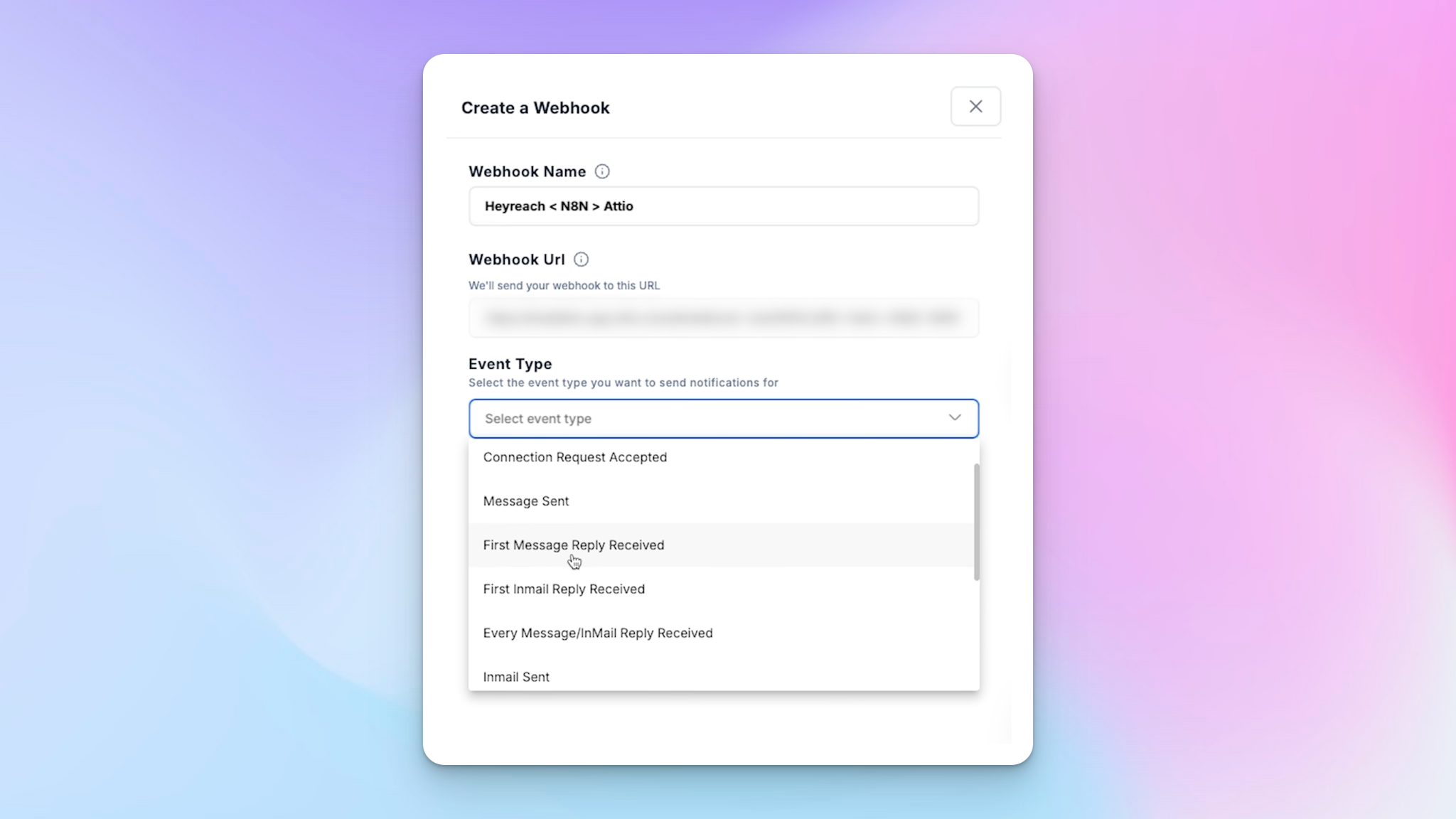
- Go to HeyReach, create a new webhook, and paste that URL in.
- Name the webhook something descriptive — I use "HeyReach to N8N to Attio" so I always know exactly which flow it corresponds to when I'm looking at my list of webhooks.
- Set the trigger event to first message reply received. You could use "lead tag updated," but that requires manual tagging — which defeats the whole point. I want the entire outbound sales automation process to run without me touching it.
- Leave it set to all campaigns unless you're running campaigns that need to be isolated from this flow.
- Test the webhook directly inside HeyReach until you see a success confirmation in n8n.
Building the AI sentiment agent
Once the webhook is live, the next node in the flow is an AI agent that reads the reply and determines sentiment. I'm using O3 Mini via the OpenAI API, connected through n8n's model node.
Here's the structure:
- System message: Instructions that tell the agent its role — in this case, determine whether the reply sentiment is positive or negative. I give it clear examples and show it the exact JSON output format I want.
- User message (prompt): I pass in two variables — my original message (labeled "me") and the prospect's reply (labeled "prospect"). That gives the model enough context to make an accurate call.
- JSON output parser: Instead of getting one blob of text back, I parse the output into two clean fields: sentiment and reasoning. This means I can use each as a dynamic variable in the next nodes.
The system prompt does the heavy lifting. The user-facing prompt stays intentionally simple — just enough context for the model to understand the exchange. If you need to generate the JSON schema quickly, just ask ChatGPT to create a JSON object based on sentiment and reasoning and drop it in.
Filtering positive replies only
After the sentiment node, I add a filter. The logic is simple: if sentiment contains "positive," let it through. Everything else gets dropped here.
This is critical. Without this filter, every reply — negative, out-of-office, "not interested" — would flow into your CRM and create noise. I only want leads who have responded positively from my LinkedIn outreach campaigns to make it into the pipeline.
Sending data to Attio via HTTP API
Most CRMs — HubSpot, Airtable, Pipedrive — have native n8n integrations. Attio is newer, so I use an HTTP request node instead. The setup is straightforward:
- Copy the endpoint URL from Attio.
- Set the content type header to application/json.
- Map all the data points coming from HeyReach: full name, first name, last name, LinkedIn URL, company name, job title, email (where available).
That data now flows from HeyReach → n8n → Attio automatically every time a positive reply comes in.
Automating records, deals, and lists inside Attio
Once the data lands in Attio, I have an internal automation workflow that does three things in sequence.
Receiving and parsing the data
The first step is a webhook inside Attio that listens for the incoming JSON from n8n. After that, I run a "parse JSON" node. Without this, all the fields arrive as one long string. The parse node lets me name each variable properly (full name, first name, LinkedIn URL, etc.) so they're usable as dynamic values in the rest of the workflow.
Creating person, company, and deal records
- Person record: Full name, email (where available), company name, job title, LinkedIn URL.
- Company record: Company name, website. This gets associated with the person record.
- Deal record: I use the person's name as the deal name. Deal stage is automatically set to "Lead Interested." I assign myself as owner and associate both the person and company records.
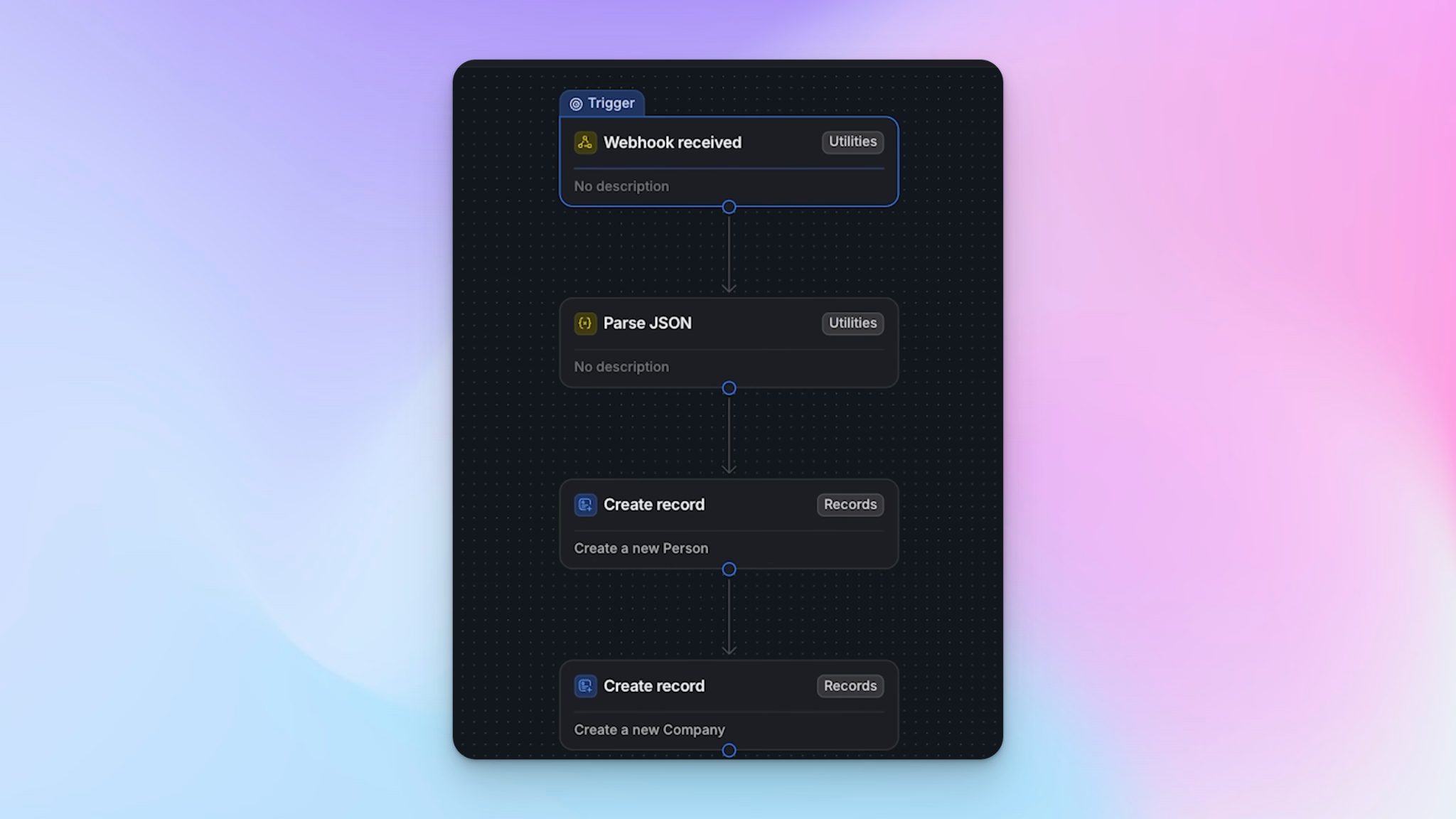
For deal source, I tag it as "Cold LinkedIn" since these leads are all coming from automated LinkedIn messaging through HeyReach.
Creating a LinkedIn attribution list
The final node creates a list entry. I maintain a "LinkedIn Attribution" list in Attio so that at any point, I (or a client) can pull up every lead that came in from LinkedIn campaigns and see exactly what's in the pipeline. You just need to create the list in Attio first, then select it in the node's input variable.
Slack follow-up reminders at 3, 7, and 14 days
A lead sitting in "Lead Interested" with no follow-up is almost as bad as not having it in the CRM at all. This is where the Slack reminder workflows come in — and I have three of them, one for each follow-up window.
How each reminder workflow is structured
Each one follows the same pattern:
- Recurring schedule trigger — set to run daily at 9:00 a.m. No manual triggering required.
- Find list entries — pulls records from Attio.
- Conditions filter — this is key. Without conditions, you'd be flooding a Slack channel with every single lead every single day. The filter checks three things:
- Deal stage = Lead Interested
- Attribution = Cold LinkedIn
- Created at = between N-1 and N+1 days (e.g., "before 4 days and after 2 days" for the 3-day reminder)
This relative date logic ensures the reminder fires exactly on day 3, day 7, or day 14 — not before, not after.
- Loop node — Attio requires looping through entries individually rather than processing them in bulk. Other tools like Airtable handle this automatically, but in Attio I need to explicitly add this step so each record is processed one at a time.
- Post message to Slack channel — using Attio's native Slack integration, I post to the "HeyReach Positive Replies" channel. The message reads something like: "Lead Rob Sloan has been in Lead Interested for 3 days. Please follow up on HeyReach. [LinkedIn URL]"
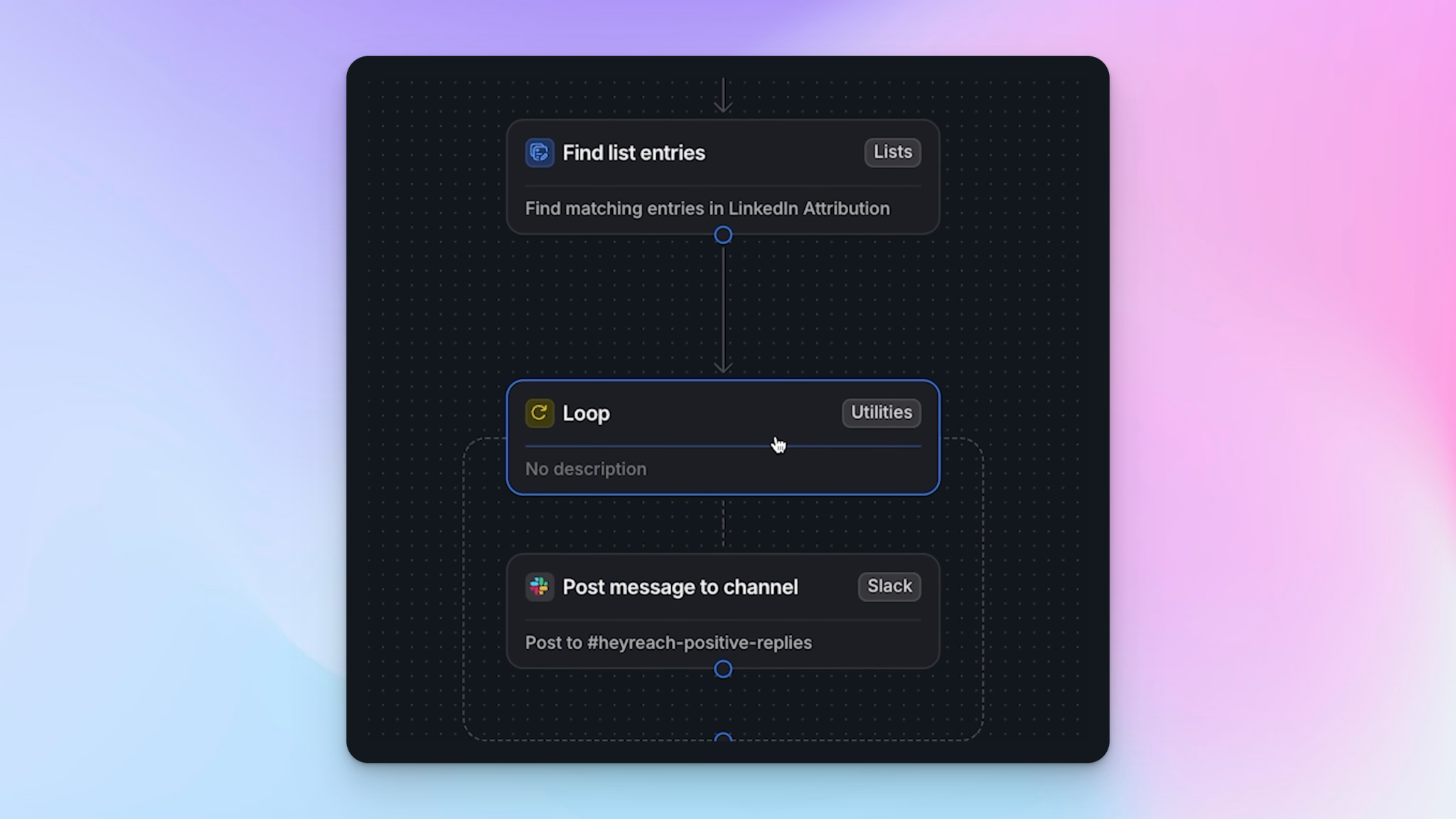
The LinkedIn URL is included in the Slack message so whoever picks it up can click straight through to the profile without having to dig around.
Reporting and pipeline visibility
Once this system is running, you get a clean pipeline almost on autopilot.
The top-of-funnel — everything generated by LinkedIn prospecting through HeyReach — fills automatically. You don't touch it. When a lead books a demo, you manually move them from "Lead Interested" to "Demo." If 14 days pass without a reply, the automation moves them to "Gone Cold."
Inside Attio (and you can do this in any CRM that supports reporting), I set up simple bar charts segmented by channel and attribution list. So at a glance I can see how many leads came in from LinkedIn versus Google Ads versus conference follow-ups. The conference attribution, for example, is triggered through a Typeform — same logic, different source.
This isn't just a LinkedIn workflow. You can replicate the same pattern across every multichannel outreach source and have the entire top-funnel CRM enrichment running automatically.
Why this setup actually works long-term
Very often outbound automation setups fail because they require too much manual maintenance. People set them up, get busy, and let them slide. What I've built here specifically avoids that by:
- Triggering on events, not manual tags. The workflow fires the moment a positive reply comes in, not when someone remembers to update a field.
- Using AI to handle sentiment. I don't have to read every reply to decide if a lead is worth adding to the CRM. The AI does it, filters out the noise, and only passes through genuine interest.
- Automating the reminders. The Slack nudges mean my team doesn't need to audit the CRM daily to know who needs a follow-up. It comes to them.
- Keeping attribution clean from day one. Every lead is tagged with its source automatically, so campaign performance reporting is always accurate.
Your team's time goes to closing deals — not updating pipelines.

Try it for free
Frequently Asked Questions
Do I need to use Attio for this workflow to work?
No. Attio is just what I use. Any CRM that supports webhooks or has a native n8n integration will work — HubSpot, Pipedrive, Airtable, and many others all have native nodes in n8n, which actually makes the HTTP request setup even simpler than what I showed here.
What happens to negative or neutral replies?
They get filtered out before anything reaches your CRM. The sentiment filter in n8n only allows records where the AI has classified the reply as positive to pass through. Everything else is dropped at that stage.
Can I use a different AI model instead of O3 Mini?
Yes. O3 Mini is what I'm using here, but the AI agent node in n8n supports other OpenAI models. You just need to connect your OpenAI API key to the model node — the rest of the workflow stays the same.
How do I handle leads that come in from campaigns I don't want included in this flow?
When you create the webhook in HeyReach, you can choose specific campaigns rather than leaving it on "all campaigns." If you're running campaigns with different objectives or different ICP segments, just create a separate webhook per flow and name them clearly so you can tell them apart.
What if a lead replies again after being moved to "Gone Cold"?
That's a manual step. The automation handles the initial entry and the follow-up reminders, but re-engaging a gone-cold lead is a judgment call. Once you get the Slack reminder at day 14 and there's still no response, you'd move them manually. From there, you can build a separate re-engagement flow if the volume justifies it.