How to connect LinkedIn to Claude (and why your outbound workflow needs it)
Published:
July 20, 2026
I used to think outbound broke at the messaging layer.
It doesn't.
It breaks when LinkedIn context gets lost between tools.
The workflow usually goes like this: find a prospect on LinkedIn, copy their profile into Claude, generate a message, tweak the generic parts, paste it into your prospecting tool, and repeat.
The problem here is that Claude only sees whatever you manually give it. No recent job change, no hiring activity, no content engagement nor signal that explains why you're reaching out now rather than six months ago.
And without signals, personalization turns into guesswork.
That's why connecting LinkedIn to Claude.ai matters.
And this isn't even because Claude writes better messages, it's because it can finally work with the context that makes outreach relevant in the first place.
Once I started feeding LinkedIn signals into Claude through HeyReach, the workflow changed completely. Rather than bouncing between tabs, LinkedIn data flowed into Claude, Claude generated personalized outreach, and HeyReach handled execution.
That's what "connecting LinkedIn to Claude" actually means: building a workflow where LinkedIn signals reach Claude in time to matter.
Connecting LinkedIn to Claude: how it actually works
The first time I heard someone say “we connected LinkedIn to Claude,” I knew they didn’t mean it the way it sounded.
There’s no button for it, or native toggle, and there's no “sync” feature hiding somewhere in settings.
What people actually mean is this:
you’re building a pipeline where LinkedIn data leaves its native world, gets structured somewhere useful, and lands inside Claude in a format it can actually reason about.
And that difference matters more than it looks like at first.
Because Claude can write really well but It struggles with missing context.
So the real job is not “connecting tools.” it's moving signals cleanly enough that Claude can do something useful with them.
I’ve tried this in a few different ways while building outbound systems inside HeyReach setups. They all work. They just serve different levels of maturity and technical comfort.
There are three practical paths teams end up using.
Method 1: Claude MCP (model context protocol)
This is the most direct version of the idea, and the one that feels the most “live.”
MCP is basically a shared language that lets tools expose data in a way other tools can understand without custom integrations for every pair.
Instead of building a one-off connection between HeyReach and Claude, MCP acts like a universal connector layer.
With HeyReach supporting MCP, Claude can access structured outreach data directly from your workspace. That includes things like:
- Ideal customer profiles
- campaign state
- engagement history
- connection status
The setup itself is straightforward once you have your workspace MCP URL and key from HeyReach.
You plug that into Claude as a connector, authenticate the workspace, and suddenly Claude isn’t guessing anymore, it’s reading real campaign data.
That’s where things start getting interesting.
Because now you can ask questions like:
“Which decision makers accepted connection requests this week but haven’t replied yet?”
And Claude doesn’t hallucinate an answer. It pulls actual campaign state from HeyReach and responds with context you can act on.
But MCP also comes with a reality check.
It’s powerful, but it assumes you’re already running structured workflows. If your campaigns are messy, MCP just surfaces messy truth faster.
So brands usually don’t start here, they evolve into it.
Method 2: HeyReach API → Claude API
This is the more controlled, builder-friendly route.
Instead of letting Claude query data live, you explicitly pass data into it.
The flow looks like this:
HeyReach holds your prospect data → you extract a batch via API → you send structured fields into Claude → Claude returns a personalized opener → you push that back into HeyReach as part of your sequence.

This is where things start to feel more “engineered.”
You define exactly what Claude sees.
For example, instead of giving it a full LinkedIn profile dump, you might pass:
- job title
- recent signal (post, job change, hiring activity)
- company size
- previous touchpoint history
Then you wrap that in a structured prompt and let Claude generate a first message that gets stored as a dynamic field like {ai_opener} inside your campaign.
I’ve seen this setup work especially well when businesses care about consistency at scale, because every message is generated from the same structure, not free-form prompting.
The tradeoff is obvious though.
You lose real-time flexibility. If something changes on LinkedIn after you pull the data, Claude won’t know unless you re-run the loop.
Method 3: CSV enrichment loop (Clay + HeyReach + Claude)
This is the “start simple, scale later” path I see a lot of agencies use.
It looks less elegant on paper, but it works surprisingly well when you’re iterating fast.
Flow goes like this:
You export leads from HeyReach → enrich them in Clay → feed structured rows into Claude → generate personalized messages → re-import into HeyReach.
It’s not real-time, or anything fancy. But it gives you control over every field before Claude touches it.
And honestly, that’s the appeal.
Because when something breaks, you know exactly where it broke, whether it is in the data, in the enrichment, or in the prompt.
I’ve seen teams use this loop to test messaging angles before they ever invest in a more automated setup.
It’s slower, but it teaches you what actually moves reply rates.
How I think about choosing between them
I don’t treat these as competing options.
I treat them as maturity stages.
- CSV loop if you’re still figuring out what good signals look like
- API route if you’ve already standardized your outbound structure
- MCP if you want Claude to sit inside your workflow rather than next to it
Lots of businesses jump straight to the “advanced” option and then realize their data isn’t ready for it yet.
Remember:
Claude doesn’t upgrade your outbound system, It only amplifies whatever system you already built.
Why HeyReach is the LinkedIn data layer Claude needs
Claude doesn’t have a messaging problem, It has a context problem.
I learned that the hard way while trying to push AI-written outreach into real campaigns. The outputs were clean, sometimes even impressive. But they kept missing the mark in the same predictable way — they sounded right, but not relevant.
And relevance only shows up when the model sees what actually matters about a prospect.
Not just a job title, or a company name.
I’m talking about signals.
That’s where HeyReach quietly changes the equation.
Because HeyReach does more than just moving messages around LinkedIn, it sits closer to the raw motion of outbound — who you’re targeting, how they’re engaging, and what’s happening inside your campaigns as they run.
When you plug that into Claude through MCP or API, you’re giving AI something to actually work with.
The difference between LinkedIn data and usable context
A LinkedIn profile on its own is thin.
It tells you where someone works, what they do, and maybe a few past roles. Useful, but static.
What actually makes a message land is everything around that profile:
- did they just change roles
- are they hiring
- did they post something recently
- did they engage with content in your space
- have they already been contacted in a campaign
- did they open or ignore previous messages
That’s the layer a lot of setups miss completely.
And when it’s missing, Claude does what it’s supposed to do — it fills the gap by guessing, and ends up writing something “safe.”
But safe messages don’t get replies.
What HeyReach actually adds to the system
Inside a working setup, HeyReach becomes the place where raw LinkedIn motion turns into structured signals.
And it does a lot more than just data collection, it actually helps with context shaping.
You can pass Claude things like:
- profile fields (role, company, seniority)
- engagement signals (opens, replies, accepts)
- campaign history (what’s already been sent, what’s been ignored)
- timing signals (recent activity windows)
And suddenly, rather than writing from scratch, Claude is reacting to something real.
That shift is subtle, but it changes everything.
Because now a message isn’t:
“Hey, I saw you work in sales…”
It becomes:
“Saw you stepped into a new sales leadership role recently — usually that’s when pipeline pressure starts showing up fast…”
Why raw linkedin data alone still falls short
A lot of people assume LinkedIn data is enough on its own.
It isn’t.
Because LinkedIn data isn’t structured for decision-making
And Claude needs structure, It needs signals grouped, cleaned, and time-aware. Otherwise it just blends everything into generic intent.
That’s where HeyReach sits in the stack.
It helps you translate LinkedIn into something Claude can actually reason about.
We ran analysis across 96,051 LinkedIn outreach campaigns inside HeyReach, and one pattern stood out immediately.
Typical campaigns convert around 20.75% of connection requests into accepted connections, but only 18.10% of those accepted connections turn into replies.
So the system isn’t breaking at the top of the funnel, it breaks at the conversation layer.
That’s exactly where Claude sits in this stack.
Right at the moment where a signal needs to become a sentence worth replying to.
And without structured context from HeyReach, that moment gets wasted.
Step-by-step — build the LinkedIn → Claude → HeyReach pipeline
This is the workflow I recommend when someone wants to move beyond “AI-assisted outreach” and into something that actually scales.
Because it's the simplest setup that keeps context intact from start to finish.
The goal is to feed Claude enough signals that the messages don't sound like they were written by Claude.
The workflow I use:
Step 1: Pull leads into HeyReach with signal data attached
Everything starts with the lead list, but not all lead lists are equal.
If all you have is a name, title, and company, Claude won't have much to work with. You'll end up with polished versions of the same generic outreach everyone else is sending.
What I care about are the signals attached to the lead.
Things like:
- recently changed jobs
- actively hiring SDRs or AEs
- posted about AI, outbound, or revenue growth
- engaged with industry content
- attended an event
- visited a website and was identified through a source like RB2B
- enriched through Clay with additional firmographic data
The richer the signal, the easier it becomes to write something relevant.
Inside HeyReach, I typically organize leads around the signal itself rather than the industry.
A prospect who posted about AI this week often has more in common with another AI-related signal than with someone in the same vertical who hasn't shown any buying intent at all.
That's the foundation behind both signal-based outbound and effective buyer intent signals.
The message gets easier to write because the reason for reaching out already exists.
Step 2: Pass profile and signal data into Claude
Once the lead data is structured, the next step is giving Claude context.
This is where I see people accidentally sabotage the whole workflow.
They send Claude a LinkedIn profile and write:
"Write a personalized LinkedIn message."
Then they wonder why the output sounds generic.
Claude performs dramatically better when the instructions are structured.
A stronger prompt looks more like this:
You are writing a first LinkedIn message.
Prospect:
- Name: Sarah Johnson
- Role: VP of Sales
- Company: Acme
- Signal: Posted about implementing AI SDR workflows
Rules:
- Mention the signal naturally
- Do not compliment for the sake of complimenting
- Keep under 60 words
- Ask one low-friction question
- Avoid pitching
Output:
Return only the message.
The difference in quality is usually immediate.
You're no longer asking Claude to invent relevance, you're asking it to interpret relevance, and that's a much easier job.
Step 3: Store the output as a dynamic field
Once Claude generates the opener, save it as a custom variable.
For example:
{ai_opener}
Instead of generating messages one-by-one during campaign execution, you're creating them ahead of time and storing them directly against each lead.
That means every prospect gets their own opening line while the sequence itself stays standardized.
The sequence might look like this:
{ai_opener}
Worth connecting?
Or:
{ai_opener}
Curious if this is something your team is actively exploring right now?
The workflow stays scalable because the personalization is already attached to the lead.
Step 4: Upload the enriched leads back into HeyReach
At this point, every lead has:
- profile information
- signal data
- AI-generated opener
Now the list goes back into HeyReach.
This is where the system starts feeling operational rather than experimental.
Rather than manually reviewing every message, you're launching a campaign where each lead already carries its own context.
The campaign framework stays consistent, but the opening line changes, which is an important distinction.
When people talk about AI personalization, they often imagine generating an entirely different sequence for every prospect.
I haven't found that necessary.
A strong signal-driven opener usually does the heavy lifting.
After that, your follow-ups can still follow proven structures from your existing LinkedIn follow-up strategy.
Step 5: Distribute activity across multiple sender accounts
Once the campaign is ready, distribute the workload properly.
This is where HeyReach shines.
Rather than forcing a single LinkedIn account to carry all campaign activity, you can spread leads across multiple senders while keeping campaign logic consistent.
That matters for both deliverability and operational scale.
I see people obsess over prompts while completely ignoring infrastructure.
Meanwhile, a well-organized sender setup often contributes more to long-term campaign stability than another three hours spent tweaking AI instructions.
Interestingly, our benchmark analysis found that campaigns running with 6–20 sender accounts generated stronger reply performance than both single-sender campaigns and very large sender pools.
The takeaway isn't "add more senders." It's that controlled scale tends to outperform chaos.
Good segmentation, consistent messaging, and properly distributed activity still matter.
AI doesn't replace that.
The MCP route — for teams that want real-time LinkedIn access
The workflow above works well because it gives you control.
You collect signals, generate messages, upload them back into HeyReach, and launch campaigns.
But sometimes you don't want another export, you don't want another enrichment step, you don't want another CSV floating around with a name like:
‘linkedin-prospects-final-v7-actually-final.csv”
I've created enough of those files to know they never stay final for long.
That's where MCP becomes interesting, because it removes friction.
What MCP actually does
MCP stands for Model Context Protocol.
Think of it as a shared language that lets AI tools and software platforms communicate using the same standard.
Before MCP, every integration needed its own custom implementation.
Tool A wanted to connect to Tool B?
Someone had to build and maintain that connection.
Then repeat the process for Tool C.
And Tool D.
You can see how that gets messy fast.
MCP flips that model.
Once a platform supports MCP, it can connect to any other MCP-compatible platform using the same standard.
That's why HeyReach's MCP server can work with:
without requiring a completely different integration for each one.
What changes when Claude can access HeyReach directly
Without MCP, Claude only knows what you manually provide.
That could be:
- a prompt
- a CSV row
- API output
- copied profile information
The limitation is obvious.
The moment your data changes, Claude's context becomes outdated.
With MCP enabled, Claude can access live data directly from your HeyReach workspace and generate insights based on what's actually happening in your campaigns.
At that point, it feels less like prompting an AI and more like having an outbound AI assistant sitting beside you, ready to answer questions and uncover opportunities on demand.
This article explains how to integrate HeyReach MCP with Claude in detail.
Where MCP becomes genuinely useful
The first instinct is usually:
"Great, now Claude can write messages."
That's true.
But honestly, that's not the part that excites me.
The interesting part is operational visibility.
Think about everything buried inside an active outbound program:
- accepted connections
- unanswered conversations
- engagement patterns
- sender performance
- campaign activity
- prospect signals
Normally, you have to dig through dashboards to find answers.
With MCP, you can ask questions in plain English.
For example:
Which prospects accepted a connection request in the last seven days but haven't replied?
Or:
Which campaign has the highest acceptance rate this month?
The value isn't the query itself.
The value is reducing the distance between a question and an answer.
MCP doesn't replace workflows
One thing I'd caution people against: MCP isn't magic.
I've seen operators assume that connecting Claude to live data somehow fixes weak outbound systems.
It doesn't.
If your segmentation is messy, Claude sees messy segmentation.
If your campaigns are disorganized, Claude sees disorganized campaigns.
MCP doesn't improve the quality of your process.
It improves access to your process.
The better your data, signals, and campaign structure, the more useful MCP becomes.
That's why I still like the workflow from the previous section.
Signal collection, segmentation, and campaign design still matter.
MCP simply removes the friction between that system and Claude.
Message examples — what Claude actually writes with LinkedIn context
The quality of the message depends on the quality of the signal.
Let's look at a few examples of how Claude can turn LinkedIn activity into personalized outreach when it has access to the right context through HeyReach.
New job signal
- Signal: Prospect started a VP Sales role three weeks ago.
- Prompt context: New role at Company X.
- Example message: "Congrats on the new role at Company X. Whenever someone steps into a VP Sales position, pipeline visibility usually becomes a priority pretty quickly. Curious if that's something you're thinking about right now?"
- Why it works: It connects the outreach to a recent career event instead of relying on a generic compliment.
Content signal
- Signal: Prospect recently posted about AI adoption.
- Prompt context: Shared thoughts on implementing AI workflows.
- Example message: "Saw your post about AI adoption. Curious whether you're already using AI to support outbound workflows or still evaluating different approaches?"
- Why it works: The conversation starts with something the prospect has already shown interest in.
Hiring signal
- Signal: Company is actively hiring SDRs.
- Prompt context: Multiple open sales development roles.
- Example message: "Noticed you're expanding the SDR team. That usually means more outreach volume and more operational complexity. Worth comparing notes on how other teams are handling that?"
- Why it works: It ties a visible business signal to a likely challenge.
After generating hundreds of these messages, I noticed Claude naturally performs best when the workflow follows a simple formula:
[Signal] + [Relevant problem] + [Low-friction question]
The signal creates context, the problem creates relevance, and the question creates a path to respond.
Take away any one of those pieces and reply rates usually suffer.
The three-part structure keeps everything connected.
Managing replies — the Unibox + CRM sync loop
There's a funny problem that shows up once AI personalization starts working.
You get more replies.
I know that sounds obvious, but a lot of brands spend months optimizing the top of the funnel without thinking about what happens after someone responds.
The result usually looks something like this:
- messages are generated by AI
- campaigns launch successfully
- replies start arriving
- conversations get scattered across sender accounts
- follow-ups fall through the cracks
- CRM updates happen three days later (or never)
At that point, the bottleneck isn't personalization anymore.
It's operations.
And that's exactly why the workflow can't stop at Claude.
More replies only matter if you can manage them
A personalized opener doesn't create revenue – a conversation does.
The moment somebody responds, your entire focus shifts.
You're no longer optimizing outbound, you're managing pipeline.
That's why I always think about the workflow as:
Signal → Message → Reply → Opportunity
Many tools focus heavily on the first two stages.
The last two are where deals actually happen.
keeping conversations in one place
Once you're running campaigns across multiple LinkedIn sender accounts, reply management gets messy fast.
- One account receives a positive response.
- Another receives an objection.
- A third receives a referral.
Before long, you're hunting through inboxes trying to remember where a conversation happened.
That's where HeyReach Unibox becomes useful.
Instead of jumping between multiple LinkedIn accounts, replies are centralized in a single workspace.
- The conversation history stays intact.
- The sender context stays intact.
- The campaign context stays intact.
Most importantly, you don't lose visibility simply because outreach is distributed across multiple accounts.
That becomes increasingly important as campaigns scale.
The same infrastructure that helps you send safely also needs to help you respond efficiently.
Context matters after the reply too
When a prospect replies, you're not looking at an isolated conversation.
You can still see the campaign, the signal that triggered outreach, the opener they received, and previous interactions.
That makes follow-up conversations much easier because you're not piecing together what happened from multiple tools.
And if you've ever inherited a CRM record full of notes but no actual story, you know how valuable that is.
Pushing qualified conversations into HubSpot
Eventually, outreach becomes sales, and sales needs CRM visibility.
Once a conversation becomes meaningful, the next step is syncing that activity into systems like HubSpot.
The goal isn't to create another place to manage conversations.
The goal is to make sure pipeline data reflects reality.
The workflow is the moat
A few years ago, using AI agents for outreach felt like an advantage.
Today, everyone has access to Claude and can generate a LinkedIn message in seconds.
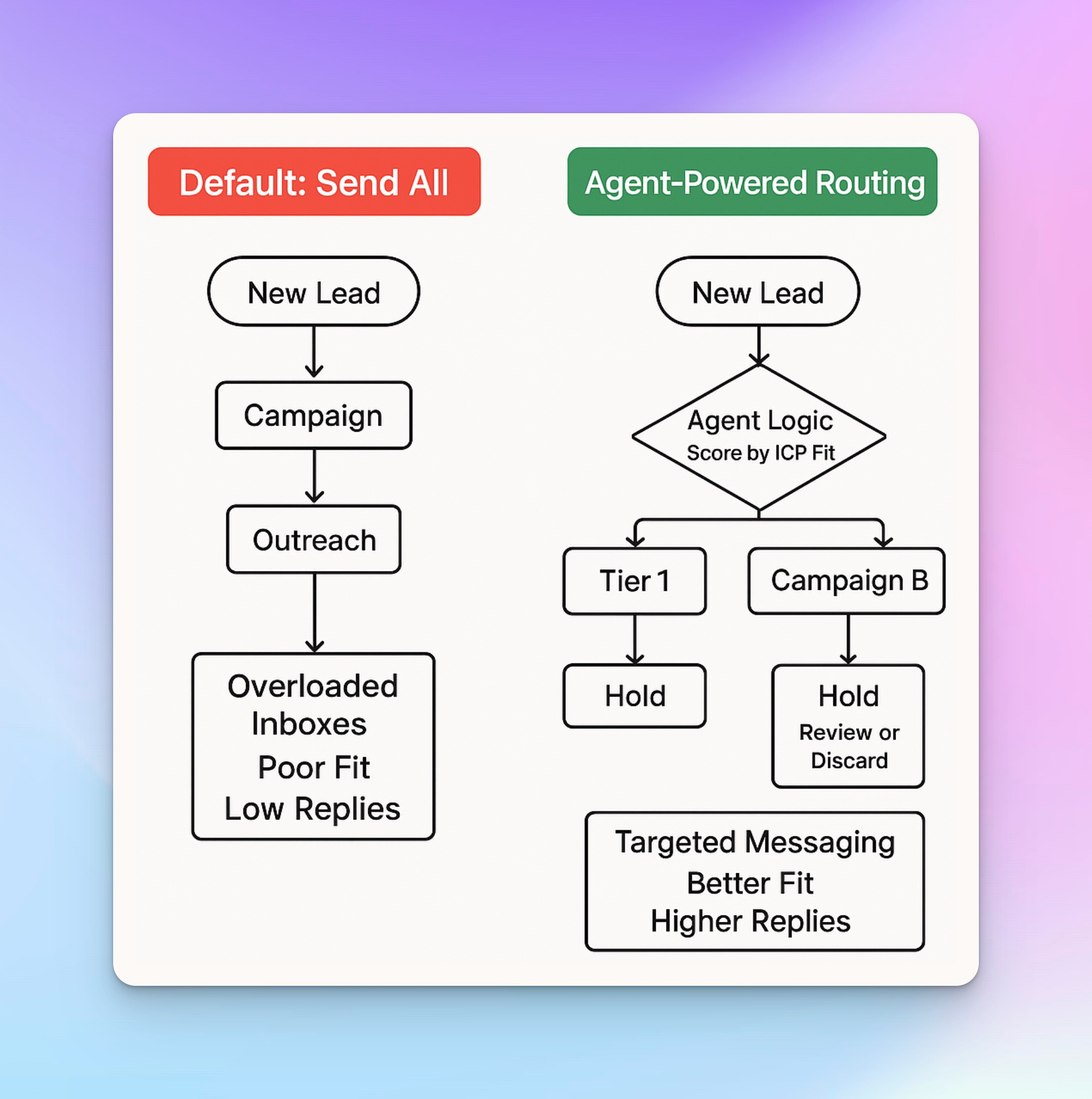
The advantage isn't the model anymore. It's the workflow around it.
The strongest outbound teams aren't winning because Claude writes better messages. They're winning because Claude receives better context.
That's why connecting LinkedIn to Claude is about building a system where signals become context, context becomes messaging, and messaging becomes conversations.
HeyReach sits at the center of that workflow, turning LinkedIn activity into structured signals that Claude can actually use.
The result is a repeatable outbound system that's much harder to copy than a prompt.
If you're ready to build your own LinkedIn → Claude workflow, start a free HeyReach trial and connect the tools you already use.

Try it for free
Frequently Asked Questions
Can I connect LinkedIn to Claude without coding?
Yes. The easiest low-code or no-code option is using the HeyReach MCP integration. Simply generate an MCP Connection URL inside HeyReach, add it as a custom connector in Claude, authenticate with your HeyReach API key, and Claude can access data from your HeyReach workspace. If you prefer not to use MCP, you can also follow a CSV-based workflow by exporting leads, enriching them with additional data, generating personalized messages in Claude, and uploading the updated list back into HeyReach. It takes a few more steps but still doesn't require writing code.
Is using Claude for LinkedIn outreach against LinkedIn's terms of service?
Using AI to help draft LinkedIn messages isn't the issue. What matters is how your outreach is executed. LinkedIn primarily enforces its policies against spam, abusive automation, fake engagement, and activity that exceeds platform limits. The safest approach is to focus on relevant outreach, proper account management, and genuine conversations, which is why many teams rely on dedicated outreach platforms instead of risky browser-based automation.
What data does Claude actually need from LinkedIn to write good messages?
Claude performs best when it has more than basic profile information. Combining profile data with signals such as recent job changes, hiring activity, content engagement, buyer intent, campaign interactions, and company growth gives the model enough context to generate messages that feel timely, relevant, and genuinely personalized.
How is this different from using ChatGPT to write messages?
The biggest difference isn't Claude versus ChatGPT—it's the context available to the model. Copying a LinkedIn profile into an AI tool only provides profile-based information, while Claude connected to HeyReach can also use live campaign activity, engagement signals, conversation history, and other outbound data. The more relevant context the model receives, the better the resulting message will be.
How can I connect HeyReach to Claude?
There are several ways to connect HeyReach with Claude, depending on your workflow. The fastest option is the HeyReach MCP integration, which gives Claude real-time access to your workspace. Teams building custom automations can use the HeyReach API to exchange prospect and campaign data with Claude, while a CSV workflow is a good choice for those getting started or working without live integrations. The right approach depends on your needs, but MCP is generally the most powerful option for teams that want Claude to interact with live HeyReach data.