Outbound lead qualification: Turn tough leads into unstoppable growth
Published:
May 30, 2026
Updated:
June 1, 2026
Here is a scenario that plays out in sales teams every single week.
You pull a list from Sales Navigator. VP of Sales, 200-person SaaS company, Series B. Checked every box. So you load them into a campaign, fire off a connection request, and wait.
Nothing.
You follow up. Still nothing. On the third touch, they reply: “We just signed a 3-year deal with a competitor.”
Fantastic. Three touches, zero pipeline, and a slightly more flagged sender account than you had yesterday. The lead wasn’t bad because of their title or the company size. It was bad because of timing, context, and signals you never checked, and LinkedIn noticed every ignored message.
Not just a lost deal. A damaged LinkedIn sender reputation, a wasted seat, and a pipeline that looks full and converts at the floor level. That’s what poor outbound lead qualification actually costs, and it compounds quietly until the whole system stops working.
And no, you don’t need better templates. What matters is qualifying leads upstream, before that first message goes out.
Why “looks good on paper” kills your LinkedIn account
Most SDRs qualify during the conversation. The discovery call is where you figure out if there is a real fit. That made sense when email was the primary channel and a bounce just meant a bounce.
LinkedIn doesn’t work this way.
When you send connection requests to unqualified leads at volume, you are training LinkedIn’s algorithm to see you as a spammer. Low acceptance rates, ignored follow-ups, and mass disengagement are all signals the platform tracks. The result is throttled sending, restricted accounts, and, in the worst cases, permanent bans. You can read more about how signal-based outbound protects against exactly this.
Sender seats are expensive in two ways: the direct cost of the account, and the indirect cost when a seat gets flagged after being used to blast unqualified lists. You don’t get that back.
The only protection is qualification at the data level. By the time a lead enters an outbound sales campaign, they should already be pre-qualified based on firmographics, technographics, and timing signals.
The anti-ICP: Stop asking who you can reach, ask who you should not
Most qualification frameworks are built around inclusion. You define the ideal customer profile, map out their pain points, then go find leads that match it.
That’s the wrong starting point.
The faster move is defining the anti-ICP first, such as the specific personas, companies, and situations that disqualify potential customers immediately, regardless of how good the title looks. When you know who you aren’t reaching out to, your list gets cleaner, your sequences stay relevant, and your acceptance rates reflect actual interest rather than luck.
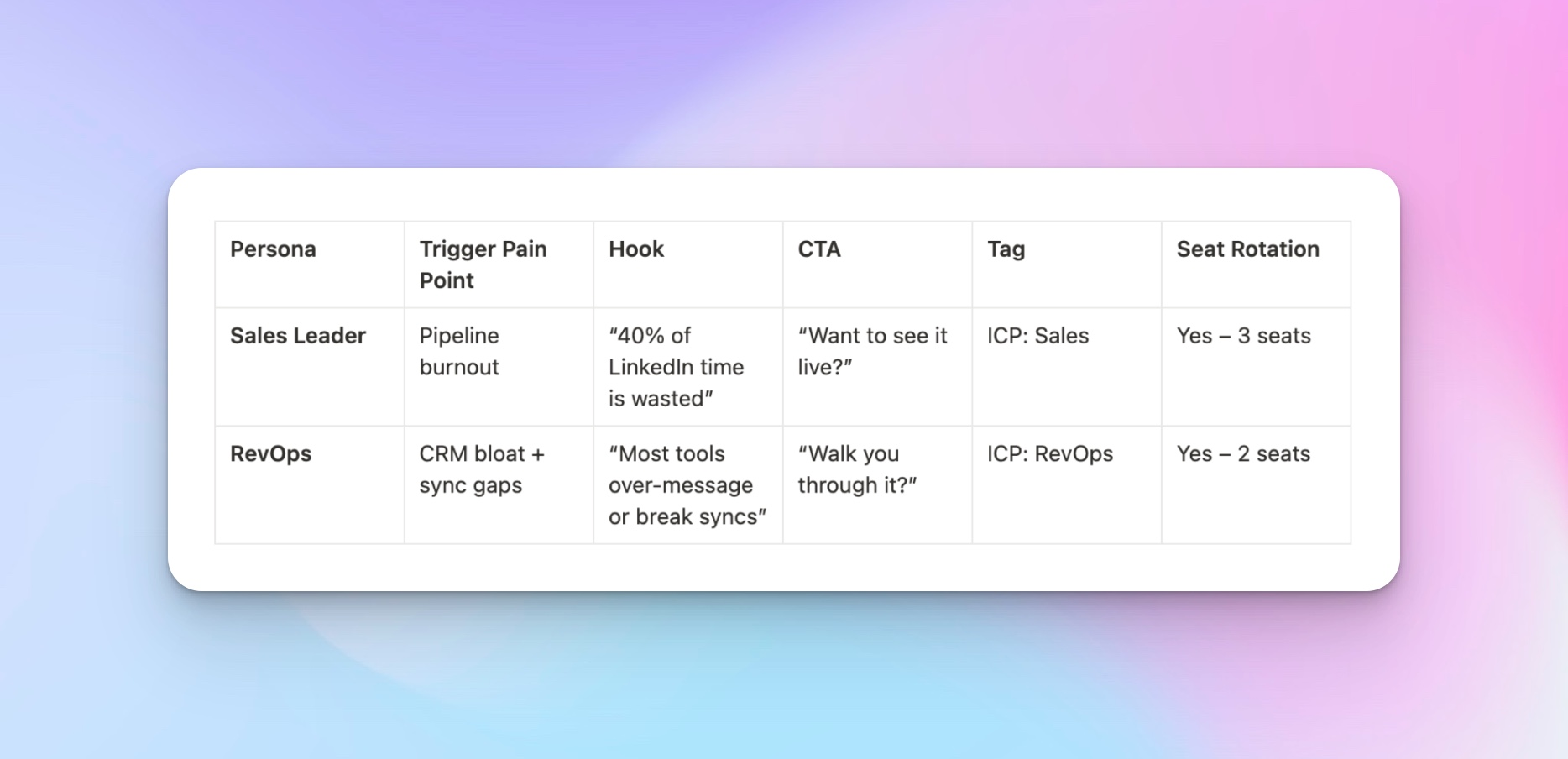
These are the red flags that mean remove from the list immediately, no exceptions:
- Stagnant or shrinking headcount. A company that has not added headcount in 12 months isn’t buying new tools. They are in cost-cut mode. Check the employee count trajectory in Clay or Prospeo before anything else.
- Recent down-round or funding pause. A company that just took a down-round or has gone 18+ months without a new funding announcement is almost certainly tightening its budget. Not a permanent disqualification, but it means they aren’t in an active buying cycle right now.
- Legacy tech stack with no integration path. If their stack doesn’t have an API layer or integration with tools your solution requires, the deal stalls in IT. Run this as a technographic filter in Clay before you send anything. If a lead would need a full tech stack migration before they could use you, that is a 12-month sales cycle minimum, not an outbound prospect.
- Recently locked into a competitor contract. Job posting language sometimes signals this. If a company is hiring for a role that explicitly requires experience with a specific competing tool, they just bought that tool. Verify in Clay by checking recent job ads.
The noise filter: Window shoppers and professional evaluators
There is a category of prospects who are in a permanent evaluation mode. They comment on every vendor’s LinkedIn posts, engage with competing tools across multiple categories, and publish posts comparing five different solutions across social media. They are never going to buy. They are building a personal brand as a thought leader on your exact topic.
You can spot them through public signals: their posts, the content they share, and the comments they leave across competing vendors. If someone’s public activity shows consistent engagement across five or more competing tools, that’s a disqualification signal. Check it manually for high-priority lists, or build it into your Clay enrichment as an AI prompt that scans public content before a lead enters a campaign.
Micro-signals: The intent data hiding in plain sight
Negative qualification clears out the dead weight. Micro-signal research is how you find the leads that are actually in-market right now, even when they haven’t raised their hand publicly.
The ghost job signal
Companies hiring for Sales Operations or Revenue Operations roles are building infrastructure for a new tool or process.
That’s different from hiring salespeople, which just means they want more headcount.
Sales Ops hiring signals that leadership has decided the current process is broken and is investing in fixing the system. That is a buying signal for tools. Track it in Clay by checking active job postings for your target list.
Any company hiring for Sales Ops, RevOps, or GTM Engineering in the past 30 days moves up the priority tier.
The executive migration map
When a champion from one of your existing customers moves to a new company, that company becomes a warm lead immediately.
They already know your product, have seen results, and are likely to advocate for the same tools in their new role. This is one of the highest-converting outbound triggers that exists, almost entirely untapped by most teams.
Track job changes for existing customers through Clay or buyer intent signal tools. The 90-day window after a champion starts a new role is when they are most influential. Move fast.
The 7-month tenure signal
Month 7 is the internal audit phase.
New managers spend their first few months learning the environment.
By month 7, they have enough context to identify what’s broken and enough credibility to propose fixing it. If you’re reaching out to someone at that mark, you’re catching them at the exact moment they are most likely to admit their current process is not working.
Filter for role tenure in Sales Navigator before building any list.
The pre-outbound checklist: 5 data points every lead needs before entering a campaign
Before any lead enters HeyReach, run this checklist. Not as a feeling or a gut check. As a literal gate.
If a lead cannot answer yes to all five, they don’t go in.
- Headcount trajectory is flat or growing. Check in Clay or Prospeo using the employee count over time.
- Tech stack is compatible. Use Clay’s technographic enrichment to verify automatically.
- The decision-maker is at the 7-month mark. Filter for time in role in Sales Navigator before pulling any list.
- At least one active intent signal is present. A Sales Ops job posting, a funding event in the last 90 days, a champion migration, or recent LinkedIn activity suggesting active tool evaluation. A lead with no intent signal is just a contact. Don’t send to contacts.
- CRM clearance confirmed. Run the dedup check against HubSpot, Pipedrive, or Salesforce every single time. Skipping this is how you kill a live deal with an accidental cold message.
Build these into your Clay table as conditional logic so the gate runs automatically.
The 4-point logic gate: How leads qualify to enter HeyReach
The checklist maps to four named filters. Think of them as the QA layer between your enrichment and your campaign.
- Firmographic fit (The Body): size, industry, revenue range, geography, all verified with current data, not a list pulled six months ago. This is where you confirm the target audience actually matches your ICP.
- Technographic synergy (The Brain): integration, compatibility, and stack signals checked in Clay before the lead moves forward.
- Timing and tenure (The Heart): the 7-month window. The most underused qualification filter in outbound. Good decision-making on when to reach out matters as much as who you reach out to.
- CRM deduplication (The Memory): Is this lead already mid-deal, opted out, or pending a handoff? Sending outbound to someone in a late-stage deal is one of the fastest ways to kill a close.
All four must clear before the lead enters HeyReach. While automation handles the first pass, your best sales reps should spend time each day reviewing what made it through before it goes live.
The automated outbound lead qualification stack: How to use Clay before leads reach HeyReach
This is where the checklist becomes automatic. Instead of running five manual checks on every lead, you build the logic into a Clay table that runs enrichments, applies filters, and only pushes qualified leads into HeyReach. No CSV exports. No manual copy-paste. Just clean, data-driven workflows.
Step 1: Build the list with the right filters already applied
Start in Sales Navigator, filtering by industry, headcount, funding round, technologies, and open roles simultaneously. This is the first disqualification layer. Filter for headcount growth, exclude anti-ICP sectors, and add a filter for companies currently hiring Sales Ops or RevOps roles. Import the result into a Clay table as your starting set.
Step 2: Enrich and qualify in Clay
For each row in the table, run enrichment columns that check the data points from your checklist: technographic fit via Clay’s built-in technology detection, job posting signals for Sales Ops or RevOps hiring activity, and financial health indicators like 10-K filings or funding history that flag companies in cost-cut mode. Each enrichment either confirms qualification or flags a disqualifier. Set conditional logic so any lead that fails a check gets excluded from the campaign automatically, without anyone having to review it manually.
Step 3: Push qualified leads into HeyReach
For leads that clear every filter, you can generate a personalized opening message based on the prospect’s LinkedIn profile and company context.
Map the output as a custom field. Then use Clay’s native HeyReach integration to select your campaign, map the LinkedIn URL, name fields, and custom message, and run the column.
Enable auto-update, and every new qualified row gets pushed automatically.
The low-volume, high-impact HeyReach blueprint
Score each lead before assigning a campaign tier. One point for each of the following intent signals:
- Sales Ops or RevOps hiring activity in the last 30 days,
- a champion migration from an existing customer,
- a funding event in the last 90 days,
- LinkedIn activity in the last 30 days,
- tenure in the role at around the 7-month mark.
Four or five points go to Tier A. Two or three go to Tier B.
Anything below two doesn’t enter a campaign yet. Tag it and revisit when a new signal fires.
Reaching out at the right time with the right score is what separates qualified opportunities from wasted sends.
Tier A: The sniper sequence
These are your 10/10 qualified leads: the high-intent, high-value accounts most worth investing in. They get the full treatment:
- 5 to 7 touches across 3 to 4 weeks,
- deep personalization referencing specific signals,
- a manual video note or voice message on touch 3 or 4, where relevant, and
- slower pacing because urgency signals are already there.
Tier B: The nurture sequence
These are your 7/10 leads: good fit, but timing or intent signals aren’t strong enough yet. The goal is sustained sales engagement without pressure:
- 3 to 4 touches over 5 to 6 weeks,
- content-forward (share relevant case studies, a framework, or a piece of research),
- multi-channel where relevant (LinkedIn plus cold email).
- no hard call to action until a micro-signal triggers an upgrade to Tier A.
Sequencing here is about staying relevant, not pushing for a close.
Sender rotation as a brand shield
Distributing outreach across multiple LinkedIn accounts via HeyReach’s account rotation feature protects individual accounts from daily limits and signals authority rather than volume, which is the difference between social selling and spray-and-pray.
When a prospect sees connection requests from three different team members over two weeks, each with a strong profile, that is social proof.
When they see the same account five times in a month, that is spam.
Qualifying through the outreach itself
Even after all the upstream filtering, your first message is still a qualification tool.
The first message in a Tier A sequence should be a discovery question, not a meeting request.
Your messaging at this stage is data-driven: it references the specific signal that triggered the outreach, gives the prospect a low-friction way to engage, and gives you a data point that confirms or challenges your qualification.
A prospect who ignores a soft ask probably would have ignored a hard CTA anyway. Now you just know sooner, without burning the relationship.
When you get “check back in 6 months,” tag it in HeyReach and route it into a long-term follow-up sequence that activates in 5 to 6 months.
When you come back, you are continuing a conversation, not restarting one.
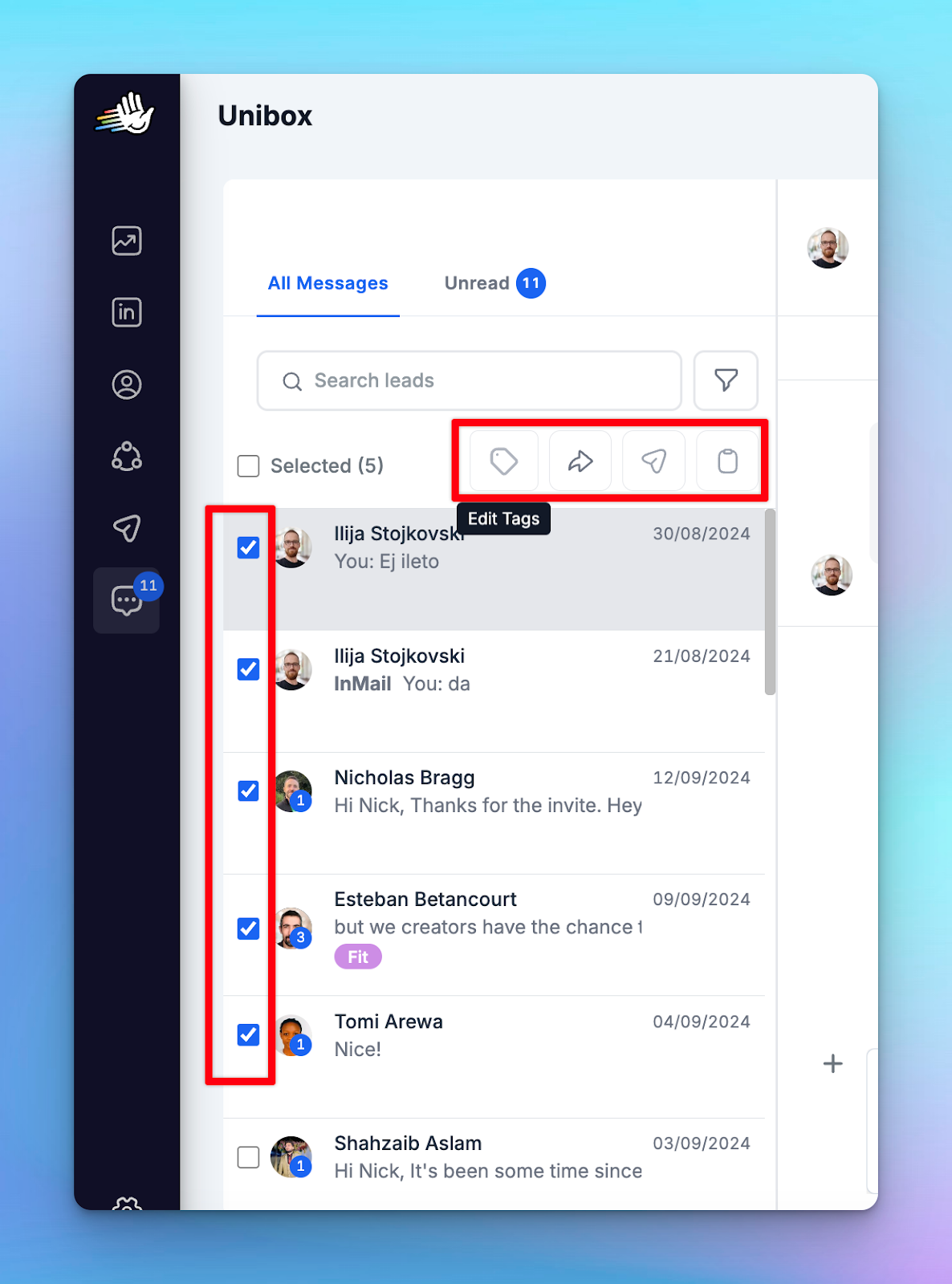
Use the HeyReach Unibox to tag every reply category, including “wrong person,” which is a warm referral waiting to happen if you just ask who the right contact is.
The post-mortem: Feeding the system back into itself
A qualification system that doesn’t learn is just a static filter.
No-show analysis: if qualified leads are accepting meetings but not showing up, that’s a qualification problem, not a scheduling one. Track the metrics, like no-show rate by firmographic segment, by tenure signal, by tier. A pattern of no-shows against a specific filter means that filter is producing false positives. Go back to the logic gate and adjust.
Reply sentiment as a filter tuner: if you are consistently getting “we already use X” or “we aren’t the right size,” the qualification layer is telling you what it missed. Those are potential leads that slipped through with the wrong fit signal. Go back to Sales Navigator, tighten the filter that would have caught those cases, and run the cycle again. Each iteration produces a cleaner list, better conversion rates, and a real-time feedback loop that keeps your sales process compounding. The teams closing deals consistently are the ones running this loop every two weeks, not every quarter.
Next steps: Build your qualification system this week
You don’t need to rebuild everything at once. Here is a 3-day sprint to get your outbound lead qualification system in place.
Day 1: Define your anti-ICP (approximately 1 hour)
- List the 3 to 5 red flags that disqualify a lead immediately for your product
- Add them as exclusion filters in Sales Navigator so they’re built into every future list pull
- Document them in a shared doc, so the whole team works from the same definition
Goal: Your list-building starts with what to exclude, not just what to include.
Day 2: Set up the enrichment and dedup layer (1 to 2 hours)
- Build a Clay table that enriches your Sales Navigator exports with technographic data and job posting activity
- Connect your CRM (HubSpot, Pipedrive, or Salesforce) for deduplication before any lead reaches HeyReach
- Set up conditional filters that auto-remove leads failing the Day 1 criteria
Goal: The quality gate runs automatically before anything enters a campaign.
Day 3: Tier your existing list and launch (approximately 1 hour)
- Score your current sales funnel leads using the 5-signal rubric and assign each to Tier A or Tier B
- Set up two HeyReach campaigns: one sniper sequence and one nurture sequence
- Tag all “not yet” replies in Unibox and set a follow-up trigger for month 5 or 6
Goal: You are live with a tiered system, not a single blasted sequence.
Qualify first, outreach second
Most teams optimize the wrong end of outbound. They refine templates, test subject lines, and add senders, while the list feeding all of it stays unqualified.
The frameworks in this article work in the opposite direction. You define who never enters the funnel, build the enrichment logic that enforces it automatically, and let HeyReach execute only on the leads that have already earned their place. The checklist, the logic gate, the tier scoring, the Clay workflow, all of it runs upstream, before a single message goes out.
Build the qualification layer once. Everything downstream gets easier.

Try it for free
Frequently Asked Questions
What is the difference between outbound lead qualification and lead scoring?
Lead scoring tells you fit. It ranks leads using criteria like firmographics and assigns them a status like MQL (marketing qualified lead) or SQL (sales qualified lead). MQLs and SQLs are useful signals, but they are not gates. Marketing qualified leads and sales qualified leads tell you who fits. Outbound lead qualification tells you whether it’s the right time to act on that fit.
How can I automate outbound lead qualification?
The most effective setup is Sales Navigator for list building, Clay for enrichment and filtering, and HeyReach for sequenced outreach. Clay sits in the middle, checking technographics, job posting signals, tenure data, and CRM dedup automatically before any lead reaches a campaign.
What tools are best for technographic qualification?
Clay is the most flexible option. It can pull technology detection, check job postings for tool-specific requirements, and run conditional filters that disqualify leads automatically based on their tech stack. The key is building disqualification logic into the enrichment layer so it runs without manual intervention.
How does lead quality impact LinkedIn account safety?
LinkedIn tracks engagement at the account level. Consistently ignored connection requests train the algorithm to restrict the account, throttle sends, or flag for review. High-quality leads produce better acceptance and open rates, which keep sender accounts healthy. Qualification is an account protection question as much as a sales pipeline one.