How your profile's history affects your LinkedIn connection acceptance rate
Published:
August 4, 2026
You spend twenty minutes agonizing over a connection note. Rewriting the first line like Eminem in Stan video.Then you hit send and pray to gods that your copy was good enough.
But, what if the main issue with your LinkedIn connection acceptance rate is not your message, but the overall feel of your profile?
LinkedIn puts your name, your photo, and your headline in front of that person before a single word of your message does anything. If they tap through, they're now looking at your whole profile, and forming an opinion in about three seconds.
We have just analyzed 96,051 LinkedIn outreach campaigns, and the typical one converts about 1 in 5 requests into an accepted connection. Some of that gap between a typical campaign and a strong one comes down to targeting.
But a good chunk of it comes down to something completely in your control: your profile's history, and its overall look and feel.
So let's stop treating acceptance rate as purely a copywriting problem. Your profile is doing half the work, or costing you half your LinkedIn connection requests.
Your profile is doing the vetting, before you say a word
People check out a profile the same way they'd check a company's website before replying to a cold email. They're looking for reasons to say yes, or an excuse to say no.
If your profile has a business logo instead of your professional picture, or you are not bothered to write down anything in your about section, the chances are that you will be ignored in the acceptance process. No copywriter can help you beat that.
You already have a full LinkedIn profile optimization guide covering exactly what to fix and how, so I won't rehash it here.
What I'll do instead is walk through the specific things worth checking before you start any lead generation campaign, plus what our success team actually sees when they look inside the campaigns they help run every day.
Photo, banner, and the first-glance test
Before anyone reads a word of your headline, they've already registered two things: is there a real, current human behind this account, and does the banner tell them anything.
You don't need a professional photographer, though if you've got the budget, go for it. What you actually need is good lighting and a plain background for your profile picture. A decent iPhone photo does the job. Avoid putting there a company logo, a mascot, or anything that isn't your actual face.
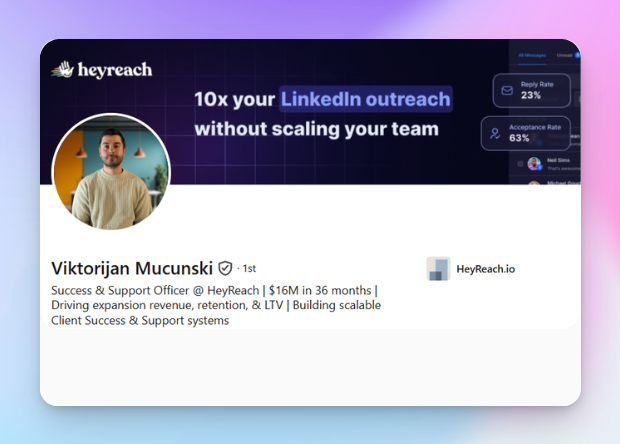
Your banner is free advertising space, and most people waste it on gradients or stock photos that say nothing.
⚡Best practice: use your banner for social proof. Logos of brands you've worked with, a shot of the product you're building, something that backs up why you're worth listening to. That's what separates "looks like a real professional" from "looks like a template nobody bothered to update." You can always A/B test different banners for different campaigns and compare acceptance rates.
Now go back to your profile. Does the top of your profile look like a real, current person doing real work? If the answer's no, fix that before you start the outreach process.
Canva has some free templates you can play with and personalize them fast with logos and your brand colors, so you don’t spend too much time on it.
Connection count: established or brand new profile?
LinkedIn shows "500+ connections" as a badge once you cross that number, and a lot of people use that badge to define a profile. Above it, this looks like a real, active professional. Below it, this could be a new account, or one that barely gets used.
If you're close to 500 and want that social proof faster, here are a few quick ways to speed up your LinkedIn connection requests:
- Connect with people you actually know first: coworkers, classmates, past clients
- Search keywords tied to your niche, start real conversations with people around those topics, then add them once there's actual context
- Explore shared connections when you add someone from your niche
- Check who's viewed your profile and send them a request
- Go to events or webinars in your space and follow up with people you actually talked to
For all of these situations your LinkedIn connection request can carry a personalized note referencing the person or the moment you connected.
But if you want my honest take: skip it. Let your profile do the work. LinkedIn caps that note at a 300-character limit anyway, so you're not saying much before they've already formed an opinion from your profile.
I avoid adding notes myself, and I tend to avoid people who add me with one too. It usually means they want something before we've even said hello. But that’s just how I do it.
🚨Quick heads-up: LinkedIn limits you somewhere around 100 connection requests a week (they reset this each Monday). Push past that manually and you're rolling the dice with a restriction. Run your outreach through HeyReach and you don't have to think about it. We've built those limits in, so your profile stays safe without you babysitting it.
Activity: does the profile look lived-in?
A profile with a few recent posts, comments, or reactions reads as "this person's actually here." Good news: this isn't about cracking out a daily posting schedule. Nobody's expecting that, and frankly, most people who try burn out in three weeks flat.
Occasional, genuine activity is enough to kill the ghost-profile look. One post a week beats zero posts for six months, every single time.
Look at Nadja's profile if you want proof. She's not posting daily, not even close. But every post has comments, has likes, has actual people showing up. So as the life coaches would say “Just be present”. On Linkedin.
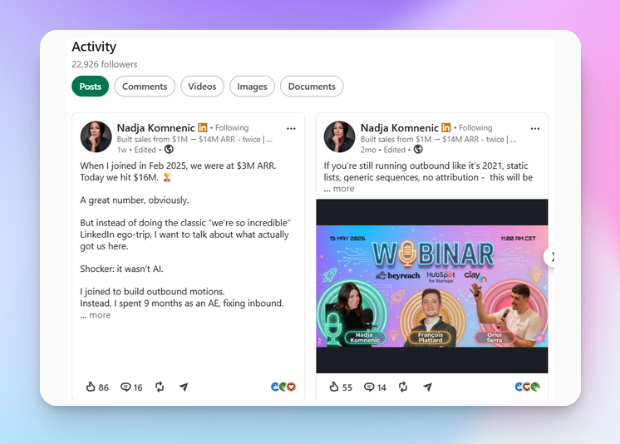
If posting isn't your thing but you've got opinions to drop in someone else's comment section, that works just as well. We put together a strategic commenting playbook with one of the best LinkedIn growth experts out there, so if that's more your lane, go run it.
Vanity URL: a small, easy fix
This one takes thirty seconds and most people never bother. If your LinkedIn URL still ends in a string of random numbers, that's a leftover from the day you signed up, and it's a tiny but real "hasn't touched this profile" signal.
Here's how to fix it:
- go to “View profile” button on LinkedIn
- in the top right, next to your profile language, you'll see a pen icon next to your URL.
- Click it, and clean it up, just your name, no numbers
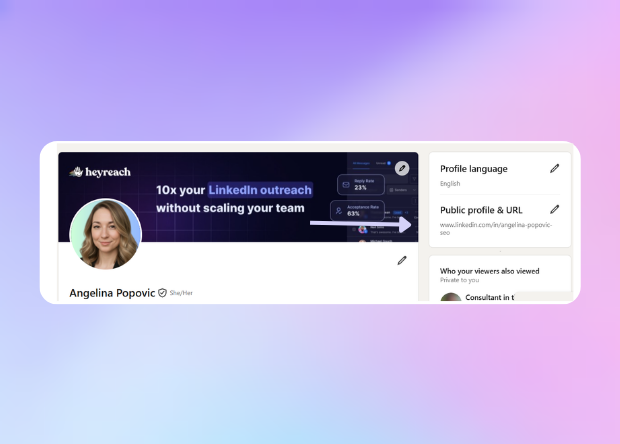
If your name's already taken, you've got room to get a little strategic. Our teammate Angelina, who works in SEO, added "seo" to the end of hers. Small tweak, but it tells anyone glancing at the URL exactly what she does, before they've even opened the profile.
Profile history and scaling Linkedin outreach
So what if you're actually scaling B2B outreach with HeyReach, not just running a handful of cold outreach requests a week?
Our customer support team sees this question constantly, and their advice is consistent:
- keep your profile clean and filled out,
- get past 500 connections,
- and stay active on LinkedIn
- avoid stacking extra automation tools during outreach
Want a number that tells you if those four things are actually landing?
Check your Social Selling Index. It's still free, still doesn't need a Sales Navigator subscription, and it updates daily off your last 90 days of activity. Four pillars, 25 points each: your professional brand, finding the right people, engaging with insights, and building relationships. Average score sits around 40-50. Cross 75 and you're in thought-leader territory. LinkedIn's been quietly steering people toward its AI tools instead of the score lately, but it's still measuring the same three things our support team keeps repeating: profile, network, activity.
A high SSI won't save you from a bad targeting list, though. A great profile sending requests to the wrong audience still underperforms.
Don’t forget to target well after all is set up
A great profile sending requests to the wrong audience still underperforms.
Our own research backs this up. Campaigns sending 50-100 requests sit around 21% acceptance. Push into 1,000+ requests, and that number drifts down to around 19%. Small drop, but reply rates don't move the same way; they stay basically flat as volume scales. That gap is the tell: when a bigger campaign underperforms with response rates, check your targeting before anything else.
Now, if you've already started running outreach and you're staring at flat numbers wondering whether the problem is your copy or your list, that's a different diagnosis, and Nadja's got you covered. Her breakdown on reply-to-acceptance rate walks through exactly how to isolate whether it's targeting or messaging that's actually broken.
A five-minute profile audit before you start any outreach push
Before you send a single LinkedIn connection request, run through this. It moves your acceptance rate more than any opener will, and takes less time to run than writing one.
- Photo: real headshot, decent lighting, plain background. No logos, no mascots, no group shots.
- Banner: says what you do, or shows proof you can back it up. No gradients, no stock coffee cups.
- Headline: speaks to one specific person, not everyone. If it reads like a job title, rewrite it.
- About section: not empty, not a keyword dump. A real person talking, with a clear value proposition and some personality in it.
- Connection count: past 500, ideally with mutual connections and people who actually make sense next to your name.
- Recent activity: something in the last few weeks. A post, a comment, a repost. Anything that isn't silence.
- Vanity URL: no leftover numbers. Just your name.
If all seven check out and your target list is dialed in, you're ready. Grab a free trial with HeyReach and start putting that profile to work.
Happy hunting!

Try it for free
Frequently Asked Questions
Does my LinkedIn connection count actually affect my acceptance rate?
Yes, but indirectly. It's a shortcut people use to judge whether an account is real and active. A low count next to a cold request can make someone hesitate. It's not proof of anything on its own, but it shapes the split-second read.
How can I get 500+ connections faster on LinkedIn?
Start with people you actually know: coworkers, classmates, past clients. Then widen out: search keywords tied to your niche and connect once there's real context, check who's viewed your profile, and follow up with people you met at events or webinars. Skip the connection note if you can. A filled-out, active profile convinces people faster than any opener will.
What's a good LinkedIn connection acceptance rate?
Based on our data across 96,051 campaigns, the median is 20.75%, average 23.85%. Below about 13% is the weaker range. Above roughly 32%, you're in strong territory.
How often do I need to post to keep my profile looking active?
Not as often as you think. One post a week beats zero for six months. Commenting counts too, so if posting isn't your thing, stay active in other people's comment sections instead.
Should I clean up my profile before or after I start an outreach campaign?
Before. In b2b outreach, your profile does half the convincing before your message ever gets read. Fixing it after you've already sent a few hundred LinkedIn connection requests just means you left acceptance rate — and reply rate — on the table.