How to generate 12+ qualified LinkedIn meetings every month using Clay and HeyReach
Published:
May 31, 2026
Updated:
June 1, 2026
Most tutorials either show you the campaign stats without explaining the process, or they show you the campaign without covering how to handle replies. This one covers everything end to end.
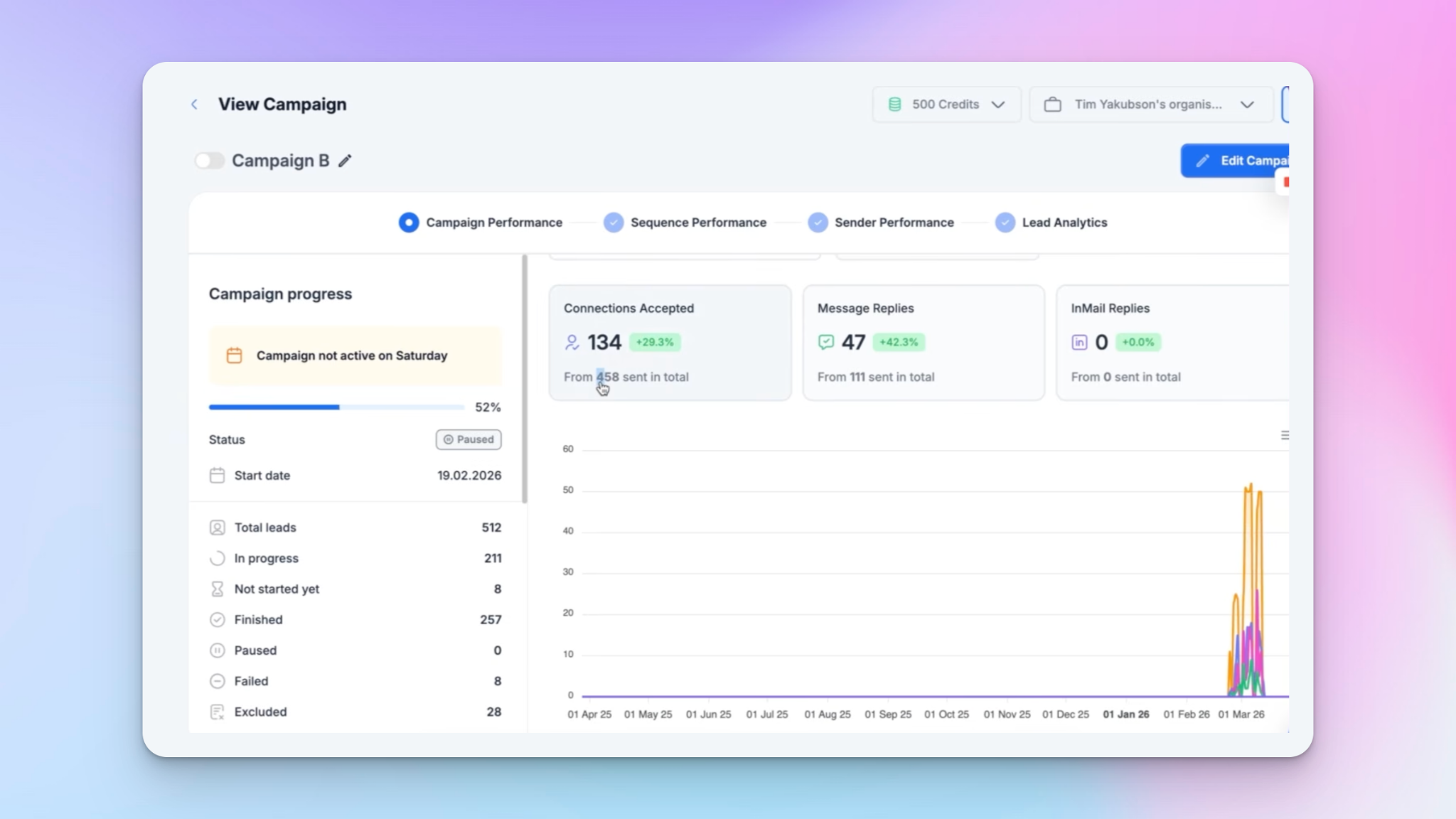
Over the last three months, one of these campaigns alone generated 47 positive replies and 15 booked demos for a client. Here's how it works.
The 8-step process for generating qualified meetings with HeyReach
The full workflow has eight steps. I'll break down each one.
Step 1: Find your leads
You have a few options here depending on your budget and setup.
- LinkedIn Sales Navigator or LinkedIn Recruiter: the gold standard for B2B lead sourcing
- Budget-friendly alternatives like Prospeo or AI Arc, which I've been using a lot recently
- Clay's built-in people search: completely free, even on the free trial, and this is what I'll use in this walkthrough
Inside Clay, click "Find leads" in the top left corner, select "People," and start filtering. For this example, I'm targeting accounting firm founders and CEOs in the UK with companies between 51–200 employees.
With those filters, Clay returned 108 results. Click continue, save to a new workbook, and Clay builds you a spreadsheet with first name, last name, location, job title, company name, and LinkedIn profile — all for free.
Step 2: Enrich and qualify leads using Clay Agent
Before pushing anyone into a LinkedIn outreach campaign, you need to qualify them. This is where Clay Agent comes in — it's the AI web crawler that pulls information from any open-source website, analyzes it, and replaces what you'd normally do manually.
Click "Tools," search for "Clay Agent," and write your qualification prompt. For this specific campaign, the goal was to identify founders who don't currently have an executive assistant — because that's exactly who we'd be pitching EA services to.
My prompt essentially told the agent: say "ICP" if the company doesn't have an executive assistant, say "not ICP" if they do.
I used the "Generate" button to improve the prompt automatically — it adds in the relevant data fields like LinkedIn profile, company domain, and company name. I also switched the model from the default to GPT-4.1 to reduce cost without sacrificing output quality. Then I ran it on the first 50 rows.
You can add as many qualification criteria as you want: headcount, geography, number of sales reps in a specific country, departments — anything that helps you tighten your lead qualification process.
Step 3: Score your leads
After qualification, I add a scoring column using Clay's formula feature. The logic is simple: give five points if the Clay Agent response contains "ICP." That's it. Now every lead has a score, and you can prioritize or filter based on that before pushing anyone forward.
This is part of a broader lead scoring automation approach that keeps your outreach focused on high-intent, high-fit prospects.
Step 4: Push qualified leads into HeyReach
Still inside Clay, click "Tools" and search for "HeyReach." You'll see the option to add a lead to a campaign.
To connect the two platforms:
- Sign up or log into your HeyReach account
- Go to Integrations → Get API Key under the HeyReach API section
- Copy the API key back into Clay under "Add account"
- Name the connection and save
At the bottom of the Clay integration step, use the "Only run if" condition and set it to: only push leads where the Clay Agent reply contains "ICP." This ensures only qualified leads make it into your campaign — not every row in the table.
The Clay integration is genuinely one of the cleanest ways to build a fully automated, pre-qualified outreach pipeline.
Step 5: Build the campaign sequence inside HeyReach
Once your campaign is created inside HeyReach, here's the sequence structure I use:
- View profile — wait 1–2 days
- Send connection request
- Like a post (optional, if their profile is open) — wait 3–4 hours
- Send InMail (if not connected yet)
- Send message (once connection is accepted)
The campaign structure mimics how you'd do this manually — check the profile first, then connect, then message. This is what makes automated LinkedIn messaging feel human rather than spammy.
Step 6: Write the outreach message using a pre-event angle
This is the part I haven't seen many people talk about. Instead of a generic cold opener, I use a pre-event outreach angle — and it works exceptionally well.
Here's the proess:
- Go to ChatGPT and use this prompt structure: "Identify the top 10 events happening in [city/region] between [date range] that [your ICP] is highly likely to attend. Events must be well-known or globally recognized, similar awareness level to Y Combinator or Web Summit. For each event, provide the name, timing, and a short explanation of why it attracts this audience."
- Replace the ICP details with your actual target (accounting founders, SaaS operators, legal professionals — whatever fits)
- Use the event name in your first LinkedIn connection message
The message itself is simple: "Hey [first name], are you coming to [Event Name] this year? I'll be there all week — would you want to find 15 minutes to compare notes?"
Most of the time, even if they're not attending, it opens the conversation. I've seen replies like "I can't make it but my colleague is — let me connect you." Or "Yes, we'll be there — are you going?" We ran this exact campaign ahead of Legal Week in New York for two clients and the reply rates were outstanding.
The beauty of this approach: it's evergreen. There are always events coming up. You don't pitch anything in the first message — you just create a natural, non-awkward conversation opener. And you can keep it running on autopilot indefinitely.
Other high-performing angles worth testing:
- Post-conference follow-up — reach out after an event your ICP attended
- First-degree connections with relevant sales triggers — people already in your network who have shown buyer intent signals
- Competitor follower targeting — reach out to people following your competitors on LinkedIn
Step 7: Manage replies through the HeyReach unified inbox
Once the campaign is live, all replies land in HeyReach's unified inbox. You can filter by sender account, which is useful if you're managing multiple LinkedIn accounts for a client or team.
Inside the inbox you can:
- Refresh messages in real time
- Create and assign tags (e.g., "interested," "follow up," "not now")
- Find a lead's email address for multichannel outreach
- Add leads to lists so your sales team can follow up at the right time
This is what turns a LinkedIn campaign into a proper pipeline. Not just a bunch of messages going out, but a structured way to manage every reply and move conversations forward.
Step 8: Book the meeting
The goal of all of this is a booked call. From the unified inbox, once a prospect responds positively, you carry the conversation, propose a time, and close the meeting. Nothing fancy — the campaign does the hard work of getting the reply, and then you take it from there.
Why this Clay + HeyReach workflow outperforms manual outreach
Most LinkedIn outreach fails for one of three reasons: the leads aren't qualified, the messaging is generic, or there's no system for managing replies. This workflow fixes all three.
- Clay handles qualification automatically — you're not manually reviewing 500 profiles
- The pre-event angle creates relevance without requiring personalized research on every single lead
- HeyReach's inbox keeps every conversation organized — nothing falls through the cracks
When you combine proper lead generation tools with a structured campaign and a clean inbox management system, the output is consistent: 12+ qualified meetings per month from a single workflow running in the background.

Try it for free
Frequently Asked Questions
What's the minimum setup required to run this workflow?
You need a free Clay account (the people search and Clay Agent features are available on the free trial), a HeyReach account with at least one connected LinkedIn profile, and a campaign created inside HeyReach. The Clay-to-HeyReach push requires the API key connection described in step 4.
How do I make sure only qualified leads get pushed into HeyReach?
Inside the HeyReach integration step in Clay, use the "Only run if" condition and set it to check that the Clay Agent response contains "ICP." This filters out any leads the AI agent marked as not fitting your ideal client profile.
What if a prospect says they're actually attending the event I'm referencing?
It happens. You can acknowledge it and pivot — say something like you had a scheduling conflict and can't make it, but you'd still love to connect before or after. The conversation is already open, which is the main goal of the first message.
Can this workflow be used for industries other than executive assistant services?
Absolutely. The Clay Agent qualification criteria can be adapted to any ICP. The pre-event outreach angle works across industries — legal, finance, SaaS, real estate — as long as there are identifiable events your ICP attends. The campaign structure and inbox management approach stay exactly the same.
How long does it take to set this up from scratch?
The Clay side — finding leads, running qualification, setting up the HeyReach integration — takes around 30–60 minutes the first time. Once you have the setup saved, launching a new campaign for a new audience segment takes 15–20 minutes. The campaign runs on autopilot from there.