


Outbound sales automation with Make: From manual grind to scalable growth
Outbound sales automation with Make: From manual grind to scalable growth
Outbound sales in 2026 runs on more tools than ever – yet most sales teams are squeezing less out of them.
They still run LinkedIn outreach in one silo and cold email campaigns in another, effectively operating two separate systems that target the same people.
This fragmentation creates what I call “brand schizophrenia,” where a prospect receives a polished email at 9:00 AM and a completely disconnected LinkedIn message at 9:05 AM. The experience feels automated – well… because it is.
In this guide, I’ll show you how to build the central nervous system that brings your outbound sales tools into one coordinated system.
The data foundations
Before a single message is sent, the "intake layer" determines your success. Most teams start with a stagnant list. High-performance teams use AI wisely and always start with signal-based sourcing to find potential customers:
- The "job change" trigger: Use LinkedIn triggers to identify when an ICP moves into a new role. New hires have "budget authority" and a "mandate for change" within their first 90 days.
- The intent signals: Using tools like RB2B or Trigify, you can identify who is visiting your website. This raw IP intent data is then passed through Make to find the specific LinkedIn profile of the visitor.
- The "technographic" trigger: If your software replaces a competitor, find companies that recently dropped that competitor or added a complementary technology.
- Advanced firmographics: Use Make to filter leads by precise revenue brackets, department headcount growth, or recent funding rounds.
The "enrichment waterfall" in Make
Once you have buying signals, you need a full profile aka data enrichment waterfall. A "Waterfall"here means if Tool A doesn't find the email, Tool B is triggered, then Tool C – to ensure sales reps have only high-quality contact data in the end.
- Step 1: Pull the LinkedIn URL from the signal.
- Step 2: Use Clay or Apollo to find the professional email.
- Step 3 (The Logic): In Make, use a routing model (Router). If the email is found, tag the lead as "multi-channel outreach ready ✅." If the email is not found, tag them as "LinkedIn Only."
This simple logic ensures that you aren't wasting Smartlead credits on unverified emails, and you aren't ignoring valuable leads just because their email is private.
The psychology of multi-channel sequencing
Why use both LinkedIn and Email? Because pattern interruption across multiple touchpoints is the only way to get noticed by the right decision-makers. If you only use email, you are a "name in a box." If you are on LinkedIn and in their inbox, you are a "person in their network."
The omnipresence workflow
The goal is to appear everywhere without being annoying. For instance:
- Day 1 (Soft Signal): HeyReach triggers a "Profile View." This puts your name in the prospect's notifications. No message yet.
- Day 2 (Network Entry): HeyReach sends a connection request. CRITICAL: If you are targeting high-level execs, send the connection request without a note. Blank requests often have 10-15% higher acceptance rates because they don't look like a B2B sales pitch.
- Day 4 (The Email Pivot): If the connection is accepted, Make waits 48 hours, then triggers the first step in email outreach via Smartlead. The personalized messages should sound like: "Hey [Name], glad we connected on LinkedIn. I noticed [Specific Insight]..." *
- Day 7 (The LinkedIn Follow-up): If there is no reply to the email, HeyReach sends a LinkedIn message. This should be a value-add, like sharing a relevant case study or a PDF guide.
The logic called smart pause
The biggest "fail" in sales automation tools is when a lead replies on LinkedIn, but the automated email sequences keep hitting their inbox. To maintain high reply rates, you must use a "Smart Pause" logic:
- The fix: Create a Make scenario: Trigger: "New LinkedIn Reply in HeyReach." -> Action: "Search Lead in Smartlead" -> Action: "Change Status to Paused/Unsubscribed."
The moment a conversation becomes human and the bot stops talking.
Technical setup you’ll need
We are moving away from the "HTTP Request" era. To streamline your sales process and automate repetitive tasks, you need a tight tech stack.
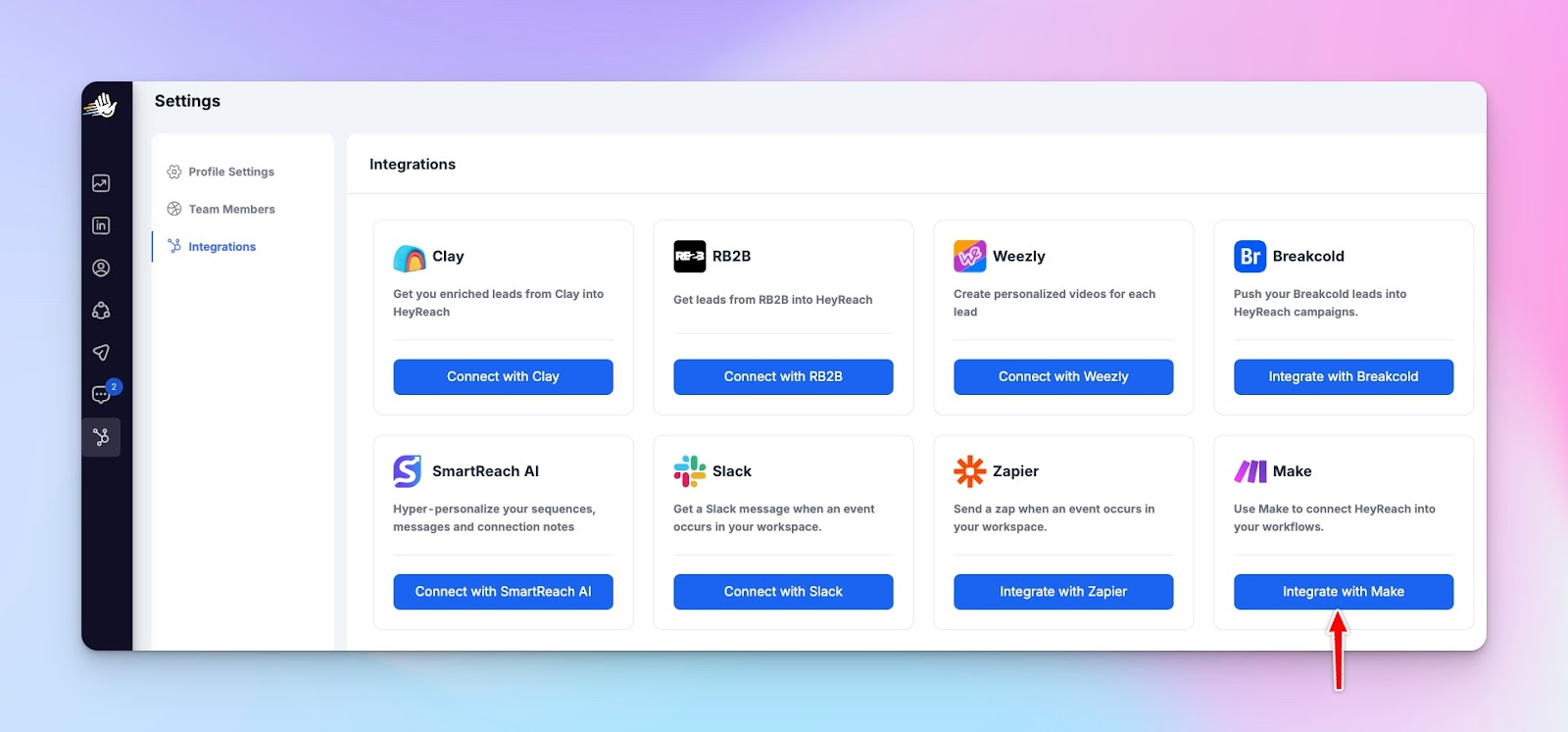
Connecting HeyReach to Make
- API Key Generation: Inside HeyReach, go to the "Integrations" tab. Generate a Make-specific API key.
- Webhook Setup: In Make, use the HeyReach "Watch" modules for real-time updates. You can watch for:
- New replies.
- Connection requests accepted.
- Messages sent.
- The "Add Lead" Module: This is the most powerful AI-driven functionality. You can push leads from anywhere (a Google Sheet, a Typeform, or via CRM integration) directly into a HeyReach campaign.
💡 For a more granular look at advanced configurations and error handling, check out our step-by-step tech guide to mastering HeyReach with Make.
Connecting Smartlead to Make
Smartlead is the "Heavy Lifter" for email.
- Master Inbox Integration: Use Make to monitor the Smartlead Master Inbox.
- Lead Category Updates: When a lead is categorized as "Interested" in Smartlead, use Make to push that lead into a HeyReach "High Value/Intent" list.
This allows you to give them "white glove" treatment on LinkedIn (e.g., sending a personalized video message).
💡 Learn more about optimizing your setup in our Smartlead setup guide, then follow the Smartlead x Make x HeyReach walkthrough to sync your lead categories and master your inbox:
Advanced reply management (the triage system)
As you scale to 50+ LinkedIn accounts and 100+ email domains, manual review becomes the bottleneck. You need an AI-powered, automated triage system to prioritize your daily tasks.
The AI classifier
Using AI tools like OpenAI or Anthropic module inside Make, you can "read" every reply and categorize it with 95% accuracy.
- Prompt: "Analyze this reply. Is the person: A) Interested, B) Not interested, C) Out of Office, D) Referring me to someone else?"
- The Action: * If A (Interested): Alert the SDR in Slack immediately to book meetings.
- If C (OOO): Use Make to "Pause" the lead for 14 days, then resume.
- If D (Referral): This is the "Golden Nugget."
💡 If you're new to this framework, our Beginner’s Guide to MCP will get you up to speed; once you've got the basics, try using these categorization rules within HeyReach itself to triage your lead lists and keep your pipeline clean.
Automating the referral path
When a lead says, "I'm not the right person, speak to Anna," most automation stops. A "Next-Gen" workflow uses AI agents to:
- Parse the name "Anna" from the reply.
- Use a LinkedIn Search module to find "Anna" at that same company.
- Automatically add "Anna" to a new HeyReach campaign.
- Opening message: "Hey Anna, [Original Lead Name] suggested I reach out to you regarding..." This turns one "No" into qualified leads.
Deliverability and safety
Automation is useless if your accounts get banned. HeyReach and Smartlead are built for safety, but Make adds the final layer of protection for your outbound campaigns..
HeyReach uses a "Cloud-based" approach with dedicated IPs. However, you should still use Make to stagger your intake.
- The "Batcher" Logic: If you have 5,000 leads, don't push them all into HeyReach at once. Use a Make "Data Store" to release 50 leads per day per account. This mimics human behavior and keeps the LinkedIn "Spam Sensors" at bay.
Now more on email deliverability:
- The "Bounce Watcher": If a lead bounces in Smartlead, it often means the data is old. In Make, if a bounce is detected, immediately stop all LinkedIn outreach for that lead. This prevents you from looking like a bot that is just firing messages at dead profiles.
- The "Unsubscribe" sync: If someone clicks "Unsubscribe" in an email, they should be removed from LinkedIn outreach too. Use Make to bridge this gap.
Reporting and the feedback loop
Data silos are the enemy of ROI. You need to know which part of your sales strategy, as well as channel, is actually driving revenue. All this data is more than vital for accurate forecasting of your quarterly revenue.
The unified dashboard
Use Make to aggregate data and metrics into a Google BigQuery or Airtable base:
- Field 1: Lead Name.
- Field 2: Source (Sales Nav / Website / Event).
- Field 3: Email Engagement (Opens/Clicks from Smartlead).
- Field 4: LinkedIn Engagement (Replies/Acceptance from HeyReach).
- Field 5: Conversion rates status.
Optimization logic
If you see that "SaaS Founders" reply on LinkedIn but ignore emails, use Make to change the "Sequence Path" for that specific segment.
This is adaptive automation – where the system learns which channel works for which persona. Then it creates the AI-generated, personalized outreach automatically.
Real-world implementation (the "agency" perspective)
If you are an agency managing 10+ clients, the complexity of lead generation is 10x higher.
- The "Multi-Client" Router: In Make, you can use one master scenario to handle all clients.
- Use a "Look-up Table" (Google Sheet) that maps Client ID to Smartlead API Key and HeyReach API Key.
This all-in-one approach allows you to update your "Master Logic" once, and it applies to every client instantly.
The new outbound standard
Outbound sales is no longer a volume game; it is a logic game. By using Smartlead for the "Push" (Email), HeyReach for the "Pull" (LinkedIn), and Make for the "Logic" (Orchestration), you build a sales funnel that is:
- Resilient: It works 24/7/365.
- Intelligent: It uses lead scoring to know when and to whom to speak.
- Scalable: You can double your sales prospecting without doubling your headcount.
The “Tony Stark of sales” isn't the guy who sends 10,000 emails a day. It’s the guy who built the system that handles the 10,000 emails so he can spend his time closing deals. 😎
Let’s build your blueprints
Let every trigger, every reply, every interaction become part of a coordinated sales engagement flow instead of isolated actions. You don’t have to reinvent the wheel. Simply start with these logic templates and customize them to your specific niche.
That’s how you eliminate noise, avoid overlap, and show up like a brand that knows what it’s doing.
And that’s the advantage most teams still don’t have.
So instead of adding another sales automation platform to your stack or sending another sequence, build your logic layer. Because once your outbound runs on systems – not effort – you scale more than activity.
You scale outcomes.

Frequently Asked Questions
What is outbound sales automation with Make?
Outbound sales automation with Make is the process of connecting tools like HeyReach and Smartlead into one coordinated system. Instead of running LinkedIn and email separately, Make acts as the logic layer that automates workflows, syncs data, and ensures every action happens at the right time.
Why should I combine LinkedIn and email outreach?
Using both channels helps you stand out and stay visible across multiple touchpoints. Email alone makes you just another name in the inbox, while LinkedIn adds familiarity—together, they create a more personal and effective outreach experience.
How does HeyReach work with Make?
HeyReach connects to Make through APIs and webhooks, allowing you to automate actions like sending connection requests, tracking replies, and updating lead status in real time. This makes LinkedIn outreach part of a larger, fully automated system.
What is a “smart pause” in outbound automation?
A smart pause automatically stops all outreach when a lead replies on any channel. For example, if someone responds on LinkedIn, Make can pause email sequences in Smartlead, ensuring your communication stays human and not repetitive.
