How to personalize cold email outreach with AI to book 15 meetings/month for SEO agency
Published:
April 28, 2026
Updated:
September 11, 2026
When most people think of AI-personalized outreach, they picture something like: "Hey [first name], I saw your profile and thought [product name] would be relevant for [company name]."
That just doesn't cut it in 2026. People can sniff AI copy from a mile off. Generic emails like that go straight to the bin — or worse, the spam filters.
However, there really is a way to personalize cold email outreach at scale and get amazing results. In this article, I'm going to walk you through my exact workflow and methodology.
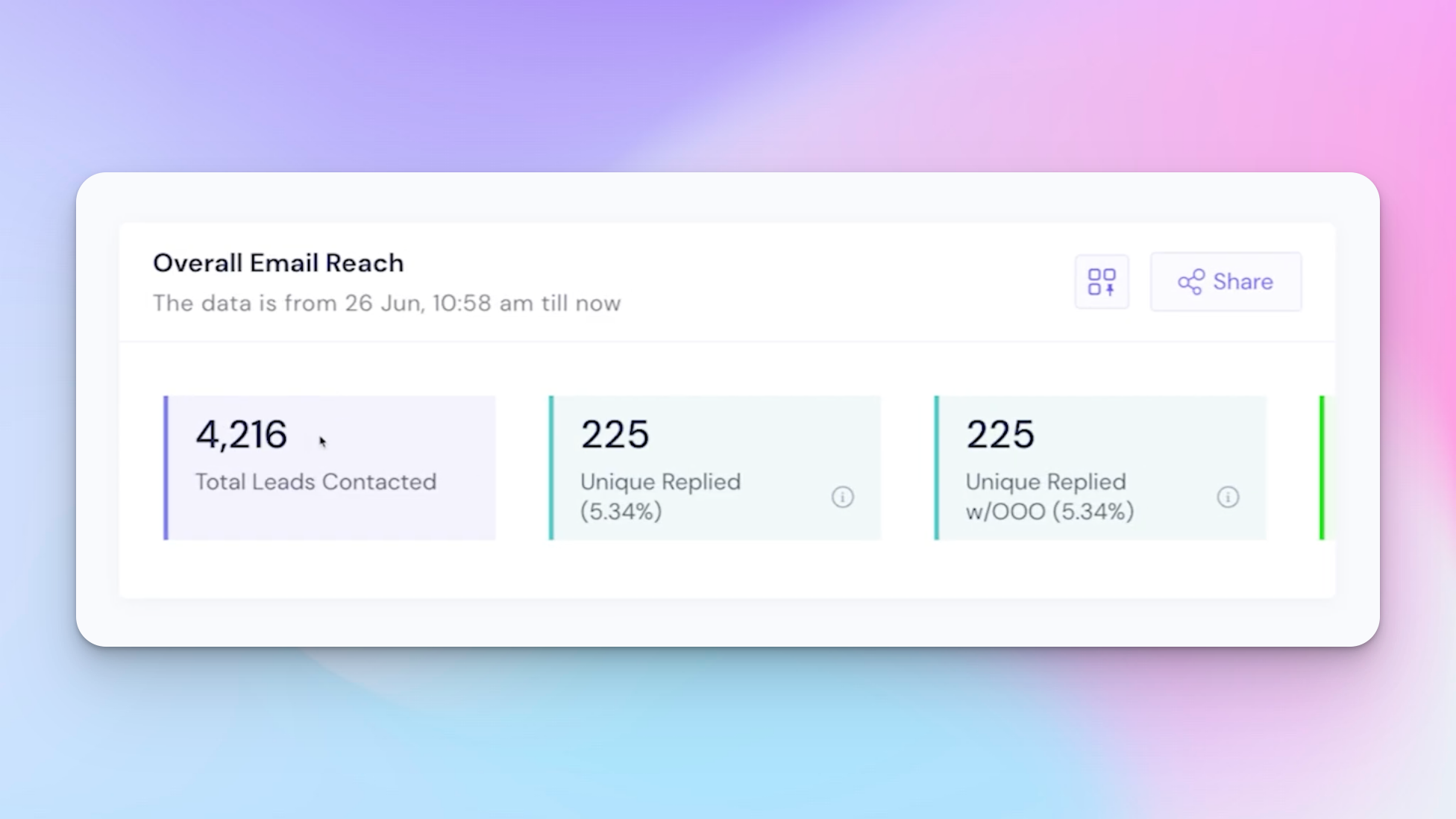
Using this approach, I've sent around 4,000 emails, received 51 positive replies, and booked 15 meetings in the space of a few weeks. The metrics speak for themselves.
Setting up the Clay table
I use Clay for this process because it has native integrations, it's fast to work with, and it includes Clay Agent built into the platform, so I can easily prompt for web surfing or AI-powered copy generation without switching tools.
My Clay table contains a range of decision makers across several industries that are relevant to the service I'm selling: SEO services.
The first step in any solid lead generation system is segmentation – knowing exactly which bucket each potential client falls into before you write a single word.
The key insight I had during brainstorming was this: what do most business owners care about as a leading indicator of their website's health? Their traffic.
So if I can scrape their current traffic and their traffic from three months ago, I can work out whether they've:
- Lost traffic
- Had stagnant traffic
- Had low traffic overall
- Grown their traffic
Those are my four buckets. This is really effective because it shows I've done my due diligence before reaching out. I'm contacting prospects with a real data point that signals a specific pain point, rather than just assuming one. That's where most cold outreach strategies go wrong.
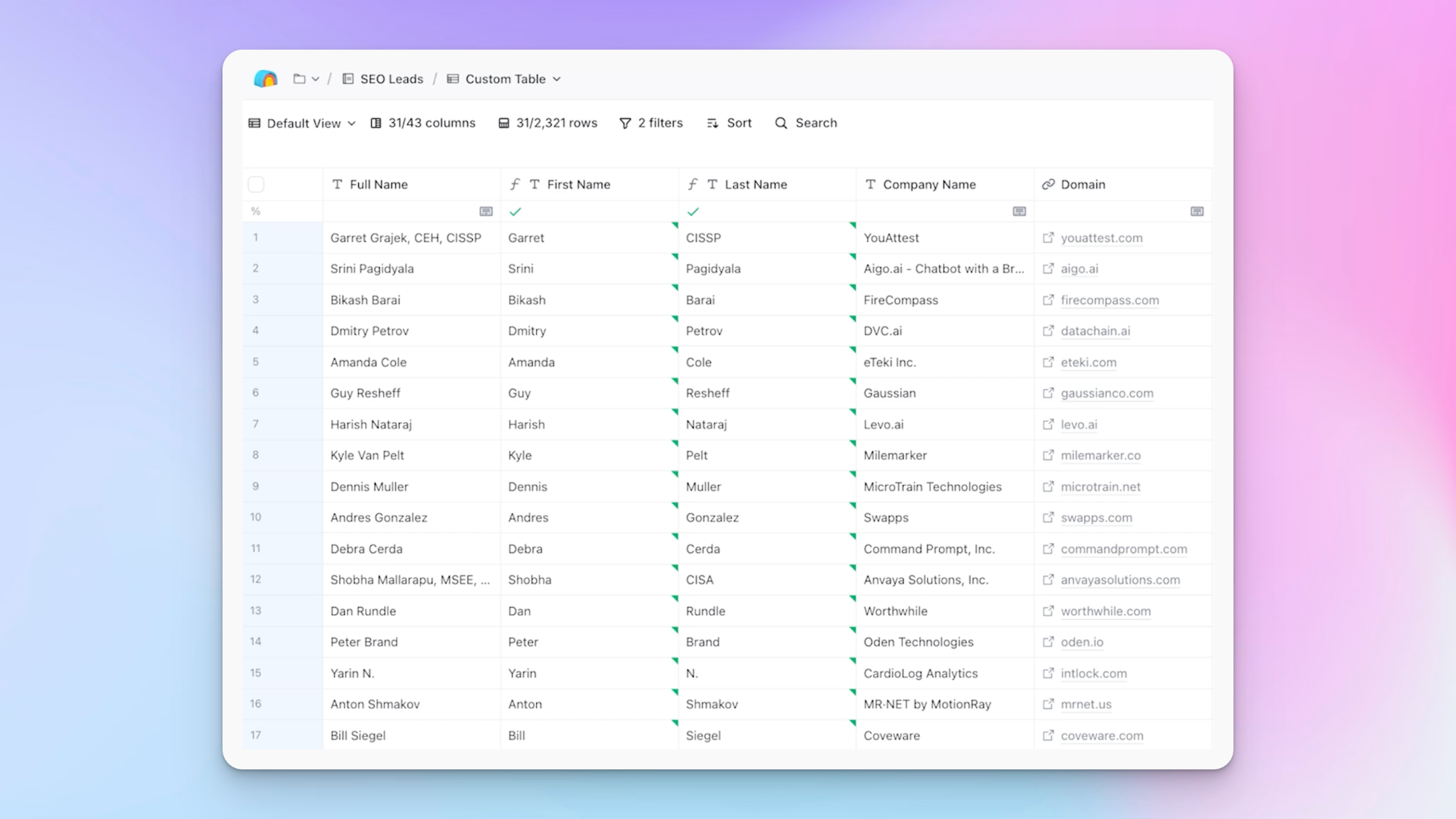
For traffic data, I use Rapid API to scrape SimilarWeb. It's a monthly subscription with an HTTP API, and it gives me traffic from one month ago, two months ago, three months ago, total visit count, and organic visit share, so I can split out organic from paid.
I also pull in company size and job title data at this stage, which feeds into how I frame the messaging later. I then format everything into clean numbers I can reference in my prompts.
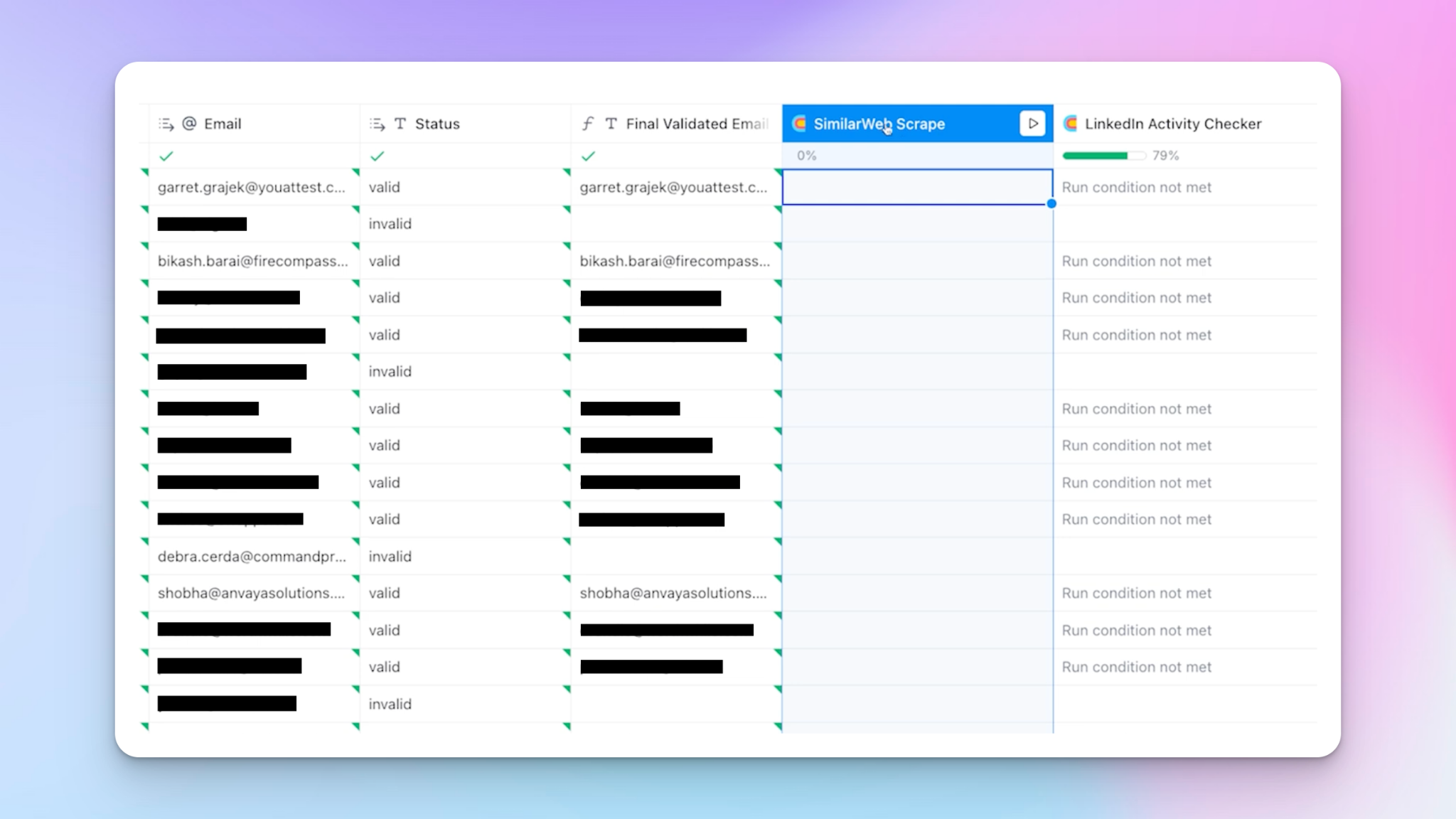
I also have a LinkedIn activity checker in the table, because I'm running a parallel LinkedIn outreach campaign using the same methodology. Checking whether a prospect is active on their LinkedIn profile before reaching out is a small step that meaningfully improves acceptance rates.
Writing the cold email copy prompt to personalize cold email outreach
For the AI model, I'm using ChatGPT o1 Mini through my API key inside Clay. For most tasks within Clay, it's the most cost-effective option, and honestly, it does a better job than some of the more expensive models for this kind of work.
Let me walk you through how I structured the prompt.
1. Defining the role
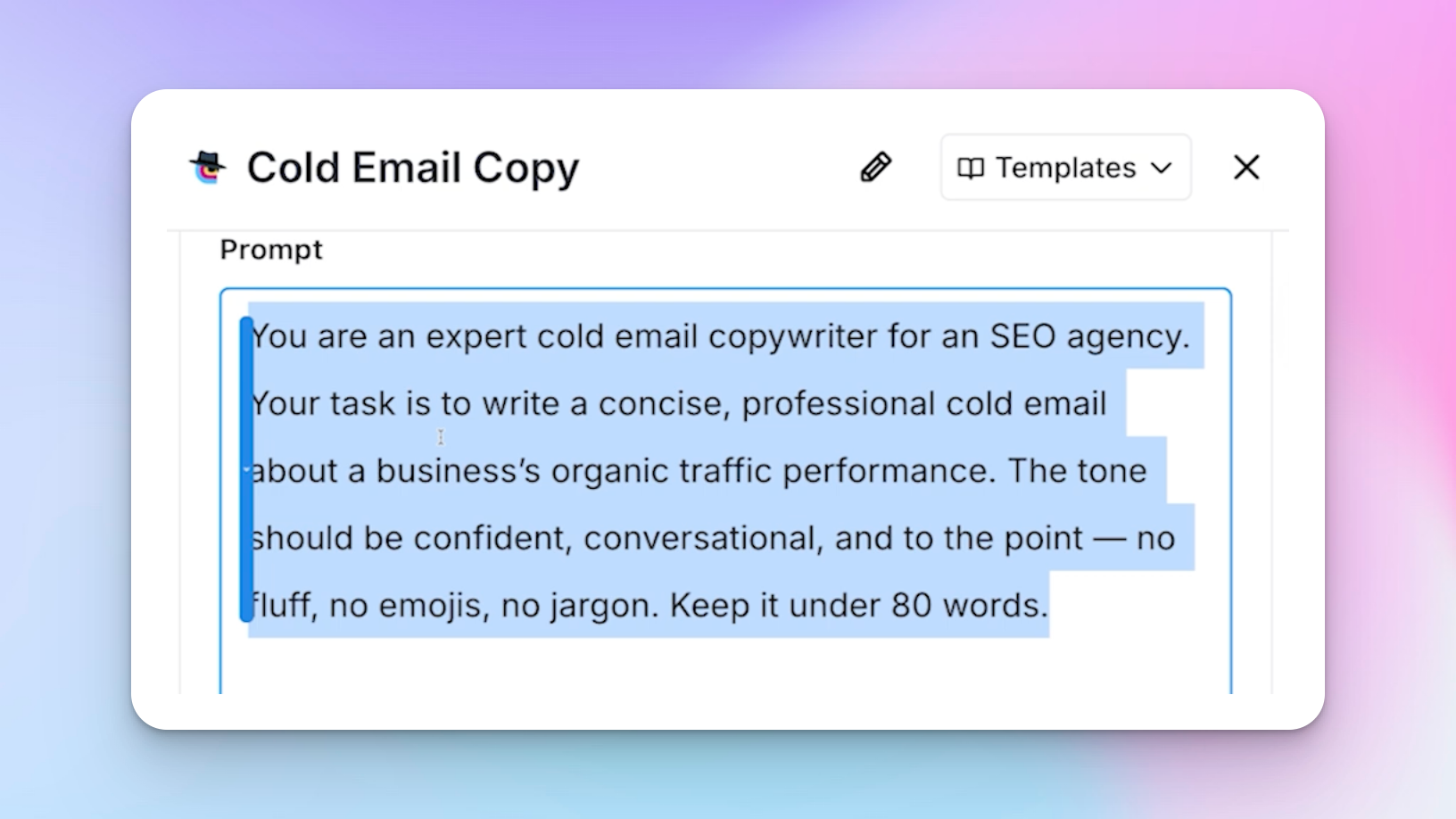
The first section of every prompt I write defines the AI's role. This is where I tell it what job it's doing, what it's an expert at, and give it a small amount of context on what I'm trying to achieve with the copy.
Think of this as the intro to the entire prompt. Without it, the AI has no anchor and the outputs drift.
2. Listing the dynamic variables
Because there are a lot of dynamic variables, I make it very clear upfront which columns from the Clay table the AI will be working with. Each variable is referenced using a forward slash — just like in n8n — and it dynamically changes for each row in real-time.
I explicitly list all the data points so the AI knows exactly what it has to work with.
One important note: turn off the toggle on your data variables so Clay doesn't treat them as required fields for the prompt.
3. Defining the four buckets
This is arguably the most important part of the prompt. I explain to the AI exactly when it should change the copy based on which bucket a lead falls into.
This is where cold email personalization actually happens. Not at the surface level of names and companies, but at the level of specific challenges each prospect is facing:
- Traffic stagnation — a formula flags leads whose traffic has stayed within ±500 visits over the past three months.
- Traffic loss — a formula subtracts current traffic from traffic three months ago. This is the highest-priority bucket because it's the strongest signal.
- Low traffic — I define this as anything below 3,000 total visits. It's the weakest signal (because for a niche B2B SaaS, 2,400 visits might actually be high), but it still works well enough and helps maximise my total lead list.
- Traffic growth (fallback) — if a company has actually grown traffic, I use that as the variable instead. It still shows I've done research on their business, and I can frame the message around future-proofing their growth.
4. Summarizing the business
I also have a separate prompt step that visits the prospect's website and grabs a couple of sentences summarising the business — manufacturing firm, IT service provider, marketing agency, and so on.
I then instruct the AI to use this summary only once or twice in the copy. If you don't specify this, the AI will try to personalize cold email outreach at every opportunity, which makes it obvious and robotic. The same principle applies when crafting LinkedIn cold messages — over-personalizing kills the natural feel.
5. Providing email templates for each bucket
Here's where most people go wrong. They write a detailed prompt and expect the AI to independently produce great personalized cold emails and stay consistent across thousands of rows. That's too much to ask of AI right now.
You still need a pattern-based approach.
What I do is write out each bucket again, and then personally write example email templates for the AI to adapt from. The opening line is particularly important — it needs to reference the specific data point immediately, before anything else.
Here's an example for the traffic loss bucket:
"Notice your site has lost around [X] visits over the last 6 months. We've correlated this with a similar trend we've been seeing with other [business type]. This particular audience seems to be moving from Google to LLMs for online searching. Quick question — can I send a short video showing how we've helped a similar business increase organic visitors by improving visibility on ChatGPT?"
The structure is: observation → icebreaker → specific pain point explanation → call to action with value prop.
The fallback (traffic growth) copy looks like this:
"Notice your site's organic traffic has grown over the last 6 months. Nice work. However, for these types of businesses, we're seeing more users turn to AI tools over Google. Future-proofing your content for LLMs can help you keep that traffic growth compounding. Can I send a quick video?"
Notice that neither of these reads like one of those sales emails that opens with "I hope this finds you well." There's a shared interest in the prospect's actual performance data, which is what makes it land.
Output instructions
At the bottom of the prompt, I include specific output instructions:
- Keep it under 30 words per paragraph
- No explanations or metadata
- Professional, confident language
- Vary phrasing slightly between outputs to maintain a personal touch without inconsistency
- Always include light personalisation based on the business summary, but only where it fits smoothly
- Format like a normal email with paragraph breaks between sentences
This last point is important — I want the email to be ready to paste directly into my cold email campaigns or LinkedIn automation tool without any manual reformatting
Iterating on the prompt before sending
Writing this prompt took me a few hours, because I was consistently spotting mistakes and improving it. This is exactly where most AI outreach efforts break down — people run a prompt once, see decent output, and ship it.
Here's the process I'd recommend instead:
- Write your base prompt
- Run it on a few rows and review the output
- Improve the prompt
- Repeat at least three or four times
- Run it on at least 500 rows and check through them meticulously
You don't want to be burning through your sending volume by blasting AI-written trash emails that tank your sender reputation. These emails do a good job of sounding human, they change dynamically for each lead, and they stay within the template structure enough to maintain consistency. When you're running cold email campaigns at this volume, consistency is everything.
I also do basic a/b testing at this stage — running two slight variations of the opening line across a sample of rows to see which version drives better open rates and click-through rates before committing to the full send.
Using a proper AI outreach agent architecture — where the AI reasons from real signals rather than generic inputs — is what separates copy that converts from copy that gets ignored.
Achievable results and how to set up your sending tools
On SmartLead, I've contacted around 4,000 people. The response rates are solid — that includes out-of-office replies — and I've had 51 positive replies, which is genuinely good for cold email today. I also track follow-up emails separately, since those often account for a meaningful chunk of booked meetings once you study the data.
Once everything is running, the process is fully automated. I drop leads into Clay, the enrichments run, the copy is written, and the leads are automatically pushed to my SmartLead campaign via an API connection.
Keeping your outreach compliant at scale
Once you're sending thousands of AI-personalized emails a month across multiple SmartLead and HeyReach accounts, compliance becomes as important as copy. Every email you send and every reply you get is a record you may need to produce later for a client audit, a CAN-SPAM or GDPR request, or just to prove what was actually said in a thread months after a deal closes. This is what archiving software is for. It captures every message automatically so you can pull up the exact record in seconds instead of hoping someone didn't delete it.
Importing into SmartLead
When exporting from Clay to SmartLead via CSV, you only need two columns:
- The email copy variant (the AI-generated body copy)
- The final validated email address
That's it. The copy is already written, so you don't need to carry over all the enrichment columns. In my SmartLead sequence, I just have the subject line ("Traffic") and the email copy field — fully dynamic for each decision maker.
One benefit of this approach for email deliverability: you don't need spin tags. Each email is unique because the copy is generated per lead. Combined with normal human-paced sending behaviour, this significantly reduces the risk of hitting spam filters. This also feeds into better LinkedIn best practices when running parallel LinkedIn sequences — varied, human-paced sending is the foundation of both.
Setting up the LinkedIn campaign in HeyReach
I'm going to walk through this setup from scratch:
- Start by going to your lead list and importing from CSV — this is the file exported from Clay. This is the same approach I use for multichannel drip campaigns that combine email and LinkedIn.
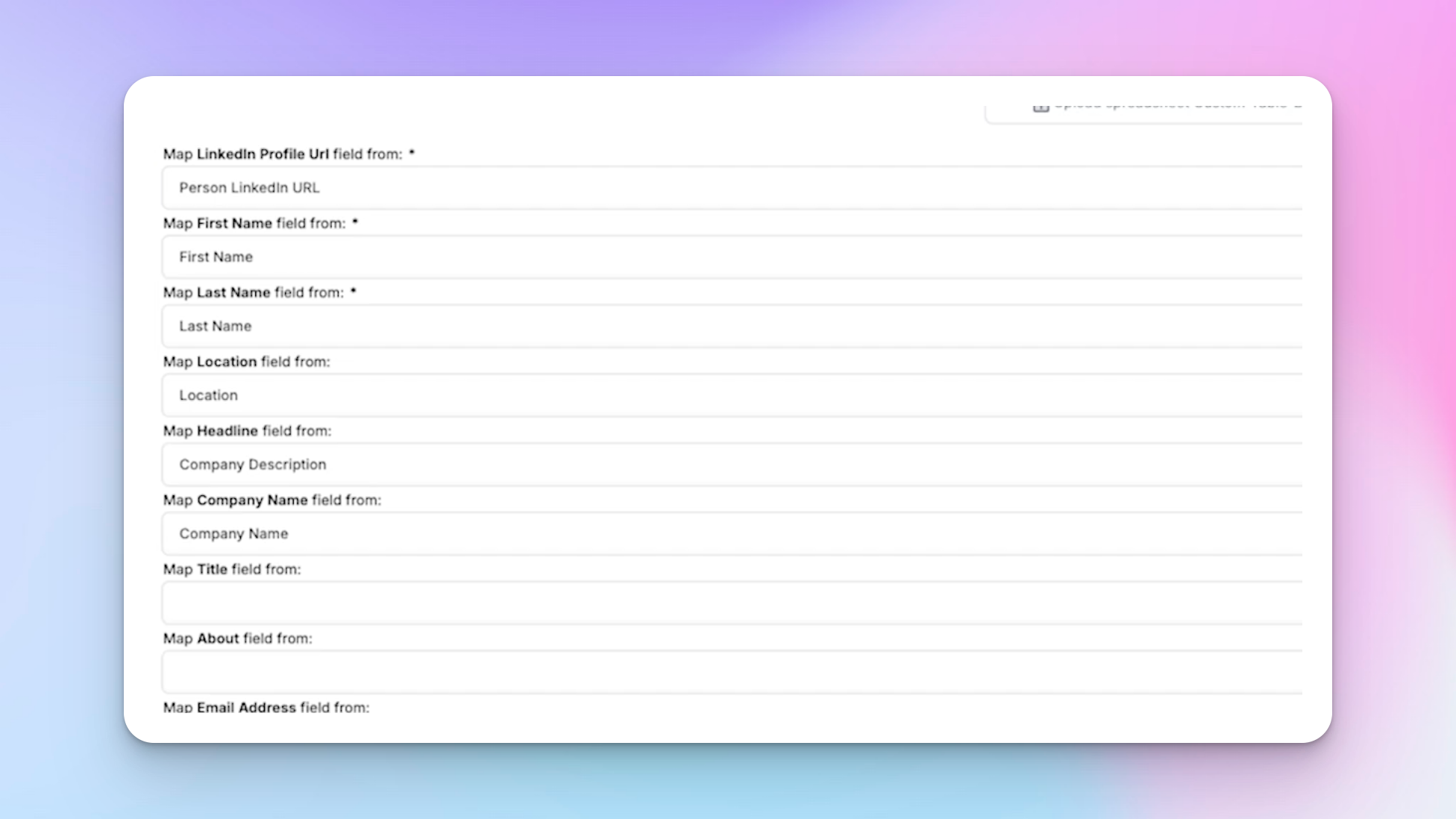
- HeyReach will auto-map standard columns (LinkedIn URL, first name, last name, location, company name).
- Add a custom variable for the email copy column, and name it something like "email copy" so it appears as a personalisation variable in your sequence builder. This is the same variable system used in the SmartReach AI + HeyReach integration.
- Select the campaign you want to import the leads into, then confirm the import.
For the sequence itself, I structure it like this:
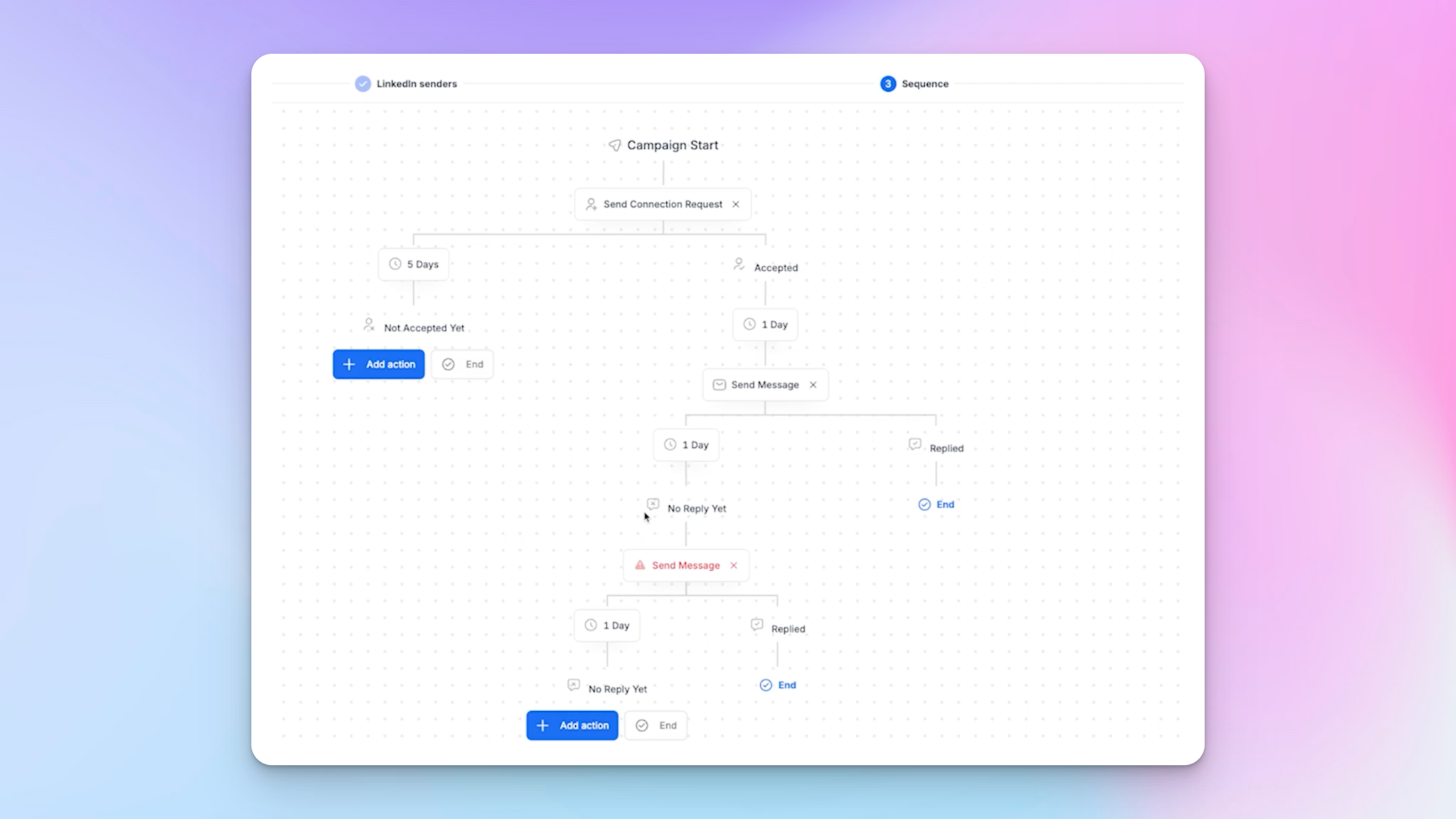
- Step 1: Send a blank connection request (no note). I get a better acceptance rate with blank requests.
- Step 2: Wait at least one day — sometimes two — to simulate natural human behaviour.
- Step 3: Send a message using the {{email copy}} personalisation variable. Set the fallback message to something like "Thanks for connecting." That way, if a high-value lead connects with me, I can follow up manually without the automation making it awkward. This manual touchpoint is also a good moment for onboarding new prospects into a longer conversation — it keeps the door open without forcing a pitch.
- Follow-ups: I only do one follow-up on LinkedIn. The same logic behind LinkedIn drip campaigns applies here — more than one follow-up gets annoying fast.
After that, review and launch.
For sales teams managing multiple senders at once, the HeyReach + Instantly integration makes it easy to bridge LinkedIn non-responders directly into your cold email sequences without any manual data work.
Let the signal do the selling
The Clay table, the bucket logic, the prompt iteration, the HeyReach sequence — none of it is complicated in isolation. What makes it work is the combination: data-driven segmentation feeding AI-powered copy, running across both email and LinkedIn simultaneously, at a volume that would take a full sales team weeks to do manually.
If you take one thing from this, let it be this: the research comes first. The copy is secondary. When you contact a potential client with something specific and true about their situation, you don't need to be clever. The data does the persuading for you.

Try it for free
Frequently Asked Questions
Can I use this same methodology for industries other than SEO?
Absolutely. The traffic data angle works well because it's a universal pain point for anyone selling digital marketing, content, or web-related services. But the real method — scraping a specific, measurable data point that signals a specific pain point, bucketing leads by that data, and writing template copy for each bucket — applies to any service. You'd just swap out traffic for a different leading indicator relevant to your offer. The ICP-based outreach templates that work best all follow the same logic: real signal, specific message, relevant call to action.
How long does it take to set up the Clay table and prompt from scratch?
Realistically, budget a full day. The Clay table setup itself (API connections, formulas, and enrichment columns) takes a few hours if you're new to it. The prompt writing and iteration process took me a few hours on its own. Expect to run the prompt, spot issues, rewrite, and test at least three or four times before you're happy with the consistency. Setting clear milestones — first working prompt, first clean batch of 50 outputs, first full campaign ready to send — helps keep the process from sprawling.
How do I avoid my emails sounding like AI?
Two things matter most. First, provide the AI with a real, specific data point for each lead — not a generic opener. Second, give the AI a handwritten template to adapt from for each bucket, rather than asking it to write the email from scratch. This gives you the human feel of a template while still allowing the copy to flex based on individual lead data — the difference between sales emails that get replies and ones that get deleted.
Do I need all the same tools you're using — Clay, SimilarWeb via RapidAPI, SmartLead, and HeyReach?
Not necessarily. Clay is the most important piece because it handles the enrichment and prompt execution in one place. For traffic data, SimilarWeb via RapidAPI is the source I use, but there are other data providers. SmartLead and HeyReach are just the delivery tools — any cold email or LinkedIn automation platform that supports custom variables will work the same way.
What reply rate should I realistically expect when I personalize cold email outreach this way?
Your results will vary depending on your offer, your target market, and how well your copy is dialled in. But as a benchmark for cold email in 2026, a positive reply rate above 1% is genuinely strong. The key is that this method gives you a real reason to reach out — a data-backed observation tied to the prospect's specific challenges — rather than a generic pitch.