Sales sequence automation: Fewer steps, more replies
Published:
May 29, 2026
Updated:
June 1, 2026
Sales sequence automation has made outbound easier to execute, but not more effective by default.
Launching campaigns, scheduling follow-ups, and sending hundreds of LinkedIn messages can now be done in a few clicks. The problem is that automating a weak sequence doesn't fix it. A generic connection request, a templated opener, and a "just checking in" follow-up still generate the same low reply rates, just faster and at higher volume.
If you want to build automated sales sequences that generate replies, your sequences have to be built around timing, relevance, and personalization that adapts to the prospect’s context instead of forcing every lead through the same flow. In the rest of this article, I will show you how to build that system, using HeyReach, Clay, and AI-driven personalization.
What a high-converting sales sequence automation looks like
Most LinkedIn sequences fail after the relationship has already started. In HeyReach’s recent analysis of 96,051 LinkedIn campaigns, the median campaign converted only 18.1% of accepted connections into replies, while 10.7% of campaigns generated zero replies after acceptance altogether.
A high-converting sales sequence rarely feels automated from the prospect’s perspective, yet many B2B sales teams still build sequences around, “What message should we send next?” High-converting outbound teams think differently: “What does this prospect need to see next to continue the conversation?”
Instead of relying on fixed follow-ups, effective sales sequence automation adapts based on whether the prospect accepted, whether they replied, how they engaged, what signals exist around them, and which sender is most relevant to the conversation. The result is a sales automation that feels less like automation and more like a natural progression toward a reply.
To create this:
Step 1: The connection request
Your connection request has one job: give the person a low-friction, credible reason to accept. It's not the place to explain your product, ask a qualifying question, or front-load your pitch.
A personalized note almost always outperforms a blank request, but keep it short and specific. When there isn't meaningful context to add, an empty connection request can perform better than a generic one, especially if your profile is strong, you have a mutual connection, or shared community context.
Step 2: The opener
Use this outreach formula: [Specific observation] + [Relevant pain] + [Low-friction ask].
Your observation has to be real and able to build trust: a hiring pattern, a post they wrote, a company announcement, a tech signal.
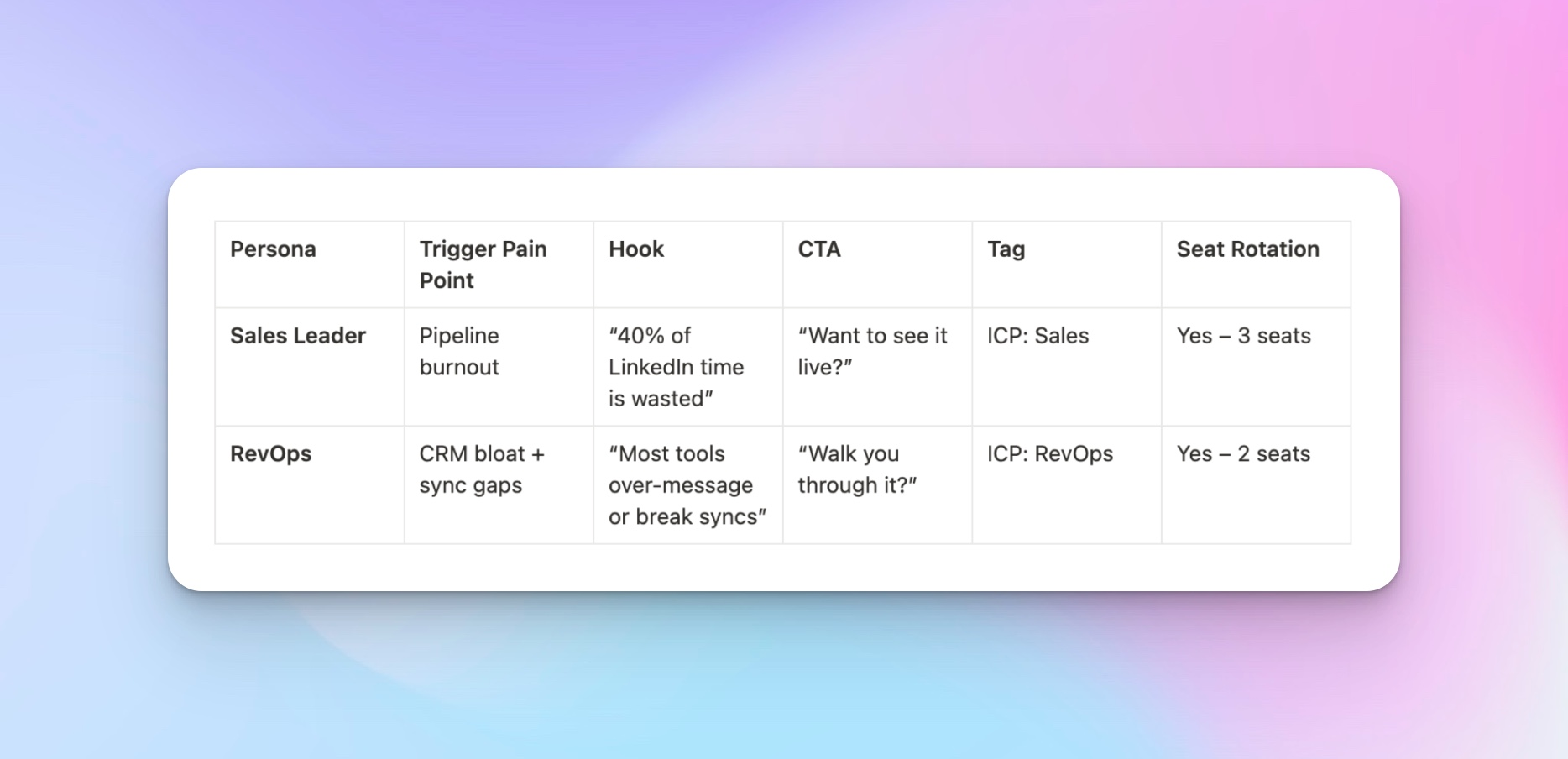
End with an ask that costs them almost nothing. "Curious if that's something you're actively working through" gets more responses than "Would you be open to a 30-minute call?" because the former starts a conversation, while the latter demands a commitment before the prospect has decided you're worth their time. This is where many LinkedIn cold messages lose momentum.
Step 3: The follow-up
Most follow-ups are reminders disguised as outreach. "Just wanted to resurface this" or "Circling back in case this got buried" messages only remind the prospect you sent something, with nothing new to offer. Always add something new: a useful data point, a different angle on the original message, a short insight relevant to their role. Stronger follow-up emails or messages introduce value into the conversation and give the prospect a reason to continue the conversation.
Step 4: The graceful exit
Tell them this is the last message, give them an easy out, and leave the door open. Ironically, this step generates more replies than you’d expect, precisely because there's now less pressure to respond.
Sequence length matters too, but longer doesn't automatically mean better. More steps can create more opportunities, but they can also create more repetition.
According to campaign data from HeyReach, performance is determined by what happens inside each step, specifically whether accepted connections turn into replies, not by how many steps you add after that. A fifth extra step rarely recovers what a weak second step lost.
Building sales sequence automation in HeyReach: step-by-step walkthrough
At this point, the structure of a high-converting sales funnel is clear. The next layer is execution, so you can run at scale without losing control over timing, personalization, or deliverability.
Step 1: Create the campaign and choose the sequence type
Start by creating a new campaign in HeyReach and selecting the sequence structure.
For most LinkedIn outbound campaigns, a connection request-to-message sequence performs best because it mirrors how real conversations happen on the platform.
InMail sequences can work for specific use cases, especially when targeting senior decision-makers and stakeholders with lower connection acceptance rates, but connection-first outreach usually creates a more natural progression into conversation.
The key decision here isn’t the format itself, but the logic behind it.
Step 2: Set step delays and conditional logic
Once the sequence structure is in place, configure the delays and progression rules between steps.
A common mistake to avoid is sending the opener immediately after a connection request gets accepted. That timing often feels automated. A 24–48 hour delay usually performs better because it matches normal LinkedIn behavior.
Use HeyReach to set conditional logic to define whether it should be sent at all.
For example:
- Step 2 only triggers if the connection request is accepted
- Step 3 only triggers if no reply is received after a defined window
- Step 4 changes based on whether the prospect engaged earlier in the sequence.
Between follow-up steps, 3–5 days is a reasonable default. Short enough to maintain continuity, long enough that you're not piling up in someone's inbox across consecutive days.
Step 3: Import dynamic variables from Clay
This is where personalization becomes scalable.
Inside Clay, enrich your lead list with signals like hiring activity, recent LinkedIn posts, role changes, funding announcements, or tech stack data.
Then generate structured variables such as:
- {icebreaker}
- {signal}
- {pain_point}
Export the enriched CSV from Clay and upload it to HeyReach.
During setup, map those variables directly into the relevant message steps so each prospect receives messaging adapted to their context automatically.
For example:
- {icebreaker} → opener message
- {signal} → follow-up message
The sequence template structure stays consistent while the personalization changes dynamically per lead.
Step 4: Set daily send limits per sender
LinkedIn has limits on how much outreach activity a single account can safely run. Pushing too many connection requests through a single account increases restriction risk and usually hurts reply quality over time.
Inside HeyReach, configure daily send limits for each sender account to stay within safer activity thresholds while maintaining consistent outreach volume across campaigns.
This way you distribute the workload across multiple senders from the start.
The multi-sender strategy: why single-sender automation breaks down
Most LinkedIn accounts start running into performance and deliverability issues once sales outreach volume pushes beyond roughly 30–40 connection requests per day consistently.
At that point, the account starts accumulating repetitive activity patterns, high outbound volume, similar send timing, repeated outreach behavior, and low interaction variance. Multi-sender sequencing solves this by turning one outbound stream into a coordinated relay.
How to distribute leads across senders in HeyReach
HeyReach handles multi-sender distribution at the campaign level. When you set up a campaign, you can assign multiple sender accounts to it, and HeyReach rotates outreach across those accounts according to the limits you've configured for each one.
But rotation doesn't have to be purely mechanical; the more sophisticated approach is assigning senders based on prospect fit.
Some examples of how sales teams can structure this:
- By seniority: A founder or VP-level sender reaches out to C-suite and VP prospects. An SDR account handles director-level and below. The message content can be identical, but the sender's credibility is matched to the audience.
- By industry: If you're running campaigns across fintech, healthcare, and logistics simultaneously, having a sender with relevant work history in each vertical increases the chance the prospect looks at the profile and sees someone worth connecting with.
- By region: For teams running global outreach, a UK-based sender account reaching out to UK prospects feels less cold than an outbound from a US profile with no apparent connection to that market.
The safety layer: deduplication and overlap control
Once multiple senders are active in the same system, coordination becomes critical. Without guardrails, the same prospect could accidentally be contacted twice from different accounts. This is where deduplication logic matters.
Inside HeyReach, leads are managed at the campaign level, meaning the system ensures:
- No duplicate outreach across sender accounts
- No overlapping sequences for the same prospect
- Consistent tracking of where each lead sits in the flow
This keeps your system from behaving like multiple disconnected tools and ensures it functions as a single coordinated lead generation engine.
Personalizing at scale: The Clay + HeyReach workflow
Real personalization at scale requires a data pipeline, one where the information feeding your message variables is actually specific to each person, and rooted in something the prospect would recognize as relevant to them. That’s where Clay and HeyReach work together.
Step 1: Build and enrich your lead list in Clay
Start by importing your raw lead list into Clay.
This can come from LinkedIn Sales Navigator, a CRM export, or a scraped list, but at a minimum, each record needs a name, company, and LinkedIn URL.
In Clay, you run that list through enrichment waterfalls. Depending on what signals are most relevant for your campaign, this might include:
- Job tenure and recent role changes: useful for identifying prospects who just stepped into a new position and are likely evaluating tools and processes
- Tech stack data: relevant if your product integrates with or replaces specific tools your prospect is already using
- Hiring signals: if a company is actively posting roles, that's a live signal about what problems they're trying to solve
- Recent LinkedIn activity: posts, comments, or social media activity that gives you something real to reference in an opener
- Company news: funding rounds, product launches, expansions, leadership changes
Each of these enrichment columns becomes a potential variable for the next step.
Step 2: Generate the icebreaker column with AI
Once you have your enrichment data, use Clay's AI column feature to generate custom icebreakers for each potential customer.
The prompt you give Clay's AI column does the framing work. Something like: "Based on the hiring signals and recent activity for this prospect, write a one-sentence observation that could open a cold LinkedIn message. Be specific, avoid flattery, and don't mention our product."
What comes back might look like:
- "Saw your team posted three SDR roles in the last month, looks like you're in active ramp mode."
- "Your post last week about pipeline quality over volume stuck with me; that's exactly the tension most teams are navigating right now."
None of these mentions a product or sounds like automation, but each one gives the prospect a reason to think that this person actually looked at something about me before sending this.
Step 3: Run the data quality check before export
This step is expensive to skip. Before you export the enriched CSV and load it into HeyReach, you need to validate that the data is clean enough to use.
Specifically, check for:
- Missing icebreaker values: rows where the AI column failed to generate output, usually because the enrichment data was too sparse. These rows need a fallback variable or need to be removed from the campaign entirely.
- LinkedIn URL format: A malformed URL means the lead doesn't enroll correctly. Check that all URLs follow the standard linkedin.com/in/ format and strip any tracking parameters.
- Duplicate leads: if your Clay table pulled from multiple sources, you may have the same prospect appearing more than once with slightly different data. Deduplicate before import.
- Leads already active in HeyReach: if a prospect is mid-sequence in another campaign, importing them into a new one creates exactly the multi-touch problem the deduplication layer is designed to prevent. Cross-reference before you load.
Garbage in, garbage out is the oldest rule in data and the one most teams violate under deadline pressure.
Step 4: Import into HeyReach and map your variables
With a clean CSV, the import into HeyReach is straightforward. You upload the file, HeyReach reads the column headers, and you map each column to the relevant variable in your message steps.
Once mapped, the variables render dynamically for each contact when the message is sent. What you're reviewing in the HeyReach message editor is the template; what you're actually sending to each prospect is a personalized version of that template, populated with the specific data you generated for them in Clay.
The workflow is identical whether you're running it for 50 leads or 5,000.
Centralizing reply management in multi-sender outreach
Once you move from single-sender to multi-sender sales sequence automation, reply management becomes just as important as sending.
At scale, you’re managing conversations across multiple sender accounts running in parallel.
Without a centralized system, this creates friction, replies get scattered across accounts, response times slow down, and high-value leads get missed while teams switch contexts.
Managing replies across sender accounts in HeyReach
HeyReach's Unified inbox pulls replies from all your sender accounts into a single view. Instead of logging into five separate LinkedIn accounts to check what came in overnight, everything surfaces in one place, tagged by sender, by campaign, and by where the prospect is in the sequence.

The practical value of this is speed. Centralizing the inbox removes the operational friction between a reply coming in and a human acting on it. It also preserves context in a way that separate inboxes don't.
Prioritizing replies by intent
A reply that says "yes, interested, what does your calendar look like?" and a reply that says "can you take me off your list?" both land in the inbox, but they require completely different responses and urgency levels.
HeyReach lets you tag replies by type: interested, not now, wrong person, unsubscribe, which lets you filter the inbox by priority and work through high-intent replies first before handling the rest. This lets salespeople triage conversations instead of manually scanning inboxes, ensuring high-intent leads are handled first.
Syncing conversations into your CRM
Sales sequence automation doesn’t end in LinkedIn. It ends in your CRM.
Once a prospect replies, HeyReach HubSpot integration pushes the lead into HubSpot automatically with full context, campaign source, sender account, message history, and engagement status.
This ensures that when a sales rep picks up the conversation, they inherit the full interaction history.
That continuity improves both follow-up quality and conversion rate for qualified leads.
Sales sequence automation metrics that predict pipeline
To understand whether your sequence is actually working, you need LinkedIn benchmark metrics that map to specific breakdown points in the system, so you're not rewriting your opener when the real issue is your targeting or rebuilding your list when the real issue is your follow-up.
The metrics that actually predict pipeline
- Connection acceptance rate: tells you whether the right people are willing to connect with you, which is a function of ICP fit, list quality, and sender profile credibility. Based on HeyReach's benchmark data across 96,051 campaigns, a typical campaign lands at 20.75% acceptance rate. Below 13% is a warning sign, and above 31.78% indicates a strong ICP fit or high sender credibility, usually both.
- Reply rate: Once people accept, the reply rate tells you whether your opener is working. A healthy benchmark sits around 22.22%. If acceptance is strong but reply rate is weak, the issue is almost always: weak opener relevance, too much pitch too early, or lack of contextual personalization.
- Reply-to-acceptance conversion: This is the metric that measures how often an accepted connection actually turns into a reply. The benchmark sits at 18.1%, meaning the typical campaign turns fewer than 1 in 5 accepted connections into any reply at all. If acceptance is fine and reply-to-acceptance is low, the problem is in the post-acceptance sequence.
- Positive reply rate: This metric directly connects to the pipeline. Total reply rate includes every response, including "please stop messaging me" and "not interested." Positive reply rate filters to replies that represent genuine interest or an open door. If total replies are high but positive replies are low, your targeting or personalization inputs are misaligned.
- Sequence completion rate: tells you how many prospects are making it through all your steps without replying. A high completion rate with a low reply rate means none of your steps are doing enough work, the sequence runs its course, and the prospect exits without ever having a reason to respond. A low completion rate usually means replies are coming in early, which is the good version of the problem.
Using step-level drop-off to find where sequences break
The step where your replies drop off is almost always the step that needs the most work. You can see your reply activity broken down by sequence step in HeyReach to understand how many replies you got, and at which point in the sequence people responded, and by extension, where they stopped responding.
If replies are flat across all steps and low overall, the issue is probably upstream, with your list quality or ICP fit, not the sequence logic itself.
A/B testing without confusing yourself
A/B testing sequences are useful, but also easy to do badly. The most common mistake is changing multiple variables at once, and then not knowing which change drove the result.
Change one thing at a time and run the test long enough to accumulate a sample that means something. Define upfront what metric determines the winner: open rates, positive reply rate, or reply-to-acceptance conversion, depending on which part of the funnel you're trying to move.
How to diagnose a broken sequence without starting from scratch
A broken sequence is usually broken in one specific place; the rest of it might be fine. The diagnostic framework below is designed to help you find that place quickly and fix the right thing.
- Start with the acceptance rate
Acceptance rate is always the first number to look at, because everything downstream depends on it. If your acceptance rate is below 13%, the problem is almost certainly not in one of three places: your list quality is weak and you're reaching out to people who have no reason to connect with you, your sender profile isn't credible enough for the audience you're targeting, or your connection request note, if you're using one, is pitching too hard before any relationship exists.
The fix here is to fix your targeting, clean the list, strengthen the sender profile, and then see what acceptance looks like before touching anything else.
- If acceptance is healthy, but reply-to-acceptance is low
When reply-to-acceptance conversion is below 9.62%, and acceptance is sitting in a normal range, the problem is almost always the first message after connection. Specifically, it's either sending too quickly after acceptance, leading with a pitch before any relevance has been established, or asking for something that costs more than the prospect is willing to spend on someone they just connected with five minutes ago.
Check the delay first. If you're sending the opener within an hour of acceptance, extend it to 24–48 hours. Then look at the message itself. Does it open with something specific to this person? Does the ask at the end require a commitment, or does it invite a low-cost response? A message that earns a reply asks for almost nothing in return.
- If your reply rate is low, but the reply-to-acceptance conversion is reasonable
This combination usually points to a volume or list issue rather than a messaging issue. You're converting the connections that do engage, but not enough connections are getting to that point. Go back upstream: Is the list broad enough to sustain the campaign? Are you hitting the same people too early in their buyer's journey? Before rewriting anything, check whether the campaign has run long enough to generate a real signal. Campaigns under 30 days consistently underperform in the benchmark data, and that's correlational, but it's still a useful flag
- If your positive reply rate is low relative to the total reply rate
A high total reply rate with a low positive reply rate means your sequence is generating responses, but most of them are unsubscribes, objections, or "not interested" replies. That's a targeting and relevance problem.
The fix is tightening the list before the next campaign. If you're using Clay to generate icebreakers, audit a sample of what the AI-powered column is producing. If the observations are vague, the enrichment data feeding the AI prompt needs to be richer before the output will improve.
- If the step-level drop-off is sharp after step 2
If replies are coming in at step 1 and step 2 and then stopping completely, your follow-up isn't adding enough to keep the sequence alive.
Look at what the follow-up is actually doing. Is it adding a new angle, a useful data point, or a reframe of the original reason for outreach? If it's the latter, rewrite it as if it were a standalone message. It should be able to earn a reply even if the prospect never saw step 2. If it can't do that, it's not doing enough.
- If the sequence runs to completion with almost no replies at any step
When no individual step is generating meaningful engagement and prospects are completing the full sequence without responding, the sequence logic is probably fine, and the input is the problem. Pause the campaign, go back to the list, tighten the targeting, and relaunch with a smaller, higher-quality segment before drawing any conclusions about whether the messaging works.
Automation is a multiplier, not a shortcut
There's a version of multi-channel automation that makes your sales teams worse. They move fast, and the automation works exactly as designed; it just scales something that wasn't worth scaling in the first place.
What the sales strategies described here actually do is compress the time between "we have a good outbound system" and "we're running that system at volume." It doesn't replace the judgment that goes into building a good sequence; it, however, makes it possible to run that sequence at a scale where it actually converts to new customers.
Build the sequence worth automating and then let the automation do its job.

Try it for free
Frequently Asked Questions
What is sales sequence automation?
Sales sequence automation is the process of building a structured series of outreach touchpoints and running them automatically through a tool rather than manually. The goal is to reach more prospects consistently without requiring an SDR to execute every individual step by hand.
How many steps should a sales sequence have?
For most LinkedIn outbound, four steps are enough. A connection request, an opener, a value-driven follow-up, and a graceful exit. HeyReach's benchmark data shows that reply-to-acceptance conversion, the metric that actually predicts pipeline, usually depends more on sequence quality than sequence length.
How do I personalize automated sales sequences at scale?
Use Clay to enrich leads with signals like hiring activity, recent posts, or role changes, then generate dynamic variables using AI. Import the enriched CSV into HeyReach and map those variables directly into your sequence steps.
What tools do I need to automate my sales sequences?
A modern outbound stack typically includes: HeyReach for sequence execution and multi-sender outreach, Clay for enrichment and AI personalization, and a CRM like HubSpot for pipeline tracking and follow-up. Workflow automation tools like n8n or Zapier can connect these layers, triggering sequence enrollment based on CRM status, or intent signals, but they're optional depending on how complex your enrollment logic needs to be.
How do I know if my automated sequence is working?
Track connection acceptance rate, reply rate, reply-to-acceptance conversion, and positive reply rate. Low numbers in any of these metrics usually point to a specific issue with targeting, messaging, sequence logic, or personalization quality.