The signal-based outreach playbook: from LinkedIn signal to booked meeting with Apify and HeyReach
Published:
October 28, 2026
Trigify switched off on 22 October: all the accounts, APIs, and integrations went dark, with no data migration. If you used it to spot who was engaging on LinkedIn and push them into HeyReach, your signal-based outreach just lost its feed.
I rebuilt the workflow on Apify, Claude and HeyReach, and ran it live: 300 high-intent, good-fit people for $12.61, and 2,000 prospects checked for LinkedIn activity for $4.91.
Here’s how it works, and how to run it yourself.
Moving from Trigify: what maps where
Most teams used Trigify to feed their signal-based outreach, this is how you can map it now:
Looking for other tools instead? See our comparison of the best Trigify alternatives.
Why signals beat lists
In traditional outbound, everyone in your market buys the same lists from the same databases and sends cold outreach to the same people. Job title, company size, and industry tell you who fits, but they don't tell you who's thinking about the problems you can solve.
Engagement signals do: if someone engaged with or wrote a post about the problem you solve, that gives you a reason to reach out now. That timing is what signal-based selling is built on. The same logic is behind trigger-based outreach and buyer intent signals.
Apify x HeyReach
Apify is a marketplace of ready-made automation tools, called Actors. You give one a LinkedIn post, a profile or a company, and it hands back a spreadsheet of people: name, headline, LinkedIn profile URL and engagement type. You pay per result, usually a fraction of a cent.
Operators who share their results report that connection lists built from post engagers are accepted at roughly 45–75%, against 14–39% for cold LinkedIn Sales Navigator lists. These numbers are self-reported, not a controlled test, so run your own and compare.
Here’s the full run, start to finish, before we break it down:
Rule zero: check who's active before you send anything
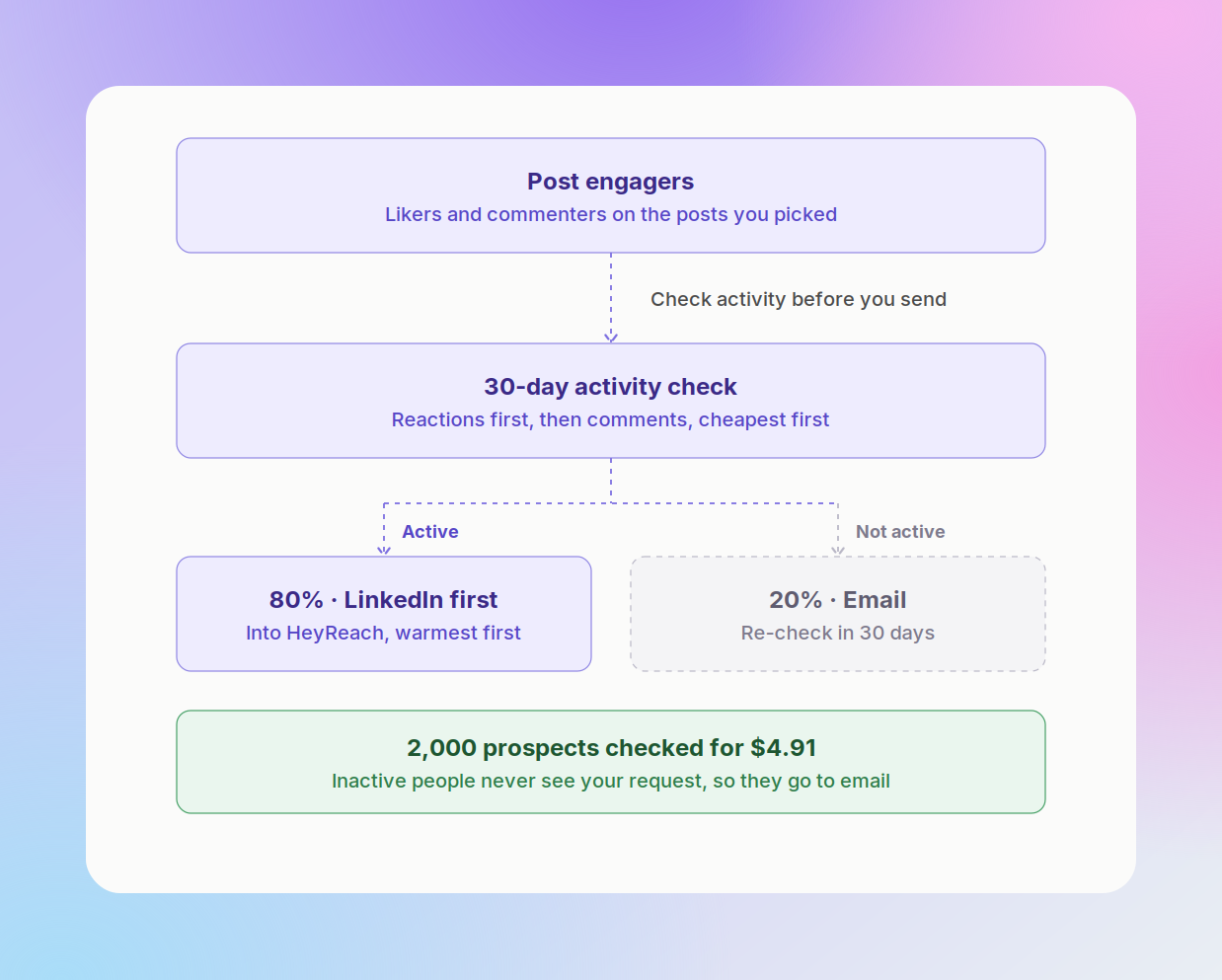
This is the one step I never skip. A great signal is wasted on someone who hasn't opened LinkedIn in months. They don’t see your request, your acceptance rate drops, and you've burned invites you can't get back that week.
So every engager list gets checked for LinkedIn activity in the last 30 days, and that check picks the channel.
How the check works, cheapest first:
- Reactions in the last month, with harvestapi/linkedin-profile-reactions. It only charges when it finds a reaction, so inactive people cost nothing to check.
- Comments, only for people with no reaction, with harvestapi/linkedin-profile-comments.
- Posts, only for people still showing nothing. I usually skip this one: it charges even when it finds nothing and adds about 2% more active people.
Checking 2,000 GTM prospects added up to $4.91. Here's how they split:
That 80% active rate is high because we sell to GTM and sales people, who live on LinkedIn. On a 4,544-person e-commerce list, only 37% were active in the last 30 days, for about $6.
If you’re sending from one or two accounts, you won't get through 1,600 active people fast. Send to the 0–7 day group first, or split the list and test which half gives the best ICP fit.
The warmth ladder: spend your invites warmest-first
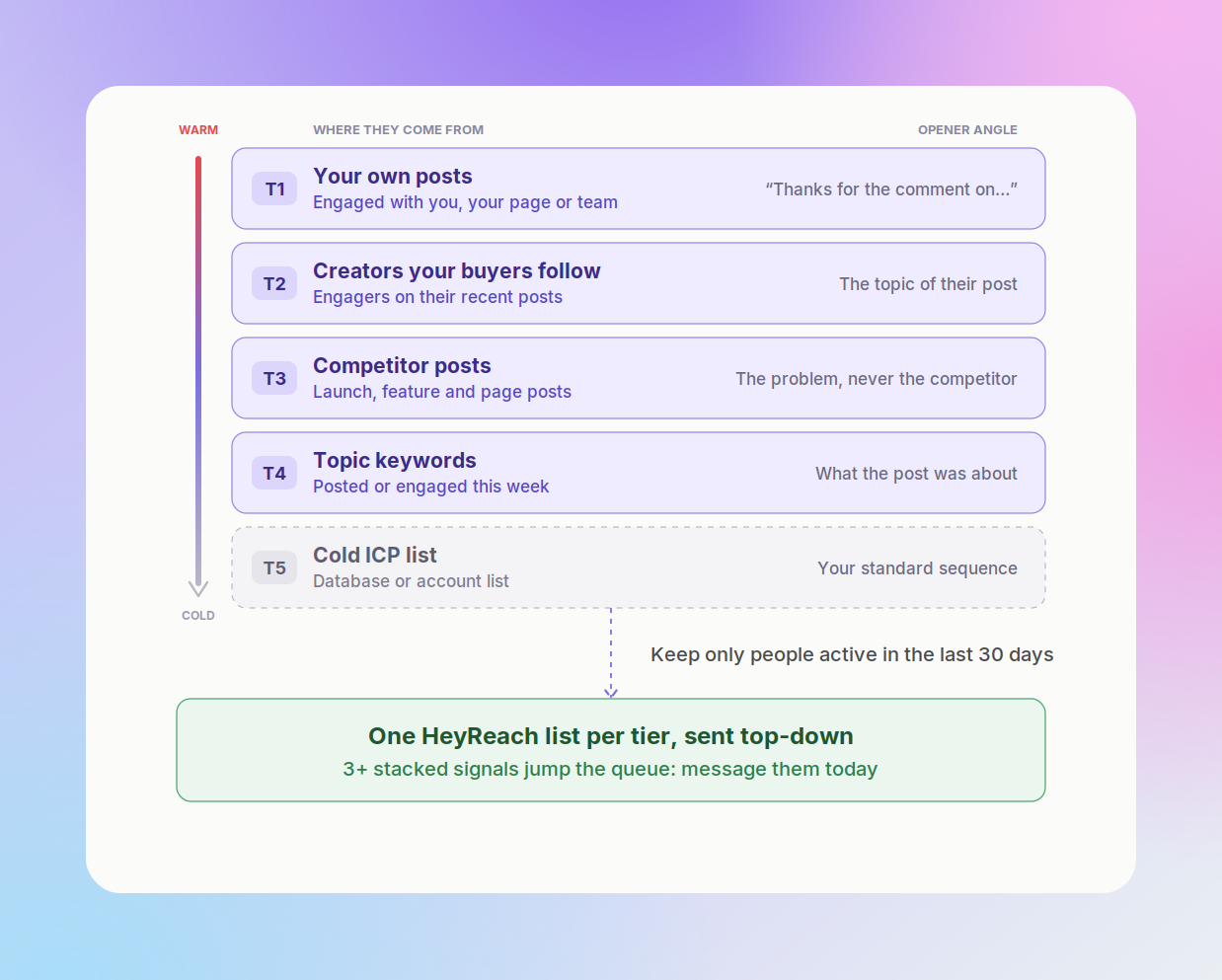
You get a limited number of connection requests a week. Multi-tiering means you spend them on your warm leads first. Pull every source, tag each person with the tier they came from, keep only the people who pass the activity check, and send top-down.
Signal stacking: jump the queue
Inside a tier, rank by: active in the last 7 days over the last 30, commented over reacted, engaged with several posts over one. Then add trigger events like hiring activity for sales roles, leadership changes or funding announcements. If they have three or more signals, message them today.
Flow 1: Claude finds them, Apify pulls them, HeyReach sends
The gist: you describe your ideal customer profile in plain English, Claude picks the posts and searches, runs the Apify Actors, judges fit person by person, runs the activity check, and drops the active people into HeyReach, one list per tier. It still needs your approval to launch.
Architecture
- Claude (Claude.ai or Claude Code) runs the job, guided by the skill.
- Apify MCP gives Claude the Actors: post search, reactions, comments, profile posts, company employees and the two activity-check Actors.
- HeyReach MCP lets Claude create lead lists and add people to campaigns.
- You get active people in HeyReach, sorted by tier + an email CSV for everyone else.
Steps
- Connect the MCPs (about 2 minutes): Add Apify as a connector in Claude and log in to your Apify account. Then connect the HeyReach MCP with your workspace's connection URL. Here’s a full walkthrough: how to connect LinkedIn to Claude.
- Add the skill: Download it from the playbook. In Claude Code, save it as ~/.claude/skills/apify-linkedin-outbound/SKILL.md. In Claude.ai, add it as a skill or paste it into a Project's instructions.
- Fill in your ICP: What you sell, who buys it, the problem in their words, your competitors, and the creators your buyers follow. The full template is in the playbook.
- Ask for people: Claude proposes the sources and search phrases and shows the cost before it spends anything.
- Correct the first 20: Claude judges fit on 20 people with a reason for each. You correct it, then it does the rest.
- Approve the send: Active people land in HeyReach as one list per tier. Inactive people come back as an email list.
The prompt I used in the demo
With a $15 cap, it came back with 300 good-fit founders and sales leaders for $12.61: people hiring for the role, people asking for or evaluating a tool, people engaging with posts about it, and some showing several signals at once.
Find people showing buying intent for LinkedIn outreach this month. Job titles: CEO, co-founder, CRO, head of sales, head of business development, head of GTM, senior GTM engineer. Regions: North America and Europe. Look for: people asking for a LinkedIn automation or outreach tool or recommendations, people saying they want to book more meetings or scale outbound, people hiring SDRs or GTM engineers, and people engaging with posts about LinkedIn outreach, cold outreach, outbound, and GTM engineering. Tier them by intent, buying triggers first. Cap the Apify spend at $15 and show me the plan first.
Flow 2: daily mode, for Trigify's always-on feed
Flow 1 is a one-off run, while daily mode is what Trigify users are used to: the same engagement signals, pulled on a schedule, with new people tiered and sent every morning. Claude sets it up, Apify pulls it daily, n8n sends it on.
If you’re new to n8n with HeyReach, you can start with our n8n playbook.
Steps
- Save flow 1's sources as Apify tasks and give each a schedule: daily for your own posts and keywords, weekly for creators and hiring.
- Add buying-signal detection for hiring and funding.
- Add a webhook to each task that fires when the run finishes.
- Import the n8n template, then add your Apify token and HeyReach API key.
- Watch a morning run land: active people in HeyReach, the rest in your email sequencer.
Watch out: if you duplicate an Apify task, its webhooks don't come with it. The copy runs fine and sends nothing. Check the webhook on every new task.
If you prefer Make or Zapier, the same steps work there: webhook in, filter and check, then add the lead to a HeyReach campaign.
Check out how to connect HeyReach with Zapier.
Picking posts and keywords worth tracking
Before you search a keyword, run the vocabulary test: is this a term people post about on purpose and would never use by accident? "SOC 2", "Sales Navigator" and "RevOps" pass. "Productivity" and "growth" fail, and you'll pay for journalists, students and job seekers.
Which posts to track
Best sources: how-to and opinion posts on your problem, lead-magnet posts (only the people asking for the asset) and competitor launches. Skip viral personal stories, and on hiring posts take the author only.
More plays to try
Our free playbook has 17 plays built on the same pattern, each with the Actor I start with and what it costs.
Good ones to try next:
- lead-magnet commenters
- competitor engagers
- hiring signals (message the hiring manager, not the candidates)
- job changes of past champions
- account lists turned into buying committees
For a walkthrough of the simplest play, see how to turn post reactors into a lead list.
What to send each signal
One opener per signal, for people who passed the activity check. Let Claude rewrite each one from the person's actual signal, so every message is personalized outreach, not a mail merge, and never thank someone for a comment when they only liked the post.
Openers for lead magnets, keyword posts and new-in-role signals are in the playbook.
In HeyReach: add a fallback for every variable, so a missing {company} or {topic} never ships as a blank.
If the data gives you no real overlap between you and the prospect, skip the personal line.
Running both halves in HeyReach
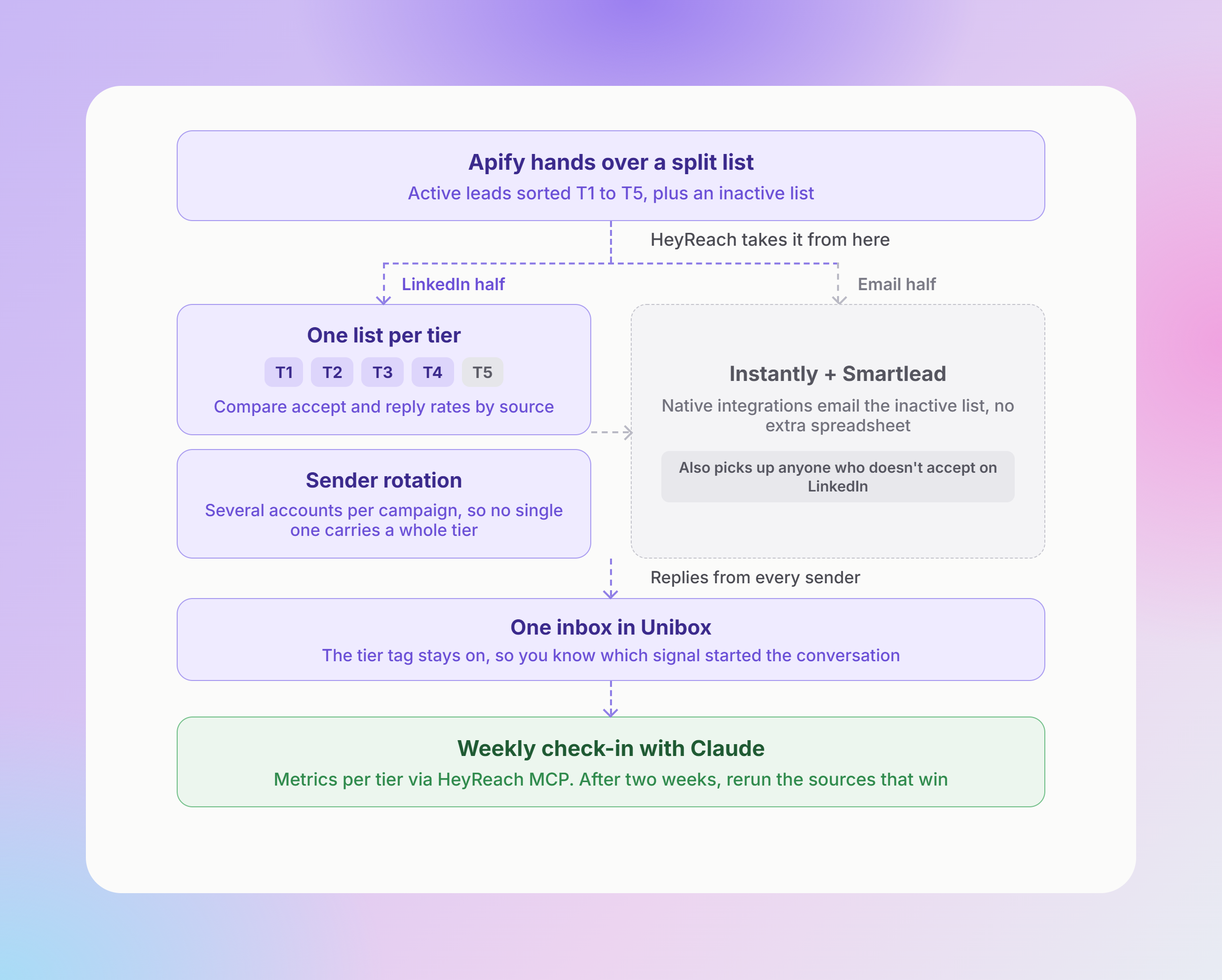
Apify's job ends when the list is split; from there, HeyReach runs the LinkedIn half and keeps the email half connected.
- One list per tier: Put T1 to T5 in separate lead lists, or tag each lead with its tier, so you can compare accept and response rates by source. After two weeks you'll know which sources to run again.
- Sender rotation: Assign several sender accounts to each campaign and HeyReach rotates between them, so no single account carries a whole tier. More on pacing in our LinkedIn outreach strategy guide.
- The email half, without another spreadsheet: HeyReach's native Instantly and Smartlead integrations send the inactive list by email, and pick up anyone who doesn't accept on LinkedIn.
- Replies in Unibox: Replies from every sender land in one inbox. Keep the tier tag on each lead, so you know which signal started the conversation. To log replies to your CRM automatically, see handling HeyReach replies with n8n.
- Weekly check-in with Claude: Ask Claude to pull campaign metrics per tier through HeyReach MCP; here's how to monitor campaigns with HeyReach MCP.
Guardrails I never switch off
- Test small, then cap: Every new Actor runs on one post and 10–20 rows first, and the row count gets checked against what LinkedIn shows. Claude shows the cost estimate and asks before anything over $2. Every real run gets a max-items limit.
- Zero results means the run failed: A post with a reaction count of 200 that returns 0 rows is a broken run. Retry smaller.
- Filter before you spend: Job titles are already in the reaction data, so filter on them first and run the activity check after. Some Actors accept a title filter and ignore it, so check the output.
- Never give an Actor your LinkedIn login: Use Actors that don't ask for your session cookie. Your sender accounts are worth more than any list.
Metrics to watch weekly
- Accept and positive reply rate per tier: This tells you which sources to run again.
- Active rate per list: So you know how much of each source ends up in email.
- Apify spend per accepted connection.
Your first run, this week
- Pick 5 posts from the last 7 days: 2 of yours, 2 from creators your buyers follow, 1 from a competitor.
- Install the skill (or paste the main prompt from the playbook) and ask Claude to pull the engagers, tier them and run the activity check.
- Upload the active T1 and T2 people to HeyReach as separate lists. Send the inactive ones to email.
- After two weeks, compare accept and reply rates per tier, and share your numbers in the HeyReach community.
Trigify told you who engaged. This setup tells you who fits, who's active, and sends them: signal-based selling, end to end. Grab the skill, prompts and Actor inputs in the free playbook, and start on Apify here.

Try it for free
Frequently Asked Questions
What is signal-based prospecting?
Signal-based prospecting is finding prospects through what they do, not only who they are. Instead of pulling every head of sales in a region, you start from buying signals: someone engaging with a post about your problem, a company hiring SDRs, a new sales leader. Then you check ICP fit. Signal-based selling applies the same idea to the conversation itself.
What are buying signals in sales?
Actions that suggest a company may be ready to buy. Common examples are social engagement, like commenting on a post about the problem you solve, a hiring surge for sales roles, a funding round, a leadership change, or first-party signals like a pricing page visit or a demo request. The strongest buyer intent comes from stacking signals. One is interesting, and three means reach out today.
How does signal-based selling differ from traditional prospecting?
Traditional prospecting starts with a static list and sends everyone the same sequence. Signal-based selling starts with a trigger event and times the message to it, so the opener has a real reason. Lead scoring ranks people by fit and past activity, while signals show who's in a buying window right now, so the two work best together.
Do I need a separate intent-data tool?
Not for the signals in this playbook. LinkedIn engagement, hiring and job changes come from public LinkedIn data through Apify, at a few dollars per run. Third-party signals from intent data tools like Bombora or 6sense track research across the web and helps with accounts that aren't active on LinkedIn, but intent data is an add-on, not a starting point.
What tools do I need for signal-based outbound?
Signal-based outbound needs three parts: a signal source, a way to qualify, and a sender. In this playbook that's Apify to collect the signals, Claude to check ICP fit and activity, and HeyReach to send on LinkedIn, with Instantly or Smartlead for email. Teams that enrich in Clay can add it between the signal and the send.
