How to turn closed-lost deals into pipeline with a HubSpot + HeyReach re-engagement workflow
Published:
August 4, 2026
Every sales team has a graveyard of closed-lost deals sitting quietly in HubSpot. Marked, forgotten, and rarely revisited unless a rep happens to remember a name. That's a shame, because most of those "no's" were never really about your product. They were about timing, budget, or a stakeholder who wasn't ready yet.
You know what’s a closed-lost deal from six months ago? A warm lead with a known objection, a documented reason for saying no, and — if you build the right workflow — a built-in trigger for exactly when to reach back out.
This guide walks through how to build a timed, loss-reason-aware re-engagement system that connects your HubSpot deal data to automated outreach strategies in HeyReach, so old opportunities get a second look without anyone on your team having to remember to check.
The wrong direction: A deal closes lost, gets tagged, and disappears. Maybe someone remembers to follow up manually a few months later. Usually, they don't.
The right direction: Every closed-lost deal gets a timer attached the moment it's marked lost, and a message built specifically around why it was lost in the first place.
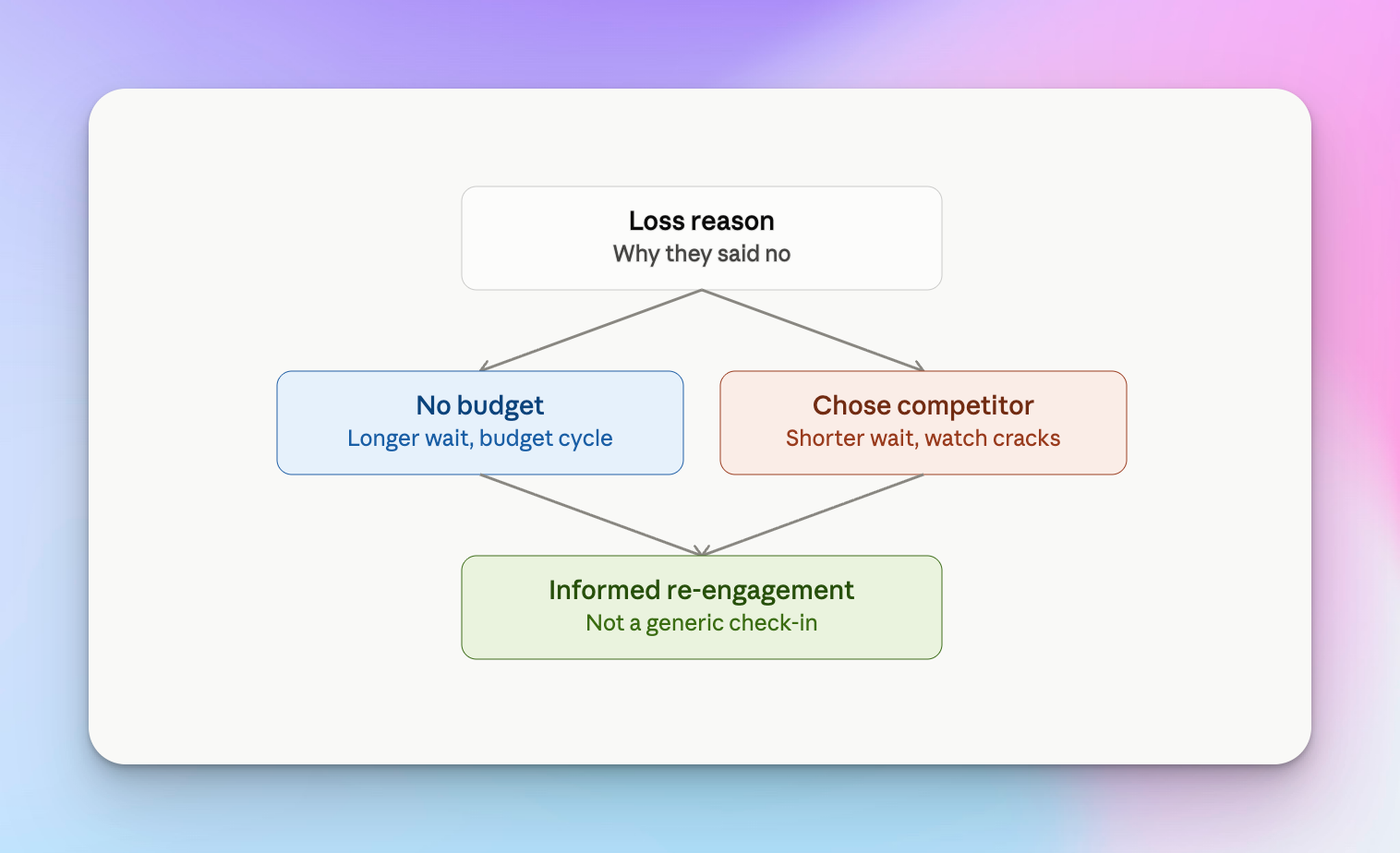
The logic: "When" and "why" matter more than a generic check-in. A deal lost to "no budget" needs a different re-engagement window and message than one lost to "chose a competitor." Treating every closed-lost deal the same way is why most re-engagement attempts get ignored.
Why closed-lost deals deserve a second shot
The budget cycle reset. Deals lost because of budget constraints often become viable again once a new quarter or fiscal year starts. The need didn't disappear, the money just wasn't there yet.
The timing problem. A lot of losses aren't about fit at all. They're about a reorg, a hiring freeze, or a competing priority that had nothing to do with your product.
The champion change. A new stakeholder joins, and the objection that killed the deal may no longer apply, or may not even be known to the new decision-maker. Watching for role changes at target accounts is the same trigger-based outreach logic that applies to any new-hire signal, just pointed at accounts you've already spoken to.
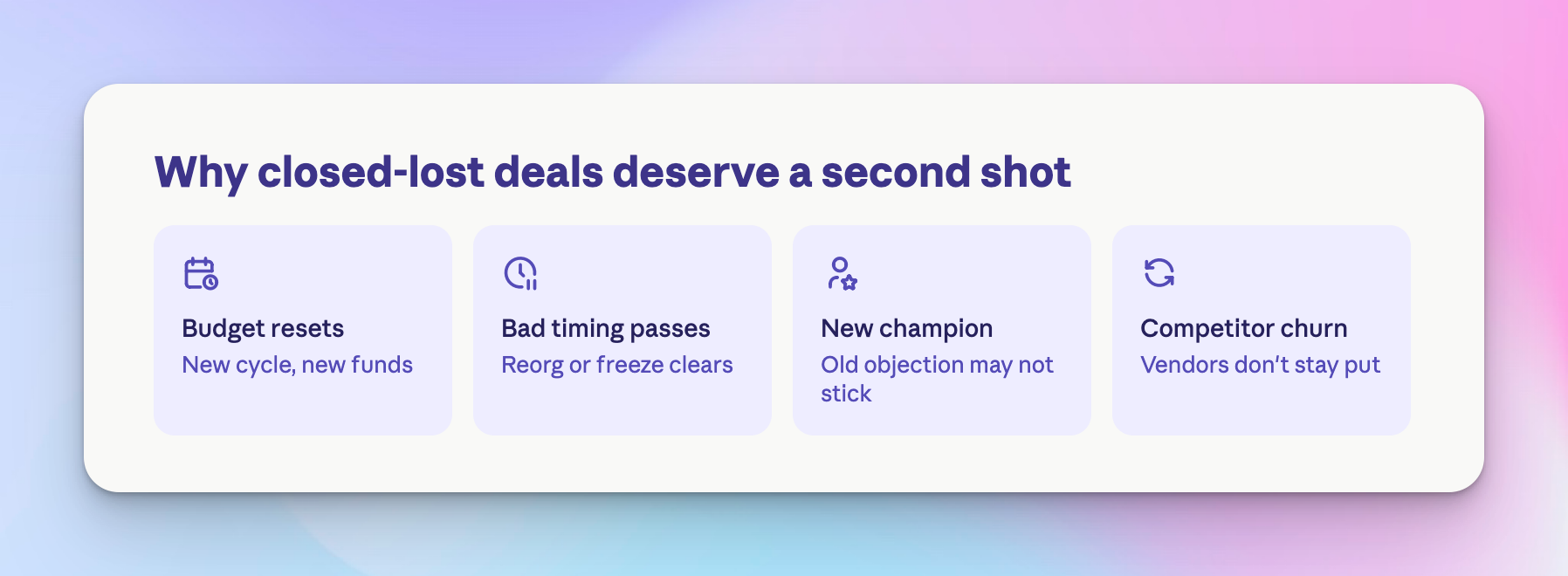
The competitor churn. Prospects who chose a competitor aren't locked in forever. Vendor churn happens constantly in B2B, and a well-timed reminder puts you back in the conversation when they're evaluating alternatives.
The compounding cost of silence. In HeyReach, we did research on re-engagement campaigns and found a 67% reply rate on a simple, well-timed outreach sequence to previously lost contacts, far higher than typical cold outbound. That gap exists because trust and context already exist, the same first-party context you'd look for when hunting high-intent leads inside your existing campaign data. Every re-engaged deal is cheaper to win back than a brand-new cold one, since the prospect already knows who you are and what you offer.
Setting up the workflow: pulling deals and loss reasons from HubSpot
The whole system depends on clean input data, so this step matters more than any automation you build downstream.
- Segmenting by loss reason. Not every closed-lost deal should get the same treatment. A "budget" loss and a "chose competitor" loss need entirely different messaging and entirely different timing.
- Cleaning the data. Loss reason fields in HubSpot are often left blank or filled in inconsistently by reps in a hurry to close out a deal. Standardize these dropdown values across your team before building any automation on top of them, the same way you'd clean any list before running it through customer segmentation logic.
- Building the list. Filter by deal stage (closed lost), close date, and loss reason property inside HubSpot to create your source list. This becomes the input for your timed trigger, and it's worth cross-checking that list against any current buying intent signals, since a contact who's already showing renewed interest should jump the queue ahead of one who's only there because a timer expired. That kind of lead prioritization keeps the highest-intent accounts from sitting behind older, cooler ones.
The timed trigger: building your re-engagement window
Why 90 days. A 90-day window works well as a default because it roughly aligns with a quarter, giving budget cycles and internal priorities time to shift. But the right window depends on your sales cycle length and deal size.
Different timers for different reasons. "No budget" might warrant a longer wait, closer to a new fiscal year. "Bad timing" or "not the right stakeholder" can often be re-engaged sooner, sometimes within 60 days.
Automating the trigger. Set up a HubSpot workflow that auto-enrolls a contact into a re-engagement list the moment their loss-reason timer expires, so no one has to manually pull a list every quarter. Layering in fresh buyer intent signals, like a new funding round or a tech stack change, alongside the timer helps you catch deals that are ready earlier than the default window. This is easier when the underlying data is kept current through automated data enrichment rather than a static export.
Execute at scale: HubSpot + HeyReach handoff
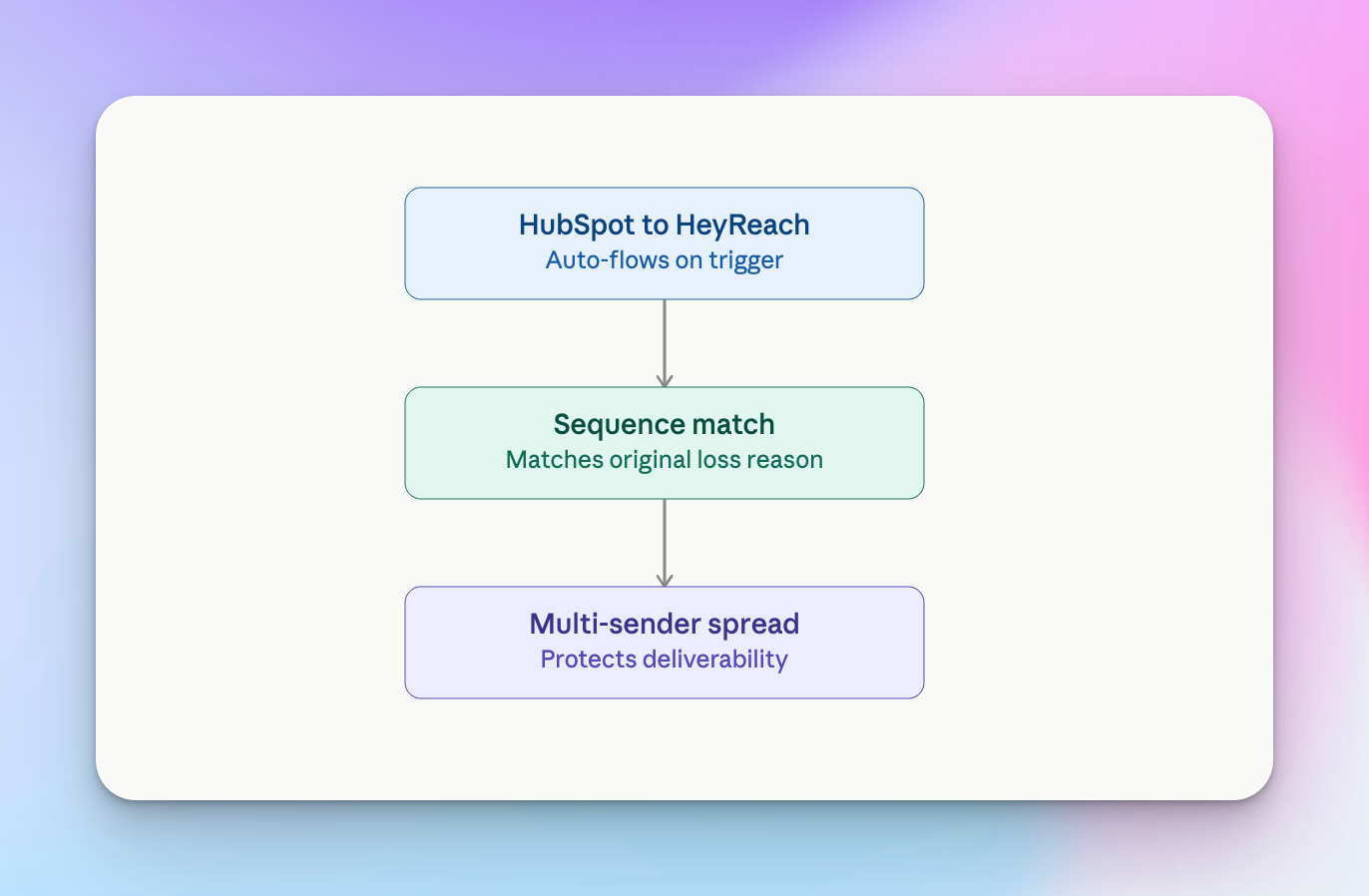
- Step 1: The integration. HubSpot connects natively to HeyReach, and once a contact hits their re-engagement trigger, they can flow automatically into a HeyReach LinkedIn sequence without anyone touching a spreadsheet. Teams that want more custom logic in the handoff often route this through n8n, which gives you conditional branching based on loss reason before the contact ever reaches a sender account.
- Step 2: The sequence match. Route each contact into the specific LinkedIn sequence built for their original loss reason, not a single generic "checking in" sequence for everyone.
- Step 3: Multi-sender distribution. Spread re-engagement volume across multiple sender accounts to protect deliverability, the same automated LinkedIn messaging safety principles that apply to any high-volume outreach.
The re-engagement message blueprint
Template vs. dynamic variable. Skip the generic "just checking in" opener. It reads as lazy because it is.
The formula: [the original loss reason] + [what's changed since] + [a low-friction ask].
Example: "Hey [name], last time we spoke budget was the blocker — since it's a new quarter, wanted to check if this is worth revisiting?"
This mirrors the same principle behind strong outbound ICP signals messaging: the trigger event does most of the persuasive work, so the message just needs to acknowledge it and make the next step easy.
Managing replies: the Unibox advantage
The good problem. Re-engaged leads tend to reply faster than cold outbound, since there's already familiarity and prior context to draw on.
Taming the chaos. Use the HeyReach unified inbox to manage replies across multiple sequences without losing track of which loss reason triggered each conversation. This matters even more once you're running customer segmentation at scale across several sender accounts.
CRM sync. Push "re-engaged" leads back into HubSpot with an updated deal stage as soon as a positive reply comes in. Teams running this at scale often automate the sync itself, capturing every reply and updating HubSpot with sentiment context using an n8n workflow instead of relying on reps to update fields manually.
Precision – that’s what you need.
A timed, loss-reason-aware re-engagement workflow beats a generic "checking in" message because it's built on something the old outreach never had: context. You already know why the deal was lost, and you're reaching back out at a moment when that specific reason might no longer apply.
This is also one of the highest-ROI motions a sales team can automate, since the leads are already qualified, already familiar with your brand, and already sitting in your CRM waiting for the right trigger. The only missing piece is a system that remembers to check.

Try it for free
Frequently Asked Questions
What is closed-lost re-engagement?
It's the practice of systematically reaching back out to deals that were marked as lost in your CRM, using the original loss reason and a set time window to determine when and how to reconnect.
When should you re-engage a closed-lost deal?
It depends on the loss reason. Budget-related losses often warrant waiting for a new quarter or fiscal year, while timing or stakeholder-related losses can often be re-engaged within 60 to 90 days.
How do you segment closed-lost deals by loss reason?
Standardize the loss reason property in HubSpot, then filter deals by that field alongside deal stage and close date to build separate lists for each re-engagement sequence.
Can closed-lost re-engagement be fully automated?
Yes. A HubSpot workflow can auto-enroll contacts based on a timed trigger, and hand them off to a HeyReach LinkedIn sequence matched to their original loss reason, with replies synced back to HubSpot automatically.
Does re-engaging closed-lost leads hurt sender reputation on LinkedIn?
Not when it's distributed properly. Spreading re-engagement volume across multiple sender accounts and pacing sends at a natural rate keeps the activity looking normal rather than triggering LinkedIn's spam detection.