Outbound ICP signals: How to spot high-intent leads before your competitors
Published:
May 29, 2026
Updated:
May 29, 2026
For years, outbound targeting looked something like this: “VP of Sales, B2B SaaS company, 50–200 employees.” You’d build the list, load the sequence, and hit send.
Then everyone started doing it. Inboxes got noisier, reply rates dropped, and the “proven ICP” stopped producing conversations.
But the problem was never the ICP. It was the logic: targeting based on who someone is, with no regard for whether right now is the right moment to reach them.
A VP of Sales at a 100-person B2B SaaS company is a decent ICP match on any given Tuesday. A VP of Sales who just stepped into the role 60 days ago, whose company is actively hiring SDRs, and who just posted about scaling outbound…
That’s a buying signal with a timestamp on it.
Let me show you five outbound ICP signals I’ve seen convert consistently, how I use Clay, Midbound, and HubSpot to catch and score them, and the exact HeyReach workflow that turns those signals into safe, personalized, automated conversations at scale.
The big 5: High-intent signals you should be tracking
Not every trigger is worth your sender capacity. These five are the ones that actually correlate with buying intent — the prospect is already in problem-solving mode, which is exactly when reply rates go up and cold messages turn into pipeline.
1. The career move: New hires and promotions
When someone steps into a new role, they have roughly 90 days to prove themselves. That means auditing what’s broken, identifying quick wins, and making purchasing decisions their predecessor either delayed or got wrong. New budget, fresh mandate, high urgency.
Prospects at the 3–6 month mark have a clear picture of what’s not working. By month 7–10, they’ve earned enough internal credibility to actually pull the trigger on new tools or processes.
And that’s your window.
What makes this signal powerful isn’t just the role change itself, it’s what surrounds it. A new VP of Sales is interesting. A new VP of Sales that’s simultaneously hiring SDRs at a company that has no outreach tool in their stack (flagged via Clay)?
That’s a sequence worth building around.
You can track career moves and leadership changes via LinkedIn job change alerts by going to your Settings > Notifications > Network Catch Up Updates > Job Changes.

You can also use Sales Navigator’s “Changed jobs” filter below the “Recent updates” section:

Alternatively, use Clay’s enrichment layer to automate detection at scale across your entire ICP list.
2. The tech stack shift
When a company adopts a new tool, especially a competitor’s product or something directly complementary to yours, they’re signaling two things:
- a problem they’re actively trying to solve
- budget allocated to solve it.
A company that just added HubSpot to their stack is probably building out a proper revenue operation for the first time. A company that just dropped a competing outreach tool from their stack is actively reconsidering their options — which means the conversation is already happening internally, with or without you. So you better act!
This is where Clay earns its place in your stack.
You can feed a LinkedIn URL or company domain into a Clay table and pull real-time technographic data: what tools they’re running, what they recently added or dropped, and when the change happened.
From there, Clay can write custom icebreakers based on that specific install (but also on signals like funding rounds or new hires), so your opening line isn’t “I noticed you work at [Company]” but “Looks like you recently added [Tool] — curious how you’re thinking about [relevant problem it creates or solves].”
The key variable to capture here is recency. A tech stack change from 8 months ago is irrelevant; the one from the last 30 days is a live signal, and that’s what you’re filtering for.
3. The growth trigger
Funding rounds and aggressive department hiring are two of the loudest signals a company can send without saying a word. Both indicate the same underlying reality: they’ve decided to scale, and they need the right tools and processes in place before the growth outpaces them.
A Series B announcement means new headcount targets, new tooling budgets, and pressure to show growth.
A spike in SDR job postings means the outbound motion is being built or rebuilt. This is exactly when decisions get made about the tools, processes, and infrastructure that motion will run on.
The specificity of the hiring signal matters here. “They’re hiring” is noise. “They posted 4 SDR roles and a RevOps manager in the last 3 weeks” is a pattern — one that tells you exactly where the pain is and who owns it.
You can track funding events via Clay’s Crunchbase integration or direct enrichment from tools like Harmonic. For hiring signals, Clay can pull live job posting data and flag companies that match specific role criteria within your ICP, so you’re not manually checking career pages.
4. The content signal
When someone engages with a post from a recognized voice in your niche, they’re basically self-selecting into a relevant conversation. That engagement is deliberate — the topic is clearly on their radar.
The play here is to track engagement on specific “authority” posts in your space: thought leaders your target accounts follow, competitor content, or your own company’s posts. Anyone engaging with content about SDR scaling, outbound automation, or LinkedIn sequencing is, by definition, thinking about those problems.
Tools like Trigify or PhantomBuster can scrape post engagement and surface a list of LinkedIn profiles who interacted with specific content.
Feed that into Clay for ICP filtering and enrichment, and you’ve turned a LinkedIn post’s comment section into a warm lead list.
The message practically writes itself: you already know what they’re thinking about.
↪️ Considering PhantomBuster? Check out PhantomBuster Review 2026: Features, Pros & Cons, Alternatives.
↪️F or smarter LinkedIn outreach, here’s how to connect HeyReach and Trifigy — this setup helped Steven Brady generate $49,000 in 8 weeks.
5. The de-anonymized visitor
Someone from your ICP just spent 4 minutes on your pricing page. They didn’t fill out a form or book a demo. But they were there, in your website visits, and that intent doesn’t disappear just because they closed the tab.
Midbound de-anonymizes website visitors and maps them to LinkedIn profiles, which means you can see not just which company visited, but which person at that company was browsing.
When that person matches your ICP, you’re looking at the warmest possible outbound signal: someone who already knows you exist and is actively evaluating you.
The approach here isn’t to call them out directly. “I saw you on our pricing page” tends to feel invasive. Instead, use the signal to inform timing and tone.
They’ve done the research. Your opening line can skip the awareness-building and go straight to the relevant question or offer. The signal gives you the why now; the relevant message just needs to meet them where they are.
Route these leads into a dedicated high-priority sequence in HeyReach. A pricing page visit outranks almost every other signal in terms of commercial intent — treat it that way.
Turn raw signals into clean lists
Catching signals is the easy part.
What matters is how you filter, score, and structure that raw data before it ever reaches a sender.
A messy list wastes outreach capacity, burns LinkedIn accounts, pollutes your CRM, and makes it impossible to know which signals are actually driving replies.
Clean inputs are what make the execution layer work.
Filtering: not every signal is a green light
A signal gets your attention. Your ICP criteria decide if it deserves your sending capacity.
Here’s a practical scoring framework to work from.
Tier 1 — High intent (act immediately):
- Pricing page visit
- Bottom-funnel engagement
- Tech stack gap detected + new decision-makers in place
Add to a high-priority sequence in HeyReach with your strongest sender accounts.
Tier 2 — Medium intent (validate first):
- New role in the last 90 days + hiring SDRs
- Recent funding round
- Competitor tool dropped
Solid; confirm with another signal before you route them.
Tier 3 — Low intent (monitor):
- Generic LinkedIn activity
- Old funding rounds (6+ months)
- No accompanying signals
Don’t act yet. Revisit when a stronger signal fires for the same account.
👉 Tip: Always deduplicate before outreach.
Routing the same person into two sequences simultaneously, even from different signals, is how accounts get flagged and relationships get damaged. (For a deeper look at how to build the deduplication and validation logic that sits upstream of your execution layer, the signal-based outbound orchestration guide covers this in detail.)
Using Clay as your AI intern
Time for some AI-powered magic.
Clay is where raw signal data becomes personalized outreach. Think of it as the enrichment layer that sits between your signal sources and your HeyReach outbound campaigns. Its job is to take a LinkedIn URL or a company domain and return everything you need to write a relevant, specific first line.
Here’s what a basic workflow looks like in practice.
Step 1: Feed the signal into Clay
Start with a LinkedIn URL or company domain — this is your seed data.
Clay will use this to pull:
- Firmographic data
- Technographic data
- Recent hiring activity
- Funding history
- News mentions.
If you’re tracking a specific signal like a 10-K filing mention or a recent executive quote in the press, Clay’s AI column can run a web search against that company and surface the exact reference you need.
For example: you want to reach out to a CFO whose company just filed a 10-K that mentions “investment in sales infrastructure.”
Feed the company domain into Clay, add an AI column with the prompt “Find any recent 10-K or earnings call mentions related to sales investment or go-to-market expansion,” and Clay returns the specific quote or reference.
That becomes your icebreaker anchor.
Step 2: Write the icebreaker inside Clay
Once the signal data is returned, add another AI column to generate the opening line. Your prompt should reference the specific signal and map it to a relevant pain point. For example:
“Write a one-sentence LinkedIn icebreaker for a VP of Sales who just joined [Company] 60 days ago and whose company has no outreach automation tool in their stack. Reference the new role and the tech gap. Keep it under 20 words. No generic phrases.”
Clay outputs a custom icebreaker for every row in your list — personalized, signal-specific, and ready to drop into a HeyReach variable field.
Step 3: Validate before you export
Before the list leaves Clay, run a completeness check. Flag any row missing a LinkedIn URL, first name, or signal value.
Incomplete records don’t get routed; they should go into a manual review bucket. Sending a “personalized” message that references a blank variable field is worse than sending a generic one.
Trust me, you want to avoid it.
The data prep: structuring your CSV for HeyReach
By the time your list exits Clay, it needs to be structured in a way that HeyReach can actually use it. Basically, it shouldn’t be just a contact list, but a signal-aware dataset that drives dynamic personalization inside your sequences.
The non-negotiable column is the signal column. Every lead in your CSV should have a clearly labeled field that identifies which trigger sourced them:
- pricing_page_visit
- new_role_90_days
- funding_series_b
- tech_gap_detected
- content_engaged
- content_engaged_competitor_post
- content_engaged_outbound_post
- content_engaged_thought_leader
- The tag should capture what they engaged with, not just that they engaged. That’s what gives your sequence enough context to personalize the opening line without guessing.
This does two things:
- It lets HeyReach use the signal as a dynamic variable inside your message templates
- It lets you track reply rates by signal type after the campaign runs.
Your CSV structure should look something like this:
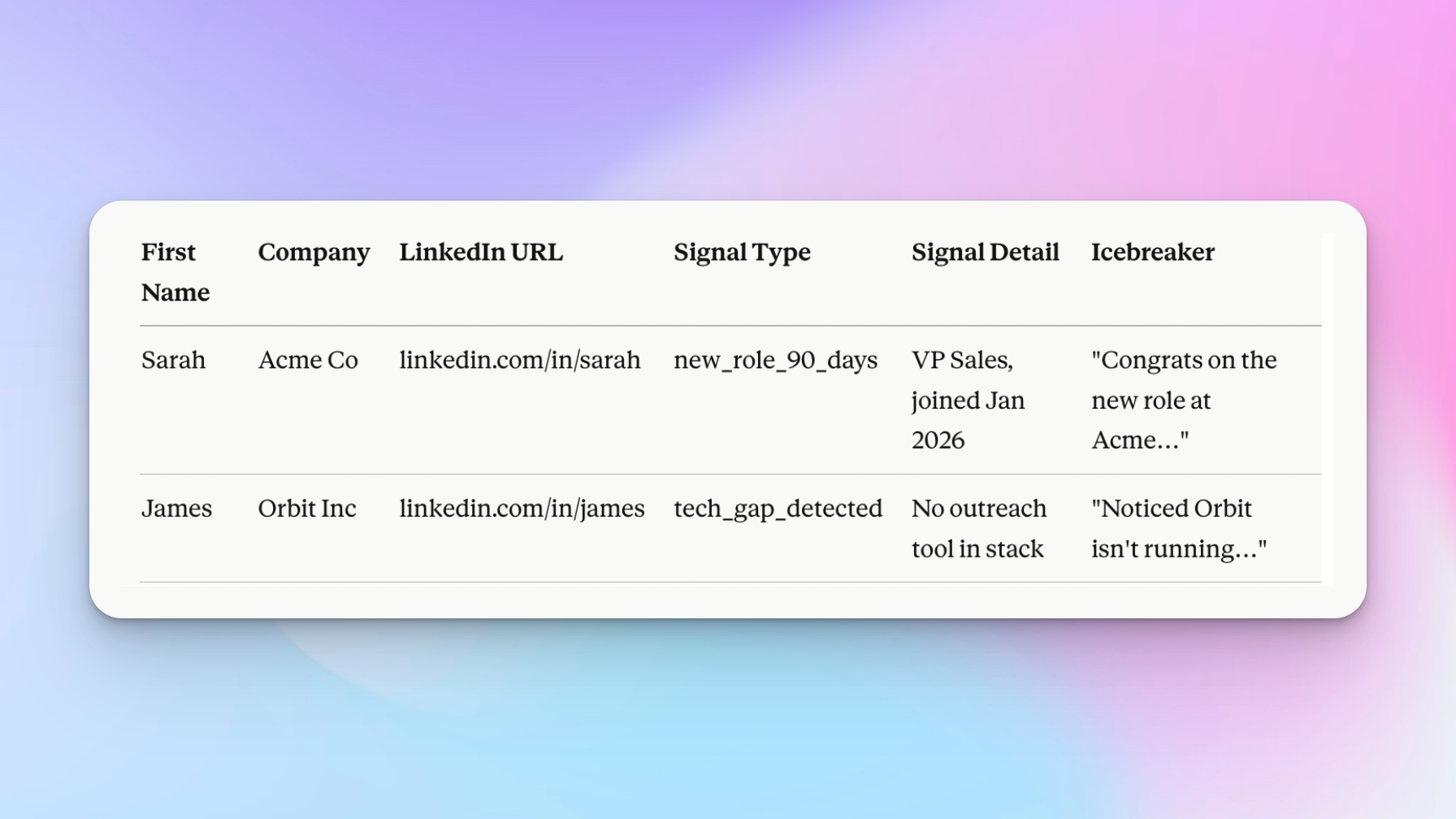
The signal_detail column gives your icebreaker context. The icebreaker column maps directly to a {icebreaker} placeholder in your HeyReach sequence, so every message opens with a line that’s specific to that lead’s trigger instead of a recycled opener.
👉 Pay attention: Keep the signal column values consistent and lowercase. Naming drift (New Role vs new_role vs NewRole90) breaks variable mapping and makes campaign-level reporting impossible to read.
💡 If your outreach spans multiple ICPs or lifecycle stages, the customer segmentation automation guide takes this routing logic further — mapping persona × signal combinations to dedicated campaigns without manual intervention.
Execute at scale: HeyReach + SmartReach AI workflow
If Clay is your intelligence layer (finding signals, enriching data, writing icebreakers) and HeyReach is your execution layer (running sequences, rotating senders, managing replies), then SmartReach AI is the personalization layer that sits between them.
It takes your enriched lead data and generates dynamic, signal-aware follow-up messages for every contact in your list, so your sequences start strong and stay relevant through every touch.
Together, the three tools cover the full workflow.

Step 1: The integration
Integrating HeyReach and SmartReach AI takes about two minutes.
In your SmartReach AI account, navigate to Settings in the left-hand menu.

You’ll need to paste your HeyReach API key here — find it inside HeyReach under Integrations > HeyReach API.
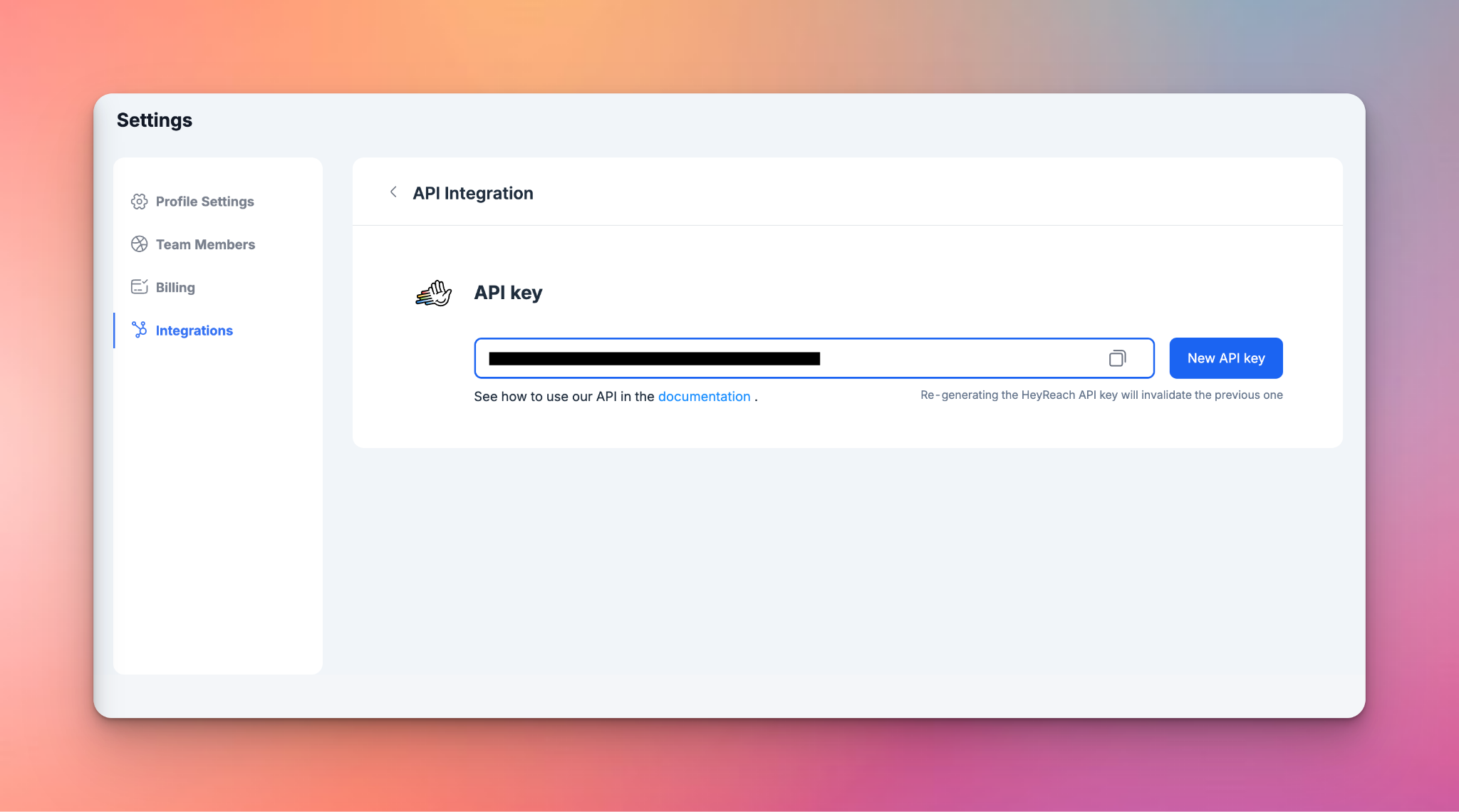
Once linked, SmartReach AI can pull your enriched lead lists directly from HeyReach, generate personalized message variants based on your signal data, and push those variants back as dynamic content inside your active sequences without manual exporting or copy-pasting between platforms.
Step 2: The relay team strategy
A single LinkedIn sender account has a hard ceiling. Since 2023, LinkedIn caps connection requests at 20–40 per day per account, and that limit is non-negotiable.
If you’re working a list of 500 signal-based leads, a single sender will take weeks to get through it. If you push daily limits to speed things up, that’s exactly how you’ll get flagged.
The answer is to distribute the load across multiple senders — each running at a safe, human pace, collectively covering far more ground.
Here’s how to set it up in HeyReach with 500 leads across 5 sender accounts.
Navigate to LinkedIn Accounts in the sidebar. Each connected account gets its own sending limits — configure these individually under Configure Limits.

Set daily caps for each sender for connection requests, messages, and any other actions in your sequence:

When building your campaign, after you upload the lead list and build out the sequence, HeyReach will let you select multiple LinkedIn accounts as senders:

Click to select each account, in this example five, and HeyReach will auto-rotate through them as leads move through the sequence, distributing the volume proportionally so no single profile carries a disproportionate share of the load.
👉 Bear in mind how limits are shared: If a sender account is active in more than one campaign simultaneously, its daily limits are split proportionally across all active campaigns. A sender with a 20 connection request limit running in 2 campaigns delivers roughly 10 requests per campaign per day. Factor this in when deciding how many senders to assign — more campaigns per sender means fewer daily actions per campaign.
Once your 5 senders are live and leads start responding, you don’t need to log in and out of five LinkedIn accounts to keep up with the dynamic.
Every reply from every sender lands in HeyReach’s Unibox, a centralized inbox where you can manage all conversations, assign owners, and respond without losing context on which sender the conversation started from.

The relay team runs itself. Your job is to set the limits, assign the senders, and let HeyReach handle the rotation.
Step 3: AI-driven personalization
This is where SmartReach AI saves the day.
Once your leads are distributed across sender accounts, SmartReach AI generates the follow-up content dynamically based on the signal data you captured in Clay and structured in your CSV.
Inside your HeyReach sequence, instead of writing static follow-up messages, you add dynamic placeholders: {follow_up_1}, {follow_up_2}, and so on for each subsequent touch.

SmartReach AI reads the signal column for each lead and generates a follow-up that’s specific to their trigger — a career move gets a different message than a pricing page visit, even if they’re in the same sequence.
What you feed SmartReach AI to make this work:
- Your elevator pitch: what you do and who it’s for
- The pain points your ICP is dealing with at each signal stage
- Social proof: relevant case studies or results by segment
- Your strategic differentiators: what makes the offer relevant right now
SmartReach AI combines these inputs with the lead’s signal data to generate follow-ups that feel written for that specific person, at that specific moment — not recycled copy with a {firstName} swap.
❗Ebru Abaz, Head of Experience here at HeyReach, explains in full detail how to connect SmartReach AI with HeyReach, build out a prompt engine in SmartReach, and push the campaign live.
💡 The gatekeeper logic: what happens before any of this fires
Before a lead reaches a sender, your stack needs to answer four questions in order.
- Validate: Is the data usable? Missing job titles, malformed LinkedIn URLs, or a company name like “Google, Inc.” instead of “Google” will break your dynamic variables — run a completeness check before import, and route anything incomplete to a manual review bucket. The buyer intent signals guide covers the full validation SOP if you want to go deeper.
- Dedupe: Is this person already in your pipeline? Check against active HeyReach sequences and your HubSpot or Salesforce CRM records.
- Prioritize: If multiple signals fired for the same contact, commercial intent decides the intro line. Build this hierarchy into your routing logic upfront, don’t leave it to in-the-moment judgment.
- Route: Which sender gets the lead? Match by territory first, load second — HeyReach’s auto-rotation handles the balancing, but territory assignment needs to be defined in your routing matrix before the campaign goes live.
For the complete orchestration architecture behind these four checks, the signal-based outbound guide covers it end to end.
The signal-message blueprint: A catchy hook
When you know why you’re reaching out today, the message almost writes itself. The signal is the context and your job is to connect it to a problem they actually have and make the next step feel effortless.
The formula: [The Signal] + [The Relevant Problem] + [The Low-friction Ask]
Every high-converting opening line follows this structure, whether it’s one sentence or three. Here’s what each component is doing:
- The signal: the specific trigger that made you reach out today. It proves you did the work and makes the message feel timely rather than random.
- The relevant problem: the logical consequence of that signal. What challenge does this trigger typically create or amplify? This is where you demonstrate you understand their world.
- The low-friction ask: not “can we jump on a 30-minute call?” Something easy to say yes or no to. A question, a curiosity check, a single point of relevance they can react to.
Template vs. dynamic variable
A template says: “I saw you recently joined [Company] as [Title]. I’d love to share how we help [Title]s achieve their goals.”
A dynamic variable says: “Congrats on the new role at [Company], [Name]. Usually when VPs take over a sales org, the first thing on the list is figuring out what the outbound motion actually looks like — curious if that's where your head is at?”
The first uses data as decoration, the second uses data as the reason for the conversation. That’s the line you need to be on the right side of.
In HeyReach, your signal column from the CSV maps directly to a dynamic placeholder in the sequence.
- {icebreaker} pulls the Clay-generated opening line.
- {signal_detail} can reference the specific trigger in a follow-up.
- {follow_up_1} and {follow_up_2} are generated by SmartReach AI based on the same signal data, so the personalization doesn’t just show up in the first message and disappear.
Signal-to-message examples by trigger type
Career move
“Congrats on the new role, [Name]. Usually when VPs take over at [Company], scaling the outbound motion is one of the first things that comes up — curious if that’s on your radar?”
What’s working: it references the signal (new role), names the logical problem (outbound at scale), and asks a yes/no question that takes three seconds to answer.
Tech gap detected
“Noticed [Company] isn’t running an outreach automation tool yet — most sales teams at your stage are either about to evaluate one or already feeling the manual pain. Worth a quick conversation?”
What’s working: the signal is specific (no tool in stack), the problem is implied rather than stated (manual pain at scale), and the ask is frictionless.
Funding trigger
“Saw the Series B announcement, congrats! Usually that kind of growth milestone comes with a hard look at whether the outbound infrastructure can actually keep up. Is that conversation happening internally?”
What’s working: it acknowledges the milestone without being sycophantic, ties it directly to an operational problem, and turns it into a question they’re probably already asking themselves.
Pricing page visit
“[Name], looks like [Company] has been doing some research on the outreach automation side of things. Happy to skip the pitch and just answer whatever specific questions came up — what were you trying to figure out?”
What’s working: it doesn't call out the page visit directly (which feels invasive), implies awareness without stating it, and immediately reduces friction by offering answers instead of asking for time.
👉 One rule that overrides everything: Keep it short. The prospect isn’t reading your message in a focused sit-down — they’re scanning notifications between meetings. If your opening line runs past two sentences, it gets skimmed or skipped.
So: One signal, one problem, and one ask. Everything else is noise.
💡 If you want to go deeper on sequence structure, timing, and how to keep automated LinkedIn messaging feeling human at every step of the funnel, the playbook breaks down the full blueprint — from connection request to close.
For the full framework on when to follow up, when to pause, and when to walk away entirely, the LinkedIn follow-up guide covers the exact decision logic by conversation state.
Managing the influx: The Unibox advantage
Signal-based outreach works — which means the replies come in fast, from multiple senders, across multiple campaigns, all at once.
Who doesn’t want that “problem”?
It will get tricky, though: five LinkedIn inboxes open in five browser tabs, no shared context, and a hot reply sitting unread for 48 hours because nobody knew it was their thread to own.
HeyReach’s Unibox solves this by centralizing every conversation from every sender account into a single inbox. It’s a single place with full context, without tab-switching.
Keeping signal context alive in the inbox
The risk with high-volume signal-based outreach is that by the time a reply comes in, nobody remembers which trigger sourced that lead. Without that context, the reply gets a generic response — and the signal that made this lead worth reaching out to in the first place gets wasted.
Tags are how you prevent that.
Inside the Unibox, every conversation thread has a lead info panel on the right where you can assign, create, and color-code tags directly.

As a reminder, here’s a list of signals to use as tags:
- pricing_page_visit
- new_role_90_days
- funding_series_b
- tech_gap_detected
- content_engaged
These tags carry the signal context through the entire conversation, so anyone who picks up the thread knows exactly why this person is in the pipeline. Talk about neatness!
You can filter the entire Unibox by tag, campaign name, message type, or sender/lead at any point.

It’s useful when you want to pull all signal replies into one view and handle them as a batch, or when you need to identify which signal type is generating the most responses in a given week.
CRM sync: closing the loop on signal-won leads
A reply is a data point. A positive reply from a signal-sourced lead is a data point with commercial context attached — the trigger that opened the conversation, the message that got the response, the sender account that ran it.
All of that belongs in your CRM, not just in a LinkedIn thread.
From any conversation in Unibox, hitting Export to CRM pushes the full lead record (including the complete LinkedIn conversation thread) directly into HubSpot.

The lead’s signal tag travels with it, so when the deal enters your CRM it’s already labeled.
That’s what makes attribution by signal type possible downstream: you can track which triggers are actually generating pipeline, not just replies.
For teams running at scale, this sync can be automated via HeyReach webhooks into HubSpot — firing automatically when a tag changes or a positive reply is detected, without anyone having to manually export anything.
For a deeper look at how to structure your tagging taxonomy, set up Slack alerts for hot replies, and build the full SDR → AE handoff workflow around Unibox, the LinkedIn inbox system guide covers the complete setup.
Precision over pressure
LinkedIn in 2026 is not a volume game. The accounts that survive, and the ones that actually book meetings, treat every sender action as a finite resource, not a tap they can leave running.
Signal-based outbound is what makes precision possible.
Teams use signal-based outbound to optimize outreach performance across key metrics like response rates and conversion rates. Instead of relying on generic industry benchmarks, they measure success by signal type — which triggers actually drive pipeline, not just opens.
When you know why you’re reaching out, every part of the system gets sharper: messages are more relevant so reply rates go up, lists are cleaner so sender accounts stay healthy, and sequences are shorter because you’re not compensating for weak targeting with extra volume.
The stack we walked through:
- Clay for enrichment
- Midbound for warm visitor identification
- SmartReach AI for personalization
- HubSpot for attribution
- HeyReach as the execution layer
gives you exactly that. Each tool has one job and each lead enters the system because something real happened, not because they matched a static filter from two years ago.
The shift is simple: from “who fits my ICP” to “who fits my ICP and something just changed in their world.” That second question is the one that gets replies.

Try it for free
Frequently Asked Questions
What are outbound ICP signals?
Outbound ICP signals are real-time triggers that indicate a prospect who matches your ideal customer profile is likely in an active buying window. Instead of targeting based on static attributes like job title or company size alone, signals add a timing layer — a new hire, a funding round, a tech stack gap, a pricing page visit — that tells you why reaching out today makes more sense than reaching out next month.
How do I find outbound ICP signals for my niche?
Start with two or three signal types that logically connect to the problem your product solves. If you sell outreach tooling, hiring SDRs and tech stack gaps are your strongest signals. If you sell financial software, funding rounds and CFO role changes are more relevant. Clay pulls technographic and hiring data at scale, Midbound surfaces warm website visitors, and LinkedIn job change alerts cover career moves. The key is filtering signals against your ICP criteria first — a signal from a company that doesn’t fit your target profile is just noise.
Can signal-based outbound be fully automated?
The enrichment, routing, personalization, and sequencing layers can all be automated — and should be. Clay handles signal detection and icebreaker generation, SmartReach AI generates dynamic follow-ups, and HeyReach runs the sequences across multiple sender accounts with zero manual intervention. What shouldn’t be fully automated is judgment: which signals belong in your routing matrix, how you prioritize conflicts, and when to pause a campaign because reply rates are dropping. The system handles execution. You handle the logic that runs it.
How many outbound ICP signals should I track at once?
Two to three per campaign, maximum. More signals don’t improve results — they create routing conflicts, dilute your messaging, and make it impossible to know which trigger is actually driving replies. Start with your highest-converting signal type, prove the workflow end-to-end, then add a second. Once your routing matrix is clean and your attribution is tracking correctly, layering in additional signals is straightforward.
Is it safe to use automation for signal-based outreach?
Yes — when the execution layer is built for it. Cloud-based tools like HeyReach enforce hard daily sending limits per account, rotate automatically across multiple senders, and apply global suppression lists to prevent the same prospect from receiving outreach from two senders simultaneously. The safety comes from pacing and governance, not from sending less. A well-structured signal-based campaign running across five sender accounts at safe daily limits will always outperform a single account being pushed to its ceiling.