How to turn website visitors into leads using RB2B and HeyReach
Published:
April 28, 2026
Updated:
April 30, 2026
Most companies obsess over driving traffic, then do nothing with it. People land on your website, scroll around, and disappear — and you have zero visibility into who they were or what they wanted.
I was on the same boat for a while. The shift happened when I built a system that turns website visitors into leads automatically. Without a form fill, without a sales rep on standby, and without me manually checking dashboards all day.
Let me take you through exactly how I built it using RB2B, HeyReach, n8n, Instantly, and FullEnrich — and how you can replicate it for your business.
What RB2B does and why it matters for turning website visitors into leads
RB2B belongs to a category of tools that place a tracking script on your website to identify who is visiting. Once it detects a visitor, it attempts to match that session to a real person — pulling in their name, company, LinkedIn profile, and contact information where available. Inside the platform, you end up with a running list of identified visitors along with their visitor data.
The question that immediately follows is: now that I have this information, what do I do with it?
The obvious answer is outreach — but the less obvious part is doing it in a structured, scalable, and personalized way.
RB2B also has a visitor identification feature built around intent layering. You define criteria — job title, company size, seniority — and any visitor who matches gets tagged as a hot lead. Separately, you flag specific high-value pages on your site as hot pages: your pricing page, a product demo page, case studies, or any landing pages designed to capture serious buyers.
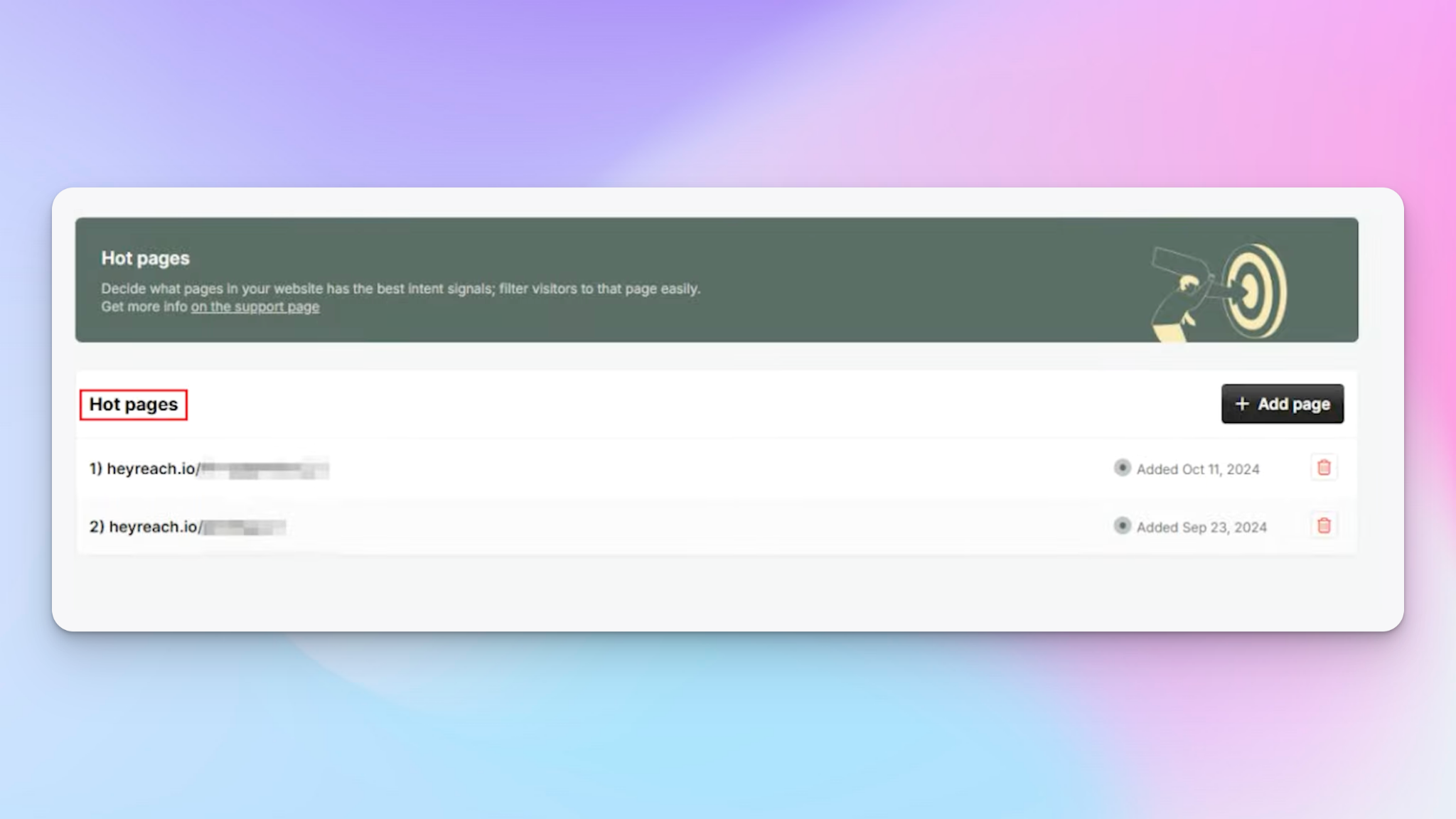
A visitor can be a hot lead only, a hot page visitor only, or both — and that distinction drives the entire routing logic in the workflow. What those tags mean in practice:
- Hot lead only: Matches your ideal customer profile but visited a low-intent page like a blog post or the homepage.
- Hot page only: Visited a high-intent page like pricing or a demo request but doesn't fully match your target audience criteria.
- Hot lead + hot page: Matches your customer profile AND visited a high-intent page — the highest-priority segment for your sales team.
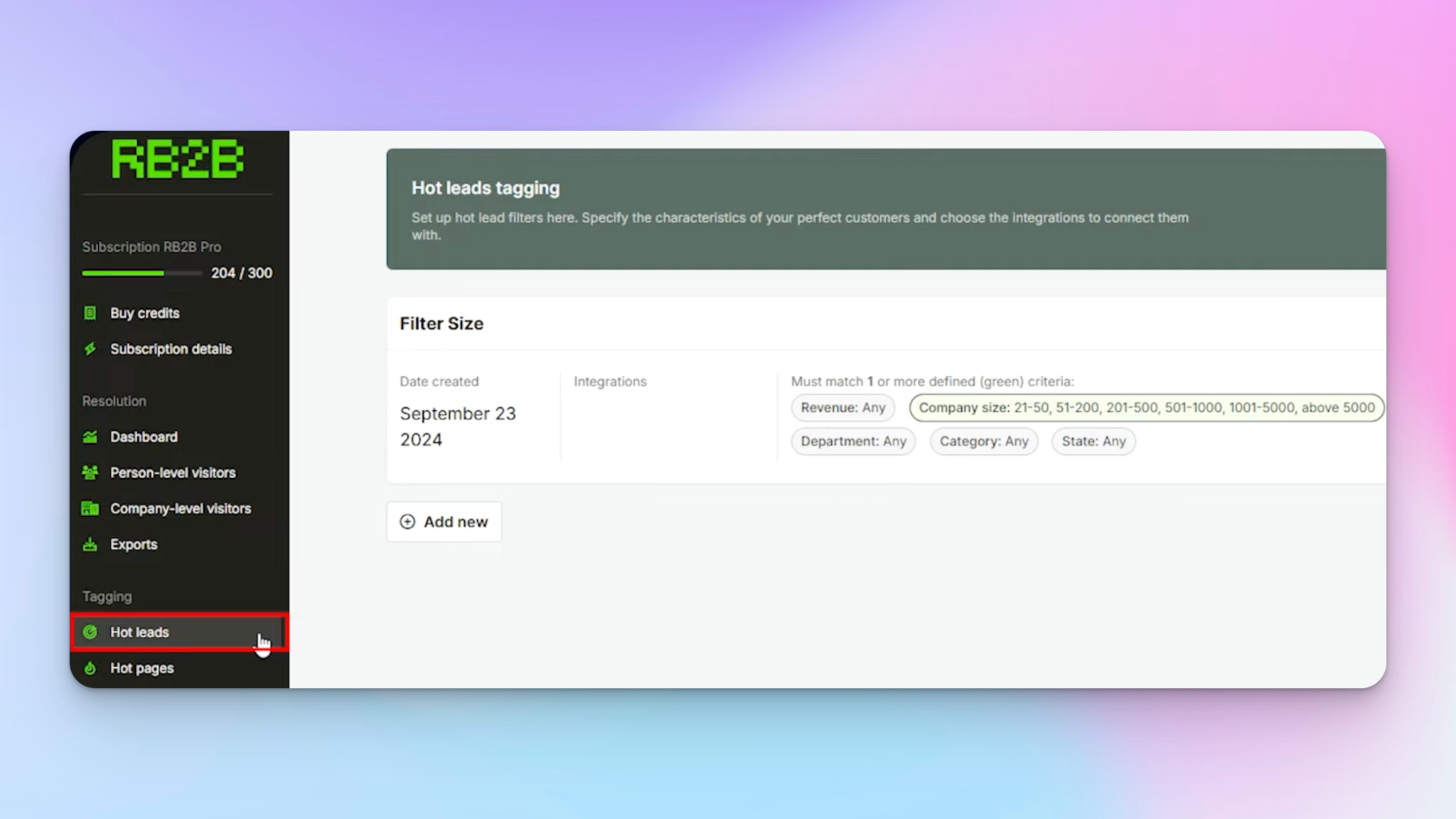
LinkedIn-only outreach: The direct RB2B and HeyReach integration
RB2B has a native integration with HeyReach, which means you can push identified visitors directly into a LinkedIn outreach campaign without any middleware. It's fast to set up and works well if your goal is simple — one campaign, one message type, everyone goes in.
But the native integration sends everyone into the same single campaign. It doesn't account for intent. A person who visited your blog once and a person who hit your pricing page three times shouldn't receive the same opening message. That's where a slightly more sophisticated workflow pays off.
Using LinkedIn automation with n8n, I set up a webhook that listens for events from RB2B in real time. A switch node then routes visitors based on their tags, each mapping to a different HeyReach campaign with messaging calibrated to that intent level.
To make testing manageable, I pinned a real webhook payload from RB2B inside n8n — so I can adjust tag values, swap email addresses, and simulate different visitor types in seconds without waiting for live traffic.
Adding email to the mix: Building a true multi-channel sequence
LinkedIn alone is powerful, but multichannel outbound lead generation consistently outperforms single-channel approaches. When someone sees you both on LinkedIn and in their inbox, the trust signal compounds. That's why I extended the workflow to include email campaigns via Instantly, which has a native two-way integration with HeyReach — making it straightforward to coordinate LinkedIn and email sequences without duplication.
The logic here is built around the email address RB2B provides. There are three possible scenarios:
- Verified business email: RB2B has confirmed it's deliverable. Route directly into an Instantly email campaign using the same tag-based switch logic.

- Gmail address: Skip it. That person didn't opt in with their personal email. Reaching out to someone's private inbox about a B2B offer damages trust — route them to LinkedIn instead.
- No email at all: Attempt enrichment via FullEnrich before deciding on channel. More on this below.
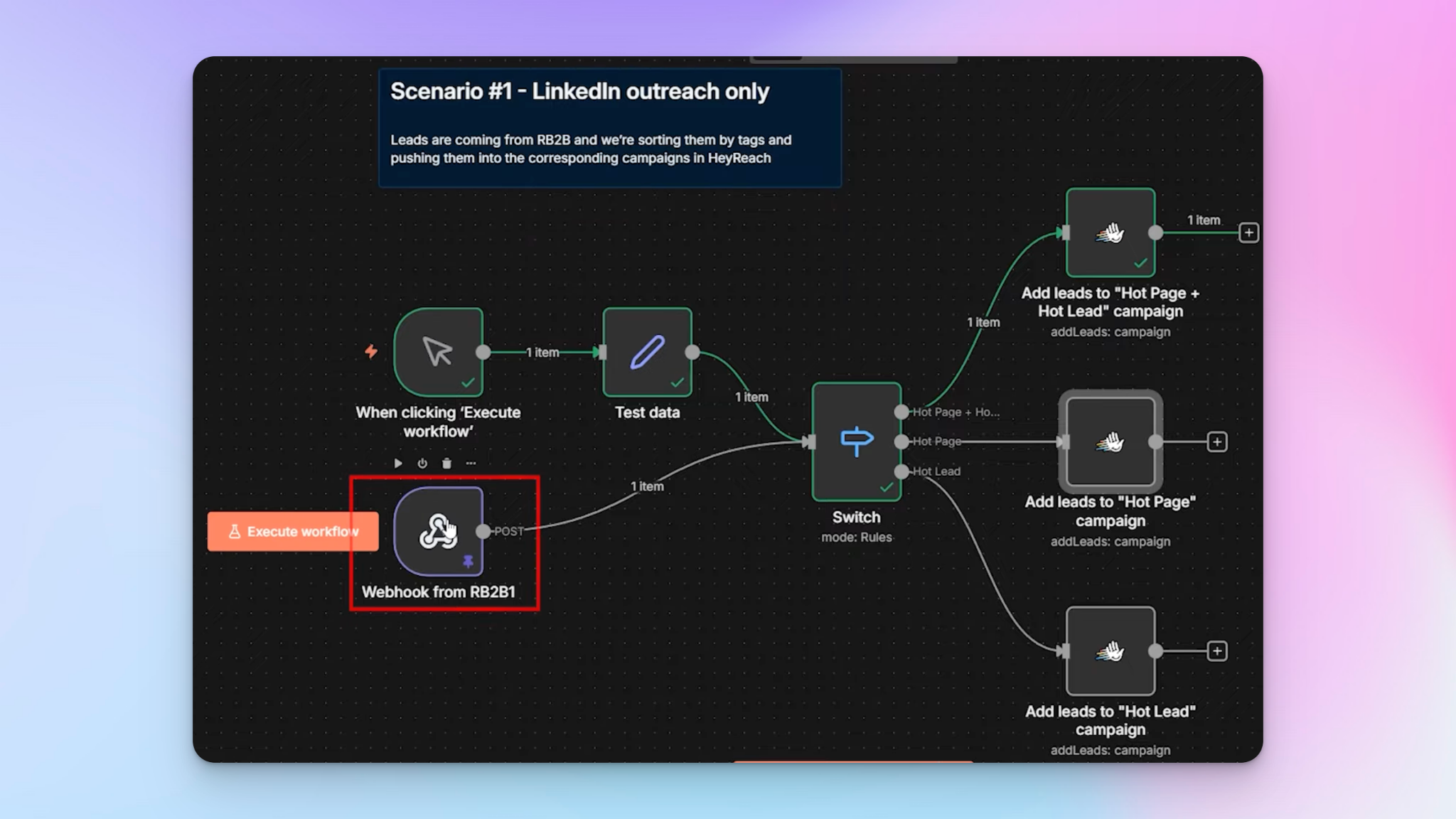
This approach keeps intent segmentation consistent whether someone enters the sales funnel through email or LinkedIn. The follow up sequence they receive always reflects their intent tier, not just the channel they happened to be reachable on.
Enriching leads when RB2B doesn't have a business email
Not every identified visitor comes with a usable email. Rather than accepting that as a dead end, I try to enrich those leads first using FullEnrich — one of the best data enrichment tools I've used inside my agency for over a year.
FullEnrich accepts a LinkedIn URL, which RB2B almost always provides. Here's how the enrichment flow works:
- I pass the LinkedIn URL to FullEnrich via their API through n8n.
- FullEnrich processes the task asynchronously in the background — no repeated polling needed.
- When finished, FullEnrich fires a webhook back to n8n with the enriched contact information, including phone number where available.
- I check whether the returned email is deliverable. If yes, that person flows into the same email-and-LinkedIn routing used for everyone else.
- If FullEnrich can't find a valid email, the visitor still ends up in a LinkedIn sequence — so no qualified lead is ever left uncontacted.
Solving the data persistence problem with n8n tables
There's a specific technical problem that appears in asynchronous enrichment workflows: you lose context.
When I hand off a lead to FullEnrich, I'm only passing the LinkedIn URL. By the time FullEnrich calls back, my workflow no longer knows whether this person was a hot lead, a hot page visitor, or both — because that context was attached to the original webhook payload, not stored anywhere durable.
My solution uses n8n's built-in data tables as permanent storage. Here's the pattern:
- On entry: The moment a visitor is identified by RB2B, I write their full record — including tags — to an n8n table before anything else happens.

- Unique key: LinkedIn URL. I use an upsert operation, so returning visitors update their row rather than creating duplicates.
- On enrichment callback: I query the table using the LinkedIn URL from the FullEnrich result, retrieve the original record with tags intact, and merge it back into the active workflow.

The two branches — the original RB2B webhook path and the FullEnrich callback path — reunite at the switch node with all context intact. It's a cleaner approach than wiring up an external database for outbound sales automation workflows at this scale.
Layering in AI personalization for every visitor segment
Routing and delivery are the foundation. Personalization is what makes people actually reply. The baseline segmentation is already meaningful, but you can go further by adding an AI agent inside the workflow that generates a custom opening line for each visitor based on their company website, LinkedIn profile, or the specific webpage they visited.
Beyond the opening line, you can layer in additional filters based on your customer profile:
- Industry-specific messaging: A hot-page and hot-lead visitor from a vertical you serve well gets a different sequence than the same signal from outside your ICP.
- Company size variants: Enterprise visitors coming from your product pages get messaging focused on scale and integration; SMB visitors get a faster-to-value angle.
- Social media context: If the visitor came through a retargeting ad or a webinar registration page, reference that touchpoint in the opening message.
- SEO-driven visitors: Someone arriving from organic search on a high-intent keyword is already educated — skip the basics and go straight to the offer.
These branches add complexity, but n8n handles them cleanly and the lift is worth it when you're focused on campaign performance and improving conversion rates across every segment.
Turning website visitors into leads at scale: Why this system works?
Most outreach strategies require the prospect to raise their hand first — click a call to action, fill a lead capture form, respond to a CTA on your homepage. This system inverts that. I'm reaching out to people who have already demonstrated interest by visiting my site, before they've consciously decided to engage. That timing advantage is significant.
Here's what makes the system reliable across different situations:
- Intent segmentation: Hot lead tags and hot page visits give each visitor a tier. The message they receive always reflects their level of buying intent, not a generic template.
- Imperfect data handling: Not everyone has a business email. Not every enrichment returns a result. Fallback paths keep every identified visitor in play through at least one channel.
- No manual input once live: Generate leads from b2b website visitors automatically. Identified visitors move through the system, get routed, and receive personalized outreach without anyone reviewing a list.
- High-intent routing: The highest-priority visitors — those matching your customer profile who visited high-value product pages — are separated from lower-intent traffic and treated accordingly.
- Lead magnet synergy: Visitors who engaged with a lead magnet or downloaded a resource get flagged and routed to a different sequence than cold browsers — improving user experience and relevance.
This is how you genuinely convert website visitors into qualified leads without wasting hours, days and weeks. The workflow handles the lead prioritization, the routing, and the follow up — you focus on the conversations that come back.

Try it for free
Frequently Asked Questions
Does this system work if I have low website traffic?
It works best when you have consistent traffic, so optimize your highest-intent pages first — pricing, demo, case studies — since those visitors convert at a significantly higher rate regardless of overall traffic volume. With very low traffic, the system still functions, but the ROI of the setup effort is better justified once traffic reaches a point where manual processing isn't realistic. Focus first on the quality of the visitors you're already getting, not just the volume. Improving your SEO and running targeted retargeting campaigns can help accelerate this.
What happens if RB2B identifies the same person visiting multiple times?
The upsert operation in the n8n table handles this. Because LinkedIn URL is the unique key, a returning visitor updates the existing row rather than creating a duplicate. On the HeyReach side, campaigns can be configured to skip leads who are already active in a sequence, so there's no risk of the same person being messaged twice.
How do I define hot lead criteria inside RB2B?
RB2B lets you set filters based on job title, seniority level, company size, and industry. Start by defining what your ideal customer profile looks like and replicate those parameters inside the hot lead settings. For example, if you sell to VP-level decision makers at companies with 50–500 employees in SaaS, set those exact filters. Anyone matching that profile who visits your site gets tagged automatically.
Is it legal to reach out to people who visited my website without opting in?
LinkedIn outreach to identified visitors is generally accepted practice in B2B sales. For email, the picture is more nuanced — which is why I only use verified business emails and never personal Gmail addresses. Always review the applicable regulations in your region and ensure your outreach complies with GDPR, CAN-SPAM, or other relevant frameworks. When in doubt, keep messages conversational rather than promotional, and give recipients an easy way to opt out.
Can I turn website visitors into leads without using n8n specifically?
Yes. The logic here can be replicated in Make, Zapier, or any other automation platform that supports webhooks, conditional routing, and data storage. The specific workflow I built in n8n uses features like pinned test payloads and built-in tables that are native to n8n, so you'd need to find equivalents — for example, using Airtable or Google Sheets for data persistence in other tools. The underlying logic stays the same regardless of the platform.