Botdog review: Is it worth it in 2026?
Published:
July 17, 2026
People ask me for a Botdog review constantly. What they’re really asking is bigger than one tool: which LinkedIn automation platform is safe, which one actually books meetings, which one won’t blow up their account two weeks in? Botdog comes up a lot, and my answer is usually the same: it depends entirely on what you need it to do.
That’s not a cop-out. Botdog is a genuinely solid tool. It does what it says, it’s easy to set up, and the people who use it for the job it’s built for tend to stick with it. The problem is that the job it’s built for is narrower than the marketing suggests, and if you’re an agency or a team running outreach across multiple accounts, you’ll feel the limits fast.
So here’s the full picture, based on running the trial myself: what Botdog does, what real users actually say (pulled from G2, not cherry-picked homepage testimonials), where it falls short, and how it stacks up against HeyReach for teams that need something built for scale.
Botdog at a glance
Tool: Botdog | Type: Cloud-based LinkedIn automation, marketing automation, and lead generation tool | Best for: Freelancers, solo professionals, and small sales teams (1–20 people) | Starting price: $69/month per account (monthly) | Free trial: 7 days, no credit card required | G2 rating: 4.9/5 (62 reviews)
One-line verdict: A solid LinkedIn automation tool for individual users and small teams. It hits a hard ceiling the moment you need to run one campaign across several accounts at once.
Pros and cons
Pros
- Cloud-based: campaigns run whether your laptop is open or not
- Clean, beginner-friendly interface, setup takes about five minutes
- 4.9/5 on G2 from 62 verified reviews; safety and ease of use are the recurring themes
- Adjustable safety limits with safe presets that keep your LinkedIn account protected
- Competitive pricing, especially on annual billing
Cons
- LinkedIn only, no email, no multi-channel
- No automatic sender rotation across accounts in a single campaign
- Unified inbox, Zapier, API, and CRM integrations all require Professional ($79/mo) or above
- AI personalization is locked to the most expensive tier ($99/month)
- Navigation feels counterintuitive at first, which several G2 reviewers flag
What real users say about Botdog
Botdog holds a 4.9/5 rating on G2 from 62 verified reviews. Capterra and GetApp both sit at 4.3/5, but from only three reviews each, so I weight the G2 sample far more heavily. I read through them so you don’t have to, and the signal is consistent: people love how quick it is to get going and how safe it feels for their LinkedIn account. The complaints are almost always the same two things: limited integrations and a UI that takes a minute to figure out.
A few reviews worth quoting directly, because they capture both sides honestly:
Kate G., Corporate Sales Director (G2, January 2026): “Being able to upload a CSV of data for contacts I want to approach is invaluable. Tailoring messages based on whether I’m connected to a prospect or not… makes it seem like the message has come directly from me.”
Lin L., Senior Manager of Growth (G2, June 2025): “Botdog is the simplest, [most] intuitive, and most successful one I’ve used so far. I achieved a 40% conversion rate… I almost don’t want to write this review so others don’t discover it.”
Siva D., Co-Founder (G2, February 2026): “The integration is a challenge… Integrating with products like Instantly and Clay could be a challenge.”
And the most useful non-five-star review, from James B., Director of Account Operations (Capterra, 3/5): “Overall the application is pretty good, but it needs just a bit more to keep up with some of the other tools I’ve tried.”

That’s the review in a sentence: Botdog is good. Whether good is enough comes down to how much you’re asking of it.
That integration gripe comes up again and again, and if your stack runs through Clay, you’ll feel it most.
Botdog features: what I found after testing it
I signed up for the free trial and ran through it myself, so here’s what Botdog looks like from the inside.
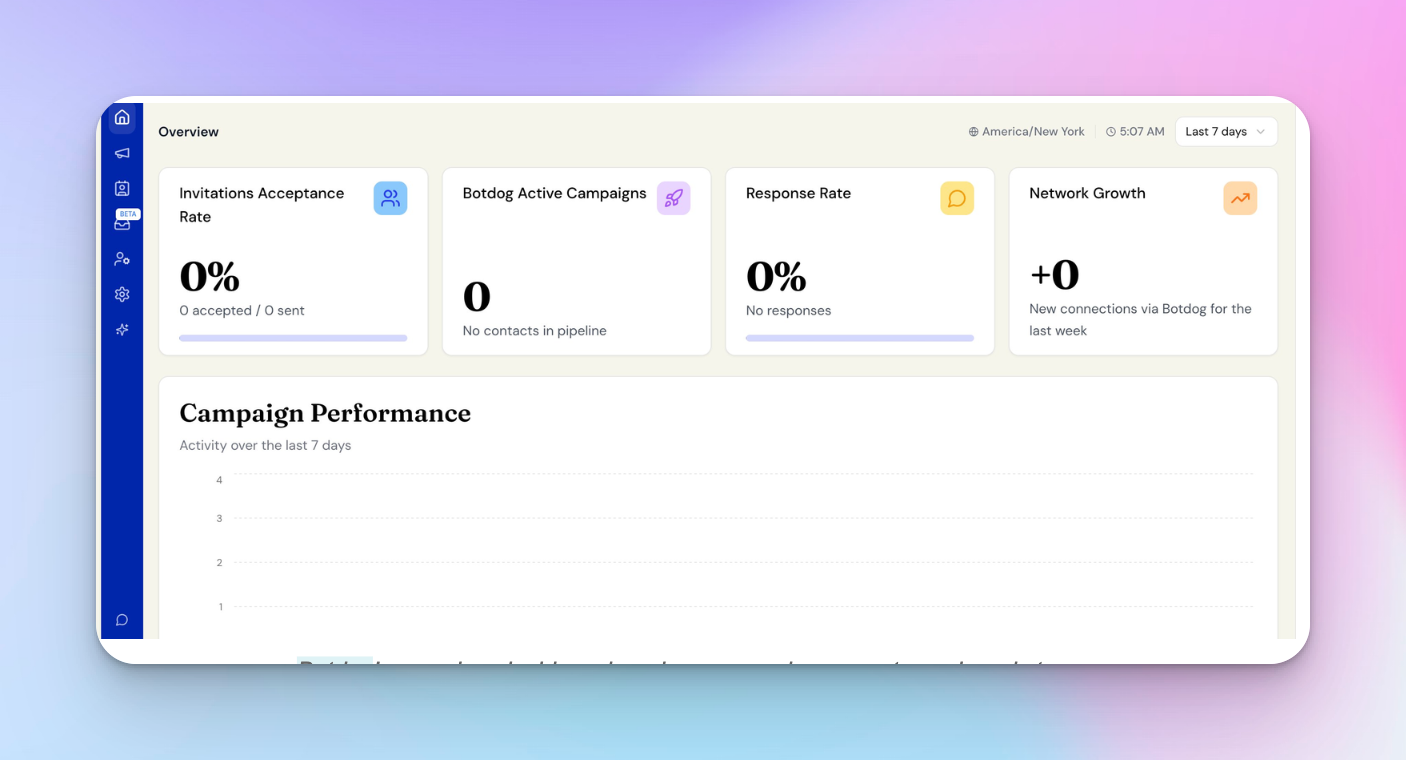
The first screen is a clean overview dashboard: acceptance rate, active campaigns, response rate, network growth, all at zero until you launch something. There is no clutter, no steep learning curve.
It’s built to get you started fast, not to have to study a manual.
Setting up a campaign
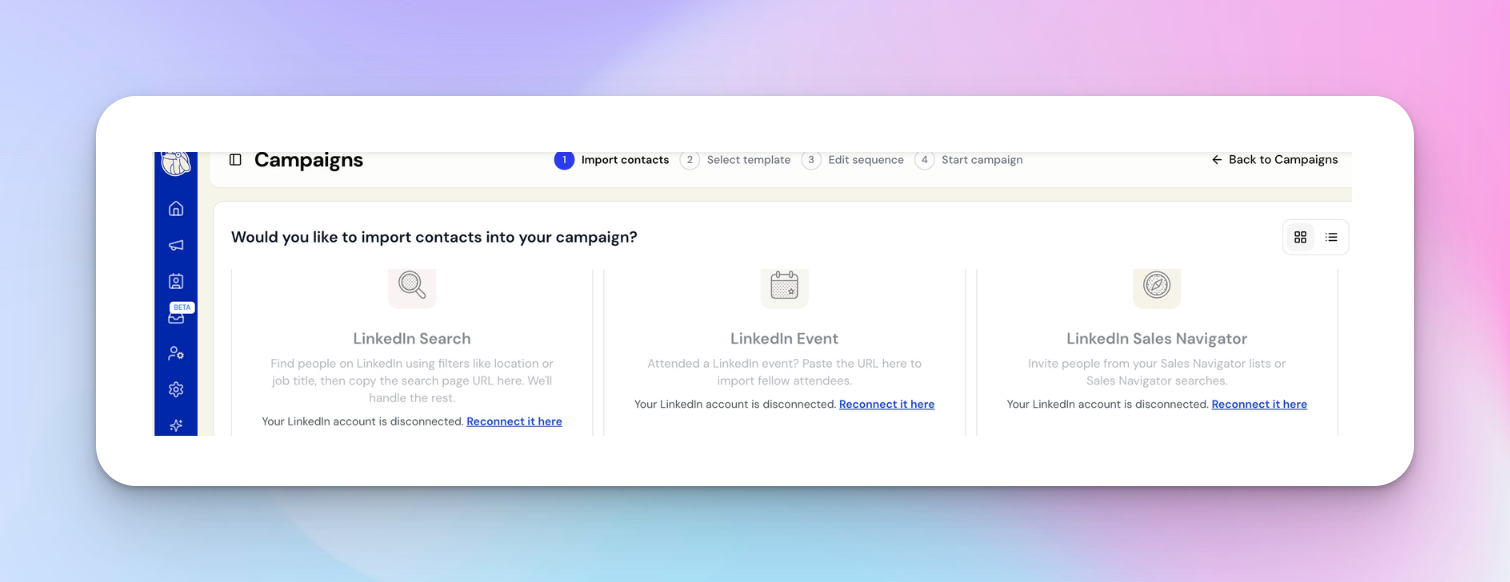
Creating a campaign runs through a tidy four-step wizard: import contacts, select a template, edit the sequence, then start.
The import step is where Botdog shows its range: you can pull leads from a LinkedIn search, a LinkedIn event, Sales Navigator, Recruiter, a CSV of profile URLs, or import later via the API.
From there, you write a connection request with custom variables, including first name, company, job title. You can add personalized messages and automate follow-ups that keep going until someone replies. The whole flow took me a few minutes.
And the follow-up is the part that actually pays off. In HeyReach’s benchmark of 96,051 campaigns, 10.7% of the ones that got the connection accepted still heard nothing back. People pour energy into landing the invite and underinvest in what comes after, which is backwards. Botdog gets this right: the sequence handles the persistent part, so an accepted connection doesn’t just go cold.
Images, video, and conditional logic are on Professional and above, while voice notes are on all plans. One thing to keep in mind: Botdog automates the outreach, not the targeting. The quality of your signal-based outbound, including who you reach and why, still happens upstream, in how you build the list.
Account safety controls
Botdog gives every action its own daily limit: connection requests, profile visits, InMails, messages, each on a slider from Safe to Risky.

If you’d rather not fiddle, there are three presets: one for free or cold accounts, one for slower premium accounts, and one for warm premium accounts that want to move fast. So the limits are safe by default, with room to dial up if you know what you’re doing. The presets keep a new user safe while the sliders give an experienced operator headroom.
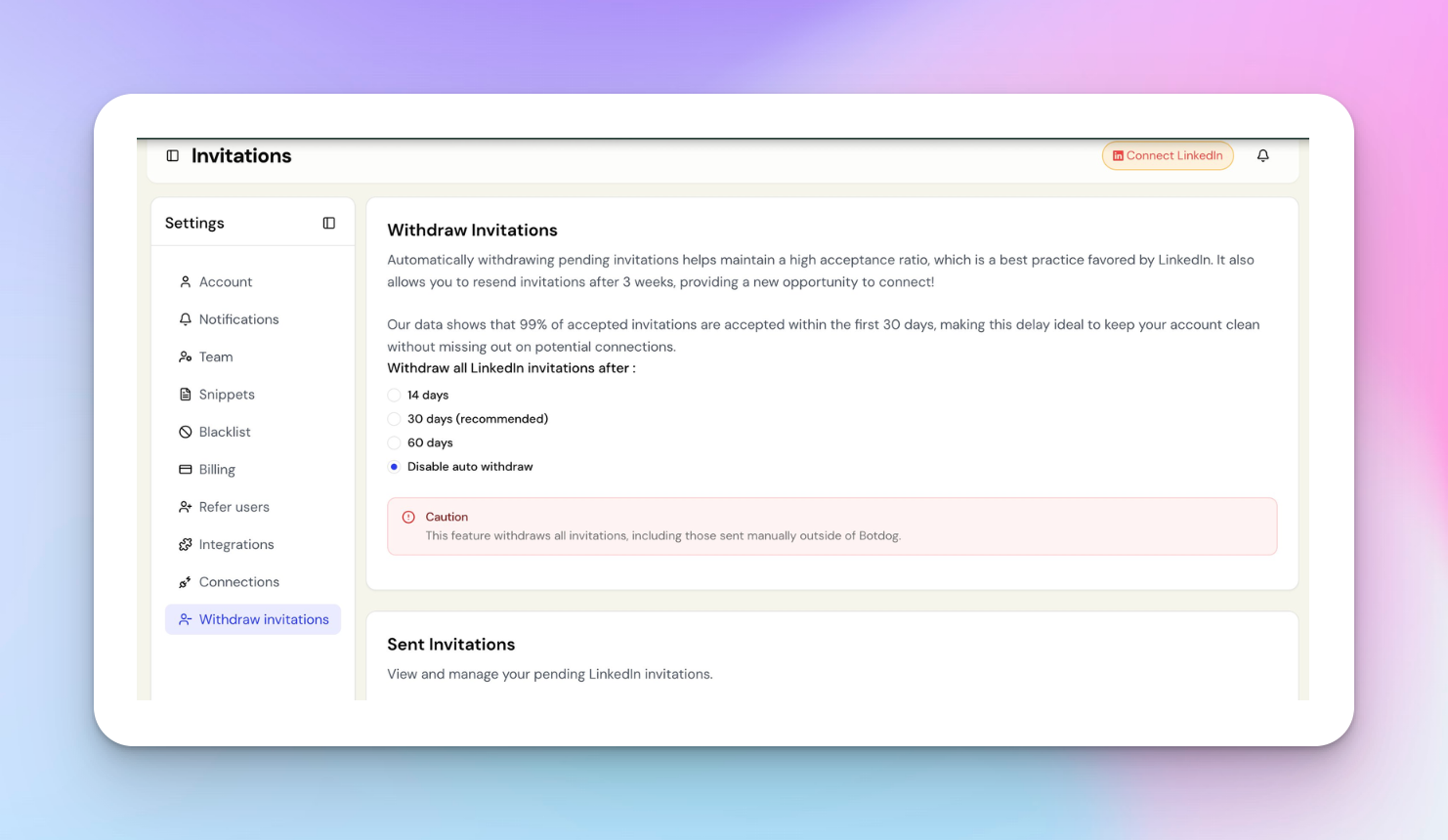
Auto-withdrawal of pending invitations works the same way. It comes as a setting, not a fixed rule. You pick 14, 30, or 60 days, or disable it, with 30 recommended. Old pending requests pile up, drag down your acceptance rate, and put your account at risk, so this matters. Botdog notes that 99% of accepted invites land within the first 30 days, which is why that’s the default.
Team and multi-account management
Botdog lets you connect multiple LinkedIn accounts to one workspace and delegate access without handing over anyone’s LinkedIn login. You can send from team members’ or clients’ accounts, and there are inbox-sharing controls. Share lead chats with team admins or members, while personal LinkedIn messages stay hidden. For a small agency, that privacy split is a thoughtful touch.
What Botdog doesn’t do is let several accounts share one campaign. Each account runs its own sequence independently, so managing five clients means five separate campaigns, not one campaign split across five senders.
That’s the core difference from HeyReach, which distributes a single campaign across all your sender accounts automatically. For a solo user, fine. For an agency with ten client accounts, it’s a real operational gap.
Unified inbox
Botdog’s Unified Inbox (a shared team inbox) is still flagged BETA in the app, and it sits on the Professional plan and above. It consolidates LinkedIn messages from your connected accounts into one view, which saves time when you’re managing a few accounts manually. What it doesn’t do is pull replies from one campaign spread across several senders, because Botdog doesn’t run campaigns that way.
The inbox surfaces everything in one place, but each account’s conversations are still functionally separate. If you want to understand the operational difference, the HeyReach Unibox is built around the multi-sender model from the start. One view for every reply from every sender on a shared campaign, with filtering, tagging, and the ability to respond on behalf of teammates.
AI features
Botdog’s AI layer is locked to the Professional + AI plan at $99/month. That includes AI filters for targeting specific profile types, useful if you’re trying to prioritize prospects showing buyer intent signals. On top of that, you get AI personalization variables, custom AI merge tags, AI message snippets you can generate on the fly, message optimization, and AI review and suggestions. If you’re on Starter or Professional, none of this is available. Just know that going in, before you assume AI personalization is part of the package.
Integrations
Botdog imports leads from LinkedIn search, LinkedIn Sales Navigator, Recruiter projects, and tools like Apollo, with CSV data import/export for getting lists in and out. Once your contacts are in, you get a searchable contact database, contact management, and lead management to keep everything organized in one place.
On the integrations side, Botdog gives you API keys with developer docs, webhooks (profile visits, invites sent and accepted, messages, replies), and a Zapier integration, plus native CRM connections to HubSpot and Attio. All of it sits behind the Professional plan. Run prospecting through Clay, and the path is CSV out, CSV in. That works fine at low volume. The friction only bites when you’re doing it across 50 accounts a month.
A note on segmentation: Botdog handles search and filtering on your contacts, but it isn’t built around heavy, ongoing segmentation workflows. If customer segmentation is central to how you run campaigns, like different messaging for different tiers, regions, or personas, you’ll get the cleanest results building those segments upstream and importing them ready to go.
Analytics and reporting
Botdog’s campaign analytics cover the basics well enough: connection rates, response rates, sequence performance, with standard reporting and statistics to match. At the individual campaign level, that’s plenty to see what’s landing and what’s dead on arrival.
Where it falls short is the roster view. There’s no way to roll ROI tracking, sales analytics, engagement tracking, or visual analytics up across multiple accounts or clients into one dashboard, as each account reports on its own. Solo, you won’t miss it. Running a client roster, you’ll be stitching those reports together by hand.
Botdog pricing
Three plans, priced per account per month.
Every plan includes a 7-day free trial, no credit card required. Annual billing runs roughly half the monthly rate, $35 versus $69 on Starter, a steeper discount than most tools here offer. So if you’re committing, commit for the year.
A five-person team on a monthly Starter pays $345/month. On annual billing, that drops to $175/month. That’s the catch with per-account pricing — it climbs with every seat you add, and faster the moment one person needs Zapier or CRM sync, since that bumps the whole team to Professional.
Botdog vs HeyReach
These two aren’t really fighting for the same job. Botdog is for individuals and small teams who want clean, simple LinkedIn outreach. HeyReach is for agencies and scaling teams running outreach across a whole roster of accounts. The table makes the gap obvious:
Who should use Botdog — and who should move on
Botdog is the right call if…
- You’re a solo founder, individual SDR, or consultant running outreach from one account
- You want to be live in under ten minutes without reading a manual
- LinkedIn-only outreach covers everything you need right now
- You don’t need campaigns coordinated across multiple accounts
You’ve outgrown Botdog if…
- You manage multiple clients or LinkedIn accounts, and want one campaign to run every account at once
- You need sender rotation to safely distribute volume, and Botdog’s architecture doesn’t support this
- You want a unified inbox that reflects a multi-sender campaign, not just individual accounts side by side
- You need native Clay integration or webhooks, and the CSV workaround is already costing you time
- You want to run outreach through an AI assistant over native MCP, not a Zapier bridge
For agencies and scaling sales teams, HeyReach was built for exactly this: flat pricing, multi-sender campaigns, a unified inbox, native integrations. The coordinated setup you can’t rig up in Botdog is HeyReach’s default.
Botdog alternatives worth looking at
Ruled Botdog out, but still shopping? Here’s the honest landscape, one line each.
- HeyReach — built for agencies and multi-account sales teams running many sender accounts under one campaign, with one inbox that catches every reply
- Linked Helper — desktop-based and cheaper, with a deep feature set, but your computer has to stay on
- Expandi — cloud-based, pricier, more setup; favored by safety-conscious teams wanting dedicated IPs
- Waalaxy — LinkedIn plus email in one tool; good for solo prospectors who want a simple multi-channel setup
- Dripify — Botdog-like positioning with a visual, drag-and-drop campaign builder
Is Botdog worth it in 2026?
For what it’s designed to do, yes. Botdog is easy to set up, it keeps your LinkedIn account safe by default, and the 4.9/5 G2 rating reflects how much its users actually like it. At $35/month per account on annual billing, the value for money is hard to argue with for a solo operator or freelancer.
Its ceiling is about scope, not quality. Botdog is built for one account, one campaign, one sender, and the moment you need to coordinate across accounts or report across a client roster, you’ve hit the wall. Actually, according to our benchmark data across 96,051 outreach campaigns, teams running 6–20 sender accounts see the strongest reply performance, the kind of coordinated setup Botdog doesn’t do, and HeyReach was built for.
Solo SDR or small team doing focused LinkedIn outreach? Botdog is a smart choice. Agency or sales org managing five or more accounts? You’ve already moved past it, and the cost of the workarounds is higher than the cost of switching.

Try it for free
Frequently Asked Questions
What is Botdog?
Botdog is a cloud-based LinkedIn automation and lead generation tool built for freelancers, solo professionals, and small sales teams. As a prospecting tool, it automates connection requests, follow-up message sequences, campaign management, and inbox management from one dashboard, with safety limits built in to reduce the risk of account restrictions.
How much does Botdog cost?
Botdog starts at $69/month per account, or $35/month on annual billing. The Professional plan, needed for the unified inbox, Zapier, and CRM integrations, is $79/month ($39 annual), and the AI tier is $99/month ($49 annual). Every plan includes a 7-day free trial, no credit card required.
Is Botdog safe to use on LinkedIn?
Botdog ships with conservative daily limits by default. When I tested it, every action (connection requests, profile visits, messages) had its own Safe-to-Risky slider, plus presets for cold, slow-premium, and fast-premium accounts. The safe defaults protect a new user, while an experienced operator can dial things up. No tool eliminates all risk, but those guardrails make restrictions less likely than tools that let you push unlimited volume. Multiple G2 reviewers switched to Botdog specifically for its account safety.
What are the best Botdog alternatives?
Depends what you’ve maxed out. For agencies running many accounts under one campaign, HeyReach is the most purpose-built option. Linked Helper is cheaper but needs your computer on. Expandi is cloud-based with a safety-first reputation. Waalaxy and Dripify are solid choices for solo users who want LinkedIn-only or LinkedIn-plus-email.
What is the difference between Botdog and HeyReach?
Architecture. Botdog runs each LinkedIn account as its own independent campaign, as there’s no coordination across accounts in a single campaign. HeyReach is built specifically for coordinated multi-account outreach: one campaign, multiple sender accounts, automatic distribution, all replies in one inbox. For solo users, that setup works perfectly well. For agencies or teams with five or more LinkedIn accounts, HeyReach’s model is what you actually need.