LinkedIn sales strategy: How to turn LinkedIn into your team's #1 pipeline channel
Published:
April 29, 2026
Updated:
April 30, 2026
Cold email deliverability continues to decline year over year. Spam filters are more aggressive. Google continues to tighten bulk sending rules. Buyer inboxes are so crowded that your carefully crafted sequence is competing with 30 other "quick question" emails that landed the same morning.
Meanwhile, the teams that figured out LinkedIn early are quietly pulling ahead, booking meetings in a channel with higher engagement, lower noise, and greater trust in every interaction.
If you're still pouring 90% of your outbound effort into email while treating LinkedIn as a side project, you're leaving pipeline on the table. This piece gives you the complete strategy to flip that and build a LinkedIn-first outbound engine that actually works.
What you will take away by the end of this:
- How to know if your team is ready to make the shift from cold email to LinkedIn first, and where to start based on where you are right now
- The four layers of a LinkedIn-first outbound engine
- A five-stage execution framework from signal-based targeting to booked meetings,
- A diagnostic framework that tells you exactly how to read your campaign data
- The tools, integrations, and workflows that make a LinkedIn-first strategy operationally possible at team scale and more.
Why LinkedIn outperforms cold email as your primary pipeline channel
The current approach is broken, but that alone isn't enough to restructure your entire outbound engine. You need a strong reason to move, and I will share five with you:
- The response rate advantage: Across 96,051 LinkedIn outreach campaigns analyzed by HeyReach, typical reply rates land around 22%, with top performers pushing past 33%, several times higher than cold email’s 2–3% reply rate benchmark.
See how to automate your LinkedIn outreach with AI for faster results.
- The trust advantage: Cold email arrives with zero context. LinkedIn lets prospects see your photo, headline, work history, and mutual connections before reading your message. You skip proving you're legitimate and go straight to being relevant.
- The multi-touch advantage: Email can either be opened or ignored. LinkedIn gives you a spectrum of touchpoints before any direct message: profile views, post comments, and content engagement. By the time your request arrives, your outreach already feels warm.
- The data advantage: Cold email personalization is limited to whatever was in your data provider's system when you pulled the list. LinkedIn lets you reference real-time signals, job changes, promotions, content, and company news.
- The durability advantage: Cold email access is temporary and fragile. It can be ignored, filtered, or bounced. A LinkedIn connection is permanent. You can re-engage in three months when their situation changes, your product evolves, or they move to a better-fit company.
Email still has a role, and we'll get to that.
See why HeyReach is the best LinkedIn outreach software for your outbound efforts in 2026.
How to know if your team is ready for a LinkedIn sales strategy
Different teams are starting from different places, so here's how to assess where you are and where to begin:
- You're an email-first team that's ready to diversify
Your cold email engine is built and running. It might even still be producing, but the numbers are trending in the wrong direction, and you can feel it.
Your team has LinkedIn accounts, but there's no structured outbound process around them.
Your starting point: Keep your email engine running while you build the LinkedIn system alongside it. Start with one campaign, one segment, and a small group of reps. Let the data make the case internally.
2. You're a multi-channel team with LinkedIn as a side project
You're already doing LinkedIn — kind of. It's in the mix but there is no shared playbook, no consistent messaging framework, or unified way to track what's working.
But here's the thing you already know, even if you haven't fully acted on it: when LinkedIn works, it really works. The evidence is already in your own data.
Your problem is that you haven't built the system that makes LinkedIn the primary channel.
Your starting point: Build the shared playbook: messaging frameworks, targeting criteria, follow-up sequences, and activity cadence. Then put the infrastructure in place to run it consistently across the whole team.
3. You're already leaning into LinkedIn and ready to go all-in
LinkedIn is generating a real pipeline for your team. Your reps are active, your campaigns are running, and you've seen enough results. The problem is that you've hit the ceiling on what you can do manually or with a patchwork of tools that weren't built for team-scale LinkedIn outbound.
You need the orchestration layer, which lets you scale what's already working without sacrificing the quality that made it work in the first place.
Your starting point: The execution framework in this article is built for you. Focus on the automation and workflow infrastructure sections, because that's where your current ceiling becomes your new floor.
You can check out our more extensive LinkedIn automation guides library to learn more based on your current level.
Inside a LinkedIn sales strategy that works: the four layers of a LinkedIn-first engine
The biggest mistake teams make when they decide to "go bigger on LinkedIn" is that they just… do more LinkedIn stuff. More connection requests. More messages. More posts. No system. Just volume with a LinkedIn logo on it.
Going LinkedIn-first doesn't mean you delete your email tools and pretend cold email doesn't exist. It means LinkedIn becomes the primary channel and everything else orbits around it.
Email shifts from being the engine to the support system – the follow-up channel for prospects who didn't convert on LinkedIn, the fallback for the small percentage of your ICP that isn't active on the platform.
The four layers of a LinkedIn-first engine
Every outbound system needs an orchestration layer; this one has four. Each one feeds the next. If you skip a layer, the whole thing underperforms.
- Targeting and enrichment: Start with qualified, enriched prospects layered with real signals like job changes, funding rounds, and hiring patterns. Rule of thumb: if your data isn't rich enough to write a personalized first line, your targeting isn't ready yet.
- Warming: Build familiarity before you send a direct message. View profiles, engage with posts, leave thoughtful comments. By the time your connection request arrives, your name shouldn't be new to them.
- Outreach and follow-up. Run structured sequences with a shared framework that your whole team executes consistently. Each touchpoint should move the conversation forward. Use LinkedIn outreach templates as starting points, not scripts.
- Conversion: Turn engaged conversations into booked meetings and sync everything into your CRM. For prospects who engaged but didn't convert on LinkedIn, extend to email. LinkedIn leads, email supports.
Building the foundation of your LinkedIn sales strategy before you scale
The teams that nail the next four things before launching a single campaign outperform the ones that skip ahead by a wide margin.
- Sharpen your ICP for LinkedIn specifically.
Your general ICP and your LinkedIn ICP are not the same, so you need to narrow them down. Within your broader ICP, which segments are actually active on LinkedIn and responsive to connection-based outreach?
Define your LinkedIn ICP by role, seniority, company stage, and industry; that's the baseline. Then add at least one trigger signal: they just started a new role, their company raised funding, they're hiring aggressively for the team your product serves, or they posted about a challenge you solve.
Once you've defined this, validate it in Sales Navigator. Build your saved searches and answer one critical question: Is this audience large enough to sustain weekly campaigns for three or more months? If too small, widen. If large enough, lock it in.
- Make your team's profiles work for outbound.
The profile needs to answer one question from the prospect's perspective: "Does this person operate in my world and understand my problems?" Instead of "Account Executive at [Company]," try "Helping B2B sales teams fix their outbound pipeline."
Your summary page should establish context and credibility. Your banner image reinforces the value proposition visually. This is free real estate that most reps leave as the default LinkedIn blue background.
These changes take an hour per rep, maybe two, but they will meaningfully impact your acceptance rates from day one.
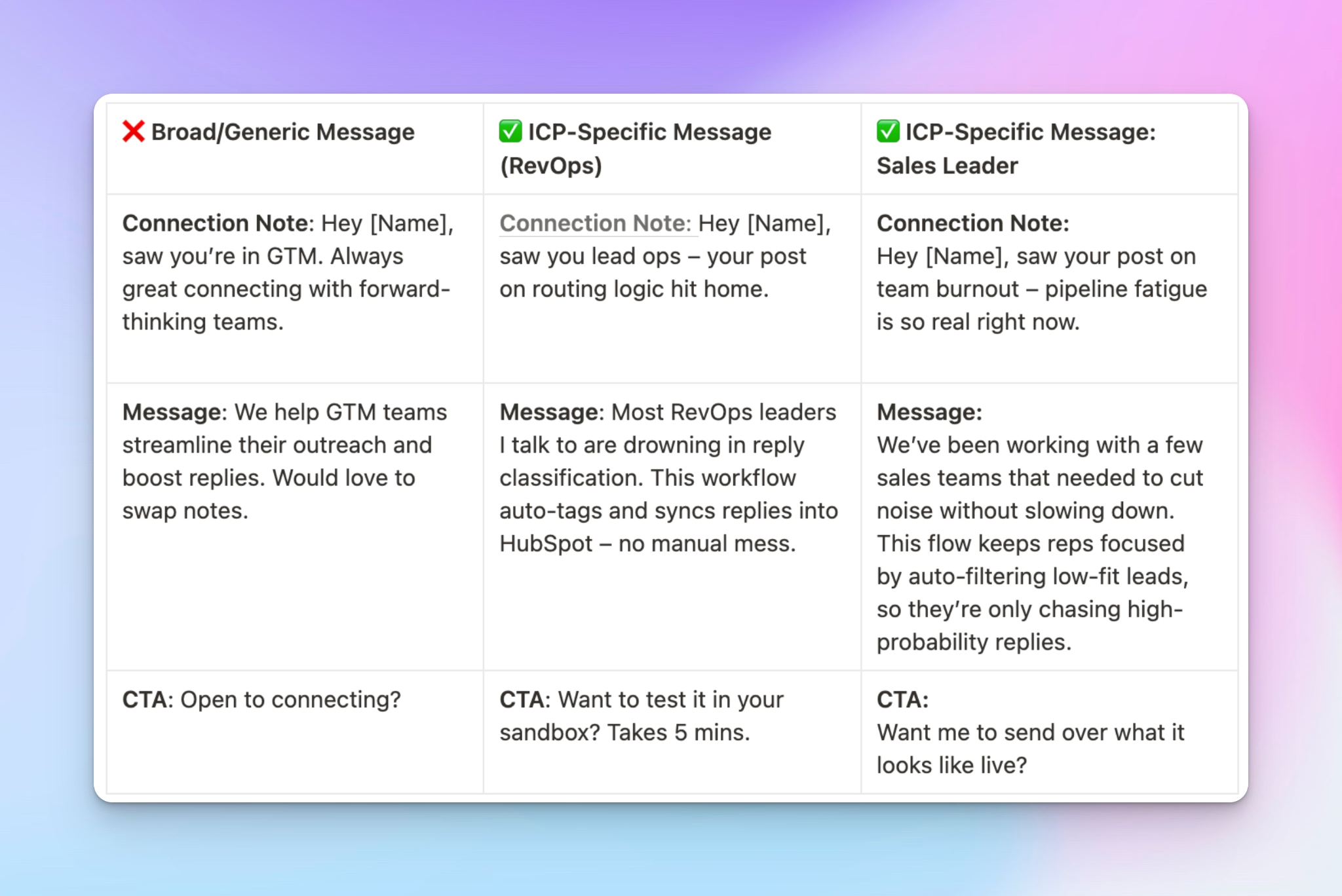
- Develop a messaging architecture
Before you write a single message, define the structure for each touchpoint in your sequence and build a template library for each.
The entire messaging architecture should sound peer-to-peer, not seller-to-buyer.
- Establish safe activity thresholds
LinkedIn monitors activity patterns, and accounts that exceed safe thresholds get restricted. Define daily limits for connection requests, messages, profile views, and post engagements.
Make them non-negotiable so you can stay comfortably within LinkedIn's safety boundaries at all times.
The execution framework: Five stages of LinkedIn-first outbound
You can implement these sequentially as you build the system for the first time, or improve them individually once the engine is running.
Stage 1: Signal-based targeting
Signal-based targeting starts with the same core filters: role, seniority, company size, and industry, but then layers on real-time signals that tell you why this prospect is worth reaching out to right now.
How to do this manually:
Start in Sales Navigator with your LinkedIn ICP. Then layer on enrichment.
- Open Clay and start layering on data points that Sales Navigator doesn't surface: tech stack information, recent funding rounds, and hiring patterns.
- Pull in signals from RB2B to identify prospects who've already visited your website.
- Check Trigify for real-time activity signals: job changes, content the prospect published recently, and engagement patterns.
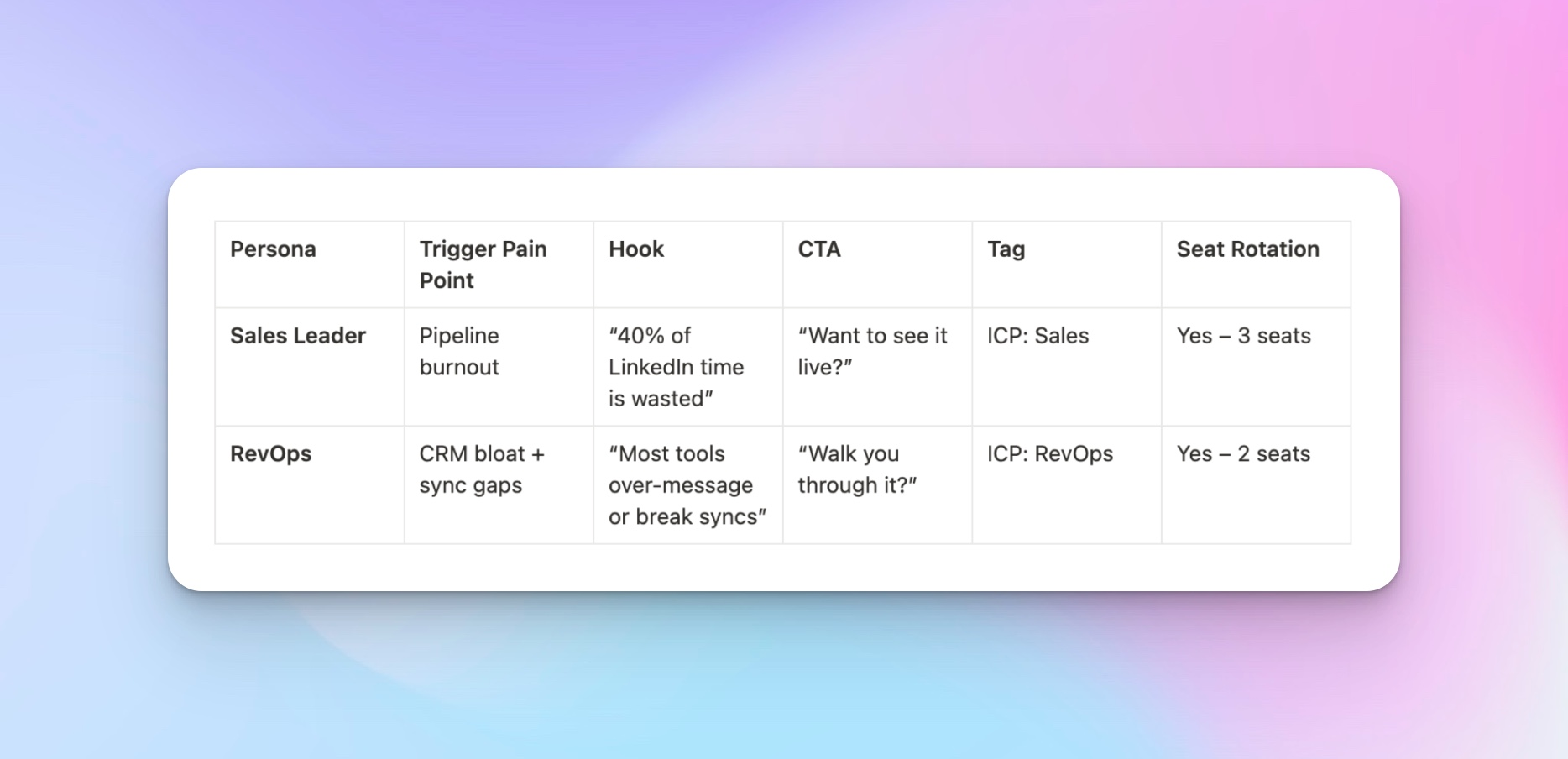
For each prospect, you need at least two personalization hooks before they enter a campaign. One signal that's relevant right now and one detail that shows you've done your homework.
This works, but if you're doing it manually for every prospect across your entire team, it's going to eat hours of your week that should be spent actually selling.
How to automate it:
Import your enriched lists directly into HeyReach via CSV, Sales Navigator URL, or native integration. Assign senders' accounts, and HeyReach automatically rotates outreach across your team, distributing workload so no single account approaches its limits.
Stage 2: Strategic warming
By the time your connection request arrives, the prospect should have a vague, almost subconscious sense that they've seen you before.
How to do this manually:
View their profile. If they post content, leave a real comment that adds to the conversation. Engage two to three times over a week before sending the connection request. That flicker of recognition makes them significantly more likely to accept.
However, scaling this manually across many prospects is operationally exhausting, which is why most teams skip it.
How to automate it:
Set up HeyReach to control timing and spacing, so warming actions run naturally across your team’s accounts—not in suspicious bursts.
Stage 3: Connection and opening conversation
The most important thing to understand about this stage is that it's not a pitch, or where you close. It's the beginning of a dialogue, and if you try to make it anything more than that, you'll kill the conversation before it starts.
How to do this manually:
Send the connection request with or without a note, depending on your messaging architecture. Once accepted, send a personalized message within 24–48 hours. That window is when the prospect is most open to engaging.
At scale, this means every rep is manually monitoring for acceptances, writing individualized openers, and tracking who's been messaged. Across hundreds of prospects, things start falling through the cracks fast.
How to automate it:
HeyReach triggers the next step automatically when a prospect accepts, with personalization variables populated for each prospect within the timeframe you've defined.
Stage 4: Value-driven follow-up
This is where the majority of your meetings will actually come from because most prospects don't reply to the first message.
How to do this manually:
Every follow-up must introduce something new: a different angle, a relevant case study, a question about their situation. Trying to manage this manually across your team causes reps to default to sending "just following up" messages because they can't keep track of every conversation.
How to automate it:
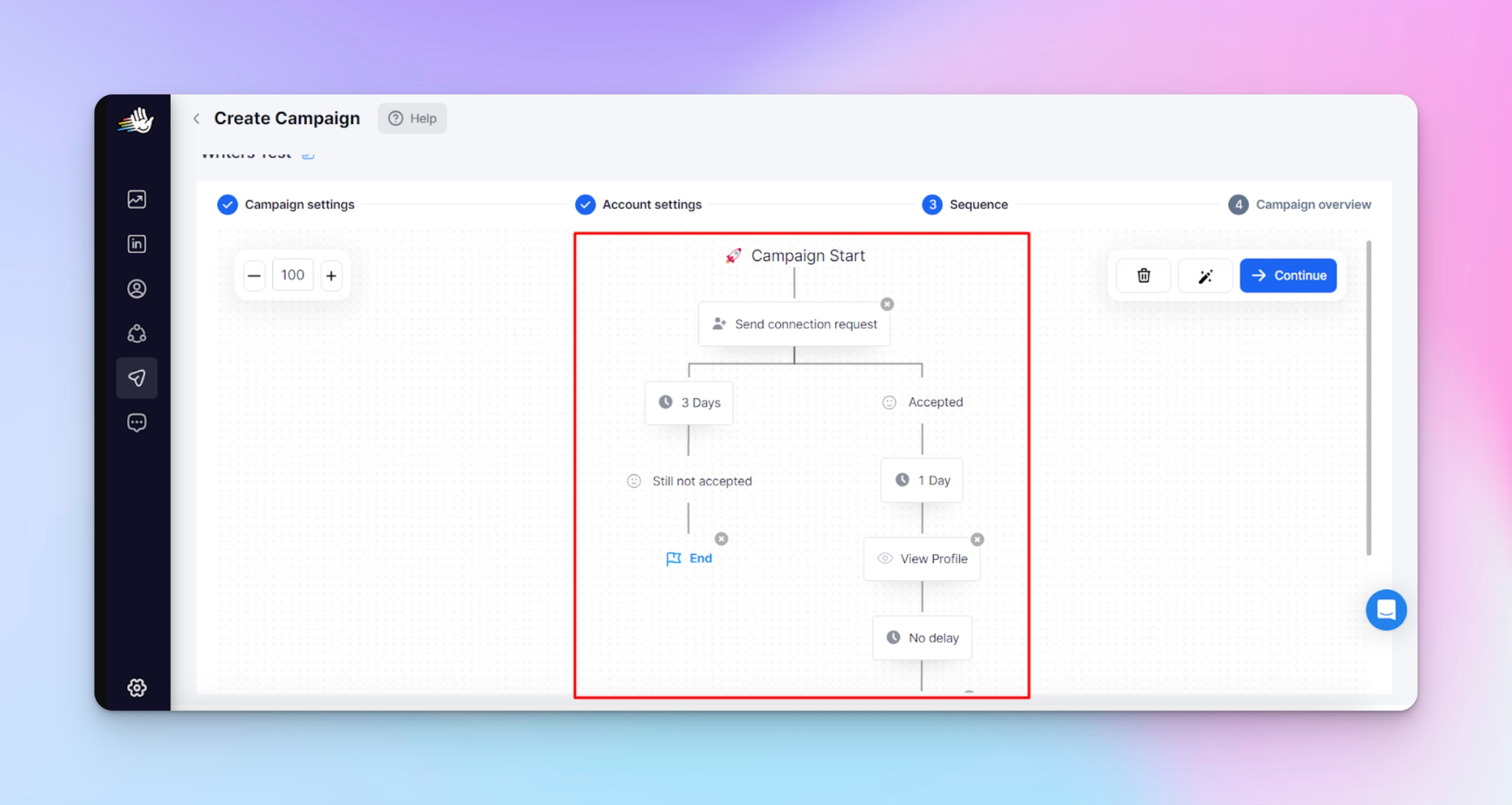
Build your full follow-up sequence in HeyReach with conditional logic at each step.
Prospect actions determine the next step:
- Connected but didn’t reply → Follow-up A
- Viewed profile but stayed silent → Follow-up B
- Replied → Exit sequence, move to live conversation
Follow-ups fire automatically at set intervals (3–5 days) across your whole team.
No rep needs to track who’s due for a touchpoint manually.
Stage 5: Meeting conversion and multi-channel extension
You've targeted well, warmed the prospect, started a conversation, and built engagement through value-driven follow-ups. Now it's time to turn that engagement into a pipeline.
How to do this manually:
Watch for engagement signals. questions, shared pain points, and multiple replies. When a prospect shows interest, make the meeting as direct and frictionless as possible. For prospects who engaged but didn't convert on LinkedIn, extend to email with a sequence that references the LinkedIn conversation.
The manual challenge here is reps are tracking who's ready for the ask, who needs to move to email, and making sure every booked meeting hits the CRM with full context. Across dozens of active conversations, things start to slip.
How to automate it:
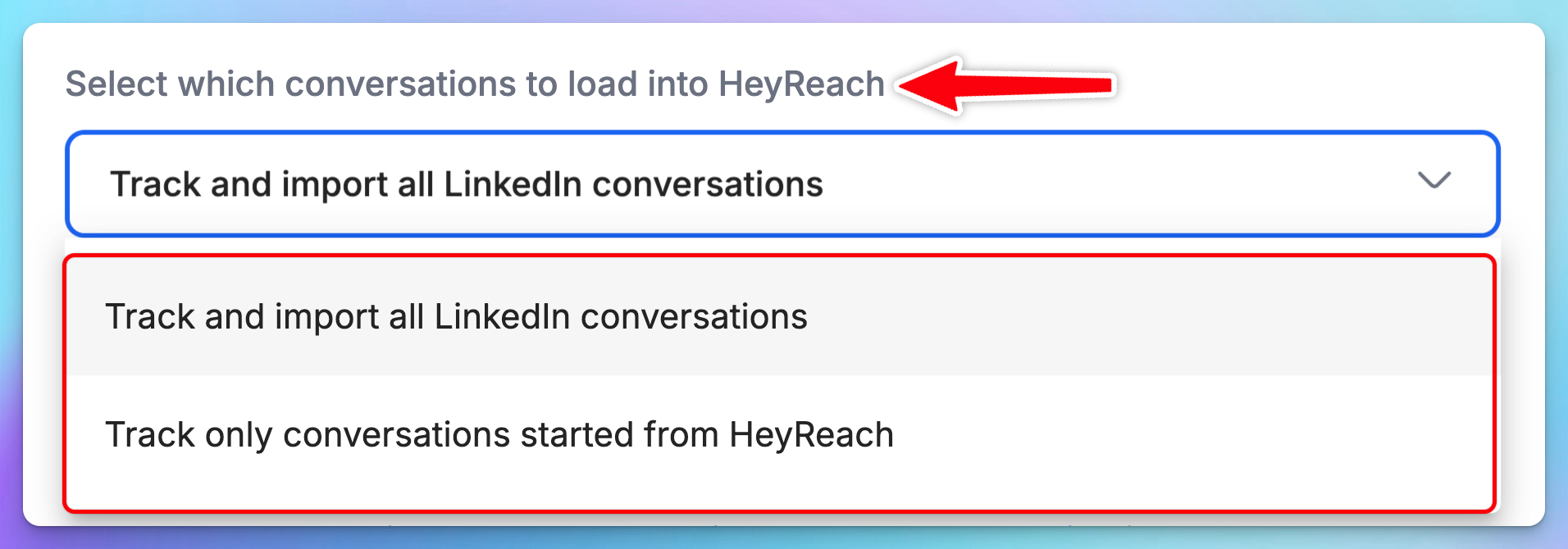
HeyReach consolidates every reply from every campaign and every rep into a single unified inbox — Unibox.
From Unibox, your team can manage all active conversations in one place, spot engagement patterns, and prioritize the prospects who are closest to booking.
For prospects who need to be extended to email, your enrichment tools provide verified email addresses, and automation workflows through Zapier or Make can route them into parallel email sequences automatically, carrying context from the LinkedIn interaction so the email feels like a continuation, not a cold start.
How to read your campaign data
Running the system is one thing. Knowing what it's telling you is something else entirely. Once you know how to read your campaign data, you can self-correct in real time without waiting for someone else to diagnose the problem for you.
These five metrics tell you something specific about where your system is strong and where it's breaking down.
1. Connection acceptance rate
This tells you two things at once: whether you're reaching the right people and whether your profile is doing its job when they check you out.
At Heyreach, we analyzed over 96,000 LinkedIn outreach campaigns and found the typical acceptance rate is around 21%. Below 13% and something upstream is seriously off; either you're reaching the wrong people or your profile is pushing them away. Above 32%, and your targeting and profile optimization are performing well above average.
2. First message reply rate
This is your messaging relevance check. Across the 96,000+ campaigns we looked at, the typical reply rate lands around 22%. Below 13% means the message isn't connecting with the prospect's reality. Above 33%, and you're in elite territory, your personalization and value proposition are genuinely resonating. That's the sweet spot.
3. Follow-up reply rate
Based on the HeyReach LinkedIn benchmark report for 2026, at least 10.7% of campaigns where connections were accepted generated zero replies. This is why you need a strong follow-up strategy in place. If follow-ups add nothing beyond the first message, the sequence isn't building engagement.
4. Profile views from prospects
If you're seeing profile views from prospects who haven't replied, but were curious enough to check you out, that's an early sign of engagement. Keep the sequence going.
Often, these are the people who reply to the second or third follow-up.
5. Content engagement from connected prospects
If people you've connected with start liking your posts, commenting on your content, or engaging with your activity, they're warming themselves.
Use that as a natural follow-up opener: "Hey, saw your comment on my post about [topic] — sounds like this is relevant to what you're working on. Would love to hear more about how you're approaching it."
That's a warm conversation starter built on real interaction and free intent data most teams never bother to act on.
The diagnostic framework for understanding campaign data.
Think of this as a decision tree for your campaigns.
- Low acceptance rate + low reply rate = the problem is targeting.
You're either reaching the wrong people, warming isn't happening, or your profiles are pushing prospects away. Fix the foundation before optimizing anything downstream.
- High acceptance rate + low reply rate = the problem is messaging.
Prospects are connecting but going quiet. That means the message itself isn't landing. Test new opening angles and sharpen personalization.
- High acceptance rate + good reply rate + few meetings = the problem is conversion.
This usually means one of two things: either the meeting ask isn't clear and direct enough, or the conversations aren't being advanced with enough intent. Tighten the meeting ask. Check whether conversations are being extended to email for prospects who need that extra channel to convert.
- Everything looks decent, but volume is too low = you have an infrastructure problem.
This is the one scenario where the fix is about scaling the operation. You need more connected LinkedIn accounts or higher daily activity levels within safe thresholds, or both.
This diagnostic framework is something you run every single week, and it tells you exactly what to fix and where to fix it.
Now that you know how to read the signals, let's talk about which metrics your team should actually be tracking and which ones to stop measuring entirely.
What are the right metrics to track for a LinkedIn-first team
I've watched teams build a LinkedIn engine that's producing a real pipeline, and then nearly kill it because leadership was evaluating it against the wrong scorecard. "How many messages did we send this week?" "What's our open rate?" "How many connections do we have now?"
Wrong questions. All of them.
When LinkedIn becomes your primary channel, the way you measure outbound has to change, too, because the old metrics made sense for email, but they don't capture what actually matters in a LinkedIn-first motion.
So let's build the right scorecard from scratch.
Primary metrics: Track these weekly
- Meetings booked from LinkedIn: Everything else helps you understand why this number moves. If your team tracks one metric, it's this one.
- Connection-to-conversation rate: How efficiently connections turn into real two-way dialogues. Low rate = messaging or follow-up needs work.
- Conversation-to-meeting rate: Your conversion efficiency. Low rate with high conversation volume is a good problem, sharpen the close.
- LinkedIn pipeline velocity: Average time from first touchpoint to booked meeting. Gives you a real number to share with leadership instead of "results take time."
Secondary metrics: Track these monthly
- Reply rate by message variant: Compare different opening angles and follow-up approaches. Scale what works, retire what doesn't.
- Acceptance rate by prospect segment: Breakdown by role, industry, and company stage. Let the data show you where your targeting is sharpest and shift volume accordingly.
- Multi-channel conversion rate: How many prospects who didn't convert on LinkedIn booked through email follow-up? Validates the LinkedIn-first-not-LinkedIn-only approach.
Metrics to stop tracking:
Total LinkedIn connections, messages sent per week, and vanity engagement metrics.
If you prioritize tracking conversations and meetings, your reps will optimize for quality instead of volume.
Tracking and adapting: the manual reality
Now you know what to track and what to stop tracking entirely, but how that happens manually or through automation, changes everything about whether your team actually does it consistently or just means to.
What tracking looks like with LinkedIn and spreadsheets:
A Monday morning in outbound:
- Open a spreadsheet with campaigns and key metrics: connection requests sent, accepted, replies, follow-ups, and meetings booked.
- Rep A checks LinkedIn notifications, logs accepted connections and replies, and cross-references against the prospect list. Rep B does the same. Repeat for every rep.
- Calculate ratios manually: connection-to-conversation, conversation-to-meeting, pipeline velocity by cross-referencing LinkedIn activity with email data.
- Week 1: manageable. Week 2: slower, messier. Week 3: A rep forgot to update Friday's numbers, and Monday's review runs on incomplete data. Month 2: The spreadsheet is chaotic, and nobody fully trusts the numbers.
- Outcome: strategic reviews get delayed, adaptation slows, and consistency drops. You're still running campaigns, but you're just not getting better at running them.
What tracking looks like with HeyReach
Monday morning. You open HeyReach. The data is already there.
Connection acceptance rates calculated per campaign, per segment, per rep, first message reply rates, follow-up reply rates, and response patterns by sequence step are all visible on one dashboard.
HeyReach enables you to track every touchpoint from first warming action to booked meeting, so you're looking at the data and making a decision: scale this variant, retire that one.
The feedback loop between seeing data and acting on data shrinks from days to minutes in a system that's designed to compound improvements over time.
The timeline to share with leadership
How you set expectations internally will determine whether this strategy gets the runway it needs to work. Here's the realistic timeline to share with leadership:
Month 1: Foundation and learning.
Profiles are optimized, the messaging architecture is built, initial campaigns launch, and data starts coming in. You should expect insights, not meetings.
Month 2: First consistent meeting flow.
The system is producing early results. Campaigns are generating real conversations. Some of those conversations are converting to meetings. You now have enough data to start optimizing. This is where the compounding starts.
Month 3: The compounding effect.
Meeting volume becomes predictable and improvable. Every week of data makes the next week's campaigns better.
Position this internally as a 90-day commitment with monthly check-ins with leadership where you share the primary metrics, the trends, and the optimizations you're making.
The stack that powers a LinkedIn-first engine
If you've been reading the last few sections and thinking, "how does a team of five or ten reps actually run this day to day without everything falling apart", good.
HeyReach is the operational layer that makes a LinkedIn-first strategy executable at team scale. Here's what it does in the context of the system we've been building throughout this article:
- Unlimited LinkedIn accounts under one dashboard: Every rep on your team, whether it's five or fifty, can operate from a single centralized platform. No more logging into individual accounts or reps running their own disconnected processes.
- Sender rotation across team members: Instead of one rep hammering a prospect list solo, HeyReach rotates sending across multiple team members within the same campaign. This distributes activity naturally, keeps individual account volumes safe, and means your campaigns can reach more prospects without any single account approaching its limits.
- Automated safety limits: Remember where we talked about establishing safe activity thresholds? HeyReach enforces those automatically. Daily limits for connection requests, messages, and profile views are built into the system.
- Multi-step sequences with conditional logic: The five-stage system we built in Section 6, with different follow-up paths based on whether a prospect connected, replied, viewed your profile, or went silent, runs automatically. You build the sequence once, define the conditions, and HeyReach executes it across every prospect in the campaign.
- Unified inbox for reply management: Every reply across every rep and every campaign lands in one place — Unibox. Every conversation is visible, manageable, and trackable from a single view.
4 Principles for going LinkedIn-first
Systems are complex, and details fade. Principles stick. Here are the four that should guide every decision as you build this.
- Channel strategy is a competitive advantage: Don't default to email because it's familiar. Reorganize around the channel that actually performs best.
- LinkedIn's advantage is structural, not temporary: Higher engagement, built-in trust, native warming, permanent connections. The gap is widening, not closing.
- Systems beat effort: A predictable pipeline comes from a system that any rep can execute consistently.
- Respect the platform: Safe activity, genuine personalization, relationship-first messaging. Teams that play within the boundaries get compounding results.
Kickstart your LinkedIn sales strategy today.
Pick one ICP segment. Build one campaign with signal-based targeting and personalized messaging. Set it up in HeyReach with the right limits, sequences, and follow-up logic. Launch it. Measure honestly. Give it ninety days and the willingness to optimize based on what the data tells you. Then let the results make the case.

Try it for free
Frequently Asked Questions
Will LinkedIn automation get my team's accounts restricted?
Accounts get restricted when they exceed LinkedIn's activity thresholds or behave in patterns that look automated. The key is operating within safe daily limits for connection requests, messages, and profile views. Tools like HeyReach enforce these limits automatically, so no individual account can exceed them.
Should we stop cold email entirely when we go LinkedIn-first?
No. LinkedIn-first doesn't mean LinkedIn-only. Email shifts from being the primary engine to a support channel. It becomes your follow-up path for prospects who engaged on LinkedIn but didn't convert there, and your fallback for the portion of your ICP that isn't active on the platform. The most effective outbound teams use both channels.
How many LinkedIn accounts does our team need to run this effectively?
It depends on your target volume, but HeyReach's sender rotation helps you distribute activity across all connected accounts within a campaign, which means more accounts equals more capacity without any individual account exceeding safe limits.
What if our ICP isn't very active on LinkedIn?
Run a Sales Navigator search for your LinkedIn ICP and assess whether the addressable audience is large enough to sustain campaigns for three or more months. If your target buyers genuinely aren't active on the platform, they don't post, don't engage, and rarely check notifications, then LinkedIn may work better as a secondary channel for your specific market. But test it before you assume.
How long until we see results from a LinkedIn-first strategy?
Expect data in month one, first consistent meetings in month two, and compounding results by month three. This is a system that builds momentum over time. Position it internally as a 90-day commitment with monthly reviews.