Expandi vs Dripify: Which LinkedIn automation tool is better for agencies?
Published:
March 27, 2026
Updated:
April 2, 2026
Expandi and Dripify are among the most widely used SaaS tools for LinkedIn automation and cold outreach campaigns. Both platforms automate connection requests, follow-ups, and prospecting workflows so outreach teams can generate leads without sending every message manually.
For agencies, the situation changes quickly once outreach moves beyond a few accounts. Instead of managing a single campaign, agencies often run LinkedIn outreach for multiple clients at the same time, across many LinkedIn accounts, campaigns, and inboxes. That operational complexity exposes the limits of many automation platforms.
In this comparison, I’ll break down Expandi vs Dripify from an agency perspective. I’ll look at how each tool handles multi-account outreach, campaign management, collaboration, and reporting across clients. I’ll also show where both tools start to struggle as agencies scale, and why many teams eventually look for infrastructure-focused alternatives like HeyReach.
TL;DR
Expandi is a LinkedIn automation tool that gives agencies more control over how outreach campaigns run. It offers advanced features, deeper campaign logic, and stronger integration options with CRMs and automation tools. That flexibility can be useful when an agency runs structured outreach processes across multiple LinkedIn accounts. At the same time, the platform can feel heavier to manage when many client campaigns are running at once.
Dripify takes a simpler approach to LinkedIn automation. Its intuitive interface and campaign builder are easier to set up, which helps teams launch outreach campaigns quickly. For agencies managing a smaller number of LinkedIn accounts, that simplicity can make campaign management easier. But as outreach operations grow and agencies begin managing more clients, the platform can start to show limits in areas like workspace structure, collaboration, and operational visibility.
Expandi vs Dripify: Key features compared
On the surface, Expandi and Dripify look like similar LinkedIn automation tools. Both automate connection requests, follow-ups, drip campaigns, and prospecting workflows so outreach campaigns can run without manual messaging. Both platforms are cloud-based and designed to scale LinkedIn outreach.
The real difference lies in how each platform handles day-to-day operations once outreach spans multiple LinkedIn accounts. For agencies managing campaigns for several clients at once, factors such as workflow control, collaboration, integrations, and visibility across accounts become far more important.
Expandi focuses more on advanced workflow control and deeper integration options. Dripify leans toward ease of use, a simpler user interface, and built-in extras like email outreach.
Instead of listing every feature, I’ll focus on the capabilities that actually affect agency operations and overall user experience: managing multiple LinkedIn accounts, running campaigns across client workspaces, coordinating teams, and maintaining visibility across many outreach campaigns.
1. Campaign automation and sequence flexibility
Expandi provides more advanced tools for building LinkedIn outreach campaigns. Its Builder gives tighter control over the workflow and includes several advanced features. Agencies can combine actions, conditions, tags, webhooks, and CRM steps inside a single sequence. That level of control becomes useful when outreach campaigns run across multiple LinkedIn accounts or when client campaigns require more complex logic and hyper-personalization than a simple “connect, wait, message” flow.
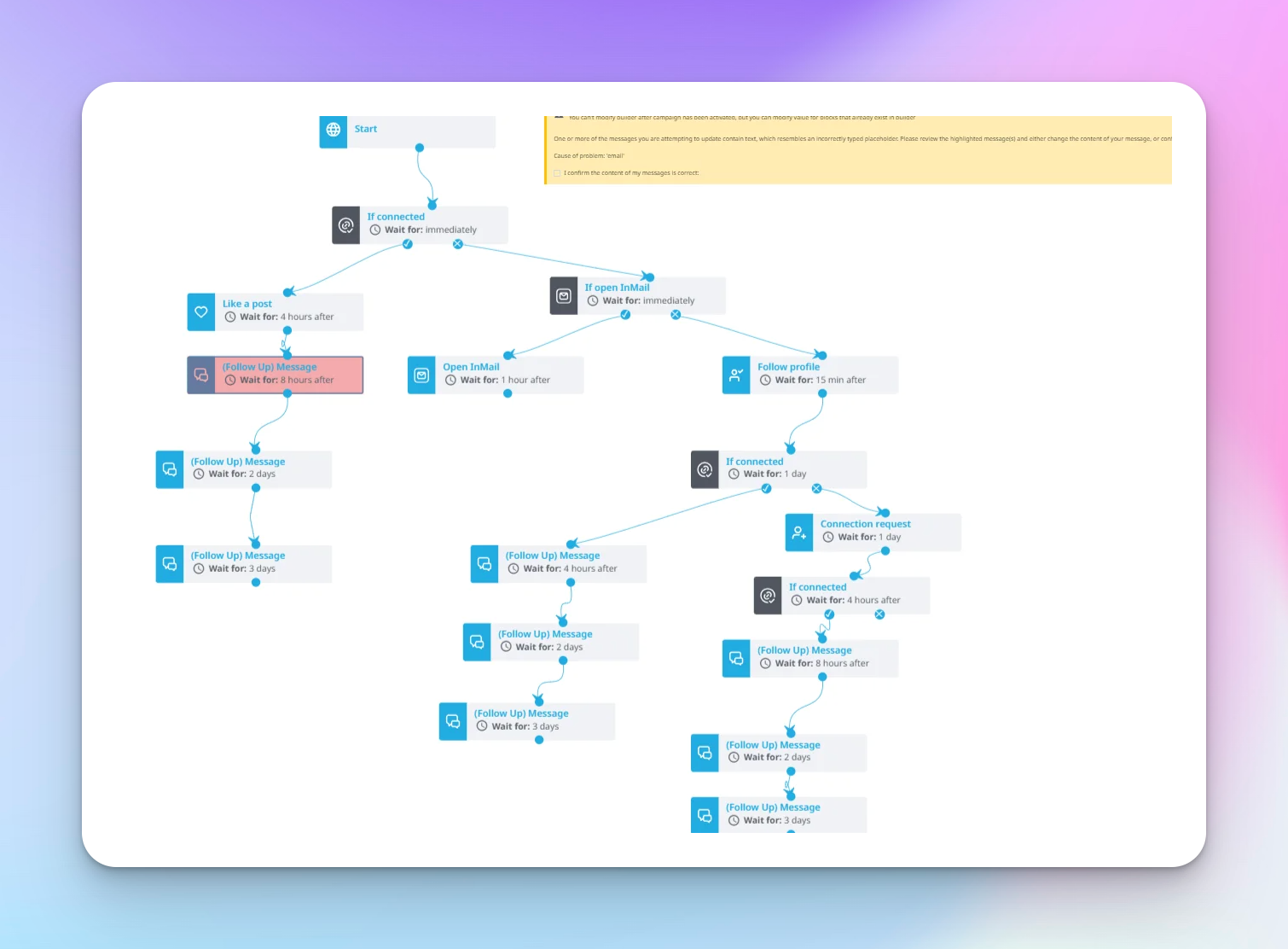
Dripify takes a simpler approach. Its visual campaign builder is easier to understand and faster to set up, which can help agencies launch outreach campaigns quickly. You can still build branches, delays, and conditional logic based on how a prospect responds, so it handles standard LinkedIn outreach flows well. But the system feels more structured and less flexible than Expandi when agencies need deeper workflow automation across multiple campaigns.

2. Team collaboration and client workspace management
Expandi supports team management through seats and workspaces. A seat is tied to a LinkedIn account, and it can be reassigned if an account gets restricted or replaced. For agencies managing outreach across multiple LinkedIn accounts, this flexibility helps maintain operations without rebuilding campaigns from scratch. Teams can collaborate inside the platform, share campaign templates, and connect workflows to external systems through CRM integrations, Zapier, or webhooks.
Dripify also includes team collaboration features, but the structure is simpler. LinkedIn accounts are connected to user environments where team members can manage campaigns, leads, and replies. This setup works when agencies run a smaller number of client accounts. As outreach operations grow, however, workspace separation, permissions, and visibility across multiple client campaigns can become harder to organize compared to tools designed specifically for agency infrastructure.
3. Inbox and reply management
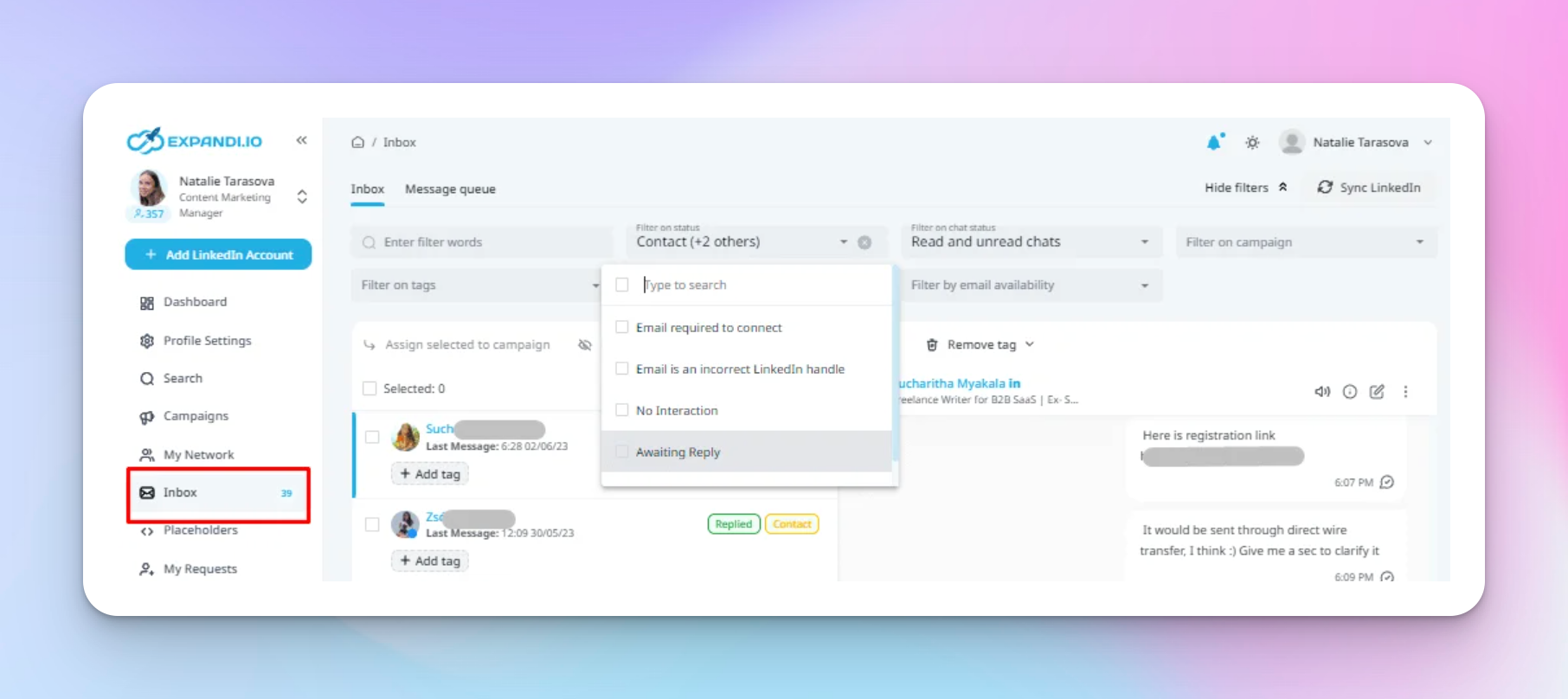
Expandi mirrors the LinkedIn inbox almost completely. Messages sent through outreach campaigns appear in the Expandi inbox, where replies can be managed directly. For agencies handling conversations across multiple LinkedIn accounts, this approach keeps streamline outreach activity inside one cloud-based environment and reduces the need to switch between LinkedIn profiles. Because replies stay inside the same environment, the platform also maintains a consistent activity pattern tied to the LinkedIn account. One limitation is that messages from the LinkedIn Sales Navigator inbox are not always visible in Expandi.
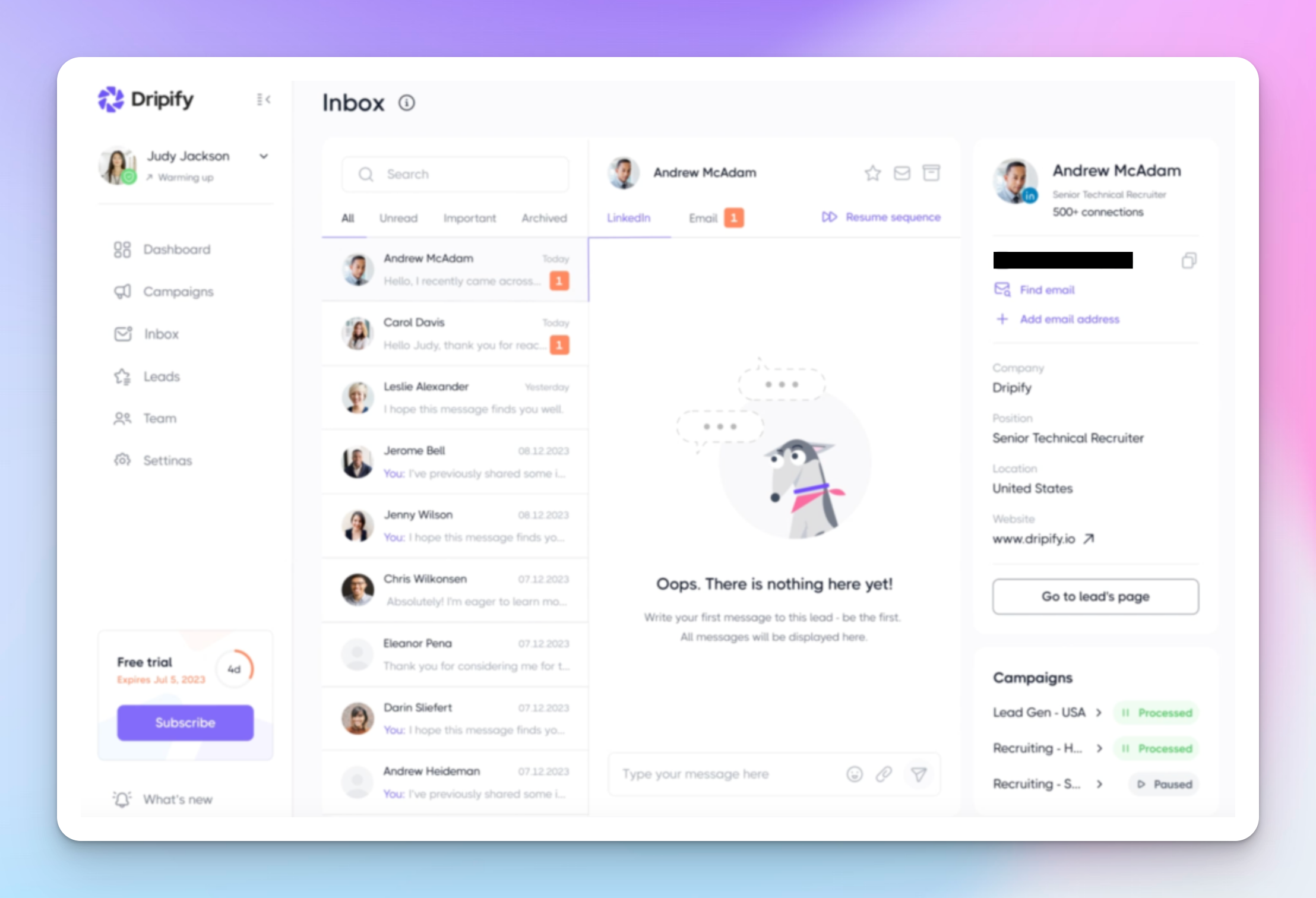
Dripify takes a more filtered approach with its Smart Inbox. Instead of showing every LinkedIn message, it displays only conversations coming from leads inside active outreach campaigns. For agencies managing prospect responses across several campaigns, this helps teams focus on leads generated through outreach rather than every LinkedIn conversation. Users can tag leads, add notes, star conversations, or blacklist contacts that should not receive follow-ups. The trade-off is that LinkedIn messages outside campaign activity may still require checking the native LinkedIn inbox.
4. Safety controls and LinkedIn account risk
Expandi puts strong emphasis on account safety controls. Each LinkedIn account can operate through a dedicated IP address based on the country selected during setup. The platform also includes warm-up systems, adjustable daily limits, and algorithms designed to keep activity within realistic ranges. The goal is to simulate human behavior and reduce patterns that could trigger LinkedIn restrictions.
Expandi also allows agencies to control activity ranges instead of fixed limits. Connection requests and follow-ups can be randomized rather than repeating the same number every day. This helps reduce predictable automation patterns across LinkedIn accounts.
Dripify approaches safety in a similar way but with simpler controls. Each LinkedIn account operates within its own local IP environment, and the platform includes activity limits and human-behavior simulation. Instead of flexible activity ranges, Dripify imposes many limits on pricing tiers that define how many actions accounts can perform each day.
For agencies managing multiple LinkedIn accounts, this tier-based structure makes activity limits easier to standardize across campaigns, although it provides less customization than Expandi’s adjustable ranges.
5. Integrations and workflow automation
Expandi is flexible in its approach to integrations and workflow automation. Within its campaign builder, agencies can trigger actions such as sending leads to a CRM or another system at specific steps in the campaign. The platform supports connections with tools such as HubSpot, Salesforce, and Pipedrive, and it also allows webhook-based automation and API access for deeper integrations. This means external systems can push or pull lead data based on campaign activity.
Expandi also supports automation via Zapier, allowing agencies to connect LinkedIn outreach to the rest of their outbound stack without requiring custom development. For agencies running lead generation across multiple clients, this makes it easier to sync campaign data with CRMs, enrichment tools, and internal reporting systems through integrations, webhooks, or the Expandi API. These integrations also make it easier to coordinate LinkedIn outreach with broader outbound workflows such as email campaigns or email automation.
Dripify also supports integrations through Zapier, Make, and webhook-based automation. These integrations allow lead data to be sent to external tools when specific campaign events occur, such as a connection acceptance or reply. The setup works well for basic workflow automation, although webhook events typically focus on lead-level data rather than full message history, which can limit how much conversation context reaches a CRM.
Dripify lists several native CRM integrations, including platforms like Salesforce, HubSpot, Zoho, and Pipedrive. In practice, many agencies still rely on Zapier, Make, webhooks, or available API endpoints to connect Dripify with the rest of their outbound stack and automate data flow between tools.
6. Reporting and client visibility
Expandi focuses on campaign-level analytics. Inside each campaign, agencies can track metrics such as acceptance rate, reply rate, and performance at each step in the sequence. This helps identify where prospects drop off and which messages generate the most engagement. Expandi also provides a central analytics dashboard for reviewing performance across campaigns and exporting data as CSV files for client reporting or CRM analysis.
For agencies managing outreach across multiple LinkedIn accounts, this type of data helps optimize messaging, compare campaign performance, and prepare reports for clients.
Dripify also provides key metrics, including acceptance rate, response rate, and step-by-step campaign performance. These analytics help agencies understand how leads move through drip campaigns and which messages generate replies. Higher pricing plans include more advanced analytics features that provide deeper visibility into campaign performance.
Expandi vs Dripify pricing
Pricing is one of the first things agencies analyze when choosing a LinkedIn automation platform. Both Expandi and Dripify charge per user or per LinkedIn account, but the structure of their pricing models differs.
Expandi keeps pricing relatively simple. There is essentially one main plan priced at $99 per month per LinkedIn account. That price includes the full automation platform from the start, including campaign automation, multichannel outreach, templates, integrations, analytics, and account safety features like warm-up and dedicated IP addresses.
Expandi also offers an Agency plan with custom pricing, which adds capabilities such as team management, client reporting, and workspace features. The overall model stays relatively straightforward because most functionality is available without upgrading through multiple pricing tiers.
Dripify uses a tiered pricing structure instead of a single plan:
- Basic: $59 per user/month ($39 billed annually)
- Pro: $79 per user/month ($59 billed annually)
- Advanced: $99 per user/month ($79 billed annually)
Lower tiers restrict campaign quotas, analytics depth, and team collaboration features. Agencies running outreach across multiple LinkedIn accounts typically move to higher plans to unlock team management and deeper analytics.
Dripify also includes built-in email outreach and an email finder. These features operate on a credit-based system, which can increase the total cost depending on how much lead enrichment or email activity an agency runs.
My take: Expandi pricing tends to be easier to predict because the core platform sits inside one main plan. Dripify may look cheaper at the entry level, but the tiered structure and credit-based features can make the total cost less predictable as outreach operations grow.
For agencies managing multiple clients and many LinkedIn accounts, pricing predictability and scalability usually matter more than the lowest starting price.
Where Expandi and Dripify fall short for agencies?
Expandi and Dripify automate connection requests, follow-ups, and outreach campaigns effectively. That is why many agencies rely on them for LinkedIn lead generation. But once outreach operations expand across multiple clients and LinkedIn accounts, several limitations begin to emerge.
1. Scaling across many clients is still manual
These platforms were originally designed around individual LinkedIn accounts rather than agency infrastructure.
Once outreach expands across many client accounts, operational complexity increases:
- Campaign management becomes fragmented
- Inbox conversations sit across separate LinkedIn accounts
- Reporting across clients becomes harder to consolidate
- Workflow automation often requires external tools
As a result, agencies often rely on spreadsheets, Zapier workflows, or custom processes to keep campaigns, leads, and client reporting organized.
2. Conversations are still manual
Automation tools handle sending outreach messages very well. What they do not handle is the rest of the conversation once prospects reply.
When replies start coming in, agency teams still need to:
- Read the response
- Qualify the lead
- Continue the conversation
- Route the lead to the right sales team or book meetings
Most LinkedIn automation tools focus on outbound messaging. Once prospects respond, agencies still need people or additional tools to manage conversations, qualify leads, and move them into the client’s pipeline.
3. LinkedIn limits cap growth
Even if the automation platform works perfectly, LinkedIn still controls the overall scale of outreach.
Daily limits for actions like connection requests and messages restrict how quickly campaigns can grow. Tools such as Dripify follow LinkedIn activity guidelines, which typically result in roughly 70–80 connection requests per day, depending on the account type and activity history.
For agencies running outreach across many client accounts, these platform limits create a natural ceiling. Scaling outbound typically requires adding more LinkedIn accounts rather than simply increasing activity on existing ones.
4. Integrations are often partial
Both platforms support integrations through webhooks, Zapier, and CRM connections. However, those integrations are not always complete when agencies try to connect LinkedIn outreach with the rest of their outbound stack.
Common issues agencies run into include:
- Limited data syncing with CRM systems
- Message content not transferring fully into the CRM
- Webhook triggers restricted to specific campaign events
Because of these limitations, agencies often end up building additional automation layers around the tool using Zapier, Make, or internal workflows just to keep lead data, conversations, and reporting aligned across systems.
5. Workflow flexibility can become restrictive
Expandi offers powerful campaign automation, but sequences usually require careful planning because editing them later can be limited once campaigns are live.
Dripify makes it easier to modify sequences after launch, but the platform can restrict more advanced automation logic. When outreach strategy changes or client requirements shift mid-campaign, agencies may need to rebuild workflows manually across multiple campaigns and accounts.
Why agencies often move beyond Expandi and Dripify
After using Expandi or Dripify, many agencies eventually run into the same operational limits: pricing that scales per LinkedIn account, fragmented inboxes across client accounts, limited workspace management, and poor visibility across dozens of outreach campaigns.
At that point, tools designed for agency outreach infrastructure start to make more sense. HeyReach is one of the best Expandi alternatives for agencies because it solves the problems that appear once outreach scales across many clients.
HeyReach pricing doesn’t scale with agencies
Pricing is usually the first place agencies start doing the math.
With Expandi, the cost is about $99 per LinkedIn account per month. Dripify uses a tiered pricing model, and most teams running serious LinkedIn outreach end up on the Advanced plan at $99 per user/month (or $79 per user/month billed annually) to unlock team management and deeper analytics.
At first glance, those numbers look reasonable. But agencies rarely run just a few accounts.
Once outreach runs across many clients, the math changes quickly.
If an agency manages 50 LinkedIn accounts for clients:
- Expandi → roughly $4,950 per month
- Dripify (Advanced plan) → roughly $4,950 per month (or about $3,950/month billed annually)
- HeyReach Agency plan → $999 per month for 50 senders
The difference becomes significant as an agency grows.
Instead of charging per seat or per LinkedIn account, HeyReach uses a sender-based pricing model designed for agency operations. One flat price covers many LinkedIn senders, allowing agencies to scale outreach campaigns across multiple clients without costs increasing every time a new account is added.
HeyReach workspaces are built for agency operations
Workspace structure becomes a major challenge once agencies start managing outreach for multiple clients. Many LinkedIn automation tools are built around individual users, which often means separate logins, separate environments, or additional paid seats for each team member managing campaigns.
HeyReach approaches this differently.
Agencies can create dedicated workspaces with roles and permissions, allowing teams to manage multiple client campaigns within a single centralized environment. Account managers, VAs, and team members can collaborate within the same workspace without requiring separate paid seats.
Pricing is tied only to connected LinkedIn senders, not to the number of people managing campaigns.
This structure makes client campaign management significantly easier and reduces the operational risk of teams logging into multiple LinkedIn accounts from different environments.
HeyReach offers white-label capability to help agencies fight the churn
For agencies offering LinkedIn outreach as a service, brand ownership becomes important as client relationships grow.
HeyReach offers white-label functionality, which allows agencies to present the platform as their own internal outreach system. Instead of interacting with a third-party tool, clients see the agency’s brand and infrastructure behind the outreach operations.
Neither Expandi nor Dripify offers a comparable white-label option as part of their standard platform.
For agencies, this helps reinforce the perception that the outreach infrastructure belongs to them rather than the software vendor. It also reduces the risk of clients discovering and switching directly to the underlying tool.
HeyReach Unified inbox helps agencies to centralize inbox management across all accounts
Reply management quickly becomes chaotic when agencies run outreach across multiple LinkedIn accounts. Most automation tools handle sending messages well, but replies typically remain tied to individual LinkedIn inboxes.
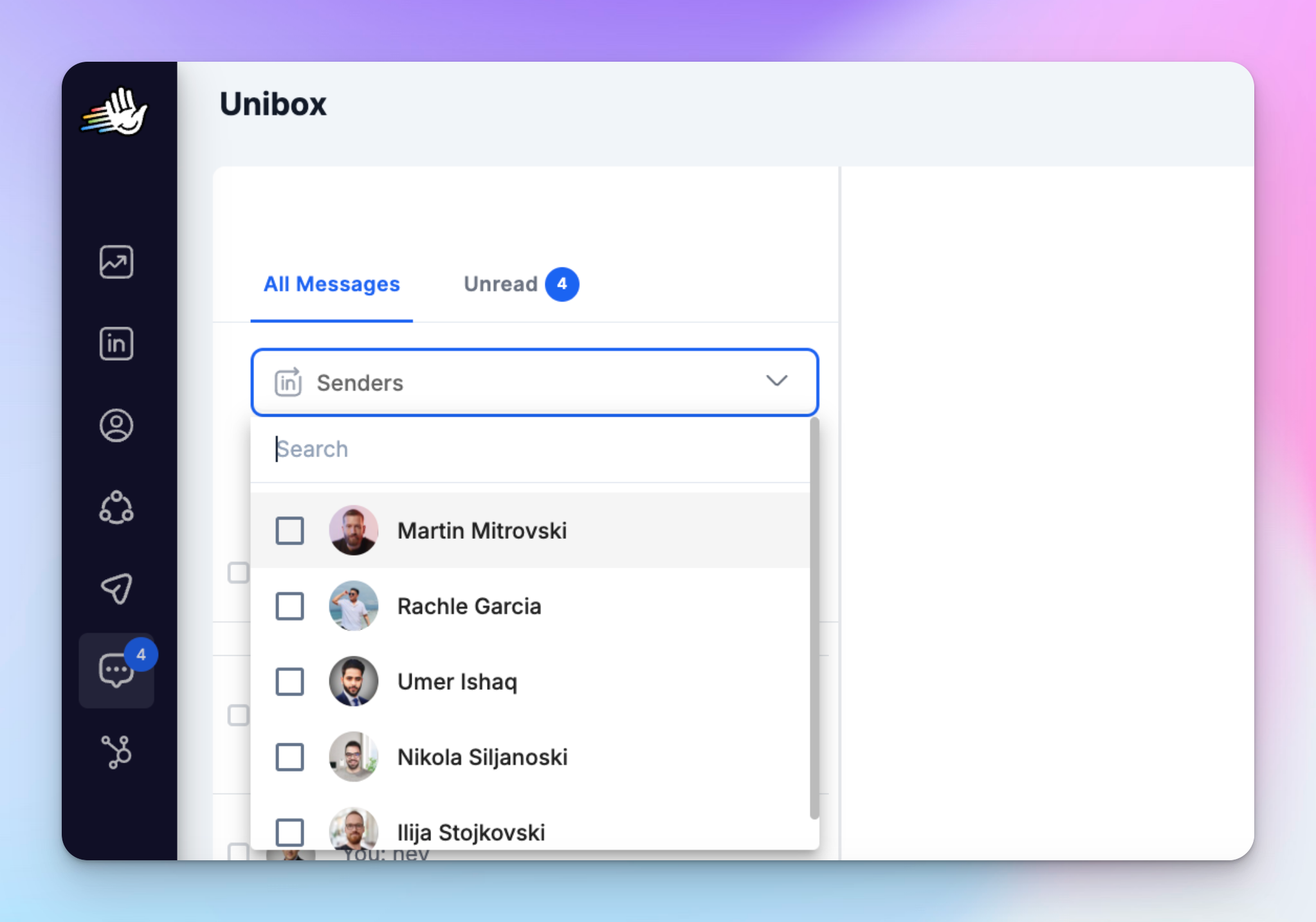
HeyReach solves this with Unibox, a centralized inbox that collects messages from all connected LinkedIn accounts in one place.
This allows agencies to:
- Manage conversations across multiple LinkedIn senders from one inbox
- Track replies across campaigns and client accounts
- Control whether to import all LinkedIn conversations or only those triggered by HeyReach campaigns
This flexibility is especially important for agencies working with multiple clients. Some clients prefer that only campaign conversations are visible, while others want full visibility across all LinkedIn messages tied to their accounts.
HeyReach MasterView centralizes analytics and visibility across all clients
Once agencies run outreach across dozens of LinkedIn accounts, maintaining visibility becomes difficult. Campaign performance, replies, and activity are usually spread across separate accounts and workspaces.
HeyReach solves this with Masterview and Masterbox, two features designed specifically for agency operations.
- Masterview provides a centralized dashboard where agencies can monitor campaign metrics across all client workspaces and connected LinkedIn accounts. Instead of opening each workspace individually, teams can track outreach activity, reply rates, and overall campaign performance from a single overview.
- Masterbox centralizes conversations from all connected LinkedIn accounts. Agencies can read and manage replies across clients without switching between multiple inboxes, which makes handling lead responses and follow-ups far easier as outreach scales.
Together, these tools give agencies a single operational view across all clients, campaigns, and conversations.
HeyReach integration stack fits any outbound agency
Most agencies do not run LinkedIn outreach inside a single tool. Outreach campaigns are usually part of a larger GTM workflow that includes enrichment platforms, CRMs, automation tools, and email infrastructure.
HeyReach plugs directly into that stack instead of forcing agencies to rebuild their workflows.
For example:
- Lead enrichment tools like Clay allow agencies to pull data from multiple sources and create highly personalized LinkedIn outreach before a campaign even starts.
- CRMs such as HubSpot, Attio, or Breakcold can automatically receive leads and replies from HeyReach campaigns, moving qualified prospects into the client’s pipeline without manual data entry.
- Email platforms like Instantly or Smartlead allow agencies to run LinkedIn and email outreach together, enabling true multichannel campaigns instead of relying on LinkedIn alone.
- Automation platforms such as Zapier, Make, n8n, Pabbly, or Albato allow agencies to connect HeyReach with the rest of their outbound stack. Campaigns, lead flows, and reporting workflows can be triggered automatically based on events happening in other tools.
- Some integrations also support signal-based outbound. Platforms like Trigify, RB2B, or Factors.ai can detect buying signals such as website visits or engagement events and automatically trigger LinkedIn outreach campaigns.
- Other tools help increase conversion rates within campaigns. Platforms like Weezly, GenPage, or Twain allow agencies to include personalized videos, landing pages, or AI-assisted messaging inside outreach sequences.
The result is an automation platform that adapts to the agency’s existing GTM stack, rather than forcing agencies to change how their outbound systems are built.
HeyReach MCP allows AI-powered campaign control
MCP stands for Model Context Protocol. It allows AI tools such as Claude, ChatGPT, and other LLMs to interact directly with your HeyReach workspace and execute real actions inside the platform.
Instead of navigating through multiple dashboards, agencies can control outreach operations through simple prompts.
For example, an AI assistant could:
- Add new CRM leads to a LinkedIn outreach campaign
- Analyze campaign performance and summarize reply rates
- Tag leads based on the sentiment of their replies
- Route positive responses to the sales team
Once the prompt is issued, the AI performs those actions directly inside HeyReach.
For agencies running outbound at scale, MCP turns AI from a simple copywriting tool into an operational layer for campaign management.
AI assistants can:
- Create LinkedIn outreach campaigns
- Generate personalized messages or icebreakers
- Filter leads by seniority, role, or company size
- Analyze replies and tag positive responses
- Move qualified leads into the next step of the workflow
- Send campaign data back to the CRM
MCP also allows HeyReach to connect with tools agencies already use, such as Claude, Cursor, Clay, n8n, and other platforms that support MCP.
As a result, agencies can control LinkedIn outreach workflows directly from their existing GTM systems instead of switching between multiple tools and dashboards.
HeyReach offers whiteglow service with dedicated GTM engineer and support for agency teams
Customer support becomes critical once agencies scale their outreach operations. Running LinkedIn campaigns across multiple clients requires more than just basic onboarding. Agencies often need guidance with:
- Campaign architecture
- Outbound strategy
- Scaling outreach infrastructure across many LinkedIn accounts
HeyReach provides dedicated support and GTM specialists who work directly with agencies to design, optimize, and scale their outbound systems.
Instead of relying only on documentation or standard support tickets, agency teams can get help structuring campaigns, improving outreach performance, and building scalable outbound workflows.
Expandi vs Dripify vs HeyReach
Want to see how HeyReach compares with other LinkedIn automation tools? Explore our full comparison library on the HeyReach comparisons page, including detailed reviews of tools like Expandi, PhantomBuster, Waalaxy, and Linked Helper.
Decision guide
Choose Expandi when:
- You want advanced LinkedIn campaign automation and deeper builder logic
- Your agency needs detailed control over outreach workflows and integrations
- CRM connections like HubSpot, Pipedrive, or Salesforce are central to your outbound system
- You manage a limited number of LinkedIn accounts and do not mind paying per seat
- Your team is comfortable with a more complex setup and campaign structure
Choose Dripify when:
- You want a simpler LinkedIn automation platform that is easy to set up
- Your agency runs straightforward LinkedIn outreach campaigns with minimal workflow complexity
- Built-in email finder and email outreach are useful for your prospecting process
- You manage a smaller number of LinkedIn accounts and prefer a simpler interface
- Fast onboarding and a lower entry price matter more than deeper automation control
Choose HeyReach when:
- You run an outbound or lead generation agency
- You manage LinkedIn outreach for multiple clients and many sender accounts
- Predictable pricing at scale is important for your agency's margins
- You want centralized inbox management, campaign visibility, and structured client workspaces
- Your outbound stack includes tools like Clay, CRMs, and automation platforms
- You want to control outreach operations with AI through MCP instead of managing campaigns manually
Which LinkedIn automation tool suits agencies best
Agencies usually need centralized inbox management, structured client workspaces, deep integrations with their GTM stack, and pricing that does not increase every time a new LinkedIn sender is added.
That is where HeyReach stands out. The platform is designed for agencies, with capabilities such as a unified inbox, workspaces with roles and permissions, integrations with tools like Clay and HubSpot, and pricing that supports many LinkedIn senders under a single plan.
For agencies running outreach across multiple clients and LinkedIn accounts, HeyReach provides infrastructure that is built for that level of scale.

Try it for free
Frequently Asked Questions
What’s the main difference between Expandi and Dripify for agencies?
Expandi is built for advanced workflow control, deeper campaign logic, and stronger CRM integrations, making it better for agencies managing multiple LinkedIn accounts. Dripify is simpler and faster to set up, ideal for smaller-scale campaigns, but can struggle with multi-account operations and team collaboration as agencies grow.
Why do agencies eventually switch from Expandi or Dripify to HeyReach?
As agencies scale outreach across multiple clients, Expandi and Dripify show limitations in inbox management, workspace visibility, pricing predictability, and operational control. HeyReach solves these with sender-based pricing, workspaces with roles, unified inbox, Masterview analytics, and AI-driven campaign control (MCP).
How do Expandi and Dripify handle LinkedIn account safety?
Both platforms use IP control, warm-up systems, and daily activity limits to reduce LinkedIn restrictions. Expandi allows flexible daily ranges and more advanced human-behavior simulation, while Dripify enforces tier-based limits and simpler safety controls, which can be easier to standardize but less customizable.
Can Expandi or Dripify handle multi-client campaigns efficiently?
Only partially. Expandi supports workspaces and team collaboration but can feel heavy with many client accounts. Dripify is simpler but lacks robust workspace separation and visibility. HeyReach, on the other hand, centralizes multiple client campaigns with Masterview and Unibox, making large-scale agency operations much smoother.
How do pricing models differ between Expandi, Dripify, and HeyReach for agencies?
Expandi and Dripify charge per LinkedIn account or user, which quickly becomes expensive as the number of accounts grows. HeyReach uses sender-based pricing for agencies, offering one flat price for many LinkedIn accounts, providing predictable costs and easier scalability for multi-client outreach.