How to keep your CRM data clean during LinkedIn outbound campaigns
Published:
May 31, 2026
Updated:
June 1, 2026
People usually obsess over their outreach copy. Their sequences. Their targeting. And then they completely ignore the one thing that makes all of it reusable, analyzable, and future-proof: keeping their CRM data clean and current.
I've been running my outbound and GTM agency for 8 years, working with dozens of companies since 2018, and this is one of the most consistently neglected parts of any LinkedIn outreach setup. So let me walk you through exactly how I structure this — pre-campaign, during, and post-campaign — and why your CRM should be the non-negotiable central source of truth for everything you do.
Why your CRM should be the source of truth for outbound
The outbound sales automation world is volatile. The tools you use today — whether you're running cold email through Instantly, Smartlead, or anything else — can change. Platforms get switched out. You migrate. And when that happens, all the data you stored inside those tools? Gone, or at least painful to extract.
That's why I build everything around a CRM from day one. I use HubSpot with most of my clients, but the principles apply to any CRM you choose. The rule is simple: nothing gets outreached before it lives in the CRM. Every lead, contact, or prospect goes in first — then gets pulled for further processing.
How leads get added varies. Some clients use the LinkedIn Sales Navigator native integration directly into HubSpot or Salesforce. Others pull CSVs from data enrichment tools and import them. Some cherry-pick manually. The method doesn't matter. What matters is they're in HubSpot first.
Pre-campaign: qualifying leads before they hit your outreach
1. Scoring LinkedIn profile activity before you spend connection requests
LinkedIn gives you roughly 150 connection requests per week per account. That's a hard limit. If your total addressable market is large and you don't have a big team, this bandwidth becomes precious. Wasting it on people with abandoned profiles — no photo, no headline, three connections — is a real cost.
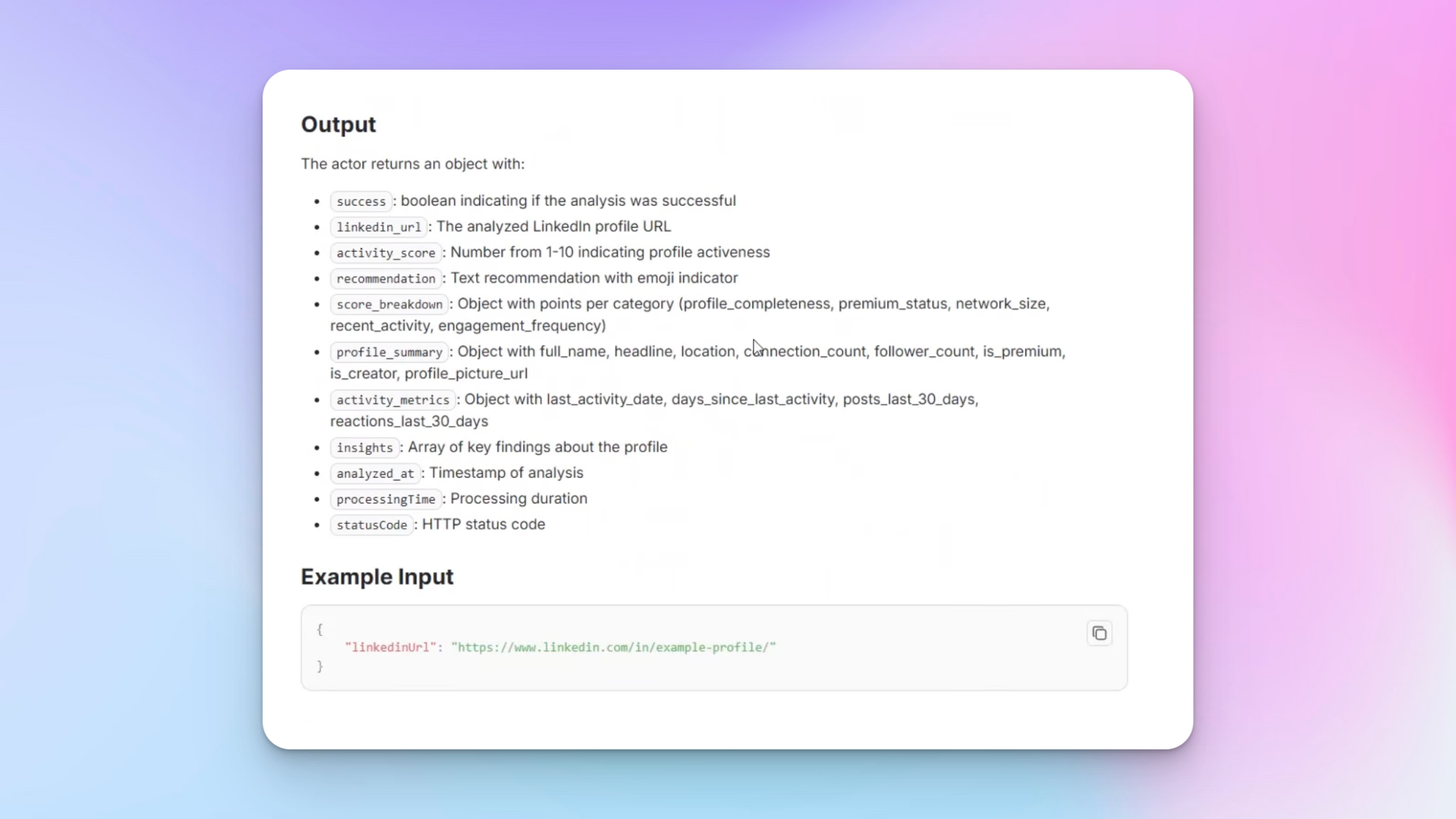
So before I push anyone into a LinkedIn outreach campaign, I score their LinkedIn profile activity. Manually, this is painful. Instead, I use an Apify actor that scores profiles from 0 to 10 based on clearly documented criteria — things like:
- Whether they have a profile photo and cover photo
- Whether their About section has meaningful content
- Whether they post and interact with others
- Whether their experience section is filled out
The actor only requires a LinkedIn URL to run — which is one of the easiest data points to get compared to verified email addresses or phone numbers. You run it, you get a detailed breakdown of each profile, and you save that score back to HubSpot.
Then it's a simple conditional: if the activity score is 2 or above, push to the HeyReach campaign. Below that threshold, you filter them out and decide later whether to try a different channel or approach.
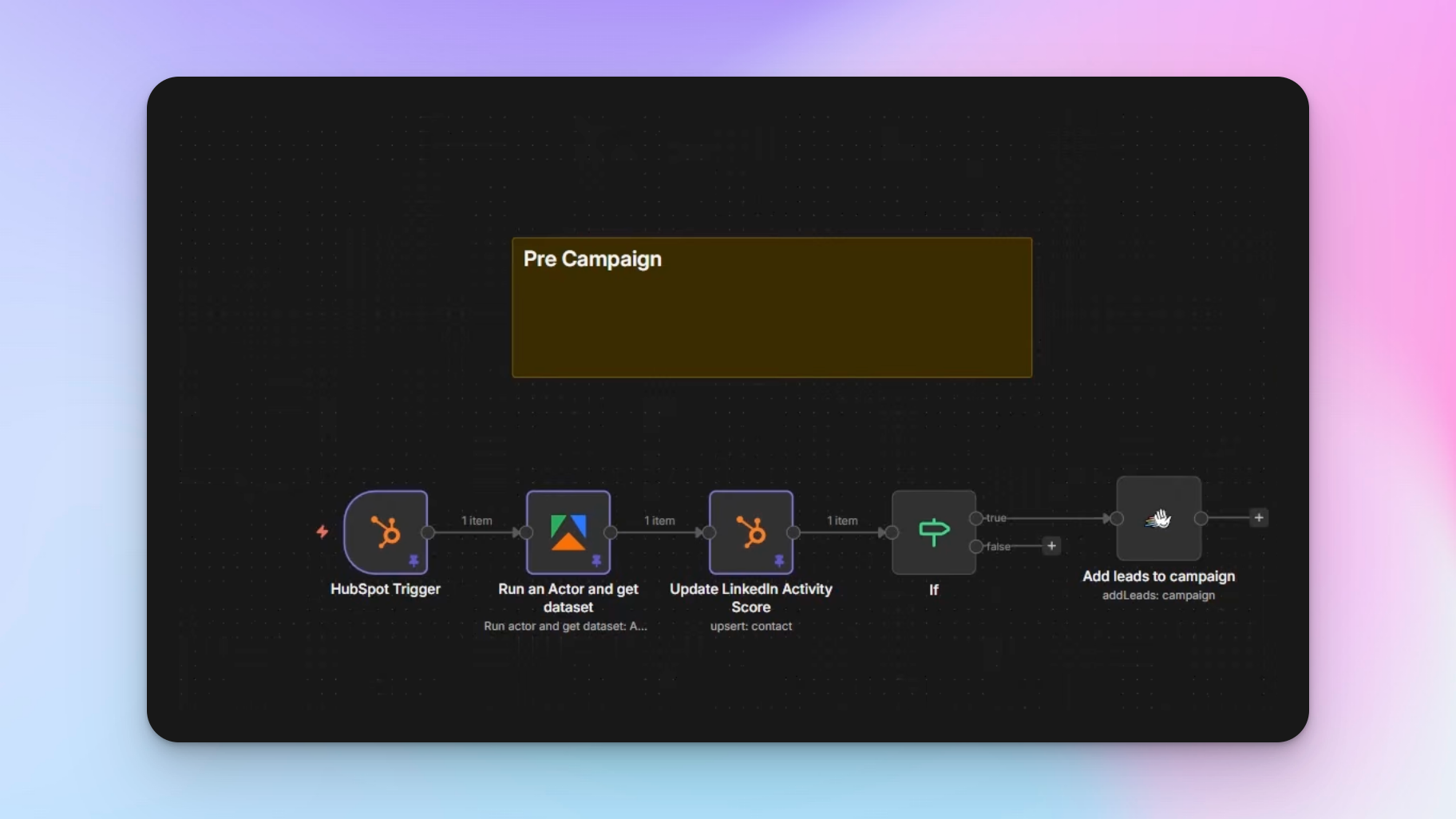
Why LinkedIn URL is the easiest data point
Unlike email addresses — which require verification tools, bounce checks, and data enrichment — LinkedIn URLs are straightforward to collect. That's one of the reasons I lean on LinkedIn message automation as a primary outreach channel, especially when reaching out to corporate accounts where security email gateways block cold email entirely.
2. Running the campaign with HeyReach
Once a lead passes the activity score threshold, they go into a HeyReach campaign. The setup I use for most clients is simple:
- Send a blank connection request (no note — tested extensively, works better)
- After a set number of days post-acceptance, send a follow-up message
I use HeyReach specifically for LinkedIn outbound because of how it handles multi-account LinkedIn management and the webhook triggers that feed back into the rest of the workflow. Those webhooks are what make the post-campaign data layer possible.
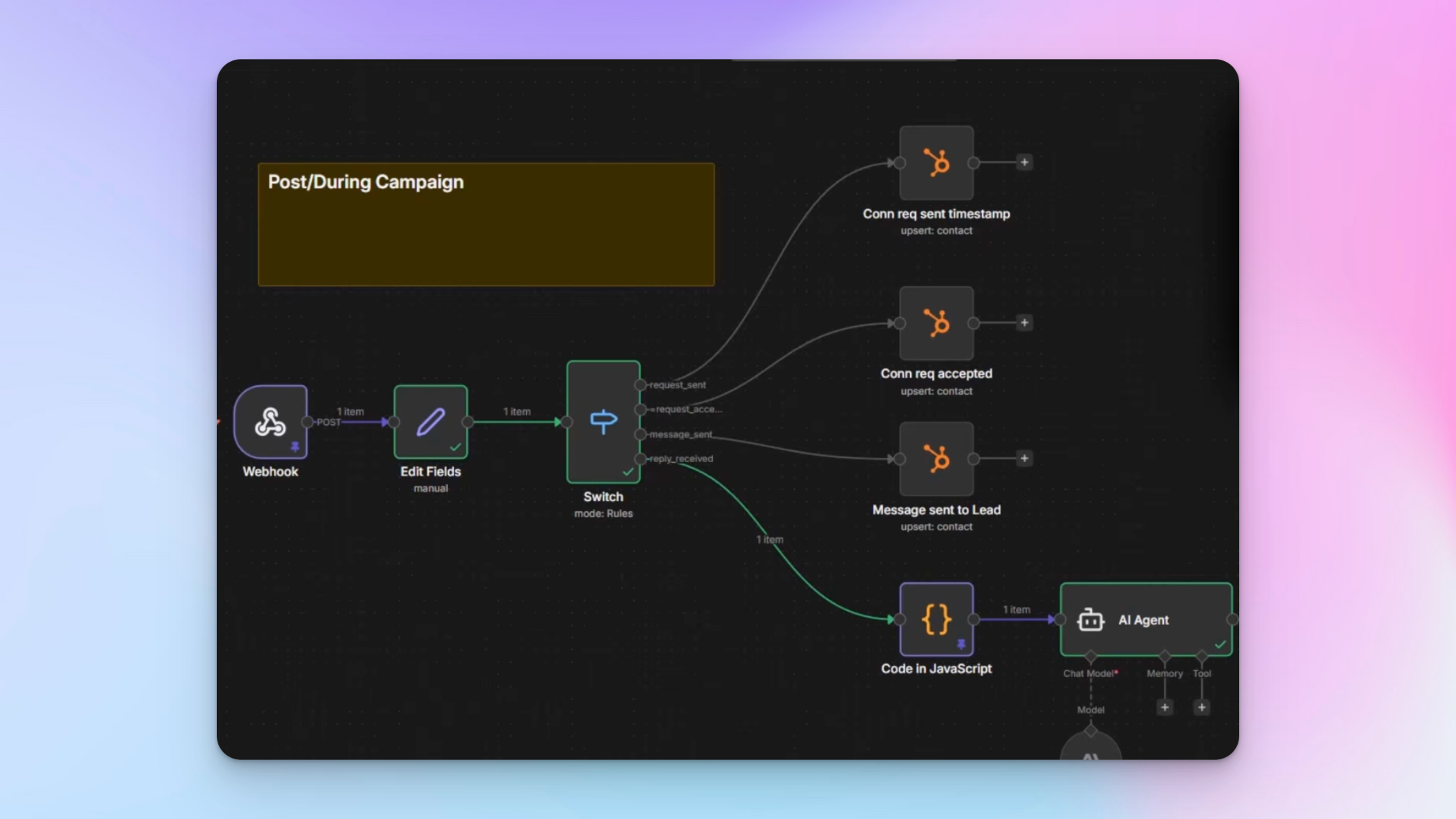
3. Post-campaign: what to save back to your CRM and why
This is where so many setups fall apart. The campaign runs, conversations happen, and none of it ends up structured in the CRM. Here's exactly what I save and why.
Connection request sent (with timestamp)
I save the date a connection request was sent for every lead. This isn't just for reporting — it's operationally important. One of my clients has several salespeople, and the sales director wants activity visibility without logging into HeyReach or any outreach tool. He wants to open HubSpot and filter: show me every connection request sent by this sales rep in this date range.
A timestamp makes that trivially easy.
Connection accepted (with rep name)
When a connection is accepted, I don't just log a checkbox. I save it as a text field: "Connected with [First Name Last Name] on [Date]." The reason is territory management. Sales reps switch accounts and territories regularly. If a lead changes hands later, you need to know which rep this person actually connected with — a checkbox doesn't tell you that.
Message sent (with full message text)
Every time a sales rep sends a message to a lead, I save the full message text to HubSpot. This is useful during team update calls — reps can review exactly what was said without reconstructing it from memory or hunting through LinkedIn DMs.
Reply sentiment (analyzed and stored)
This is the one that provides the most long-term value. Every time a reply comes in, I run it through an AI model to analyze sentiment and save two things to HubSpot:
- The sentiment label (positive, neutral, negative)
- The full conversation thread
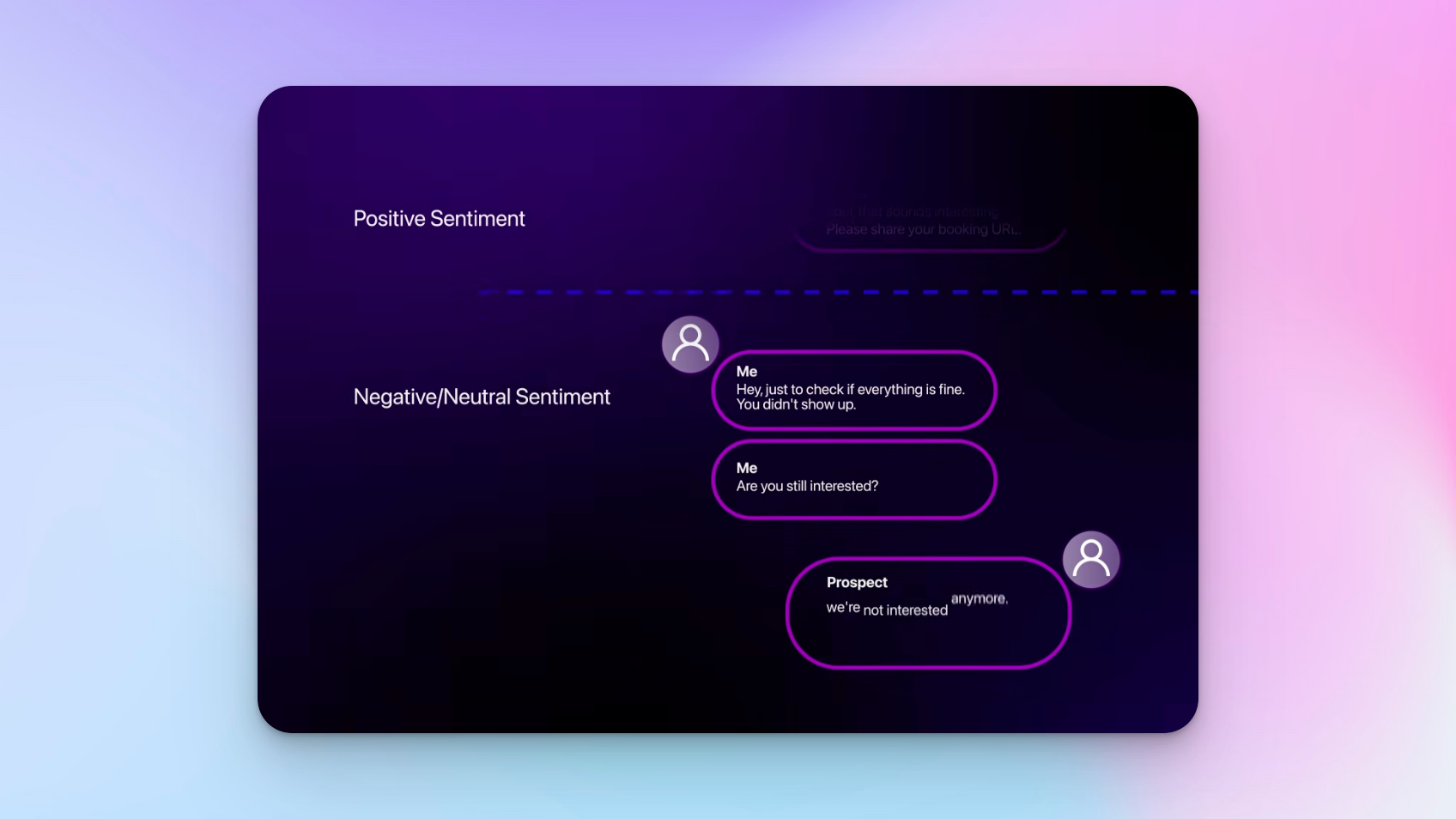
The reason I save sentiment on every reply — not just the first one — is that conversations evolve. Someone might say "this sounds interesting, send me your booking link" (positive), book a call, not show up, and then when you follow up on LinkedIn, respond with "actually we're not interested." The sentiment shifted from positive to negative across the thread.
Capturing that change tells you a lot more than a single snapshot. I use a bit of custom JavaScript to flatten the thread JSON before passing it to the AI node, and I add a note if there's an attachment or voice message in the thread so future analysis accounts for that.
What this looks like inside HubSpot
Once everything is wired up, a contact record in HubSpot shows:
- LinkedIn activity score
- Date connection request was sent
- Which sales rep they're connected with and when
- Every message sent to them
- Full reply thread
- Current sentiment label
From there, you can build dashboards, create segments based on activity score or sentiment, filter by rep or time period, and — because HubSpot has its own MCP server — even run analysis by prompting directly in natural language.
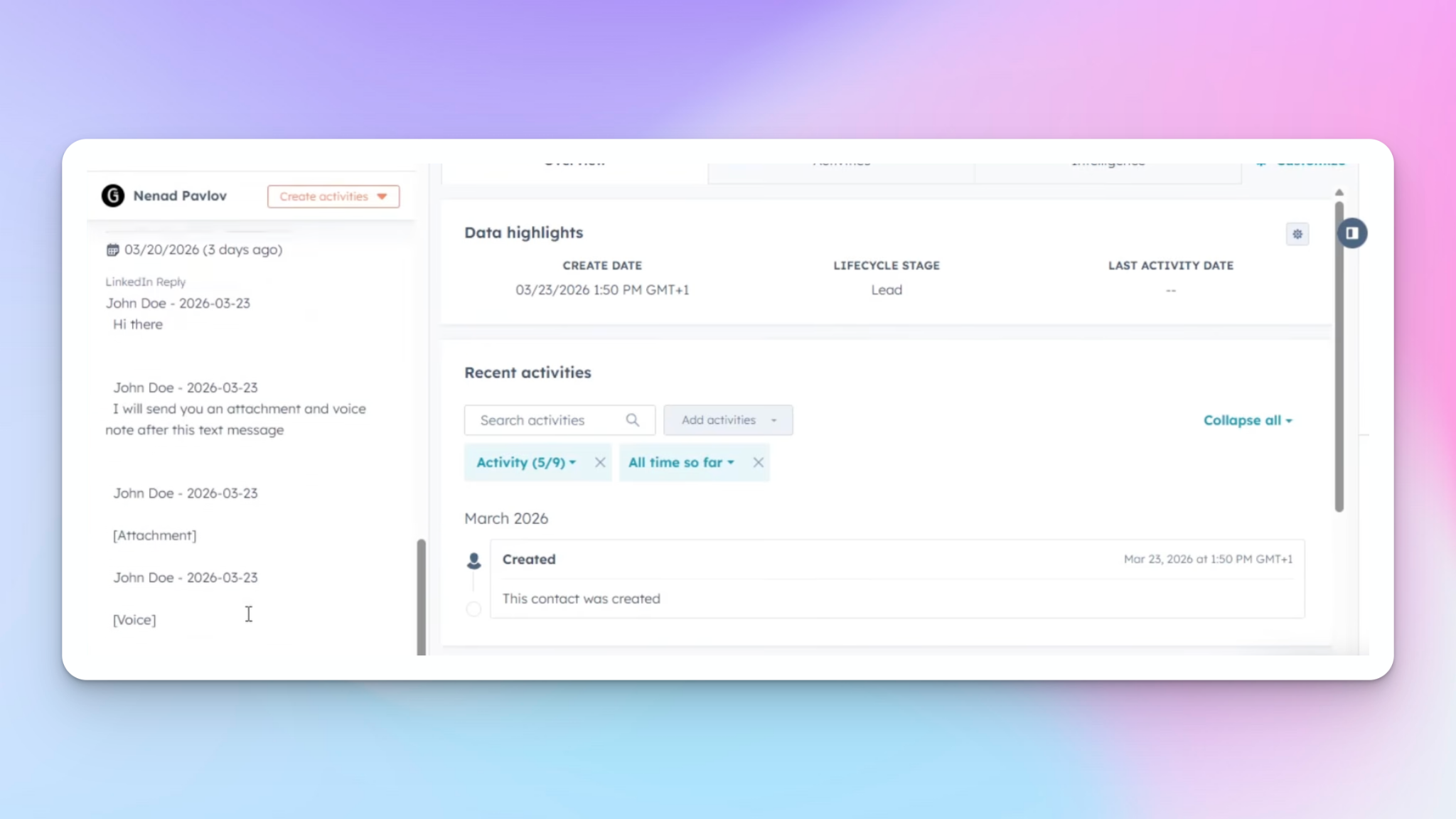
The whole point is that regardless of what happens in any outreach tool, the data lives in one place. You're not dependent on HeyReach's dashboard, or Instantly's, or Smartlead's. Your sales tech stack can change, and your historical data stays intact.
This is what campaign performance tracking actually looks like when it's done rightl. You get a structured data you own and can query years later.

Try it for free
Frequently Asked Questions
What CRM should I use for this workflow?
I demonstrate this on HubSpot because most of my clients use it, but the principles apply to any CRM. As long as it supports custom properties and can receive data via webhook or API, the workflow translates directly.
Do I need to score every LinkedIn profile before outreach?
Yes, if you're serious about not wasting your weekly connection request limit. Profiles with scores of 0 or 1 are essentially abandoned — no activity, no presence. Sending requests to them burns your bandwidth on leads that will never engage.
Why save the full message text in HubSpot instead of just logging that a message was sent?
Because reps forget what they said. During update calls or when a lead re-engages months later, having the exact message text in HubSpot means you don't have to reconstruct it from LinkedIn DMs. It also lets sales directors audit messaging quality without requesting screenshots.
How does sentiment analysis work in practice?
After each reply, the conversation thread is extracted, flattened into a readable format, and passed to an AI model with a simple prompt: analyze the sentiment of this conversation. The result — positive, neutral, or negative — is stored as a custom property in HubSpot alongside the full thread. Because it runs on every reply, you get a living record of how the conversation evolved.
What happens to the data if I switch outreach tools?
Nothing happens to it — it's already in HubSpot. That's the entire point of this setup. Your outreach tool is just a sender; HubSpot is where the record lives. You can swap HeyReach for any other LinkedIn automation tool and your historical contact data, activity logs, and conversation threads remain completely intact.