LinkedIn outreach sequence: 8 first messages and 2 follow-ups
Published:
November 25, 2026
A LinkedIn outreach sequence is three messages, and almost all the work sits in the first one.
When a campaign stalls, most people rewrite the copy. I'd look somewhere else first: the gap between who's on your list and what your first message says to them.
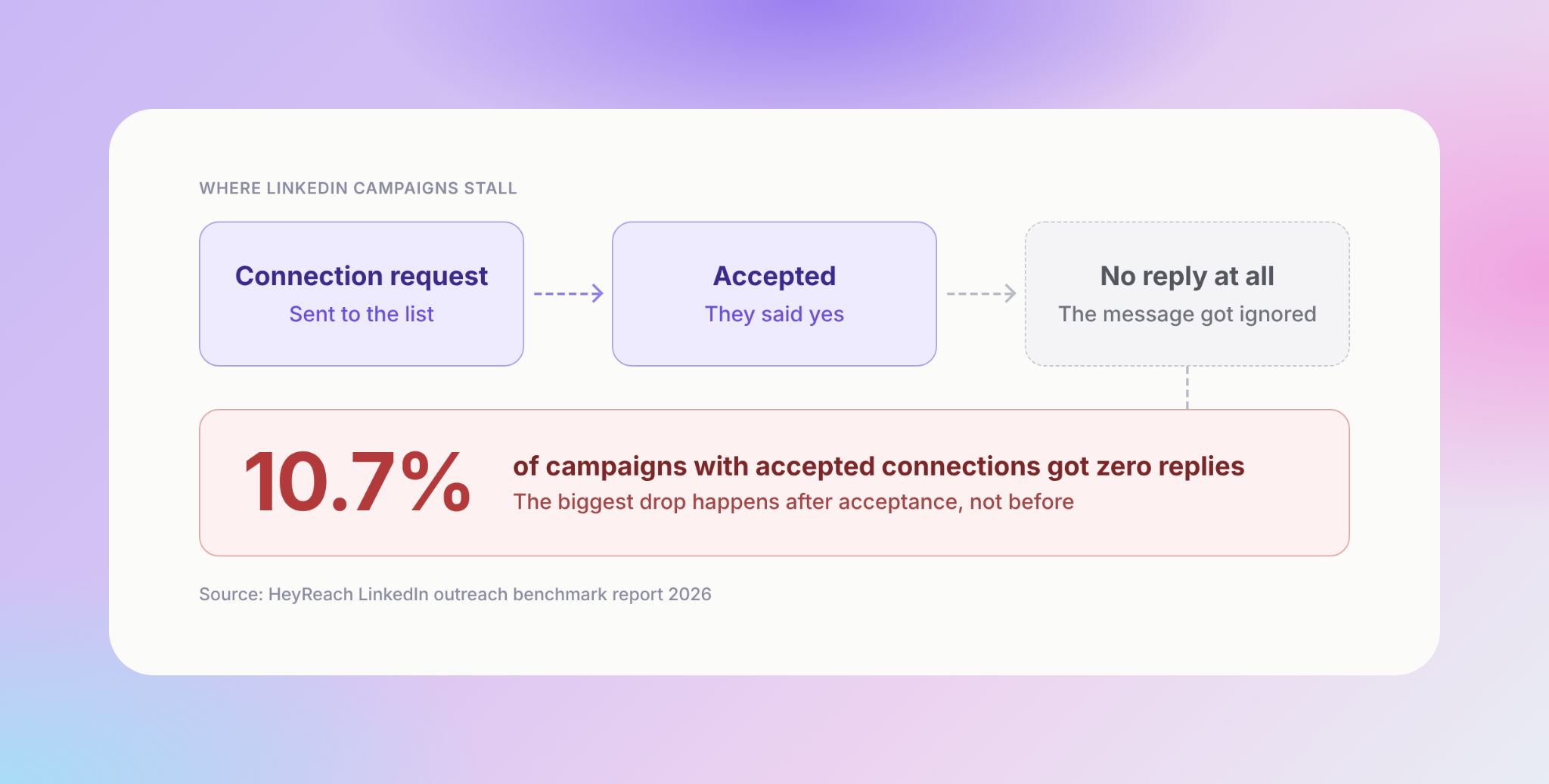
The data points the same way. In HeyReach's benchmark report, we found that 10.7% of campaigns with accepted connections got zero replies. People said yes to the connection, then ignored the message.
This post is built around the first message. You get 8 first messages, grouped by four ways to write personalized messages, and 2 follow-ups you can reuse in every campaign without edits.
Before you write anything: the list decides what you're supposed to say
You can't write a good first message for a bad list. So check the list before the copy.
Focus on one group, you don’t need to chase the job title. A head of sales at a 20-person startup and a head of sales at a 500-person company share a title, not a problem. Build each list around one slice of your ideal customer profile: people who'd recognize the same pain.
Finding a niche detail always beats a broad title, one detail only their industry would recognize tells them you know their world.
Location should decide when you send and how you open. It should reflect in your timing and the context you use.
Whether you build the list in LinkedIn Sales Navigator or enrich it in Clay, the test is the same: could one first message speak to every person on it? If not, split the list.
The connection request stays empty
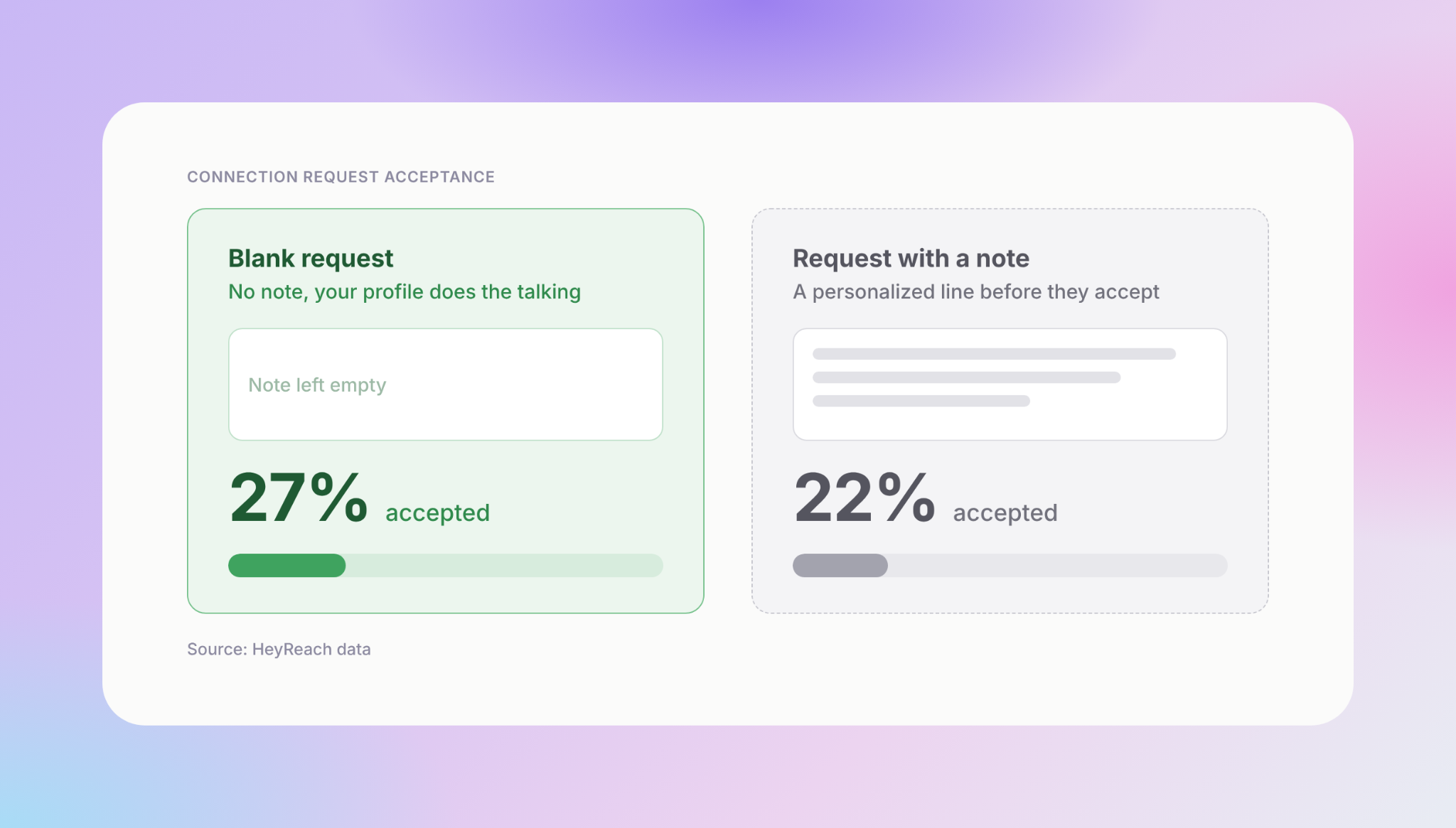
Send it without a note, because in HeyReach's data, blank requests get accepted more often than personalized ones: 27% vs. 22%.
Your profile should do the job the note would do. People check who's asking before they accept, so treat that profile visit as your note: a clear headline and a relevant About section carry more than 300 characters of note. If yours needs work, start with LinkedIn profile optimization.
Notes also don't hold up when you send connection requests at volume. LinkedIn limits how many personalized notes free accounts can send, so a sequence that depends on them stalls unless you're on a paid plan.
In HeyReach, you just leave the connection request message empty. Several of our outbound playbooks run this way, like Signado's at 47.8% acceptance and a 36.4% reply rate. If you still want to write a note for a specific case, here's how to write a LinkedIn connection message.
The first message: the rules
If your acceptance rate is healthy and your response rate is low, the first message is usually the problem. That's one of the clearest patterns in our benchmark report.
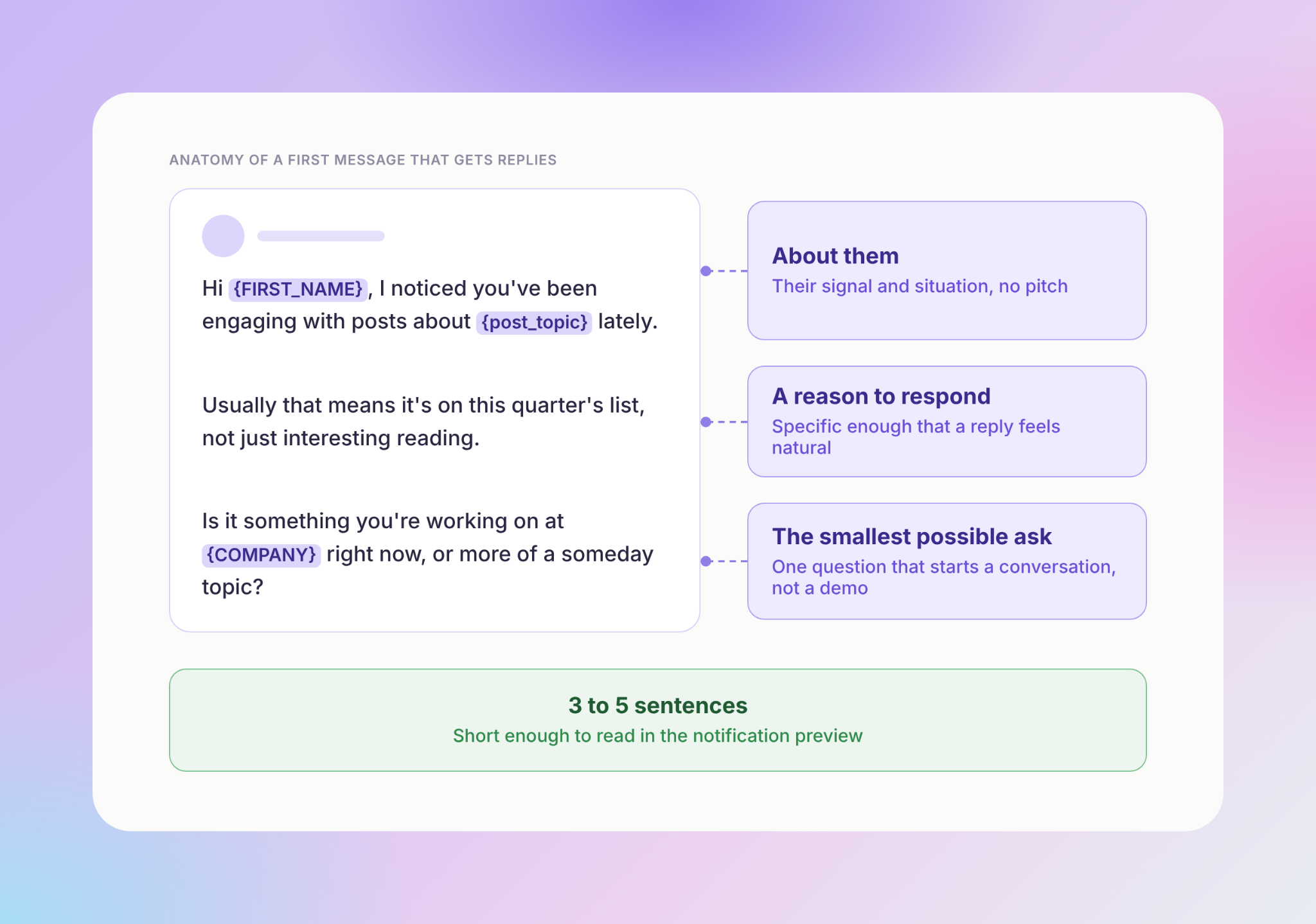
A first message that gets replies follows four rules:
- 3 to 5 sentences: Short enough to read in the notification preview.
- Entirely about them: Their signal, their situation, their problem. No pitch.
- A reason to respond: Something specific enough that a reply feels natural.
- The smallest possible ask: One clear CTA, like a question that starts a conversation; don’t jump straight into a request for a demo.
8 first messages, by type of personalization
Every template is written for SDRs and AEs running their own outreach. Each one is the full message, plus who it's for and when to use it. With these, you have two kinds of gaps to fill:
- {CAPITALS} are HeyReach variables, filled per lead: {FIRST_NAME}, {COMPANY}, {POSITION} and so on. {lowercase} ones, like {post_topic}, are custom columns you import with your CSV.
- [Square brackets] are yours to fill once per campaign, before you launch.
Every template also has a fallback: the version HeyReach sends when a lead is missing a variable. But fallbacks only use first names.
Signal based
Intent signals are things the lead did that tell you the timing is right. For the bigger picture, see signal-based outbound.
Template 1: post engagement
Hi {FIRST_NAME}, I noticed you've been engaging with posts about {post_topic} lately. Usually that means it's on this quarter's list, not just interesting reading. Is it something you're working on at {COMPANY} right now, or more of a someday topic?
- Who it's for: people engaging with posts about a problem you solve.
- When to use it: within a week or two of the activity, while the topic is still live for them.
- Fallback: Hi {FIRST_NAME}, quick question: is [problem you solve] something your team is working on right now, or more of a someday topic?
Template 2: hiring signal
Hi {FIRST_NAME}, saw {COMPANY} is hiring a {open_role}. When a team opens that role, [the problem it usually signals] tends to land on someone's desk before the new hire ramps up. Is that sitting with you right now, or am I off?
- Who it's for: companies whose open roles show what they're building.
- When to use it: while the job post is still live.
- Fallback: Hi {FIRST_NAME}, when a team grows fast, [the problem] tends to land on someone's desk before the next hire ramps up. Is that sitting with you right now, or am I off?
Value led
Template 3: timely resource
Hi {FIRST_NAME}, we just put together [resource] on [topic], built from [what it's based on]. With [timely reason], it felt relevant to your work at {COMPANY}. Want me to send it over?
- Who it's for: leads with a clear, current reason to care about the topic.
- When to use it: when the resource is fresh and tied to something happening now, like a new quarter or a change in their market.
- Fallback: Hi {FIRST_NAME}, we just put together [resource] on [topic], built from [what it's based on]. With [timely reason], I thought it might be useful. Want me to send it over?
Template 4: what worked for peers
Hi {FIRST_NAME}, I talk to a lot of [role group] at [company stage] companies. The ones who [solved the problem] usually did one thing first: [the thing]. Curious if that matches what you're seeing at {COMPANY}?
- Who it's for: one tight group of people in the same situation.
- When to use it: when you have real conversations behind the pattern. Only claim what's true.
- Fallback: Hi {FIRST_NAME}, I talk to a lot of [role group] at [company stage] companies. The ones who [solved the problem] usually did one thing first: [the thing]. Curious if that matches what you're seeing?
Pain point
Template 5: shared pain
Hi {FIRST_NAME}, one thing I keep hearing from B2B sales teams: reps spend hours on [manual task], and managers still can't see [what they need]. So both sides are unhappy about the same thing. Is that true at {COMPANY}, or have you already fixed it?
- Who it's for: team leads and managers who feel the problem from both sides.
- When to use it: when the pain hits the rep and the manager, so whoever reads it can forward it.
- Fallback: Hi {FIRST_NAME}, one thing I keep hearing from B2B sales teams: reps spend hours on [manual task], and managers still can't see [what they need]. Is that true for your team, or have you already fixed it?
Template 6: growth stage
Hi {FIRST_NAME}, {COMPANY} looks like it's at the stage where [what breaks], usually right after [growth trigger]. What worked at [previous size] stops working, and nobody owns the fix yet. Is that where you are, or are you past it?
- Who it's for: companies at the same growth stage, whatever the title.
- When to use it: when you build the list by stage, like headcount, funding or hiring.
- Fallback: Hi {FIRST_NAME}, a lot of teams hit a point where [what breaks], usually right after [growth trigger]. What worked before stops working, and nobody owns the fix yet. Is that where you are, or are you past it?
Location
HeyReach sets working hours and the time zone per campaign, not per lead. So run one region per campaign, and set the campaign's time zone to that region.
Template 7: local greeting
[Local greeting] {FIRST_NAME}, hope [something true about their week in that region] is treating you well. I work with [type of company] across [region], and [problem] keeps coming up. Is it on your radar at {COMPANY}?
- Who it's for: one region per campaign. Use a local greeting only if you'd say it naturally.
- When to use it: during their working hours, with the campaign time zone set to their region.
- Fallback: [Local greeting] {FIRST_NAME}, I work with [type of company] across [region], and [problem] keeps coming up. Is it on your radar?
Template 8: local market
Hi {FIRST_NAME}, with [local market change] coming in [region], a lot of [role group] I talk to are [what they're doing about it]. How is {COMPANY} handling it?
- Who it's for: one region facing the same change: a regulation, a market shift, a local event.
- When to use it: before the change lands, while people are still deciding what to do.
- Fallback: Hi {FIRST_NAME}, with [local market change] coming in [region], a lot of [role group] I talk to are [what they're doing about it]. How is your team handling it?
If you’re writing to founders and CEOs instead, you can use our CEO outreach sequence templates.
What can a sequence like this do?
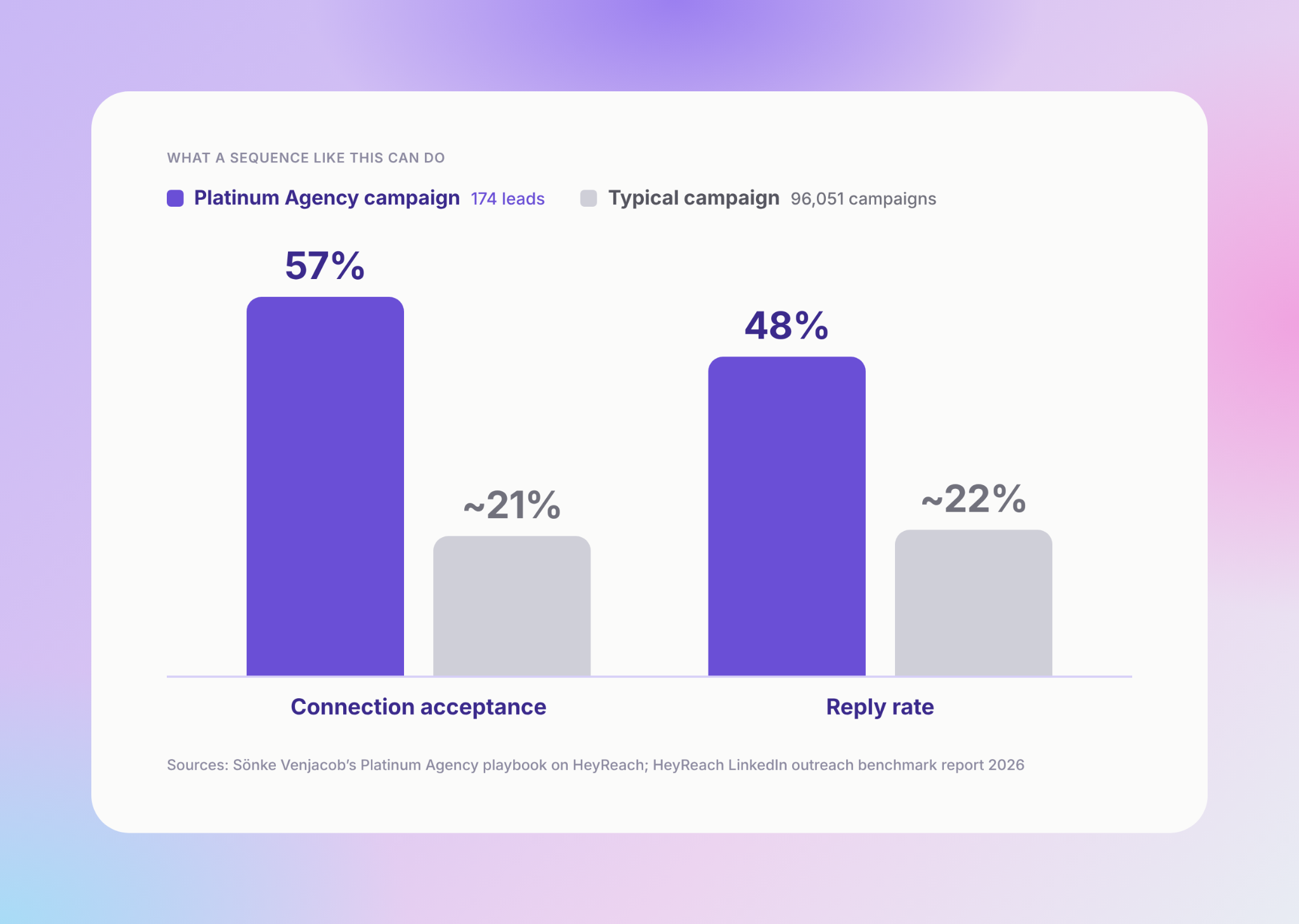
In Sönke Venjacob's Platinum Agency campaign, a sequence with this shape reached a 57% connection acceptance rate and a 48% reply rate on 174 leads. A typical campaign in our benchmark report gets about 21% acceptance and a 22% reply rate, across 96,051 campaigns.
The timing: the connection request, a like on a recent post 2 days after acceptance, the first message 3 hours later, and a follow-up 4 days after that.
Follow-up 1: the bump
The bump catches people who missed your first message. It does a different job, so it doesn't reword the opener or add a new pitch or a new CTA. You can write it once and reuse it in every campaign. For more on timing and tone, see how to follow up on LinkedIn.
Hi {FIRST_NAME}, bumping this in case it got buried. No rush either way.
- When to send it: 4 days after the first message, as in the Platinum Agency campaign.
- Fallback: the same line works as is, since it only uses {FIRST_NAME}.
Option: send the bump as a voice note
The bump is the one step where a voice note fits. After a run of text in their direct messages, a voice message breaks the pattern. There's no preview to skim, so curiosity does the opening.
Keep the first message as text. LinkedIn voice notes only go to 1st degree connections, so they can't open the sequence anyway. And people need to scan the first message to decide it's relevant. Use one voice note in the sequence, not a sequence - no need to overdo it.
Hey {FIRST_NAME}, it's [your first name] from [company]. I sent you a quick message a few days ago and thought a voice note might be easier than another text. No pressure at all. Just curious whether [the question from your first message]. Talk soon.
- Fallback (plain text): Hi there, bumping my last message in case it got buried. No rush either way.
How it works in HeyReach:
- Each sender's voice. HeyReach turns the script into audio for each lead, with {FIRST_NAME} filled in, in the sender's assigned voice. That can be a HeyReach Included voice or the sender's own ElevenLabs voice.
- The fallback is required, and it's plain text. It goes out when a voice note can't be generated or delivered, so the campaign keeps running. It can't use variables, which is why the fallback above has no name in it.
- Script rules. At least 3 words, up to 800 characters. A variable counts as one word.
- Test it against text. A Send message step can hold a text version and a voice version, so you can run the text bump and the voice bump side by side.
Check out the full setup guide + workflows.

Try it for free
Frequently Asked Questions
How long should a LinkedIn outreach sequence be?
Three messages after an empty connection request: a first message that does the work, a short bump about 4 days later and a breakup a few days after that. Add more touchpoints only when you have something new to say. A nudge with nothing new in it rarely changes the outcome, so start a new sequence with a new first message instead.
What makes a LinkedIn outreach sequence work?
Two things: a tight list and a strong first message. Build each list around one group with the same problem, then write a first message of 3 to 5 sentences that's about them, gives a reason to respond and ends with one small question. The follow-ups only catch people who missed it, so most of the result depends on that first message.
How can I improve my LinkedIn outreach response rate?
Look at the first message before anything else. If your connection acceptance rate is healthy but your response rate is low, the message is usually the problem, not the list or the timing. Make it specific to the person, give a reason to reply and ask one small question. Then test two first messages against each other and keep the one that gets more replies.
How can I effectively follow up in a LinkedIn sequence?
Keep it to two short follow-ups that each do a different job. The first is a bump about 4 days after the first message, for people who missed it. The second is a breakup that closes the loop and leaves the door open. Neither should reword the opener or add a new pitch. In HeyReach, the bump can also go out as a voice note.
Can I send a voice note as the first LinkedIn message?
You can once you're connected, since voice notes only go to 1st degree connections, but it works better later in the sequence. Keep the first message as text so people can scan it and decide it's relevant. Then use a voice note for the bump, where it breaks a run of text. In HeyReach, every voice note step also needs a plain-text fallback.