LinkedIn automation: Everything you need to grow, generate leads, and make sales
Published:
July 14, 2026
LinkedIn automation has helped my agency book meetings with names like Morgan Stanley, Reddit, PwC, Deutsche Bank, and Stripe. We did all of this by running LinkedIn automation across 200+ accounts with a handful of clever techniques I'm going to break down for you here.
These automations are battle-tested and currently used by more than 2,000 B2B businesses to generate leads — without hiring a VA, spending thousands on an agency, getting flagged as spam, or wasting dozens of hours on manual tasks.
Why LinkedIn automation is a no-brainer for serious businesses
The most common objection I hear is that manual outreach is more personalized. And sure, to a degree that's true. But here's what you're actually giving up when you do it manually:
Time. Your competition is running automated flows and using the hours they've saved to focus on sales, product, and marketing. Manually clicking through hundreds of profiles is not the best use of your time.
Consistency. VAs make mistakes, take time off, and need training. A $3/hour VA sounds cheaper than a $50–$100/month tool until you factor in the quality drop, the rework, and the management overhead.
Measurability. Without automation, it's nearly impossible to know which niche is performing. I had a client where we split campaigns by vertical — HVAC vs healthcare. HVAC came in at a 5% acceptance rate. Healthcare almost doubled it. That kind of insight is impossible to get cleanly when you're doing things manually across three spreadsheets.
Passive growth. I can create a lead list of 2,500 people, set it live today, and not check back on it for one to three months. The network grows while I sleep. And if you're not ready to pitch yet, that's fine — you're still building an audience of qualified people who'll already know you when you are ready.
Scale. Going from one LinkedIn account to ten gives you 10x the outreach volume. That's not possible if you're doing things by hand.
For LinkedIn outbound that actually scales, automation isn't optional — it's the foundation.
What to look for (and watch out for) in LinkedIn automation tools
I've used almost every tool on the market over six-plus years. Here's what actually matters when choosing one.
Proxies and location consistency
Every time you log into LinkedIn, LinkedIn tracks where you're logging in from. Some cheaper tools relog into your account every day — from a different IP each time. That triggers repeated location-change alerts, which can restrict your account. I had this happen to me years ago.
A good tool locks your login to a consistent residential static proxy. HeyReach lets you select a country so your login always appears from the same location, and it even lets advanced users supply their own proxy.
Message volume limits
LinkedIn caps you at roughly 200 actions per day and 200–400 connection requests per week. Most tools build in volume controls so you can set daily limits per action. Don't panic about this — just leave it at defaults when you start.
Inbox management
The better tools — around 50% of them — include a shared inbox manager so your team can handle DMs without needing direct access to the LinkedIn account itself. HeyReach's uni-box lets you flip between multiple sender accounts and manage all DM conversations from one place. That's genuinely useful when you're running outreach across many accounts.
Account rotation
This is the newest feature that separates the best tools from the rest. LinkedIn caps each account at roughly 400–800 connection requests per month. Even at a 5% booking rate — which is exceptional for cold outbound — you'll never book more than four to eight calls per month from a single account.
Account rotation solves this. Once one account hits its daily limit, the next account picks up. It's the same model as high-volume cold email, just applied to LinkedIn. HeyReach supports this natively inside campaign setup.
Pricing traps to avoid
A $9.99/month tool that doesn't let you send bulk automated messages isn't actually cheaper — you'll hit the wall within 30 minutes and need to upgrade. A $17/month tool that caps you at 300 invitations per month gives you half the volume you need. Always check what's actually included before assuming the lower price is the better deal. Here's a broader look at the best LinkedIn automation tools if you want to compare.
How to build your lead list for LinkedIn automation
The quality of your lead list determines everything downstream — acceptance rates, reply rates, meeting bookings. Here are the sources I use, from simplest to most advanced.
1. LinkedIn free search
Free, requires no additional tools, and works fine for testing. The downside is weak filters — it's hard to build a clean, qualified list this way. You can't easily isolate, say, CEOs of SaaS companies only.
2. LinkedIn Sales Navigator
This is my preferred method for LinkedIn prospecting. The filters are genuinely powerful:
- Filter by job title (e.g., VP of Sales)
- Company HQ location (e.g., North America)
- Tenure (e.g., 3–5 years in current role — signals a stable business)
- Posted on LinkedIn recently — this one is critical
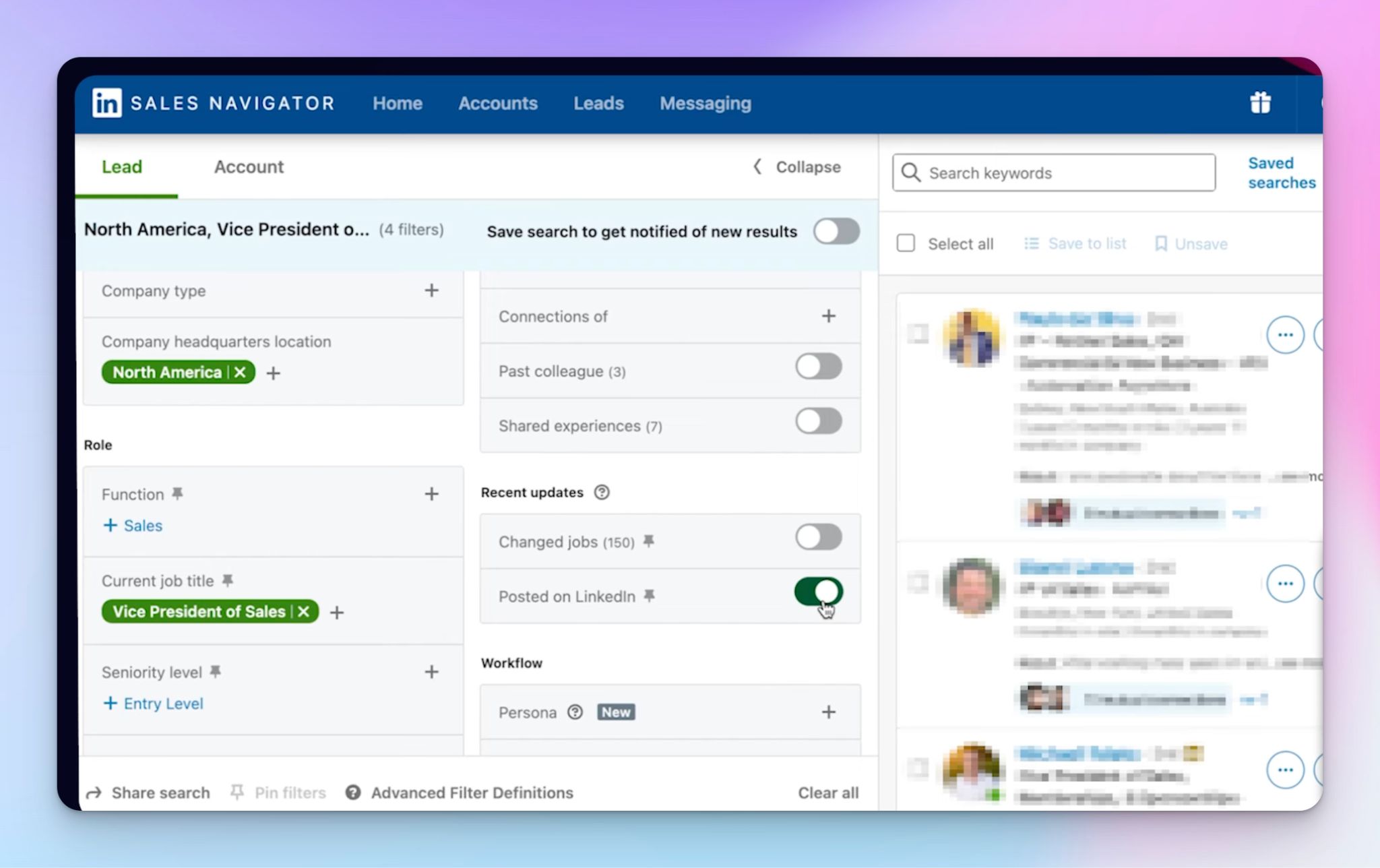
That last filter is underrated. Most people have a LinkedIn account but never open it. You want to be reaching people who are actually active on the platform. No other data tool gives you that signal as cleanly as Sales Navigator does.
Once you've built your search, copy the URL and paste it directly into HeyReach. No scraping tool needed — HeyReach pulls those leads in within two to three minutes.
If you want to get the most out of LinkedIn Sales Navigator, pair it with good boolean filters to tighten your targeting further.
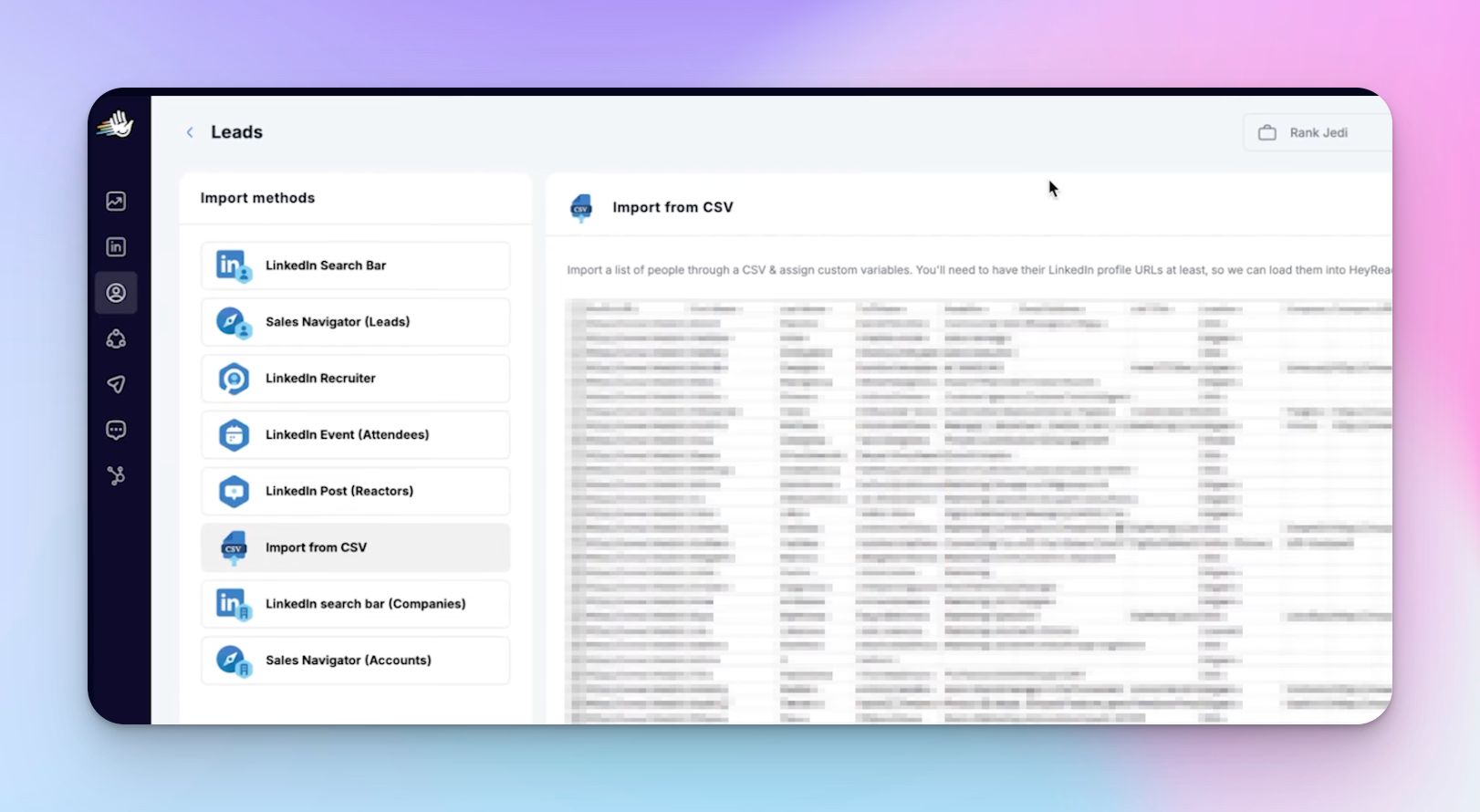
3. CSV import from Apollo, ZoomInfo, or Clay
If you're using a data enrichment tool like Apollo, ZoomInfo, or Clay to build lists with AI qualification columns, just export the CSV and upload it into HeyReach directly. Useful when you need to qualify on criteria that Sales Navigator can't filter for.
4. Trigify (intent signals)
Trigify is a social listening platform that tracks who's liked a competitor's post, who's just changed roles, who's recently gone active. You harvest those signals and push them straight into HeyReach via webhook. These are warm, intent-rich leads — they convert at a much higher rate than cold lists.
5. RB2B (website visitors)
RB2B de-anonymizes website visitors and surfaces their LinkedIn profile. You set it up on your highest-converting pages — pricing, demo request, how it works — and any visitor who doesn't fill out your form gets automatically sent to HeyReach for a connection request. That's pipeline you'd otherwise never see.
The two LinkedIn automation campaigns you need to run
Cold connection campaign
A cold connection request is simple: the recipient sees your name, your headline, and an accept/ignore choice. Sometimes there's a connection note.
Here's how I build it in HeyReach:
- Add a trigger: if not connected, send a connection request
- Keep the note blank — data consistently shows blank requests outperform those with notes
- After acceptance, add a send message action with a personalized opening using variables (first name, company, etc.)
A simple message like "Hey [first name], I help B2B SaaS companies book meetings — are you looking for more deal flow?" is a starting point. Not a masterpiece, but it works. The variable pulls from the HeyReach scrape. If the scrape fails for any reason, you set a fallback.
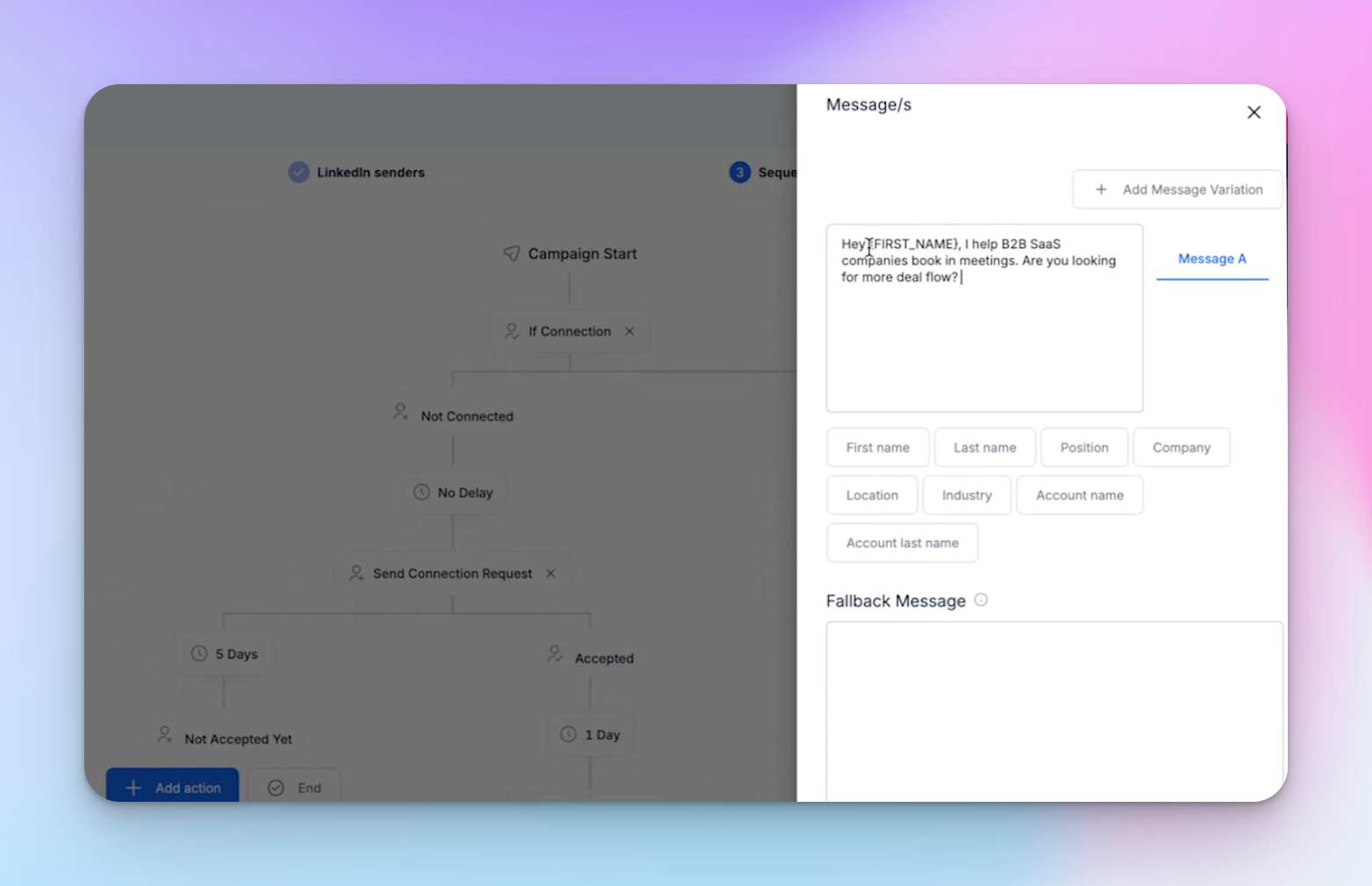
That's the whole campaign. It takes five to ten minutes to set up.
Cold inmail / open profile campaign
This is essentially a cold email but sent through LinkedIn. It has a subject line and body copy, and it goes to open profiles.
My best-performing subject line is just the word "hey."
The body I use follows this structure:
- Social proof up front (who I've helped, what result I got them)
- A personalized observation (e.g., "I noticed you've started posting on LinkedIn")
- A low-friction offer (e.g., "Want a free audit? I'll show you what's working and what's not — no strings attached")
You build this the same way in HeyReach — swap the connection trigger for "if open profile, send inmail," write your message, set a fallback, save.
Advanced: warming actions
You can extend campaigns by adding a profile view and a post like before the connection request. This warms the lead slightly — they see you in their notifications before you pitch. I've seen this increase acceptance rates. The tradeoff is it consumes more of your daily action limit, which reduces overall volume. Personally, I go straight to the connection request without the warm-up steps.
A real campaign example: website visitor targeting
One of the best LinkedIn outreach campaigns I've seen came from a user named Taylor. He got 30 positive replies from 1,332 messages — an exceptional positive reply rate.
Here's what he did:
- Set up RB2B on his demo, growth, and "how it works" pages
- Connected RB2B to HeyReach via the integrations tab (literally one click + paste a URL)
- Used Clay to create custom columns — a use case variable and a visitors variable — that auto-populated personalized lines in his message
- Campaign sequence: like a post → view profile → if accepted, send message
His message said something like: "Hey [first name], noticed [company name] visited our site. With [X visitors] hitting your website, imagine being able to identify and engage with [specific segment relevant to their use case]."
Every line was personalized to the specific prospect. That's the level of AI outreach that drives real reply rates.
LinkedIn automation KPIs: the hierarchy that matters
When you're running LinkedIn outreach, you're tracking a stack of metrics. Here's how I think about them:
Inputs (you control these directly)
- Connection requests sent (target: 400–800/month per account)
- Inmails sent
Leading indicators (these predict revenue)
- Connection acceptance rate
- Message reply rate
- Email reply rate
- Positive reply rate
- Meetings booked
Lagging indicators (the outcome)
- Deals closed
- Revenue
To increase revenue, work backwards from the leading indicators. More on how to move each one below.
How to improve your LinkedIn automation results
Increasing connection acceptance rate
Average is 15–30%. If you're below that, work through this list:
- Reframe your headline. We changed one client's headline from "We help you get more leads" to "Founder at [Company] | We help you get more leads" — acceptance rate jumped from 14% to 20%. The person-first framing just looks less salesy.
- Tighten your targeting. Low acceptance often means the wrong audience. Use boolean filters in Sales Navigator to add qualifying keywords, or use Clay to layer on AI qualification columns. Sometimes the fix is just switching industries entirely.
- Test different niches. HVAC sat at 5% for us. E-commerce consistently runs sub-15%. Some industries just don't respond well on LinkedIn — test before you commit.
- Remove the connection note. If your offer isn't strong or you don't have a relationship, go blank. It almost always performs better.
Increasing reply rates
Two paths depending on your approach:
If you're being direct: The offer itself needs to be more irresistible. We run a direct offer template that generates around five qualified calls per month from 800 outreaches — a 6% meeting-book rate from cold. The formula: big brand name + result you got them + high-value free service to try. The better the proof, the higher the response.
If you want a softer approach:
- Market research framing: "I'm doing some research — what are you struggling most with when it comes to [thing]?" No implied pitch, people respond more freely.
- This vs. that question: "I saw you're doing [X] — is the goal [Y] or [Z]?" Giving options reduces the cognitive load of responding.
- Compliment with no ask: just say "Hey [name]" and give a genuine compliment. No CTA. It's a pattern interrupt and consistently gets high response rates.
Increasing meeting book rates
The gap between a positive reply and a booked call is where most people leak pipeline. Bridge it by attaching value to the call: a free audit, a roadmap, a case study walkthrough. You're not asking them to spend 30 minutes — you're offering something worth 30 minutes.
Follow-up
A lot of my meetings are booked on the follow-up, not the first message. I tag conversations in HeyReach's uni-box as "not booked yet" so I can filter for them and follow up systematically. Messages that work: "Managed to find a time yet?", "Got some slots next week — does that work better?", "Is this still a priority?"
I space follow-ups one day apart for the first two, then weekly, then monthly. LinkedIn keeps infinite message history, so there's no rush — they'll come back when they're in buying window.
Why I use HeyReach for LinkedIn automation
I've tested a lot of tools. Here's why HeyReach is the one I keep coming back to:
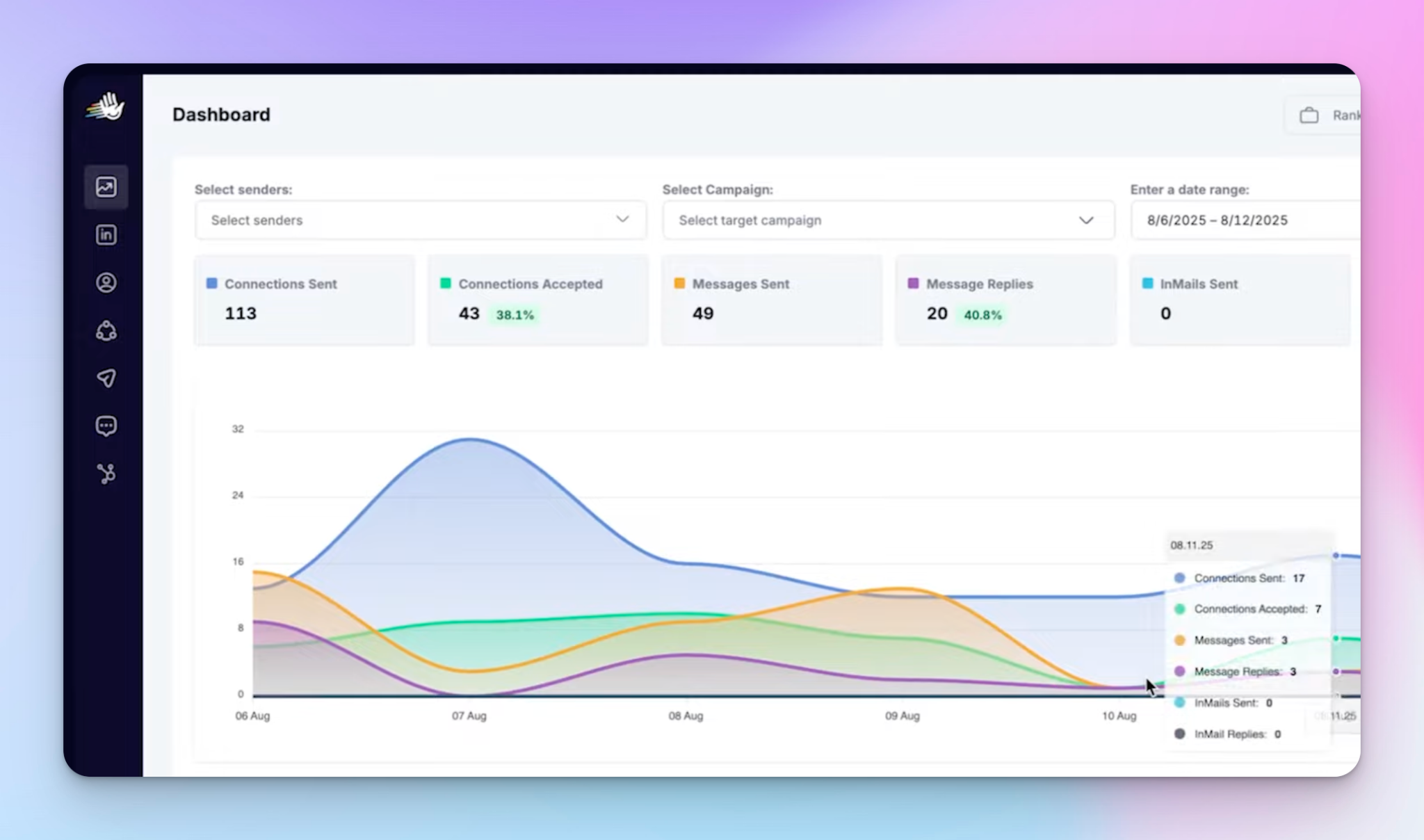
- Dashboard: All leading and lagging indicators in one view. I can see what's working and pull the right levers.
- Lead sources: Sales Navigator URL import, CSV upload (from Apollo, ZoomInfo, Clay), LinkedIn event attendees, post reactors, and direct webhook integrations with tools like Trigify and RB2B.
- Proxy management: Choose your login country. Bring your own proxy. Accounts stay safe.
- Account rotation: Natively supported inside campaign setup — critical for scaling volume beyond one account.
- Uni-box: Manage DMs across all sender accounts from a single inbox.
- Pricing: Gets cheaper per account as you add more — designed for LinkedIn automation for agencies and teams running multi-account LinkedIn management.
- Speed: A campaign is live in five to ten minutes.
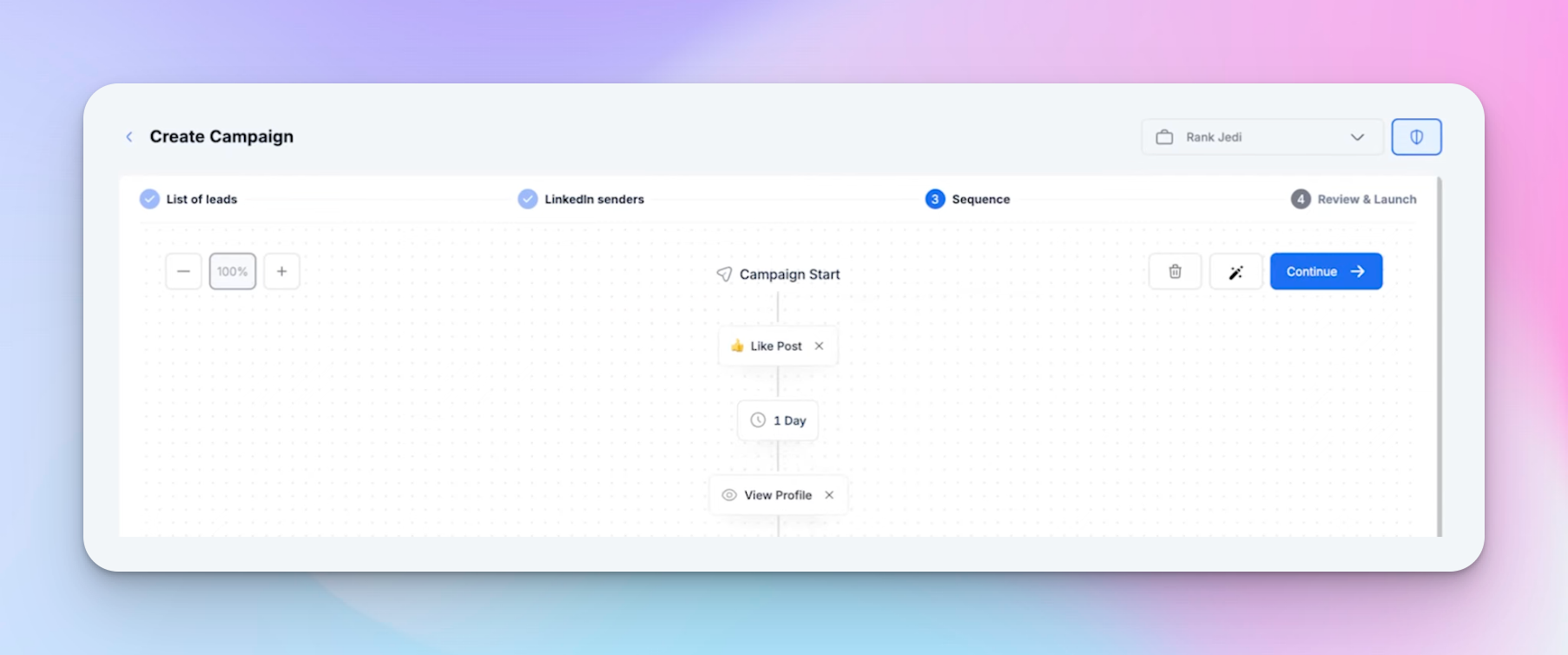
If you're running outbound sales automation at any real volume, this is what the setup looks like in practice.
Building a complete LinkedIn lead generation system
LinkedIn automation on its own is powerful, but it's one piece of a bigger LinkedIn lead generation strategy. The biggest ROI I've seen comes from combining outbound with inbound — content that drives people to you while automation handles cold outreach in parallel.
We added $1M in revenue for a B2B paid ads agency and $600K in 90 days for a B2B business consultant by mixing LinkedIn content with automated outbound. The multichannel outreach approach — where LinkedIn automation feeds into email follow-ups or CRM workflows — is what separates good results from great ones.
For LinkedIn connection messages that actually get accepted, and LinkedIn outreach templates that convert, the framework I've described here is the starting point. Test it, measure it, and iterate.

Try it for free
Frequently Asked Questions
What is LinkedIn automation and how does it work?
LinkedIn automation uses software to perform outreach actions on LinkedIn — sending connection requests, messages, and inmails — automatically and at scale. You set up a campaign with a lead list, define the sequence of actions, and the tool runs it on a schedule within LinkedIn's daily limits. This frees you to focus on conversations that are ready to convert rather than manually clicking through hundreds of profiles.
How many connection requests can I send per month with LinkedIn automation?
LinkedIn limits accounts to roughly 400–800 connection requests per month. To go beyond that, you need to add more LinkedIn accounts to your automation tool and use account rotation, where the next account picks up once the first hits its daily limit. This is how high-volume outreach operations scale their pipeline.
What's a good connection acceptance rate on LinkedIn?
A healthy acceptance rate is 20–30% or above. Below that, the likely culprits are a salesy headline, poor targeting, or a mismatch between your offer and the niche you're reaching out to. Testing different industries, tightening your filters, and removing the connection note are the fastest ways to move this number.
Is LinkedIn automation safe? Can it get my account banned?
It can cause problems if you use the wrong tool. The main risks are tools that log into your account from a different IP every day (triggering location alerts) and tools that push volume past LinkedIn's limits. A good tool like HeyReach assigns a consistent residential proxy to each account and has built-in volume controls that keep you within safe limits.
How do I improve reply rates on LinkedIn outreach messages?
The fastest fixes are: make your offer more concrete (specific brand name + result + free service), use softer openers like market research framing or a compliment with no ask, and follow up consistently. Most meetings get booked on the second or third follow-up, not the first message. Tagging conversations and filtering by status in your inbox tool keeps the follow-up process from falling through the cracks.
.jpeg)