LinkedIn company expansion strategy: Grow and scale your outreach
Published:
May 29, 2026
Updated:
May 29, 2026
If your entire LinkedIn presence is one company page and a single SDR blasting 50 connection requests a day, I gotta break it to you: you’re running a bottleneck, not a LinkedIn strategy.
The moment you tie your entire outreach capacity to a single profile, you’ve already capped your business growth. LinkedIn’s limits are per person, not per company.
It’s a lose-lose situation, really: push volume too hard and the account starts sweating bullets. Play it safe and your pipeline flatlines.
Top players figured this out. They stopped treating LinkedIn like a single sales rep’s side quest and started building a coordinated network of sender accounts, each covering a different segment, territory, or vertical, all operating under the same brand strategy.
This makes the company page the anchor and sender accounts the engine.
That’s what a LinkedIn company expansion strategy looks like in practice: not a bigger following or a fancier content calendar, but a distributed outreach infrastructure that works with LinkedIn’s limits instead of constantly running into them.
This shift is now a core part of modern marketing strategy for both SaaS and service-based teams that rely heavily on social media as a primary acquisition channel.
I’m here to show you how to build it — the account architecture, the safety guardrails, and the HeyReach workflow that keeps every sender coordinated, deduplicated, and running at a pace LinkedIn won’t flag.
What LinkedIn company expansion actually means
“LinkedIn company expansion” gets thrown around a lot, usually meaning someone wants more followers or better post reach. That’s not what we’re talking about here.
A real LinkedIn expansion strategy means scaling the number of coordinated touchpoints your brand can make simultaneously — without any single profile bearing a load that LinkedIn flags or that burns out your team.
It’s infrastructure and an operational concept, not a marketing one.
At its core, it helps B2B marketers move away from fragmented execution and toward structured systems that support a scalable growth strategy.
The 3 layers of a LinkedIn expansion strategy
Think of it as a three-layer system, where each layer has a distinct job:
👉 Layer 1: The company page (brand anchor)
This is your credibility baseline. When a prospect gets a connection request from one of your reps, the first thing they do is check the company page.
A polished, active page with consistent LinkedIn content signals legitimacy and makes every sender’s outreach land better. It’s not the engine per se, but it’s what makes the engine credible.
This is especially important for startups, where early trust is often built through perception.
👉 Layer 2: Employee advocacy (organic reach)
Personal profiles posting relevant content (think thought leadership and personal branding, product insights, customer wins, even social networking) extend the brand’s reach organically. This is where content marketing becomes a distribution layer, not just a blog function.
When your senders are visible in a prospect’s feed before the connection request arrives, the outreach feels warmer and performs better.
👉 Layer 3: The sender account network (outreach engine)
Multiple LinkedIn profiles, each assigned to a specific ICP slice, running coordinated sequences through HeyReach — deduplicated, paced safely, and managed from a single inbox.
This is the layer most companies never build, and it’s the one that actually scales outreach, protects sender accounts, and keeps pipeline moving .
Each layer reinforces the next; unfortunately, most companies stop at layer one.
The 4 pillars of a LinkedIn expansion strategy
To avoid chaos at scale, use these four pillars that turn a collection of LinkedIn accounts into a coordinated outreach infrastructure.
Pillar 1: Account architecture
Before you connect a single account to HeyReach, you’ll have to be clear on who’s messaging whom — and why.
The most common mistake I see is treating all sender accounts as interchangeable. They’re not. Each profile brings its own credibility signals, level of seniority, and relevance to specific buyer personas.
A founder reaching out to a CFO lands differently than an SDR doing the same. An AE covering EMEA shouldn’t be messaging potential customers in APAC from a US-based profile.
Roles and what they’re best suited for:
- Founders/CEOs: highest credibility, lowest volume. Best used for Tier 1 accounts, strategic logos, or prospects where a peer-to-peer dynamic matters. One well-timed message from a founder/co-founder outperforms five from an SDR on the right account.
- AEs: mid-funnel conversations, demo invites, territory-specific outreach. Their profiles typically carry more social proof than SDRs, so that means more connections, activity, and context.
- SDRs: top-of-funnel volume. They carry the heaviest sequencing load and are best paired with strong ICP segmentation so their outreach stays relevant despite the volume.
How to split by territory or vertical:
As I mentioned, the simplest model is one sender per ICP slice.
If you’re targeting three verticals, for example SaaS, fintech, and eCommerce, assign a dedicated sender to each.
If you’re covering multiple geographies, match sender profiles to regions where possible.
In practice, most teams start with 3–5 senders and expand from there.
Based on data from 96,051 campaigns run through HeyReach, the sweet spot for reply performance is 6–20 sender accounts, which produces a median reply rate of 25%, compared to 22.22% for single-sender campaigns.
Once you move beyond a single sender and structure outreach by ICP, reply rates improve and stability increases.
Pillar 2: Content and thought leadership
Cold outreach doesn’t exist in a vacuum. Every connection request lands in a social environment where the prospect has already formed an impression of your brand — or hasn’t, which is its own problem.
Good content strategy is what warms that environment before outreach ever starts.
Imagine what happens when a prospect sees a thoughtful post from your company page about a problem they’re actively dealing with, then gets a connection request from one of your reps two days later. The trust barrier gets lower and the cold outreach becomes a lot less cold. 😉
In many cases, this is also where influencer-style amplification comes in — not necessarily external influencers, but internal team members acting as distribution nodes across their professional network.
That recognition doesn’t guarantee a reply, but it meaningfully increases the chances of a meaningful convo.
And here’s the thing most outbound teams forget: the person you’re messaging usually isn’t the only one influencing the deal.
B2B buying decisions are full of “hidden buyers” in ops, finance, procurement, legal, or leadership who may never reply to a LinkedIn message but absolutely shape whether a deal moves forward or quietly dies in an internal meeting.
The 2025 Edelman-LinkedIn B2B Thought Leadership Impact Report found that 95% of hidden buyers say strong thought leadership makes them more receptive to sales and marketing outreach. Even more interesting: 71% said they interact very little with sales teams directly.
In other words, people are forming opinions about your company long before someone books a demo. Content and thought leaders are what make sure those opinions work in your favor.
What this looks like in practice:
- The company page posts consistently about the operational challenges your ICP faces daily. Think tactical content: frameworks, data, honest takes on what’s broken in the industry.
- Individual sender profiles amplify that content and add their own layer, like personal experiences, client wins, commentary on industry trends. This is what makes the outreach feel human.
The principle is simple: content is the pre-sell. Outreach is the ask. When you skip the pre-sell entirely, the ask has to work a lot harder.
Pillar 3: Outreach orchestration
Having multiple sender accounts is the starting point.
The challenge is coordinating them so they work as a system, without overlap, account overload, or prospects hearing from two of your reps on the same day.
You already know it — this is what HeyReach is built for.
Each sender account gets assigned its own ICP slice and its own campaign. HeyReach distributes leads across senders automatically, enforces per-account sending limits as hard caps, and applies a global suppression list across the entire workspace — so the same prospect never enters two sequences simultaneously, regardless of which sender would have reached them.
When one sender approaches their daily limit, HeyReach’s auto-rotation routes the next lead to an available account.
The prospect never notices the handoff. The campaign keeps moving. And no single profile bears a volume that raises flags.
The result is outreach that scales horizontally, with more senders, coverage, and pipeline — without any single account being pushed to the point where LinkedIn’s algorithm starts paying attention.
I covered the full routing logic and how signal-based targeting plugs into this orchestration layer in the signal-based outbound playbook.
Pillar 4: Safety and compliance
Scale creates risk if you don’t build the guardrails before you need them.
LinkedIn’s limits are per account, which means every sender in your network needs to be managed individually — and collectively.
The numbers that matter:
- Connection requests: LinkedIn caps these at roughly 20–40 per day per account, depending on profile age, SSI score, and activity history. Stay well within that range, especially with newer profiles.
- New account warm-up: Don’t connect a fresh profile to HeyReach and immediately run it at full capacity. Start with profile views and light activity in week one, then increase volume gradually if acceptance rates hold.
- Follow-up spacing: Minimum 5–7 days between touches. Less than that and you’re generating pressure.
What the relay team looks like in practice:
Our data shows that acceptance rates decline slightly as volume scales, dropping from 21.43% at the 50–100 lead tier to 19.35% at 1,000+ leads — but reply rates stay broadly flat across volume tiers.
That stability is what happens when volume is distributed across multiple accounts rather than concentrated in one.
The relay team model is simple: each sender runs at a safe, human pace. Collectively, they cover far more ground than any single account could. HeyReach coordinates the rotation so no account overheats, and the suppression list ensures no prospect gets caught in the crossfire between senders.
Building the expansion list: Segmenting your ICP by sender
For a multi-sender setup to work, the segmentation has to happen before the leads reach HeyReach.
Each sender needs their own slice of the ICP — clean, non-overlapping, and structured in a way the campaign can actually use.
Slicing your ICP with Clay
Clay is where the raw ICP definition becomes a segmented, sender-ready list.
The logic is straightforward: take your total addressable ICP and divide it into non-overlapping slices based on the criteria that map most cleanly to your sender structure.
The most common segmentation variables:
- Geography. EMEA sender gets EMEA prospects, APAC sender gets APAC, and so on. This keeps sender profiles regionally credible and avoids friction.
- Vertical. SaaS, fintech, eCommerce, professional services. If your senders have domain expertise or case studies in specific industries, match them to the vertical where that credibility lands.
- Company size. Enterprise accounts go to AEs or founders; SMB goes to SDRs. Seniority of the sender should match the complexity of the sale.
- Intent signal. If you’re running signal-based outreach alongside your expansion strategy, high-intent signals like pricing page visits or career moves can be routed to your strongest sender accounts rather than distributed broadly.
In Clay, the workflow looks like this:
- Start with your full ICP list — company domains or LinkedIn URLs filtered by your baseline firmographic criteria.
- Add enrichment columns for the segmentation variables that matter: geography, vertical, headcount band, tech stack, or intent signals pulled from your signal sources.
- Use Clay’s filter logic to split the enriched list into separate exports — one per sender or sender group.
- Add an assigned_sender column to each export before it leaves Clay, so the segmentation is baked into the data, not applied manually later in HeyReach. I cannot stress this enough.
How to prep and structure your list for HeyReach
Before any list hits HeyReach, every row needs to carry enough information for the campaign to route it correctly, without anyone making manual decisions on import.
The column that each lead row absolutely needs to have is the assigned_sender. It’s what tells HeyReach which profile owns this lead. Without it, you’re back to manual sorting, which defeats the entire point of building a coordinated multi-sender system.
A sender-ready list will look like this:

Two rules that keep this from breaking:
1️⃣ One prospect, one sender — resolved in Clay, not in HeyReach.
If a lead could technically belong to two senders, that conflict needs to be resolved before export. Whoever is geographically or vertically closest wins. If you leave this to judgment calls on import, you’ll get overlap.
2️⃣ Naming conventions are non-negotiable.
The assigned_sender value must match exactly how that account is labeled inside HeyReach. One inconsistency (emma.jones vs. Emma Jones), and the routing breaks.
Set the convention before you build the first list and don’t change it.
The HeyReach expansion workflow: Step by step
This is where the architecture you’ve built becomes live outreach.
Each step below maps directly to an action inside HeyReach, in the order you’d actually do it.
Step 1: Account setup
In HeyReach, navigate to LinkedIn Accounts in the left sidebar and connect each sender profile.

Every account gets its own dedicated IP and device fingerprint so each profile looks like a real person operating from their own device, not five profiles running from the same machine.
Once connected, configure sending limits individually for each account.
Click on Configure Limits to set it up:

These are hard caps and HeyReach won’t exceed them regardless of campaign volume. For a new or recently idle profile, start conservative:
- Connection requests: 10–15 per day in week one
- Messages: 20–30 per day
- Profile views: 30–50 per day
Increase weekly only if acceptance rates hold.
If they dip, pull back before changing anything else. The account health comes first, always.
Step 2: Campaign routing
With your segmented lists ready and senders connected, the next step is making sure each list routes to the right sender automatically.
Create a separate campaign for each ICP segment.
When building the campaign, select the sender account that corresponds to that segment’s assigned_sender value.
If you’re running multiple senders within one segment (for example, three SDRs covering North America), select them all and auto-rotation will be activated by default:

⚠️(Pay attention: For InMails, ensure every selected LinkedIn sender has Sales Navigator or Recruiter subscription, otherwise, the campaign won’t launch.
Active senders in other campaigns share daily limits across all campaigns, so actions per day will drop below your set limit if you select LinkedIn senders who are already active in other campaigns.)
A few things to configure before the campaign goes live:
- Stop on reply, so sequences pause automatically the moment a prospect responds.

- Global suppression list to import your existing customers, DNC records, and anyone already in an active sequence. This applies across all campaigns and all senders in the workspace. Use “Exclude Lists” option — import leads via CSV, then select the list during campaign setup in the “List of Leads” tab to skip them across campaigns.

- Withdraw unanswered connection requests — set a window after which pending requests are automatically withdrawn.
(I covered the full blueprint in the automated LinkedIn messaging guide.)
Step 3: Message personalization at scale
Multiple senders only work if each one sounds like themselves, not like a template with a name swapped in.
Use dynamic variables to make this scalable without making it generic.
In HeyReach, your message templates support custom variables that pull directly from your CSV columns.
If your list includes a company_vertical column, {company_vertical} becomes a live field in the message. Same for {trigger_event}, {region}, or any other signal-specific data you enriched in Clay.
For example, an SDR covering fintech in EMEA might have a connection request that reads:
“Hi [Name], I work with a lot of fintech teams in Europe on scaling outbound without burning sender accounts. Curious if that’s something on your radar at [Company].”
While a founder reaching out to a SaaS VP in North America can send:
“Hi [Name], I saw that [Company] is expanding the sales team. Usually at that stage the outbound infrastructure question comes up fast. Happy to share what’s worked for teams at your scale."
It’s the same campaign logic, but a different sender, vertical, and message — all driven by variables populated in Clay before import.
Ilija Stojkovski, the CRO here at HeyReach, shared a great breakdown on buyer intent signals and how HeyReach structures signals like leadership changes, hiring spikes, funding rounds, and missing tools in a prospect’s stack.
Step 4: The relay handoff
When a sender account approaches its daily limit, the next lead in the queue doesn’t wait — it gets routed to the next available sender automatically.
Sender rotation handles this without any manual intervention.
From the prospect’s side, nothing changes. They receive one connection request, from one person, at a normal pace. They have no visibility into the fact that a rotation happened behind the scenes.
From your side, the campaign keeps moving at full velocity.
The one thing auto-rotation doesn’t handle is context continuity when a prospect replies to a different sender than the one who initiated the sequence.
That’s what the Unibox resolves:

Every reply from every sender lands in one centralized inbox, with the full conversation thread and sender context preserved. That way, whoever picks up the reply knows exactly which “version” of your team the prospect has been talking to.
💡 The territory logic guardrail
Before any lead enters a sequence, four checks need to run in order. Skip one and the system breaks down in ways that are hard to diagnose after the fact.
- Validate. Is this lead already active in another sender’s sequence? Check against your global suppression list and active campaign lists before routing.
- Dedupe. One prospect, one sender, no exceptions. If the same LinkedIn URL appears in two segmented lists (a data hygiene issue that happens more often than it should), catch it in Clay before export.
- Prioritize. If a lead legitimately matches two senders’ criteria, one sender owns them. The rule of thumb: whoever is geographically or vertically closest wins.
- Route. Confirmed assignment before the first connection request fires. The assigned_sender column in your CSV is the confirmation. If it’s missing or inconsistent, the lead goes to manual review, not to a sequence.
For a more granular look at how to build deduplication and validation logic, the customer segmentation guide covers the routing architecture in detail.
What “safe” looks like numerically
What those numbers look like in practice for a multi-sender expansion setup:
Connection requests per account per day:
- New accounts (weeks 1–2): 10–15
- Warming accounts (weeks 3–4): 15–25
- Established accounts (30+ days, healthy metrics): up to 30–40
Stay at the lower end if the account has a low SSI score, few connections, or limited activity history. LinkedIn rewards profiles that look like real, active professionals — not accounts that were created last month and immediately started sending 40 requests a day.
👉 A useful checkpoint during warm-up: if acceptance rate drops below 13% in the first few weeks, that’s a reliable signal something is off — list quality, profile completeness, or volume moving too fast. The benchmark data from HeyReach puts the lower-performance threshold at 12.97% acceptance rate.
Follow-up spacing:
Minimum 5–7 days between touches. Less than that increases pressure without increasing reply probability.
Our research shows that campaigns under 30 days consistently underperform on both acceptance and reply metrics — short, compressed sequences rarely have time to find their footing.
Warm-up timeline:
- Week 1: Profile views, a handful of connection requests, light engagement
- Week 2: Increase requests to 15–20 if week 1 metrics held
- Week 3+: Ramp toward target volume only if acceptance rate is above ~13% — below that is weak territory regardless of sender count.
I broke down the full timing framework in this blog about following up on LinkedIn, where I also covered enforcing follow-up restraints straight from HeyReach.
Managing replies at scale
A multi-sender expansion working correctly generates a volume of replies that a single LinkedIn inbox, or five separate ones, can’t realistically handle.
It’s a problem if you don’t have the infrastructure to handle it.
One inbox, every sender, zero lost context
When five sender accounts are running simultaneously, the default situation is five separate LinkedIn inboxes. This means five logins, five notification streams, and a near-certainty that something falls through the cracks.
Unibox solves this by pulling every conversation from every sender into a single centralized inbox for full visibility without tab-switching.
What makes this particularly important in a multi-sender expansion setup is the sender context preservation.
When a prospect replies, the Unibox shows you not just the message, but which sender account the conversation originated from, which campaign it’s tied to, and the full thread history.
Whoever picks up the reply knows the full context and can respond accordingly, without starting the conversation over or contradicting something a colleague already said.
To make it even easier, you can filter by sender, campaign, or tag to prioritize your reply queue. HeyReach now auto detects warm leads by analyzing reply sentiment so you’re spared from manual hassle:

For a deeper look at how to structure tagging, set up reply alerts, and build handoff protocols around the Unibox, the LinkedIn inbox system guide covers the full setup.
Closing the loop: sender attribution in HubSpot
A reply with full context about which sender generated it, which campaign it came from, and which signal triggered the outreach in the first place — that’s what makes expansion measurable.
From any conversation in the Unibox, hitting Export to CRM pushes the full lead record directly into HubSpot, including the complete LinkedIn thread and the sender attribution.
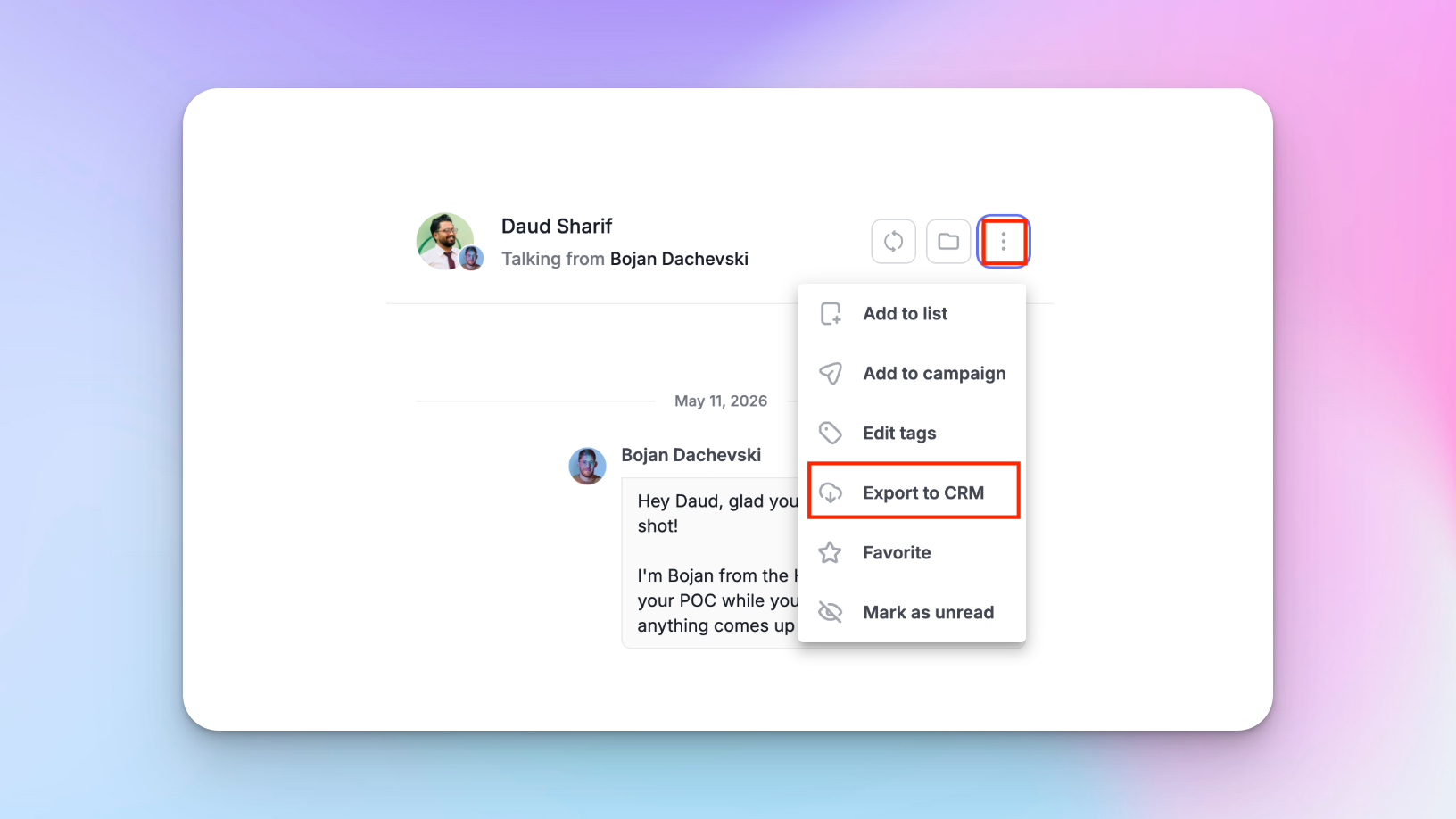
That means when a deal enters your CRM, it already carries the information about which part of your expansion setup is generating pipeline, and which part isn’t.
For teams running at scale, this sync can be automated via HeyReach webhooks — firing automatically when a positive reply is detected or a tag changes, without anyone manually exporting anything.
The webhook catches the event, passes it to HubSpot via Zapier or Make, and creates or updates the contact record with the conversation thread attached.
If you need help with setting everything up:
- Push leads and conversations to your CRM (via Zapier)
- How to integrate HeyReach with Make (in under 5 minutes)
What this enables downstream:
- Sender attribution: which sender account sourced this contact, so you can measure performance per profile, not just per campaign.
- Signal attribution: if your leads were tagged by signal type before import, that tag travels into HubSpot with the contact, letting you track which triggers are actually generating revenue.
- Handoff continuity: AEs picking up expansion-sourced leads have full context before the first call, including what was said, by whom, and what the prospect responded to.
The expansion strategy generates the conversations and the CRM sync is what turns those conversations into data you can optimize from.
Scale smart, not just wide
More sender accounts don’t automatically mean more pipeline. Without coordination, expansion just means more noise at a higher volume.
What moves the needle is the discipline behind the setup: every sender has a defined ICP slice, every lead has one owner, every sequence runs at a pace that doesn’t raise flags, and every reply lands somewhere someone can act on it fast.
The benchmark data backs this up: 6 to 20 senders hits the reply rate sweet spot, but only when the targeting and coordination are clean.
At the end of the day, the real takeaway is this — LinkedIn expansion only works when you build systems that let you consistently build relationships, not just send messages.
That's what this setup delivers — company page as the brand anchor, sender network as the engine, HeyReach as the layer that keeps it all coordinated, deduplicated, and measurable.
Build it right and it runs.

Try it for free
Frequently Asked Questions
What is a LinkedIn company expansion strategy?
It’s the practice of distributing your LinkedIn outreach capacity across multiple coordinated sender profiles, each covering a specific segment, territory, or vertical, rather than running everything through a single account or company page. The goal is to scale the number of qualified conversations your brand can run simultaneously, while staying inside LinkedIn’s limits and keeping outreach feeling personal.
How many LinkedIn sender accounts should a company use?
It depends on your ICP coverage, team size, and the segments you’re targeting. Our data points to a clear sweet spot: campaigns using 6–20 senders produce a median reply rate of 25%, compared to 22.22% for single-sender campaigns. That doesn’t mean more is always better — beyond 20 senders, maintaining consistent targeting and messaging quality becomes the limiting factor. Start with 3–5, prove the workflow, then expand.
Is it safe to run outreach from multiple LinkedIn profiles?
Yes, when each account is properly warmed up, running at safe daily limits, and coordinated through a platform that enforces global suppression and sender rotation. But the risk with multi-sender setups is running them without coordination. Duplicate outreach, overlapping sequences, and accounts pushed beyond safe volume thresholds are what trigger LinkedIn flags, not the multi-sender model itself.
How do I prevent overlap when multiple senders target the same ICP?
Three mechanisms working together: clean segmentation in Clay before import, an assigned_sender column that routes each lead to exactly one profile, and a global suppression list in HeyReach that prevents the same prospect from entering two sequences simultaneously. If a lead matches two senders’ criteria, resolve the conflict in Clay — geographically or vertically closest sender wins — before the list hits HeyReach.
Can I manage replies from multiple LinkedIn accounts in one place?
Yes. HeyReach’s Unibox centralizes every conversation from every sender account into a single inbox with full sender context, campaign history, and thread continuity preserved. You can filter by sender, campaign, or tag, respond on behalf of any sender account without logging into LinkedIn directly, and export conversations to HubSpot with sender attribution intact. One person can realistically manage replies across 10+ sender accounts from a single screen.